[Maylyn's Review] ASUS RT-AC3200 Router

maylyn

Master Member
Joined
Jul 12, 2007
Messages
4,861
Reaction score
77
This thread serve as a channel thread and related for the ASUS Tri-Band Wireless-AC3200 Gigabit Router and my personal take on it.
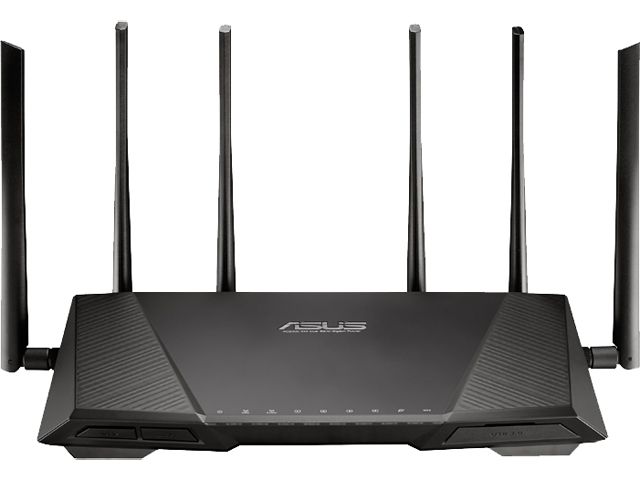


What is ASUS Tri-Band Wireless-AC3200 Gigabit Router?

It's a

~ Ultra-fast 802.11ac Wi-Fi router with a combined tri-band data rate of 3200 Mbps for smooth up to 4K/UHD video playback, ultra-fast file-sharing for large files and low-latency online gaming.

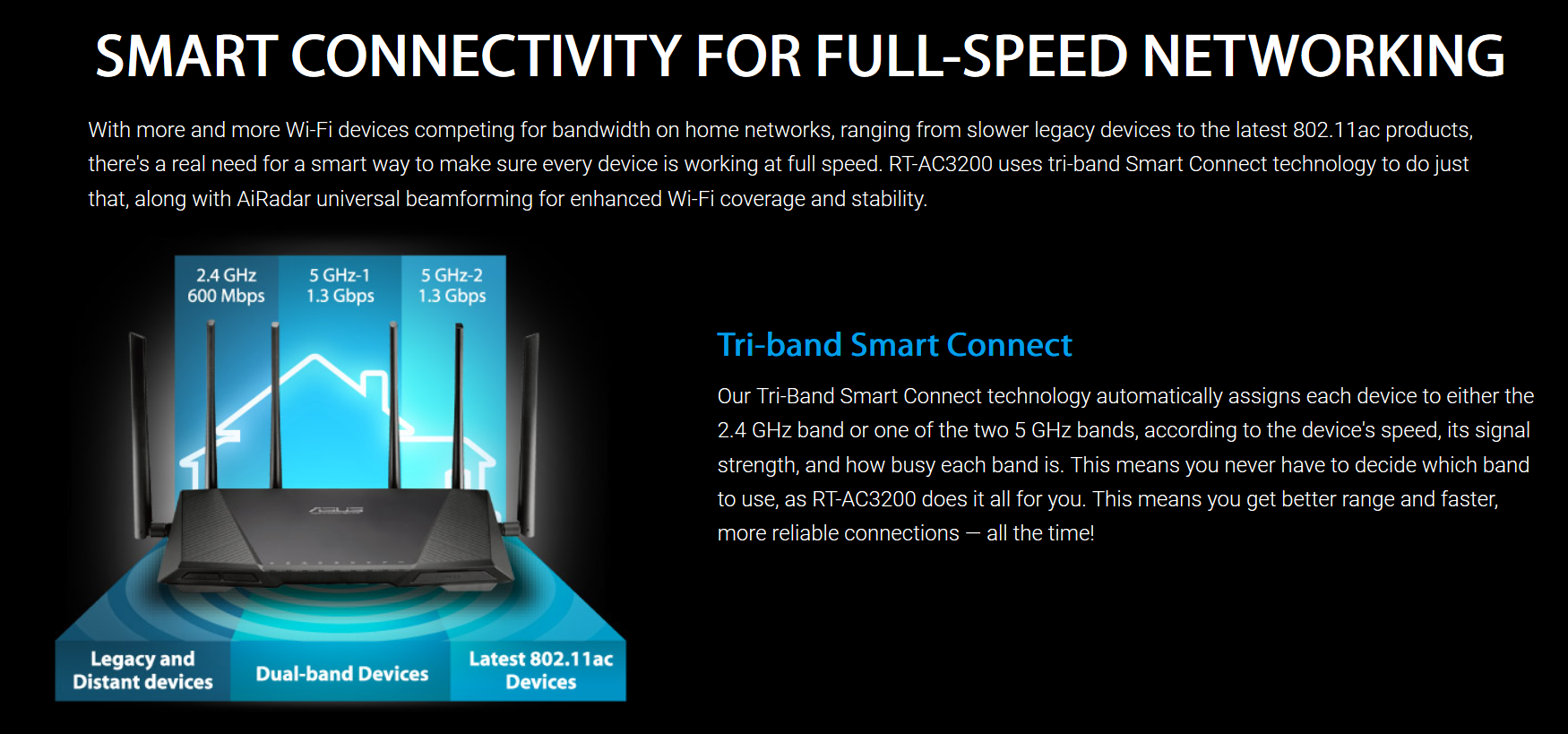
~ Tri-Band Smart Connect automatically selects the fastest of the three available frequency bands for each device, based on the device’s speed, signal strength and how busy each band is.


~ Built-in USB 2.0 and USB 3.0 ports for up to 10-times faster data transfers to USB storage devices, printer sharing, and 3G/4G dongle support.

~ ASUSWRT graphical user interface for easy, CD-free 30-second setup and hassle-free advanced network control.

~ AiProtection with Trend Micro with triple-strength total network security, plus robust parental controls and privacy protection.

~ ASUS AiCloud 2.0 lets you access, sync, share and stream your files anywhere, on any internet-connected device.

~ Usual RMerlin-ASUSWRT firmware support.

Read more ~> Networking - RT-AC3200 - ASUS

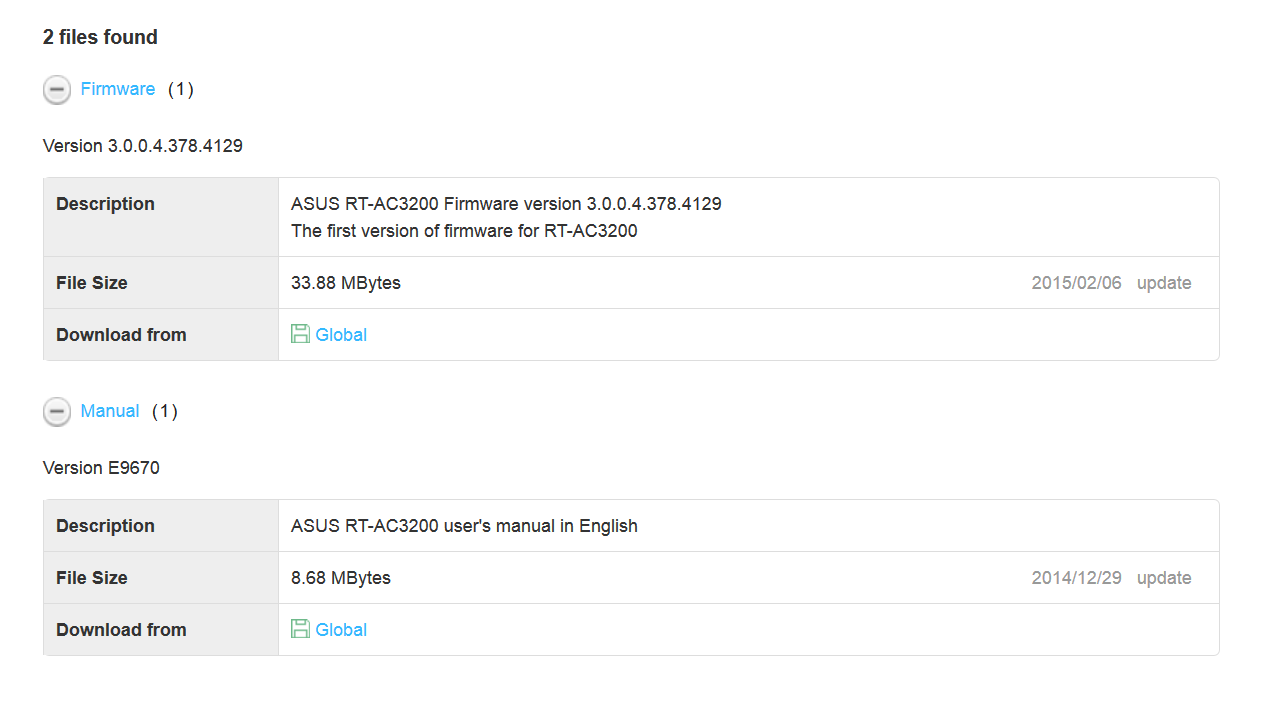
First firmware has been released as well.


Specifications overview

1). CPU ~ Broadcom BCM4709A0 (2 cores @ 1GHz)
2). WiFi ~ 3x Broadcom BCM43602
3). Memory ~ 256 MB DDR3 RAM (128MB firmware flash)
4). Antenna ~ 6 x External dual-band detachable Antenna
5). Operating Frequency ~ 2.4 GHz and 5 GHz (concurrent)
6). Data Rate ~ 802.11b: up to 11Mbps, 802.11a/g: up to 54Mbps, 802.11n : up to 450Mbps, TurboQAM (2.4GHz): up to 600Mbps, 802.11ac (5GHz): up to 2.6Gbps between both bands
7). Interface Type ~ 1 x RJ45 WAN, 4 x Gigabit LAN Ports, 1 x USB 3.0 Port, 1 x USB2.0 Port
8). Button ~ Power on/off Button
9). Reset Button ~ Push for 5 seconds to restore factory setting
10). WPS Button ~ Push for 5 seconds to enter WPS mode

Dummy ASUS RT-AC3200 WebUI

@ ~> ASUS Wireless Router RT-AC3200 - Network Map
 
Last edited:

maylyn

Master Member
Joined
Jul 12, 2007
Messages
4,861
Reaction score
77
Times flies since ASUS has announced the ASUS RT-AC3200 during Computex Taiwan 2014 and during the ASUS SG Networking 2014 Event.


And finally the day has arrived for us to savor what the ASUS RT-3200 is all about ^^

ASUS RT-AC3200

Do note that the package for ASUS RT-3200 for APAC region will be different, as this is a North America packaging.


Actual ASUS RT-AC3200


Joining one of my many ASUS routers' family


Last edited:

maylyn

Master Member
Joined
Jul 12, 2007
Messages
4,861
Reaction score
77
ASUS AC3200 Overview

Front


Back


What's inside?


Image Credits ~ www.smallbuilder.com

Features

ASUSWRT and RMerlin AC3200 firmware support.


AiProtection powered by Trend Micro


AiCloud

 
Last edited:

maylyn

Master Member
Joined
Jul 12, 2007
Messages
4,861
Reaction score
77
LAN - Wired - Performance

Nothing new, it's more than capable in delivering the symmetrical 1Gbps anytime of the day.


Unless if you have looking to get more like this? ;) :s12:


Storage Performance – USB 3.0

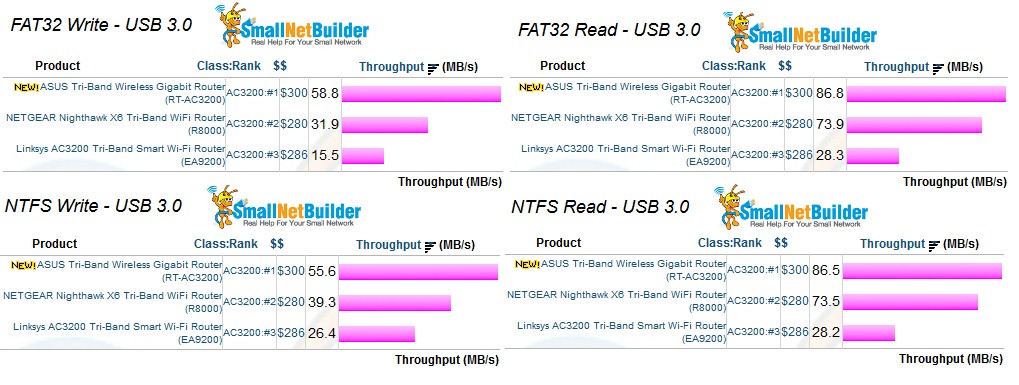
From ASUS internal USB 3.0 runs shows superior USB 3.0 transfers performance.

USB 3.0 interference disabled 30GB BD file

Write ~ NTFS


Read - NTFS


Citing what Tim Higgins - Managing Editor of smallnetbuilder.com say regarding their ASUS AC3200 review on the USB3.0 performance.

asus_rtac3200_storage_performance.jpg


ASUS seems to have overcome its problems with getting good USB 3.0 storage performance, to take the lead spot with 56 MB/s NTFS writes and 87 MB/s reads with USB 3.0. Note I had to disable the Reducing USB 3.0 interference setting in the 2.4 GHz wireless "Professional" settings that is enabled by default to get these results. It looks like ASUS reaps the benefit of some Broadcom storage driver tweaking to beat NETGEAR's R8000, which had held the lead. I still don't know why Linksys' EA9200 results are so low; they never got back to me with an explanation.

Full ASUS RT-AC3200 smallnetbuilder review ~> http://www.smallnetbuilder.com/wire...-band-wireless-ac3200-gigabit-router-reviewed
 
Last edited:

trichard

High Supremacy Member
Joined
Jan 1, 2000
Messages
48,737
Reaction score
2
Review can find everywhere........ more important is what sort of problem it has and how to resolve it or have to bear with it until AC3200 Version 2 ?
 

renfred89

Arch-Supremacy Member
Joined
Nov 11, 2007
Messages
17,520
Reaction score
19
Review can find everywhere........ more important is what sort of problem it has and how to resolve it or have to bear with it until AC3200 Version 2 ?

Dont scare maylyn leh.. He usually comes out with fantastic user reviews. Most importantly he has alot of pictures.. Hahas
 

maylyn

Master Member
Joined
Jul 12, 2007
Messages
4,861
Reaction score
77
Review can find everywhere........ more important is what sort of problem it has and how to resolve it or have to bear with it until AC3200 Version 2 ?

Why should there be any ASUS AC3200 version 2? :s22: :D

All current AC3200 routers in the market (i.e. ASUS AC3200, NetGear X8000 and Linksys EA9200) all uses the same Broadcom BCM4709A 1GHz - CPU and Broadcom BCM43602 (2.4GHz, 2x5GHz) same Broadcom SDK and same Broadcom wireless drivers as per se.

So what currently some handful of NA AC3200 users are experiencing (5GHz disconnection?) as mentioned by Tim's Higgins AC3200 review is partially due the smart connect changes connections too often, causing disconnects and ASUS has make changes to the Smart Connect to further enhance the 5GHz connectivity stability and will continue to do so and providing a full smart connect suite for one to utilise.

Current workaround is to disable the Smart Connect and manually assign the respective 5GHz-1 and 5GHz-2.

ASUS RT-AC3200 Firmware version 3.0.0.4.378.4145

Security related
- Upgrade OpenSSL library to 1.0.0q
- Upgrade TrendMicro engine

Modifications
- Adjusted Smart connect variable
- Modified QIS process
- Enlarged IPv6 ARP cache

Some comments from the smallnetbuilder forum AC3200 thread

That would be nice , though seems to be working well without smart on . So far 4 days running no drops of wireless , no reboots , no complaints from anyone in the house about connection , streaming or slow connection . And I'm getting a signal in places none of the other routers , so no complaints

From ~> http://www.snbforums.com/threads/asus-rt-ac3200-issues-and-impressions.22414/page-20#post-172870

Mine is very stable with smart connect off. Range is ok. I just wish the smart connect feature worked, but I guess in the end I am happy with finally having a stable router (coming from 87u) . I did read 87u is much more stable now but oh well.

From ~> http://www.snbforums.com/threads/asus-rt-ac3200-issues-and-impressions.22414/page-20#post-172865

Mine has been pretty stable as of late. Reverted back to stock .4145, did the reset to factory default and the whole nine yards. Two days without any drops while leaving the Key Refresh as the default of 3600, and now another 3 days since changing it to 0. So far so good, again Smart Connect is off.

From ~> http://www.snbforums.com/threads/asus-rt-ac3200-issues-and-impressions.22414/page-20#post-172870

So has any of the other vendors AC3200 done the same? Some will say that NetGear doesn't have 5GHz disconnection even their Smart Connect is enabled because they uses very conservative Smart Connect implementation as good as none.

Let me talk about it more on my wireless part of the review :D
 
Last edited:

maylyn

Master Member
Joined
Jul 12, 2007
Messages
4,861
Reaction score
77
I was make aware of whether does ASUS AC3200 work with SingTel Fiber 500Mbps and under which requires VLAN tagging (SingTel profiles or manual).

Yes, it's working properly as intended on the latest AC3200 firmware (4145) and i'm even running on earliest firmware (3192) that is not make available on VQ 1 Gbps @ 940+Mbps up/940Mbps down.

SingTel Fiber 300M on AC3200 4145 firmware

Look @ my SingTel IP, it's identical.


VQ 1Gbps

 
Last edited:

trichard

High Supremacy Member
Joined
Jan 1, 2000
Messages
48,737
Reaction score
2
For AC3200 , is Beamforming on for 2.4Ghz and 5Ghz ? How about the setting for interval ? need to set to Zero ?

AC87 have reached a stable state now - Disable BF , 0 for interval .
 

maylyn

Master Member
Joined
Jul 12, 2007
Messages
4,861
Reaction score
77
For AC3200 , is Beamforming on for 2.4Ghz and 5Ghz ? How about the setting for interval ? need to set to Zero ?

AC87 have reached a stable state now - Disable BF , 0 for interval .

Default AC3200 Explicit beamforming, Universal Beamforming + Network Key Rotation Interval is enabled.

I can't say for sure whether the AC3200 will be experiencing the same kind of 5GHz connection that an AC87 user is experiencing at times, do bear in mind that the AC3200 is using Broadcom BCM43602 to power the 5GHz rather than the Quantenna QSR1000 in the case of AC87.

So far, some of the WiFi disconnections (before AC3200 4145 firmware) i have experienced are caused by the Smart connect (5GHz-1 and 5GHz-2) and Tri-band smart connection (2.4GHz, 5GHz-1 and 5GHz-2) as a result of too much dynamic switching.

As for AC3200 4145 firmware, ASUS have make some critical changes to the dwell time from 1800 seconds to 3600 seconds to prevent the STA from being steered for an hour.

I have yet to arrive to any conclusion (haven't really give the 4145 firmware a thorough run) whether does the both Beamforming and Network Key Rotation Interval disabled helps in reducing the disconnections.
 
Last edited:

maylyn

Master Member
Joined
Jul 12, 2007
Messages
4,861
Reaction score
77
Some connectivity updates using ASUS RT-AC3200 using SingTel Fiber 500M and lower that requires VLAN tagging.

After some extensive checks and highlighted by Nanoflag, ASUS RT-AC3200 is affected by the LAN GE port 1 with limited or no connectivity when the SingTel profile are in used resulting not able to establish Internet connectivity.

GE port 2, 3 and 4 (MIO TV STB port) are not affected.

SingTel Fiber users can continue to use the ASUS RT-3200 by connecting via GE port 2

ASUS has been make aware and I will provide new updates when I have the info.

Regards.

Maylyn
 

thiamhui

Senior Member
Joined
Jan 3, 2001
Messages
814
Reaction score
118
Some connectivity updates using ASUS RT-AC3200 using SingTel Fiber 500M and lower that requires VLAN tagging.

After some extensive checks and highlighted by Nanoflag, ASUS RT-AC3200 is affected by the LAN GE port 1 with limited or no connectivity when the SingTel profile are in used resulting not able to establish Internet connectivity.

GE port 2, 3 and 4 (MIO TV STB port) are not affected.

SingTel Fiber users can continue to use the ASUS RT-3200 by connecting via GE port 2

ASUS has been make aware and I will provide new updates when I have the info.

Regards.

Maylyn
How about using manual configuration?
 

Apparatus

Great Supremacy Member
Joined
May 27, 2005
Messages
54,220
Reaction score
11,632
Re

I think it has some bugs still

In NETWORK MAPS -> CLIENTS

I have 9 IP cams, 2xNOTE 4 and 1xMS SP3 all on wireless and guess what? Sometimes the WIRELESS would show 12 items, sometimes 11 items and sometimes 11 items with 1 under WIRED. And best of all only 2 on 5GHz-2, 2 on 5GHz-1 and the rest on 2.4GHz. I also found that the device on 5GHZ-2 would moved to 2.4GHz for no apparent reason. I thought once a device has been identified as 5GHz-2 or 5GHz-1 or 2.4GHz it would remain sticky?

This is when the SMART CONNECT is on.

Anybody can explain? Thanks
 
Last edited:
Important Forum Advisory Note
This forum is moderated by volunteer moderators who will react only to members' feedback on posts. Moderators are not employees or representatives of HWZ. Forum members and moderators are responsible for their own posts.

Please refer to our Community Guidelines and Standards, Terms of Service and Member T&Cs for more information.
Top