

Starhub TV+ Recontract

wolnavi

Senior Member
Joined
May 5, 2013
Messages
705
Reaction score
3
Hi, I was recently contacted by Starhub to recontract my TV and was told that I’ll need to switch to the TV+ variant as the Fibre TV has been discontinued and would be unable to keep the existing Fibre TV if I wish to recontract. So I recontracted but am awaiting the installation of the TV+ box

So far I have been reading here and found that we would need to use the Nokia Beacon 2 router if we want to continue watching Mediacorp channels on the TV+ box

My question is why can’t we just connect the TV+ to port 2 of the ONT to maintain the Mediacorp channels as per the previous way like the Fibre TV? Thanks
 
Solution
Hi, I was recently contacted by Starhub to recontract my TV and was told that I’ll need to switch to the TV+ variant as the Fibre TV has been discontinued and would be unable to keep the existing Fibre TV if I wish to recontract. So I recontracted but am awaiting the installation of the TV+ box

So far I have been reading here and found that we would need to use the Nokia Beacon 2 router if we want to continue watching Mediacorp channels on the TV+ box

My question is why can’t we just connect the TV+ to port 2 of the ONT to maintain the Mediacorp channels as per the previous way like the Fibre TV? Thanks

They are using totally different technology with Starhub TV+ box...

xiaofan

High Supremacy Member
Joined
Sep 16, 2018
Messages
31,306
Reaction score
8,774
Now their TV+ app can not use Chromecast anymore so may be now they are trying to force user to get their TV box.

What do you mean by "can not use Chromecast any more"? Do you mean Google Android TV OS device (eg: Sony TV, Xiaomi Mi Box S Gen 2, Nvidia Shield TV, Google Chromecast with Google TV released in 2020) or Chromecast cast function (from mobile phone or PC to cast to Chromecast supported device, like official Android TV OS devices).

Anyway, he is not using Chromecast function from mobile phone, but rather Stathub TV+ Android TV app on an official Android TV OS device (Nvidia Shield)

Starhub FAQ still says Google Andoid TV OS devices are supported.

StarHub TV+ App and Web Portal FAQ
https://www.starhub.com/personal/support/article.html?id=yIYIAKiQcF7ou6fXL9BGH7

What devices can I use to stream StarHub TV+?
You can watch shows on StarHub TV+ using the following:

- StarHub TV+ or StarHub TV+ Pro boxes.
- Mobile phone or tablet via the StarHub TV+ app that can be downloaded from the App Store or Google Play Store.
- PC web browser via www.starhubtvplus.com.
- Android TV via the StarHub TV+ Android TV app that can be downloaded from Google Play Store.
- Samsung TV via the StarHub TV+ Samsung TV app that can be downloaded from Samsung App Store.

Note: StarHub TV+ is not supported on mobile web browsers, LG Smart TVs and Apple TV.
 
Last edited:

xiaofan

High Supremacy Member
Joined
Sep 16, 2018
Messages
31,306
Reaction score
8,774
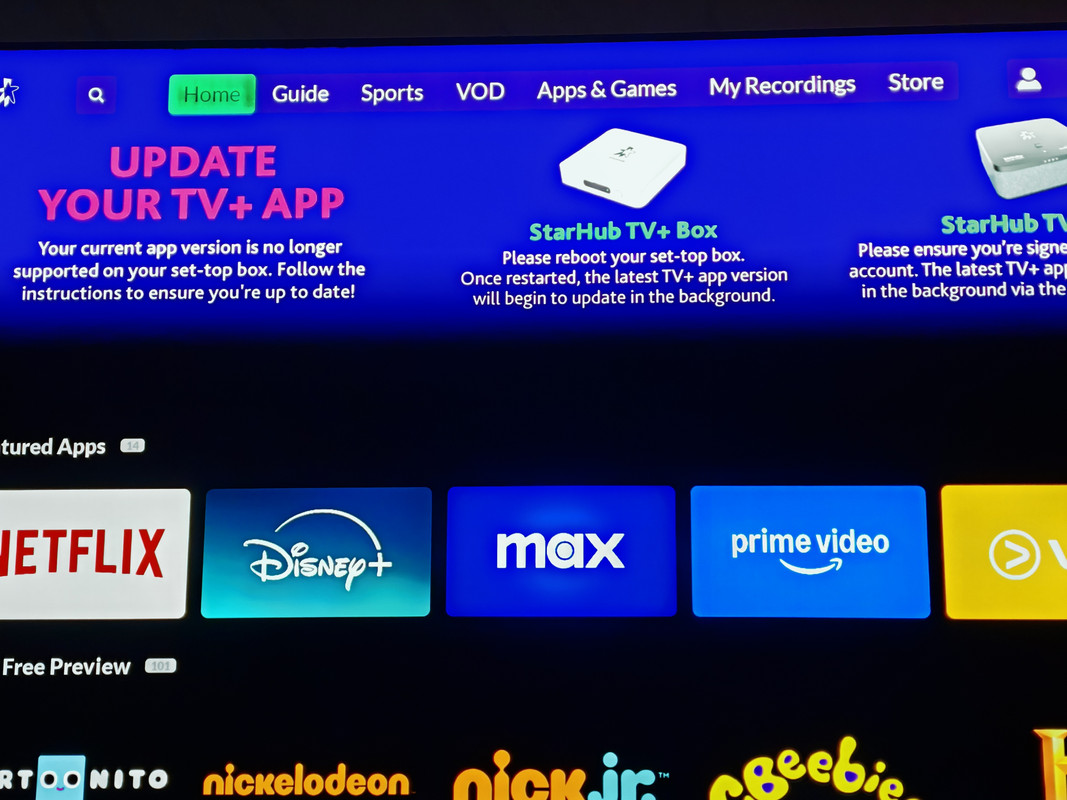
Does anyone have this message at the top band when you open the Starhub TV+ app? I am using a Nvidia TV Shield.

UPDATE YOUR TV+APP
Your current app version is no longer supported on your set-up box. Follow the instructions to ensure you're up to date!

I followed the instructions to reboot my set-top box, but the update message still appeared on the homepage.

I also tried uninstalling and reinstalling the app, but that didn’t make any difference. I contacted their tech support but they were of no help.

The app version is 4.617.977.

IMG-20250203-005500.jpg

Strange. You should contact Starhub for help. Hopefully other users using Starhub TV+ Android TV OS app can also check whether they are also facing this problem.

Starhub TV+ Smart TV FAQ
https://www.starhub.com/personal/support/article.html?id=q4cO03FeAO3lTpZkhhREd8

What devices can I use to stream content on StarHub TV+?

StarHub TV+ is available on compatible internet-enabled devices.

Compatible devices include:
1. Apple mobile devices with iOS 12 / iPadOS 12 or later. Jailbroken devices are NOT supported.
2. Android mobile devices with Android 9.0 or later. Rooted devices are NOT supported.
3. Desktop Web Browsers (latest 3 stable versions)
Chrome
Firefox
Microsoft Edge (Chromium)
Safari
4. Smart TV models with Android TV or Google TV OS running version 9.0 or later
5. Samsung Smart TV models from 2020 onwards with Tizen OS 4.0 or later.

Note: StarHub TV+ is not supported on mobile web browsers, LG Smart TVs with webOS and Apple TV.

I am unable to log in on the StarHub TV+ Smart TV app to access my subscription. What should I do?

Please ensure that your StarHub TV+ Android TV app software is up to date.
Access Google Play, search for StarHub TV+ app and select "Update" if it is available.

If you're unable to log in to the StarHub TV+ Android TV app with your Hub ID and password, you can reach out to us on Facebook or WhatsApp or send us an email via this form.

If you have forgotten your Hub iD or password, you can reset it any time on this page.
 

Able

Member
Joined
Aug 3, 2000
Messages
118
Reaction score
28
Strange. You should contact Starhub for help. Hopefully other users using Starhub TV+ Android TV OS app can also check whether they are also facing this problem.

Starhub TV+ Smart TV FAQ
https://www.starhub.com/personal/support/article.html?id=q4cO03FeAO3lTpZkhhREd8

What devices can I use to stream content on StarHub TV+?

StarHub TV+ is available on compatible internet-enabled devices.

Compatible devices include:
1. Apple mobile devices with iOS 12 / iPadOS 12 or later. Jailbroken devices are NOT supported.
2. Android mobile devices with Android 9.0 or later. Rooted devices are NOT supported.
3. Desktop Web Browsers (latest 3 stable versions)
Chrome
Firefox
Microsoft Edge (Chromium)
Safari
4. Smart TV models with Android TV or Google TV OS running version 9.0 or later
5. Samsung Smart TV models from 2020 onwards with Tizen OS 4.0 or later.

Note: StarHub TV+ is not supported on mobile web browsers, LG Smart TVs with webOS and Apple TV.

I am unable to log in on the StarHub TV+ Smart TV app to access my subscription. What should I do?

Please ensure that your StarHub TV+ Android TV app software is up to date.
Access Google Play, search for StarHub TV+ app and select "Update" if it is available.

If you're unable to log in to the StarHub TV+ Android TV app with your Hub ID and password, you can reach out to us on Facebook or WhatsApp or send us an email via this form.

If you have forgotten your Hub iD or password, you can reset it any time on this page.
I contacted StarHub tech support on Monday and was told my case had been escalated, with someone expected to contact me within 24 hours. However, it’s now Friday, and I haven't received any calls from them. Interestingly, when I turned on the TV Shield today, the message to update the TV+ app was gone. It seems the app was upgraded from version 4.617.977 to 4.618.38, and my guess is that this update resolved the issue. I am still disappointed with Starhub for their failure to contact me. Very poor customer service.
 

Cometdevil

Arch-Supremacy Member
Joined
Dec 19, 2008
Messages
10,427
Reaction score
3,013
Does anyone have this message at the top band when you open the Starhub TV+ app? I am using a Nvidia TV Shield.

UPDATE YOUR TV+APP
Your current app version is no longer supported on your set-up box. Follow the instructions to ensure you're up to date!

I followed the instructions to reboot my set-top box, but the update message still appeared on the homepage.

I also tried uninstalling and reinstalling the app, but that didn’t make any difference. I contacted their tech support but they were of no help.

The app version is 4.617.977.

IMG-20250203-005500.jpg
my tv+ box also showing this.
i didnt really bother about it since the the channels still work, and netflix also work.

annoying to see that banner warning, but i decided to f it after trying restart and looking through all the option setting.

if you resolve it please post here as well.
thanks
 

xiaofan

High Supremacy Member
Joined
Sep 16, 2018
Messages
31,306
Reaction score
8,774
my tv+ box also showing this.
i didnt really bother about it since the the channels still work, and netflix also work.

annoying to see that banner warning, but i decided to f it after trying restart and looking through all the option setting.

if you resolve it please post here as well.
thanks

He already resolved the issue, just one post above your post -- you have to update the app from version 4.617.977 to 4.618.38.

I contacted StarHub tech support on Monday and was told my case had been escalated, with someone expected to contact me within 24 hours. However, it’s now Friday, and I haven't received any calls from them. Interestingly, when I turned on the TV Shield today, the message to update the TV+ app was gone. It seems the app was upgraded from version 4.617.977 to 4.618.38, and my guess is that this update resolved the issue. I am still disappointed with Starhub for their failure to contact me. Very poor customer service.
 

Henry Ng

Arch-Supremacy Member
Joined
Aug 9, 2011
Messages
16,987
Reaction score
941
I contacted StarHub tech support on Monday and was told my case had been escalated, with someone expected to contact me within 24 hours. However, it’s now Friday, and I haven't received any calls from them. Interestingly, when I turned on the TV Shield today, the message to update the TV+ app was gone. It seems the app was upgraded from version 4.617.977 to 4.618.38, and my guess is that this update resolved the issue. I am still disappointed with Starhub for their failure to contact me. Very poor customer service.
They have too many users so hard to expect them to call. Most important is the issue resolved. My auto updated. Very flexible as user can add or remove those App that is without contract.
 
Last edited:

Cometdevil

Arch-Supremacy Member
Joined
Dec 19, 2008
Messages
10,427
Reaction score
3,013
He already resolved the issue, just one post above your post -- you have to update the app from version 4.617.977 to 4.618.38.
Ah. But he using tv shield I using starhub box.
The starhub box did not auto update when I power off and on. And there is not update button I can find
 

xiaofan

High Supremacy Member
Joined
Sep 16, 2018
Messages
31,306
Reaction score
8,774
Ah. But he using tv shield I using starhub box.
The starhub box did not auto update when I power off and on. And there is not update button I can find

You may have to be a bit patient to wait for the app to update to the new version.

Since you are using Starhub TV+ box, you may also want to contact Stathub for help.
 

Cometdevil

Arch-Supremacy Member
Joined
Dec 19, 2008
Messages
10,427
Reaction score
3,013
You may have to be a bit patient to wait for the app to update to the new version.

Since you are using Starhub TV+ box, you may also want to contact Stathub for help.
Well. I got the box since I signed up new plan in mid Jan. And have this since. Haha. But as mention I didn't really care since can still watch. See how it will go away itself or not
 

HiHelloBye

Senior Member
Joined
Oct 8, 2010
Messages
1,312
Reaction score
380
Ah. But he using tv shield I using starhub box.
The starhub box did not auto update when I power off and on. And there is not update button I can find
you can manually update it...

the SH's app itself can only be updated via Play Store

there's also another update which focuses on the Android OS in General, such as Security features, etc...
this one is under 'About' under 'Settings'...
 

Cometdevil

Arch-Supremacy Member
Joined
Dec 19, 2008
Messages
10,427
Reaction score
3,013
you can manually update it...

the SH's app itself can only be updated via Play Store

there's also another update which focuses on the Android OS in General, such as Security features, etc...
this one is under 'About' under 'Settings'...
Can't find where to update leh.
The screen say power off and on and that didn't work.
 

Henry Ng

Arch-Supremacy Member
Joined
Aug 9, 2011
Messages
16,987
Reaction score
941
Ah. But he using tv shield I using starhub box.
The starhub box did not auto update when I power off and on. And there is not update button I can find
Actually, you can manually check for update. For TV+ Pro, Go to settings > system > more settings > device preference > about > system update. Then it will check for update.
 

Cometdevil

Arch-Supremacy Member
Joined
Dec 19, 2008
Messages
10,427
Reaction score
3,013
Actually, you can manually check for update. For TV+ Pro, Go to settings > system > more settings > device preference > about > system update. Then it will check for update.
ah. i think i tried it last time and it says its up to date.
but main screen still have the banner say not updated.
now i just do again say updated but version 4.617.977 still.

im on the white box though.
 

HiHelloBye

Senior Member
Joined
Oct 8, 2010
Messages
1,312
Reaction score
380

Cometdevil

Arch-Supremacy Member
Joined
Dec 19, 2008
Messages
10,427
Reaction score
3,013
booo. few days didnt switch on tv box, now i getting error PLB300 whenever it turns on, but i able to go to "main menu" and checked app version was upgraded to 4.618.38. then from main menu can nagivate other stuff..

what gives man..

-edit-
after a few restart now no more error liao
 
Important Forum Advisory Note
This forum is moderated by volunteer moderators who will react only to members' feedback on posts. Moderators are not employees or representatives of HWZ. Forum members and moderators are responsible for their own posts.

Please refer to our Community Guidelines and Standards, Terms of Service and Member T&Cs for more information.
Top