Asus WiFi 7 and WiFi 6E routers

yukita

Supremacy Member
Joined
Jan 1, 2000
Messages
7,931
Reaction score
71
No problem with AImesh. The mesh nodes runs in AP mode basically.

Merlin FW does not change AImesh or other main stock Asus FW features. If later Merlin FW supports RT-BE88U, you should have no issues with AImesh or other existing Asus FW features, it just adds some functionalities.

Take note Merlin FW starts to support Asus WiFi 7 router. So there is a chance that RT-BE88U will be supported as well in the future, especially if Asus releases it to the global market.
https://www.asuswrt-merlin.net/

RT-AX58U3004.388.8_2
RT-AX86U3004.388.8_2
RT-AX88U3004.388.8_2
GT-AX110003004.388.8_2
RT-AX68U3004.388.8_2
GT-AXE110003004.388.8_2
ZenWiFi Pro XT123004.388.8_2
GT-AX60003004.388.8_2
GT-AXE160003004.388.8_2
GT-AX11000_PRO3004.388.8_2
RT-AX86U_PRO3004.388.8_2
RT-AX88U_PRO3004.388.8_2
RT-BE96U3006.102.1
GT-BE98_PRO3006.102.1
what is the main benefit of using merlin firmware based on your experience?
can I flash back to the original asus firmware after done testing?
 

xiaofan

High Supremacy Member
Joined
Sep 16, 2018
Messages
31,145
Reaction score
8,703
what is the main benefit of using merlin firmware based on your experience?
can I flash back to the original asus firmware after done testing?

Yes, it is easier to change between stock and Merlin.

Main benefits -- not so much to me but to some others -- because of the extra scripts like ad-blocking and QoS. I do not use those features and mainly use Entware which is supported on stock FW as well.
https://www.asuswrt-merlin.net/features
https://github.com/RMerl/asuswrt-merlin.ng/wiki/AMTM
https://github.com/RMerl/asuswrt-merlin.ng/wiki/User-scripts
https://github.com/Entware/Entware

Discussions in this forum.
https://forums.hardwarezone.com.sg/threads/asuswrt-merlin-installation-rough-guide-for-starters-12-dec-2021.6658392/
 

xiaofan

High Supremacy Member
Joined
Sep 16, 2018
Messages
31,145
Reaction score
8,703
Asus RT-BE86U Chinese Youtuber review

qPWoM6b.png


xiaofan

High Supremacy Member
Joined
Sep 16, 2018
Messages
31,145
Reaction score
8,703
Assu Global site now lists the following routers which are not available in Singapore yet.
https://www.asus.com/networking-iot-servers/wifi-7/all-series/filter?Category=WiFi-Routers

Dual band without 6GHz band
RT-BE88U --> BE7200, dual 10G ports, quad 2.5G ports, quad 1G ports; available in mainland China and a few other places
RT-BE86U --> BE6800, one 10G port and quad 2.5G port; available in China
RT-BE58U --> BE3600, single 2.5G port, quad 1G ports
TIF-BE3600 --> BE3600, single 2.5G port, quad 1G ports; available in China

Triband with 6GHz band
RT-BE96U --> BE19000, dual 10G ports and quad 1G ports
RT-BE92U --> BE9700, one 10G port and quad 2.5G ports

Quadband
ROG GT-BE98 Pro --> quad band with dual 6G bands so not available in SIngapore, similar or same HW as GT-BE98 (quad band, dual 5G band)
ZenWiFi BQ16 Pro quad band with dual 6G bands so not available in SIngapore, similar or same HW as ZenWiFi BQ16 (quad band, dual 5G band)
 

natyllek

Junior Member
Joined
Nov 4, 2014
Messages
16
Reaction score
0
@xiaofan , saw your post on TUF-BE6500, decided to buy it off TB moments ago. I have an existing TUF-AX3000, do you think I can use it to extend coverage (though no dead zones at all, just wanna increase speed across the house). Not sure if BE and AX would work..

If it is possible, should I use AiMesh or is it better to wire the AX up in the room for better speed? I have LAN points in 2 of the rooms - not sure if it works that way. Preferably to have both routers broadcasting the same SSID. am on 3gbps plan..

Side track a little: Not sure if anyone has any ideas….
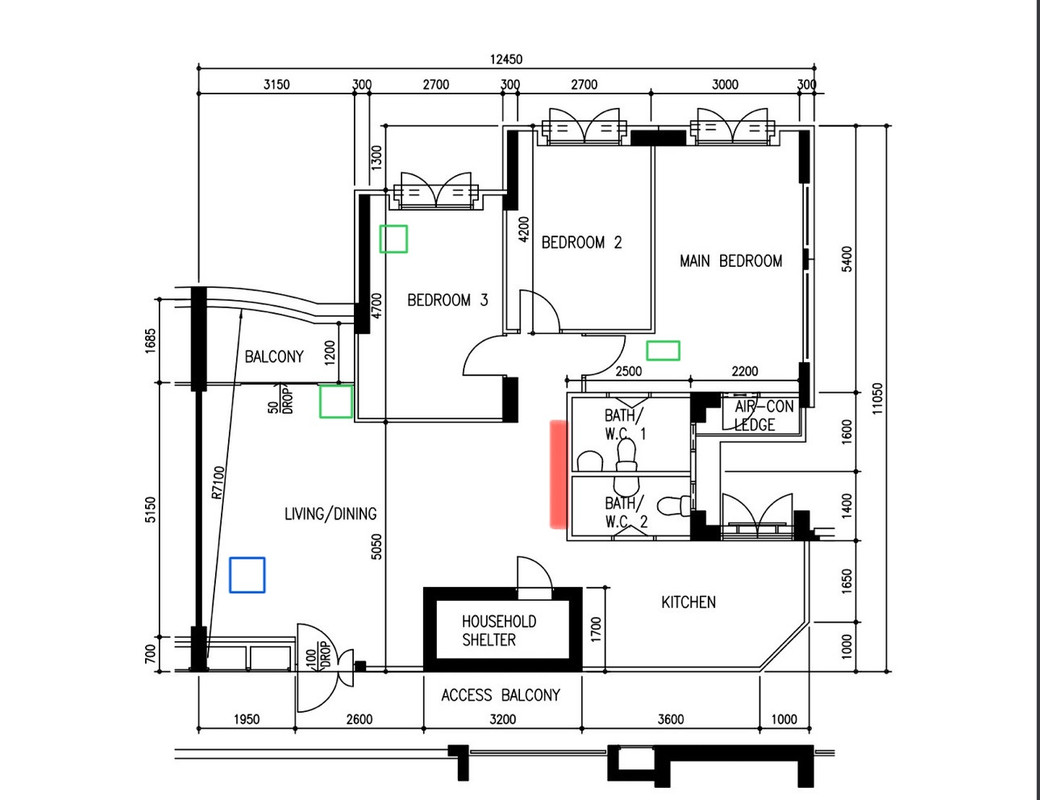
I have a friend whose house has a huge mirror, on 3gbps plan with TP Link Deco M5x3. Previously on 1gbps, the speeds she get from her Main bedroom is around 80mbps and Bedroom 2 around 40mbps. Now, it isn’t getting any better. In the living, the speed can go up to 900mpbs on iPhone, the rest of the house dropped to below 100mbps.

Floorplan as below. Blue is the ONT. Decos were in green. Mirror is the one in red.
IMG-1757.jpg


Are there any ways to improve the speeds around the house esp bedrooms?

TYIA!
 

gundamkitten

Member
Joined
May 18, 2024
Messages
181
Reaction score
122
[
I have a friend whose house has a huge mirror, on 3gbps plan with TP Link Deco M5x3. Previously on 1gbps, the speeds she get from her Main bedroom is around 80mbps and Bedroom 2 around 40mbps. Now, it isn’t getting any better. In the living, the speed can go up to 900mpbs on iPhone, the rest of the house dropped to below 100mbps.

The 3Gbps plan is bottlenecked by the Deco M5, regardless of the mirror.

The Deco accepts at best 1Gbps ethernet wired input (the WAN port). The wireless AC speed is 5 GHz: 867 Mbps (802.11ac) max.

So there is no point signing up for 3Gbps when the M5 specs do not support that.
 

natyllek

Junior Member
Joined
Nov 4, 2014
Messages
16
Reaction score
0
The 3Gbps plan is bottlenecked by the Deco M5, regardless of the mirror.

The Deco accepts at best 1Gbps ethernet wired input (the WAN port). The wireless AC speed is 5 GHz: 867 Mbps (802.11ac) max.

So there is no point signing up for 3Gbps when the M5 specs do not support that.
Hello, thank you for your reply. We have also tried using the BE230 when the guy came to change the ONT, the speeds were also the same, and when it reaches the far end of Main Bedroom, the signal dropped entirely. Even with M5's capability of max 1gbps, isn't mirror the cause of the huge drop in speed? 40mbps is really low...

Would it be better to use EasyMesh to mesh up 2 units of BE230? Where should the second unit be placed to enhance the speed? Or is there any other recommendations? (There are no LAN points in any of the rooms)
 
Last edited:

WatCult

Senior Member
Joined
Jan 1, 2000
Messages
506
Reaction score
49
Hello, thank you for your reply. We have also tried using the BE230 when the guy came to change the ONT, the speeds were also the same, and when it reaches the far end of Main Bedroom, the signal dropped entirely. Even with M5's capability of max 1gbps, isn't mirror the cause of the huge drop in speed? 40mbps is really low...

Would it be better to use EasyMesh to mesh up 2 units of BE230? Where should the second unit be placed to enhance the speed? Or is there any other recommendations? (There are no LAN points in any of the rooms)

Looking at the floorplan, I would suggest that you try moving the BE230 to the mirror which is right at the centre of the whole house if possible. Probably, you can try and see whether that will improve the speed in the main bedroom.

The walls are the main issue plus the capability of the BE230 router you have on hand. Especially, if you plan to use Mesh, I would suggest you get a Triband router so that you have a dedicated wireless backhaul to help mesh routers to communicate better with one another.

With the M5, suggest moving the M5 in the living room closer to the mirror and move the bedroom 3 M5 to bedroom 2 to improve the signal strength in that room. Hopefully that will not affect the speed within bedroom 3 too much.

For your initial question, wired connection should always be better than AiMesh (pure Wireless). You can setup AiMesh using TUF-BE6500 with TUF-AX3000 connected via LAN and act as an Access Point. AiMesh should help you setup everything under one SSID.
 
Last edited:

xiaofan

High Supremacy Member
Joined
Sep 16, 2018
Messages
31,145
Reaction score
8,703
@xiaofan , saw your post on TUF-BE6500, decided to buy it off TB moments ago. I have an existing TUF-AX3000, do you think I can use it to extend coverage (though no dead zones at all, just wanna increase speed across the house). Not sure if BE and AX would work..

If it is possible, should I use AiMesh or is it better to wire the AX up in the room for better speed? I have LAN points in 2 of the rooms - not sure if it works that way. Preferably to have both routers broadcasting the same SSID. am on 3gbps plan..

It will be good that you can post the floor plan, with details of the LAN ports locations.

The following is just a generic answer without looking at the floor plan, which may not be the best for your situation.

AImesh --> can be Ethernet backhaul (recommended for your use case as you use dual band Asus routers) or wireless backhaul (not recommended in your use case)
https://dongknows.com/asus-aimesh-overview/

Just treat TUB-BE6500 as a normal WiFi 6 router with some WiFi 7 features.

You can use your 3Gbps plan as 2.5Gbps plan as TUF-BE6500 has quad 2.5G ports.

AImesh setup with Ethernet Backhaul.
ONT --> TUF-BE6500 2.5G WAN port (as main AImesh router)
TUF-BE6500 2.5G LAN port --> room LAN port --> TUF-AX3000
 

xiaofan

High Supremacy Member
Joined
Sep 16, 2018
Messages
31,145
Reaction score
8,703
Side track a little: Not sure if anyone has any ideas….
I have a friend whose house has a huge mirror, on 3gbps plan with TP Link Deco M5x3. Previously on 1gbps, the speeds she get from her Main bedroom is around 80mbps and Bedroom 2 around 40mbps. Now, it isn’t getting any better. In the living, the speed can go up to 900mpbs on iPhone, the rest of the house dropped to below 100mbps.

Floorplan as below. Blue is the ONT. Decos were in green. Mirror is the one in red.
IMG-1757.jpg


Are there any ways to improve the speeds around the house esp bedrooms?

TYIA!

Hello, thank you for your reply. We have also tried using the BE230 when the guy came to change the ONT, the speeds were also the same, and when it reaches the far end of Main Bedroom, the signal dropped entirely. Even with M5's capability of max 1gbps, isn't mirror the cause of the huge drop in speed? 40mbps is really low...

Would it be better to use EasyMesh to mesh up 2 units of BE230? Where should the second unit be placed to enhance the speed? Or is there any other recommendations? (There are no LAN points in any of the rooms)


Previously on Singtel 1Gbps with ONR? Now on MR with TP-Link BE230 as the main router?

No LAN ports in the rooms, with big mirror?

No easy solutions then. 3Gbps plan will not help. 10Gbps plan will not help either.

1) Best solution --> to get contractor to lay cables; at least from ONT to the main Bedroom and Bedroom 3, so that the Deco M5 can use Ethernet Backhaul.

2) Throw away the mirror.

3) Get Netgear Orbi RBK853 at S$999 or Orbi RB863S at about S$1299. This may work. Both are triband AX mesh solution.
https://netgearstore.sg/products/orbi-rbk853-ax6000-tri-band-3-pack-wifi-6-mesh-system-1
https://netgearstore.sg/products/orbi-rbk863s-ax6000-tri-band-3-pack-wifi-6-mesh-system
 
Last edited:

natyllek

Junior Member
Joined
Nov 4, 2014
Messages
16
Reaction score
0
It will be good that you can post the floor plan, with details of the LAN ports locations.

The following is just a generic answer without looking at the floor plan, which may not be the best for your situation.

AImesh --> can be Ethernet backhaul (recommended for your use case as you use dual band Asus routers) or wireless backhaul (not recommended in your use case)

Just treat TUB-BE6500 as a normal WiFi 6 router with some WiFi 7 features.

You can use your 3Gbps plan as 2.5Gbps plan as TUF-BE6500 has quad 2.5G ports.

AImesh setup with Ethernet Backhaul.
ONT --> TUF-BE6500 2.5G WAN port (as main AImesh router)
TUF-BE6500 2.5G LAN port --> room LAN port --> TUF-AX3000
Here's the floorplan:
2024-09-12-16-50-57.png

The green area is where the ONT and routers are. The purple ones are the LAN points. Do you think adding the additional AX3000 in the Master Room would improve the speed using either wired/wiressless AiMesh?

In Ethernet Backhaul case, is it just plug and play or do I have to configure in the Asus admin panel via AiMesh?

Previously on Singtel 1Gbps with ONR? Now on MR with TP-Link BE230 as the main router?

No LAN ports in the rooms, with big mirror?

No easy solutions then. 3Gbps plan will not help. 10Gbps plan will not help either.

1) Best solution --> to get contractor to lay cables; at least from ONT to the main Bedroom and Bedroom 3, so that the Deco M5 can use Ethernet Backhaul.

2) Throw away the mirror.

3) Get Netgear Orbi RBK853 at S$999 or Orbi RB863S at about S$1299. This may work. Both are triband AX mesh solution.

Previously on MR 1gbps and now on MR 3gbps with TP-link BE230.
No, we removed the BE230 entirely as it is causing her work laptop to disconnect every minute. So basically, the set up is ONT > Decos, and yes, there are no LAN points in the rooms. (Initially the MR guy came and said that the M5 can still be used. So he connected ONT > BE230 > Decos)

She is not into high speed, she would probably be happy if her Main bedroom can get 200mbps. Option 1 and 2 are quite out of the question since both options require her family's approval. Option 3 is a tad too high a price..... :( Are there other viable options? @WatCult has suggested to place the Deco on the mirror side, I think I will give it a try - question though -is it better to connect Deco or BE230 in this case?
 

xiaofan

High Supremacy Member
Joined
Sep 16, 2018
Messages
31,145
Reaction score
8,703
Previously on MR 1gbps and now on MR 3gbps with TP-link BE230.
No, we removed the BE230 entirely as it is causing her work laptop to disconnect every minute. So basically, the set up is ONT > Decos, and yes, there are no LAN points in the rooms. (Initially the MR guy came and said that the M5 can still be used. So he connected ONT > BE230 > Decos)

She is not into high speed, she would probably be happy if her Main bedroom can get 200mbps. Option 1 and 2 are quite out of the question since both options require her family's approval. Option 3 is a tad too high a price..... :( Are there other viable options? @WatCult has suggested to place the Deco on the mirror side, I think I will give it a try - question though -is it better to connect Deco or BE230 in this case?

Get a new Deco then. It seems that Archer BE230 is not stable as of now based on various reports in this forum. Probably FW problem.

ONT --> Deco XE75 Pro (2.5G WAN) as main router --> wireless --> Deco XE75 Pro in Bedroom 3 and Main Bedroom

Deco XE75 Pro 3-pack at S$739 (or can try two-pack at S$429 first and reuse the Deco M5 unit in Main Bedroom)
https://www.challenger.sg/biz-solut...and-mesh-wifi-6e-system-3pack0--4897098684993
 

xiaofan

High Supremacy Member
Joined
Sep 16, 2018
Messages
31,145
Reaction score
8,703
Cheaper alternative, lower the expectation as well. 200Mbps may be difficult behind the mirror. More like 100Mbps to 150Mbps for wireless devices.

Get 4 units of the Power Line adapter and use them as "pesudo Ethernet backhaul" for the Deco M5 units. Total cost S$170.
https://www.challenger.sg/biz-solut...ort-gigabit-powerline-starter0--6935364098568

ONT --> Deco M5 --> Power Line Adapter
Power Line adapter in bedroom 3 --> Deco M5
Power Line adapter in main bedroom --> Deco M5
Power Line adapter in living room or bedroom 2--> wired device (100Mbps to 250Mbps)

Take note Deco M5 is not suitable for 3Gbps solution as it has 1G WAN port.
 
Last edited:

natyllek

Junior Member
Joined
Nov 4, 2014
Messages
16
Reaction score
0
Get a new Deco then. It seems that Archer BE230 is not stable as of now based on various reports in this forum. Probably FW problem.

ONT --> Deco XE75 Pro (2.5G WAN) as main router --> wireless --> Deco XE75 Pro in Bedroom 3 and Main Bedroom

Deco XE75 Pro 3-pack at S$739 (or can try two-pack at S$429 first and reuse the Deco M5 unit in Main Bedroom)
Thank you, so moving the living room unit to the mirror side of wall will not work in your opinion?
 

xiaofan

High Supremacy Member
Joined
Sep 16, 2018
Messages
31,145
Reaction score
8,703
Thank you, so moving the living room unit to the mirror side of wall will not work in your opinion?

I believe so. You can try.

A large mirror is pretty effective in blocking WiFi signal.

Deco M5 is already a poor solution with wireless backhaul, adding a mirror in between makes the things even worse.
 

WatCult

Senior Member
Joined
Jan 1, 2000
Messages
506
Reaction score
49
Thank you, so moving the living room unit to the mirror side of wall will not work in your opinion?

The issue with mirror is that it is acting as a large piece of metal that will reflect the wireless signal.

I was trying to move the main router in the living as close to the other mesh routers as close as possible in the hope that it will provide better transmission between the mesh routers even though a huge piece of metal is potentially disrupting the wireless signal in the house.

If possible, mount the main router as high as possible and see whether that will help.
 

natyllek

Junior Member
Joined
Nov 4, 2014
Messages
16
Reaction score
0
The issue with mirror is that it is acting as a large piece of metal that will reflect the wireless signal.

I was trying to move the main router in the living as close to the other mesh routers as close as possible in the hope that it will provide better transmission between the mesh routers even though a huge piece of metal is potentially disrupting the wireless signal in the house.

If possible, mount the main router as high as possible and see whether that will help.
Thank you @WatCult , but the socket is at a very low height area, I don't think it can be mounted too high though.. Maybe have to use an extension if this is the case.. Let me try it with the wall socket height first and see if it helps!
 
Important Forum Advisory Note
This forum is moderated by volunteer moderators who will react only to members' feedback on posts. Moderators are not employees or representatives of HWZ. Forum members and moderators are responsible for their own posts.

Please refer to our Community Guidelines and Standards, Terms of Service and Member T&Cs for more information.
Top