[Google Pixel Update📱] Android 16 QPR2 Beta 3.3 now available!

limmk

High Supremacy Member
Joined
Jul 5, 2001
Messages
38,048
Reaction score
7,799


Google released Android 16 QPR1 Beta 1 during its Google I/O keynote, downloadable onto Pixel devices dating back to the Pixel 6.

Labeled as build number BP31.250502.008, this build will contain new platform features, bug fixes, performance optimizations, and the May 2025 security patches. On top of that, users will also spot the beginnings of the Material 3 Expressive rollout. Look for it in the notifications, quick settings, lock screen, and launcher.

Supported devices: Pixel 6, 6 Pro, 6a, 7, 7 Pro, 7a, 8, 8 Pro, 8a, 9, 9 Pro, 9a, Pixel Tablet series devices.

Release date: May 20, 2025
Build: BP31.250502.008
Emulator support: x86 (64-bit), ARM (v8-A)
Security patch level: May 2025
Google Play services: 25.13.33

Flashable factory images and OTA files are now live. The OTA is also live, so if you’re more into that, enroll via the link below.

Enroll in Android Beta

// Android Developers

nbrPghg.png
 
Last edited:

limmk

High Supremacy Member
Joined
Jul 5, 2001
Messages
38,048
Reaction score
7,799
TL;DR
  • Google is beginning to introduce the Advanced Protection mode feature to users on Android 16 QPR1 Beta 1.
  • Advanced Protection is a one-click toggle for enhanced security measures on the entire device, including theft protection, network security, app restrictions, and more.
  • Once Advanced Security is enabled, individual settings cannot be adjusted.


Sometimes your worst enemy is yourself. Or maybe you just want some extra protection on your device to keep you and your data safe from other, more malicious hands. Either way, one can never have too much protection, especially when our lives are on our phones, and Google’s Advanced Protection mode in Android 16 is a valuable tool to keep you safe.

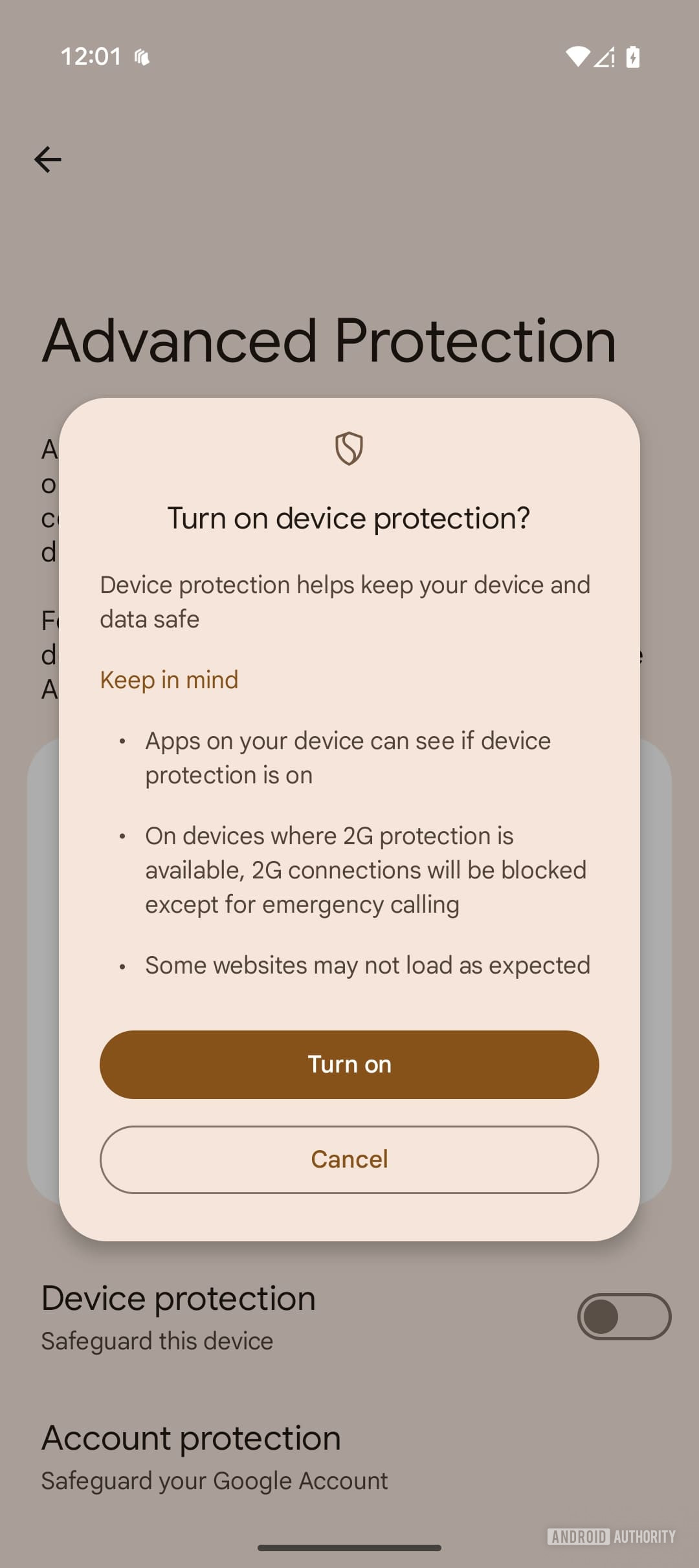
If you’re currently testing Android 16 QPR1 Beta 1, then you should be getting access to the new Advanced Protection feature (we previewed it in an APK teardown) that Google is rolling out to users (Thanks: @AyushmaanT on Telegram). This is a one-click toggle that will turn on several of the highest tier security settings on the device, and once enabled, there is no way to adjust the individual security settings. It’s like a security blanket that aims to make sure your device is safe from known threats, like no sideloading, USB data access, and more.

android 16 qpr1 beta advanced protection mode
Android 16 beta 4 advanced protection mode categories
Android 16 beta 4 advanced protection mode on


Of course, even though this mode ensures that users have the safest experience with their device, it’s not on by default. Users have to opt in themselves, but that’s not too hard to do. If you want to enable Advanced Protection, go to the Settings app on your device, select Personal & device safety, and find the Advanced Protection page. Switch the toggle for device protection to on.

Once Advanced Protection is on, those security protocols cannot be adjusted, so it’s basically one-size-fits-all for your device’s safety. There are a few different categories of protection too, so here’s a brief overview of each one.
  • Device Safety: Protects your device from theft, confiscation, and even blocks USB data transfers.
  • Apps: Keeps your device safe from unknown, potentially malicious apps, and also prevents apps from corrupting device memory.
  • Network and Wi-Fi: This blocks all unsecured connections, including 2G and WEP. However, 2G will still be available for emergency calling only. It also prevents the device from automatically reconnecting to insecure networks.
  • Web: Safeguards your phone from malicious websites, Chrome enforces HTTPS for all website connections when possible, and prevents Javascript from running.
  • Phone by Google: There are several safety measures here to prevent spam and scam calls from reaching you.
  • Messages by Google: Similar to Phone, it adds extra protection against spam and scams.
Individually, these are not new security settings — they’ve already existed as an option on Android for a while. But with Advanced Protection, all of these will be on and the user cannot adjust them in any way. Like mentioned earlier, we can be our own worst enemy, and this mode helps keep us safe from — well — ourselves, as well as other malicious forces.

Google does have an API that third-party apps can utilize to detect when Advanced Protection is on, but it’s up to individual developers to use it. When they do, then they can add their own security features in addition to the default settings.
If you’re currently on Android 16 QPR1 Beta 1, you should start seeing the option for Advanced Protection on your device, if you haven’t already.
 

limmk

High Supremacy Member
Joined
Jul 5, 2001
Messages
38,048
Reaction score
7,799
TL;DR
  • Google Pixel phones may soon feature an always-on display that shows a blurred version of your lock screen wallpaper, a new option called ‘ambient AOD’.
  • This ‘ambient AOD’ feature is hidden in the Android 16 QPR1 beta update and includes a user toggle to turn the wallpaper display on or off.
  • However, we observed screen flickering on current Pixels, suggesting this new AOD feature might be reserved for future devices like the Pixel 10.


Many Android smartphones feature an always-on display (AOD) that allows you to see the date, time, and notifications at a glance. Since the display is a primary source of battery drain on mobile devices, many smartphones restrict AOD content to black and white. Some devices, however, can show your wallpaper on the AOD, personalizing its appearance at the cost of some battery life. Currently, Google Pixel phones do not offer this wallpaper feature on their AOD, but this could change with the next quarterly Android 16 release.

Although Pixel phones have featured an always-on display (AOD) since the Pixel 2’s release in 2017, the ability to show the wallpaper on the AOD has been notably absent for most of that time. Google briefly experimented with this feature for the Pixel 3 in 2018 but didn’t carry the feature forward to later devices. In contrast, OEMs like Samsung and Xiaomi have long offered this functionality, and Apple more recently implemented a similar feature on its iOS platform. Now, it appears Google is set to reintroduce AOD wallpaper support with Android 16 QPR1.

We’ve found evidence suggesting Google is developing a feature dubbed ‘ambient AOD.’ This version would display a blurred iteration of the lock screen wallpaper on the always-on display, differing from the Pixel 3’s implementation that showed only a small wallpaper segment. This new approach aligns well with Android’s Material 3 Expressive design philosophy, which incorporates background blur across various system elements like the app drawer, keyguard, recents screen, and notification panel.

Last month, we showed off an early version of Android’s new ‘ambient AOD’ feature. At the time, we weren’t sure if it would be optional, but we’ve since discovered that Google is preparing to add a toggle for the feature.


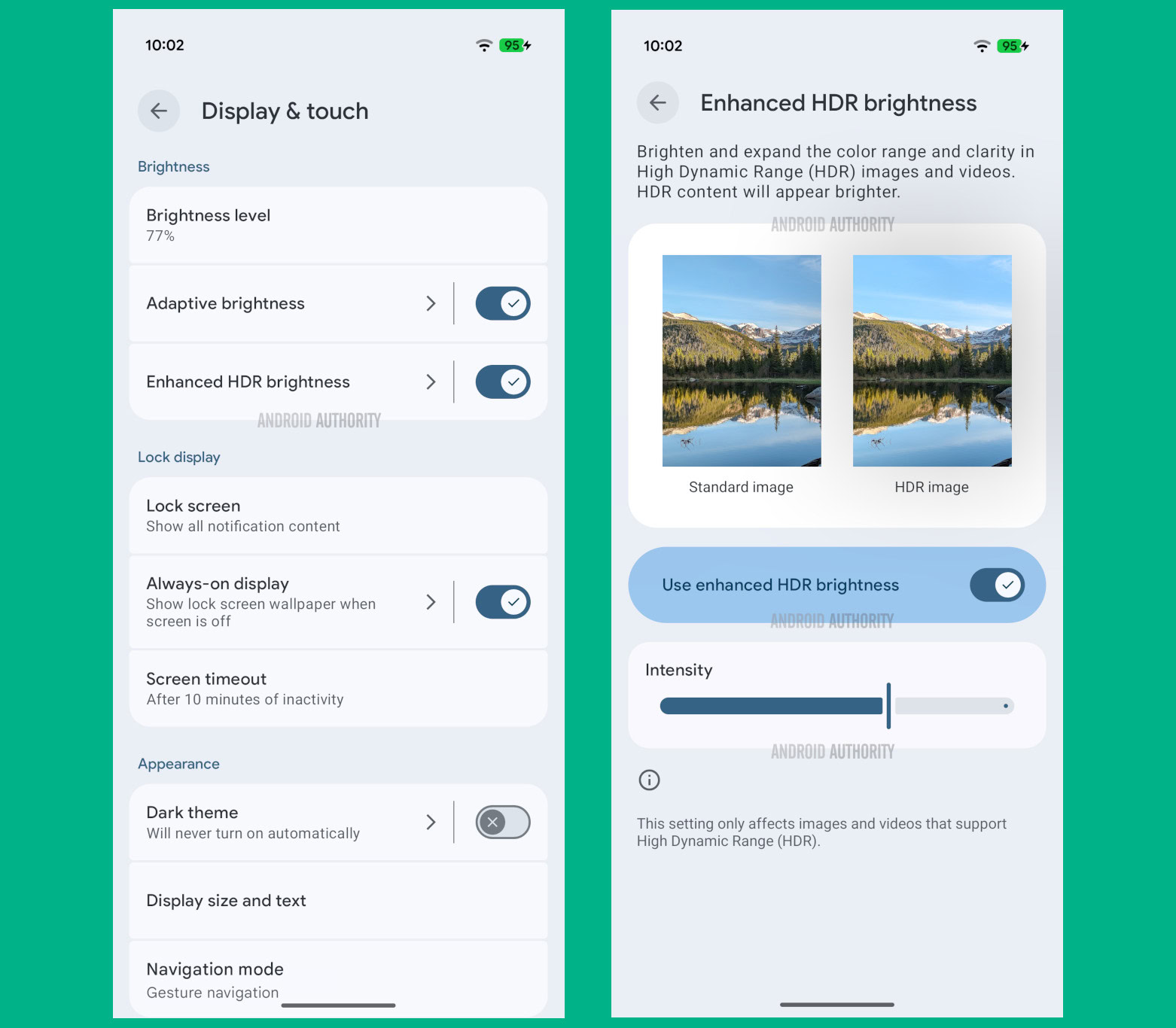
In Android 16 QPR1 Beta 1, Google subtly changed the “always-on display” setting. Previously a toggle under Settings > Display & touch > Lock screen, this setting in QPR1 Beta 1 now resides on its own subpage within Settings > Display & touch. While this new “always-on display” page currently features only one toggle for the overall AOD function, we found strings in the Settings app that suggest a “show lock screen wallpaper” toggle will soon be added.

The description for this upcoming “show lock screen wallpaper” toggle reads: “Lock screen wallpaper is visible with always-on display.” This toggle will be placed under a new “wallpaper options” section on the “always-on display” page. While this placement hints at the potential for additional AOD wallpaper options in the future, there’s currently no indication that more are actively in development.

Code:
<string name="doze_always_on_wallpaper_options">Wallpaper options</string>
<string name="doze_always_on_wallpaper_title">Show lock screen wallpaper</string>
<string name="doze_always_on_wallpaper_description">Lock screen wallpaper is visible with always-on display</string>
<string name="doze_always_on_summary_with_wallpaper">Show lock screen wallpaper when screen is off</string>
<string name="doze_always_on_summary_without_wallpaper">Hide lock screen wallpaper when screen is off</string>
Here’s what the “always-on display” settings page looks like when the ‘ambient AOD’ feature is enabled in Android 16 QPR1 Beta 1:

Show lock screen wallpaper setting in Android 16 QPR1


When we first reported on the ‘ambient AOD’ feature last month, some users expressed concern that it wouldn’t be optional, so we’re pleased to see Google incorporate a settings toggle. Unfortunately, it appears unlikely that Google will extend AOD wallpaper support to existing Pixel devices. We’ve observed periodic screen flickering on current models when the feature is enabled.

This issue might stem from our previous observation that ‘ambient AOD’ is intended for devices with “particular displays,” suggesting a need for specific hardware-level changes for proper support. Without knowing the exact display characteristics required, we can’t definitively say existing Pixel models won’t receive the ‘ambient AOD’ feature, but it seems probable Google is reserving it for the upcoming Pixel 10 series.

 

limmk

High Supremacy Member
Joined
Jul 5, 2001
Messages
38,048
Reaction score
7,799
TL;DR
  • Google is developing an “Enhanced HDR brightness” setting for Android 16 QPR1 to give users system-level control over screen brightening from HDR content.
  • This upcoming feature will include both a toggle to disable HDR support entirely and a slider to adjust the intensity of HDR effects.
  • It aims to prevent jarring brightness shifts from HDR media, a solution Samsung users already have with a similar feature in One UI 7.


When you’re using your smartphone at night, you probably prefer to keep its brightness low to avoid blinding yourself or disturbing your partner. However, if you come across HDR media at night, your phone may automatically boost its brightness to display the content properly. This sudden brightness shift can be jarring, which is why some apps offer options for disabling HDR media support. Google now aims to address this problem at the system level in an upcoming Android 16 release.

Google is currently testing an “Enhanced HDR brightness” setting that will allow you to control how much HDR content brightens your Pixel phone’s screen. This setting, expected in an upcoming release under Settings > Display & touch > Enhanced HDR brightness, will include both a toggle to disable HDR support entirely as well as a slider to adjust the HDR effect’s intensity.

Demonstrating this feature on camera is challenging, but it’s easy to describe what it does. Basically, with the feature disabled, a “standard” (SDR) image and a HDR image will look the same on screen. When it’s enabled, adjusting the slider will dynamically alter the brightness of specific elements within an HDR image, such as the sky or water. This control is possible because the HDR display mode enhances supported images and videos by boosting their brightness and expanding their color range and clarity.

Enhanced HDR brightness feature in Android 16 QPR1


If you’ve ever been bothered by social media apps like Instagram flash banging you upon encountering an HDR image, you’ll likely appreciate this new feature when it rolls out. The “Enhanced HDR brightness” setting isn’t available in Android 16 QPR1 Beta 1, but it could arrive in a future beta or the stable release. Samsung phone users, however, won’t have to wait; the Korean tech giant has already implemented a similar feature in its One UI 7 release.
 

limmk

High Supremacy Member
Joined
Jul 5, 2001
Messages
38,048
Reaction score
7,799
TL;DR
  • Pixel phones may soon get a “double tap to turn off screen” gesture in the Android 16 QPR1 update.
  • A new toggle for this gesture is expected to appear in the Settings app under System > Gestures.
  • However, this double tap gesture will reportedly only function on the lock screen, not the home screen.


Reaching for the power button to wake your phone can be awkward if it’s on a table or stand. To address this, many Android phones let you double tap the screen to turn it on. Many of these phones also support the reverse — double tapping the screen to turn it off — which is convenient when you’re finished using your device. Pixel phones, however, currently lack this handy screen off gesture, but Google could finally add it in the first quarterly release of Android 16.

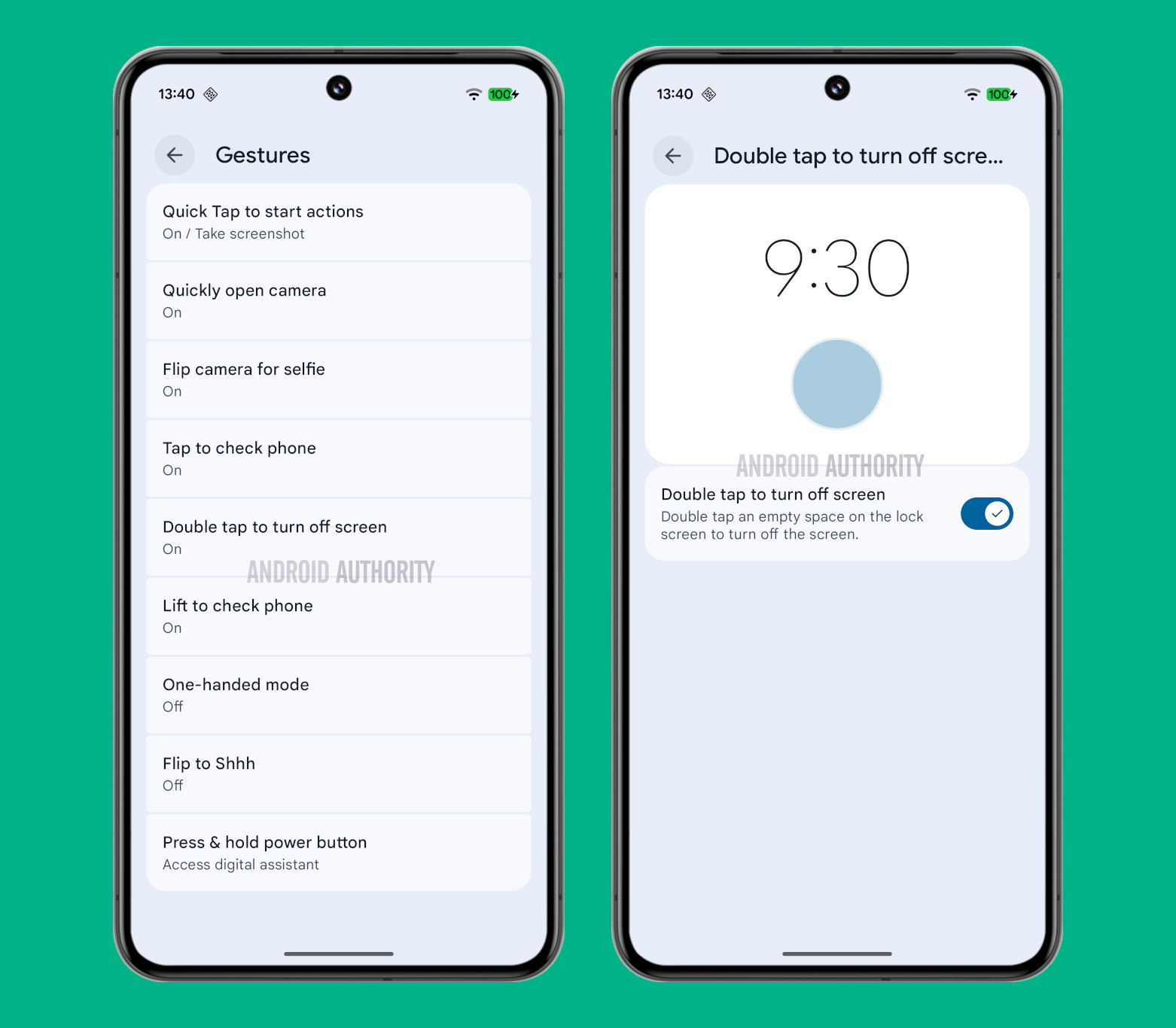
While digging through the Android 16 QPR1 Beta 1 release, we found new strings in the Settings app that suggest a “double tap to turn off screen” page will soon appear under Settings > System > Gestures. The page will have a toggle for enabling this new double tap screen off gesture, which allows you to “double tap an empty space on the lock screen to turn off the screen.”

Code:
<string name="double_tap_screen_to_sleep_title">Double tap to turn off screen</string>
<string name="double_tap_screen_to_sleep_summary">Double tap an empty space on the lock screen to turn off the screen.</string>
The page isn’t live yet in Android 16 QPR1 Beta 1, but here’s what it’ll look like when it goes live:

Double tap to sleep settings in Android 16 QPR1


Back in April, we reported that Google was working on a double tap screen off gesture for Pixel phones. While we managed to get the gesture working then, it wasn’t clear if Google would provide a user-facing setting. With the Android 16 QPR1 Beta 1 release, however, we now know a toggle for this feature will indeed appear in the Settings app.


Unfortunately, we’ve also learned that this double tap screen off gesture will only work on the lock screen, not on the home screen. This is disappointing because it means the gesture’s primary use will be turning off the screen after checking lock screen notifications. Some third-party Android launchers do let you double tap the home screen to turn it off, so consider exploring those if you want that broader functionality.

Although the double tap screen off gesture appears ready, we don’t know exactly when it will roll out. It’ll likely go live in a future beta or with the stable release of Android 16 QPR1. When it does go live, we’ll be sure to let you know.
 
Important Forum Advisory Note
This forum is moderated by volunteer moderators who will react only to members' feedback on posts. Moderators are not employees or representatives of HWZ. Forum members and moderators are responsible for their own posts.

Please refer to our Community Guidelines and Standards, Terms of Service and Member T&Cs for more information.
Top