My REW (speaker measurement) adventures

lxXXxl

Master Member
Joined
Dec 7, 2001
Messages
2,617
Reaction score
26
Last time wanted to play with Dirac Live, but now they don't sell standalone software anymore, LL started playing with the free REW with the umik-1 from minidsp.

Tried measuring the ancient Megaworks 550 satellite speaker.

SPL, Phase
WalDqSV.png


Weird drop in the 4-7k region? And getting brighter and brighter...

Distortion
6pggYXv.png


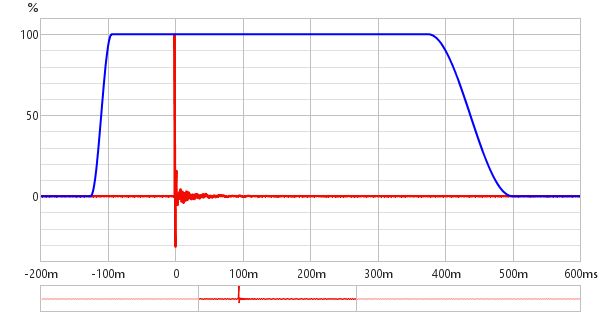
Impulse
7b5FPp0.png


Measurement is done in HDB study room, mic is about 5 cm away from the single speaker (placed on table edge), cos heard this helps reduce problem of room and table reflections screwing up the numbers. Behind mic is sofa and curtains (about 1.5m away from mic), hopefully less audio reflections.

Don't quite understand how to read the distortion and impulse charts....and the phase chart, why the weird 'zigzag' section?
 
Last edited:

wwenze

Greater Supremacy Member
Joined
Dec 2, 2002
Messages
82,437
Reaction score
26,610
Distortion is just distortion lor. Like your signal is 85dB while second harmonic is at 30dB etc. Noise floor is just noise floor. You have something humming that's why it shows up as spikes at 1k 2k 3k 4k...

Note that close-mic'ing a speaker results in a boost in the bass close to the speaker's resonant frequency.

Close-mic avoids reflection because SPL drops by square of distance. 0dB @ 5cm = -26dB @ 100cm (-26dB = 1/400), mathematically speaking it will not affect your FR measurement much.

Impulse response for speaker i.e. without room effects is measured until max 5ms to 10ms. Room response, yes we measure as long as we want, really, lol.

Speed of sound in air is 343m/s, which means it takes around 14ms to travel 5m (from speaker to wall and back to speaker or wherever your mic is). So you can see your room reflections in the first 50ms and then dying down. The drop after 150ms are probably measurement error or noise.

Zigzag in phase graph is normal, don't worry about it. It is actually looping from 180 to -180.

Because your speaker is already nearly silent at those frequencies, noise dominates, so no need to decipher what it means.
 

lxXXxl

Master Member
Joined
Dec 7, 2001
Messages
2,617
Reaction score
26
Distortion is just distortion lor. Like your signal is 85dB while second harmonic is at 30dB etc. Noise floor is just noise floor. You have something humming that's why it shows up as spikes at 1k 2k 3k 4k...

Note that close-mic'ing a speaker results in a boost in the bass close to the speaker's resonant frequency.

Close-mic avoids reflection because SPL drops by square of distance. 0dB @ 5cm = -26dB @ 100cm (-26dB = 1/400), mathematically speaking it will not affect your FR measurement much.

Impulse response for speaker i.e. without room effects is measured until max 5ms to 10ms. Room response, yes we measure as long as we want, really, lol.

Speed of sound in air is 343m/s, which means it takes around 14ms to travel 5m (from speaker to wall and back to speaker or wherever your mic is). So you can see your room reflections in the first 50ms and then dying down. The drop after 150ms are probably measurement error or noise.

Zigzag in phase graph is normal, don't worry about it. It is actually looping from 180 to -180.

Because your speaker is already nearly silent at those frequencies, noise dominates, so no need to decipher what it means.

Haha...yeah, my computer's not too loud, but still quite audible in a room, hence the humming.

Distortion means the speaker is not doing something desirable 'physically', or producing some undesirable audio frequencies? Should the harmonics be as low as possible? Or maybe I should be trying to understand what the different harmonics mean.

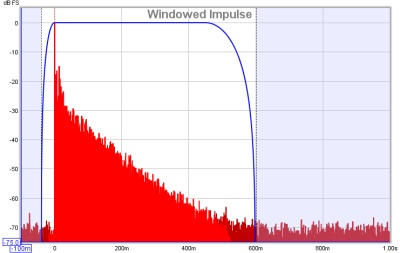
And is this right? How to read the impluse graph? What's ideal?
6W9Tsv8.png


Also, I did the above with 1 speaker. That is more for speaker builders right? If I want measurements for improving the response, I should have the mic at my seated location and recording both speakers, and then tweaking the equalizer, correct?
 
Last edited:

wwenze

Greater Supremacy Member
Joined
Dec 2, 2002
Messages
82,437
Reaction score
26,610
Fourier series: Any periodic wave of whatever shape can be broken down into its components, which is a series of sine waves.
So basically, if your 1kHz sine is not perfectly sine-shaped, it contains other frequency components i.e. the final wave shape is actually 1kHz sine + a bit of 2kHz sine added to it + etc.
Harmonic distortion is called harmonic distortion because when you try to produce a sine wave, it produces other components that are harmonics of the fundamental.
Root cause of harmonic distortion is usually non-linearity.

Impulse response: Blue line is the gating window.
Impulse response sends a short square wave i.e. an impulse that you hear as a click or a piak lasting less than a few ms. Then your mic records how that sound decays.
Purple line is your mic waveform. Your mic waveform is definitely weird. Is there something hitting the mic periodically? Or some major noise source vibrating the table?

Impulse response should look like this example:
impulseplot.jpg


This is with linear scale i.e. the type you see in a recording software. If we convert it to dB scale it becomes like this:
impulseplotdb.jpg


For room correction, you should be doing at your listening position. Using moving microphone method.
https://www.youtube.com/watch?v=6RiuwqzjqlQ

Do separate measurement and correction for each speaker. They will have different in-room response due to being placed in different positions, and one can be louder than the other. Then with correction turned on for both speakers, measure them together to see if result is good. Sometimes they can cancel or reinforce each other for no reason.

And finally finish by hearing the sine sweep with your own ears.
 

benedium

Banned
Joined
Jan 22, 2005
Messages
12,474
Reaction score
3,715
So usually after taking measurements, what are people supposed to do? Maybe make speaker placement adjustments like toe in/out, add room treatments like sound absorbers/diffusers add carpet/curtains? Then when all physical changes cannot be done liao then do EQ? I guess before all these measurement instruments were developed, people just use their ears to judge and make adjustments. Is that correct?
 
Last edited:

lxXXxl

Master Member
Joined
Dec 7, 2001
Messages
2,617
Reaction score
26
So usually after taking measurements, what are people supposed to do? Maybe make speaker placement adjustments like toe in/out, add room treatments like sound absorbers/diffusers add carpet/curtains? Then when all physical changes cannot be done liao then do EQ? I guess before all these measurement instruments were developed, people just use their ears to judge and make adjustments. Is that correct?

Yah all of the above, depending on the user's needs (professional recording environment vs home use etc).

"before all these measurement instruments were developed, people just use their ears to judge and make adjustments."

Yup, just like last time people memorised phone numbers and roads vs now use handphones and Google maps and Waze. Technology is getting increasingly accessible to the masses.

Last time measuring equipment is only for the audio hardware / recording industry. Now we can play with them too! :s13:

The measuring mic's a hundred bucks and REW's free. Way way WAY cheaper than the audio gear we see around here.

note: too lazy to treat my room physically, lol. As long as kill off overly boomy bass and/or certain frequencies I call it a day liao.
 
Last edited:

benedium

Banned
Joined
Jan 22, 2005
Messages
12,474
Reaction score
3,715
For my 5.1 home theatre system, I find crossover settings is very important too. Turns out after trying entry level bookshelf speakers as well as tower speakers, 90hz is best crossover for front speakers. The popular 80hz (thx recommended) makes bass too boomy and muddy. Maybe because my speakers are cheap haha.
 

jedi5diah

Supremacy Member
Joined
Feb 12, 2009
Messages
6,480
Reaction score
0
For my 5.1 home theatre system, I find crossover settings is very important too. Turns out after trying entry level bookshelf speakers as well as tower speakers, 90hz is best crossover for front speakers. The popular 80hz (thx recommended) makes bass too boomy and muddy. Maybe because my speakers are cheap haha.

what tower did you try?
 

benedium

Banned
Joined
Jan 22, 2005
Messages
12,474
Reaction score
3,715
Wharfedale Crystal 4.3. Still stuck in low budget land heheh.
 
Last edited:

benedium

Banned
Joined
Jan 22, 2005
Messages
12,474
Reaction score
3,715
Yah after tweaking daily for months, I find for mission LX2 bookshelf 80hz crossover makes bass muddier. I find even for tower speaker wharfedale crystal 4.3 crossover at 90hz gives maybe best combo of tactile bass, mid range warmth and treble clarity. 80hz for the crystal 4.3 was just too boomy in my room. My subwoofer is svs pb1000. Maybe my speaker placement in the room is less ideal than the subwoofer placement? I'm not very knowledgable at acoustics.
 
Last edited:

wwenze

Greater Supremacy Member
Joined
Dec 2, 2002
Messages
82,437
Reaction score
26,610
(Bookshelves @ 40Hz in-room) Huh 80Hz is boomy?

Indeed, the lower Hz you go, the more likely you run into extra bass peaks from your room. 50 to 150 Hz have a lot of bass peaks, but people don't usually notice the lower frequency ones because their speakers are already dropping in volume below 80Hz.

When your speakers can reach low frequency, bass becomes an issue and hence room correction becomes necessary.

You don't feel the issue with subwoofers because you can always adjust subwoofer volume. However if your speakers have a flat response from 30Hz to 20kHz, then when you put it into a room, you will get big peaks.

Play this file: If certain notes suddenly explode in loudness, then u have room issues that need to be solved.
 

benedium

Banned
Joined
Jan 22, 2005
Messages
12,474
Reaction score
3,715
I am an idiot. Forgot to recalibrate speakers after moving them. Now recalibrate not boomy liao haha. Anyway no harm trying between 80hz and 90hz. May still have some benefits. Thanks for the test video wwenze:)
 
Last edited:

lxXXxl

Master Member
Joined
Dec 7, 2001
Messages
2,617
Reaction score
26
Fourier series: Any periodic wave of whatever shape can be broken down into its components, which is a series of sine waves.
So basically, if your 1kHz sine is not perfectly sine-shaped, it contains other frequency components i.e. the final wave shape is actually 1kHz sine + a bit of 2kHz sine added to it + etc.
Harmonic distortion is called harmonic distortion because when you try to produce a sine wave, it produces other components that are harmonics of the fundamental.
Root cause of harmonic distortion is usually non-linearity.

Impulse response: Blue line is the gating window.
Impulse response sends a short square wave i.e. an impulse that you hear as a click or a piak lasting less than a few ms. Then your mic records how that sound decays.
Purple line is your mic waveform. Your mic waveform is definitely weird. Is there something hitting the mic periodically? Or some major noise source vibrating the table?

Impulse response should look like this example:
impulseplot.jpg


This is with linear scale i.e. the type you see in a recording software. If we convert it to dB scale it becomes like this:
impulseplotdb.jpg


For room correction, you should be doing at your listening position. Using moving microphone method.
https://www.youtube.com/watch?v=6RiuwqzjqlQ

Do separate measurement and correction for each speaker. They will have different in-room response due to being placed in different positions, and one can be louder than the other. Then with correction turned on for both speakers, measure them together to see if result is good. Sometimes they can cancel or reinforce each other for no reason.

And finally finish by hearing the sine sweep with your own ears.

Woo....didn't realise can use the mic this way....I'll have to study how he did the 2nd part after he got the measurements, using REW to 'equalise' automatically....it's only possible if you get the minidsp? Otherwise need to eq by hand?

Hmm....the speaker was at the edge of the table and the mic's actually on a 'platform' of stacked things, including chair and books. Nothing is hitting speaker or mic.

Update: I'm watching the video that's recommended next, using Equalizer APO. I'm using 2.1. So I need to measure each speaker & sub separately? And apply 3 correction filters into Eq APO?


Updating my update:
I see a guy's comment on subwoofer in above video:
For anyone with a subwoofer in the system: Set the speaker type to "Full Range" and set the LF cutoff to wherever your subwoofer rolls off. You can usually tell where it rolls off by looking at the response curve, usually around 20 or 30 Hz. I set my LF slope to 24 dB/Octave to more closely match the response curve of my system. After that, you can continue to follow the tutorial as it is. Side note: I brought the target level way down to the lowest trough to get better bass response, and have not run into an issue with the output being too quiet.

Updating my updated update:
Need to go video tutorial hunting. This guy talks more on subwoofer. And uses the mic in 90 degree and recommends as long as it's not 1 or 2 channels, should use 90 degree. Makes sense...
 
Last edited:

benedium

Banned
Joined
Jan 22, 2005
Messages
12,474
Reaction score
3,715
Thanks for sharing. Very helpful for all who wanna improve their speaker systems.
 
Last edited:

benedium

Banned
Joined
Jan 22, 2005
Messages
12,474
Reaction score
3,715
Huh, you crossover-ed higher but become less boomy? So meaning the bookshelf speakers doing something weird around 90hz region?

Oh just maybe realised something. I find that front tower speaker crossover at 90hz makes my speakers plus subwoofer sounds more similar to running speakers full range in direct mode.

Think I heard somewhere the crossover setting controls the sound quality of the subwoofer instead of the speaker. So maybe i should have said the subwoofer sounds best when speakers are crossover at 90hz instead of 80hz.

Conclusion: crossing over at 80hz sounds muddier than at 90hz. Maybe others can try and lemme know your findings?
 
Last edited:
Important Forum Advisory Note
This forum is moderated by volunteer moderators who will react only to members' feedback on posts. Moderators are not employees or representatives of HWZ. Forum members and moderators are responsible for their own posts.

Please refer to our Community Guidelines and Standards, Terms of Service and Member T&Cs for more information.
Top