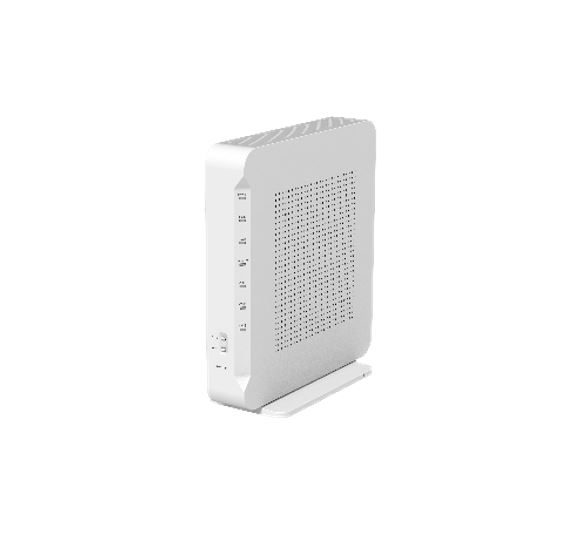
Singtel 10Gbps ZTE F8648P superadmin password.

frakristy

Junior Member
Joined
Aug 4, 2011
Messages
40
Reaction score
24
Hi everyone good news, just installed the 10G sintel. and I already found the zte f8648p superadmin password.

username: support
password: reverse your GPON default password

but unfortunately, I logined to check, there's totally dont have bridge mode setting button...
 
Last edited:

jasonho

Senior Member
Joined
Jan 1, 2000
Messages
1,257
Reaction score
297
Hi everyone good news, just installed the 10G sintel. and I already found the zte f8648p superadmin password.

username: support
password: reverse your GPON default password
Good news! So you can bridge it and connect to your main router?
 

guards80

Senior Member
Joined
Jul 23, 2007
Messages
1,499
Reaction score
18
Hi everyone good news, just installed the 10G sintel. and I already found the zte f8648p superadmin password.

username: support
password: reverse your GPON default password
This one also apply to nokia ONR.
 

jasonho

Senior Member
Joined
Jan 1, 2000
Messages
1,257
Reaction score
297
Is this the ONR used by Singtel?
ZXHN%20F8648P.JPG

https://www.zte.com.cn/global/product_index/smart_home_en/ont/zxhn-f8648p0/zxhn-f8648p.html
 

xiaofan

High Supremacy Member
Joined
Sep 16, 2018
Messages
31,157
Reaction score
8,704

xiaofan

High Supremacy Member
Joined
Sep 16, 2018
Messages
31,157
Reaction score
8,704
seriously said, this ONR dont have any bridge mode settings, I login with super to check already nothing

In any case, it is always better that you go through Singtel for official bridging.

As mentioned by Mach 3.2, even if you could change the profile to bridging mode, Singtel may push the default profile which makes you lose internet connection.

As per the reports in the 10Gbps thread, Singtel again allows bridging of the ZTE XGS-PON ONR.
Called singtel as well, my install is in a few days time, they said the ONR will be installed in router mode first, then I have to request to convert it to bridging via call or live chat after the installation. Apparently there's some terms like agreeing singtel not responsible after the ONR but once agreed they can switch the ONR to bridge mode.

If they allow bridging for their 1+1 gamer plan I see no reason why they wouldn't allow it for the 10gbps plan
 
Last edited:

frakristy

Junior Member
Joined
Aug 4, 2011
Messages
40
Reaction score
24
In any case, it is always better that you go through Singtel for official bridging.

As mentioned by Mach 3.2, even if you could chnage the profile to bridging mode, Singtel may push the default profile which makes you lose internet connection.

As per the reports in the 10Gbps thread, Singtel again allows bridging of the ZTE XGS-PON ONR.

just called sintel, they said need escalate to other team to review it first, I'm singtel prestige member, almost 400 monthly paid to them, hopefully can do that for me, hahaha
 

noobzpro

Arch-Supremacy Member
Joined
Mar 13, 2010
Messages
12,055
Reaction score
106
whats the best way to setup 10gbps for singtel? mine arriving at the end of the month...mostly running wifi around the house
 

TanKianW

Supremacy Member
Joined
Apr 21, 2005
Messages
6,663
Reaction score
3,315
whats the best way to setup 10gbps for singtel? mine arriving at the end of the month...mostly running wifi around the house​

It could just be me, but I will think the preferred way to setup a 10G internet line should start with a 10G capable WAN router, with 10G LAN connected to an optional 10G LAN switch to distribute your network to every room (Cat6 patch panel) with 10G ready PCs/end devices.

If you are running an optimized wireless (wifi 6 and above) network, then APs with 2.5G LAN should be more than plentiful. However, imo such high speed wireless do not really have very practical use in a home network environment esp when the end devices are mainly mobile devices. For anything that requires more than 1G speed, which is likely some form of servers/services, you are better off to wire it for stability and consistency. For comparison, I am still pretty satisfied with my 250-400Mbps wireless speed at home.​
 
Last edited:

xiaofan

High Supremacy Member
Joined
Sep 16, 2018
Messages
31,157
Reaction score
8,704
whats the best way to setup 10gbps for singtel? mine arriving at the end of the month...mostly running wifi around the house

1. Using Stock Singtel Setup
If you are only worried about wireless performance and do not worry about other things, the bundled Asus GT-AX11000 Pro is a pretty good WiFI 6 router already.

Do you have any 10G capable client? If not, just go with the default setup.

Connection scheme:
Singtel ONR 10G port -- GT-AX11000 Pro 10G WAN -- wireless/wired connection to other devices (eg: Asus AImesh node)
Singtel ONR 1G port -- Singtel TV box if you have any

Configuration of GT-AX11000 Pro if you keep the Singtel ZTE XGS-PON ONR as main router (not bridged)
1) AP mode -- many features of the GT-AX11000 Pro will be lost.
2) Router mode -- Double NAT -- some features of the GT-AX11000 Pro will be lost

Configuration of GT-AX11000 Pro if you get the Singtel ZTE XGS-PON ONR bridged by Singtel (through request)
ROuter mode -- all features of GT-AX11000 Pro are available

GT-AX110000 Pro Spec:
https://rog.asus.com/networking/rog-rapture-gt-ax11000-pro-model/spec/1 x 2.5 Gigabit WAN Port
1 x 10 Gigabit WAN/LAN Port
4 x Gigabit LAN Ports

Limitations of the above setup
No 10G client supported.

2. Using Stock Singtel Setup + 10G Switch
improvement (no bridging of Singtel ONR) -- adding a 10G swtich

Singtel ONR 10G port -- 10G switch -- GT-AX11000 Pro 10G WAN -- wireless/wired connection to other devices
10G Switch -- 10G capable devices like PC or NAS
Singtel ONR 1G port -- Singtel TV box if you have any
Singtel ONR 1G port -- other 1Gbps wired device

improvement (with bridging of Singtel ONR) -- adding a 10G swtich
Singtel ONR (bridged) 10G port -- GT-AX11000 Pro 10G WAN -- wireless/wired connection to other devices
GT-AX11000 Pro -- 10G/5G/2.5G/1G Switch -- 10G/5G/2.5G/1G capable wired devices like PC or NAS
Singtel ONR 1G port -- Singtel TV box if you have any

3. Bridge the Sintgel ONR and using your own 10G capable router (eg: pfSense, Unifi, MikroTik, etc) and only use Asus GT-AX11000 Pro as a wireless AP

For real power users only. I am not one of them so I will let others to comment.

 
Last edited:

noobzpro

Arch-Supremacy Member
Joined
Mar 13, 2010
Messages
12,055
Reaction score
106
thanks alot for the replies guys. my main objective is mainly multiple devices maxing out their bandwidth without ever throttling. not exactly one device utilizing the full 10gbps as of yet. so maybe 4/5 devices at 1gbps loads
 

neptunesea

Junior Member
Joined
Sep 5, 2023
Messages
11
Reaction score
8
Hi everyone good news, just installed the 10G sintel. and I already found the zte f8648p superadmin password.

username: support
password: reverse your GPON default password

but unfortunately, I logined to check, there's totally dont have bridge mode setting button...
Support is not actually the highest level of account. there is a higher "admin" account.

You may want to follow this (spanish) guide to extract the admin account password at your own risk. There are also instructions on how to enable bridging without involving the ISP.

[VERY ADVANCED USERS ONLY!]bandaancha .eu/foros/todo-sobre-f8648p-admin-decodificar-1746950[VERY ADVANCED USERS ONLY!]

and TIL, it only costs 25EUR (~35sgd) for a 10gbps XGSPON plan in spain without a 3rd party router. Singtel stonks 📈📈 📈

digimobil .es/fibra-optica/

sorry for the broken links can't post URLs yet
 
Last edited:

jasonho

Senior Member
Joined
Jan 1, 2000
Messages
1,257
Reaction score
297
Support is not actually the highest level of account. there is a higher "admin" account.

You may want to follow this (spanish) guide to extract the admin account password at your own risk. There are also instructions on how to enable bridging without involving the ISP.

[VERY ADVANCED USERS ONLY!]bandaancha .eu/foros/todo-sobre-f8648p-admin-decodificar-1746950[VERY ADVANCED USERS ONLY!]

and TIL, it only costs 25EUR (~35sgd) for a 10gbps XGSPON plan in spain without a 3rd party router. Singtel stonks 📈📈 📈

digimobil .es/fibra-optica/

sorry for the broken links can't post URLs yet


@frakristy I read some of the posts......and it says

1B4tFWl.png
 

jasonho

Senior Member
Joined
Jan 1, 2000
Messages
1,257
Reaction score
297
actually this not match all region customer, like as ZTE modem in China, also different login ID and password
yeah i am aware, just giving it a try , like the default admin / password.

did you try to ask for those folks in your chiphell thread?
 

jasonho

Senior Member
Joined
Jan 1, 2000
Messages
1,257
Reaction score
297
haha, chiphell guys confim no idea, they never touch this ah.
Haha. Ok la. 8gbps up and 8gbps down with their router is considered not bad liao

I heard from my China friend this 中兴F8648P is quite a good modem.
 

TanKianW

Supremacy Member
Joined
Apr 21, 2005
Messages
6,663
Reaction score
3,315
Haha. Ok la. 8gbps up and 8gbps down with their router is considered not bad liao

I heard from my China friend this 中兴F8648P is quite a good modem.

Doing speed-tests with 8G up/down is one thing.

Whether can stress load with multiple simultaneous connections (Eg. BT) to sustain >5G up/down over NAT is another story. Majority of the consumer network routers/appliances will be brought to their knees. :LOL:
 
Important Forum Advisory Note
This forum is moderated by volunteer moderators who will react only to members' feedback on posts. Moderators are not employees or representatives of HWZ. Forum members and moderators are responsible for their own posts.

Please refer to our Community Guidelines and Standards, Terms of Service and Member T&Cs for more information.
Top