Xiaomi Routers: Xiaomi BE10000/BE7000/BE6500 Pro/BE5000/BE3600, Xiaomi AX6000, Redmi AX6000, Redmi AX5400/Gaming, Xiaomi AX3200/AX3000, Xiaomi AX3000T

xiaofan

High Supremacy Member
Joined
Sep 16, 2018
Messages
31,357
Reaction score
8,795
Another thing is, is it recommended to use MLO?
I have it disabled for now as I cannot use it if I am only using the 5ghz-1 which is the 5.2ghz band.

What kind of WiFi 7 clients you are using now?

I do not have any WiFi 7 clients now so I disable MLO.

Intel BE200 based WiFi 7 adapter is said to be not supporting 5GHz-1 and 5GHz-2 MLO, even if you configure your Xiaomi BE7000 as a triband router.

It does support 2.4GHz + 5GHz MLO, which may not be so useful in the end. Some tests show it can help on the speed and latency on the far range as 2.4GHz starts to be useful at far range.

It is perfectly okay to disable MLO as of now since Windows 11 does not really have good MLO support now, you have to wait for the formal release of Windows 11 24H2.
 
Last edited:

FinalTidus

High Supremacy Member
Joined
Dec 8, 2004
Messages
35,083
Reaction score
1,165
What kind of WiFi 7 clients you are using now?

I do not have any WiFi 7 clients now so I disable MLO.

Intel BE200 based WiFi 7 adapter is said to be not supporting 5GHz-1 and 5GHz-2 MLO, even if you configure your Xiaomi BE7000 as a triband router.

It does support 2.4GHz + 5GHz MLO, which may not be so useful in the end. Some tests show it help on the speed and latency on the far range as 2.4GHz starts to be useful at far range.

It is perfectly okay to disable MLO as of now since Windows 11 does not really have good MLO support now, you have to wait for the formal release of Windows 11 24H2.

Ah ok that explains it all!

Thanks so much again! 😊😊
 

FinalTidus

High Supremacy Member
Joined
Dec 8, 2004
Messages
35,083
Reaction score
1,165
Sorry to ask again..

Does the BE7000 has any sort of firewall? Any spi or NAT firewall?

If not no firewall at all?

Any sqm management settings to reduce bufferbloat?
Please do not use the triband feature of Xiaomi BE7000 as the reviews show bad WiFi performance in triband configuration. Just use it as dual band.

If you need triband, you have to go with higher end models like Xiaomi BE10000 (2.4GHz, 5GHz-1 and 5GHz-2) , or go with true WiFi 7 routers like TP-Link Archer BE805 (2.4GHz, 5GHz, 6GHz, around S$400+ BNIB from Carousell).
 

xiaofan

High Supremacy Member
Joined
Sep 16, 2018
Messages
31,357
Reaction score
8,795
Sorry to ask again..
Does the BE7000 has any sort of firewall? Any spi or NAT firewall?
If not no firewall at all?
Any sqm management settings to reduce bufferbloat?

All the modern consumer router will have firewall function built-in and usually some other functions like parental control.

It also has simple QoS function. My personal opinion is that it is better to not to use the simple QoS function but you can play with it by yourself to see if it fits your use cases or not.

I guess you are buying the wrong router if you expect rich firmware features like Asus.

Edit to add:
Even for Asus router, the Adaptive QoS function is not good.

And for average users it is recommended to turn off QoS/SQM function as consumer routers usually can not handle them well for 1Gbps and above Fibre Internet.
 
Last edited:

FinalTidus

High Supremacy Member
Joined
Dec 8, 2004
Messages
35,083
Reaction score
1,165
All the modern consumer router will have firewall function built-in and usually some other functions like parental control.

It also has simple QoS function. My personal opinion is that it is better to not to use the simple QoS function but you can play with it by yourself to see if it fits your use cases or not.

I guess you are buying the wrong router if you expect rich firmware features like Asus.

Edit to add:
Even for Asus router, the Adaptive QoS function is not good.

And for average users it is recommended to turn off QoS/SQM function as consumer routers usually can not handle them well for 1Gbps and above Fibre Internet.
Haha I am trying to see what kind of firmware features this router has as I was trying to see all the interface options and I don't find any sort of firewall status or setting. So I thought there might not be any firewall.

Yup I won't be using any qos or anything like this as I am very noob in this.

Just asking again sorry for the constant questions as I am a little confused with.

What's the difference between lan aggregate and dual wan load balancing? I notice when in AP mode only the lan aggregate was available. But in router mode, the dual wan load balancing became available. I take it that only the dual wan load balancing is functioning if I connect 2 ports to the 2 ports on my onr to get the combined 2gb bandwidth. Do I need to do anything to the lan aggregate option?

Sorry and really thankful for your help so far
 

xiaofan

High Supremacy Member
Joined
Sep 16, 2018
Messages
31,357
Reaction score
8,795
What's the difference between lan aggregate and dual wan load balancing? I notice when in AP mode only the lan aggregate was available. But in router mode, the dual wan load balancing became available. I take it that only the dual wan load balancing is functioning if I connect 2 ports to the 2 ports on my onr to get the combined 2gb bandwidth. Do I need to do anything to the lan aggregate option?

Sorry and really thankful for your help so far

I do not know if there are good documenation from Xiaomi so I am quoting Asus documentations.

1) Dual WAN Load Balancing -- for WAN side
https://www.asus.com/sg/support/faq/1011719/

Link Aggregation is not suppoted on the WAN side for Singapore ISPs (Asus calls it WAN Aggregation) since the ONT/ONR from Singapore ISPs does not support LACP.

2) LAN Link Aggregation -- for LAN side (LACP based)
https://www.asus.com/sg/support/faq/1016088/

3) As for how to set up Link Aggregation on the LAN side for your Xiaomi BE7000, I will leave that to you as a learning exercise. But I think it is not that useful in your use case. Please refer to the following point 4.

4) Special use case -- using both Dual WAN and LAN side Link Aggregation. I will think this is not so useful as Xiaomi BE7000 has only quad 2.5G ports.

WC ONR LAN port 1+2 -- Xiaomi BE7000 WAN1 + WAN2 dual wan load balancing (up to 2Gbps to internet)

Xiaomi BE7000 LAN1+LAN 2 Link Aggregation (2.5G x 2) -- PC desktop home server or NAS with two 2.5G network cards (up to 2Gbps to Internet, up to 5Gbps to other wireless clients over local home network)

5) LAN side Link Aggregation will be more useful for Xiaomi BE10000 (or oher routers like Asus RT-BE88U) with more LAN ports.
https://www.acwifi.net/23337.html (Xiaomi BE10000 review in Chinese).
 
Last edited:

FinalTidus

High Supremacy Member
Joined
Dec 8, 2004
Messages
35,083
Reaction score
1,165
I do not know if there are good documenation from Xiaomi so I am quoting Asus documentations.

1) Dual WAN Load Balancing -- for WAN side
https://www.asus.com/sg/support/faq/1011719/

Link Aggregation is not suppoted on the WAN side for Singapore ISPs (Asus calls it WAN Aggregation) since the ONT/ONR from Singapore ISPs does not support LACP.

2) LAN Link Aggregation -- for LAN side (LACP based)
https://www.asus.com/sg/support/faq/1016088/

3) As for how to set up Link Aggregation on the LAN side for your Xiaomi BE7000, I will leave that to you as a learning exercise. But I think it is not that useful in your use case. Please refer to the following point 4.

4) Special use case -- using both Dual WAN and LAN side Link Aggregation. I will think this is not so useful as Xiaomi BE7000 has only quad 2.5G ports.

WC ONR LAN port 1+2 -- Xiaomi BE7000 WAN1 + WAN2 dual wan load balancing (up to 2Gbps to internet)

Xiaomi BE7000 LAN1+LAN 2 Link Aggregation (2.5G x 2) -- PC desktop home server or NAS with two 2.5G network cards (up to 2Gbps to Internet, up to 5Gbps to other wireless clients over local home network)

5) LAN side Link Aggregation will be more useful for Xiaomi BE10000 (or oher routers like Asus RT-BE88U) with more LAN ports.
https://www.acwifi.net/23337.html (Xiaomi BE10000 review in Chinese).
Thank you so much! 🙏🙏🙏
 

xiaofan

High Supremacy Member
Joined
Sep 16, 2018
Messages
31,357
Reaction score
8,795
Detailed review and setup guide for Xiaomi BE7000 in English, including guide for Docket (Xiaomi BE7000 and Xiaomi BE10000 support Docker since they have powerful CPU).


He has a tear-down video of Xiaomi BE7000 as well.
 
Last edited:

xiaofan

High Supremacy Member
Joined
Sep 16, 2018
Messages
31,357
Reaction score
8,795
This is a controversial topic, just sharing one view from the above Youtuber (he is located in US) -- I am not saying I agree with him though.

In the end, if you are worried, do not buy Xiaomi routers. I am not worried myself...
 

FinalTidus

High Supremacy Member
Joined
Dec 8, 2004
Messages
35,083
Reaction score
1,165
Sorry to bring this thread up again.

I configured the dual wan load balancing on my Xiaomi 7000 router. I exceeded the 1gb bandwidth when testing speedtest but only about 100mb only. I have 2.5gb and 1gb per port. If nobody is using the bandwidth shouldn't I be getting close to 2gb???

What am I doing wrong here?
Detailed review and setup guide for Xiaomi BE7000 in English, including guide for Docket (Xiaomi BE7000 and Xiaomi BE10000 support Docker since they have powerful CPU).


He has a tear-down video of Xiaomi BE7000 as well.
 

hub8246

Supremacy Member
Joined
Dec 31, 2005
Messages
8,313
Reaction score
875
Sorry to bring this thread up again.

I configured the dual wan load balancing on my Xiaomi 7000 router. I exceeded the 1gb bandwidth when testing speedtest but only about 100mb only. I have 2.5gb and 1gb per port. If nobody is using the bandwidth shouldn't I be getting close to 2gb???

What am I doing wrong here?

Maybe you want to try to switch to different servers?
Seem like CTCSCI TECH LTD is able to give me more than 1gb consistently. Sometimes 1.1gb and highest is 1.6gb download.

Anyway, I am using Asus tx ax6000 with dual wan on whizcomms 2.5G broadband.


livros online 2
 

wasabi8888

Junior Member
Joined
Jun 13, 2007
Messages
32
Reaction score
1
Hi

Please see attached.

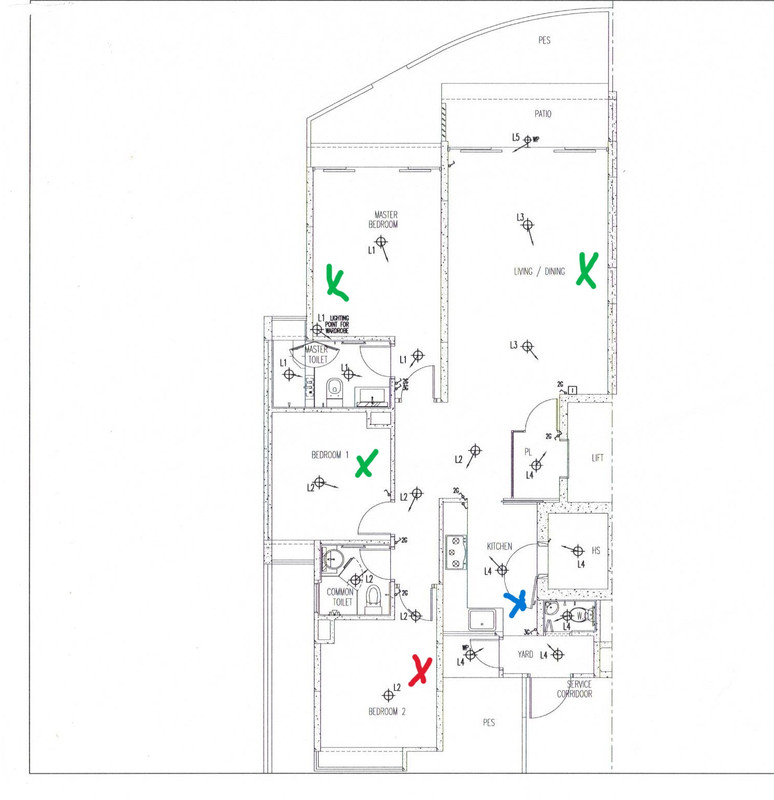
Blue X: Main router TP link EB810v. It is located ON TOP of a false ceiling. ONT is there as well. 10 Gps going in. THere will be be 4 cables that will be connected to wall points to the other 4 'X's.

Red X: Another TP link EB810v. Will act as a mesh. A cable will be connected from the wall to this router. A lap top is also wired to this mesh/router.

3 Green X: I was thinking of getting the be5000 to act as a mesh/router. So the Master bedroom, Bedroom 1 and Living room will have the BE5000. SImilarly, all will be connected to the wall socket.


How is the Be5000 as a router? Will this setup work for me? I am signed up with Starhub wifi 7 (10gbs) plan.
I am not good with terminology. Hence not knowing the difference between mesh and router and tend to use the terms loosely.

Scan2024-07-16-235208-crop.jpg
 
Last edited:

xiaofan

High Supremacy Member
Joined
Sep 16, 2018
Messages
31,357
Reaction score
8,795
Hi
Please see attached.
Blue X: Main router TP link EB810v. It is located ON TOP of a false ceiling. ONT is there as well. 10 Gps going in. THere will be be 4 cables that will be connected to wall points to the other 4 'X's.
Red X: Another TP link EB810v. Will act as a mesh. A cable will be connected from the wall to this router. A lap top is also wired to this mesh/router.
3 Green X: I was thinking of getting the be5000 to act as a mesh/router. So the Master bedroom, Bedroom 1 and Living room will have the BE5000. SImilarly, all will be connected to the wall socket.
How is the Be5000 as a router? Will this setup work for me? I am signed up with Starhub wifi 7 (10gbs) plan.
I am not good with terminology. Hence not knowing the difference between mesh and router and tend to use the terms loosely.
Scan2024-07-16-235208-crop.jpg

In your case, EB810v at blue X is the main router of the home network. Red X EB810v will be able to form a mesh network with the main EB810v using TP-Link EasyMesh technology.

Xiaomi BE5000 is not compatible with TP-Link EasyMesh technology. So the three BE5000 will have to form another mesh network. This will work but probably not good if you want seamless roaming.

Your better bet may be another EB810v. You may want to optimize the placement so that three nodes will be good enough.
 

wasabi8888

Junior Member
Joined
Jun 13, 2007
Messages
32
Reaction score
1
In your case, EB810v at blue X is the main router of the home network. Red X EB810v will be able to form a mesh network with the main EB810v using TP-Link EasyMesh technology.

Xiaomi BE5000 is not compatible with TP-Link EasyMesh technology. So the three BE5000 will have to form another mesh network. This will work but probably not good if you want seamless roaming.

Your better bet may be another EB810v. You may want to optimize the placement so that three nodes will be good enough.

Thanks for the info. Would the TP link Deco BE65 be a better fit as a mesh to this set up? I would prefer a router/mesh in each location rather than 1 more TP link eb810 as i have Lan ports in each location.
 

xiaofan

High Supremacy Member
Joined
Sep 16, 2018
Messages
31,357
Reaction score
8,795
Thanks for the info. Would the TP link Deco BE65 be a better fit as a mesh to this set up? I would prefer a router/mesh in each location rather than 1 more TP link eb810 as i have Lan ports in each location.

TP-Link Deco BE65 also uses a different (but better) mesh technology (Deco mesh) compared to TP-Link EasyMesh used in TP-Link EB810v.

If you want the best roaming experiences and single wireless mesh network, sell the two EB810v and change to use one Deco BE85 as main router, then use Deco BE65 as mesh nodes.

But if you are okay with two wireless mesh networks, you can stick to you existing ideas. Deco BE65 should be better than Xiaomi BE5000 in that case as it supports 6GHz. You can even try to set up the new Deco BE65 mesh network using the same SSID and password as the existing EB810v network, and then see if there are roaming issues. If got issues, then no choices you have to use two wireless SSIDs.
 

wasabi8888

Junior Member
Joined
Jun 13, 2007
Messages
32
Reaction score
1
TP-Link Deco BE65 also uses a different (but better) mesh technology (Deco mesh) compared to TP-Link EasyMesh used in TP-Link EB810v.

If you want the best roaming experiences and single wireless mesh network, sell the two EB810v and change to use one Deco BE85 as main router, then use Deco BE65 as mesh nodes.

But if you are okay with two wireless mesh networks, you can stick to you existing ideas. Deco BE65 should be better than Xiaomi BE5000 in that case as it supports 6GHz. You can even try to set up the new Deco BE65 mesh network using the same SSID and password as the existing EB810v network, and then see if there are roaming issues. If got issues, then no choices you have to use two wireless SSIDs.
If all the 3 BE 65 at green X are wired, will that matter? Mesh won't be needed anymore right?
 

xiaofan

High Supremacy Member
Joined
Sep 16, 2018
Messages
31,357
Reaction score
8,795
If all the 3 BE 65 at green X are wired, will that matter? Mesh won't be needed anymore right?

I think it is just a terminology thingy.
1) Consumer Mesh with Ethernet backhaul (usually single vendor, same series) = APs with better roaming.
2) Consumer APs connected together though Ethernet (from different vendors, or even from the same vendors but with different mesh technology) = may or may not be good enough for roaming.
3) Enterprise APs connected together though Ethernet (usually single vendor, same series) = best roaming performance, but more expensive, needs a controller.

You can always try Option 2 if you like.

More about consumer mesh systems:
https://dongknows.com/mesh-wi-fi-system-explained/

A mesh consists of multiple centrally managed Wi-Fi broadcasters working together to form a unified Wi-Fi network. Among them, there’s one primary router that handles routing, network settings/features, and Internet connectivity. The rest only expand the network’s coverage.

In a mesh with wireless backhauling, each satellite unit is essentially a centrally managed Wi-Fi extender.

In a mesh with wired backhauling, each satellite unit is essentially a centrally managed access point.
 
Last edited:

xiaofan

High Supremacy Member
Joined
Sep 16, 2018
Messages
31,357
Reaction score
8,795
I think it is just a terminology thingy.
1) Consumer Mesh with Ethernet backhaul (usually single vendor, same series) = APs with better roaming.
2) Consumer APs connected together though Ethernet (from different vendors, or even from the same vendors but with different mesh technology) = may or may not be good enough for roaming.
3) Enterprise APs connected together though Ethernet (usually single vendor, same series) = best roaming performance, but more expensive, needs a controller.
You can always try Option 2 if you like.

In this case, I tend to think Option 2 (EB810v plus Deco BE65) may well work for your use case, as both TP-Link EasyMesh and Deco Mesh are based on 802.11 k/v/r. You may config the Deco BE65 as APs without forming Deco mesh to see if that is better or forming Deco mesh is better. Basically Option 2 requires some trial and errors.

In reality, even Option 1 requires careful placement. Sometimes too many nodes actually hinder seamless roaming.

There are always different options in terms of how to achieve seamless roaming.

Some people do not think a central manager node is necessary and just rely on 802.11 k/v or 802.11 k/v/r.

Some power users may even use APs which support none of 802.11 k/v/r to achieve seamless roaming, by cleverly position the APs and tune the transmission power.
 

wasabi8888

Junior Member
Joined
Jun 13, 2007
Messages
32
Reaction score
1
In this case, I tend to think Option 2 (EB810v plus Deco BE65) may well work for your use case, as both TP-Link EasyMesh and Deco Mesh are based on 802.11 k/v/r. You may config the Deco BE65 as APs without forming Deco mesh to see if that is better or forming Deco mesh is better. Basically Option 2 requires some trial and errors.

In reality, even Option 1 requires careful placement. Sometimes too many nodes actually hinder seamless roaming.

There are always different options in terms of how to achieve seamless roaming.

Some people do not think a central manager node is necessary and just rely on 802.11 k/v or 802.11 k/v/r.

Some power users may even use APs which support none of 802.11 k/v/r to achieve seamless roaming, by cleverly position the APs and tune the transmission power.

Hi

I read that TP link HB810 is compatible with Easymesh techonology. Will this be a better option over the Deco BE65 and/or Xiaomi BE5000?
 

xiaofan

High Supremacy Member
Joined
Sep 16, 2018
Messages
31,357
Reaction score
8,795
Important Forum Advisory Note
This forum is moderated by volunteer moderators who will react only to members' feedback on posts. Moderators are not employees or representatives of HWZ. Forum members and moderators are responsible for their own posts.

Please refer to our Community Guidelines and Standards, Terms of Service and Member T&Cs for more information.
Top