Aorus X3+ Unboxing, early impressions & mini review.

BlueSwift

Member
Joined
Mar 10, 2009
Messages
416
Reaction score
0
Before I start spamming the photos below, I did take note and considered the other brands before I pulled the plug to buy the Aorus X3.

MSI's GS60 Ghost Pro was great, with similar specs, but with the mediocre 53Whr battery life, it won't cut it when I am going to use it outside of the house without having to carry a large adapter. I would have actually bought this if the battery capacity was much bigger, which will definitely give a longer battery life.

Razer Blade 14 was also into consideration, but only 8GBs of RAM, a measly one year warranty and out of my budget if I want the 512GB SSD configuration.

Asus GX500 was also seriously considered, but it will not be launched until October and I need a laptop soon.

I did some research on Aorus as well. They were created by Gigabyte, and they are the OEM partner to produce the Razer Blades. Definitely copying the internals, which result in having similar specs, layout and even the battery capacity is close to the same size, Gigabyte should be able to produce the X3 without having reliability and quality issues.

When the Aorus X3 was going to be on sale in Singapore, I was pretty sceptical about the price as I was not sure how expensive this was going to be. But when I saw the specifications at the price I was quoted by skyblue88, it is better than the GS60 Pro 3K and the Blade 14.

I bought the Aorus X3+ on the first day of Comex (Thursday) at the gamespro booth. Travelling back home, it wasn't that light. There was a bit of weight to it (around 3-4kg), and I was already expecting it to be a big and heavy power brick, which it is. More to that later.

Got home and did an unboxing.

So this is the box that I had to carry home. A nice big Aorus logo which I can say that at least 99% of people in Singapore will not know. :s22::s22:

20140828_162729.jpg


A nice Security seal to know that it was not tampered with. (unlike some sold by certain SLS shops)

20140828_162838.jpg

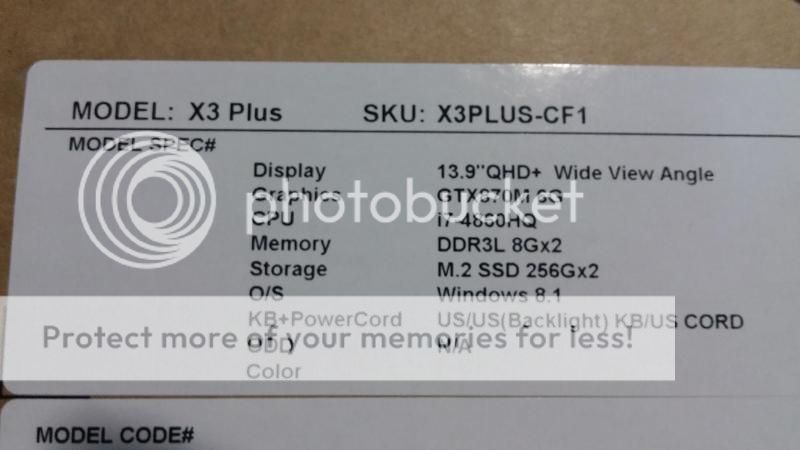
The X3+'s Specifications
20140828_184621.jpg


Apparently opening up the box holds another one.... But nicely protected by 4 soft foams

20140828_163109.jpg


Inside, there is a nice Aorus cloth that contains the laptop itself, with all the other items below it.
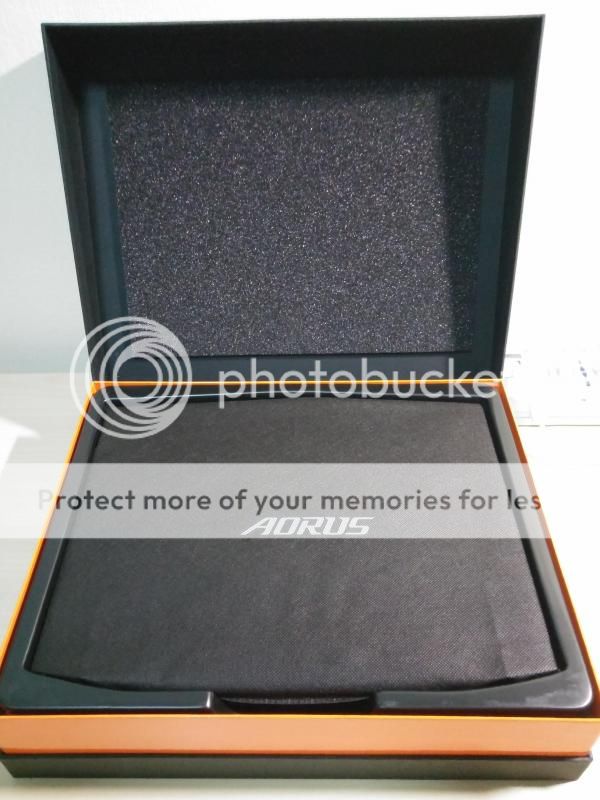
20140828_163247.jpg


Apparently all were packaged in cloth.
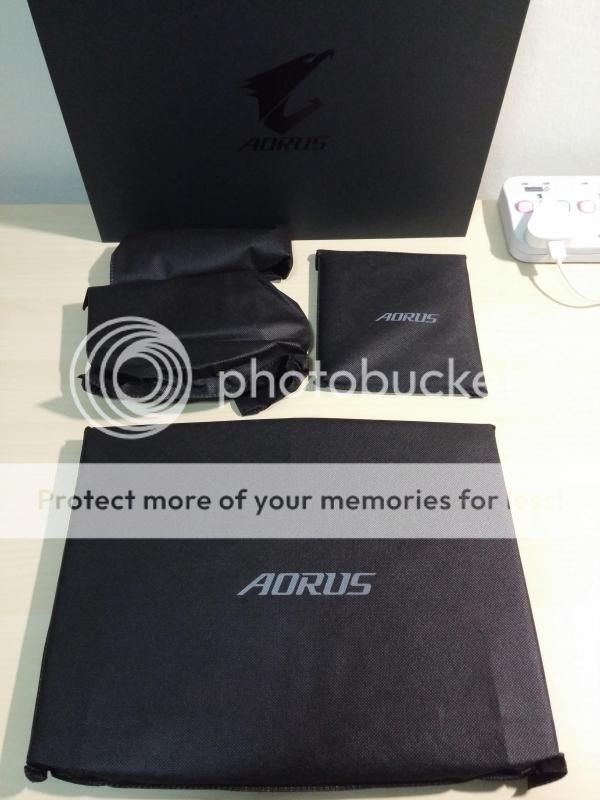
20140828_163349.jpg
 

BlueSwift

Member
Joined
Mar 10, 2009
Messages
416
Reaction score
0
CON'T

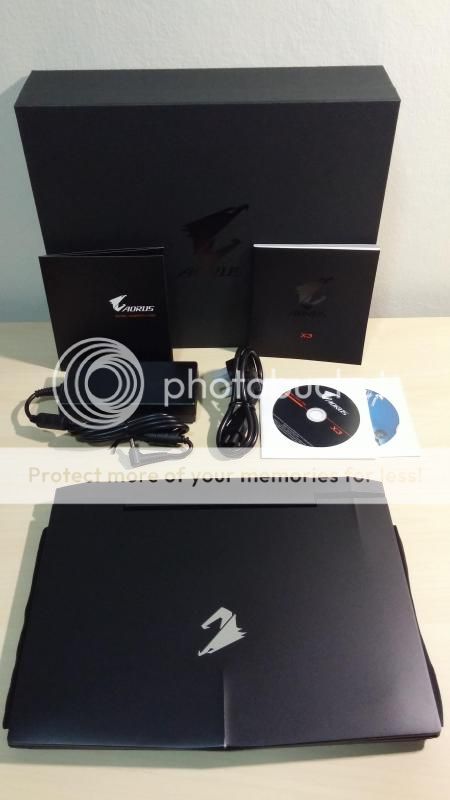
These are the items that comes with the X3.
Power Brick, 3-pin cable, Manual, Welcome Card and 2 Software Disks.
20140828_163744.jpg


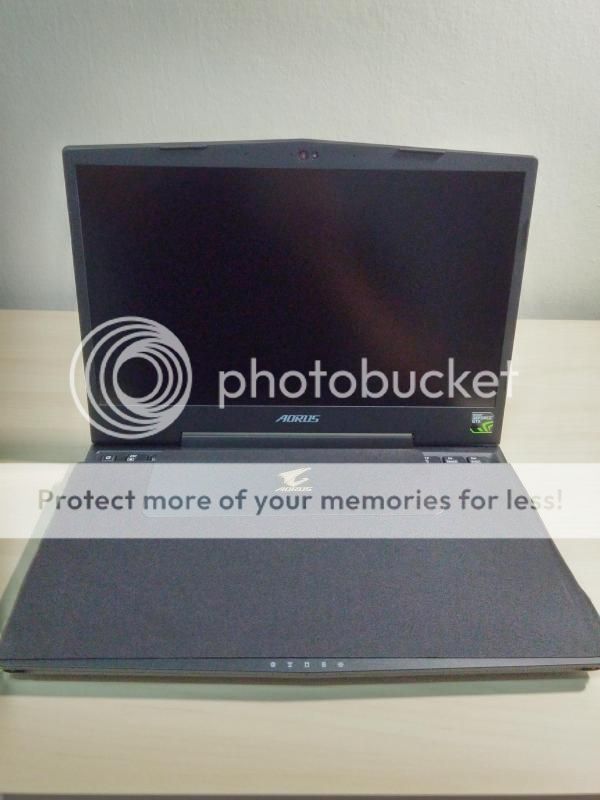
Lifting the screen up, the X3+ contains a warranty reminder card and a cleaning cloth.
20140828_164120_HDR.jpg


I also took out the nvidia and Intel stickers as I prefer a clean look (like Macbooks).
20140828_165620.jpg


The rear contains a Killer Ethernet port and a power connector. It also has the X7's look (exhaust seems to also be inspired from the Asus ROG G750).
20140828_164254.jpg


Underneath shows plenty of intake vents, so as to make sure all the components will have adequate cooling.
20140828_164932.jpg


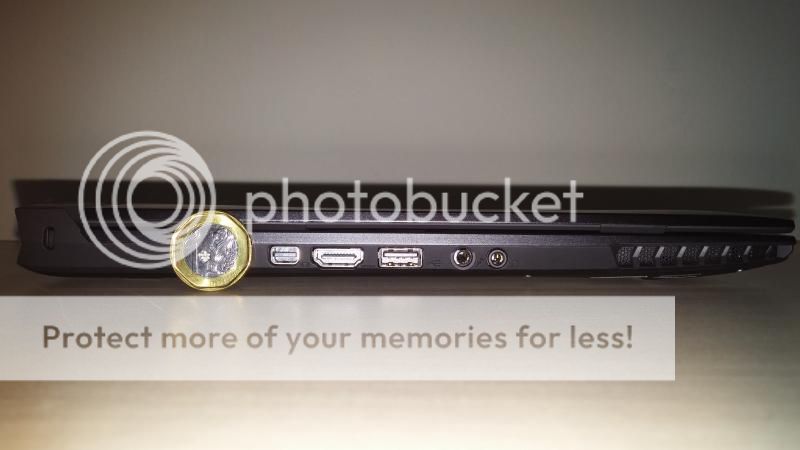
Now for the side. On the left, it has a Mini Display port, HDMI port, USB 2.0, headphone and microphone 3.5mm jacks while the right, has 2 USB 3.0 ports, SD card slot and a power button

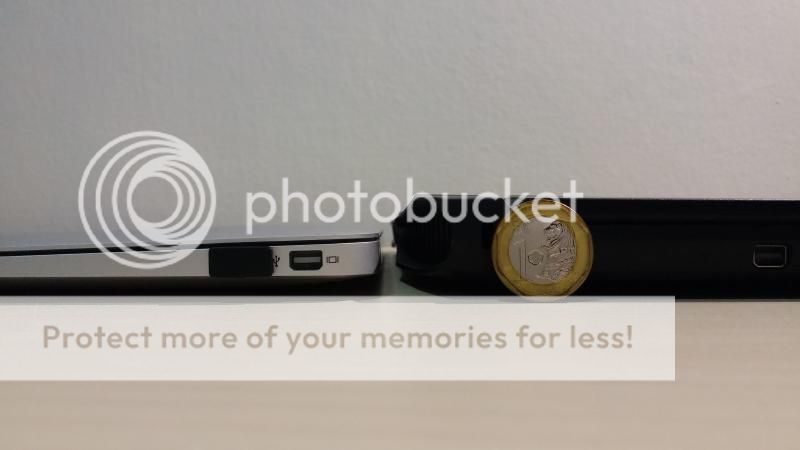
Also the X3+'s thickness is actually the same height as our new $1 dollar coin. So it's not thinner than a dime. (sorry that the shadow made it look thicker)
20140828_164411.jpg


The thickness in comparison to my 11-inch Macbook Air
20140828_164704.jpg


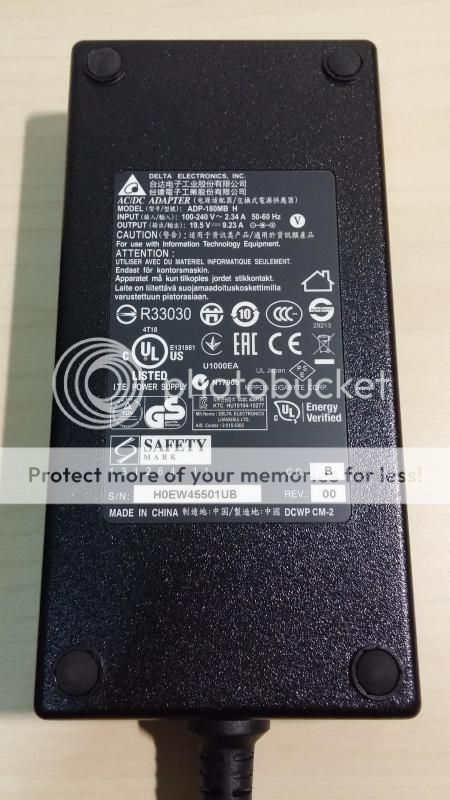
The power brick. It is 200W and is extremely huge, and heavy, at 0.89kg. This is something which I am pretty disappointed given the fact that Razer can pull it off while Aorus can't.
20140828_164043.jpg
 

BlueSwift

Member
Joined
Mar 10, 2009
Messages
416
Reaction score
0
CON'T

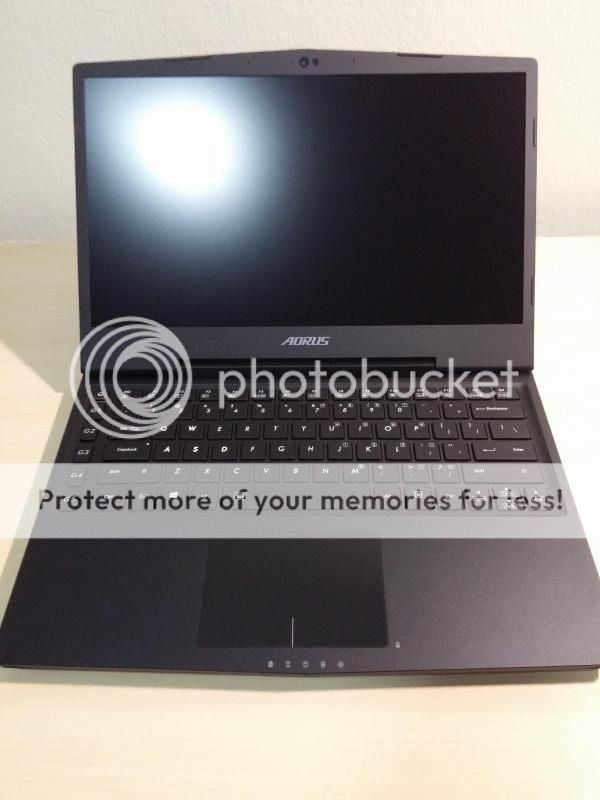
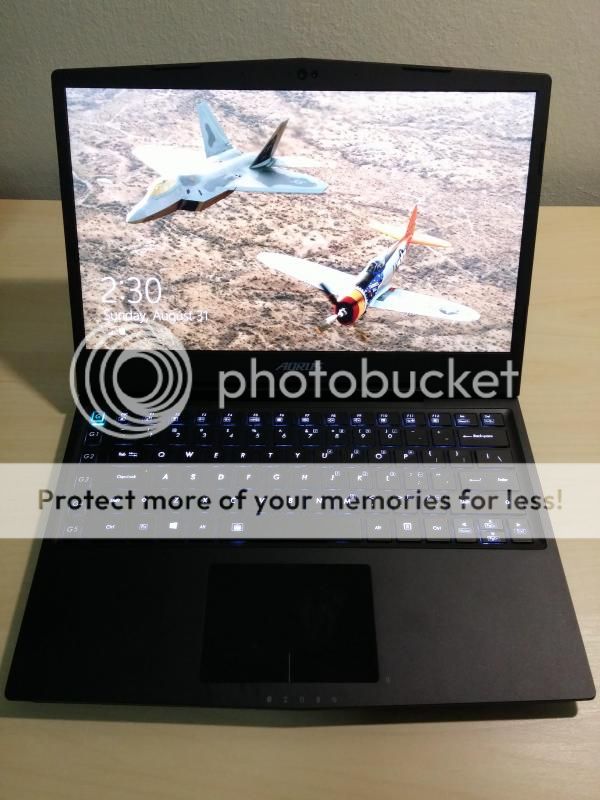
First boot!
20140831_023026.jpg


The backlit keyboard (only white), nicely laid out with Macro keys (which I actually use as I own a Razer BlackWidow Ultimate on my desktop).
20140831_023129.jpg


An extremely shiny and glossy trackpad :s31:
20140828_165256.jpg


So, that's it for my unboxing! Now for my impressions and short review after 3 days of use.

SOFTWARE

For Bloatware, there is only one. Just the PowerDVD which is unnecessary as the X3 does not have a DVD or Blue-ray drive.

There are a few of Aorus' own programs though. Things like the software updater, macro hub (to configure the 5 macro keys) and this, the command and control.
20140831_023415.jpg

15 configurations that can be controlled by the user to what he/she wants to use at the given point in time. One of the problems I did face is the "fan tweak".

There are only 3 options. Stealth (silent), Auto and Max. I really wish Aorus can let users customize the fan speed as Auto is not efficient in dissipating heat. More to that in the Temperature Section.

HARDWARE
The Chassis feels exactly the same as the Razer Blade 14 with some parts of containing plastic, especially the 2 rear exhausts. It is understandable as shape of the exhaust can be difficult to make in aluminium. Also its aluminium finish attracts fingerprints.

The screen is excellent. At 3200 x 1800, it is the same as the Razer Blade 14's panel but without the touchscreen (which I find it unnecessary) and is a matt finish, as compared to the Blade's fingerprint magnet glossy panel. It does have a noticeable colour shift when looking at the side, which I was surprised as this is an IGZO panel.

The track pad is nice to use, but not fantastic and way off compared to the Macbook's glass trackpad. Reason being that it is glossy, which is not only a fingerprint magnet, but not smooth. It gives a grippy texture, making it a hard time moving my finger around the trackpad.

Sound coming from the speakers are pretty decent. Obviously not bassy, but better and louder (at 100%) as compared to my Macbook Air (that is the only comparison I have).

The keyboard is good. There is a nice tactile feedback and feels responsive, though it does feel hollow when typing on the keys at the middle of the keyboard.

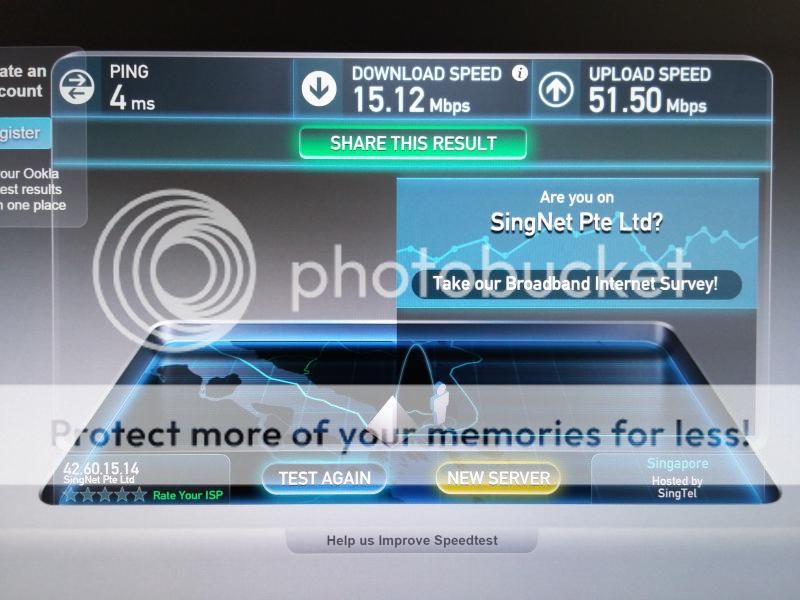
The Wi-fi is an Intel Wireless AC 7260, and.... is horrible. While my macbook Air is getting 78mbps download speeds and 70mbps upload speeds on a 100mbps Singtel Wireless Network, the X3+, at out of the box settings, is getting poor results as shown in the photo below.
20140831_023620.jpg

It also stops downloading programs, which gets really annoying. I had to resort to using ethernet (pulled from my desktop) in order to download my programs.

I will probably bring it back to GamesPro sometime this week to see if it is just my wireless adapter, or Intel's problem as this specific model (AC 7260) is a known issue with all other laptop manufacturers that has this adapter.

BATTERY LIFE
I did alot of battery saving settings by making my own power option, even limiting the processor speed to maximum of 85% and screen brightness of 50%.

The results I got was slightly less than those who used the Razer Blade 14. Slightly more than 4 hours with an hour on YouTube, while the rest of the time surfing the web and updating some software programs.
 

BlueSwift

Member
Joined
Mar 10, 2009
Messages
416
Reaction score
0
PERFORMANCE
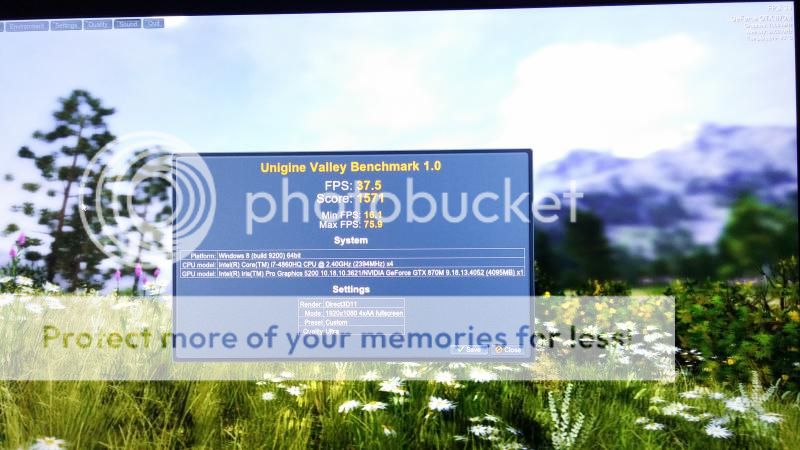
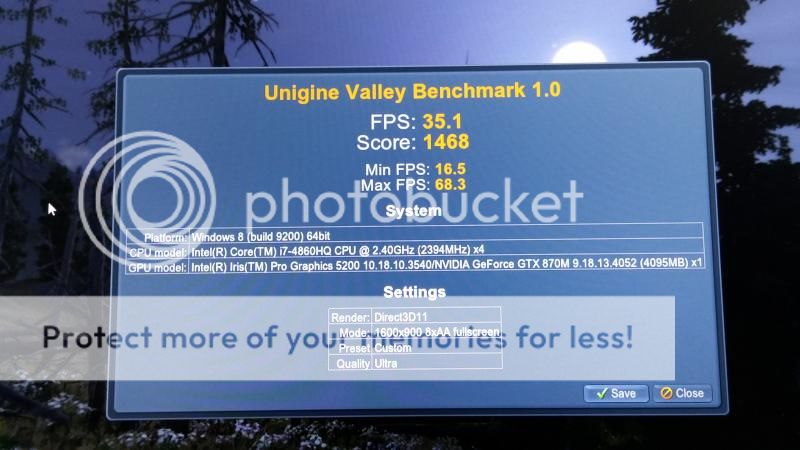
All I have is just the Unigine Valley 1.0. So apologises if you prefer to see results from 3D Mark programs.

Native 3200 x 1800, High, 0x AA
20140831_011119.jpg


1920 x 1080, Extreme, 8x AA
20140828_235831.jpg


1920 x 1080, Extreme, 4x AA
20140830_122537_HDR.jpg


1600 x 900, Extreme, 8x AA
20140829_030810.jpg


I do have a few popular games that I play often and the results are similar to all laptops that has the GTX870M.

At 1920 x 1080,
Battlefield 4 in ultra is around 35-60fps,
Guild Wars 2 in ultra is also around 35-60fps.

Basically most games play perfectly fine (above 30fps) at 1080p with VSync off and 2x AA at ultra.

For Native Resolution (3200 x 1800), there is one game I have that is perfectly playable in ultra settings. Dota 2 actually works with frame rates above 40fps most of the time!

NOISE
While web browsing or watching videos, the X3 stays silent, even in auto. It only starts to get noticeable when CPU temps get past 65 degrees C.

When gaming in Auto fan settings, the noise is about the same as the Razer Blade as well. Though the X3 really tries its best to be as quiet as possible by not reaching max fan speeds until the temps get way too high.

For Max fan speeds, it was definitely not noticeable when I was at the Gamespro booth in Comex (obviously). At home, it is loud. 20cm away from the X3 and the noise level reaches as high as 55dB (Not that accurate as I used a phone app to get the readings).

TEMPERATURE
This is the downside of all thin, gaming laptops.

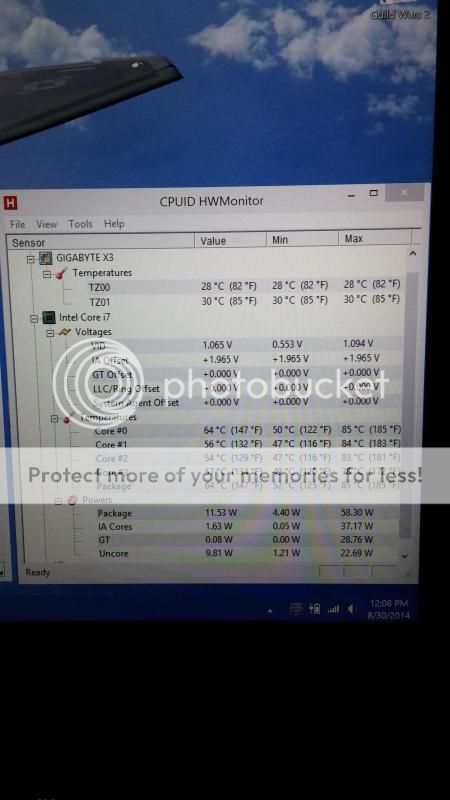
To make it as accurate as possible, I left the X3 run on Unigine Valley for an hour before I took a photo of the readings.

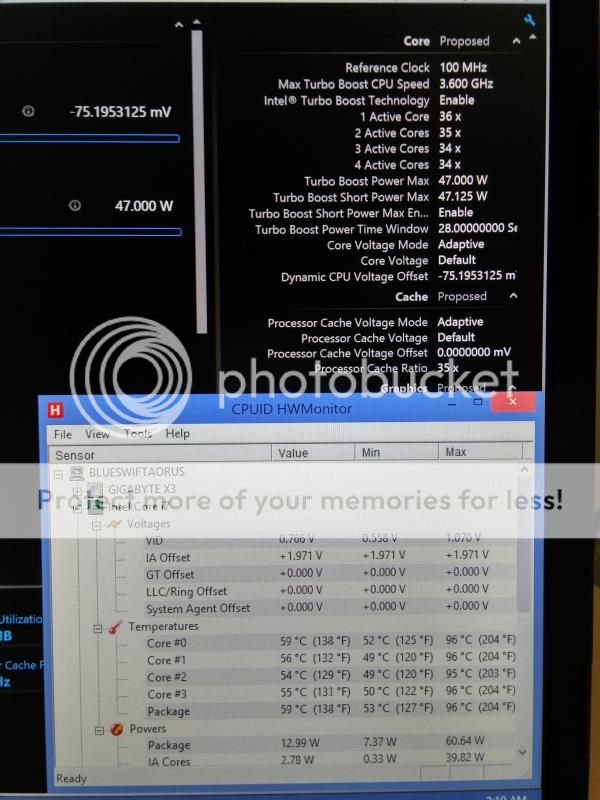
I also did under-volt the i7-4860HQ with the Intel Extreme Tuning Utility. -75mV dynamic voltage offset (any lower will cause the X3 to shutdown and restart) and lowering the Turbo Boost Short Power Max from 58W to 47.125W (just slightly above the rated 47W).

At Max Fan settings, even though the fans are loud, the GPU and CPU runs really cool. Most of the time the GPU Temps will not go past 75 degrees C and CPU temps won't go any higher than 85 degrees C.
20140830_120851.jpg


On Auto Fan settings, my GPU Temps were decent, at max temp of 85 degrees C (only once in awhile). However, this was my max CPU Temp
20140831_021043_HDR.jpg

The fan only spools up to near the max speed only when GPU temps hit 84-85 degrees and CPU temps going past 90 degrees, and slows down after lowering temps by 5 degrees. This is the reason why I hope Aorus is able to give users the freedom to set our personal fan curve in future updates, especially for some who do not want their CPU temps to go past 90 degrees C.

FINAL THOUGHTS
Well, this is going to be my laptop for the next 3 years (at least) and overall, the Aorus X3+ is an outstanding, if slightly pricey, laptop. At 1920 x 1080 settings, the GTX870M and i7-4860HQ goes through the Unigine Valley and gaming benchmarks, and delivered seamless performance with the graphics cranked all the way up. Moreover, the 3200 x 1800 display looks stunning, even if there are few opportunities beyond gaming to use it.

There are issues, however. The Intel Wireless AC 7260 is giving me slowly internet speeds, the X3+ also gets uncomfortably warm when playing games (in Auto Fan Settings), and the power brick could have been smaller.

Complaints aside, it's pretty thin, lightweight, and packed with high-end components. I'm happy with it. :D:D

*If there were grammatical errors, I do apologize. It's 6.40am, I spent the early morning hours to do this, and I too tired to read through again.


UPDATE!!
I went to GameProSG in Sim Lim Square to do some diagnostics on the Wireless AC7260 on Friday. Fortunately, there is nothing wrong with the 7260 as the speeds were at 100mbps down and up. This is definitely got to do with Singtel's old wireless router at home as it only supports the highest of 802.11n.

After a week of use, I have to confirm that the battery life is respectable. On light usage, the X3+ lasted 4 hours and 45 minutes with 15% battery life left. On par with the Razer Blade 14 (2014).

The 3200 x 1800 resolution, IGZO panel is really amazing while surfing the web, reading articles, watching videos and doing work on Microsoft Office. The texts are crisp and clear with colours being natural and pleasant, though it definitely is not a nice my desktop's Asus PB278Q. I also have to say that lowering to 1080p while gaming is also not an issue, playing on a 13.9 inch screen, it is small enough from noticing any jagged edges.

One issue I have noticed this week is the i7-4860HQ. When gaming, the CPU is fine and dandy. Consistently at it's max clock speed of 3.6Ghz with no throttling whatsoever. However, when doing CPU benchmarking on Cinebench R15, stress testing on Prime95 and Intel XTU, where all 4 cores are running at full load, it throttles alot. At 100% CPU loads, the highest recorded frequency is no more than 3.1Ghz, and it throttles down to 2.7Ghz and stays there until the benchmarking or stress testing is complete. THIS IS NOT THERMAL THROTTLING. But instead, throttled by the CPU's power limit of 47W. I have informed skyblue88 and he has already emailed to Aorus regarding this issue.
 
Last edited:

VoodooKing

Supremacy Member
Joined
Jan 1, 2000
Messages
7,690
Reaction score
33
Can you put your left hand on it and take a pic? I was initially thinking about this but I felt that 13.9 inch was too small.
 

BlueSwift

Member
Joined
Mar 10, 2009
Messages
416
Reaction score
0
Can you put your left hand on it and take a pic? I was initially thinking about this but I felt that 13.9 inch was too small.

Hello! As we all have different hand sizes, I'll use an A4 sized paper as a comparison to how "small" the X3+ is. As I own a Macbook Air, 13.9 inches is just nice for me. Thin and small enough to fit into a backpack. The screen size is about the same as the Razer Blade 14 so do not really find it too small. ;)

20140831_1452501.jpg
 

NexusArc

Junior Member
Joined
Mar 31, 2013
Messages
12
Reaction score
0
Wow! Are you me? I've considered all the laptops that you did as well. Only difference being that I'm not in a rush to buy one yet. I'm actually more skewed towards the GS60 (that backlit keyboard), as it seems the Aorus line's GPU drivers cannot be updated normally using default Nvidia's releases. You'd have to wait for Aorus to release them. Another thing being the over-excessive speaker vents at the back of the laptop, making it squarish. But the GS60 has serious temperature issues too.
Couldn't find a perfect knockout laptop yet. How much did you get the laptop for?
 

xXshad0wXx

Senior Member
Joined
Jan 8, 2010
Messages
565
Reaction score
0
Wow! Are you me? I've considered all the laptops that you did as well. Only difference being that I'm not in a rush to buy one yet. I'm actually more skewed towards the GS60 (that backlit keyboard), as it seems the Aorus line's GPU drivers cannot be updated normally using default Nvidia's releases. You'd have to wait for Aorus to release them. Another thing being the over-excessive speaker vents at the back of the laptop, making it squarish. But the GS60 has serious temperature issues too.
Couldn't find a perfect knockout laptop yet. How much did you get the laptop for?

i think the driver issue is only for the x7 v2 which uses sli cards and therefore cannot be updated normally.

only issue in gs60 is the temps on graphc card which can go up to 93 degrees max on intensive gaming. can undervolt or repaste thermal compound from stock to a better one to maintain temps a bit. cpu temps are not that high.

maybe you can consider gigabyte p35w v2. similar specs to aorus but has bigger screen, although at fhd only. but it has a bonus disk drive which can be swapped to an ssd or hdd. price is much cheaper also. if im not wrong prices for aorus x3+ at comex is 3599 while the p35 v2 is around 3k
 

BlueSwift

Member
Joined
Mar 10, 2009
Messages
416
Reaction score
0
Wow! Are you me? I've considered all the laptops that you did as well. Only difference being that I'm not in a rush to buy one yet. I'm actually more skewed towards the GS60 (that backlit keyboard), as it seems the Aorus line's GPU drivers cannot be updated normally using default Nvidia's releases. You'd have to wait for Aorus to release them. Another thing being the over-excessive speaker vents at the back of the laptop, making it squarish. But the GS60 has serious temperature issues too.
Couldn't find a perfect knockout laptop yet. How much did you get the laptop for?

Hi. I did consider the GS60, as stated. But battery was a turn off. If they took out the 2.5 inch hdd to have an additional battery, I would have bought it.

If you are not in the rush. I'd suggest you to wait next month when nvidia announces their new line of gpus.

For the Aorus drivers, I have no issues updating with the latest nvidia drivers from the nvidia website. Do you have the source of where you get this information from?

The over excessive speaker vents is from the X3 or the GS60?

I believe for a perfect laptop is when intel releases their 14nm broadwell chips, nvidia's 20nm maxwell chips and ddr4 ram.

For the price of the laptop, i got the quote from skyblue88. You can PM him. He works for gamespro, the only Aorus reseller currently in SG.
 

roasted

Junior Member
Joined
Aug 22, 2014
Messages
9
Reaction score
0
Hi. I did consider the GS60, as stated. But battery was a turn off. If they took out the 2.5 inch hdd to have an additional battery, I would have bought it.

If you are not in the rush. I'd suggest you to wait next month when nvidia announces their new line of gpus.

For the Aorus drivers, I have no issues updating with the latest nvidia drivers from the nvidia website. Do you have the source of where you get this information from?

The over excessive speaker vents is from the X3 or the GS60?

I believe for a perfect laptop is when intel releases their 14nm broadwell chips, nvidia's 20nm maxwell chips and ddr4 ram.

For the price of the laptop, i got the quote from skyblue88. You can PM him. He works for gamespro, the only Aorus reseller currently in SG.

Thank you for posting a review on this one as others are requesting to have some as I did not have much time due to work constraints to make one.

As a fellow aorusx3+ owner.. Reading your review, I have to agree with all you said. Plus the only thing that bugs me is that power brick and temperature when the setting is on auto fan. Other than that I don't have that much issue even with the nvidia driver update. Oh, another thing, that wifi is not that good when you're at hard to reach places around your home. I just had to get myself a powerline and go for ethernet connection.

Please do update us back regarding the wifi issue when you inquire at gamepro.
 

liew90

Junior Member
Joined
Dec 27, 2013
Messages
0
Reaction score
0
Nice unboxing! :s12:

In terms of keyboard and outlook, i still prefer GS60 :s13: rainbow bling bling steelseries keyboard :s41:
 

watzup_ken

High Supremacy Member
Joined
Nov 21, 2003
Messages
25,672
Reaction score
2,123
Looks good.

Anyway, with the specs and a GTX 870M, it made sense for the bigger power brick so that you can still charge your battery while gaming. ;)
 

sHaDy69

Master Member
Joined
Nov 22, 2004
Messages
2,955
Reaction score
6
Hi bro, hoping that u can share ur views after few days of usage. Thanks in advance
 

QQQ321

Junior Member
Joined
Jun 25, 2014
Messages
66
Reaction score
0
Hello! As we all have different hand sizes, I'll use an A4 sized paper as a comparison to how "small" the X3+ is. As I own a Macbook Air, 13.9 inches is just nice for me. Thin and small enough to fit into a backpack. The screen size is about the same as the Razer Blade 14 so do not really find it too small. ;)

20140831_1452501.jpg

Is this a real 13" inch laptop ?

Looks like 14" , should not call it 13" and indeed 13.9" = 14"

And size/weitht also close to GS60


Model Name : GS60 / X3+ / Razer Blade
Width(mm) : 390 / 330 / 345
Depth (mm) : 266 / 263.5 / 235
Height (mm) : 19.9 / 22.9 / 17.8
Weight (kg) : 1.96 / 1.8 / 2.03


For the dimension,
total volume (mm^3) = 20664426 v.s. 1991270 v.s. 1443135

Only 3.5% smaller than GS60 and GS60 is a 15.6" laptop !
And it's 38% larger than Razer Blade , you should definitely
go to razer blade if you want a real small size gaming laptop

For the weight part,
considering GS60 is with HDD and X3+ no hard drive,
I would call it the same
And yes indeed it's lighter than Razer Blade, but difference just
about 200g, not a big difference when carry in bag


So, really can't take it as a 13"
Should call it a large14" laptop
 
Last edited:

BlueSwift

Member
Joined
Mar 10, 2009
Messages
416
Reaction score
0
Looks good.

Anyway, with the specs and a GTX 870M, it made sense for the bigger power brick so that you can still charge your battery while gaming. ;)

Yeap, I will agree but if Razer can pull it off and make their power brick so much smaller, why can't Aorus/Gigabyte? :slant:
 

BlueSwift

Member
Joined
Mar 10, 2009
Messages
416
Reaction score
0
Is this a real 13" inch laptop ?

Looks like 14" , should not call it 13" and indeed 13.9" = 14"

And size/weitht also close to GS60


Model Name : GS60 / X3+ / Razer Blade
Width(mm) : 390 / 330 / 345
Depth (mm) : 266 / 263.5 / 235
Height (mm) : 19.9 / 22.9 / 17.8
Weight (kg) : 1.96 / 1.8 / 2.03


For the dimension,
total volume (mm^3) = 20664426 v.s. 1991270 v.s. 1443135

Only 3.5% smaller than GS60 and GS60 is a 15.6" laptop !
And it's 38% larger than Razer Blade , you should definitely
go to razer blade if you want a real small size gaming laptop

For the weight part,
considering GS60 is with HDD and X3+ no hard drive,
I would call it the same
And yes indeed it's lighter than Razer Blade, but difference just
about 200g, not a big difference when carry in bag


So, really can't take it as a 13"
Should call it a large14" laptop

To be honest, it is 14 inches, because the x3+'s IGZO Panel is, if I'm not wrong, the same as Razer's (but without the touch screen).

On the Aorus' website, they are promoting the x3 as being the lightest 13.3/13.9 inch gaming laptop. They did not mention anything about being just "13 inch".

You can't really compare volume to show the size difference. If you really want to use volume, the Aftershock XG13 is actually much larger than all 3 laptops that you have mentioned while being only 13.3 inches, unfair isn't it? And speaking of size, yes, the Razer Blade has a slightly smaller area than the X3+, but it is also not a big difference when being carried around in a bag.

To repeat WHY I did not buy the Razer Blade 14: Only 8GB RAM, 1 Year warranty, slower (and cheaper) CPU and costs $3700 on the razerstore for the 512GB option. If I want 2 years warranty, it will cost $4100.

And as to why I did not buy the GS60: Battery life is really important when choosing which laptop I wanted, and the GS60's battery life is the worst of the 3. I would probably JUST have enough juice to last through the day with the Blade 14 and X3+ without having to bring a power brick. But with the GS60? Doubtful.

We're fast approaching the days where I even want to have a 2.5" HDD bay in a laptop, I'd rather have a good 512GB SSD and more battery life, though others may disagree.
 

BlueSwift

Member
Joined
Mar 10, 2009
Messages
416
Reaction score
0
Hi bro, hoping that u can share ur views after few days of usage. Thanks in advance

Thank you for posting a review on this one as others are requesting to have some as I did not have much time due to work constraints to make one.

As a fellow aorusx3+ owner.. Reading your review, I have to agree with all you said. Plus the only thing that bugs me is that power brick and temperature when the setting is on auto fan. Other than that I don't have that much issue even with the nvidia driver update. Oh, another thing, that wifi is not that good when you're at hard to reach places around your home. I just had to get myself a powerline and go for ethernet connection.

Please do update us back regarding the wifi issue when you inquire at gamepro.


Updated! It is on the 3rd post, last part of my review. :)
 

guolongx

Member
Joined
Jul 3, 2012
Messages
200
Reaction score
0
I just exchanged my p35w v2 to the aorus x3+ as coming from the MacBook, the screen bleeding problem in the p35w v2 and Msi gs60 is intolerable. I'm glad to find my aorus x3+ has no/slight screen bleeding that I can tolerate. Now time to fiddle with my new laptop!
 

FlyingNuggets

Senior Member
Joined
Jul 5, 2014
Messages
628
Reaction score
0
I just exchanged my p35w v2 to the aorus x3+ as coming from the MacBook, the screen bleeding problem in the p35w v2 and Msi gs60 is intolerable. I'm glad to find my aorus x3+ has no/slight screen bleeding that I can tolerate. Now time to fiddle with my new laptop!

How you exchange? =o
 
Important Forum Advisory Note
This forum is moderated by volunteer moderators who will react only to members' feedback on posts. Moderators are not employees or representatives of HWZ. Forum members and moderators are responsible for their own posts.

Please refer to our Community Guidelines and Standards, Terms of Service and Member T&Cs for more information.
Top