
You are using an out of date browser. It may not display this or other websites correctly.
You should upgrade or use an alternative browser.
You should upgrade or use an alternative browser.
Need help choosing a Z370 Mobo for i5-8600k!
- Thread starter "sanbo"
- Start date
More options
Who Replied?
elmariachi
Supremacy Member
- Joined
- May 30, 2005
- Messages
- 6,332
- Reaction score
- 1,484
Depends on your budget but I am a fan of the Aorus Gaming 7 motherboard.

ZrE0_Cha0s
Arch-Supremacy Member
- Joined
- Jun 21, 2011
- Messages
- 16,703
- Reaction score
- 26
anyway needs from the mobo and budget constraint?
Encrypted11
Supremacy Member
- Joined
- Jun 9, 2012
- Messages
- 5,907
- Reaction score
- 250
I still don't see how any of the K CPUs are a good buy. Especially i3-8350k and i5-8600K. i7-8700K I can understand for the mainstream halo.
If you factor the total cost of ownership of a 8600K vs. i7-8700 (Same as i5-6600k vs. i7-6700 relationship)
(+Higher end cooler, more power consumption, less consistent performance). Is the 8600K really that great? You can enable multicore enhancement to run locked i7-8700 at 4.6GHz all core (locked CPU overclocking)?
Here's a Gigabyte confirmation on the gamersnexus MCE video. Basically gamersnexus was doing a callout on twitter, when someone linked him AnandTech's 5 year old MCE article since he initially had no idea of the actual reason some review benchmarks are high, some are low (MCE being the reason)

There is even this twitter thread when a puget systems reviewer that lacked the knowledge of MCE being a 5+ year old "bug" who stirred the hornet's hive on the subject matter. Other reviewers like Hardware Canucks chipping in that MCE existed in their Z68 board's default setting.
https://twitter.com/hardwarecanucks/status/917088762324234242
tl;dr remark: Is it true that i7-8700 is a superior part to the 8600K with a lower total cost of ownership?
Personal opinion: i3-8100<i5-8400<i7-8700<i7-8700K
(Don't bother with the "neither here or there 8350k and 8600K")
If you factor the total cost of ownership of a 8600K vs. i7-8700 (Same as i5-6600k vs. i7-6700 relationship)
(+Higher end cooler, more power consumption, less consistent performance). Is the 8600K really that great? You can enable multicore enhancement to run locked i7-8700 at 4.6GHz all core (locked CPU overclocking)?
Here's a Gigabyte confirmation on the gamersnexus MCE video. Basically gamersnexus was doing a callout on twitter, when someone linked him AnandTech's 5 year old MCE article since he initially had no idea of the actual reason some review benchmarks are high, some are low (MCE being the reason)
There is even this twitter thread when a puget systems reviewer that lacked the knowledge of MCE being a 5+ year old "bug" who stirred the hornet's hive on the subject matter. Other reviewers like Hardware Canucks chipping in that MCE existed in their Z68 board's default setting.
https://twitter.com/hardwarecanucks/status/917088762324234242
tl;dr remark: Is it true that i7-8700 is a superior part to the 8600K with a lower total cost of ownership?
Personal opinion: i3-8100<i5-8400<i7-8700<i7-8700K
(Don't bother with the "neither here or there 8350k and 8600K")
Last edited:

gld998
High Supremacy Member
- Joined
- Feb 21, 2008
- Messages
- 38,025
- Reaction score
- 2,081
Decided to get a i5-8600k but can't seem to decide which Z370 Mobo to pair with. Any ideas guys?
Just get the cheapest. Invest more gpu ie gtx1080ti if u into gaming
-Synchronicity-
Senior Member
- Joined
- Apr 29, 2012
- Messages
- 2,424
- Reaction score
- 185
I still don't see how any of the K CPUs are a good buy. Especially i3-8350k and i5-8600K. i7-8700K I can understand for the mainstream halo.
If you factor the total cost of ownership of a 8600K vs. i7-8700 (Same as i5-6600k vs. i7-6700 relationship)
(+Higher end cooler, more power consumption, less consistent performance). Is the 8600K really that great? You can enable multicore enhancement to run locked i7-8700 at 4.6GHz all core (locked CPU overclocking)?
Here's a Gigabyte confirmation on the gamersnexus MCE video. Basically gamersnexus was doing a callout on twitter, when someone linked him AnandTech's 5 year old MCE article since he initially had no idea of the actual reason some review benchmarks are high, some are low (MCE being the reason)
There is even this twitter thread when a puget systems reviewer that lacked the knowledge of MCE being a 5+ year old "bug" who stirred the hornet's hive on the subject matter. Other reviewers like Hardware Canucks chipping in that MCE existed in their Z68 board's default setting.
https://twitter.com/hardwarecanucks/status/917088762324234242
tl;dr remark: Is it true that i7-8700 is a superior part to the 8600K with a lower total cost of ownership?
Personal opinion: i3-8100<i5-8400<i7-8700<i7-8700K
(Don't bother with the "neither here or there 8350k and 8600K")
+1 to this
I still don't see how any of the K CPUs are a good buy. Especially i3-8350k and i5-8600K. i7-8700K I can understand for the mainstream halo.
If you factor the total cost of ownership of a 8600K vs. i7-8700 (Same as i5-6600k vs. i7-6700 relationship)
(+Higher end cooler, more power consumption, less consistent performance). Is the 8600K really that great? You can enable multicore enhancement to run locked i7-8700 at 4.6GHz all core (locked CPU overclocking)?
Here's a Gigabyte confirmation on the gamersnexus MCE video. Basically gamersnexus was doing a callout on twitter, when someone linked him AnandTech's 5 year old MCE article since he initially had no idea of the actual reason some review benchmarks are high, some are low (MCE being the reason)
There is even this twitter thread when a puget systems reviewer that lacked the knowledge of MCE being a 5+ year old "bug" who stirred the hornet's hive on the subject matter. Other reviewers like Hardware Canucks chipping in that MCE existed in their Z68 board's default setting.
https://twitter.com/hardwarecanucks/status/917088762324234242
tl;dr remark: Is it true that i7-8700 is a superior part to the 8600K with a lower total cost of ownership?
Personal opinion: i3-8100<i5-8400<i7-8700<i7-8700K
(Don't bother with the "neither here or there 8350k and 8600K")
Seconded. The reason why I went with B150 + i7-6700 instead of Z170 + i5-6600K at that time (was it 2 years ago already???)

hlots123
Supremacy Member
- Joined
- Apr 5, 2006
- Messages
- 5,207
- Reaction score
- 11
but isn't Encrypted11 taking mce into context in his comparison, which i think ur b150+6700 dun hav...?Seconded. The reason why I went with B150 + i7-6700 instead of Z170 + i5-6600K at that time (was it 2 years ago already???)
besides, ram at 2133 loses out tho i dunno how much on other games, but in witcher3 quite significantly...
Encrypted11
Supremacy Member
- Joined
- Jun 9, 2012
- Messages
- 5,907
- Reaction score
- 250
Looking back at Macclipper's thread U had asus b150i pro gaming right?but isn't Encrypted11 taking mce into context in his comparison, which i think ur b150+6700 dun hav...?
besides, ram at 2133 loses out tho i dunno how much on other games, but in witcher3 quite significantly...

That board really no such option in the "fake" non oc board XMP submenu?
At least for Z170 asus including ROG the combo is toggled on via
-XMP (Then in the MCE pop up dialogue hit ok than cancel)
-Or alternatively Extreme Tweaker/OC Menu toggle MCE to auto right?
-And also turboboost enabled
Iirc linus's comparison of i7 vs i5-8400 was definitely a by product of MCE.
Last edited:
hlots123
Supremacy Member
- Joined
- Apr 5, 2006
- Messages
- 5,207
- Reaction score
- 11
ahh, u mean enabling xmp could discreetly enable mce?Looking back at Macclipper's thread U had asus b150i pro gaming right?
That board really no such option in the "fake" non oc board XMP submenu?
At least for Z170 asus including ROG the combo is toggled on via
-XMP (Then in the MCE pop up dialogue hit ok than cancel)
-Or alternatively Extreme Tweaker/OC Menu toggle MCE to auto right?
-And also turboboost enabled
Iirc linus's comparison of i7 vs i5-8400 was definitely a by product of MCE.
hmm, if so i stand corrected - but i can't cfm because using i3-6100 no turbo (plus currently its used in ofc, no testing)
Encrypted11
Supremacy Member
- Joined
- Jun 9, 2012
- Messages
- 5,907
- Reaction score
- 250
ahh, u mean enabling xmp could discreetly enable mce?
hmm, if so i stand corrected - but i can't cfm because using i3-6100 no turbo (plus currently its used in ofc, no testing)
Yes, its
Step 1: Make sure normal turboboost is auto or enabled (normally default enabled)
step 2: XMP
step 3: XMP: MCE popup keyima? (Keyi)
Alternatively,
in boards that can explicitly OC (asus example)
step 1: TB enabled
step 2: MCE
step 2: XMP
step 3: XMP: MCE popup keyima? (Keyi)
Alternatively,
in boards that can explicitly OC (asus example)
step 1: TB enabled
step 2: MCE
But the most direct way to find out if its definitely enabled is to save the bios profile in the .txt file and check the log, since locked boards have similar features except you don't get to decide to enable or disable within bios and the manufacturer decides.
Edit: Or manually eyeball the frequency behaviour.
Also if the intel PR this round says "we won't tell you what is the default per core TB value (without MCE override)", it can still be detected with Intel XTU + Management engine driver.
So if Anandtech also didn't receive the official table info (Their editor charted it in excel), they probably used XTU to easily extract the numbers on the chips they were sampled. Its on the top right of window.

MoneyFace =p
High Supremacy Member
- Joined
- Dec 17, 2010
- Messages
- 35,373
- Reaction score
- 401
Just get the cheapest Z370 board and calls it a day cos it will be eventually succeeded by Z390 next year trollolol....
hlots123
Supremacy Member
- Joined
- Apr 5, 2006
- Messages
- 5,207
- Reaction score
- 11
currently someone using pc, but i found an old saved .txt profile - on 1st glance no mce...Yes, its
Step 1: Make sure normal turboboost is auto or enabled (normally default enabled)
step 2: XMP
step 3: XMP: MCE popup keyima? (Keyi)
Alternatively,
in boards that can explicitly OC (asus example)
step 1: TB enabled
step 2: MCE
But the most direct way to find out if its definitely enabled is to save the bios profile in the .txt file and check the log, since locked boards have similar features except you don't get to decide to enable or disable within bios and the manufacturer decides.

[2017/01/20 18:36:43]
Ai Overclock Tuner [Auto]
CPU Core Ratio [Auto]
DRAM Odd Ratio Mode [Enabled]
DRAM Frequency [Auto]
EPU Power Saving Mode [Disabled]
CPU SVID Support [Auto]
CPU Core/Cache Current Limit Max. [Auto]
CPU Graphics Current Limit Max. [Auto]
Min. CPU Cache Ratio [Auto]
Max CPU Cache Ratio [Auto]
Max. CPU Graphics Ratio [Auto]
CPU Core/Cache Voltage [Auto]
DRAM CTRL REF Voltage [Auto]
DRAM DATA REF Voltage on CHB [Auto]
DRAM DATA REF Voltage on CHA DIMM0 Rank0 BL0 [Auto]
DRAM DATA REF Voltage on CHA DIMM0 Rank0 BL1 [Auto]
DRAM DATA REF Voltage on CHA DIMM0 Rank0 BL2 [Auto]
DRAM DATA REF Voltage on CHA DIMM0 Rank0 BL3 [Auto]
DRAM DATA REF Voltage on CHA DIMM0 Rank0 BL4 [Auto]
DRAM DATA REF Voltage on CHA DIMM0 Rank0 BL5 [Auto]
DRAM DATA REF Voltage on CHA DIMM0 Rank0 BL6 [Auto]
DRAM DATA REF Voltage on CHA DIMM0 Rank0 BL7 [Auto]
DRAM DATA REF Voltage on CHA DIMM0 Rank1 BL0 [Auto]
DRAM DATA REF Voltage on CHA DIMM0 Rank1 BL1 [Auto]
DRAM DATA REF Voltage on CHA DIMM0 Rank1 BL2 [Auto]
DRAM DATA REF Voltage on CHA DIMM0 Rank1 BL3 [Auto]
DRAM DATA REF Voltage on CHA DIMM0 Rank1 BL4 [Auto]
DRAM DATA REF Voltage on CHA DIMM0 Rank1 BL5 [Auto]
DRAM DATA REF Voltage on CHA DIMM0 Rank1 BL6 [Auto]
DRAM DATA REF Voltage on CHA DIMM0 Rank1 BL7 [Auto]
DRAM DATA REF Voltage on CHB DIMM0 Rank0 BL0 [Auto]
DRAM DATA REF Voltage on CHB DIMM0 Rank0 BL1 [Auto]
DRAM DATA REF Voltage on CHB DIMM0 Rank0 BL2 [Auto]
DRAM DATA REF Voltage on CHB DIMM0 Rank0 BL3 [Auto]
DRAM DATA REF Voltage on CHB DIMM0 Rank0 BL4 [Auto]
DRAM DATA REF Voltage on CHB DIMM0 Rank0 BL5 [Auto]
DRAM DATA REF Voltage on CHB DIMM0 Rank0 BL6 [Auto]
DRAM DATA REF Voltage on CHB DIMM0 Rank0 BL7 [Auto]
DRAM DATA REF Voltage on CHB DIMM0 Rank1 BL0 [Auto]
DRAM DATA REF Voltage on CHB DIMM0 Rank1 BL1 [Auto]
DRAM DATA REF Voltage on CHB DIMM0 Rank1 BL2 [Auto]
DRAM DATA REF Voltage on CHB DIMM0 Rank1 BL3 [Auto]
DRAM DATA REF Voltage on CHB DIMM0 Rank1 BL4 [Auto]
DRAM DATA REF Voltage on CHB DIMM0 Rank1 BL5 [Auto]
DRAM DATA REF Voltage on CHB DIMM0 Rank1 BL6 [Auto]
DRAM DATA REF Voltage on CHB DIMM0 Rank1 BL7 [Auto]
DRAM CAS# Latency [Auto]
DRAM RAS# to CAS# Delay [Auto]
DRAM RAS# ACT Time [Auto]
DRAM Command Rate [Auto]
DRAM RAS# to RAS# Delay L [Auto]
DRAM RAS# to RAS# Delay S [Auto]
DRAM REF Cycle Time [Auto]
DRAM Refresh Interval [Auto]
DRAM WRITE Recovery Time [Auto]
DRAM READ to PRE Time [Auto]
DRAM FOUR ACT WIN Time [Auto]
DRAM WRITE to READ Delay L [Auto]
DRAM WRITE to READ Delay S [Auto]
DRAM CKE Minimum Pulse Width [Auto]
DRAM Write Latency [Auto]
tRDRD_sg [Auto]
tRDRD_dg [Auto]
tRDWR_sg [Auto]
tRDWR_dg [Auto]
tWRWR_sg [Auto]
tWRWR_dg [Auto]
tWRRD_sg [Auto]
tWRRD_dg [Auto]
tRDRD_dr [Auto]
tRDRD_dd [Auto]
tRDWR_dr [Auto]
tRDWR_dd [Auto]
tWRWR_dr [Auto]
tWRWR_dd [Auto]
tWRRD_dr [Auto]
tWRRD_dd [Auto]
TWRPRE [Auto]
TRDPRE [Auto]
tREFIX9 [Auto]
OREF_RI [Auto]
MRC Fast Boot [Auto]
DRAM CLK Period [Auto]
Memory Scrambler [Enabled]
Channel A DIMM Control [Enable both DIMMs]
Channel B DIMM Control [Enable both DIMMs]
MCH Full Check [Auto]
DLLBwEn [Auto]
DRAM SPD Write [Disabled]
DRAM RTL INIT value [Auto]
DRAM RTL (CHA DIMM0 Rank0) [Auto]
DRAM RTL (CHA DIMM0 Rank1) [Auto]
DRAM RTL (CHA DIMM1 Rank0) [Auto]
DRAM RTL (CHA DIMM1 Rank1) [Auto]
DRAM RTL (CHB DIMM0 Rank0) [Auto]
DRAM RTL (CHB DIMM0 Rank1) [Auto]
DRAM RTL (CHB DIMM1 Rank0) [Auto]
DRAM RTL (CHB DIMM1 Rank1) [Auto]
DRAM IOL (CHA DIMM0 Rank0) [Auto]
DRAM IOL (CHA DIMM0 Rank1) [Auto]
DRAM IOL (CHA DIMM1 Rank0) [Auto]
DRAM IOL (CHA DIMM1 Rank1) [Auto]
DRAM IOL (CHB DIMM0 Rank0) [Auto]
DRAM IOL (CHB DIMM0 Rank1) [Auto]
DRAM IOL (CHB DIMM1 Rank0) [Auto]
DRAM IOL (CHB DIMM1 Rank1) [Auto]
CHA IO_Latency_offset [Auto]
CHB IO_Latency_offset [Auto]
CHA RFR delay [Auto]
CHB RFR delay [Auto]
ODT RTT WR (CHA) [Auto]
ODT RTT PARK (CHA) [Auto]
ODT RTT NOM (CHA) [Auto]
ODT RTT WR (CHB) [Auto]
ODT RTT PARK (CHB) [Auto]
ODT RTT NOM (CHB) [Auto]
ODT_READ_DURATION [Auto]
ODT_READ_DELAY [Auto]
ODT_WRITE_DURATION [Auto]
ODT_WRITE_DELAY [Auto]
Data Rising Slope [Auto]
Data Rising Slope Offset [Auto]
Cmd Rising Slope [Auto]
Cmd Rising Slope Offset [Auto]
Ctl Rising Slope [Auto]
Ctl Rising Slope Offset [Auto]
Clk Rising Slope [Auto]
Clk Rising Slope Offset [Auto]
Data Falling Slope [Auto]
Data Falling Slope Offset [Auto]
Cmd Falling Slope [Auto]
Cmd Falling Slope Offset [Auto]
Ctl Falling Slope [Auto]
Ctl Falling Slope Offset [Auto]
Clk Falling Slope [Auto]
Clk Falling Slope Offset [Auto]
CPU Load-line Calibration [Auto]
CPU Current Capability [Auto]
CPU VRM Switching Frequency [Auto]
CPU Power Duty Control [T.Probe]
CPU Power Phase Control [Auto]
CPU Graphics Load-line Calibration [Auto]
CPU Graphics Current Capability [Auto]
CPU Graphics Switching Frequency [Auto]
CPU Graphics Power Duty Control [T.Probe]
CPU Graphics Power Phase Control [Auto]
Intel(R) SpeedStep(tm) [Enabled]
Long Duration Package Power Limit [Auto]
Package Power Time Window [Auto]
Short Duration Package Power Limit [Auto]
IA AC Load Line [Auto]
IA DC Load Line [Auto]
Hyper-threading [Enabled]
Active Processor Cores [All]
Intel Virtualization Technology [Disabled]
Hardware Prefetcher [Enabled]
Adjacent Cache Line Prefetch [Enabled]
Intel(R) SpeedStep(tm) [Enabled]
CPU C states [Enabled]
Enhanced C-states [Enabled]
CPU C3 Report [Enabled]
CPU C6 Report [Enabled]
CPU C7 Report [CPU C7s]
CPU C8 Report [Enabled]
Package C State limit [Enabled]
CFG lock [Disabled]
PCI Express Native Power Management [Disabled]
DMI Link ASPM Control [Disabled]
ASPM Support [Disabled]
DMI Link ASPM Control [Disabled]
PEG - ASPM [Disabled]
VT-d [Disabled]
Primary Display [Auto]
iGPU Multi-Monitor [Disabled]
RC6(Render Standby) [Enabled]
DVMT Pre-Allocated [32M]
PCIEX16_1 Link Speed [Auto]
DMI Max Link Speed [Auto]
IOAPIC 24-119 Entries [Enabled]
PCIe Speed [Auto]
SATA Controller(s) [Enabled]
Aggressive LPM Support [Disabled]
SMART Self Test [Enabled]
M.2 [Enabled]
SATA6G_1(Gray) [Enabled]
Hot Plug [Disabled]
SATA6G_2(Gray) [Enabled]
Hot Plug [Disabled]
SATA6G_3(Gray) [Enabled]
Hot Plug [Disabled]
SATA6G_4(Gray) [Enabled]
Hot Plug [Disabled]
Legacy USB Support [Enabled]
XHCI Hand-off [Disabled]
SanDisk [Auto]
USB3_1 [Enabled]
USB3_2 [Enabled]
USB3_3 [Enabled]
USB3_4 [Enabled]
USB7 [Enabled]
USB8 [Enabled]
USB9 [Enabled]
USB10 [Enabled]
USB3_C5 [Enabled]
ErP Ready [Enable(S4+S5)]
Restore AC Power Loss [Power Off]
Power On By PCI-E [Disabled]
Power On By RTC [Disabled]
HD Audio Controller [Enabled]
Front Panel Type [HD Audio]
DVI Port Audio [Disabled]
Depop [Enabled]
SupremeFX LED Lighting [Disabled]
RGB LED (onboard) [Disabled]
Wi-Fi Controller [Enabled]
Bluetooth Controller [Enabled]
Intel LAN Controller [Enabled]
Intel PXE Option ROM [Disabled]
Charging USB devices in Power State S5 [Disabled]
Network Stack [Disabled]
Device [CT250BX100SSD1 ]
CPU Temperature [Monitor]
MotherBoard Temperature [Monitor]
CPU Fan Speed [Monitor]
Water Pump Speed [Monitor]
Chassis Fan 1 Speed [Monitor]
CPU Core Voltage [Monitor]
3.3V Voltage [Monitor]
5V Voltage [Monitor]
12V Voltage [Monitor]
Anti Surge Support [Enabled]
CPU Q-Fan Control [PWM Mode]
CPU Fan Speed Lower Limit [200 RPM]
CPU Fan Profile [Manual]
CPU Upper Temperature [60]
CPU Fan Max. Duty Cycle (%) [100]
CPU Middle Temperature [55]
CPU Fan Middle. Duty Cycle (%) [80]
CPU Lower Temperature [40]
CPU Fan Min. Duty Cycle (%) [35]
Chassis Fan 1 Q-Fan Control [DC Mode]
Chassis Fan 1 Q-Fan Source [CPU]
Chassis Fan 1 Speed Low Limit [600 RPM]
Chassis Fan 1 Profile [Standard]
Water Pump Control [Disabled]
Fast Boot [Enabled]
Next Boot after AC Power Loss [Normal Boot]
Boot Logo Display [Full Screen]
POST Delay Time [0 sec]
Boot up NumLock State [Enabled]
Wait For 'F1' If Error [Enabled]
Option ROM Messages [Force BIOS]
Interrupt 19 Capture [Disabled]
Setup Mode [EZ Mode]
Launch CSM [Disabled]
OS Type [Windows UEFI mode]
Setup Animator [Disabled]
Load from Profile [1]
Profile Name [6100 Office]
Save to Profile [1]
Ai Overclock Tuner [Auto]
CPU Core Ratio [Auto]
DRAM Odd Ratio Mode [Enabled]
DRAM Frequency [Auto]
EPU Power Saving Mode [Disabled]
CPU SVID Support [Auto]
CPU Core/Cache Current Limit Max. [Auto]
CPU Graphics Current Limit Max. [Auto]
Min. CPU Cache Ratio [Auto]
Max CPU Cache Ratio [Auto]
Max. CPU Graphics Ratio [Auto]
CPU Core/Cache Voltage [Auto]
DRAM CTRL REF Voltage [Auto]
DRAM DATA REF Voltage on CHB [Auto]
DRAM DATA REF Voltage on CHA DIMM0 Rank0 BL0 [Auto]
DRAM DATA REF Voltage on CHA DIMM0 Rank0 BL1 [Auto]
DRAM DATA REF Voltage on CHA DIMM0 Rank0 BL2 [Auto]
DRAM DATA REF Voltage on CHA DIMM0 Rank0 BL3 [Auto]
DRAM DATA REF Voltage on CHA DIMM0 Rank0 BL4 [Auto]
DRAM DATA REF Voltage on CHA DIMM0 Rank0 BL5 [Auto]
DRAM DATA REF Voltage on CHA DIMM0 Rank0 BL6 [Auto]
DRAM DATA REF Voltage on CHA DIMM0 Rank0 BL7 [Auto]
DRAM DATA REF Voltage on CHA DIMM0 Rank1 BL0 [Auto]
DRAM DATA REF Voltage on CHA DIMM0 Rank1 BL1 [Auto]
DRAM DATA REF Voltage on CHA DIMM0 Rank1 BL2 [Auto]
DRAM DATA REF Voltage on CHA DIMM0 Rank1 BL3 [Auto]
DRAM DATA REF Voltage on CHA DIMM0 Rank1 BL4 [Auto]
DRAM DATA REF Voltage on CHA DIMM0 Rank1 BL5 [Auto]
DRAM DATA REF Voltage on CHA DIMM0 Rank1 BL6 [Auto]
DRAM DATA REF Voltage on CHA DIMM0 Rank1 BL7 [Auto]
DRAM DATA REF Voltage on CHB DIMM0 Rank0 BL0 [Auto]
DRAM DATA REF Voltage on CHB DIMM0 Rank0 BL1 [Auto]
DRAM DATA REF Voltage on CHB DIMM0 Rank0 BL2 [Auto]
DRAM DATA REF Voltage on CHB DIMM0 Rank0 BL3 [Auto]
DRAM DATA REF Voltage on CHB DIMM0 Rank0 BL4 [Auto]
DRAM DATA REF Voltage on CHB DIMM0 Rank0 BL5 [Auto]
DRAM DATA REF Voltage on CHB DIMM0 Rank0 BL6 [Auto]
DRAM DATA REF Voltage on CHB DIMM0 Rank0 BL7 [Auto]
DRAM DATA REF Voltage on CHB DIMM0 Rank1 BL0 [Auto]
DRAM DATA REF Voltage on CHB DIMM0 Rank1 BL1 [Auto]
DRAM DATA REF Voltage on CHB DIMM0 Rank1 BL2 [Auto]
DRAM DATA REF Voltage on CHB DIMM0 Rank1 BL3 [Auto]
DRAM DATA REF Voltage on CHB DIMM0 Rank1 BL4 [Auto]
DRAM DATA REF Voltage on CHB DIMM0 Rank1 BL5 [Auto]
DRAM DATA REF Voltage on CHB DIMM0 Rank1 BL6 [Auto]
DRAM DATA REF Voltage on CHB DIMM0 Rank1 BL7 [Auto]
DRAM CAS# Latency [Auto]
DRAM RAS# to CAS# Delay [Auto]
DRAM RAS# ACT Time [Auto]
DRAM Command Rate [Auto]
DRAM RAS# to RAS# Delay L [Auto]
DRAM RAS# to RAS# Delay S [Auto]
DRAM REF Cycle Time [Auto]
DRAM Refresh Interval [Auto]
DRAM WRITE Recovery Time [Auto]
DRAM READ to PRE Time [Auto]
DRAM FOUR ACT WIN Time [Auto]
DRAM WRITE to READ Delay L [Auto]
DRAM WRITE to READ Delay S [Auto]
DRAM CKE Minimum Pulse Width [Auto]
DRAM Write Latency [Auto]
tRDRD_sg [Auto]
tRDRD_dg [Auto]
tRDWR_sg [Auto]
tRDWR_dg [Auto]
tWRWR_sg [Auto]
tWRWR_dg [Auto]
tWRRD_sg [Auto]
tWRRD_dg [Auto]
tRDRD_dr [Auto]
tRDRD_dd [Auto]
tRDWR_dr [Auto]
tRDWR_dd [Auto]
tWRWR_dr [Auto]
tWRWR_dd [Auto]
tWRRD_dr [Auto]
tWRRD_dd [Auto]
TWRPRE [Auto]
TRDPRE [Auto]
tREFIX9 [Auto]
OREF_RI [Auto]
MRC Fast Boot [Auto]
DRAM CLK Period [Auto]
Memory Scrambler [Enabled]
Channel A DIMM Control [Enable both DIMMs]
Channel B DIMM Control [Enable both DIMMs]
MCH Full Check [Auto]
DLLBwEn [Auto]
DRAM SPD Write [Disabled]
DRAM RTL INIT value [Auto]
DRAM RTL (CHA DIMM0 Rank0) [Auto]
DRAM RTL (CHA DIMM0 Rank1) [Auto]
DRAM RTL (CHA DIMM1 Rank0) [Auto]
DRAM RTL (CHA DIMM1 Rank1) [Auto]
DRAM RTL (CHB DIMM0 Rank0) [Auto]
DRAM RTL (CHB DIMM0 Rank1) [Auto]
DRAM RTL (CHB DIMM1 Rank0) [Auto]
DRAM RTL (CHB DIMM1 Rank1) [Auto]
DRAM IOL (CHA DIMM0 Rank0) [Auto]
DRAM IOL (CHA DIMM0 Rank1) [Auto]
DRAM IOL (CHA DIMM1 Rank0) [Auto]
DRAM IOL (CHA DIMM1 Rank1) [Auto]
DRAM IOL (CHB DIMM0 Rank0) [Auto]
DRAM IOL (CHB DIMM0 Rank1) [Auto]
DRAM IOL (CHB DIMM1 Rank0) [Auto]
DRAM IOL (CHB DIMM1 Rank1) [Auto]
CHA IO_Latency_offset [Auto]
CHB IO_Latency_offset [Auto]
CHA RFR delay [Auto]
CHB RFR delay [Auto]
ODT RTT WR (CHA) [Auto]
ODT RTT PARK (CHA) [Auto]
ODT RTT NOM (CHA) [Auto]
ODT RTT WR (CHB) [Auto]
ODT RTT PARK (CHB) [Auto]
ODT RTT NOM (CHB) [Auto]
ODT_READ_DURATION [Auto]
ODT_READ_DELAY [Auto]
ODT_WRITE_DURATION [Auto]
ODT_WRITE_DELAY [Auto]
Data Rising Slope [Auto]
Data Rising Slope Offset [Auto]
Cmd Rising Slope [Auto]
Cmd Rising Slope Offset [Auto]
Ctl Rising Slope [Auto]
Ctl Rising Slope Offset [Auto]
Clk Rising Slope [Auto]
Clk Rising Slope Offset [Auto]
Data Falling Slope [Auto]
Data Falling Slope Offset [Auto]
Cmd Falling Slope [Auto]
Cmd Falling Slope Offset [Auto]
Ctl Falling Slope [Auto]
Ctl Falling Slope Offset [Auto]
Clk Falling Slope [Auto]
Clk Falling Slope Offset [Auto]
CPU Load-line Calibration [Auto]
CPU Current Capability [Auto]
CPU VRM Switching Frequency [Auto]
CPU Power Duty Control [T.Probe]
CPU Power Phase Control [Auto]
CPU Graphics Load-line Calibration [Auto]
CPU Graphics Current Capability [Auto]
CPU Graphics Switching Frequency [Auto]
CPU Graphics Power Duty Control [T.Probe]
CPU Graphics Power Phase Control [Auto]
Intel(R) SpeedStep(tm) [Enabled]
Long Duration Package Power Limit [Auto]
Package Power Time Window [Auto]
Short Duration Package Power Limit [Auto]
IA AC Load Line [Auto]
IA DC Load Line [Auto]
Hyper-threading [Enabled]
Active Processor Cores [All]
Intel Virtualization Technology [Disabled]
Hardware Prefetcher [Enabled]
Adjacent Cache Line Prefetch [Enabled]
Intel(R) SpeedStep(tm) [Enabled]
CPU C states [Enabled]
Enhanced C-states [Enabled]
CPU C3 Report [Enabled]
CPU C6 Report [Enabled]
CPU C7 Report [CPU C7s]
CPU C8 Report [Enabled]
Package C State limit [Enabled]
CFG lock [Disabled]
PCI Express Native Power Management [Disabled]
DMI Link ASPM Control [Disabled]
ASPM Support [Disabled]
DMI Link ASPM Control [Disabled]
PEG - ASPM [Disabled]
VT-d [Disabled]
Primary Display [Auto]
iGPU Multi-Monitor [Disabled]
RC6(Render Standby) [Enabled]
DVMT Pre-Allocated [32M]
PCIEX16_1 Link Speed [Auto]
DMI Max Link Speed [Auto]
IOAPIC 24-119 Entries [Enabled]
PCIe Speed [Auto]
SATA Controller(s) [Enabled]
Aggressive LPM Support [Disabled]
SMART Self Test [Enabled]
M.2 [Enabled]
SATA6G_1(Gray) [Enabled]
Hot Plug [Disabled]
SATA6G_2(Gray) [Enabled]
Hot Plug [Disabled]
SATA6G_3(Gray) [Enabled]
Hot Plug [Disabled]
SATA6G_4(Gray) [Enabled]
Hot Plug [Disabled]
Legacy USB Support [Enabled]
XHCI Hand-off [Disabled]
SanDisk [Auto]
USB3_1 [Enabled]
USB3_2 [Enabled]
USB3_3 [Enabled]
USB3_4 [Enabled]
USB7 [Enabled]
USB8 [Enabled]
USB9 [Enabled]
USB10 [Enabled]
USB3_C5 [Enabled]
ErP Ready [Enable(S4+S5)]
Restore AC Power Loss [Power Off]
Power On By PCI-E [Disabled]
Power On By RTC [Disabled]
HD Audio Controller [Enabled]
Front Panel Type [HD Audio]
DVI Port Audio [Disabled]
Depop [Enabled]
SupremeFX LED Lighting [Disabled]
RGB LED (onboard) [Disabled]
Wi-Fi Controller [Enabled]
Bluetooth Controller [Enabled]
Intel LAN Controller [Enabled]
Intel PXE Option ROM [Disabled]
Charging USB devices in Power State S5 [Disabled]
Network Stack [Disabled]
Device [CT250BX100SSD1 ]
CPU Temperature [Monitor]
MotherBoard Temperature [Monitor]
CPU Fan Speed [Monitor]
Water Pump Speed [Monitor]
Chassis Fan 1 Speed [Monitor]
CPU Core Voltage [Monitor]
3.3V Voltage [Monitor]
5V Voltage [Monitor]
12V Voltage [Monitor]
Anti Surge Support [Enabled]
CPU Q-Fan Control [PWM Mode]
CPU Fan Speed Lower Limit [200 RPM]
CPU Fan Profile [Manual]
CPU Upper Temperature [60]
CPU Fan Max. Duty Cycle (%) [100]
CPU Middle Temperature [55]
CPU Fan Middle. Duty Cycle (%) [80]
CPU Lower Temperature [40]
CPU Fan Min. Duty Cycle (%) [35]
Chassis Fan 1 Q-Fan Control [DC Mode]
Chassis Fan 1 Q-Fan Source [CPU]
Chassis Fan 1 Speed Low Limit [600 RPM]
Chassis Fan 1 Profile [Standard]
Water Pump Control [Disabled]
Fast Boot [Enabled]
Next Boot after AC Power Loss [Normal Boot]
Boot Logo Display [Full Screen]
POST Delay Time [0 sec]
Boot up NumLock State [Enabled]
Wait For 'F1' If Error [Enabled]
Option ROM Messages [Force BIOS]
Interrupt 19 Capture [Disabled]
Setup Mode [EZ Mode]
Launch CSM [Disabled]
OS Type [Windows UEFI mode]
Setup Animator [Disabled]
Load from Profile [1]
Profile Name [6100 Office]
Save to Profile [1]
Encrypted11
Supremacy Member
- Joined
- Jun 9, 2012
- Messages
- 5,907
- Reaction score
- 250
Mature bios, probably its final.[2017/01/20 18:36:43]
Means not the best motherboard brand anymore
lifeishard
Supremacy Member
- Joined
- Apr 30, 2012
- Messages
- 5,623
- Reaction score
- 7
Wait wait, you mean we still can oc locked cpu with z board? Just that no manual oc but auto oc (xmp)? For eg i7 6700 can turbo boost to 4ghz by default, using xmp how much can it goes to?
Encrypted11
Supremacy Member
- Joined
- Jun 9, 2012
- Messages
- 5,907
- Reaction score
- 250
The 5 year and counting bug..? Zehzeh check those previous links lah
 So this is how far MCE can go, look at 1C column (old CPU)
https://www.intel.com/content/www/us/en/support/processors/000005523.html
How far CFL can go.
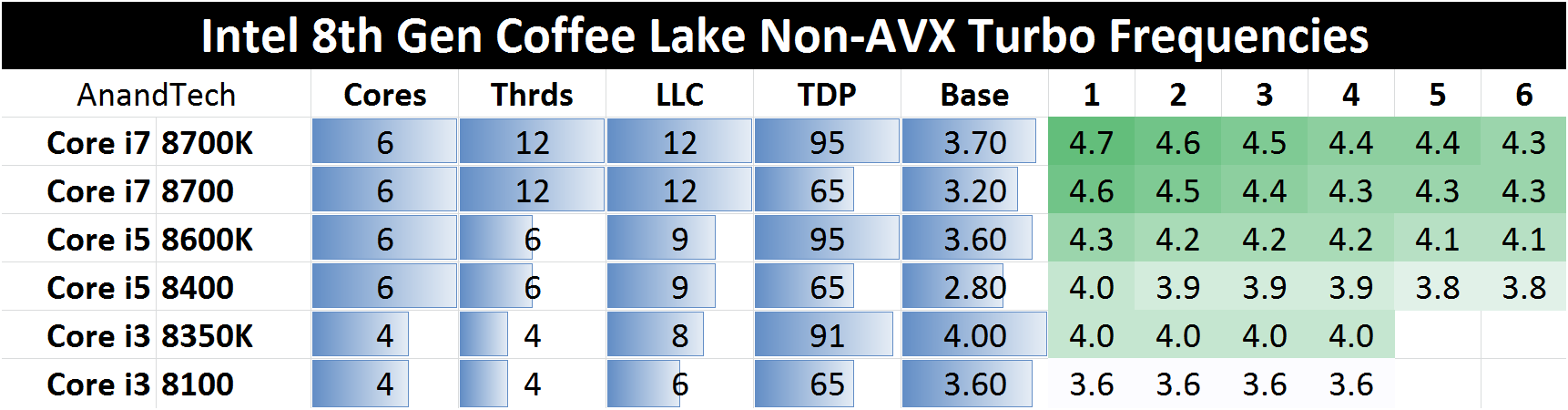
But with AMD Ryzen in the game, I think Intel won't padlock this "bug" because some reviewers scream cheating (its the mobo vendor).
It's a way to demonstrate IPC and frequency advantage and take interest away from Ryzen 5. i5 8400 peak boost is +1.2GHz over base.
https://www.intel.com/content/www/us/en/support/processors/000005523.html
How far CFL can go.
But with AMD Ryzen in the game, I think Intel won't padlock this "bug" because some reviewers scream cheating (its the mobo vendor).
It's a way to demonstrate IPC and frequency advantage and take interest away from Ryzen 5. i5 8400 peak boost is +1.2GHz over base.
Last edited:
In the end it’s only a 200mhz increase. And how much would a board that will support this MCE “feature” cost seeing as how much higher Asus boards are priced in SG. So Asus is out the qn.
Will gigabyte cheapest Z370 board support MCE?
I don’t see why is it bad to get 8600k if u wanna oc to 4.8-4.9ghz.
But of course looking at the game reviews right now, I’d say 8600k will not be that worth it. Cuz it’s not having a substantial performance improvement over 8400 even after oc.
Will gigabyte cheapest Z370 board support MCE?
I don’t see why is it bad to get 8600k if u wanna oc to 4.8-4.9ghz.
But of course looking at the game reviews right now, I’d say 8600k will not be that worth it. Cuz it’s not having a substantial performance improvement over 8400 even after oc.
OP, for motherboard look at their features to decide. Basically there are a few important points, power phases will be important since you’re gonna oc. I wouldn’t say for sure that having a lower amount of power phase is bad, but it may help your oc if you have more.
Look at the amount of sata ports, USB ports, PCIe, mSata, wifi etc. And then buy the cheapest one amongst the brands. In Singapore, I tend to avoid brands that are marked up. You can tell immediately because if they have the same amount of features, why is one brand costing much higher? Is it because they use better quality components? Sometimes it is but most of the time it’s cuz of mark up. Just look at the prices in Singapore and then you go amazon see their true price.
Look at the amount of sata ports, USB ports, PCIe, mSata, wifi etc. And then buy the cheapest one amongst the brands. In Singapore, I tend to avoid brands that are marked up. You can tell immediately because if they have the same amount of features, why is one brand costing much higher? Is it because they use better quality components? Sometimes it is but most of the time it’s cuz of mark up. Just look at the prices in Singapore and then you go amazon see their true price.
Important Forum Advisory Note
This forum is moderated by volunteer moderators who will react only to members' feedback on posts. Moderators are not employees or representatives of HWZ Forums. Forum members and moderators are responsible for their own posts.
Please refer to our Community Guidelines and Standards and Terms and Conditions for more information.
