Does your internet Throttle during Peak Period.

Free-Spirit

Junior Member
Joined
Jun 12, 2017
Messages
12
Reaction score
0
Does your internet Throttle during Peak Period.

I dunno what wrong, but my internet tend to stop and start or become very slow for a few seconds then recover immediately. I rebooted very equipment I have, and some games is really affected.:s22:

This usually happen during peak hours.
 

dryteletubby

Senior Member
Joined
Aug 25, 2017
Messages
2,302
Reaction score
1
Does your internet Throttle during Peak Period.

I dunno what wrong, but my internet tend to stop and start or become very slow for a few seconds then recover immediately. I rebooted very equipment I have, and some games is really affected.:s22:

This usually happen during peak hours.

Yes and no, usually from 7pm to 10pm most people are online and likely using WiFi. WiFi ls prone to interference especially the 2.4Ghz band. With most Singaporean living in appartments close together WiFi is extremely conjested. You may want to use the 5ghz WiFi band or switch to ethernet wherever possible. I am on M1 300Mbps plan and the internet does slowdown during peak hours but not to the point where it is noticable. Usually it's my torrents slowing to 10MB/s or some 4K YouTube videos start buffering
 
Last edited:

benjaminsg

Member
Joined
Sep 6, 2004
Messages
265
Reaction score
0
i get this on wired connection as well.
have always wondered what was wrong.
i browse the web with many tabs, then some tabs will not load properly. sometimes wait a while, hit refresh ok liao.

is this internet throttle?
 

dryteletubby

Senior Member
Joined
Aug 25, 2017
Messages
2,302
Reaction score
1
i get this on wired connection as well.
have always wondered what was wrong.
i browse the web with many tabs, then some tabs will not load properly. sometimes wait a while, hit refresh ok liao.

is this internet throttle?

Does this only happen on peak hours? If not it may be your router overheating. My old RT n56u needs a fan blowing on it to run without freezing up. Can be many other reasons like PC lagging etc
 

benjaminsg

Member
Joined
Sep 6, 2004
Messages
265
Reaction score
0
Does this only happen on peak hours? If not it may be your router overheating. My old RT n56u needs a fan blowing on it to run without freezing up. Can be many other reasons like PC lagging etc

it just tends to happens during peak period. not often though.
usually my routers no fan blow, i just leave it as it is.
just sometimes have this, not always.
 

HMAN

Supremacy Member
Joined
Jan 6, 2002
Messages
5,218
Reaction score
654
Most consumer grade Router will not be able to take the stress and will do the following first slowing down, when thermal continue to build up, it will reset itself to cool down. Otherwise true thermal melt down will happen.

Hardly to see enterprise grade router without cooling measure.
.
 

windwaver

High Supremacy Member
Joined
Apr 28, 2000
Messages
33,901
Reaction score
2,595
Sorry to bump this but which ISP in SG doesn't throttle?

Recently it's always slow during evening peak hours.

Wired, no problem during off peak timing.
 

xiaofan

High Supremacy Member
Joined
Sep 16, 2018
Messages
33,198
Reaction score
10,495
Sorry to bump this but which ISP in SG doesn't throttle?
Recently it's always slow during evening peak hours.
Wired, no problem during off peak timing.

This is not throttle. Usually this means you do not have a good WiFi router or mesh solution. Your router and devices get affected by the neighborhood's WiFi signal. The interferences will be worse during peak hours.

What is your ISP plan and wireless router used? What is the budget of wireless router or mesh solution if you want to improve the situation?
 

xiaofan

High Supremacy Member
Joined
Sep 16, 2018
Messages
33,198
Reaction score
10,495
all Telco(s) throttle, no?

No, not for normal web browsing and media streaming. All ISPs are good to provide good speed for 500Mbps/1Gbps/2Gbps plans.

Singtel, Whizcomms and Starhub are known to throttle BitTorrent traffic. M1 does that but probably to a lesser extent. VQ and MR are reported not throttling BT traffic. Not sure about SIMBA.

FYI, am on SingTel and Starhub and I support the policy of throttling BT traffic.
 

Henry Ng

Arch-Supremacy Member
Joined
Aug 9, 2011
Messages
17,109
Reaction score
984
This is not throttle. Usually this means you do not have a good WiFi router or mesh solution. Your router and devices get affected by the neighborhood's WiFi signal. The interferences will be worse during peak hours.

What is your ISP plan and wireless router used? What is the budget of wireless router or mesh solution if you want to improve the situation?
Yes for wifi the router will play a very important part and that is the reason why many people are spending money on router.
 

Henry Ng

Arch-Supremacy Member
Joined
Aug 9, 2011
Messages
17,109
Reaction score
984
No, not for normal web browsing and media streaming. All ISPs are good to provide good speed for 500Mbps/1Gbps/2Gbps plans.

Singtel, Whizcomms and Starhub are known to throttle BitTorrent traffic. M1 does that but probably to a lesser extent. VQ and MR are reported not throttling BT traffic. Not sure about SIMBA.

FYI, am on SingTel and Starhub and I support the policy of throttling BT traffic.
If too many devices on wifi will also have problem and need to upgrade to higher bandwidth.
 

xiaofan

High Supremacy Member
Joined
Sep 16, 2018
Messages
33,198
Reaction score
10,495
If too many devices on wifi will also have problem and need to upgrade to higher bandwidth.

Unlikely that will happen if you have a decent router and if you only browse internet and watch media streaming.

That is why we always say 1Gbps should be good enough for 99% of the internet users, at least for now. But you do need to have a good wireless router or mesh solution (or wired router plus AP/mesh solution).

On the other hand, nothing wrong to go with higher bandwdith plans like 5Gbps or 10Gbps. I feel that is a good push for people to carry out study for better home networking and learn more about their devices (Desktop/Laptop)'s networking capability.

Different people have differnet spending habits. Some like to spend money on high end iPhone but do not want to pay S$400 for a decent router. That is a fine choice as it is their money.

My budget for my main mobile phone is S$400 and I spend more money buying routers (to play with) than mobile phones for myself. Then again, I still need to buy an iPhone for my wife.

For those who have budget constraints, there are also decent options at lower cost (say S$100). One may needs to spend a bit more efforts in that case.
https://forums.hardwarezone.com.sg/...reless-solution-for-typical-hdb-flat.7006182/
 
Last edited:

xiaofan

High Supremacy Member
Joined
Sep 16, 2018
Messages
33,198
Reaction score
10,495
From the following thread.
https://forums.hardwarezone.com.sg/threads/singtel-5gbps-enhanced.7030365/page-2

I mentioned the following.
The main issues faced by average users are main related to wireless performance problem associated with the lousy ISP issued wireless router for the base 1Gbps plan by SingTel/Starhub. M1 is a bit better compared to SingTel and Starhub currently by offering decent one like TP-Link Archer AX72 (BTW, I do not consider M1 issued Asus RT-AX3000P a good router for 1Gbps plan unless one has very few devices due to the use of 256MB RAM).

@Mach3.2 has some good points with his reply.
This is an aspect the consumer has full control over. People who don't fix what I'd argue as the most important aspect of their web surfing experience, either due to ignorance or other reasons, kinda deserve what they get, especially so when information are so readily available and people who are higher ed should have capabilities to do online research.
 

windwaver

High Supremacy Member
Joined
Apr 28, 2000
Messages
33,901
Reaction score
2,595
This is not throttle. Usually this means you do not have a good WiFi router or mesh solution. Your router and devices get affected by the neighborhood's WiFi signal. The interferences will be worse during peak hours.

What is your ISP plan and wireless router used? What is the budget of wireless router or mesh solution if you want to improve the situation?
As mentioned wired.

Lag from internet traffic usually comes around evening, morning to afternoon is ok.

I wonder if it's due to the EU cable being cut.
 

xiaofan

High Supremacy Member
Joined
Sep 16, 2018
Messages
33,198
Reaction score
10,495
As mentioned wired.
Lag from internet traffic usually comes around evening, morning to afternoon is ok.
I wonder if it's due to the EU cable being cut.

I see. Are you testing with local SpeedTest server or overseas speedtest server?

Which ISP and which router are you using?

The earlier post in this thread mentioned that M1 had the issue. Last time I was guessing that M1 had higher typical split ratio but no one would be able to confirm. And IMDA has the common standard for all ISPs in this regard. The post was in early 2018 so M1 should have sorted out the issue now.

Lousy routers may also have the issue (even for wired client) and you need to restart the router periodically to clean up the memory leak caused by firmware bug.

Just an example, if you are doing quite a bit of torrent, typical consumer router may not be able to handle that. Extra load in the peak hours may cause the poor router to collapse because of the last straw. And take note quite ISPs (other than VQ/MR) do throttle BT traffic. BTW, I support the BT throttle policy of the ISPs.

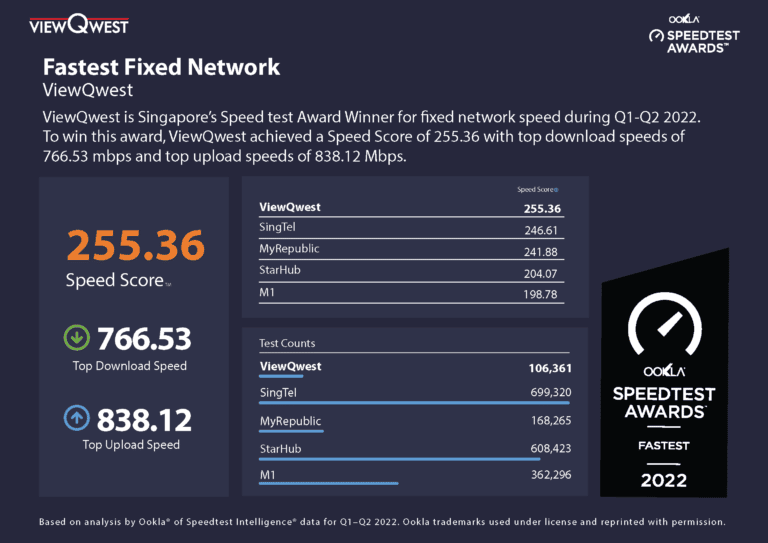
The following info may not be fair to M1 since it may have more 500Mbps customers than other ISPs. Similarly for Starhub.
5442_A4_Page_2-1-768x543-1.webp
 
Last edited:

Mach3.2

Great Supremacy Member
Joined
Apr 8, 2011
Messages
72,406
Reaction score
2,466
Recently it's always slow during evening peak hours.
Lag from internet traffic usually comes around evening, morning to afternoon is ok.

You need to quantify slow, lag and peak hours

also what ISP, what kind of content are you consuming?

Nobody can work off subjective feelings, must have hard data to back your point up right?
 

bert64

Senior Member
Joined
Jan 20, 2020
Messages
1,027
Reaction score
539
Does your internet Throttle during Peak Period.

I dunno what wrong, but my internet tend to stop and start or become very slow for a few seconds then recover immediately. I rebooted very equipment I have, and some games is really affected.:s22:

This usually happen during peak hours.
Don't confuse congestion with throttling...

You don't have a dedicated 1gbps connection at home, you have a "best effort" 1gbps connection which is shared with other users in several places. A dedicated 1gbps would cost a LOT more.

Wireless - the wireless spectrum is shared by everyone within range and beyond - even users that are out of range while their networks won't be strong enough for you to connect and use, their traffic will still generate noise which interferes with your usage... Also devices using older wireless standards will hog more of the spectrum than newer standards.

GPON - home fibre uses GPON which allows for up to 128 users to share a single port.

Upstream - the connections from your ISP to the rest of the internet is shared between all users of the ISP... Most ISPs will have multiple links of varying capacity to different places, any of those links could become saturated.

Target servers - whatever you're connecting to is also shared amongst everyone accessing the same service.

It's quite normal that things would slow down at peak times, this is how they meet the price point of the service, and the limitations of wifi are unavoidable laws of physics.

 

bert64

Senior Member
Joined
Jan 20, 2020
Messages
1,027
Reaction score
539
Lousy routers may also have the issue (even for wired client) and you need to restart the router periodically to clean up the memory leak caused by firmware bug.

Just an example, if you are doing quite a bit of torrent, typical consumer router may not be able to handle that. Extra load in the peak hours may cause the poor router to collapse because of the last straw. And take note quite ISPs (other than VQ/MR) do throttle BT traffic. BTW, I support the BT throttle policy of the ISPs.

Speedtest results are meaningless, most ISPs run their own local servers so you're only testing the local loop, and many will prioritise this traffic over regular usage.

Using IPv6 will reduce the load on the router - no NAT, no having to recompute the checksum for every single packet, any traffic that flows over IPv6 will put significantly less strain on the processing resources of the router. It's also possible to turn off state tracking completely to reduce the load even further, although this will result in no inbound traffic filtering so you should understand what you're doing before taking this step (in practice modern end users devices are absolutely fine, but there is a small risk with certain embedded devices that have weak passwords or known vulnerabilities - small because it's unlikely an attacker would be able to work out the address even if the device is wide open and accessible with a default password)

Temperature of the router as well as load should be considered, equipment which gets too hot will thermal throttle and reduce performance. if the router is hot already (eg in a location without ac and/or without ventilation) then it will throttle much sooner. I have noticeably worse performance when the ac isn't running in the room containing the router.
 
Important Forum Advisory Note
This forum is moderated by volunteer moderators who will react only to members' feedback on posts. Moderators are not employees or representatives of HWZ Forums. Forum members and moderators are responsible for their own posts. Please refer to our Community Guidelines and Standards and Terms and Conditions for more information.
Top