Android 17: Leaked features, codename, release date, and everything else

limmk

High Supremacy Member
Joined
Jul 5, 2001
Messages
38,484
Reaction score
7,869

Android 17: Leaked features, codename, release date, and everything else we know so far​

Android 16 is just about to go stable, but we already know a bit about what's coming with Android 17!

We’re mere days away from stable Android 16 rolling out to Pixel devices and the rest of the Android clan, and Google has already confirmed all the features coming with the stable platform release. We’ve also gotten our hands on Android 16 QPR betas, which gives us a peek at the features expected to come with the next platform release, Android 17. These spotted features and the other features that weren’t confirmed for Android 16 help us paint a picture of what’s possibly coming with Android 17. Here’s what we know so far about the next big platform update for Android!

Android 17: Name​

Google used to name Android versions with dessert codenames, but it strayed away from that tradition with the release of Android 10, choosing to stick with only the version number for all future releases. Consequently, Android 17 will most likely be known simply as “Android 17,” with no dessert codename officially used.
However, Google still uses the dessert codename internally. Android 15’s codename was Vanilla Ice Cream, while Android 16 jumped all the way back to “B” with Baklava. We haven’t yet spotted Android 17’s dessert codename, but it will most likely be a dessert that starts with “C.” Do you have any guesses on what it could be?

Android 17 expected release date​

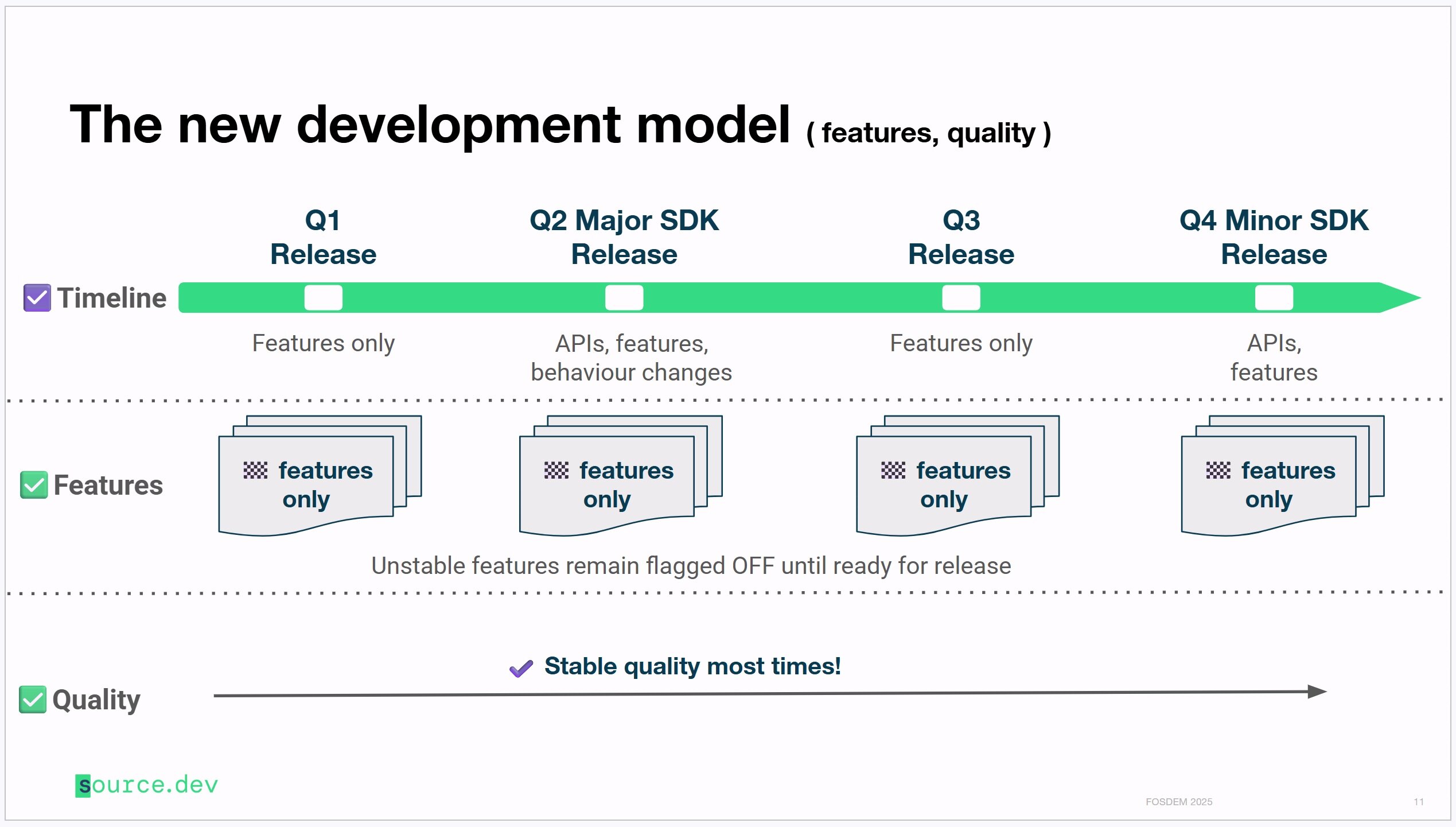
Google has been switching things up with the Android 15 and Android 16 releases. Android 15 decoupled the platform update from the Pixel 9 series, giving the software release its independent timeline. Android 16 gave the platform a new timetable, with a major SDK release in Q2 and a minor SDK release promised for Q4.
For Android 17, we presume Google will continue on the path it set for itself with Android 16. Thus, unless things change for Android 17, we expect a major SDK release in Q2 2026 and a minor SDK release in Q4 2026.
You won’t have to wait that long to try out Android 17, though. With Android 16, Google released the first Developer Preview in November. If the company sticks to this release plan, we expect the first Android 17 Developer Preview builds to be released in November 2025.


Android 17: Confirmed features and changes​

Here are the features that Google has announced or confirmed are coming with the official Android 17 platform update:
  1. Intrusion Logging
  2. Improvements to Factory Reset Protection
  3. Material 3 Expressive

Intrusion Logging​

Google announced Intrusion Logging as a new feature in Android 16 that will help users detect if their device has been compromised. Intrusion Logging collects “activity logs” which include details such as USB connection events, network info like browsing history, app installs, Bluetooth connections, lock screen info, and Wi-Fi connections. Your activity logs are encrypted using your Google account password and device lock screen, ensuring only you can view them. These logs are stored in a “private and encrypted Google Drive,” providing further protection against unauthorized access.
While the API is already available in Android 16, Google hasn’t yet integrated Intrusion Logging into Google Play Services. Consequently, the feature will roll out later in the year, possibly as part of an Android 16 QPR, or even Android 17.

Improvements to Factory Reset Protection​

At The Android Show: I/O Edition, Google announced that Android’s existing Factory Reset Protection mechanisms will become even more powerful later in the year. While Android already has several mechanisms to deter bypassing the setup screen after triggering a factory reset, these new protections will restrict all functionalities on devices that are reset without the owner’s authorization.
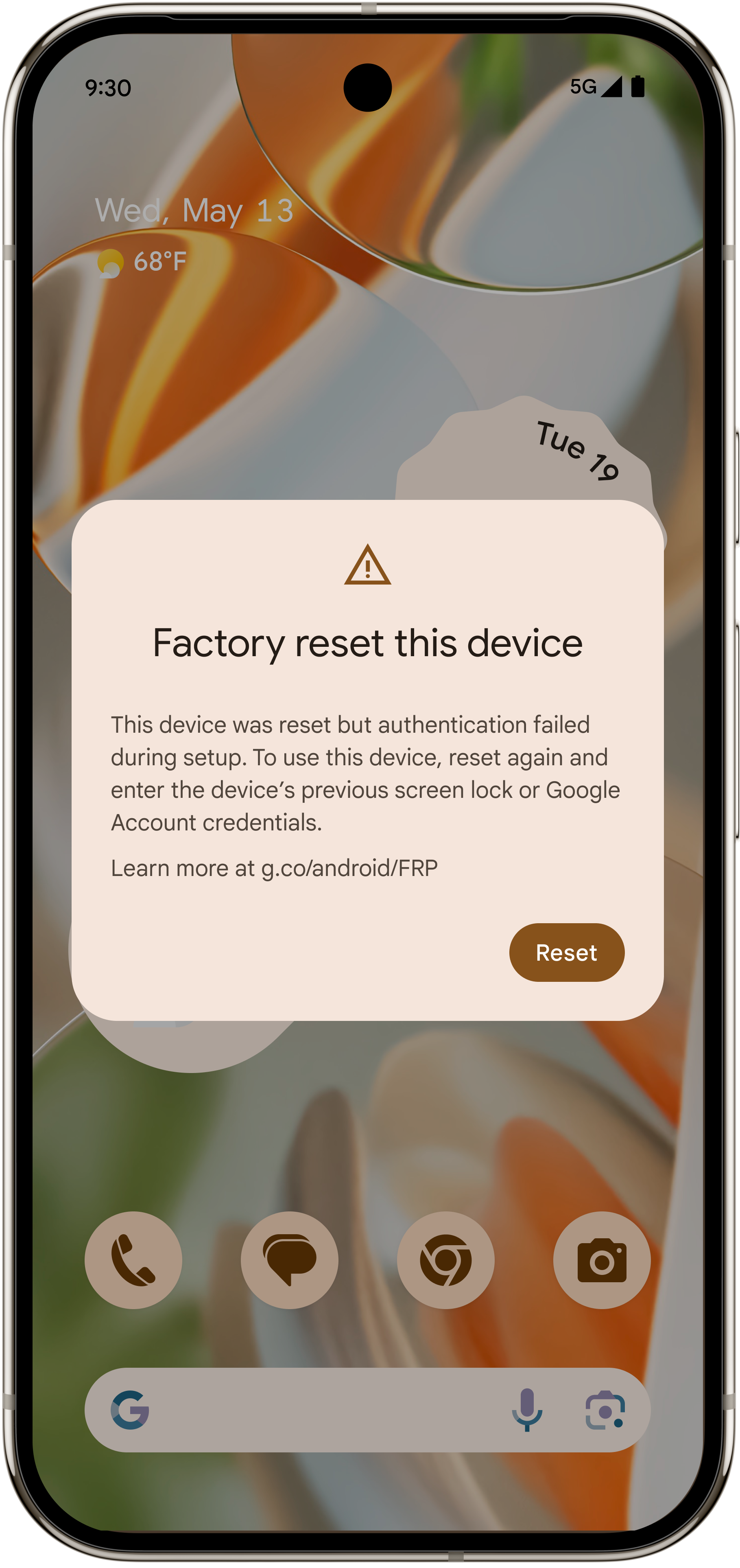
Factory reset protection dialog telling user to factory reset again


Android will likely detect if someone bypassed the setup wizard (to bypass previous factory reset protection mechanisms), and will thus force another factory reset cyclically, preventing unauthorized use until the user proves ownership.

Since these upgrades are coming later in the year, they will not be part of the first stable release of Android 16. Instead, we expect this update to come with the Android 16 QPR1 update for Pixel devices and then to the wider platform with Android 17.

Material 3 Expressive​

Material 3 Main header Google

Google
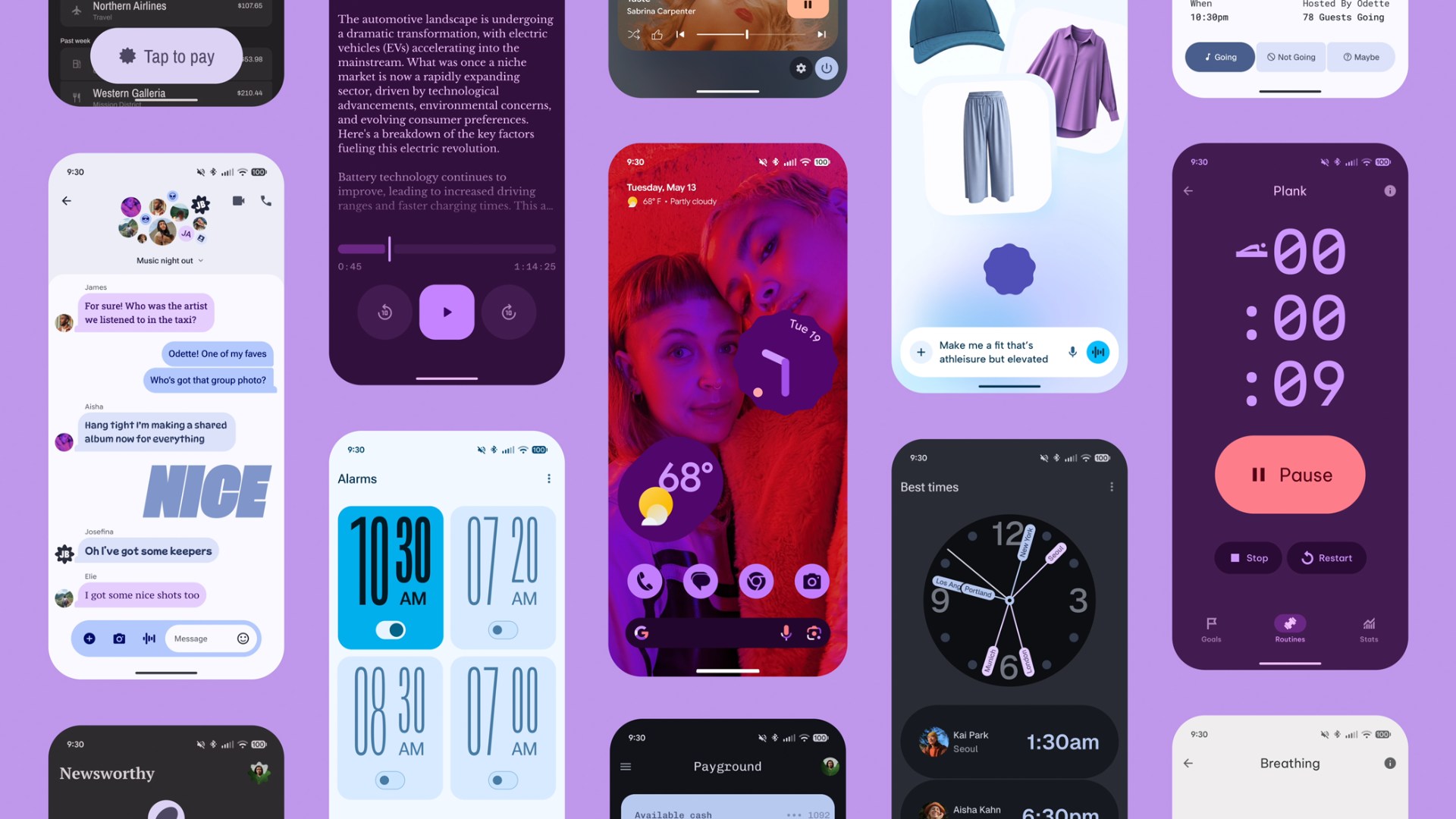
Google has officially announced Material 3 Expressive as the next evolution of Material Design. This UX update is set to arrive with Android 16, but not the first stable release. Instead, it will come with Android 16 QPR1 to Pixels, meaning most non-Pixels will get access to this with Android 17, albeit individual apps could have their own redesign on Android 16. If you’d like to try the changes ahead of its stable rollout, you can already do so, starting with Android 16 QPR1 Beta 1.
“So, the updates for Material Expressive are going to be available on Pixel devices first later this year, but it’s not going to be part of the public release in June,” confirmed Allen Huang, Google’s Director of Product Management for Pixel and Android system UI.

This sweeping UI update is a significant step in Google’s ongoing effort to make Android and Wear OS more visually engaging, emotionally resonant, and interactive. Some of its highlights include:
  • Springier, natural-feeling animations that enhance touch interactions
  • New icon shapes and refreshed typography
  • Background blur effects for depth and focus
  • Updated color themes
  • Home screen and Quick Settings enhancements for a more dynamic layout
  • Visual redesigns for many Google apps, bringing them in line with the new expressive aesthetic
You can learn more about Material 3 Expressive in our deep dive article.
 
Last edited:
limmk

High Supremacy Member
Joined
Jul 5, 2001
Messages
38,484
Reaction score
7,869

Android 17: Leaked and upcoming features​
Google has shared some details about Android 17 through its official announcements, but we’ve spotted a ton of changes in Google’s QPR updates that help paint a more complete picture of the changes we can expect to see in the final Android 17 release.

Google’s QPR updates and what they tell us about future Android releases​

The Android platform follows an annual release schedule, which OEMs and the world at large have access to. Google also follows a second public release schedule for its Pixel devices in the form of QPR updates.
QPR refers to Quarterly Platform Release, an update track in which updates are released once every three months (quarter). So, we generally get an annual Android platform update on Pixels, followed by three QPR releases and then the next annual Android platform update.

While the features included in the Android platform update are final and available to the world, features released in the QPR updates are available exclusively to Pixel devices until the next Android platform update incorporates them. Further, Google also runs a separate beta program for the QPRs months in advance.
This gives us situations where we can try out new features coming to Android 17 (by checking them out in Android 16 QPR1 betas) before the stable Android 16 update is even launched! Later QPR betas give us even more features that can be chalked up to the next platform release, unless they are completely Pixel-exclusive.
As a result, we have a list of features that are coming to upcoming Android 16 QPR releases for Pixel devices, which are also likely to be added to the next Android platform update, Android 17. Let’s check them out!

Local Network Protection​

Android 16 Beta 3 officially added the ability to test an upcoming “Local Network Protection” feature, which Google says is planned for a future Android major release, which we presume is Android 17.

Essentially, any app with the “INTERNET” permission can communicate with the Internet worldwide and with devices on the user’s local network. Local Network Protection will eventually require apps to request specific permission to access the local network. With Android 16 Beta 3, Google is giving app developers a chance to test if their apps are affected by this upcoming change.

Android’s big UI overhaul​


Old vs new Pixel Launcher app drawer with blur in Android


Old vs new app drawer UI in the Pixel Launcher
With the above-mentioned Material 3 Expressive changes, Google is also planning a big UI overhaul for Android and expressive animations to accompany it. These changes were spotted and activated within Android 16 Beta 4, and are available widely with Android 16 QPR1 Beta 1, but they are unlikely to be available with the Android 16 stable release. Instead, they could come with a future QPR release or Android 17 and beyond in the stable branch.

As part of the UI overhaul, we expect changes across several important areas, like status bar icons, clock font, combined notifications, Quick Settings panel, cleaner lock screen with collapsed notifications, and so much more. The changes are pretty voluminous to list here, so check out our original coverage for the whole scoop.

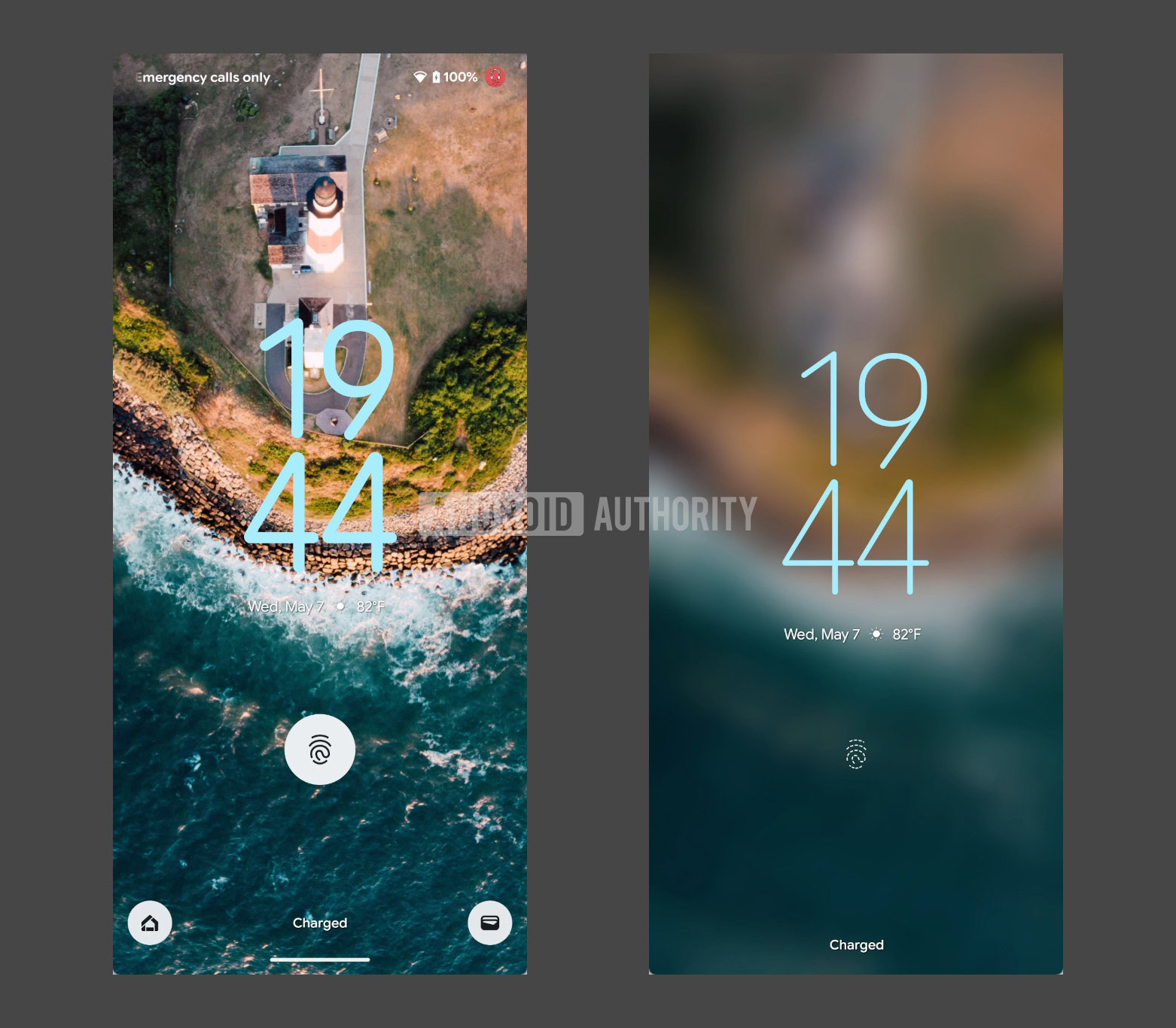
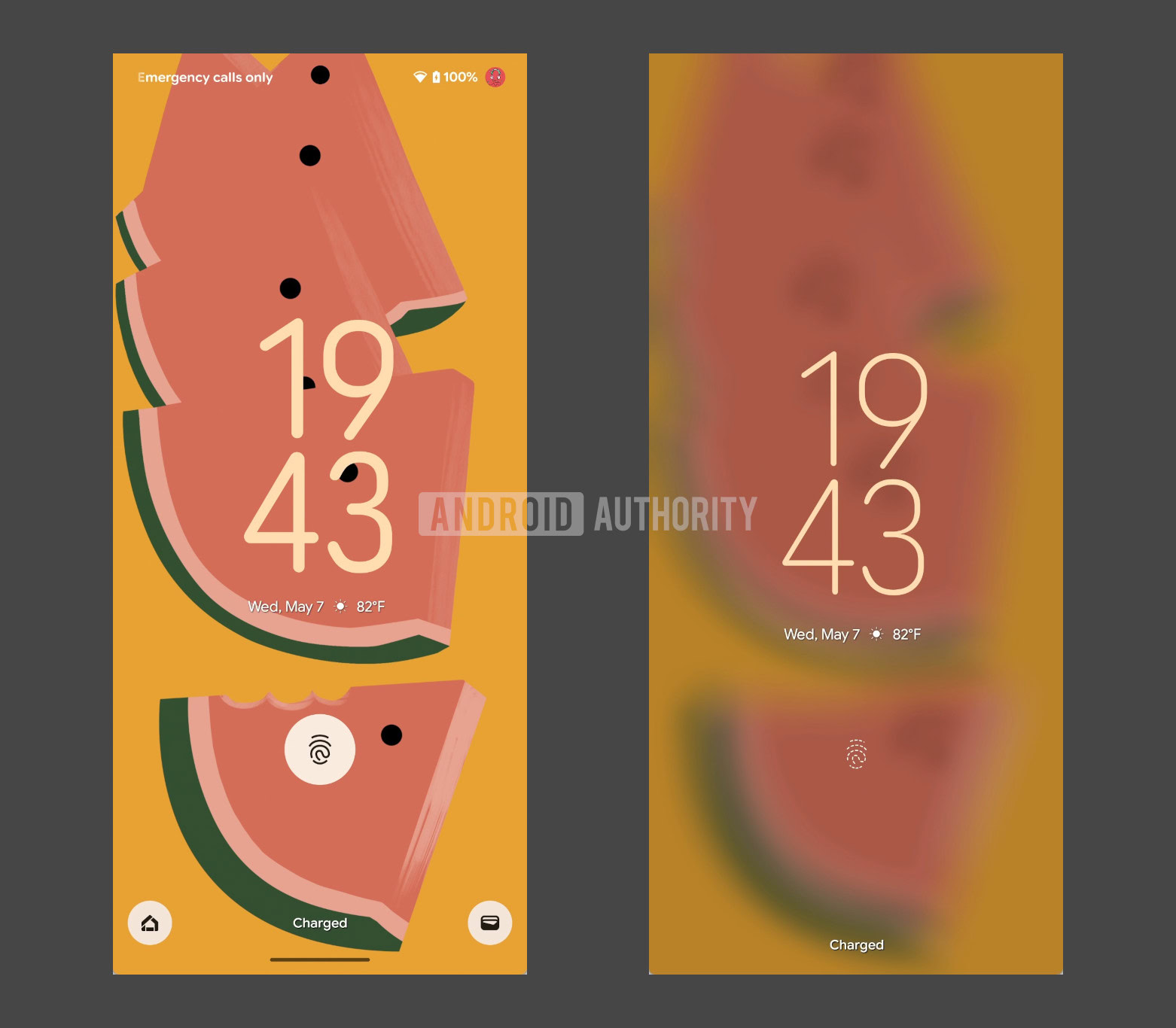
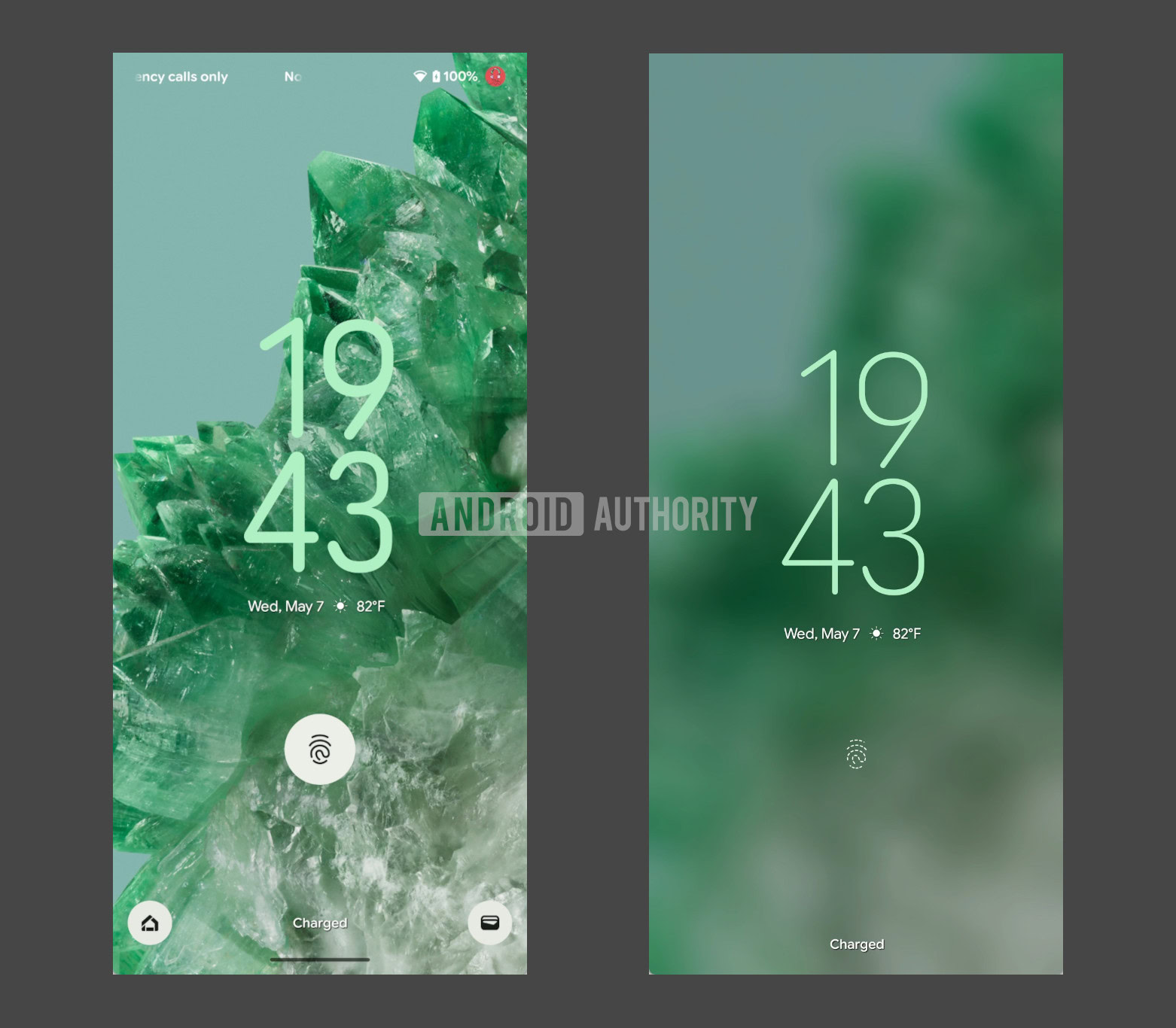
Ambient Always On Display: Blurred wallpaper on lock screen​

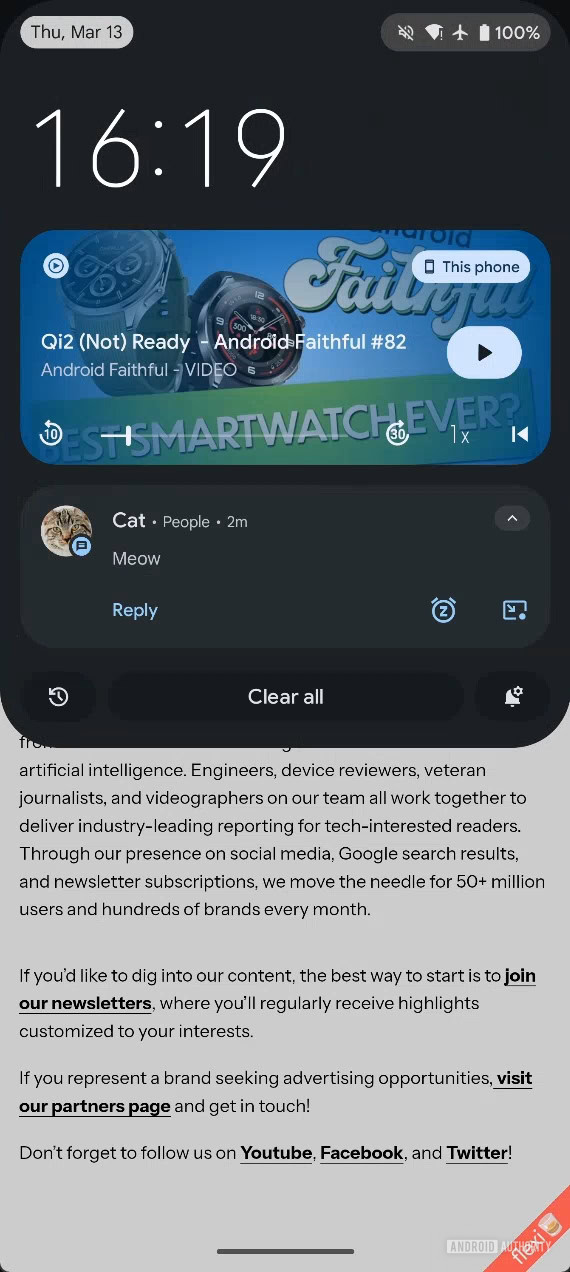
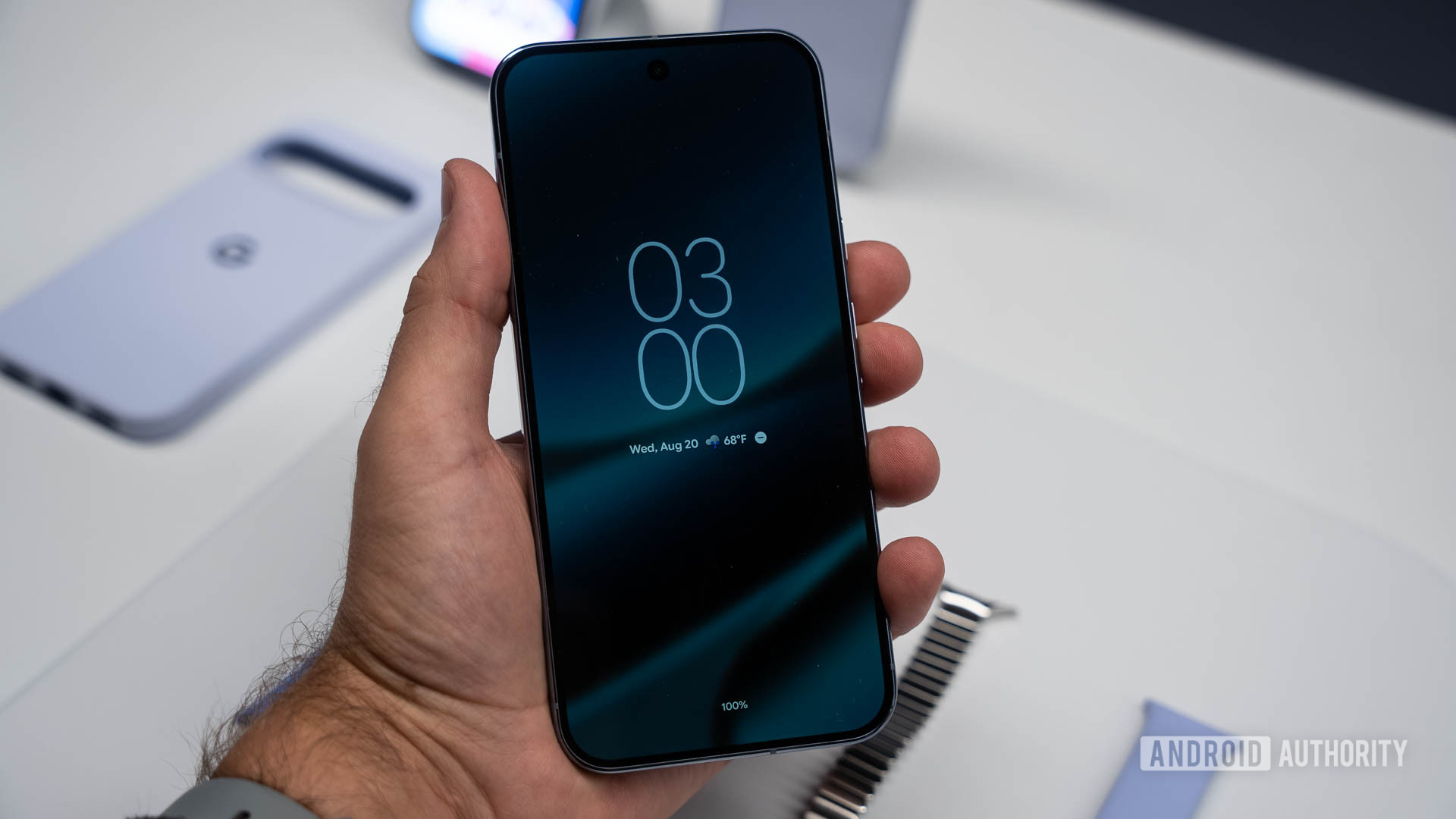
Google introduced wallpaper support on the Always On Display back in 2018 with Android 9 Pie, and briefly implemented it on the Pixel 3 series before removing it on future models. Once again, Google has been working on an AOD wallpaper implementation called “ambient AOD.” We managed to get the feature working before its launch for these screenshots, showcasing the lock screen wallpaper and the corresponding AOD counterparts:

Android Ambient AOD demo set 1
Android Ambient AOD demo set 4
Android Ambient AOD demo set 3
Android Ambient AOD demo set 2


As expected, the feature is still a work in progress and quite buggy at the moment. Code for the feature suggests that it will only be supported by particular displays, indicating that it could be restricted to some upcoming devices, like the Pixel 10 series.

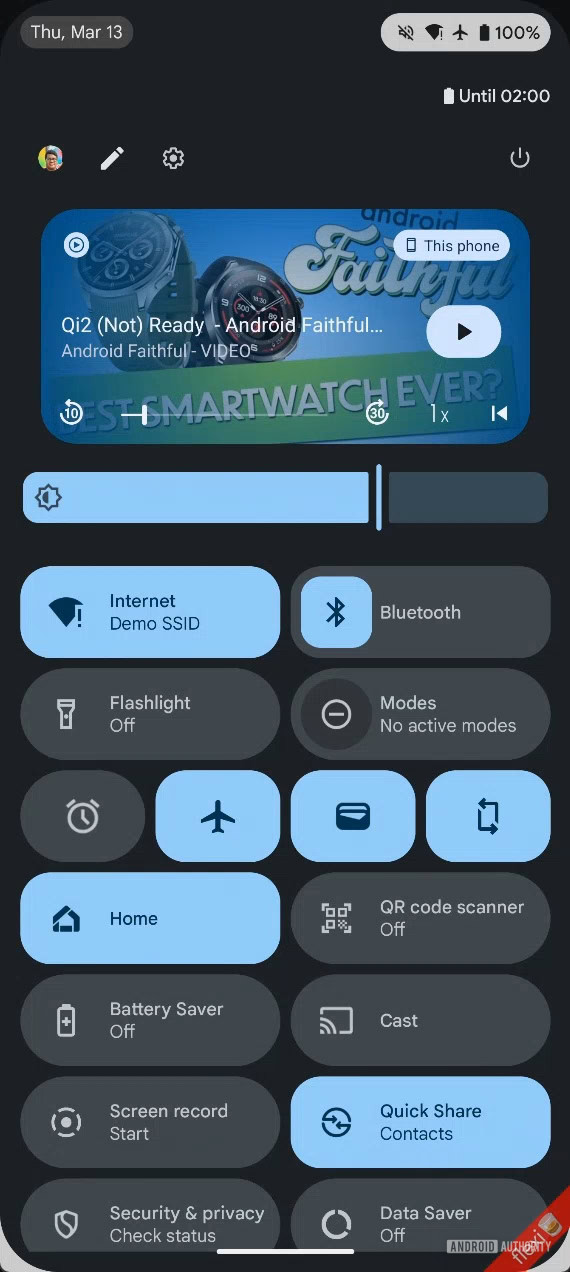
Split Notification and Quick Settings panel​

Android 16 dual shade demo notifications panel
In-development notification panel UI in Android 16.
Android 16 dual shade demo Quick Settings panel


While Google didn’t showcase the split notification and quick settings panel when it showed off the Material 3 Expressive changes coming to the operating system, the company hasn’t abandoned the change, as we could spot progress in the code with the release of Android 16 QPR1 Beta 1. The feature could arrive in future Android 16 QPRs to Pixels and subsequently with Android 17 to the rest of the Android ecosystem. However, several OEMs already offer the split panels as an option, so many of us don’t actually need to wait to use this feature.

Notification summary​

We’ve found strings within Android 16 Beta 3 that hint at a new “notification summaries” page. This “notification summaries” page will be positioned between the existing notification history and the upcoming notification bundle options under Settings > Notifications. The new page will have a single toggle to enable the feature, labeled “use notification summaries.”

The feature’s description states that it will “automatically summarize conversation notifications from apps.” Only messaging apps correctly categorize their notifications as conversation notifications, so only those would be AI summarized. The system will also let you exclude apps from having their notifications summarized.

It’s not clear when the feature will arrive on Android. It might not make it to the stable Android 16 release, but come through on an Android 16 QPR release or even on Android 17.

Gemini-powered Notification “Magic Actions”​

In 2018, Android 9 released Smart Reply, which provides suggested replies as tappable chips beneath a notification for quick responses. Android 10 expanded this with Smart Actions, offering contextual actions based on notification content. This Smart Actions feature powers the “Open Maps” chip when a notification includes an address. Smart Replies and Smart Actions are powered by on-device machine learning models, but are limited to short, canned replies that might not fully appreciate the context.

We’ve spotted evidence with Android 16 that suggests Google is developing a more advanced version of Smart Actions, dubbed “Magic Actions.” When the Magic Action feature is enabled, Android will hide Smart Actions and instead prominently display a new Magic Action button. This button is slated to receive “special visual treatment,” possibly indicating a custom animation when it appears or is tapped. Speculatively, the feature could tap into Google’s Gemini model to generate more personalized and powerful actions.
 

limmk

High Supremacy Member
Joined
Jul 5, 2001
Messages
38,484
Reaction score
7,869

Recents screen changes​

With Android 16 QPR1 Beta 1, Google made some subtle changes to the Recents screen. Previously, only the app’s icon appeared above its task. Now, the Recents screen displays the app’s icon, name, and a downward-pointing arrow within a small pill-shaped button overlaid on the task.

New recents menu UI in Android 16 QPR1
New recents context menu in Android 16 QPR1


Displaying the app’s name is a welcome clarification, clearly identifying which app corresponds to each task preview. The most impactful change, however, is the addition of the downward arrow. This icon is widely understood to indicate an additional menu, so its presence should help more users realize they can access further actions directly from the recents screen.
The dedicated “Screenshot” and “Select” buttons are now also enclosed in pill-shaped containers, creating a more consistent look in the Android 16 QPR1 Beta 1 release. Furthermore, the previously solid gray background has been replaced with a blurred version of the user’s wallpaper or underlying content, a visual effect aligning with Google’s new Material 3 Expressive theme.

Standby for Hub Mode​

The evidence for this isn’t strong, but Google could be working on Standby for Hub mode, similar to iOS’s Standby Mode, which transforms the iPhone into a mini smart display. When Hub Mode arrives on Pixels with Android 16 QPR1 (and other Android devices with Android 17), users will be able to seamlessly switch between their screen saver (displaying clocks, photo frames, etc.) and their widgets, similar to how iOS’s Standby Mode functions.

Android’s Desktop Mode​

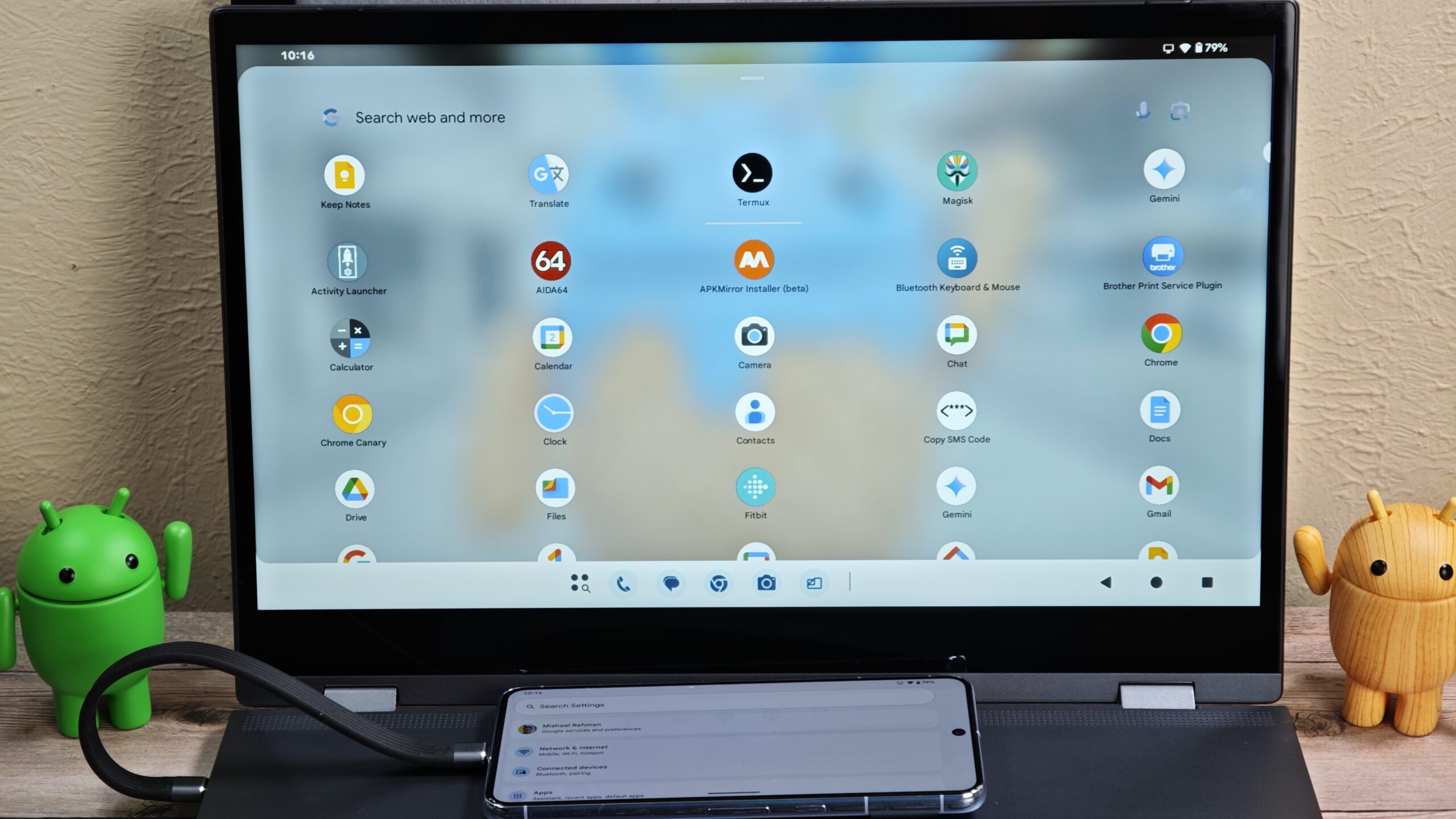
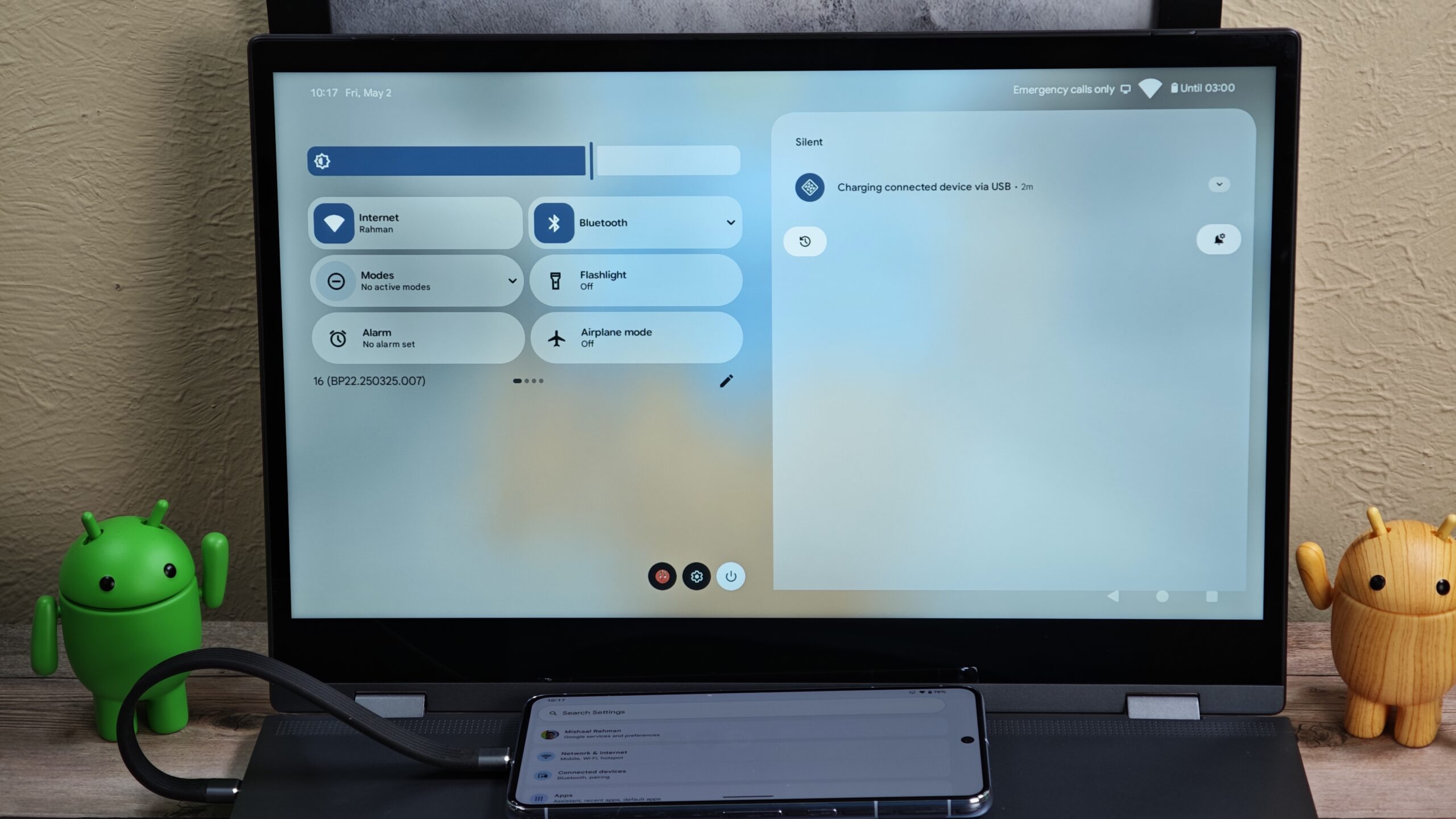
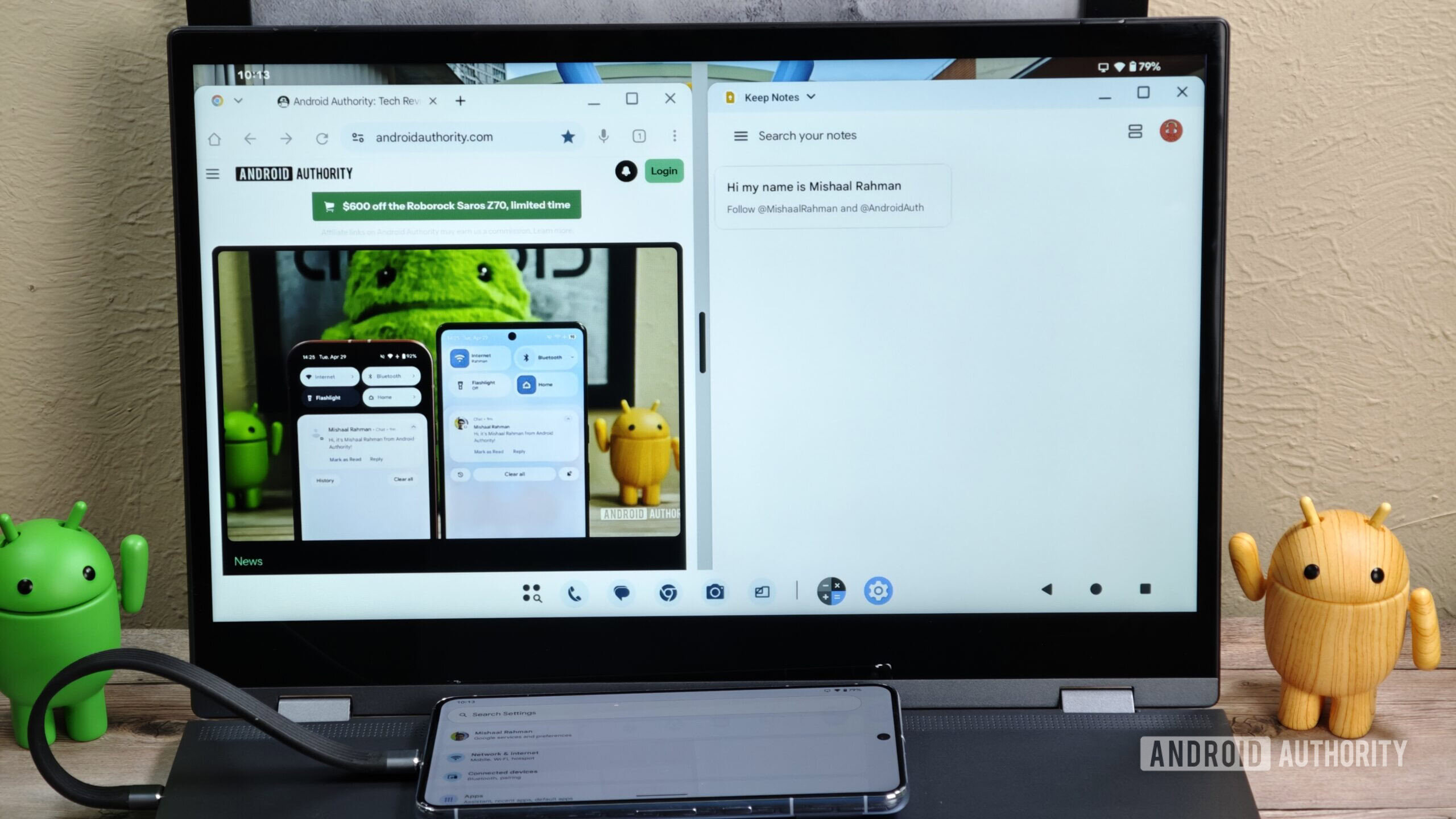
With Android 16 Beta 4, we managed to activate Android’s desktop mode. Given the feature’s unfinished state, we expect it to arrive either with a later Android 16 QPR release or with Android 17.


Compared to the current, barebones desktop interface that appears when you connect a Pixel device to an external display, Android’s new desktop mode actually displays the taskbar and status bar. The taskbar is a big addition, as it provides access to your pinned apps and a better version of the app drawer. The taskbar can also show recent apps while in desktop mode, making it easier to multitask.
Android desktop mode app drawer
Android desktop mode status bar pulled down


It’s also possible to launch multiple apps in floating windows simultaneously using the new desktop mode. Further, you can freely move, resize, or snap windows to the side, just like on desktop operating systems. This makes it easy to drag and drop content from one app to another, provided the apps you’re using support drag-and-drop.

Android desktop mode windows side by side


At Google I/O 2025, Google also announced that Android’s new desktop windowing features will be available as a developer preview for phones connected to external displays in upcoming beta releases of Android 16 QPR1. Android’s enhanced support for external monitors is also coming soon as a developer preview in the Android beta program.

This feature still needs more work, so we expect to learn more in the coming months.

These are all the changes we expect to see in the Android 17 platform update in 2026.

// androidauthority
 

limmk

High Supremacy Member
Joined
Jul 5, 2001
Messages
38,484
Reaction score
7,869


For most of Android’s history, Google publicly referred to each release by a version number and a codename. Traditionally, the codename was a dessert like Marshmallow, Jelly Bean, or Froyo. With the release of Android 10 in 2019, however, Google ended this public practice to make its branding more globally accessible. Internally, though, the company’s developers kept the sweet tradition alive. Following that tradition, Google’s developers have recently decided on the dessert codename for Android 17 — and it’s not what any of you guessed.

Google surprised many last year by choosing “Baklava” as the dessert codename for Android 16. Since the codename for Android 15 was “Vanilla Ice Cream,” most people expected the next version to follow the alphabetical tradition with a dessert starting with the letter “W.”

Android Version Number
1.0
Dessert Codename
No codename
Year of Release
2008
Android Version Number
1.1
Dessert Codename
Petit Four (internal)
Year of Release
2009
Android Version Number
1.5
Dessert Codename
Cupcake
Year of Release
2009
Android Version Number
1.6
Dessert Codename
Donut
Year of Release
2009
Android Version Number
2.0, 2.1
Dessert Codename
Éclair
Year of Release
2009
Android Version Number
2.2
Dessert Codename
Froyo
Year of Release
2010
Android Version Number
2.3
Dessert Codename
Gingerbread
Year of Release
2010
Android Version Number
3
Dessert Codename
Honeycomb
Year of Release
2011
Android Version Number
4
Dessert Codename
Ice Cream Sandwich
Year of Release
2011
Android Version Number
4.1, 4.2, 4.3
Dessert Codename
Jelly Bean
Year of Release
2012
Android Version Number
4.4
Dessert Codename
KitKat
Year of Release
2013
Android Version Number
5.0, 5.1
Dessert Codename
Lollipop
Year of Release
2014
Android Version Number
6
Dessert Codename
Marshmallow
Year of Release
2015
Android Version Number
7.0, 7.1
Dessert Codename
Nougat
Year of Release
2016
Android Version Number
8.0, 8.1
Dessert Codename
Oreo
Year of Release
2017
Android Version Number
9
Dessert Codename
Pie
Year of Release
2018
Android Version Number
10
Dessert Codename
Quince Tart (internal)
Year of Release
2019
Android Version Number
11
Dessert Codename
Red Velvet Cake (internal)
Year of Release
2020
Android Version Number
12, 12L
Dessert Codename
Snow Cone (internal)
Year of Release
2021
Android Version Number
13
Dessert Codename
Tiramisu (internal)
Year of Release
2022
Android Version Number
14
Dessert Codename
Upside Down Cake (internal)
Year of Release
2023
Android Version Number
15
Dessert Codename
Vanilla Ice Cream (internal)
Year of Release
2024
Android Version Number
16
Dessert Codename
Baklava (internal)
Year of Release
2025

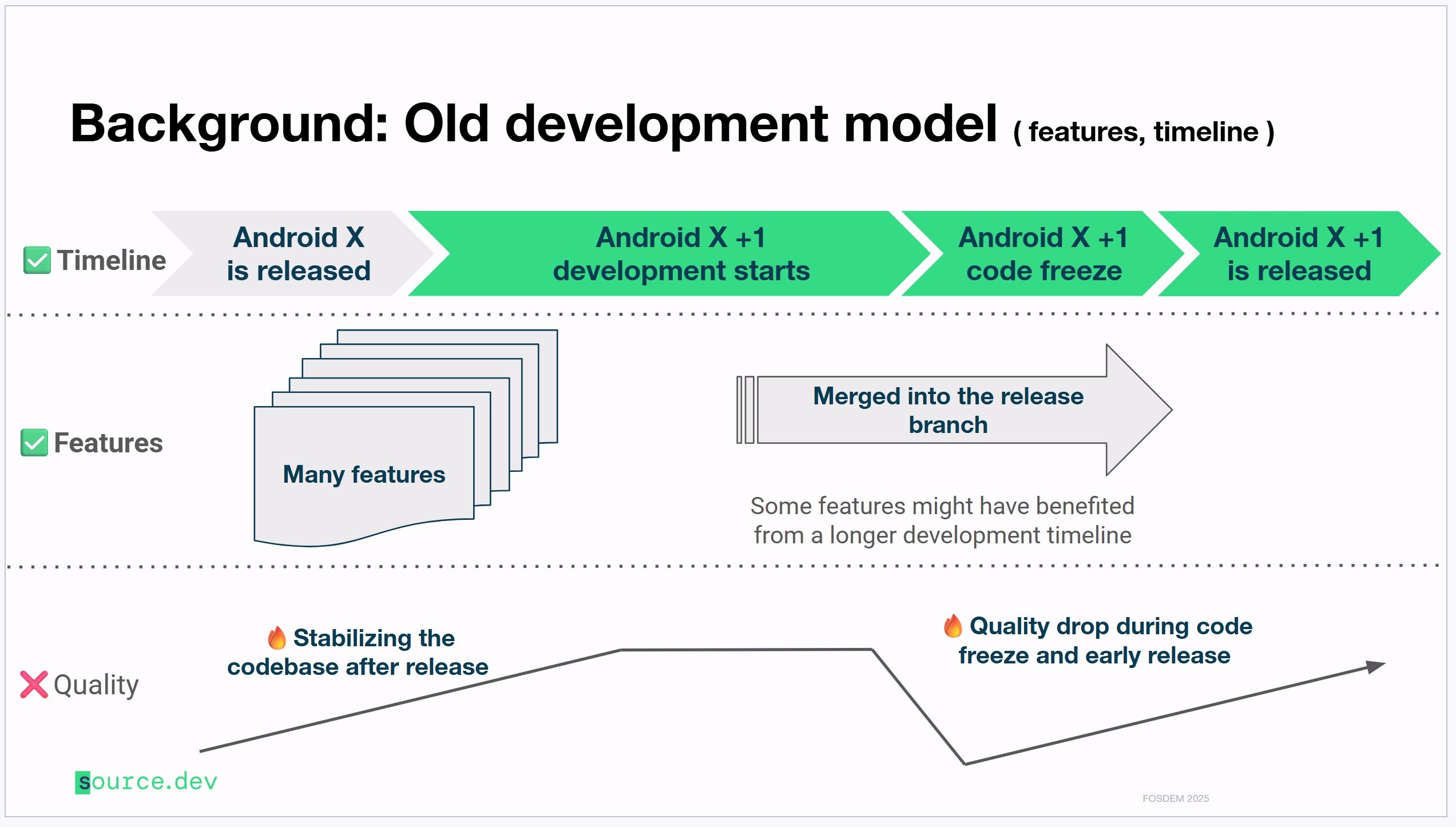
Google broke this years-long pattern to reflect major changes to its development practices under the new “Trunk Stable” project. This project shifts Android development to a trunk-based model, where all work occurs in a single, main internal code branch that must always remain stable. New features, APIs, and bug fixes are developed behind “feature flags” that keep them disabled until they’re ready for launch. In contrast, Google previously used a branch-based model, which often created significant problems when merging new release branches back into the main one.

Old branch based development model used by Android
Android's old branch-based development model

New trunk based development model used by Android
Android's new, trunk-based development model.

The first Android version released after Google completed its migration to trunk-based development was Android 14 QPR2. To mark this change, Google reset its build ID scheme. The IDs for Android 14 QPR2 and QPR3 builds were prefaced with “AP1A” and “AP2A,” respectively. The company used the letter “A” because 2024 was the first year Google released Trunk Stable builds, while the “P1A” and “P2A” reflected that Android 14 QPR2 and QPR3 were respectively the first and second platform releases of the year. When the calendar turned to 2025, Google advanced the letter to “B,” which is why Android 16’s codename was a dessert that started with B.

Following this pattern, you’d be right to guess that Android 17’s dessert codename will start with the letter “C.” The problem is the sheer number of desserts that start with C. We can immediately rule out “Cupcake,” since Google already used it for Android 1.5, but that still leaves dozens of choices. When we polled our readers on the topic, we presented eight popular options, and they floated seven more in the comments.

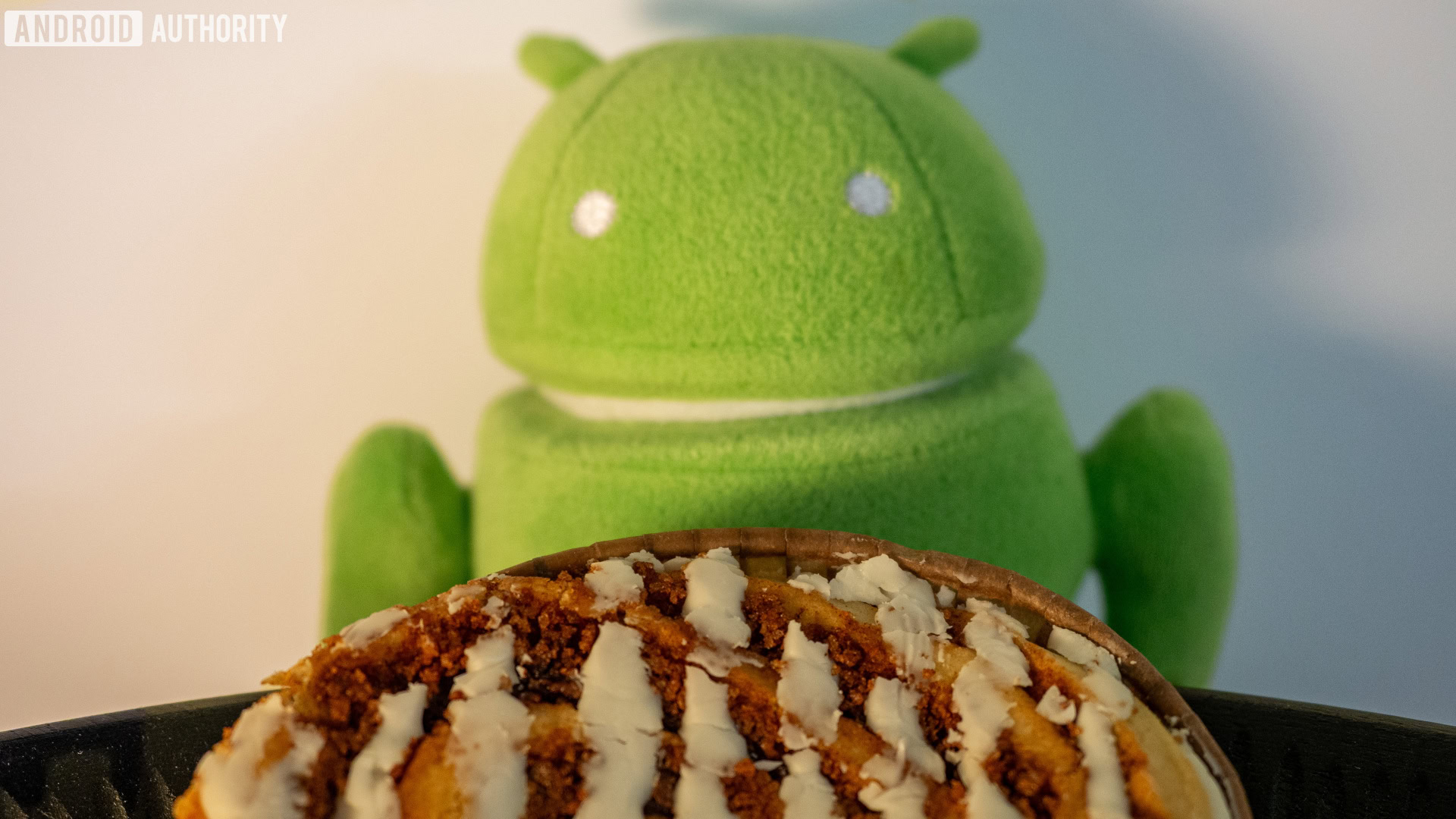
However, none of these were correct, as Google has decided on “Cinnamon Bun” as the dessert codename for Android 17! A cinnamon bun — also called a cinnamon roll or swirl — is a sweet, baked pastry made of rolled dough filled with a cinnamon-sugar mixture and often topped with glaze or icing. It’s a popular dessert in northern Europe and North America, with several well-known chains specializing in its creation.

Android 17 Cinnamon bun hero image 2


Although we don’t have any public sources that mention “Cinnamon Bun” as Android 17’s codename, we are confident this is the name. A trusted source within Google shared evidence with us that clearly shows the company using “CinnamonBun” as the internal codename for API level 37.0.

The API level is a number that uniquely identifies a specific Android version and its set of core APIs. Each Android version has a distinct API level; for example, Android 15 is API level 35.0, and Android 16 is 36.0. Hence, we can assume that API level 37.0 will refer to Android 17, unless Google suddenly decides to drop numbers from its versioning entirely — which seems unlikely.

Ultimately, the dessert codename doesn’t matter. It won’t appear in most of Google’s marketing next year, though the company may still erect a new Android statue on its campus that references it. You’ll likely see “Android CinnamonBun” appear under the “Android version” field in early beta releases, but this will be replaced with “Android 17” once the OS reaches platform stability.

Still, we know that many of you have been wondering what dessert codename Google has cooked up for Android 17, so we thought it would be fun to reveal it in the inaugural edition of the Authority Insights Newsletter.

If you’re wondering when Android 17 will launch, we expect it to land around June 2026. As we’ve noted before, Google pushed up Android 16’s release date to enable summer device launches to ship with the latest OS. There’s no reason to think Google won’t stick with this accelerated schedule next year. Still, plans can change, and if they do, I’ll report on them in a future edition of this newsletter.

P.S. That awesome photo of a cinnamon bun surrounded by Android pins was taken by my colleague Rita El Khoury, who went on a bit of an adventure to get it. After picking it up at a Starbucks, it traveled with her on a train, crossed a highway, and rested on a fence before she acquired proper protection for it. When I asked her how it tasted, she told me that she “had a sugar rush crash” after eating it. Cinnamon buns will do that to you.
 

limmk

High Supremacy Member
Joined
Jul 5, 2001
Messages
38,484
Reaction score
7,869


Hundreds of millions of people live with diabetes or other chronic conditions that require continuous monitoring. Fortunately, modern medical devices make it significantly easier for people to track their glucose levels, blood pressure, and other key vitals. Some even connect directly with smartphones, sending crucial data and alerts via Bluetooth to the mobile devices we carry every day.

Despite the importance of these medical devices in many people’s lives, Android doesn’t treat them any differently than other Bluetooth peripherals. The operating system is designed to maximize privacy and battery life, which forces medical device makers to jump through hoops to ensure their apps operate reliably. These apps must request a host of permissions during setup and then hope the OS doesn’t terminate their background processes — a dangerous possibility, since any lapse in reporting can become a life-or-death situation for users.

Fortunately, Android may finally treat medical device apps with the importance they deserve. Next year’s Android 17 release may bring a new companion device profile for medical device apps. This profile will not only streamline the setup process for new medical devices but also help their companion apps stay active in the background. Here’s how.

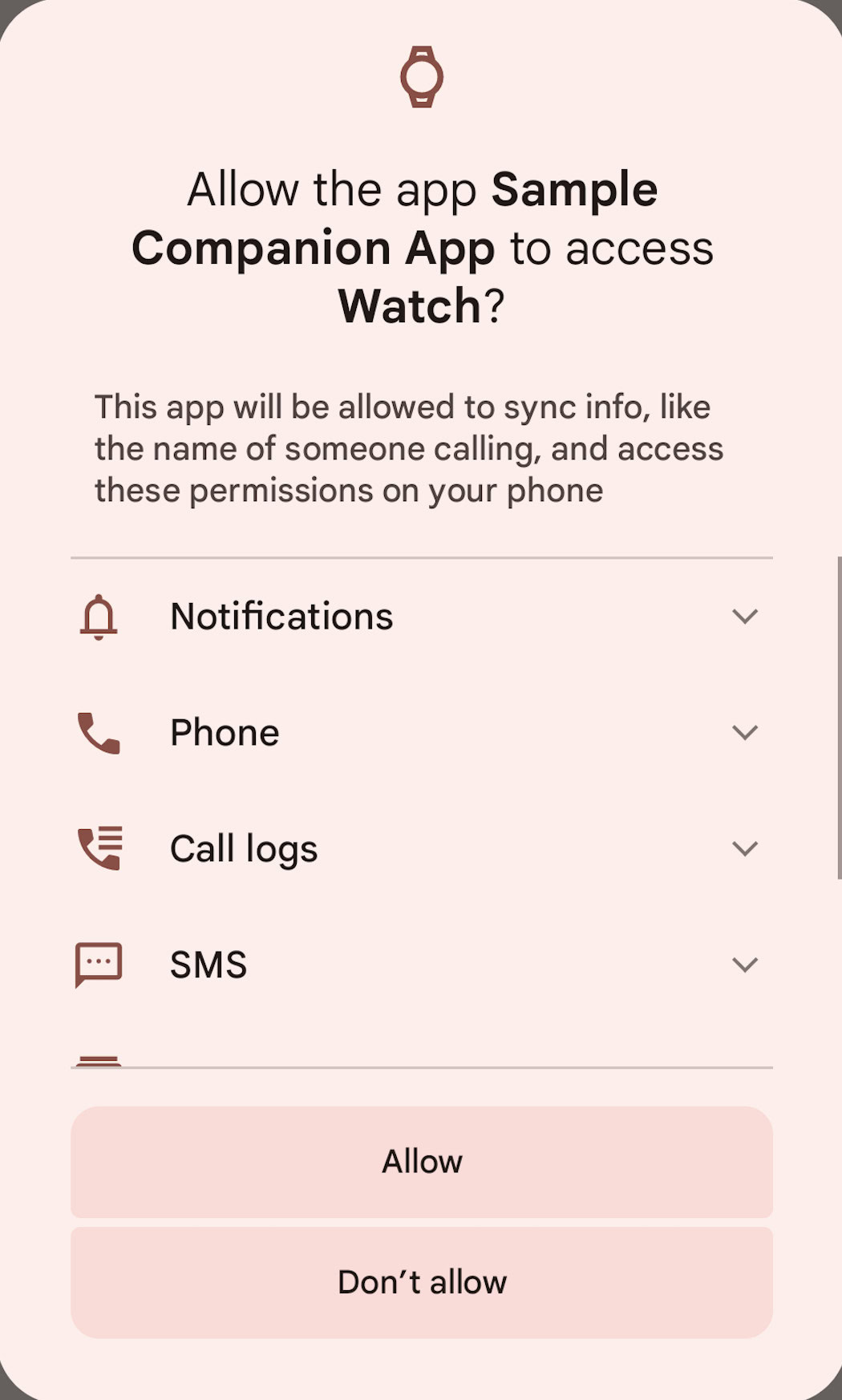
In 2021, Google introduced companion device profiles with Android 12 to simplify the setup process for apps that connect to accessories like smartwatches. Instead of requesting permissions one by one, these apps can use a device profile to show a single, bundled permission prompt.

companion device profile

Sample dialog for an app requesting to hold the COMPANION_DEVICE_WATCH role.

When a user taps “Allow,” the system associates the device with the app and grants it a predefined set of permissions for that profile. Furthermore, Android elevates the app’s process priority whenever the companion device is nearby or connected. This makes it much less likely for the OS to kill the app’s background service when memory is low.

Android currently offers two companion device profiles for third-party applications: the Watch profile and the Glasses profile. As their names suggest, these are for smartwatch and smart glass companion apps, respectively, and grant permissions necessary for posting notifications, accessing phone calls, reading SMS, and more.
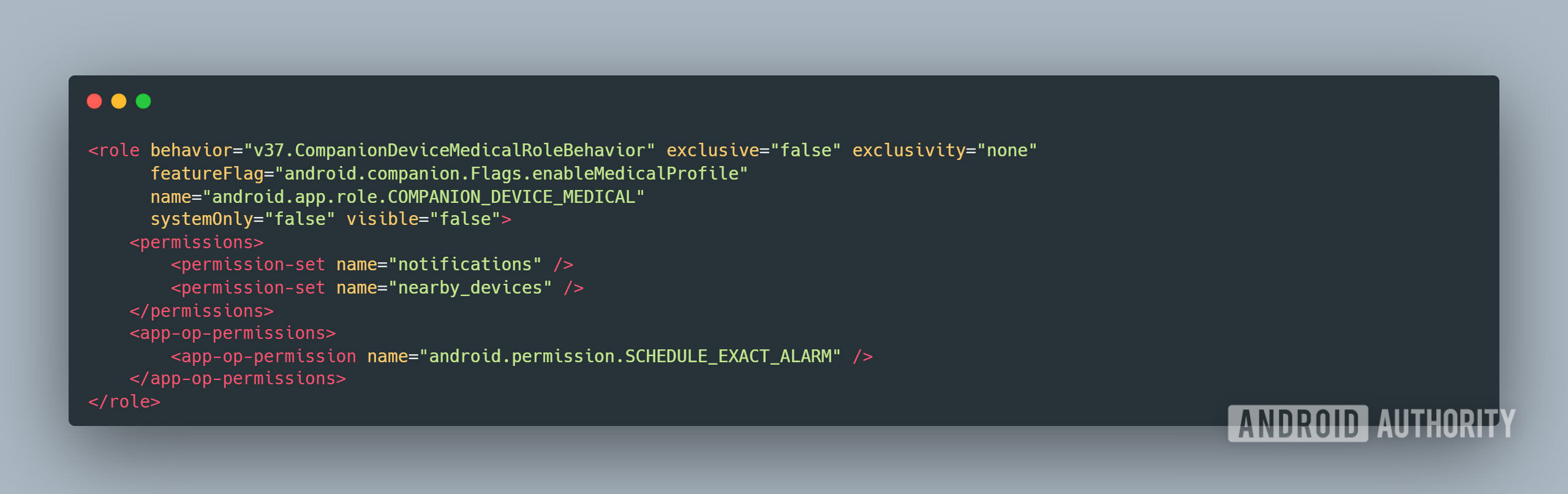
While digging through Android 16 QPR2 Beta 2, I found code for a third companion device profile for third-party apps. The new “Medical” profile is intended for companion apps to medical devices and grants permissions for posting notifications, managing Bluetooth connections, and sending alerts at precise times.

Here is the code for the new Medical profile role, followed by an explanation of each element:

Android 17 companion device medical profile


  • Behavior: The ‘v37’ prefix suggests the profile is tied to SDK version 37, which corresponds to next year’s Android 17 release. (For context, Android 16 is SDK version 36).
  • Exclusive/exclusivity: The profile is not exclusive, so multiple apps can hold this role. This makes sense, as a user might have several medical devices managed by different apps.
  • Feature flag: This determines if the role is enabled. The flag is currently off in Android 16 QPR2 Beta 2, so the Medical profile isn’t active yet.
  • System-only/visible: Third-party apps can request this role (systemOnly: false), but it won’t be visible for users to manage in Android’s Default Apps settings (visible: false).
  • Permissions:This is the most important part, defining what the app can do. The key permissions granted are:
    • Notifications: Crucial for sending critical alerts and for signaling to the OS that the app is performing important work, which helps prevent it from being killed.
    • Bluetooth: Allows the app to discover, connect with, and be discoverable by nearby medical hardware.
    • Exact Alarms: Needed for apps that must perform a task at a precise time, such as taking a scheduled sensor reading.
The new Medical role provides a standardized way for Android to recognize that an app has a critical function, ensuring it’s prioritized over standard battery and memory conservation measures. This is a significant step forward, but the profile will be most beneficial for a specific class of devices.
Companion apps for medical devices that deliver medication on an exact schedule — like insulin pumps, smart medication dispensers, and respiratory aids — will benefit the most from this role. On the other hand, devices that need to operate continuously, such as blood glucose and cardiac monitors, will still need additional permissions not covered by this profile.

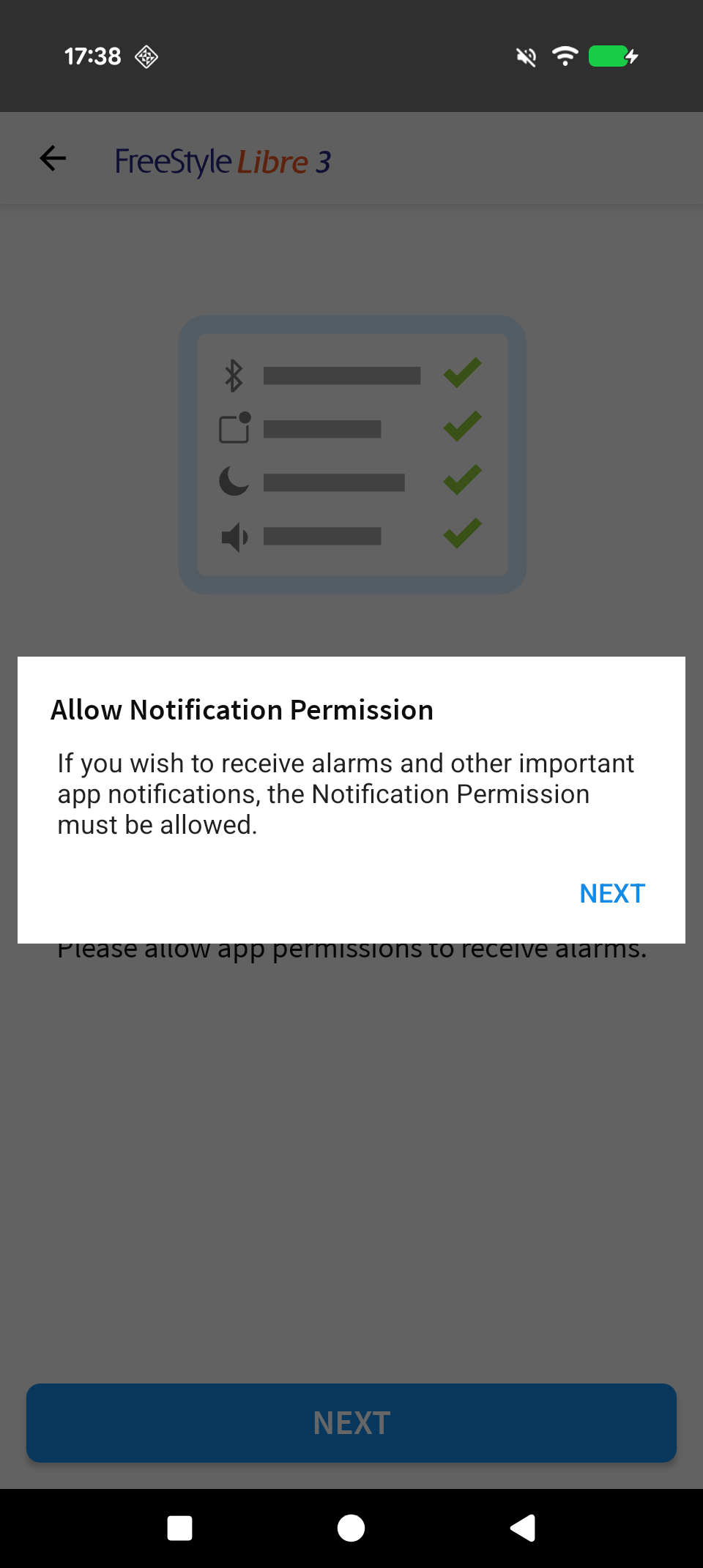
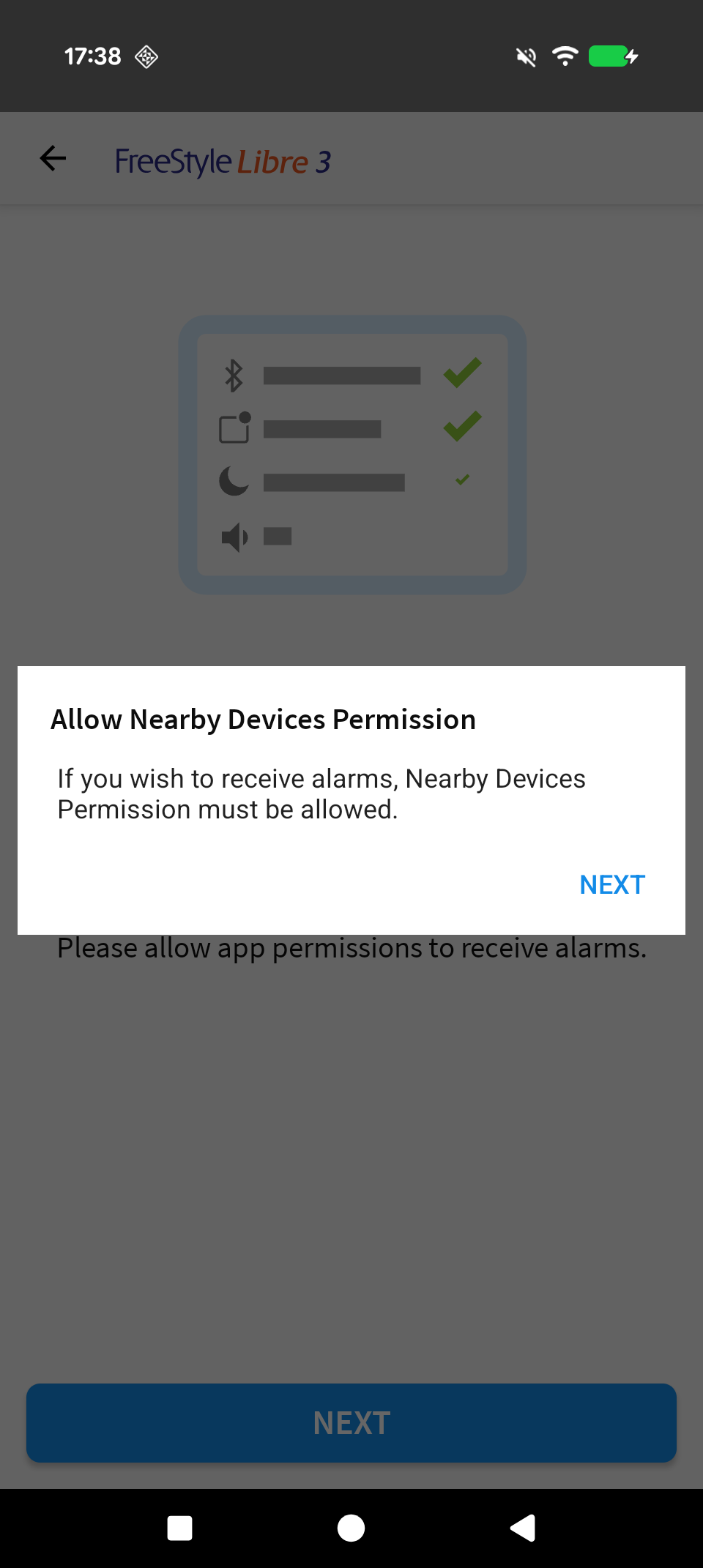
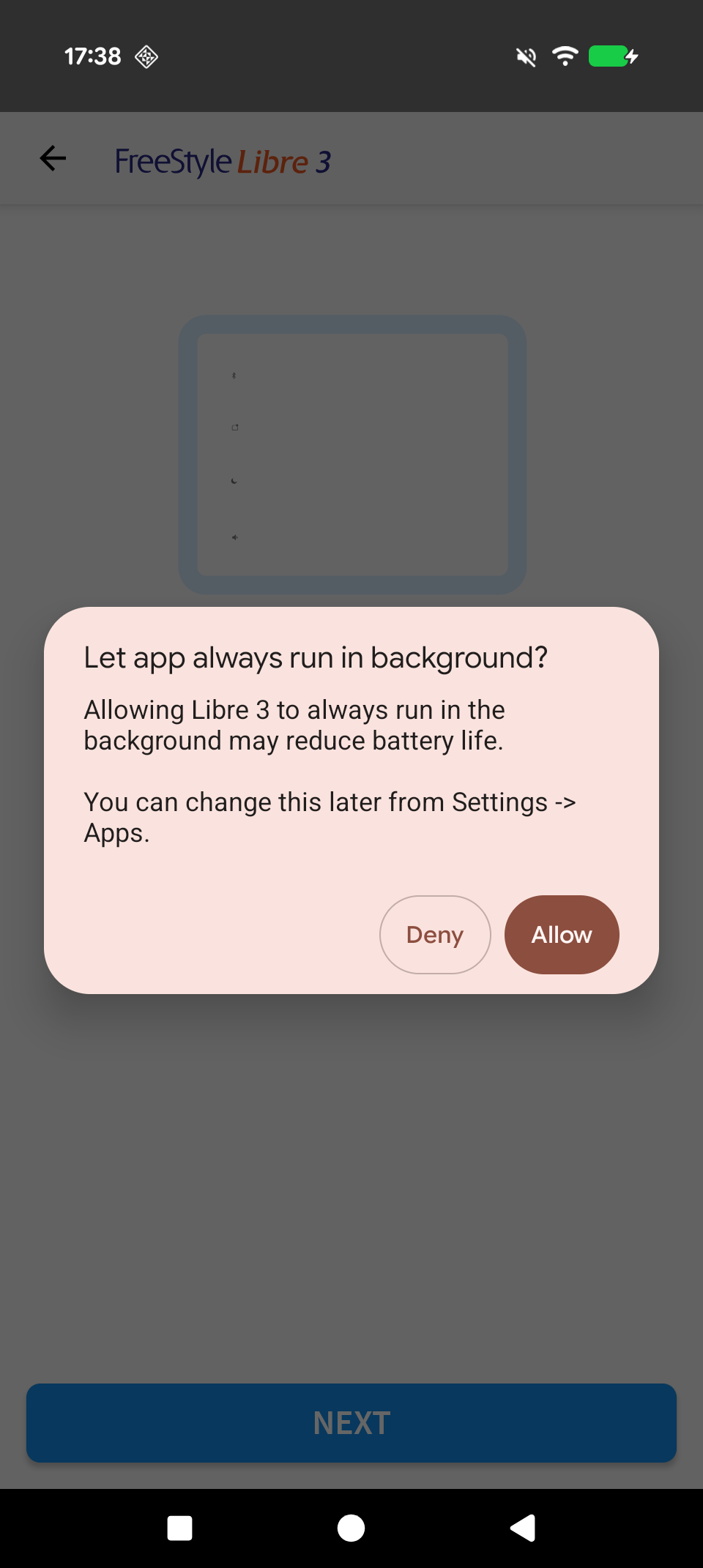
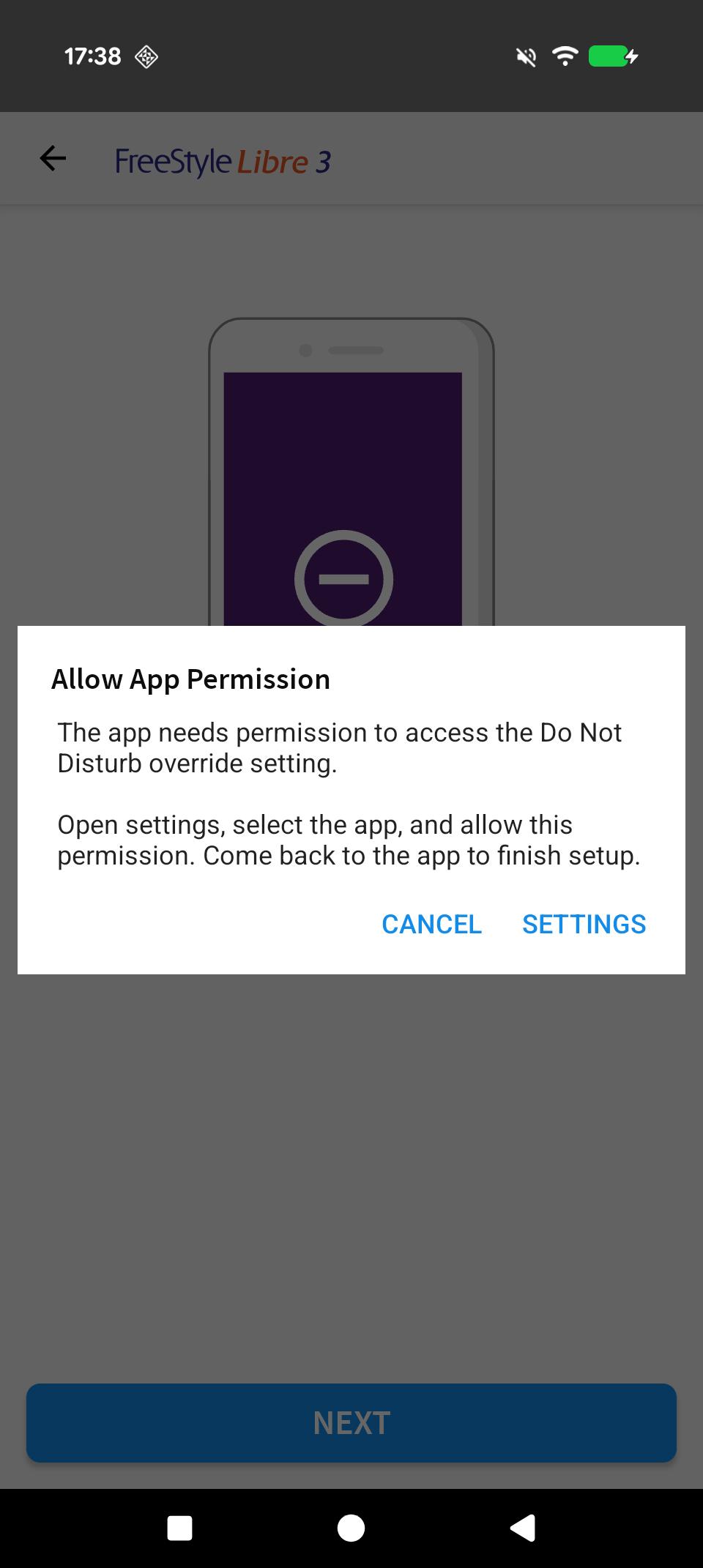
For instance, the app for the Freestyle Libre 3 glucose monitor requests permission to always run in the background and override Do Not Disturb mode so it can immediately notify users of dangerous blood sugar events. The Medical role doesn’t grant these two permissions at the moment, but perhaps that’ll change in the future.

Freestyle Libre 3 app permissions 1
Freestyle Libre 3 app permissions 2
Freestyle Libre 3 app permissions 3
Freestyle Libre 3 app permissions 4


In any case, we’re glad to see Google finally give medical devices some much-needed attention. As medical devices become smarter, so too should our smartphones’ handling of them. Google has to carefully balance battery life and privacy when designing Android, but these measures often conflict with the needs of medical devices. Apps currently have to work around many of Android’s restrictions, but hopefully, they’ll be treated as first-class citizens in Android 17.
 

limmk

High Supremacy Member
Joined
Jul 5, 2001
Messages
38,484
Reaction score
7,869
TL;DR
  • Google is developing a native color picker tool called “EyeDropper” that is expected to be released with Android 17.
  • This new app will provide a system-wide API, allowing any app to let users select a specific color from their screen and get its value.
  • The tool is designed for both touchscreens and desktop modes, with logic to handle multiple displays when a mouse and keyboard are detected.


For professionals who work with images and videos, knowing the exact colors they’re dealing with is critical. Eyeballing it isn’t always enough, as many jobs require precise color reproduction. That’s why hexadecimal codes are often used to represent colors, providing a standard way to accurately replicate them across different software. While most professional apps and web browsers have built-in color pickers that can grab these codes, Android currently lacks this feature. That could change in next year’s Android 17 release, though.

While looking through the new 2510 Android Canary update that Google released this week, I discovered a new system application named “EyeDropper.” It’s a small, simple app with a single purpose: providing a public API for other Android apps to implement a color picker. This new, native solution means developers will no longer need to build their own in-app color pickers or import third-party libraries, which will simplify development, save time, and slightly reduce the file size of their apps.

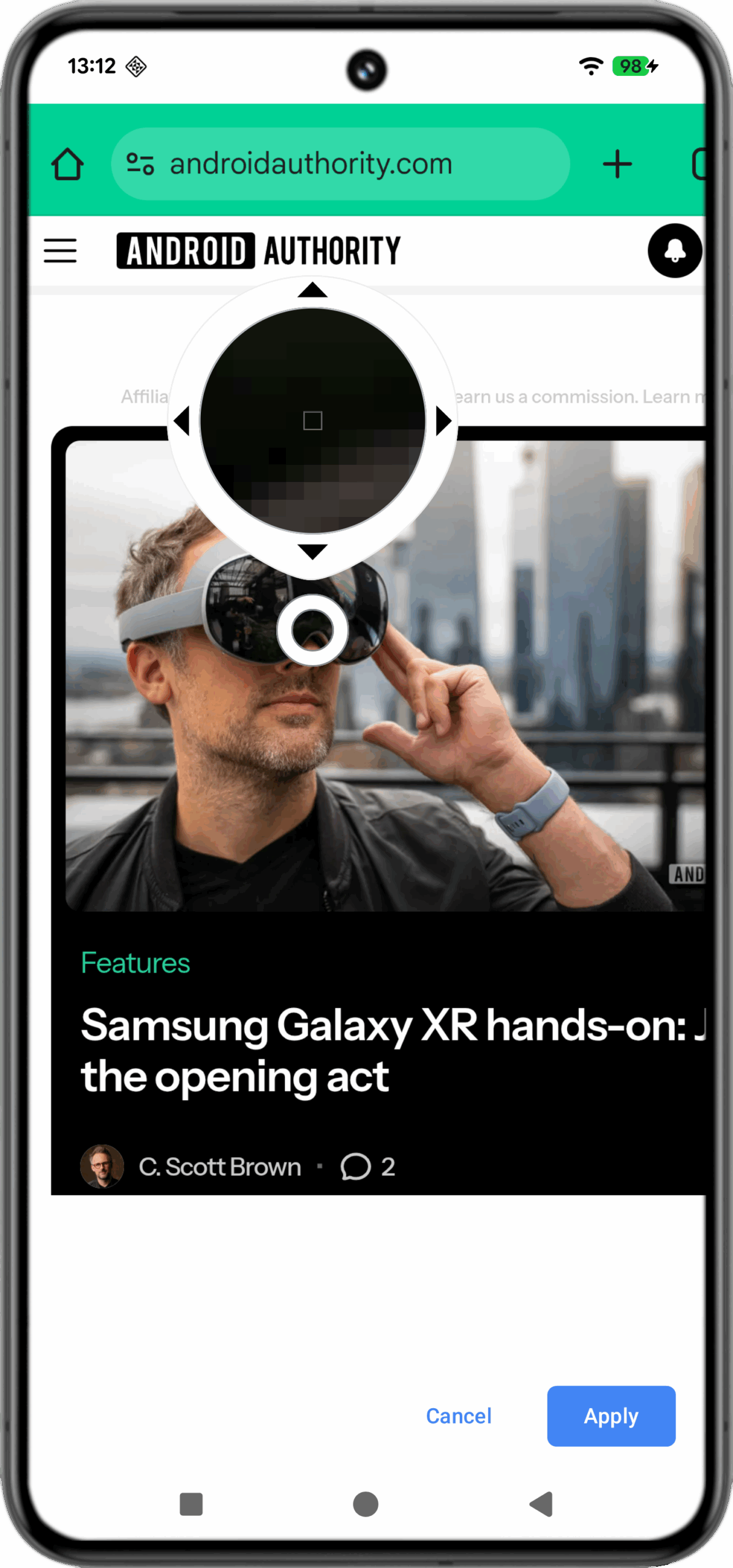
The API works by having an app send a specific Intent (android.intent.action.OPEN_EYE_DROPPER) — a message requesting an action from another app — to the EyeDropper app. In response, EyeDropper launches an activity with a capture of the current screen and a selector that the user can move to choose their desired color. For example, a photo editor app could use this API to let a user retrieve the exact color value of a specific pixel in an image.

Android color picker screenshot


Here’s a quick demo of the EyeDropper app. As you can see, it lets you move a cursor over a static capture of the screen. A magnified window above the cursor shows the exact pixel being selected, and you can use the on-screen arrow keys for precise, one-pixel adjustments. When you’re done, you tap the “Apply” button to return to the app that called the EyeDropper. You won’t see a color value in the demo, however. Since I invoked the app manually, there was no calling app to receive the color code; normally, it would be returned directly to the app that sent the request.


Google clearly has its ‘Android on PCs‘ project in mind with this app, as it not only implements functionality from Chrome’s desktop version but also accounts for large-screen Android devices. For example, when launched, the app checks for connected peripherals to determine its operating mode. If it detects a mouse and keyboard, it assumes a desktop environment and activates logic to handle multiple displays. Otherwise, it defaults to a touchscreen interface.

Although we spotted the EyeDropper app in the latest Android Canary release, we don’t expect it to appear in the upcoming Android 16 QPR2 or QPR3 updates. The feature requires a new API for apps, and the window for adding new APIs in Android 16 has closed. Android 16 QPR2 reached Platform Stability last month, and QPR3 will not introduce new APIs, so the earliest we’ll likely see this is in Android 17.

While Google could potentially introduce this to existing devices through a Google Play System Update, there’s currently no indication it plans to do so. A lot can happen between now and Android 17’s release, though, but we’ll keep you updated if we learn anything new.
 

limmk

High Supremacy Member
Joined
Jul 5, 2001
Messages
38,484
Reaction score
7,869
TL;DR
  • Google is developing a new “Min Mode” feature for the Always-On Display that will allow apps to show their own minimal, persistent interfaces.
  • This enables richer, glanceable experiences, with Google Maps expected to be one of the first apps to use it for low-power navigation.
  • The feature uses the same ultra-low-power display state as AOD to save battery and will likely be introduced as a new developer API in Android 17.


Most Android phones have an optional feature called always-on display (AOD) that, as its name implies, keeps your phone’s screen on at all times. This feature is handy because it lets you see the time and new notifications at a glance, though it does drain some extra battery. While Android’s new Live Updates feature lets you see more from certain notifications on the AOD, they can only show so much, forcing you to pick up your phone to get the full picture. To solve this problem, Google is working on a major evolution of the AOD in Android 17 that could allow apps to fully integrate with it.

Recently, I discovered references to a new Android feature called “Min Mode.” Code for this feature resides in Android’s SystemUI package, which is, quite literally, “everything you see in Android that’s not an app.” SystemUI is a persistent process that provides the UI for a variety of system components, such as the status bar, notifications panel, Quick Settings panel, recents menu, volume panel, lock screen, and, most relevantly, the AOD.

Min Mode is specifically part of the AOD’s code, and based on my analysis, it appears to let Android apps persistently display their own specialized, minimal interfaces. Google hasn’t officially detailed Min Mode yet, but here’s what I’ve pieced together from the latest version of SystemUI in the 2510 Android Canary release.

First, I’ve learned that Min Mode is not a replacement for the AOD but rather a new, separate version. It still uses the same ultra-low-power display state as the regular AOD, meaning brightness, refresh rate, and colors are limited. However, instead of the clock and notifications, it displays a full-screen application. While Android will typically show the regular AOD when the screen times out, it can transition to the new Min Mode AOD if an app requests it.

Google Pixel Always on Display with Wallpaper Active
The existing, regular AOD interface on a Pixel 10.

Speaking of which, my code analysis suggests the Min Mode feature is application-aware. It checks which application and activity were running before the screen turned off and which component is set to display when the AOD activates. Applications designate this component by registering a “MinModeActivity” in their Manifest file. They will communicate with the exported “MinModeProvider” in SystemUI to register this activity and request the feature’s activation. The system then displays that component on the AOD and prevents screen burn-in by shifting every pixel by one position every 60 seconds.

Code:
<integer name="minmode_burnin_interval_ms">60000</integer>
<integer name="minmode_burnin_shift_px">1</integer>
<integer name="minmode_burnin_padding">5</integer>

Essentially, Min Mode appears to be a mechanism for enabling persistent live activities on Android. Apps can provide minimal, AOD-compliant activities for the OS to display while the device is idle, enabling richer, more glanceable experiences without sacrificing battery life. This is perfect for things like Google Maps navigation, which can heavily drain the battery because of its simultaneous use of location services, mobile data, and the display.

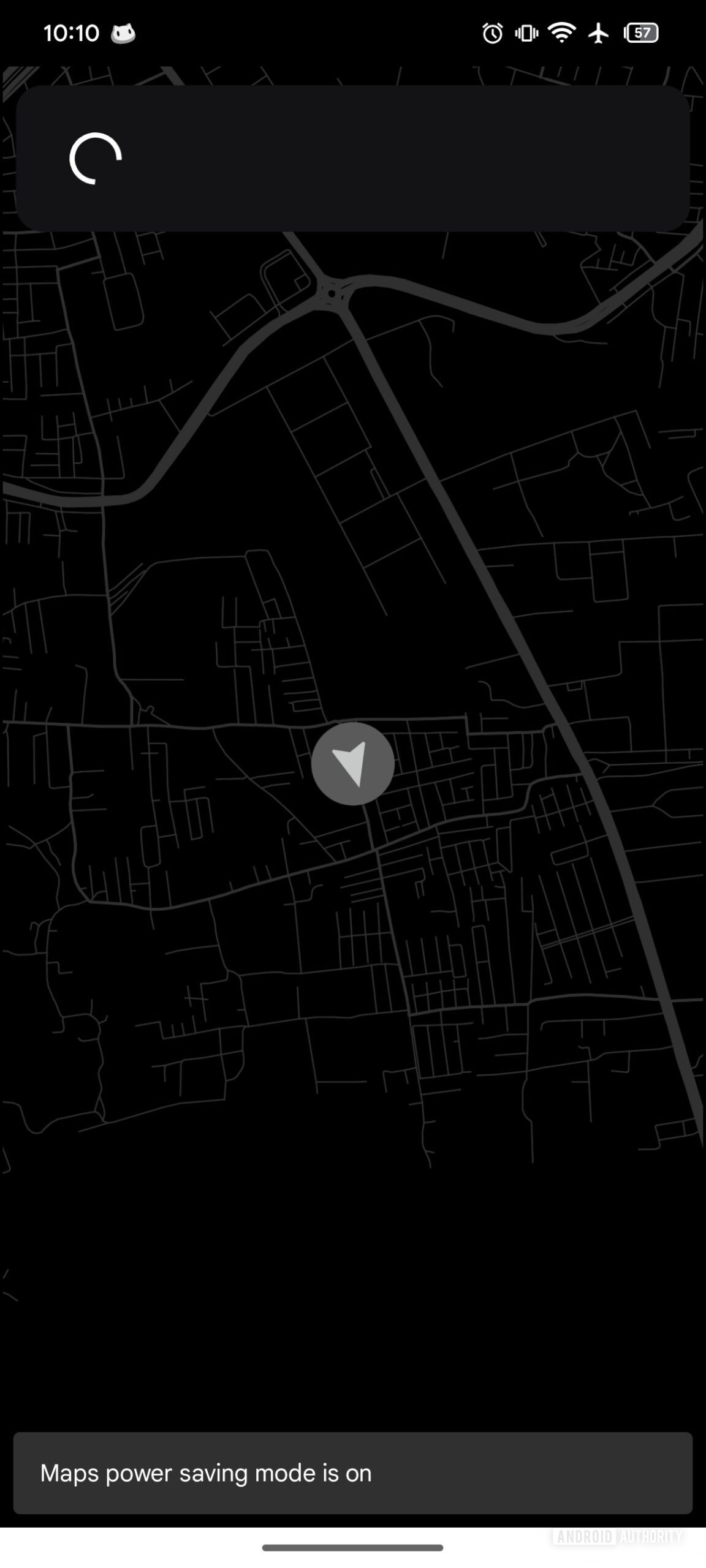
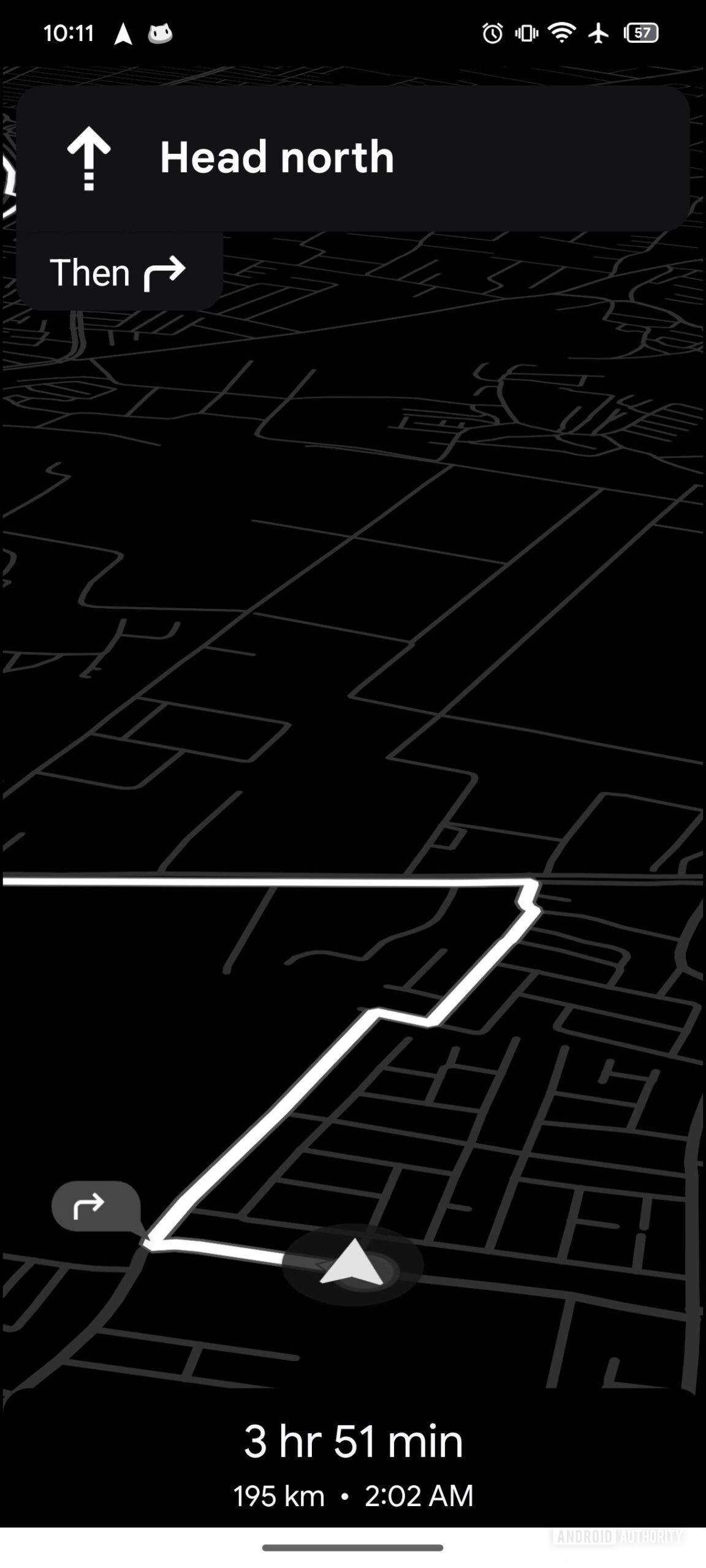
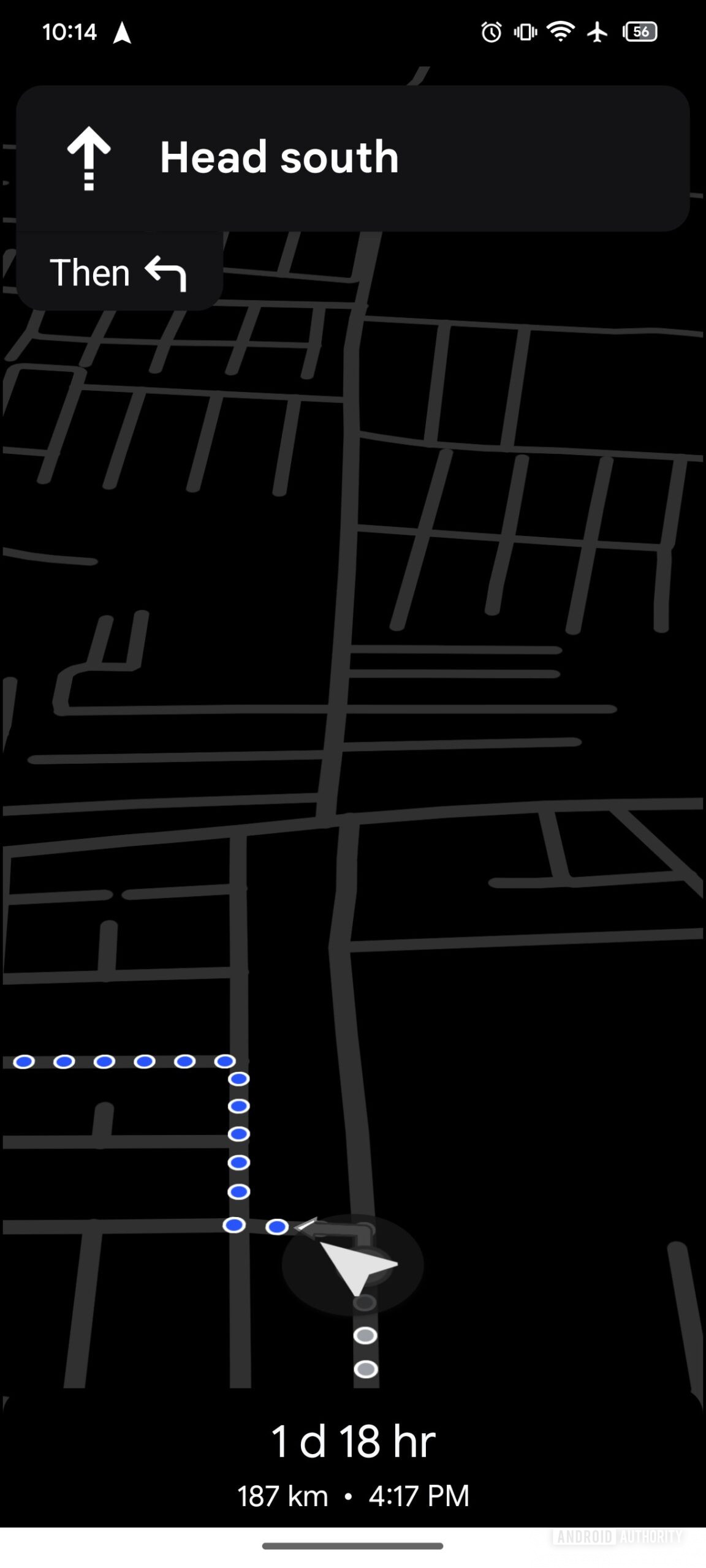
In fact, we recently spotted evidence that Google Maps might be one of the first apps to use the new AOD Min Mode. My colleagues discovered that Google Maps is developing an extremely minimalist power-saving mode that strips away almost all UI elements and makes the interface monochrome.

maps power save 2
maps power save 3
maps power save 4


On the surface, there’s nothing directly tying this new power-saving mode to the AOD Min Mode feature I discovered. But digging deeper confirms the connection. For one, the feature’s activity name is “com.google.android.apps.gmm.features.minmode.MinModeActivity.” The code also checks whether AOD Min Mode is enabled at a system level, among other things.

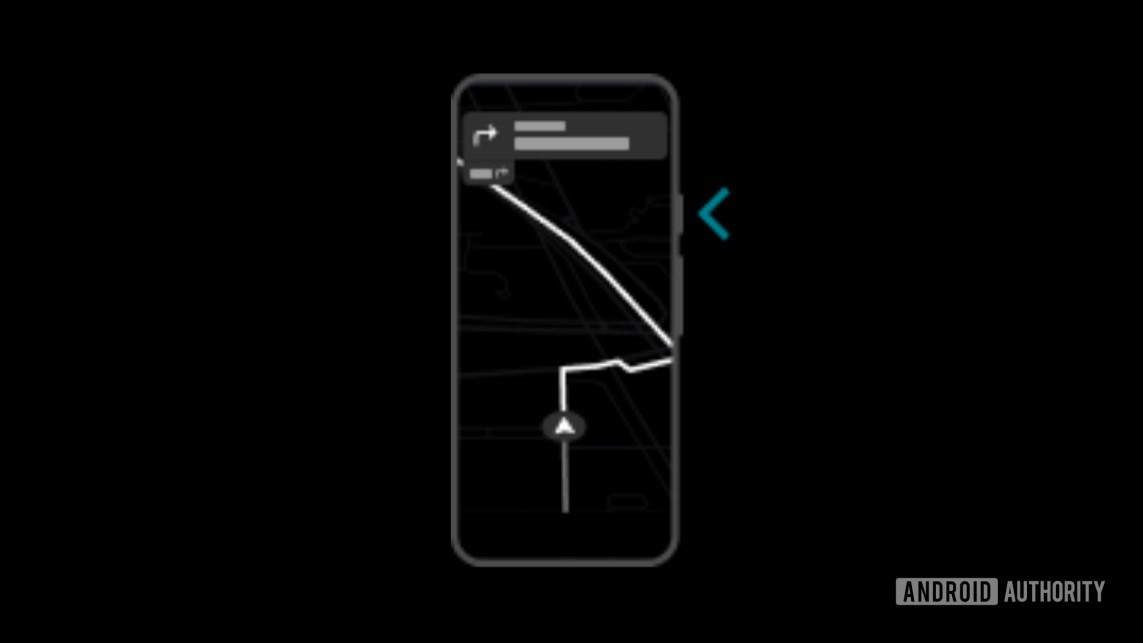
Another strong indicator is a string informing the user that this power-saving mode can’t be used in landscape. This makes sense, as the AOD is limited to portrait mode, so a feature built on it would have the same restriction. Plus, an introductory illustration we found for the feature suggests it’s activated by pressing the phone’s power button — something my colleagues thought was odd but makes perfect sense in light of the AOD Min Mode connection.

maps power save 1


Thus, I’m fairly confident that Google Maps is preparing to use Android’s new AOD Min Mode to display turn-by-turn navigation in a low-power format. The feature is currently disabled at a system level and likely won’t be ready until next year’s Android 17 release, though, so we probably won’t see Google Maps’ new power-saving mode go live until then. I believe AOD Min Mode will be reserved for Android 17 because it appears to be a feature other developers could use, meaning Google will likely open it up as an API. Since Android 16 QPR3 won’t introduce new developer APIs, Android 17 is the most likely release for this feature.

We’ll be keeping an eye on this new AOD Min Mode feature and Google Maps’ power saving mode to see if we can find more information. Subscribe to our Authority Insights newsletter and podcast to stay informed, and let us know in the comments below what you think of these new features!
 

limmk

High Supremacy Member
Joined
Jul 5, 2001
Messages
38,484
Reaction score
7,869
TL;DR
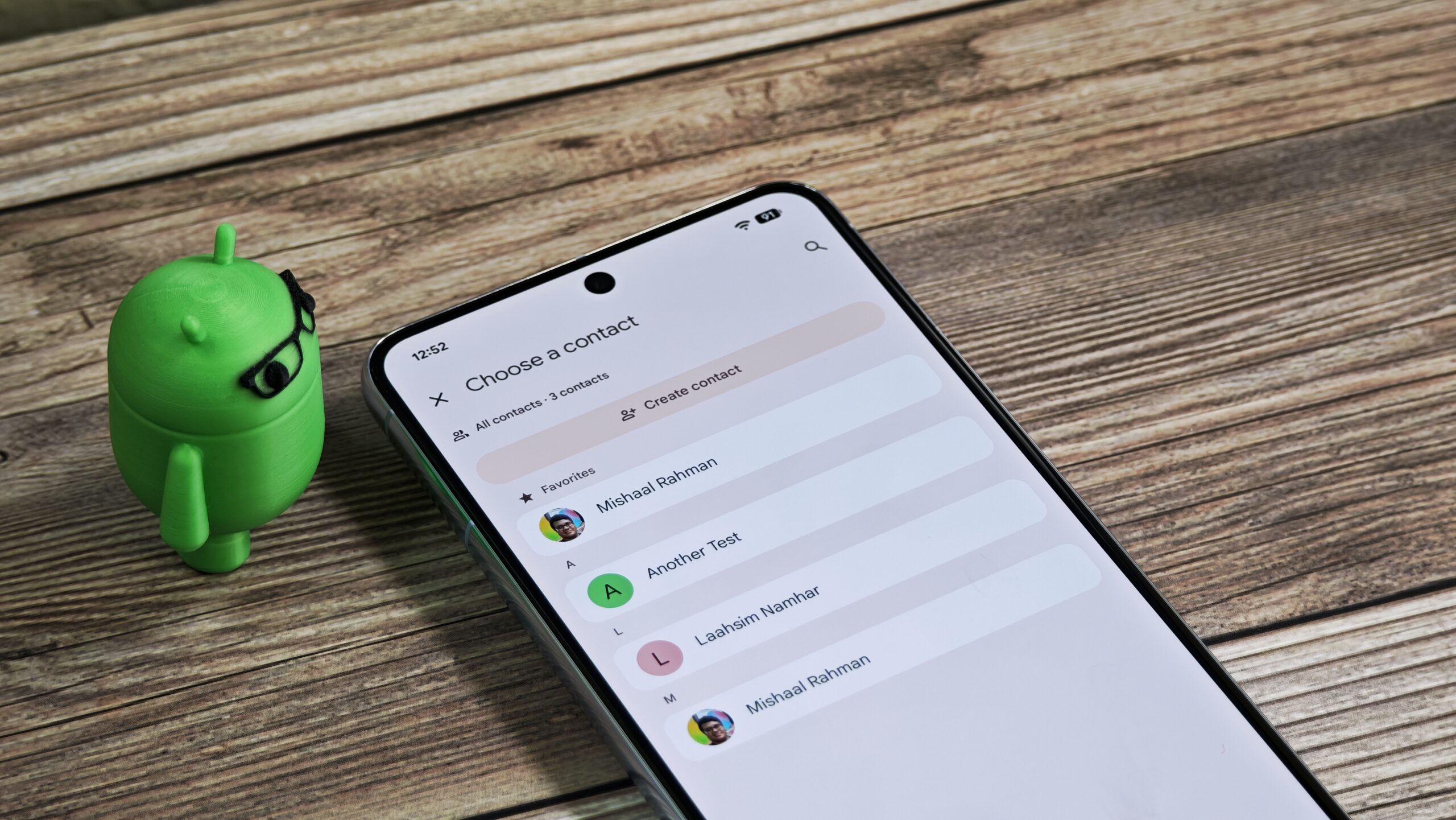
  • Google is developing a new Contacts Picker tool for Android 17 to fix the current all-or-nothing contacts permission.
  • This tool will allow you to share specific contacts with an app, rather than your entire contacts list.
  • Access will be a one-time snapshot, and apps can request only the specific data fields they need.


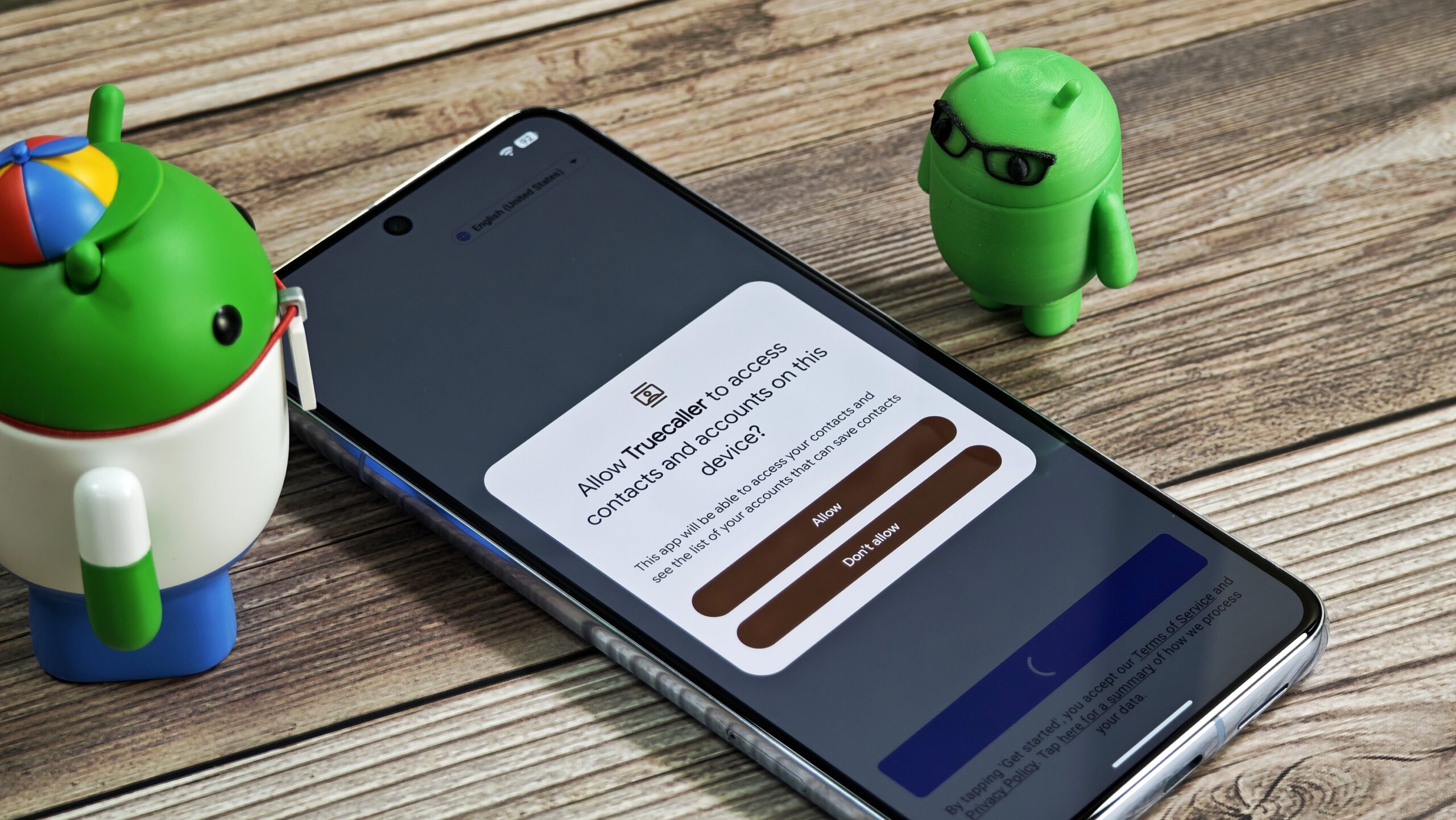
Your device’s contacts list holds a treasure trove of sensitive data that many apps want to get their hands on. Fortunately, Android’s permissions system prevents apps from accessing your contacts without your knowledge. Unfortunately, it’s an all-or-nothing system: You either grant an app access to all your contacts or none of them. This is highly problematic because it forces you to grant many apps full access to your contacts even if they don’t need it. Next year’s Android 17 update could tackle this problem by introducing a system Contacts Picker tool that allows you to select specific contacts to share with an app, rather than giving it access to your entire contacts list.

How Android apps currently read your device’s contacts​

Every Android phone has a centralized, local database of contacts. The operating system guards access to this database to prevent apps from reading it directly. Instead, apps must interact with the Contacts Provider, a system component that provides APIs for retrieving or modifying information in the contacts database. To use these APIs, applications must hold the READ_CONTACTS permission to read data and the WRITE_CONTACTS permission to write it.

The problem with this approach, as I mentioned, is that it’s all-or-nothing. An app either gets full read or write access to your entire contacts list, or it gets no access at all. While messaging and social media apps might have a legitimate need to see all your contacts, many other apps only need to access one, two, or just a handful. However, because of how Android currently manages contacts access, these apps have no choice but to request broad permissions.

Contacts permission prompt on Android


While the permission model is the most common method, there is technically another way for an app to access contacts. Instead of interfacing with the Contacts Provider directly, an app can use an intermediary — the system’s default contacts app — to read information about a contact. Since the contacts app already has full access to the contacts database, it can safely retrieve this information on behalf of other apps without requiring a new permission prompt.

However, this approach is riddled with flaws. First, there isn’t a single, unified contacts app across all Android devices. Although Google provides a reference app in the Android Open Source Project (AOSP), most manufacturers either create their own (like Samsung) or use Google’s Contacts app. This fragmentation means the contact-picking experience can be inconsistent, creating complications for developers.

Second, this method only allows an app to pick a single contact at a time. If an app needs more than one, it has to repeatedly ask the user, which is a frustrating experience. Third, there’s no way for you to limit what information about a contact gets shared. Finally, the underlying API has issues, with many developers finding they need to request the broad READ_CONTACTS permission anyway to avoid problems.

Single contact picker UI in Google Contacts for Android


These shortcomings are likely why Google is developing a new system Contacts Picker tool for Android 17. This move would follow a similar change Apple introduced to iOS last year.

How Google will improve privacy with Android 17’s Contacts Picker​

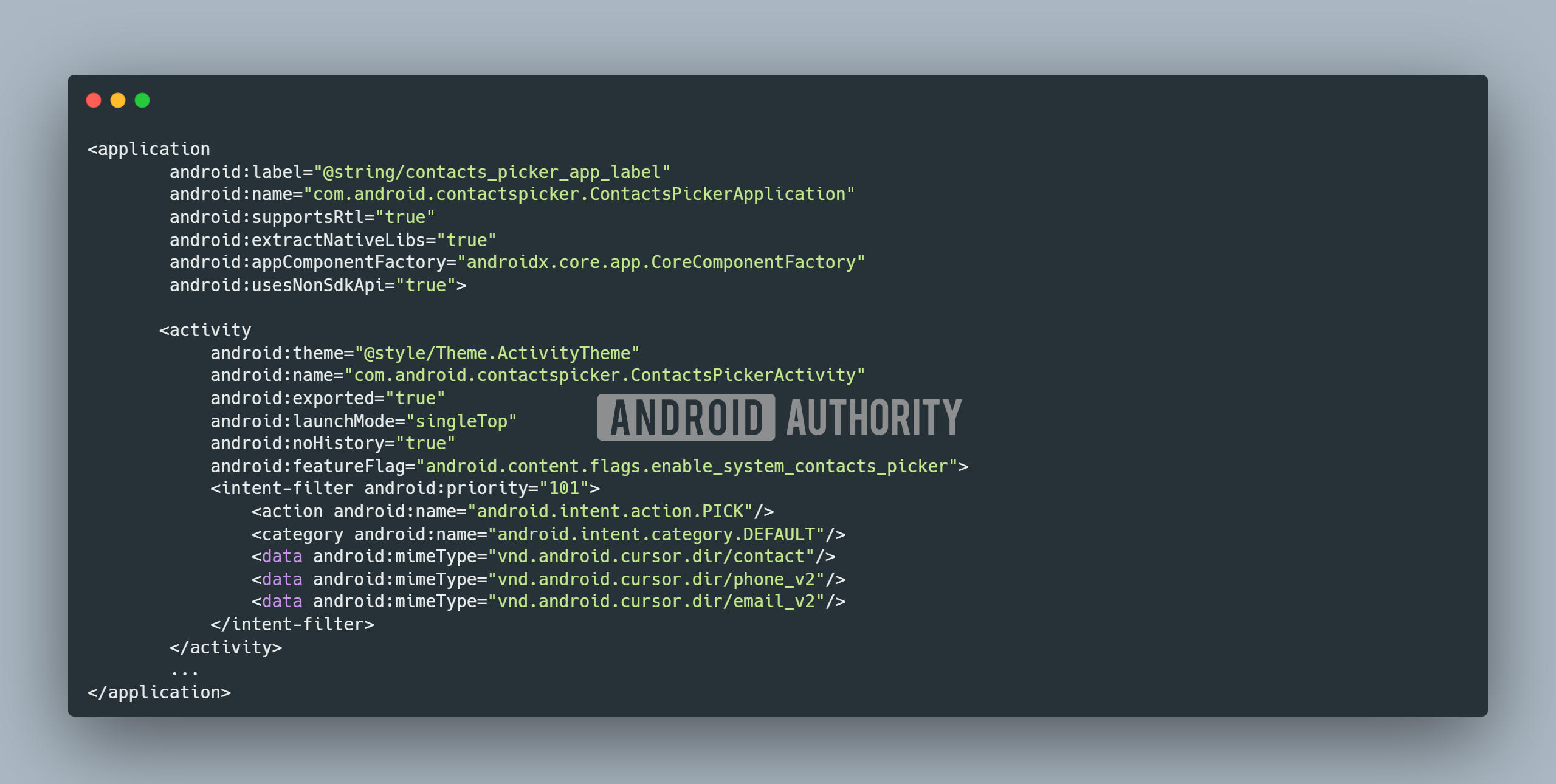
Google is developing a new, dedicated “Contacts Picker” application, as I discovered in the latest Android Canary release. This app provides a new, privacy-preserving way for other apps to select contacts, similar to how Android’s Photo Picker works for media selection. Under the hood, the new Contacts Picker is registered to handle the standard system request for selecting contacts (ACTION_PICK with the vnd.android.cursor.dir/contact, phone_v2, email_v2 MIME types), but it’s configured with a higher priority (101) to ensure it takes precedence over the device’s default contacts app.

Contacts Picker Manifest


Strings within the Contacts Picker app reveal that you’ll be able to select one or more contacts to share with an app at a time. The app will then get access to all the available information for the contacts you select, such as their address, birthday, email, and name. Crucially, this access appears to be a one-time snapshot. The app will not receive any subsequent updates you make to a contact’s information, further protecting your privacy by preventing apps from tracking changes over time.

Code:
<string name="privacy_banner_description">%1$s will only have access to info from the contacts you select</string>
<string name="privacy_details_description">When you select a contact, %1$s will have access to the following info from your device contacts.\n\nIf you make any updates to the contact info, %1$s won’t have access to the changes.</string>
<string name="privacy_details_contact_data_fields_list_header">Contact info can include details such as:</string>
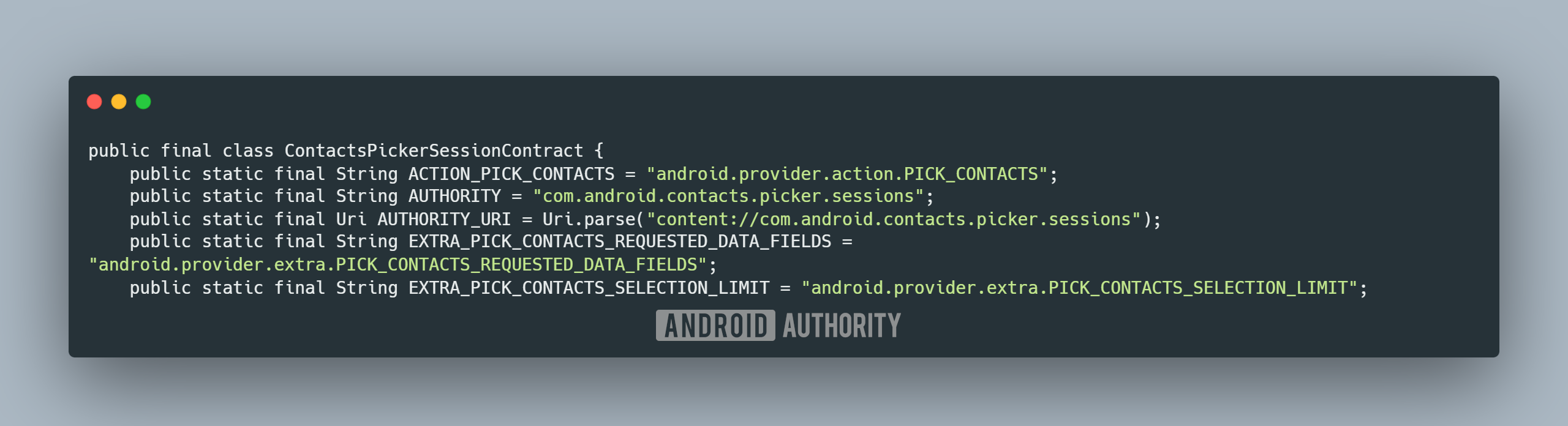
New code within the OS reveals additional information about how the system Contacts Picker will work. The ContactsPickerSessionContract class shows that Android 17 is adding a new, dedicated Intent action called ACTION_PICK_CONTACTS. This will give apps the ability to directly invoke the new Contacts Picker.

More importantly, this new action includes Intent extras that will allow apps to be much more specific

Contacts Picker Session Contact class in Android 17


about what they need. For example, they can:
  • Limit how many contacts the user can select at once using EXTRA_PICK_CONTACTS_SELECTION_LIMIT.
  • Specify what specific data fields they need (e.g., only phone numbers) using EXTRA_PICK_CONTACTS_REQUESTED_DATA_FIELDS.

This gives developers a granular way to request access to only the necessary data from one or more contacts, a significant improvement for user privacy.

The new Contacts Picker is clearly a work in progress. In its current state, it doesn’t yet handle the new ACTION_PICK_CONTACTS Intent. We also know it’s not yet active, as the feature is hidden behind a disabled flag in the latest Canary release.

Google is likely targeting Android 17 for this feature’s debut, since it introduces a new API and changes a common intent that many apps use. This is supported by code within the Contacts Picker app that checks the SDK version of the calling app. For apps built for Android 17 and later, the new Contacts Picker will handle the request; for older apps, the request will be forwarded to the device’s default contacts app to maintain compatibility.

However, this new approach has one major hurdle: it’s optional. Nothing will stop developers from continuing to request broad access to your contacts anyway. For this feature to make a real difference, apps must be updated to use the new Contacts Picker. While some privacy-conscious developers will adopt it quickly, many will not.

To drive widespread adoption, Google will likely need to follow the same playbook it used for the Photo Picker. This would involve backporting the feature to older Android versions, providing support through its AndroidX library, and eventually enforcing its use through Google Play policies. If Google takes these steps, the Contacts Picker could become a significant privacy win for all Android users.
 

limmk

High Supremacy Member
Joined
Jul 5, 2001
Messages
38,484
Reaction score
7,869
TL;DR
  • Strong evidence has surfaced confirming that “Cinnamon Bun” is the internal dessert codename for Android 17.
  • A reference to “CINNAMON_BUN” was discovered within the code of the latest Android Canary release.
  • The OS is currently using the placeholder API level 10000, but it will eventually graduate to API level 37.


Development on Android 17 is well underway, but we still don’t know much about the next major OS update. While we have an inkling about some of its potential new features, we lack concrete evidence confirming they’ll be included. We’ve even heard through the grapevine that Android 17’s dessert codename is “Cinnamon Bun,” but without official confirmation, we couldn’t be sure. Fortunately, we’ve now found strong evidence confirming that “Cinnamon Bun” is indeed the internal moniker.

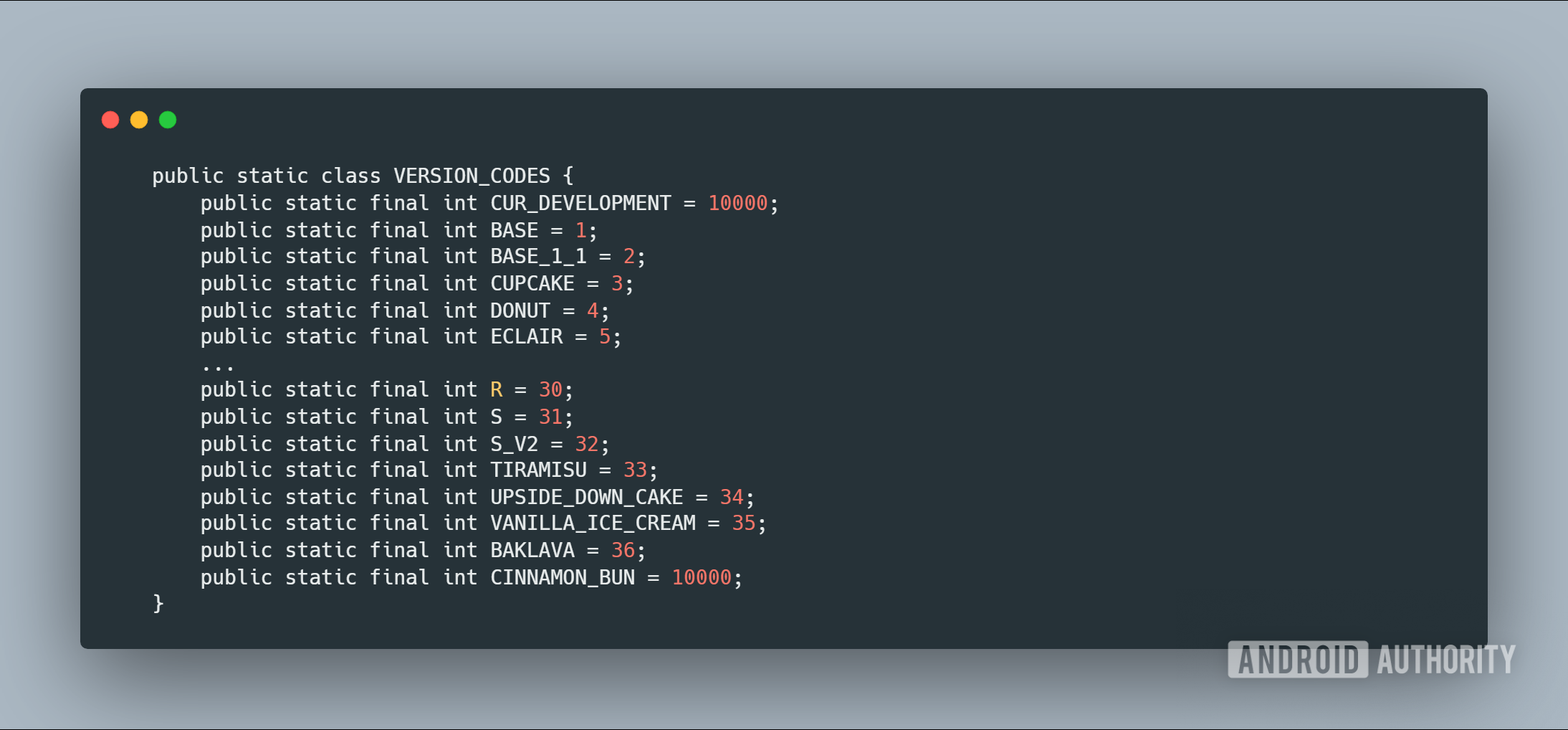
While digging through the latest 2511 Android Canary release — the latest preview build that offers a taste of future Android features — I discovered the first public mention of “Cinnamon Bun” in Android code. Specifically, android.os.Build now lists “CINNAMON_BUN” as a valid Android version.

Android version codes from android.os.build


“CINNAMON_BUN” has been assigned the version code “10000.” This number represents the API level, a unique identifier for each Android version. Google uses API levels to clearly delineate features and behaviors, helping developers understand what’s available and how system changes might affect their apps.

Normally, Google increments the API level sequentially for each major release. Since Android 16 is API level 36, Android 17 will eventually become API level 37. However, that won’t happen until the OS reaches what’s called “Platform Stability” next year, which is when all APIs and app-facing system behaviors are finalized. Until then, it will stick with the “10000” placeholder — the “magic version number” for a current development build that hasn’t yet become an official release.

We’ve known for a while that “Cinnamon Bun” was the likely codename; the very first edition of my Authority Insights Newsletter even mentioned it. However, since we relied on unnamed sources, some people were skeptical. This new code finding should finally put those doubts to rest.

We can now confirm that Cinnamon Bun is Android 17’s codename, but does that change anything? Honestly, no. Google stopped publicly referring to Android versions by dessert names with Android 9 Pie in 2018, so this remains a fun bit of trivia for hardcore Android nerds. Now, if you’ll excuse me, I’m going to indulge in a tasty cinnamon bun.
 

Loser

Arch-Supremacy Member
Joined
May 7, 2019
Messages
23,503
Reaction score
10,419
TL;DR
  • Strong evidence has surfaced confirming that “Cinnamon Bun” is the internal dessert codename for Android 17.
  • A reference to “CINNAMON_BUN” was discovered within the code of the latest Android Canary release.
  • The OS is currently using the placeholder API level 10000, but it will eventually graduate to API level 37.


Development on Android 17 is well underway, but we still don’t know much about the next major OS update. While we have an inkling about some of its potential new features, we lack concrete evidence confirming they’ll be included. We’ve even heard through the grapevine that Android 17’s dessert codename is “Cinnamon Bun,” but without official confirmation, we couldn’t be sure. Fortunately, we’ve now found strong evidence confirming that “Cinnamon Bun” is indeed the internal moniker.

While digging through the latest 2511 Android Canary release — the latest preview build that offers a taste of future Android features — I discovered the first public mention of “Cinnamon Bun” in Android code. Specifically, android.os.Build now lists “CINNAMON_BUN” as a valid Android version.

Android version codes from android.os.build


“CINNAMON_BUN” has been assigned the version code “10000.” This number represents the API level, a unique identifier for each Android version. Google uses API levels to clearly delineate features and behaviors, helping developers understand what’s available and how system changes might affect their apps.

Normally, Google increments the API level sequentially for each major release. Since Android 16 is API level 36, Android 17 will eventually become API level 37. However, that won’t happen until the OS reaches what’s called “Platform Stability” next year, which is when all APIs and app-facing system behaviors are finalized. Until then, it will stick with the “10000” placeholder — the “magic version number” for a current development build that hasn’t yet become an official release.

We’ve known for a while that “Cinnamon Bun” was the likely codename; the very first edition of my Authority Insights Newsletter even mentioned it. However, since we relied on unnamed sources, some people were skeptical. This new code finding should finally put those doubts to rest.

We can now confirm that Cinnamon Bun is Android 17’s codename, but does that change anything? Honestly, no. Google stopped publicly referring to Android versions by dessert names with Android 9 Pie in 2018, so this remains a fun bit of trivia for hardcore Android nerds. Now, if you’ll excuse me, I’m going to indulge in a tasty cinnamon bun.

Are they calling us... CBs? :s14:
 

limmk

High Supremacy Member
Joined
Jul 5, 2001
Messages
38,484
Reaction score
7,869
TL;DR
  • Google may be working on a native App Lock feature for Android 17 that lets users secure specific apps without the restrictions of Private Space.
  • This new API allows the default launcher to lock apps, eliminating the need to use third-party app lockers.
  • We spotted code for this feature in a recent Android Canary build, though it isn’t expected to officially launch until next year’s major update.


People store a lot of sensitive data on their Android phones, so it’s no wonder they are reluctant to hand them over to anyone they don’t trust. Even if you are comfortable letting a friend or family member borrow your device, you probably still have data you don’t want them to see. Locking down specific apps is a great way to protect your privacy, but the core Android OS still lacks a native way to do this, forcing many users — especially of Pixel devices — to rely on third-party tools. Fortunately, Google may finally address this in next year’s Android 17 update by adding a new App Lock feature.

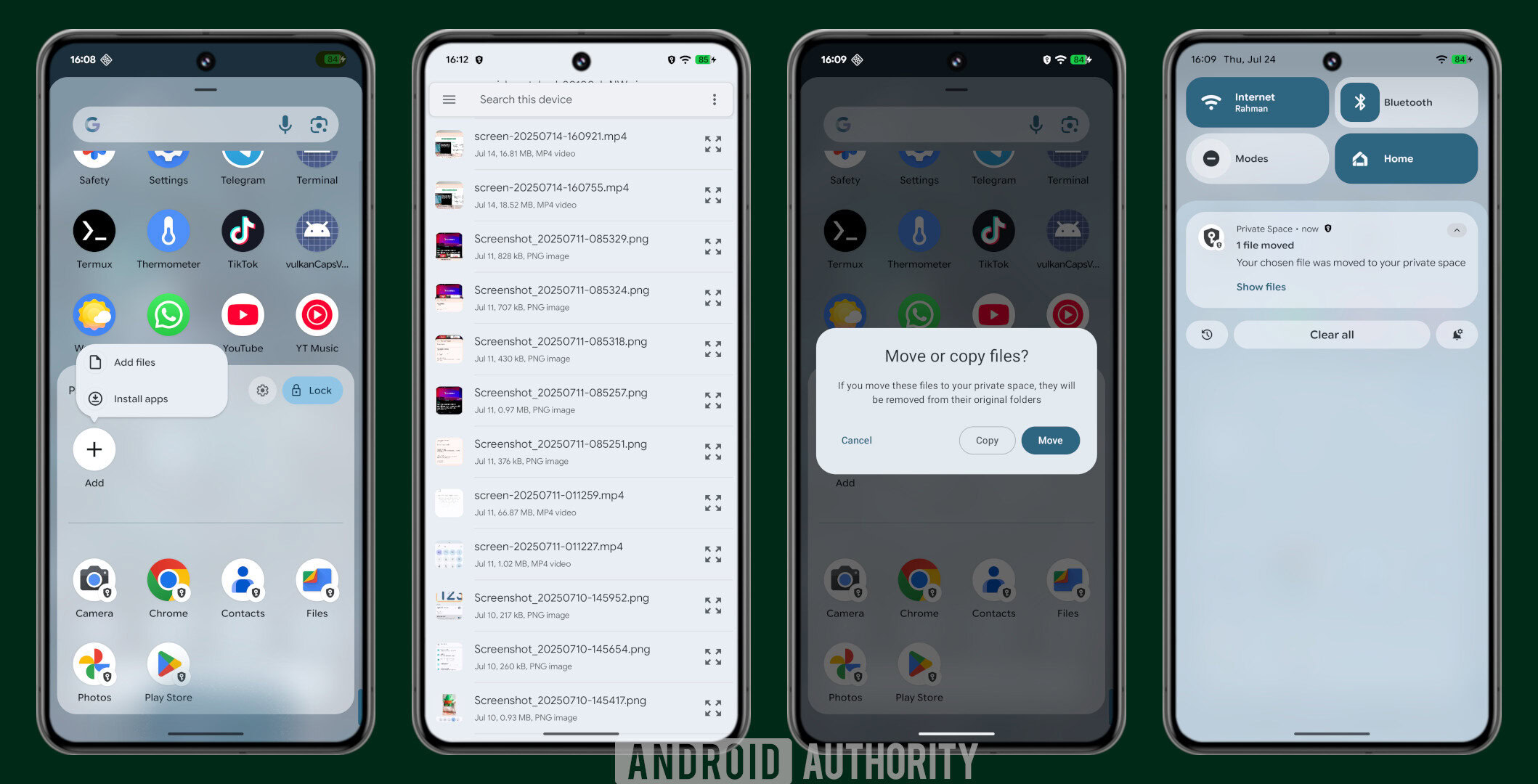
Apart from Private Space, Android lacks a native way to secure apps behind your screen lock or biometrics. The issue with Private Space is that it isn’t designed for convenience. When you move an app there, it is sequestered; that works fine for apps you rarely open, but it quickly becomes a hassle for apps you open daily. Apps inside Private Space cannot be placed on your home screen, and the container itself lacks a shortcut. To access these apps, you are forced to unlock the space by opening the app drawer then and scrolling or searching every single time.

Furthermore, apps within the Private Space are completely siloed from the rest of your system because they run in a separate user profile. This isolation prevents them from easily accessing files in your main profile — great for privacy, but a headache for productivity. While you can manually move files back and forth, it is not a workflow you want to be doing daily.

Moving files to Private Space in Android


This is why many OEMs developed their own App Lock solutions for their specific Android skins. Without a native option in the core OS, however, Pixel users are forced to rely on third-party app lockers, which are fundamentally flawed. Since these tools are just standard apps, they can be easily bypassed by simply uninstalling them. The developers of these apps often try to plug this hole by requesting Device Administrator privileges, but granting that level of control to a third-party app requires a massive amount of trust. Furthermore, the detection methods are often hacky, relying on the Accessibility API to monitor your screen for specific window openings — which poses both privacy and performance problems.

A native, system-level App Lock would solve all of these problems. It would be impossible to uninstall, inherently more trustworthy, and wouldn’t rely on janky workarounds to detect when a protected app is launched. The good news is that there is strong evidence Google is working on a native App Lock for Android, and it appears it will be accessible to all launchers, not just the stock one.

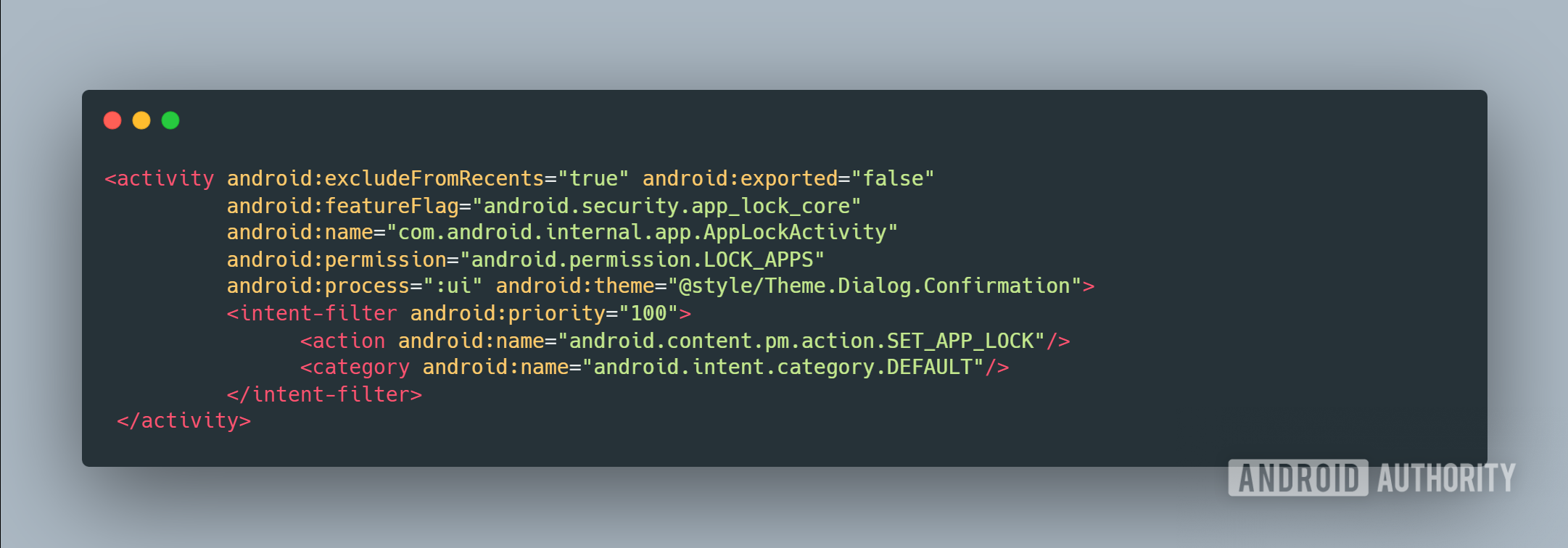
While digging through the latest 2512 Android Canary release, I discovered code within the Android framework package hinting at a new App Lock API. Access to this API is gated behind the new LOCK_APPS permission, which is restricted to internal system apps and the app holding the HOME role. Since the user’s default launcher is automatically granted the HOME role, it is eligible to hold this permission.

Code
<permission android:featureFlag="android.security.app_lock_apis" android:name="android.permission.LOCK_APPS" android:protectionLevel="internal|role"/>

With this permission, the default launcher can invoke the API by starting Android’s App Lock activity via the SET_APP_LOCK intent action. The system then validates the request by checking if the target app has a launcher entry, isn’t on a system exemption list, and checks its current lock status. If the app is eligible to be locked, the user sees a prompt asking, “Lock [App Name]?” Conversely, if the launcher requests an unlock, the dialog asks, “Remove App Lock from [App Name]?” Once the user confirms the action, the system displays a toast message verifying the change.

AppLock Activity in 2512 Android Canary release


Here are the relevant strings pertaining to these dialogs:

Code
Code:
<string name="enable_app_lock_dialog_enable_button_text">Lock</string>
<string name="enable_app_lock_dialog_title">Lock %1$s?</string>
<string name="enable_app_lock_failure_toast_message">"Can't lock %1$s"</string>
<string name="enable_app_lock_success_toast_message">%1$s is locked</string>

<string name="disable_app_lock_dialog_disable_button_text">Remove lock</string>
<string name="disable_app_lock_dialog_title">Remove App Lock from %1$s?</string>
<string name="disable_app_lock_success_toas

Android also includes several checks to ensure the App Lock feature is used as intended. First, it verifies the device type to exclude Wear OS, Android Automotive, and Android TV, as the feature is intended for handhelds. Second, it checks that the current user isn’t a supervised profile, restricting app locking to the main user.

You might be wondering how you actually trigger the lock. Since the API is exposed to the launcher, the specific UI implementation is left to the launcher’s developer. I suspect most launchers will simply add a new lock button or action to the context menu that appears when you long-press an app icon.

As for the locking mechanism itself, the code hasn’t actually been implemented yet, at least not in this Canary release. However, I would be surprised if Google doesn’t leverage Android’s existing Biometric Prompt API. This would provide a standardized way to secure apps using biometrics, with a seamless fallback to the device PIN or pattern.

As for the feature’s expected release date, we don’t know for certain. The feature is not live in the current Canary release, as the flags controlling it are disabled. We also don’t expect it to land in Android 16’s third quarterly release (QPR3), given that it won’t introduce new developer APIs. Thus, the earliest we expect to see the App Lock feature appear is in next year’s Android 17 update, though there are no guarantees.

Android Authority will keep a close eye on this feature as it develops. We are particularly interested in how App Lock will handle notifications from secured apps. Specifically, whether they will be fully visible or if their content will be redacted. While the latter is the logical choice for this feature, I haven’t found any code suggesting notifications will be modified, though Google could certainly add that functionality before launch.
 

limmk

High Supremacy Member
Joined
Jul 5, 2001
Messages
38,484
Reaction score
7,869


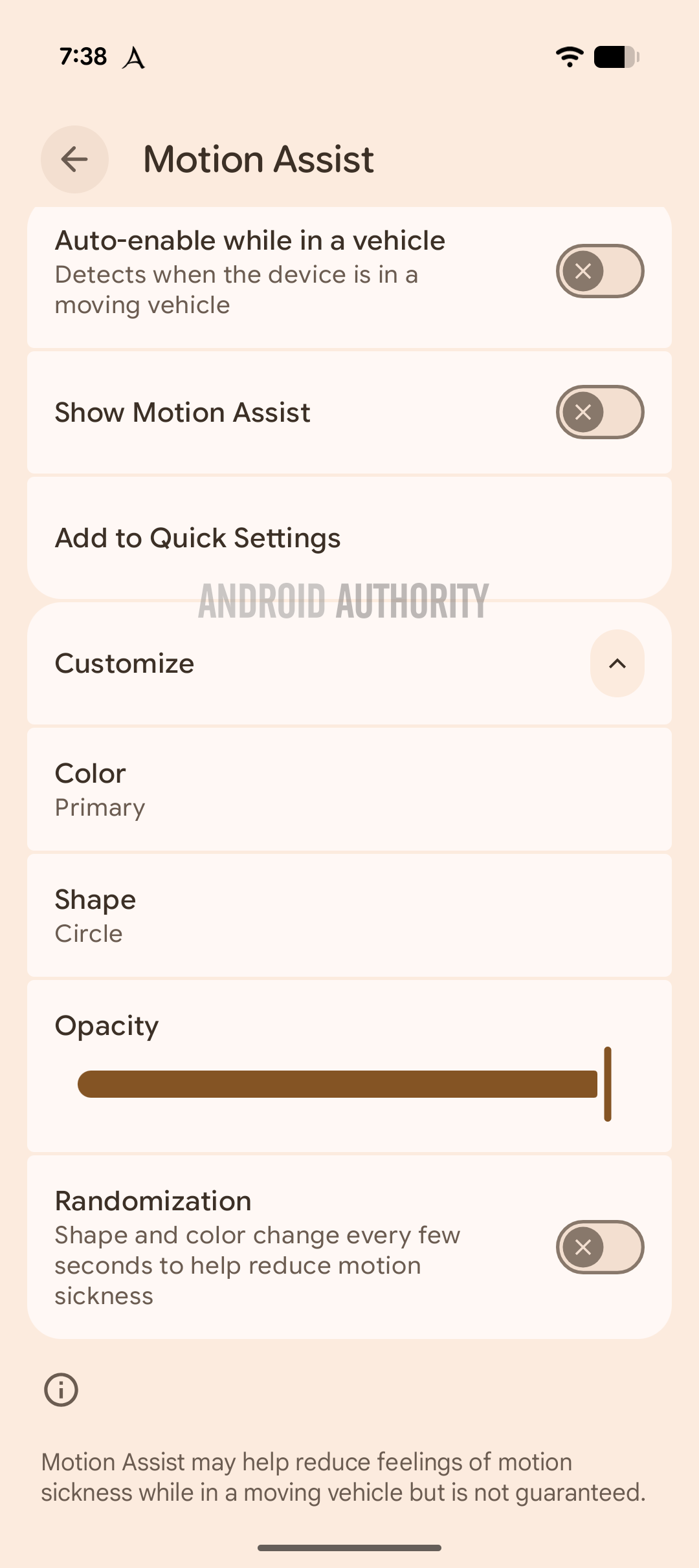
Many people avoid using their Android phones in moving vehicles due to motion sickness, a condition that can induce nausea, headaches, and dizziness. Motion sickness is believed to be caused by a sensory conflict; your eyes focus on a stationary object (the phone) while your inner ears signal that you are moving. Since people spend so much time as passengers, it’s a bummer that many can’t use their phones without feeling sick. Fortunately, Google is working on a new feature for Android 17 aimed at reducing this discomfort.

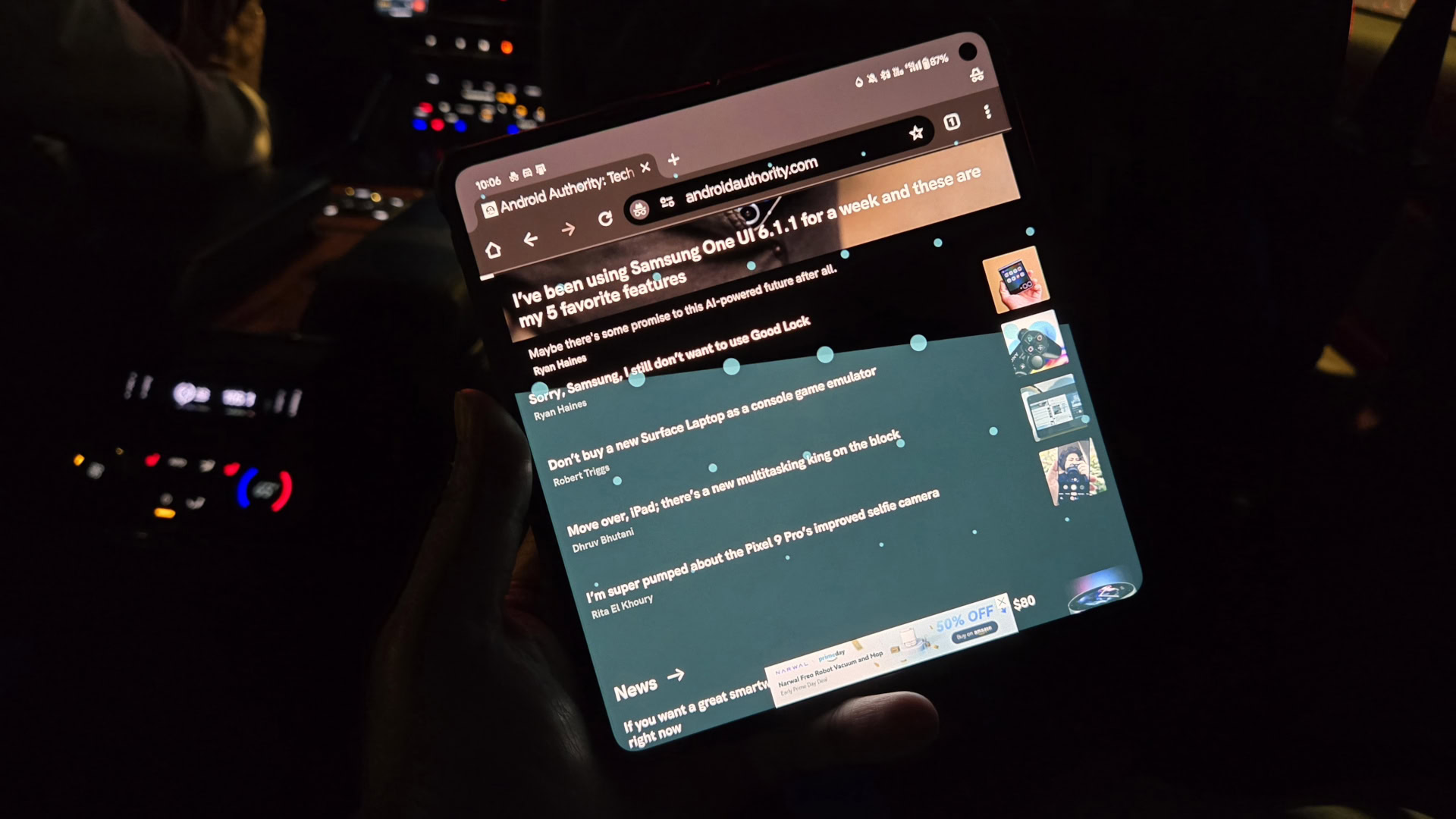
Called Motion Cues, the feature mitigates this sensory mismatch by adding visual elements that mimic the vehicle’s movement. It places dots on the screen that shift in real-time based on data from your phone’s motion sensors. This simple yet incredibly useful trick effectively “moves” the screen with you, potentially solving motion sickness for many users.

If this feature sounds familiar, it’s because Google isn’t the pioneer here. While Apple’s Vehicle Motion Cues in iOS 18 might be better known, a free Android app implemented this idea back in 2018. Available for any phone running Android 7.0 or later, KineStop simply requires you to download it, grant the “display over other apps” permission, and tap start.

KineStop hero image

Using KineStop, a third-party Android app, to reduce motion sickness while riding in a vehicle.

Why, then, must Google’s version wait for next year’s Android 17 update? It is a question we’ve grappled with since discovering evidence of Motion Cues in late 2024. According to our resident APK teardown specialist, Assemble Debug, the feature is fully functional but lies dormant in Google Play Services. However, it has a flaw that likely explains why Google is holding off on releasing it until a future OS release.


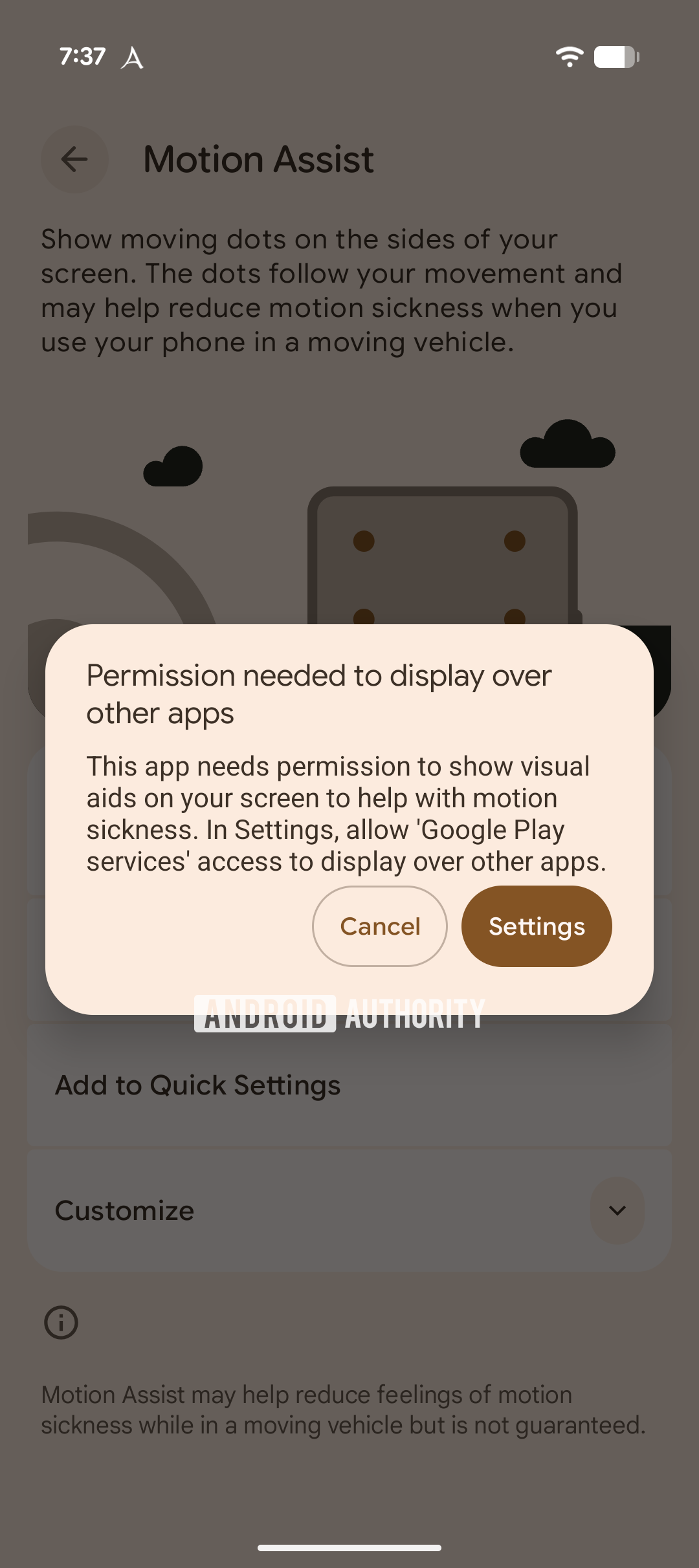
As shown in the screen recording above, the motion dots fail to appear over system elements like the Settings app, status bar, notifications, Quick Settings, lock screen, or volume panel. This happens because the current implementation relies on Android’s standard overlay API. For security reasons, Android prevents apps from drawing over these critical system components to stop malicious actors from tricking users into performing unintended actions. While this is a sensible security limitation, it reduces the effectiveness of Motion Cues.

Android Motion Assist draw over other apps


Android 17 could address this by introducing a system-level Motion Cues API. Evidence found in the latest 2512 Android Canary release suggests this API transfers the rendering responsibility to SystemUI — the exact system app that manages the components where Motion Cues currently fail to appear.

Android now includes code — MotionCuesService, IMotionCuesCallback, MotionCuesData, and MotionCuesSettings — that allow a client application (in this case, Google Play Services) to define the X/Y coordinates, color, radius, and spacing of the dots. It then renders these dots on a privileged window layer via the startMotionCuesSession command. Effectively, Google Play Services determines the placement and look of the dots, while SystemUI handles the actual on-screen display.

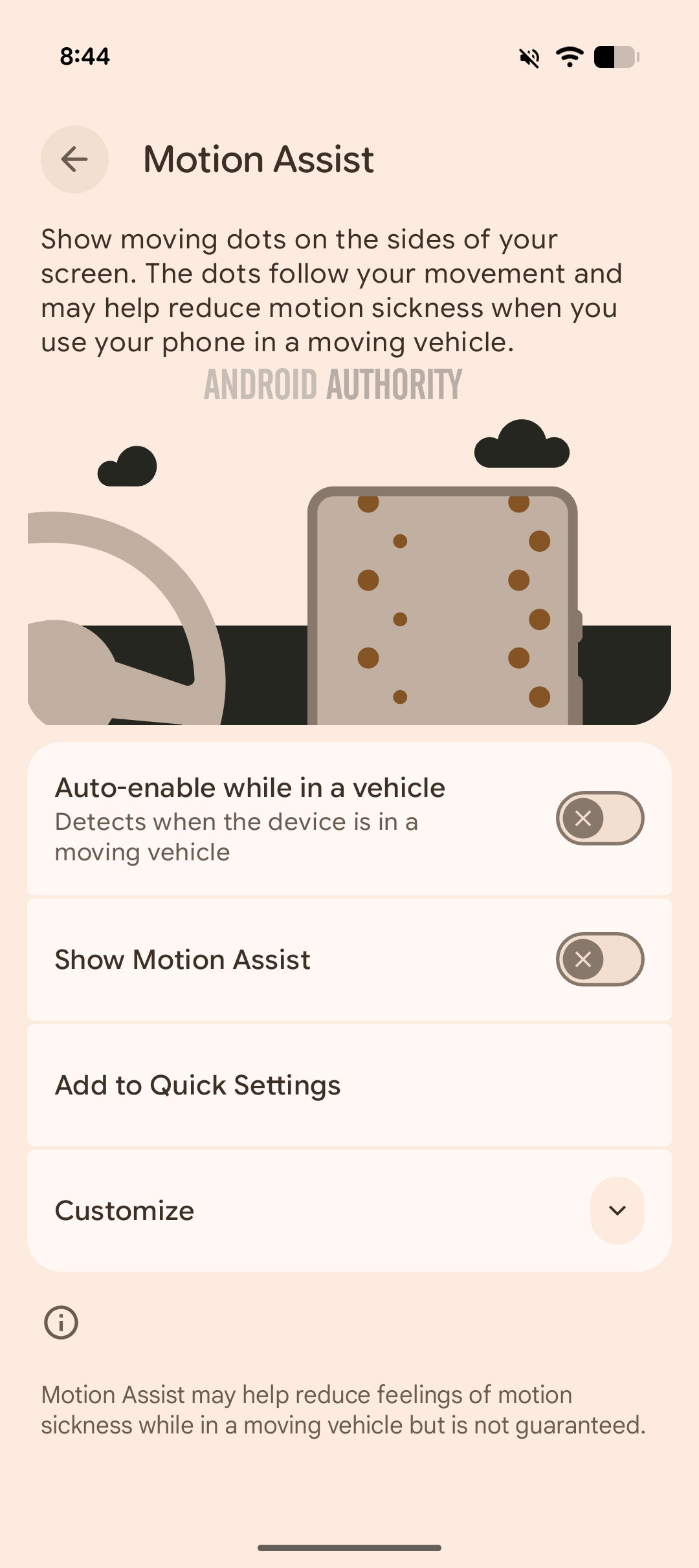
Android Motion Assist settings unexpanded
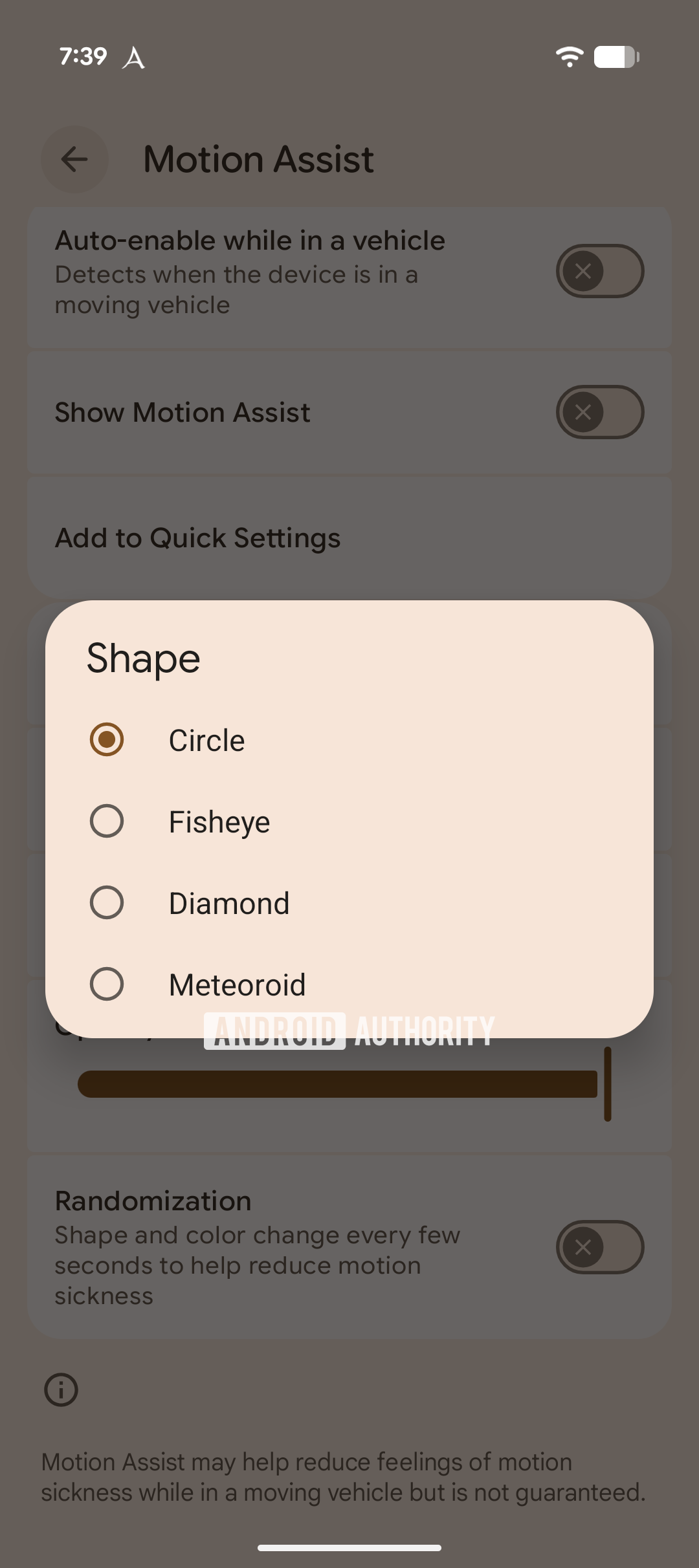
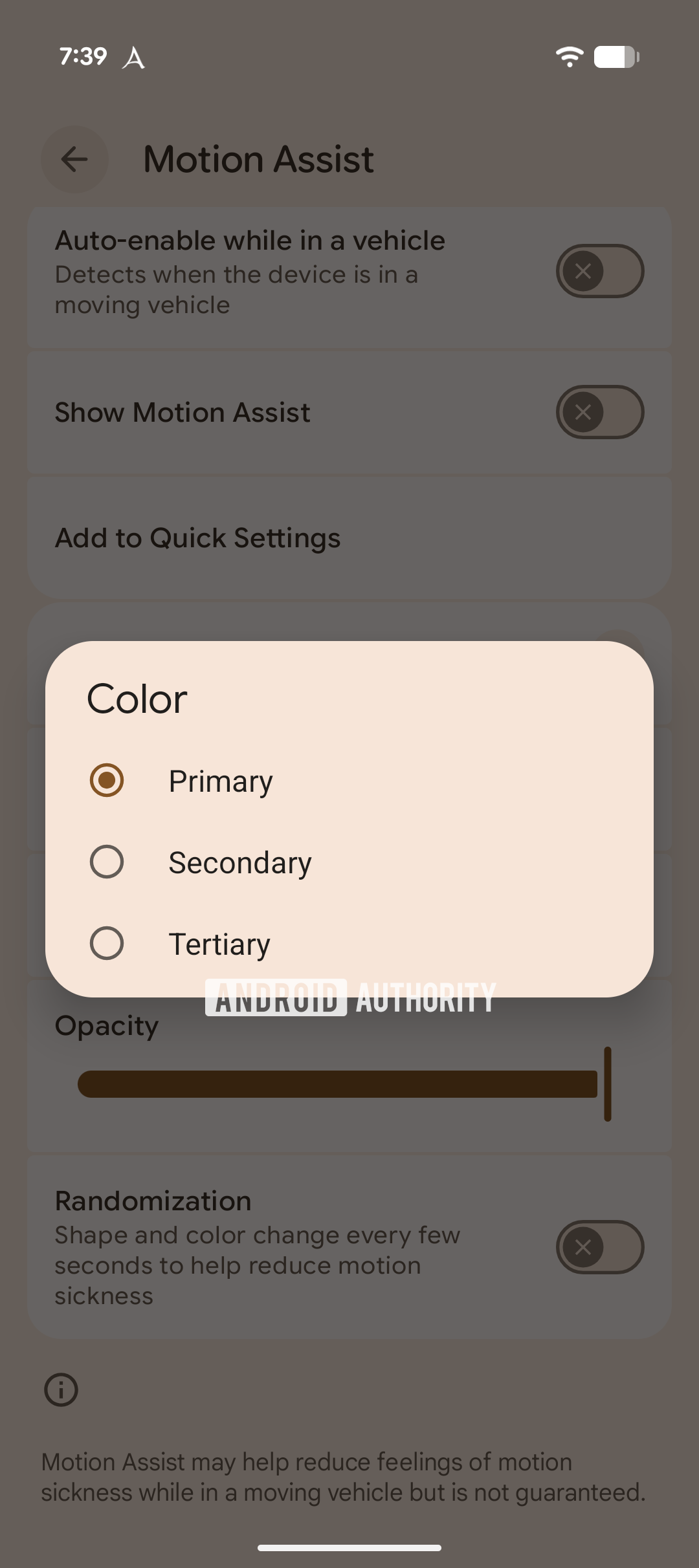
Android Motion Assist customization settings
Android Motion Assist shape settings
Android Motion Assist color settings


To prevent third-party apps from cluttering the screen with unwanted dots, Android only allows apps holding the new DRAW_MOTION_CUES permission to use the API. This permission is restricted to privileged system apps or those signed by the platform certificate. SystemUI will only bind to services (BIND_MOTION_CUES_SERVICE) that meet this requirement, ensuring it ignores data from unauthorized third-party apps.

This dual-layer architecture bypasses the limitations of the overlay API, but because it relies on a new system API, it requires an OS upgrade. This would explain why Google hasn’t released the feature yet. Depending on Google’s roadmap, we could see this feature roll out in the third quarterly release of Android 16 or, more likely, in Android 17. While we don’t know Google’s plans for this feature, I’m personally betting on an Android 17 debut.

Hopefully, Google releases a version of this feature that’s compatible with existing devices. Despite the limitations with the overlay API, many would still find the current implementation useful. If Google doesn’t release the feature as is, though, users can always turn to KineStop as a reliable alternative.

When Google eventually launches the feature, it might debut as “Motion Assist” rather than “Motion Cues” to avoid accusations of copying Apple. Regardless of the name, we hope Google integrates it with the upcoming Transiting mode, which is designed to automate device settings for smoother commutes. Ideally, Transiting mode would trigger Motion Assist automatically, though the feature’s built-in vehicle detection might make that unnecessary.
 

limmk

High Supremacy Member
Joined
Jul 5, 2001
Messages
38,484
Reaction score
7,869


A split of Android Notifications and Quick Settings has been rumored for the past year or so, and a leak today provides the latest look.

Mystic Leaks on Telegram today shared a video and screenshot of what might be an internal build of Android 17. The design is a maturation of what was previously shown. Under Settings > Notifications, there will be a new “Notifications & Quick Settings” menu with two options:

  • Separate: Swipe down from the top right to open Quick Settings. Swipe down from the top left to open notifications.
  • Combined (classic): Swipe down from the top of your screen to access the classic panel that combines notifications and Quick Settings.

2caD3Xa.png
YgxeVQO.jpeg
4xOg5IP.jpeg


When the “Separate” option is enabled, swiping from the left shows notifications. There are no changes to the actual list as of this build, but you get a large clock at the top. The day/date and status bar icons are placed in pills at the corners.

A swipe down from the right side of the screen shows Quick Settings, which is placed in a (top) sheet container. You get a miniature clock here, while the next two rows offer carrier information, QS edit, settings, and power.

A new addition to Quick Settings is the volume slider underneath brightness. The three-dot button next to it presumably opens the full set of sliders. Otherwise, the QS tiles are unchanged from their last redesign.

v5Uff2O.jpeg
iAkbgOV.jpeg
q5OTRmS.jpeg
s8jRSSo.jpeg


On large screens, Separate will be the only option: “Combined (classic) view is limited to the outer screen of your foldable device.”

Meanwhile, Android 17 is said to bring back a dedicated “Mobile Data” Quick Settings tile, which would use a cellular bar icon. The separate Wi-Fi toggle uses the icon you’d expect.
 

limmk

High Supremacy Member
Joined
Jul 5, 2001
Messages
38,484
Reaction score
7,869
TL;DR
  • Android 17 is said to be shifting away from flat design toward translucent, blur-heavy visuals.
  • Google could roll out a frosted-glass look across core UI elements, including the volume slider and power menu.
  • Dynamic Color will reportedly tint blurred panels, helping the new transparency effects blend with your wallpaper and theme.


Android 17 is still months from its official launch, but it’s clear that Google plans to change how you use your phone. After years of flat, solid colors, the next version — codenamed “Cinnamon Bun” — is said to focus on translucent, blurry backgrounds.

We saw the seeds of this change planted last year with the introduction of Material 3 Expressive, which brought subtle blurs to the notification shade and the Quick Settings panel. Google wanted to create a sense of depth so that the user interface felt lightweight rather than like a heavy, opaque wall of color blocking your view.

By blurring the background instead of hiding it entirely, you stay aware of the app you were just using while focusing on the task at hand. It creates a hierarchy that feels more natural to the human eye, and Android 17 is set to take that concept to the next level.

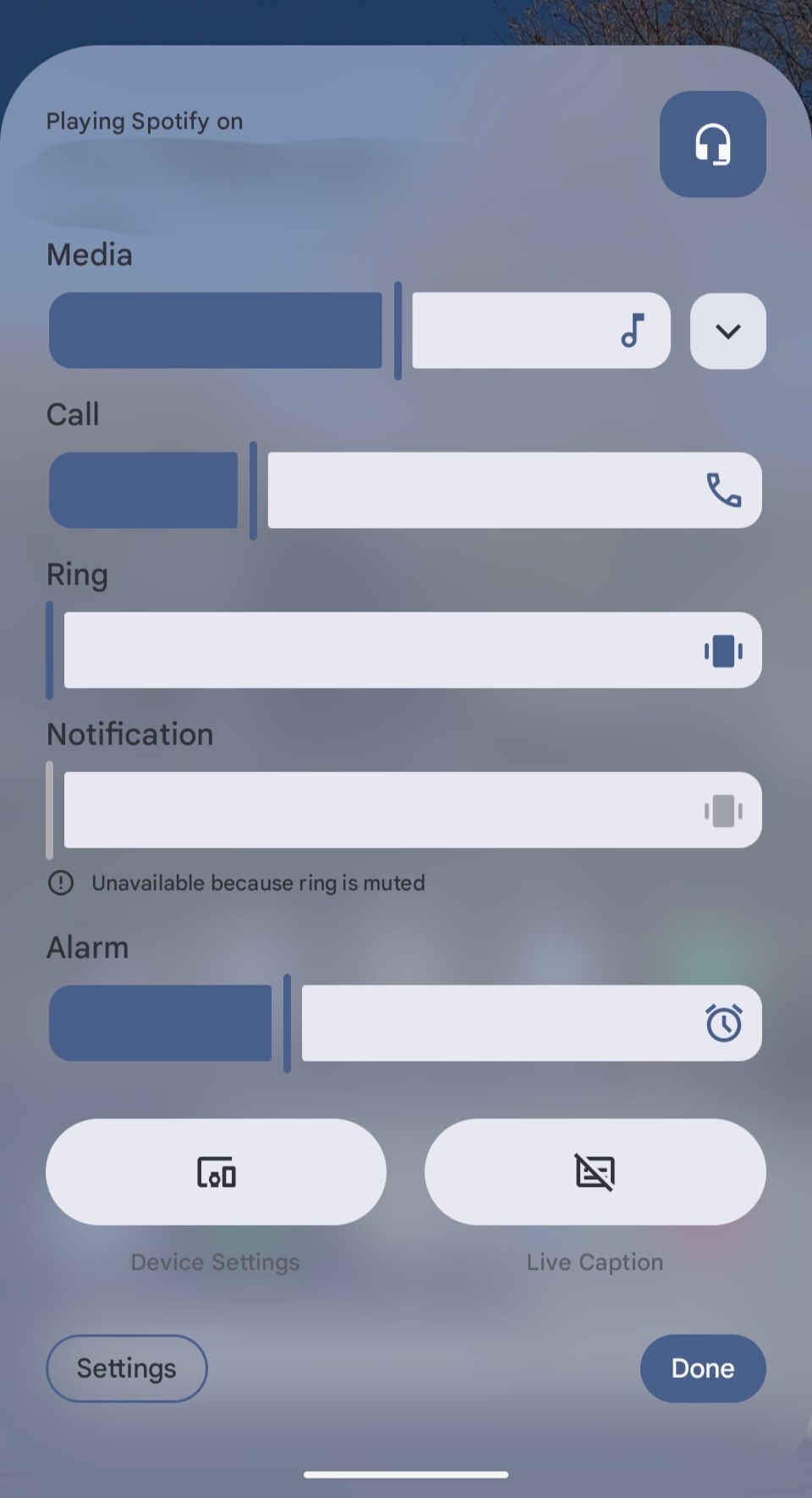
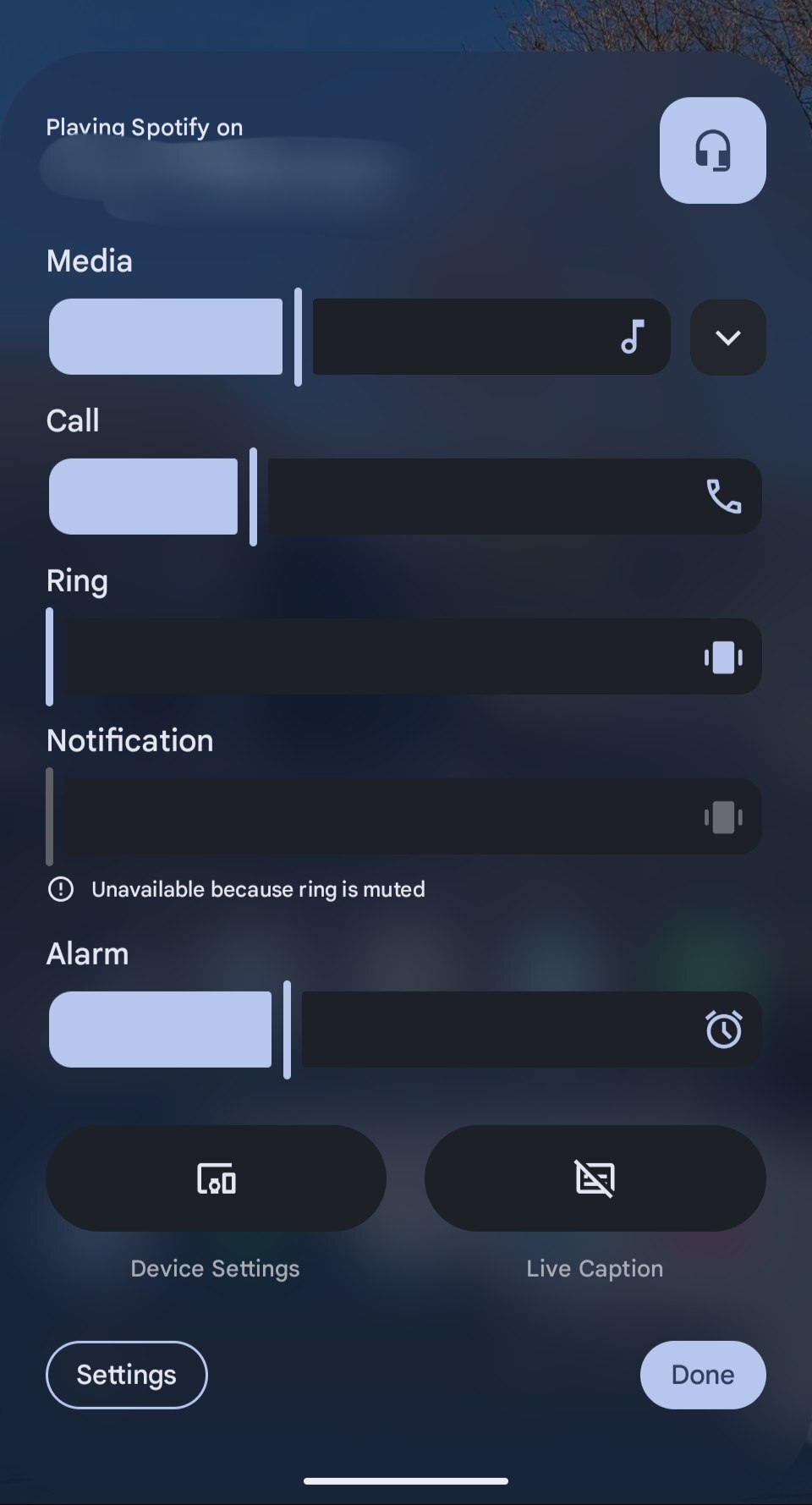
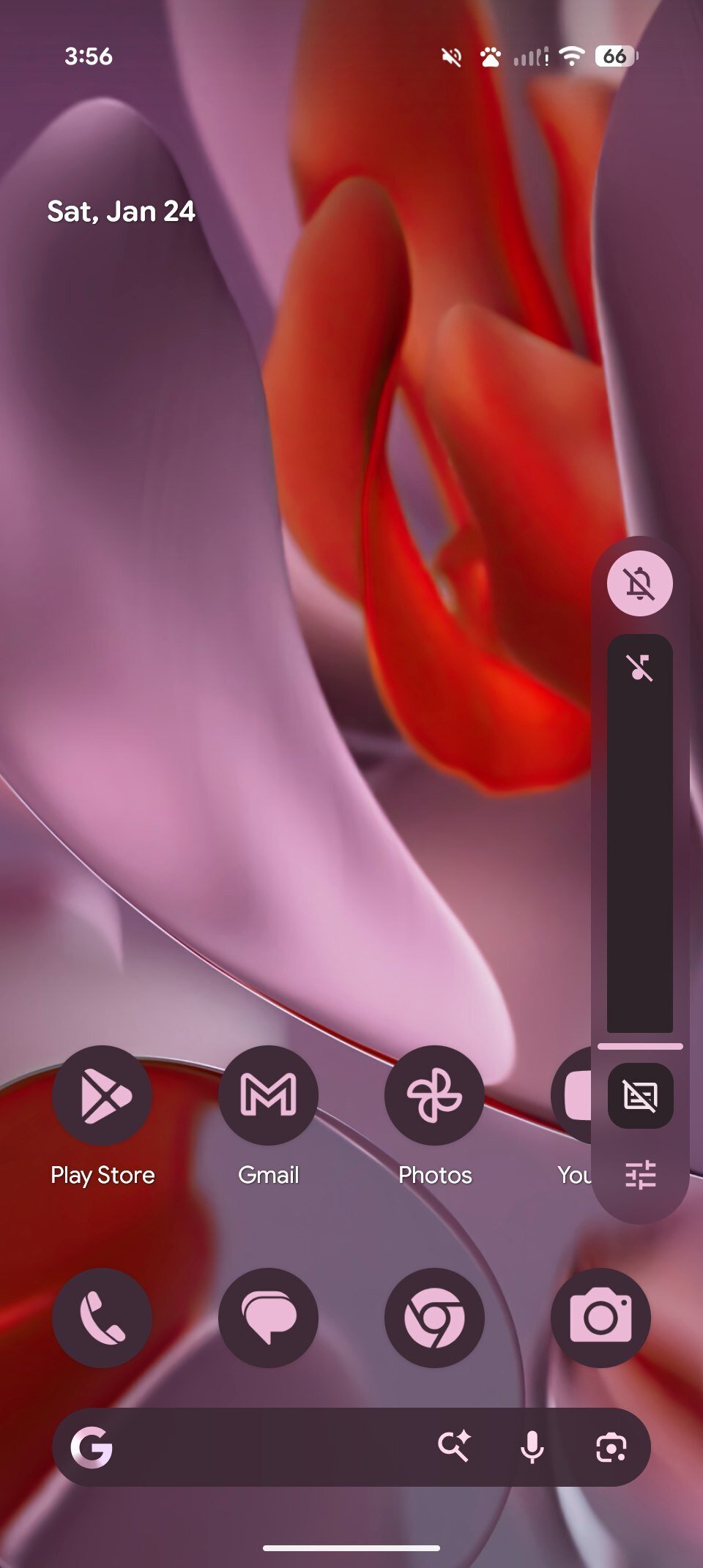
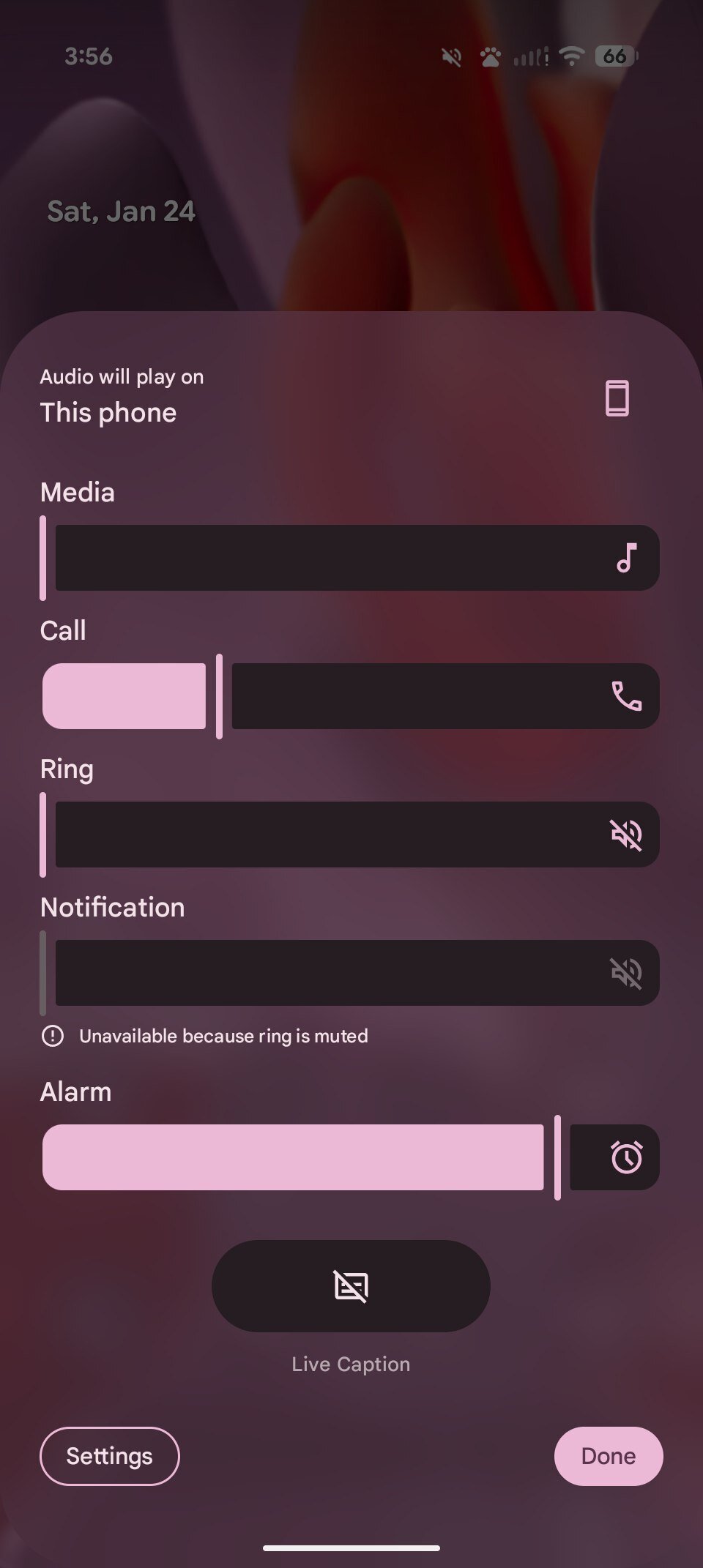
In the next version, Google is apparently going all-in on the frosted-glass look across the system. Internal builds seen by 9to5Google show this translucent effect appearing in some key parts of the UI. One big change is the volume bar, which now uses a translucent slider so your wallpaper or app icons show through.

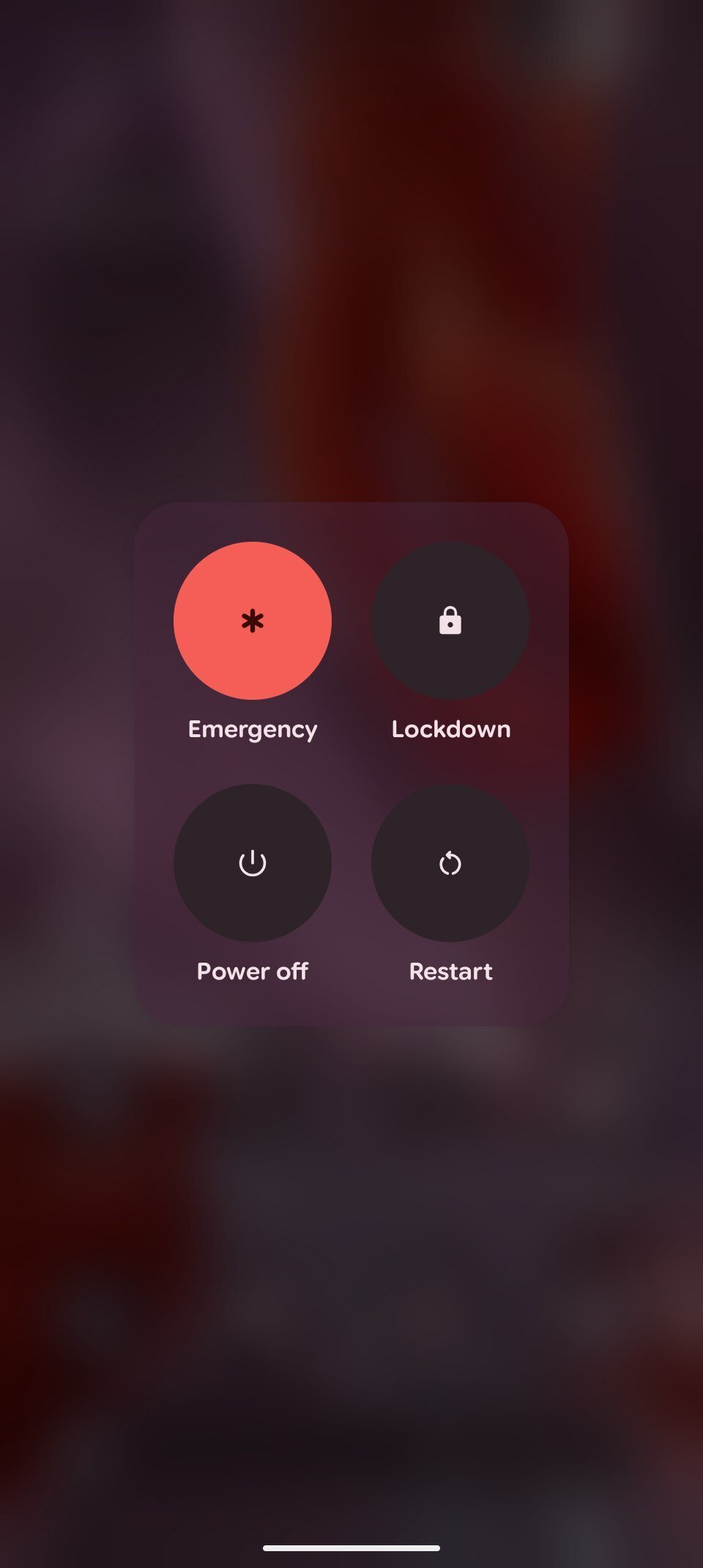
This approach also applies to the power menu and other system overlays. The blurs are reportedly tinted by your Dynamic Color theme, helping the whole OS feel unified.

While some might point out that this look follows Apple’s Liquid Glass design on iOS or Samsung’s recent UI tweaks, Google’s implementation is reportedly more subtle and refined.

We’ll likely notice these changes most when the first Android 17 Developer Preview arrives, expected in early 2026. The blur effect is expected to appear mostly in system menus, but it’s unclear if Google will bring this look to third-party apps with new Material Design guidelines.
 

limmk

High Supremacy Member
Joined
Jul 5, 2001
Messages
38,484
Reaction score
7,869
TL;DR
  • A recent leak suggests Android 17 could gain even more blur effects, and we’ve obtained images showing some of these new elements.
  • The images show that the volume menu and pop-up volume slider could have blur effects.
  • This comes a while after Android 16’s Material 3 Expressive update introduced some blur and transparency.


Google already offers some subtle blur and translucency effects in Android 16, but a recent leak suggests the company could up the ante with Android 17. Now, we have obtained images showing Android 17’s increased blur effects.

MysticLeaks on Telegram posted and then quickly deleted images apparently showing an internal build of Android 17. These images purportedly showed blur effects in almost every part of the UI. We weren’t able to view these screenshots at the time, but Telegram user @jspirit has obtained their own images of these translucency effects and shared them with us.

Android 17 blur jspirit Telegram 1
Android 17 blur jspirit Telegram 4
Android 17 blur jspirit Telegram 2
Android 17 blur jspirit Telegram 3


The images reveal blur effects in the volume menu and volume bar in particular, apparently showing light and dark themes. By contrast, Android 16’s Material 3 Expressive design offers translucency in the notification shade, quick settings menu, the lock screen, and app drawer. So Google is clearly building on a strong foundation of translucency.

These aren’t the only screens showing off blur in Android 17. Telegram user @romashka also shared screenshots of translucency effects in Android 17. These images show off blur in the power menu and give us a better idea of what to expect in the volume bar and volume menu.

Android 17 blur romashka Telegram 1
Android 17 blur romashka Telegram 2
Android 17 blur romashka Telegram 3


It’s worth noting that all these screenshots come from a work-in-progress Android 17 build, so it’s possible these blur effects and other UI elements could change between now and subsequent releases.

In any event, this all suggests that Google could more tightly embrace blur in 2026. So if you’re tired of Apple and other Android OEMs offering translucency effects, you might be disappointed with Android 17. Nevertheless, Material 3 Expressive still stands out as a refreshing UI, so I hope Android 17 still retains that unique look and feel.
 
Important Forum Advisory Note
This forum is moderated by volunteer moderators who will react only to members' feedback on posts. Moderators are not employees or representatives of HWZ. Forum members and moderators are responsible for their own posts.

Please refer to our Community Guidelines and Standards, Terms of Service and Member T&Cs for more information.
Top