Formatting hdd in Mavericks

derrickgoh

High Supremacy Member
Joined
Jan 1, 2000
Messages
39,097
Reaction score
13
Having problems installing Win 7 in my 2013 iMac and long story short, some have suggested I do a complete erase and reinstall of Mavericks.

I guess that would solve the problem but it means I need to reinstall ALL my software plus copy all my files from Time Machine back to the HDD. Which would be a massive headache.

If I choose the option to format the HDD and restore from an earlier Time Machine backup would that be okay? Assuming there was a problem with the disk partition which I suspect, would restoring from an earlier Time Machine backup means I restore the problematic disk partition too?

I mean if its a hardware issue then common sense no way it can be backed up or restored lah. Or if its software related then of course restoring from an earlier back up will recreate the problem. But what about disk partition? Would a screwed up partition be recreated when I restore from Time Machine?

Or would this be a better option?
OS X Mountain Lion: Reinstall OS X
 
Last edited:

asriznet

Senior Member
Joined
Oct 2, 2009
Messages
981
Reaction score
0
Having problems installing Win 7 in my 2013 iMac and long story short, some have suggested I do a complete erase and reinstall of Mavericks.

I guess that would solve the problem but it means I need to reinstall ALL my software plus copy all my files from Time Machine back to the HDD. Which would be a massive headache.

If I choose the option to format the HDD and restore from an earlier Time Machine backup would that be okay? Assuming there was a problem with the disk partition which I suspect, would restoring from an earlier Time Machine backup means I restore the problematic disk partition too?

I mean if its a hardware issue then common sense no way it can be backed up or restored lah. Or if its software related then of course restoring from an earlier back up will recreate the problem. But what about disk partition? Would a screwed up partition be recreated when I restore from Time Machine?

Or would this be a better option?
OS X Mountain Lion: Reinstall OS X

This is my suggestion for you.

1. Do a complete time machine backup of the whole system
2. Perform an erase and install of OS X Mavericks - OS X Mavericks: Erase and reinstall OS X
3. DO NOT restore from time machine, set it up as new mac
4. run software updates
5. test out bootcamp installation
6. if issue is resolved, it's a software issue
7. start migration assistant and just restore "Applications" + your own user account
8. at the end of migration, you should have most of the data back to the system with a working bootcamp installation.

data that it will not restore are system wide data such as network settings etc...

if step 5 didnt work for you, it looks like a hardware issue which is still a shocker in my opinion, i honestly would still try a different installation medium just to be sure.
 

derrickgoh

High Supremacy Member
Joined
Jan 1, 2000
Messages
39,097
Reaction score
13
This is my suggestion for you.

1. Do a complete time machine backup of the whole system
2. Perform an erase and install of OS X Mavericks - OS X Mavericks: Erase and reinstall OS X
3. DO NOT restore from time machine, set it up as new mac
4. run software updates
5. test out bootcamp installation
6. if issue is resolved, it's a software issue
7. start migration assistant and just restore "Applications" + your own user account
8. at the end of migration, you should have most of the data back to the system with a working bootcamp installation.

data that it will not restore are system wide data such as network settings etc...

if step 5 didnt work for you, it looks like a hardware issue which is still a shocker in my opinion, i honestly would still try a different installation medium just to be sure.
Thanks. I believe its software as I managed to install Win 7 the first time but not the second. :s8:

Not blaming the forumer who gave me the advise but he said install Win 7 first then run the exe file to obtain Win 8.1 ISO. After that remove the Win 7 partition and run Boot Camp Asst again this time with 8.1 ISO.

Apple support tech noted that 8.1 says it needs Win 7 installed even though its a full version not an upgrade. So technically after installing Win 7 I should have run the exe file, obtain Win 8.1 ISO and upgrade to 8.1.

Anyways when I did what the forumer said it didn't work so I thought go back to Win 7 and that's when this time round even Win 7 wouldn't install.

I guess I have to note down by network settings right? I'm guessing those will be wiped out.

Photos and videos will need to be copied over manually from Time Machine I gather? What about iTunes and all my iPhone apps? Will those be lost?
 
Last edited:

asriznet

Senior Member
Joined
Oct 2, 2009
Messages
981
Reaction score
0
Thanks. I believe its software as I managed to install Win 7 the first time but not the second. :s8:

Not blaming the forumer who gave me the advise but he said install Win 7 first then run the exe file to obtain Win 8.1 ISO. After that remove the Win 7 partition and run Boot Camp Asst again this time with 8.1 ISO.

Apple support tech noted that 8.1 says it needs Win 7 installed even though its a full version not an upgrade. So technically after installing Win 7 I should have run the exe file, obtain Win 8.1 ISO and upgrade to 8.1.

Anyways when I did what the forumer said it didn't work so I thought go back to Win 7 and that's when this time round even Win 7 wouldn't install.

I guess I have to note down by network settings right? I'm guessing those will be wiped out.

Photos and videos will need to be copied over manually from Time Machine I gather? What about iTunes and all my iPhone apps? Will those be lost?

As long as you do not exclude anything in Time Machine Preference, it should backup EVERYTHING to time machine.

It's not really manual, when you run migration assistant, you will see a prompt something like below.

migration_item_costumize.png


You should check the primary user account and Applications, nothing else.

Just curious, why is windows 7 not installing this time?

http://support.apple.com/kb/ht4889
 
Last edited:

derrickgoh

High Supremacy Member
Joined
Jan 1, 2000
Messages
39,097
Reaction score
13
As long as you do not exclude anything in Time Machine Preference, it should backup EVERYTHING to time machine.

It's not really manual, when you run migration assistant, you will see a prompt something like below.

migration_item_costumize.png


You should check the primary user account and Applications, nothing else.

Just curious, why is windows 7 not installing this time?

OS X: How to migrate data from another Mac using Mountain Lion and earlier
You mean I do NOT select "settings", "computer" and "other files & folders on apple" which are ticked in the diagram you posted?

Wouldn't that mean I lose all my settings then such as ethernet settings, safari settings, and settings to all my apps like MS Office and Intego antivirus?

I wish I knew why dude. If I did I wouldn't need to go through all this. :s13:
 
Last edited:

asriznet

Senior Member
Joined
Oct 2, 2009
Messages
981
Reaction score
0
You mean I do NOT select "settings", "computer" and "other files & folders on apple" which are ticked in the diagram you posted?

Wouldn't that mean I lose all my settings then such as ethernet settings, safari settings, and settings to all my apps like MS Office and Intego antivirus?

I wish I knew why dude. If I did I wouldn't need to go through all this. :s13:

that setting you see in the picture are system-wide settings.

if you expand a user account in the photo, there is a setting there as well which will be user-specific settings(mainly for apps).

yes, why i advice you not to check the system-wide settings because that's usually what causing the problem.

Rule of thumb when troubleshooting mac and isolating software/hardware.

1 - test in another user account, issue persists in another account = system-wide issue
2 - test in safe mode, issue does not happen in safe mode = running process(safe mode disables them)OS X: What is Safe Boot, Safe Mode?
3 - if issue happens in safe mode, test in a clean OS, either installing OS X on a portable HDD or erase and install, if issue persists = hardware issue, NOT software issue

As long as you do a recent time machine backup, you don't have to worry much, best way to learn is by experience.

You can do a lot of research, asking in different forums but you might get different results when you try it yourself.
 

speedster4005

Senior Member
Joined
Oct 25, 2007
Messages
2,164
Reaction score
1
Hi bro, it was me who suggested the Windows 7 thingy. I thought it went through ok. Anyway,
my apologies if it did not work.

But just to correct, I believe what Apple tech support is not right. You do not need Windows 7 to install a retail version of Windows 8.1 (which if I remember correctly, you bought from Microsoft online). You can install it fresh from an ISO via BootCamp as what I have told you. I know because I have done that quite a number of times - on 4 different machines. Only that they were Macbooks. But I see no difference on iMacs. I am a software developer too, so the Apple tech, in my opinion, just ran out of options. ;-)
 

asriznet

Senior Member
Joined
Oct 2, 2009
Messages
981
Reaction score
0
Hi bro, it was me who suggested the Windows 7 thingy. I thought it went through ok. Anyway,
my apologies if it did not work.

But just to correct, I believe what Apple tech support is not right. You do not need Windows 7 to install a retail version of Windows 8.1 (which if I remember correctly, you bought from Microsoft online). You can install it fresh from an ISO via BootCamp as what I have told you. I know because I have done that quite a number of times - on 4 different machines. Only that they were Macbooks. But I see no difference on iMacs. I am a software developer too, so the Apple tech, in my opinion, just ran out of options. ;-)

I believe the applecare advisor was just saying those because TS provided the same information to the applecare advisor.

I agree that you should be able to install Windows 8.1 using a valid 8.1 iso file with bootcamp.
Upgrading from windows 7 is possible as well, not sure if TS tried to do this.

Install Windows 8.1 on a Mac - Windows Help
 

derrickgoh

High Supremacy Member
Joined
Jan 1, 2000
Messages
39,097
Reaction score
13
that setting you see in the picture are system-wide settings.

if you expand a user account in the photo, there is a setting there as well which will be user-specific settings(mainly for apps).

yes, why i advice you not to check the system-wide settings because that's usually what causing the problem.

Rule of thumb when troubleshooting mac and isolating software/hardware.

1 - test in another user account, issue persists in another account = system-wide issue
2 - test in safe mode, issue does not happen in safe mode = running process(safe mode disables them)OS X: What is Safe Boot, Safe Mode?
3 - if issue happens in safe mode, test in a clean OS, either installing OS X on a portable HDD or erase and install, if issue persists = hardware issue, NOT software issue

As long as you do a recent time machine backup, you don't have to worry much, best way to learn is by experience.

You can do a lot of research, asking in different forums but you might get different results when you try it yourself.
Will try it tonight. Thanks and fingers crossed.
 

derrickgoh

High Supremacy Member
Joined
Jan 1, 2000
Messages
39,097
Reaction score
13
Hi bro, it was me who suggested the Windows 7 thingy. I thought it went through ok. Anyway,
my apologies if it did not work.

But just to correct, I believe what Apple tech support is not right. You do not need Windows 7 to install a retail version of Windows 8.1 (which if I remember correctly, you bought from Microsoft online). You can install it fresh from an ISO via BootCamp as what I have told you. I know because I have done that quite a number of times - on 4 different machines. Only that they were Macbooks. But I see no difference on iMacs. I am a software developer too, so the Apple tech, in my opinion, just ran out of options. ;-)
Not your fault. Something screwed up.

Anyway yes mine was full version 64 bit Win 8.1 bought from MS online store. I installed the trial version 64 bit Win 7 Home as you suggested so that I could run the exe file which extracted the Win 8.1 ISO.

Win 7 was able to install then. Next I used Boot Camp Asst to remove the Windows partition and ran Boot Camp Asst again hoping to install Win 8.1. This was when as it was attempting to copy some files it popped a message saying something like this machine only supports Win 7 and drivers not available blah blah.

I was told to download the drivers manually which I did but the problem was the options. Keeping in mind the 2013 iMac has no optical drive. I do not have the option to create a bootable USB without the drivers. Once I untick the option for drivers, the option to create bootable USB auto goes off too.

So it insists on creating a bootable thumbdrive TOGETHER with installing the drivers and half way through it would tell me I can only run Win 7. I can't even get to the screen where I get to select partition size for Boot Camp partition.

Anyway I will now be very grateful if I can install Win 7 Home trial again. I don't mind upgrading it to Win 8.1 even though it may not be the "best" or the "correct" method but as long as it works, what the hell!

I just don't understand why I could install Win 7 the first time with no problems but after the Boot Camp partition was removed and the second time I installed Win 7 it tells me the machine only supports Win 7. This IS Win 7 I am installing you fool!! :s8:

Some suspected the Boot Camp partition must have been screwed when I removed it. I used Boot Camp Assistant to remove the Boot Camp partition which I believe is the correct method. Don't know what happened.

Hopefully a clean format and reinstall will help. I doubt its a hardware issue. Sure doesn't sound like one.
 

derrickgoh

High Supremacy Member
Joined
Jan 1, 2000
Messages
39,097
Reaction score
13
Upgrading from windows 7 is possible as well, not sure if TS tried to do this.

Install Windows 8.1 on a Mac - Windows Help
Nope because speedster4005 said it was better to remove Win 7 then install Win 8.1 fresh.

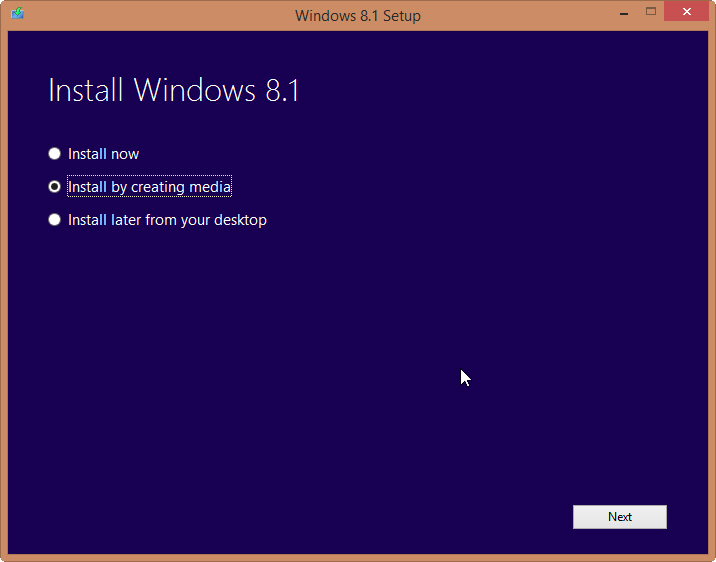
Assuming the reformat works and I can install Win 7 Home trial, I guess I should just copy the ISO to the Win 7 desktop and choose the option to install now then pray very hard.

Windows-8.1-ISO.jpg
 
Last edited:

asriznet

Senior Member
Joined
Oct 2, 2009
Messages
981
Reaction score
0
Nope because speedster4005 said it was better to remove Win 7 then install Win 8.1 fresh.

Assuming the reformat works and I can install Win 7 Home trial, I guess I should just copy the ISO to the Win 7 desktop and choose the option to install now then pray very hard.

Windows-8.1-ISO.jpg

Do you still have a copy of the Win 8.1 ISO file? if yes try to install 8.1 using bootcamp the first time.

If not then go with Win 7 and upgrade to Win 8.1 after...
 

derrickgoh

High Supremacy Member
Joined
Jan 1, 2000
Messages
39,097
Reaction score
13
Do you still have a copy of the Win 8.1 ISO file? if yes try to install 8.1 using bootcamp the first time.

If not then go with Win 7 and upgrade to Win 8.1 after...
I do. I'm scared it will cork things up again then I'll have to do another erase and restore. :(

Edit: Come to think of it, I'm already doing a erase and install so what the hell!! Guess I should not use Migration Assistant to restore my account and applications yet. Wait till the darn Win 8.1 is installed and working first.
 
Last edited:

asriznet

Senior Member
Joined
Oct 2, 2009
Messages
981
Reaction score
0
I do. I'm scared it will cork things up again then I'll have to do another erase and restore. :(

Edit: Come to think of it, I'm already doing a erase and install so what the hell!! Guess I should not use Migration Assistant to restore my account and applications yet. Wait till the darn Win 8.1 is installed and working first.

Yep, precisely as mentioned on my earlier posts.

Restore only after you successfully installed windows.
 

derrickgoh

High Supremacy Member
Joined
Jan 1, 2000
Messages
39,097
Reaction score
13
Ok Win 8.1 seems to have installed ok in the Boot Camp partition. Have just restored applications and account from Time Machine.

Had to reinstall Flash for some strange reason but no big deal. Odd thing is the Java icon under system preferences have disappeared. Did a recent update of Maverick remove it or did something screw up in my system?

Last time with the Java icon I could see what version I'm on and also get it to check if I have the latest Java. Without the icon now, how do I check all this?
 

derrickgoh

High Supremacy Member
Joined
Jan 1, 2000
Messages
39,097
Reaction score
13
For some reason after I did the erase and reinstall and restored the user account and apps from Time Machine, when I ran Time Machine again it started to delete older back ups before it started to create a new backup.

Any idea why this was the case? My Time Machine drive is 1 TB and I still had 200 GB free. Considering that only incremental back ups are made, I'm sure 200 GB is more than enough space. I just want to be sure this is "normal" as I'm kinda paranoid now after the recent screw ups.
 
Important Forum Advisory Note
This forum is moderated by volunteer moderators who will react only to members' feedback on posts. Moderators are not employees or representatives of HWZ Forums. Forum members and moderators are responsible for their own posts. Please refer to our Community Guidelines and Standards and Terms and Conditions for more information.
Top