Google Gemini 3.5

limmk

High Supremacy Member
Joined
Jul 5, 2001
Messages
41,206
Reaction score
8,166
Google announced an absolute banger feature for Gemini this week — Storybook. With it, Gemini can generate 10-page storybooks, complete with images in all sorts of styles. You can use your own words or Storybook can generate text itself, so long as you have an idea of what the story is about.

“Simply describe any story you can imagine, and Gemini generates a unique 10-page book with custom art and audio. For a truly personal touch, you can ask Gemini to draw inspiration from your own photos and files.” Google also provides some good use cases, in case you need a bit of inspiration for your storybook.

  • Help your child understand a complex topic: Create a story that explains the solar system to my 5 year old.
  • Teach a lesson through storytelling: Teach a 7-year-old boy about the importance of being kind to his little brother. My son loves elephants so let’s make the main character an elephant.
  • Bring personal artwork to life: Upload an image of a kid’s drawing and modify this example prompt for your use case: “This is my kid’s drawing. He’s 7 years old. Write a creative storybook that brings his drawing to life.”
  • Turn memories into magical stories: Upload photos from your family trip to Paris and create a personalized adventure.

Storybook is now live on Gemini

Try Storybook Here


limmk

High Supremacy Member
Joined
Jul 5, 2001
Messages
41,206
Reaction score
8,166


Google is finally going beyond “limited,” “expanded,” and “highest access” to detail Gemini’s usage limits, with actual numbers for free and paid customers.

Some of these usage limits have been known or at least suspected, but Google’s “Gemini Apps limits & upgrades for Google AI subscribers” support page is now explicit about everything.

Those on free accounts using Gemini 2.5 Pro have up to 5 prompts per day (with a 32,000 token context window). They can generate or edit up to 100 images daily, while Deep Research is limited to 5 reports per month. All users can generate 20 Audio Overviews per day.

Meanwhile, Google AI Pro subscribers ($19.99 per month) have 100 Gemini 2.5 Pro prompts, up to 1,000 images, and 3 Veo 3 Fast videos per day, while it’s 20 Deep Research reports per day.


New vs. old (May)

KqMghjd.jpeg
do2eXlt.jpeg


Google AI Ultra customers ($249.99 per month) have up to 500 2.5 Pro prompts, 1,000 images (unchanged), and 5 Veo 3 videos per day, though it’s 200 Deep Research reports. They can send up to 10 Deep Think prompts/day with a 192,000 token context window.

Google says Canvas, Gems, and Storybook are “subject to the limits of the model that you select when you use the feature.”
 

elvintay07

Suspended
Joined
Jan 4, 2022
Messages
12,373
Reaction score
4,443
This kind of AI sibei dangerous. Lately my friends played a prank on one guy. While his wife is on business trip, they AI another woman sensitive belonging in a photo of their bedroom. lol! The wife kicked up a big fuss but heng because we know his wife also, we told her this is just edited. Haha!

Future we can’t really tell real or fake
 

limmk

High Supremacy Member
Joined
Jul 5, 2001
Messages
41,206
Reaction score
8,166


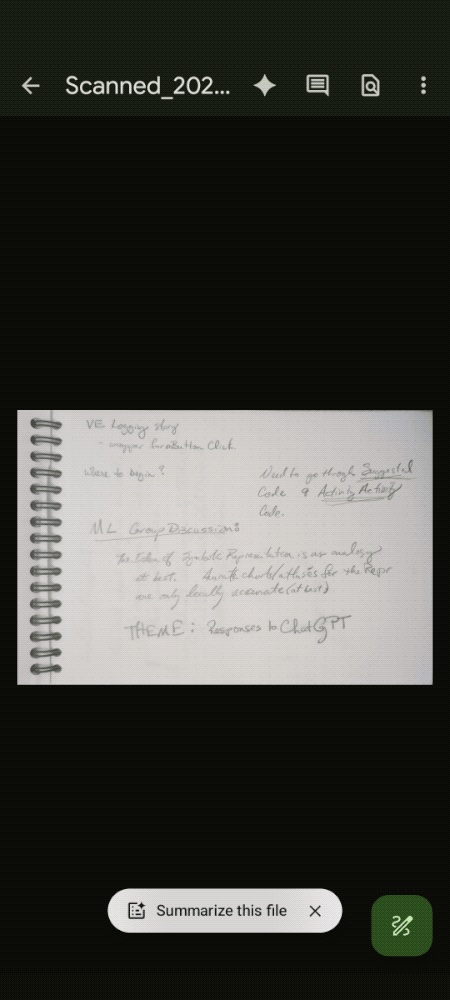
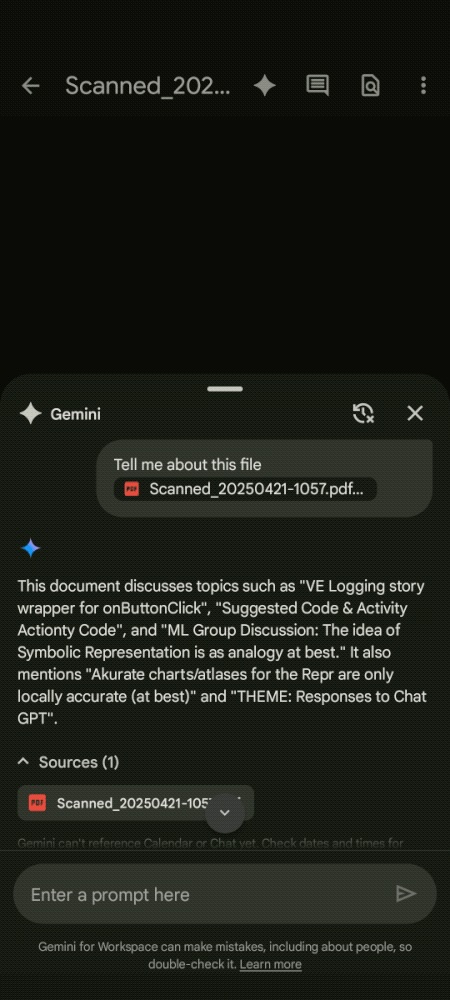
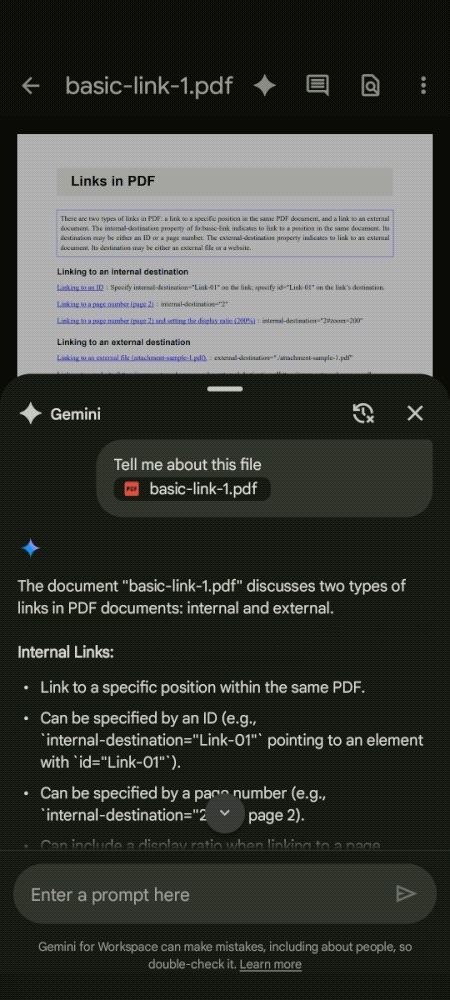
Following Gmail and Docs, Gemini is coming to Google Drive for Android and iOS. This integration lets users “ask questions about their files and folders and receive conversational responses.”

On mobile, Gemini can:
  • Summarize a file, a folder, or information across several files.
  • Retrieve quick facts about a project or topic without the need to find and read the relevant documents.
  • Ask questions about folders.
  • Find a file or folder.
  • Summarize and ask questions about your images.
Gemini can be accessed from several locations, including the top-right corner of the app (to ask questions about folders), in the document viewer, and overflow menus. You might also get a “Summarize this file” chip at the bottom of the screen.

All those access points slide open a bottom sheet to enter prompts and browse responses. Besides Google AI Pro and AI Ultra subscribers, this is available for the following Workspace tiers:

  • Business Standard and Plus
  • Enterprise Standard and Plus
  • Google AI Pro for Education
Gemini in the Google Drive mobile app is rolling out over the coming weeks.
Gemini Google Drive

Gemini Google Drive

Gemini Google Drive

Meanwhile, Google is bringing its Nano Banana image editing model to Slides and Vids. You will see “improved quality to image editing to make it easier to bring your ideas to life.” This lets you edit images with custom prompts. For example:

  • Change to a product shot in studio
  • Replace the background with a night sky and some stars
This is rolling out now to AI Pro/Ultra subscribers and Workspace customers.

nano%20Banana%20image%20editing%20slides.gif
 

Loser

Arch-Supremacy Member
Joined
May 7, 2019
Messages
23,592
Reaction score
10,487


Following Gmail and Docs, Gemini is coming to Google Drive for Android and iOS. This integration lets users “ask questions about their files and folders and receive conversational responses.”

On mobile, Gemini can:
  • Summarize a file, a folder, or information across several files.
  • Retrieve quick facts about a project or topic without the need to find and read the relevant documents.
  • Ask questions about folders.
  • Find a file or folder.
  • Summarize and ask questions about your images.
Gemini can be accessed from several locations, including the top-right corner of the app (to ask questions about folders), in the document viewer, and overflow menus. You might also get a “Summarize this file” chip at the bottom of the screen.

All those access points slide open a bottom sheet to enter prompts and browse responses. Besides Google AI Pro and AI Ultra subscribers, this is available for the following Workspace tiers:

  • Business Standard and Plus
  • Enterprise Standard and Plus
  • Google AI Pro for Education
Gemini in the Google Drive mobile app is rolling out over the coming weeks.
Gemini Google Drive
Gemini Google Drive

Gemini Google Drive

Meanwhile, Google is bringing its Nano Banana image editing model to Slides and Vids. You will see “improved quality to image editing to make it easier to bring your ideas to life.” This lets you edit images with custom prompts. For example:

  • Change to a product shot in studio
  • Replace the background with a night sky and some stars
This is rolling out now to AI Pro/Ultra subscribers and Workspace customers.

nano%20Banana%20image%20editing%20slides.gif

Can it summarize Japanese live action documentaries? :s34:
 

limmk

High Supremacy Member
Joined
Jul 5, 2001
Messages
41,206
Reaction score
8,166


We’ve been talking nonstop about the Pixel 10 series since its announcement in August. And for good reason: there’s a lot to discuss! Between new camera features, Pixelsnap, and new AI tools, the Pixel 10 family has kept us busy.

As with all Pixel phones released over the last couple of years, a big selling point for the Pixel 10 is Gemini. Google’s Tensor G5 chip enables faster and more reliable Gemini interactions on the Pixel 10, and while that’s great, I’d argue that — despite what Google leads you to believe — the Pixel 10 isn’t the best phone for Gemini.
Instead, that title should belong to some of Google’s older Pixel phones, and there’s a very important reason why.

Squeezing for Gemini just feels right​

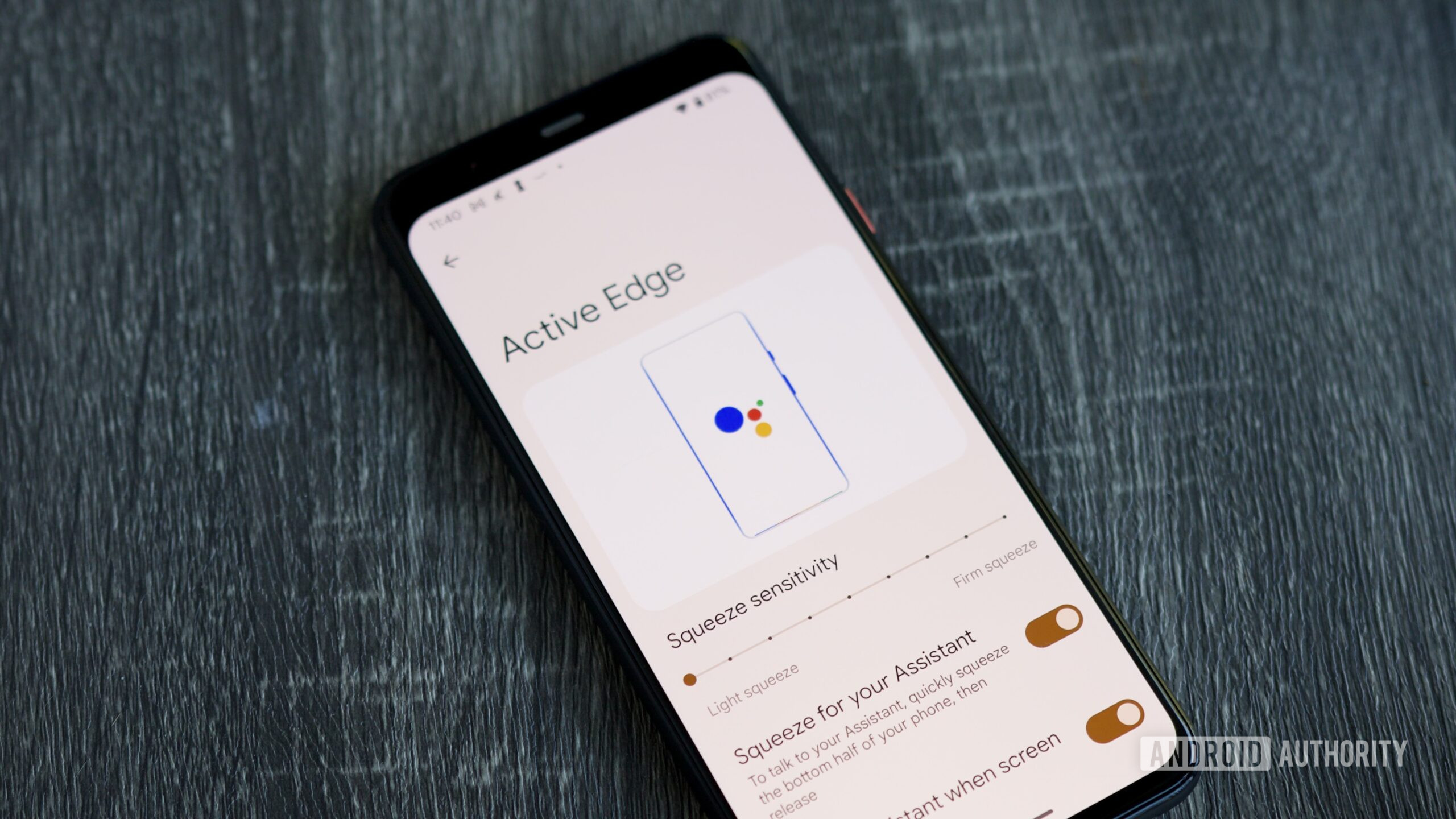
Active Edge settings page on the Pixel 4.


When Google released the Pixel 2 series in 2017, one of the big new features was something called “Active Edge.” Active Edge allowed you to squeeze the sides of the Pixel 2 to summon Google Assistant, meaning Google’s digital helper was always within reach.

If you’ve never used Active Edge, I understand that this may sound silly. But in practice, it was phenomenal. You didn’t have to reach across your phone screen or stretch your finger to the power button to activate Google Assistant. Instead, all you had to do was give your phone a little squeeze while holding it normally, and like magic, Google Assistant would appear.

Active Edge was also present on the Pixel 3 and Pixel 4 lineups before it was eventually discontinued on the Pixel 5. While reminiscing about Active Edge with my colleague Hadlee a couple of weeks ago, I started thinking: Would Active Edge still work with Gemini?

In practice, Active Edge was phenomenal.

So, I did what any sane person would do. I dug out my box of old Android phones, turned on my Pixel 4 for the first time in years, and downloaded Gemini. After confirming that Gemini was set as the default assistant instead of Google Assistant, it was time for the moment of truth.

I gave my Pixel 4 a good squeeze, and sure enough, Gemini popped up at the bottom of the screen — just as if it was built for the Pixel 4 and Active Edge.

And you know what? It’s incredible. Lightly squeezing the Pixel 4 to activate Gemini is both easier and more fun than holding the Pixel 10’s power button to use the AI. No matter how I’m holding the Pixel 4, whether I’m scrolling through Reddit, taking it out of my pocket, or picking it up off my desk, Gemini is always just a squeeze away.

Now, is it difficult to prompt Gemini by using the power button or saying the “Hey Google” wake word? Of course not. But there’s something special about Active Edge that those other methods can’t replicate. It means my Pixel’s power button can be just that — a power button. It means I don’t have to accidentally alert every Gemini/Google Assistant device in my home when saying “Hey Google.”

There’s also something intangible about Active Edge compared to those other actions. It’s fun, charming, and makes Gemini feel like an essential part of the phone, rather than just another app installed on it. It’s wonderful.

I wish Google would bring this back​

Active Edge animation on the Pixel 4.


The Google colors that appear at the bottom when using Active Edge are such a small, fun touch
Realistically, I know that Active Edge will probably never be on another Pixel phone. Google hasn’t released a Pixel with Active Edge since 2019, and in the six years since then, Google hasn’t given any indication that it plans on resurrecting the feature.

But having used the Pixel 4 again and experiencing Active Edge in the Gemini era, I can’t help but wish Google would reconsider.
Active Edge was always one of Google’s most unique Pixel features, and as forgotten as it may be, it works so well with Gemini that it feels like a huge missed opportunity to leave Active Edge in the history books. What better way to encourage people to use Gemini than by providing a helpful, clever, and delightful way for users to interact with it?
 

limmk

High Supremacy Member
Joined
Jul 5, 2001
Messages
41,206
Reaction score
8,166
TL;DR
  • Google is working on several updates to the Gemini app, including a new processing animation and new buttons to facilitate long conversations.
  • Google is also working to remove the ability to switch back to Google Assistant, effectively locking users into Gemini.


Gemini Deep Research could soon get the ability to choose and control sources, but that’s not the only improvement that Google is working on. We’ve spotted several other changes coming soon to Gemini, including a new processing animation, expand and collapse buttons, and preparation for the eventual demise of Google Assistant.

New Gemini animation​

In Google app v16.44.59, we’ve managed to enable a new processing animation for when Google is working on your queries. Here’s an early look:


Expand and collapse buttons for Gemini​

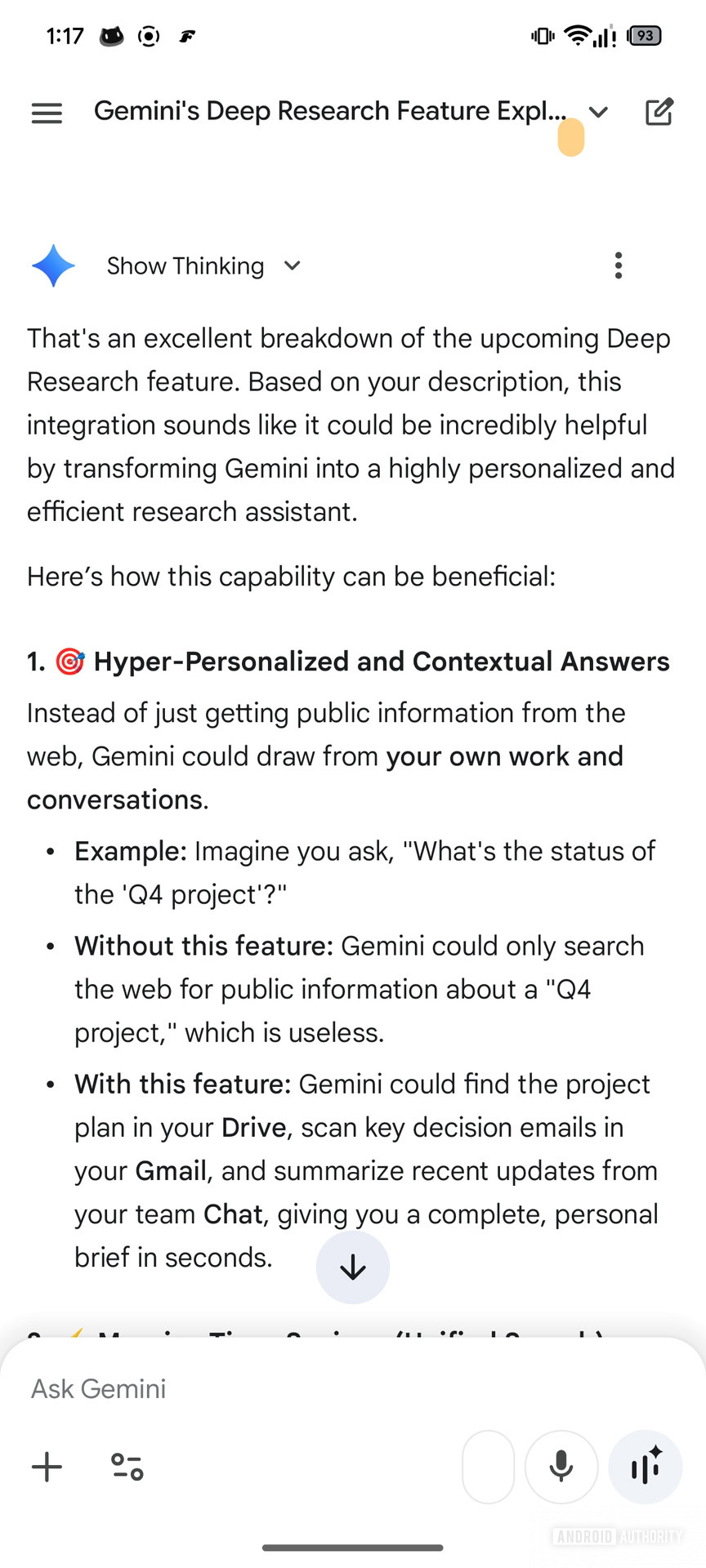
When you send a long query to Gemini, the entire query is displayed in the chat conversation UI, which can occupy a large portion of the available display area. There’s little utility in displaying this whole message, since the user already knows what they sent. To improve the situation, Google is working on buttons to expand and collapse the long query, similar to the button that already exists in Gemini on the web.

Gemini Expand and collapse buttons (2)

Current UI​

Gemini Expand and collapse buttons (3)

Upcoming UI with Expand/Collapse button​

Gemini Expand and collapse buttons (4)

Upcoming UI with Expand/Collapse button​

Gemini Jump to bottom button

Upcoming UI with Jump to Bottom button​

Google is also working on a “Jump to bottom” button, which is very helpful when you want to reach the bottom of any long conversation.

Google Assistant is completely going away​

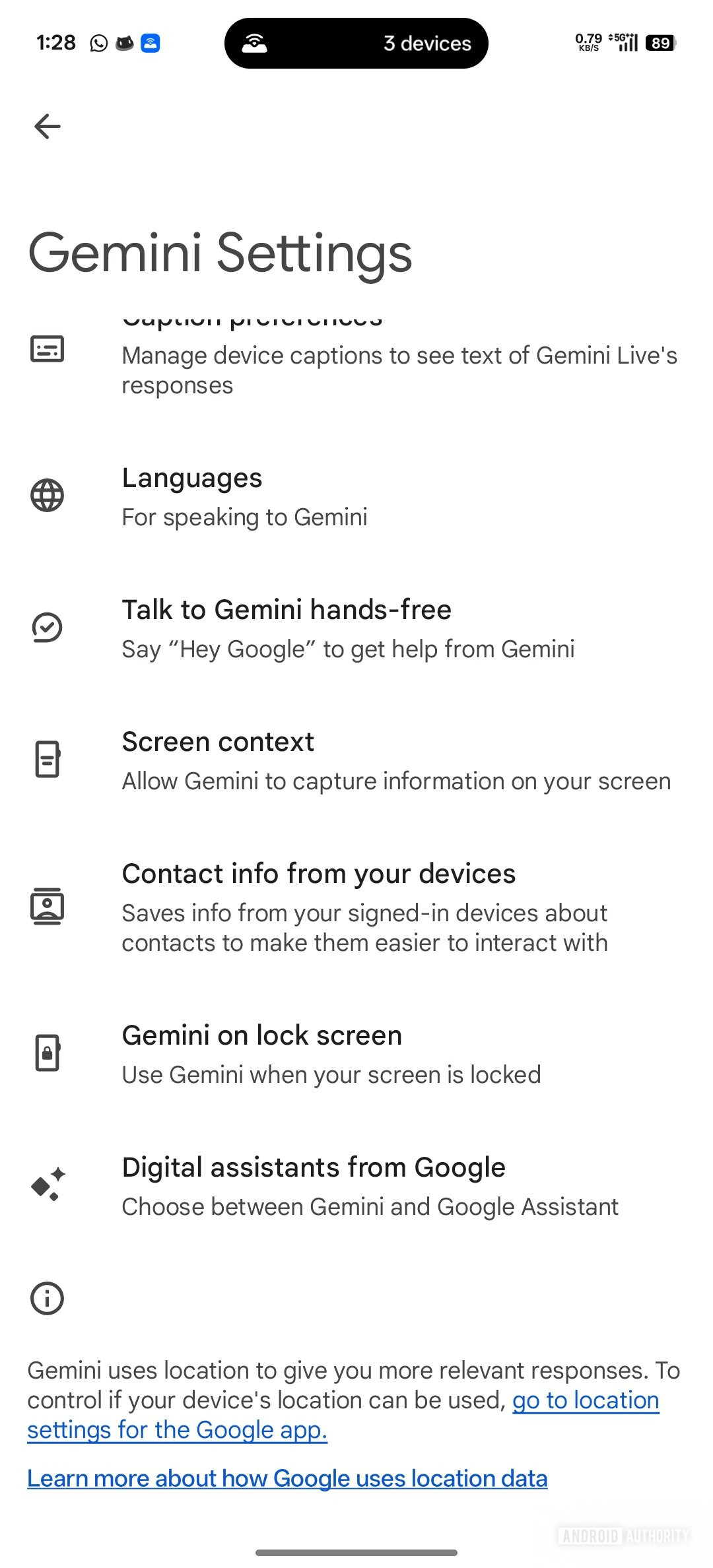
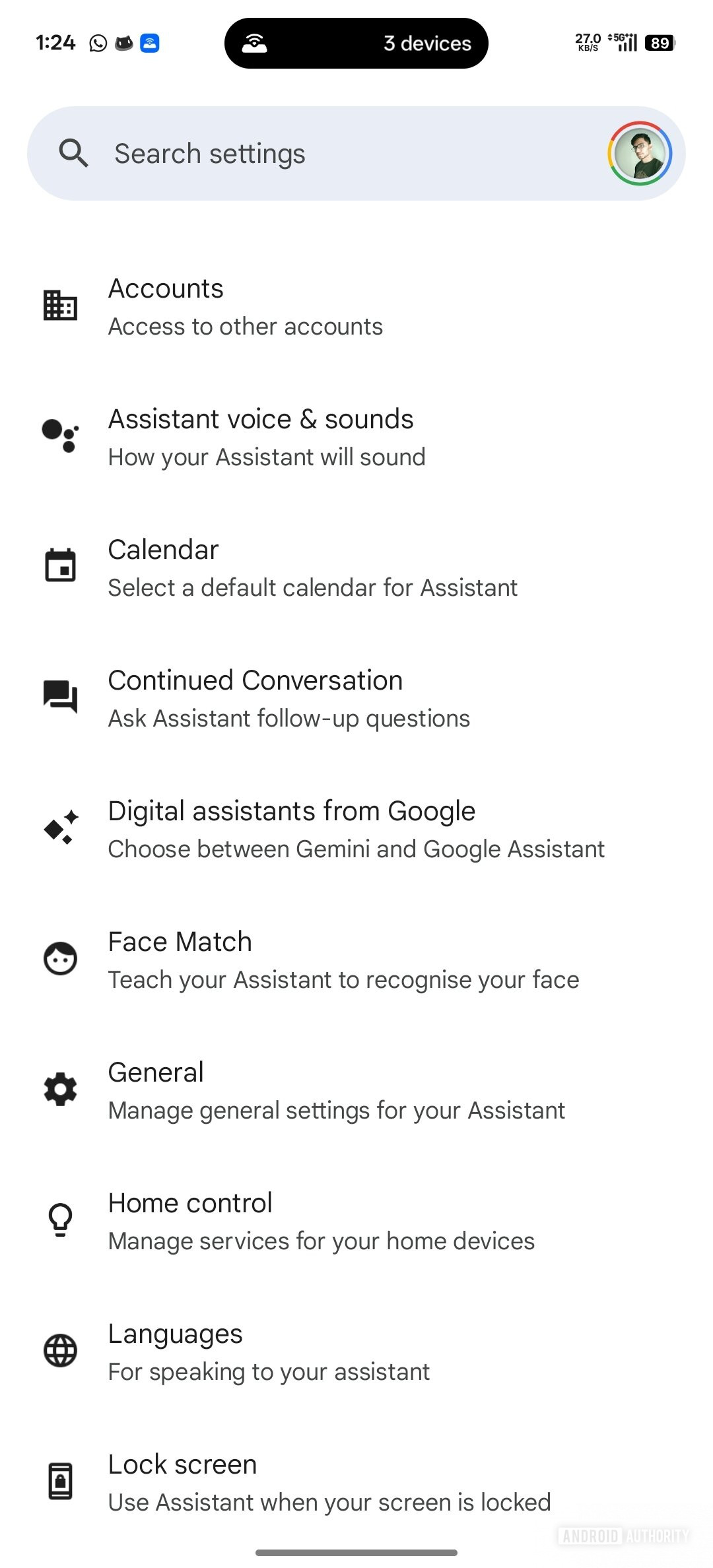
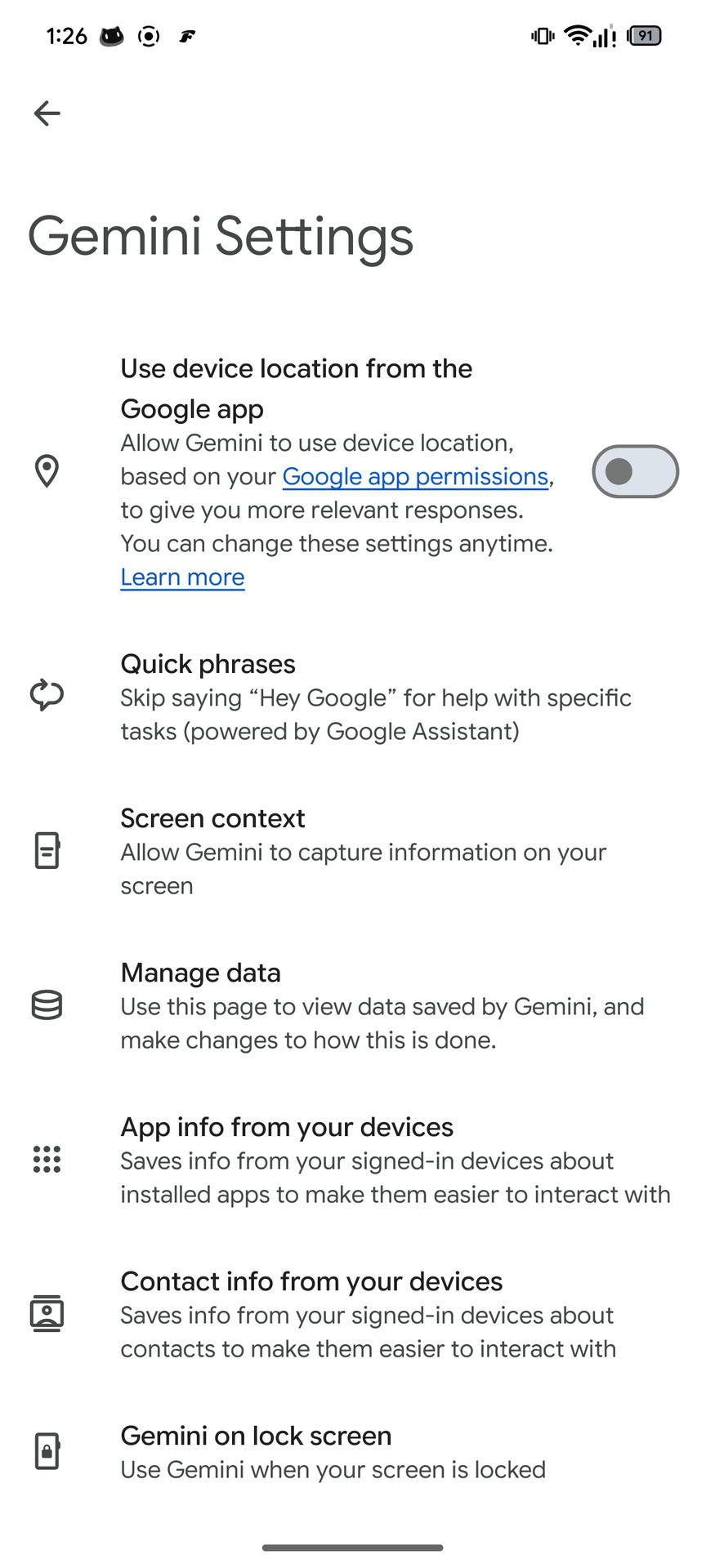
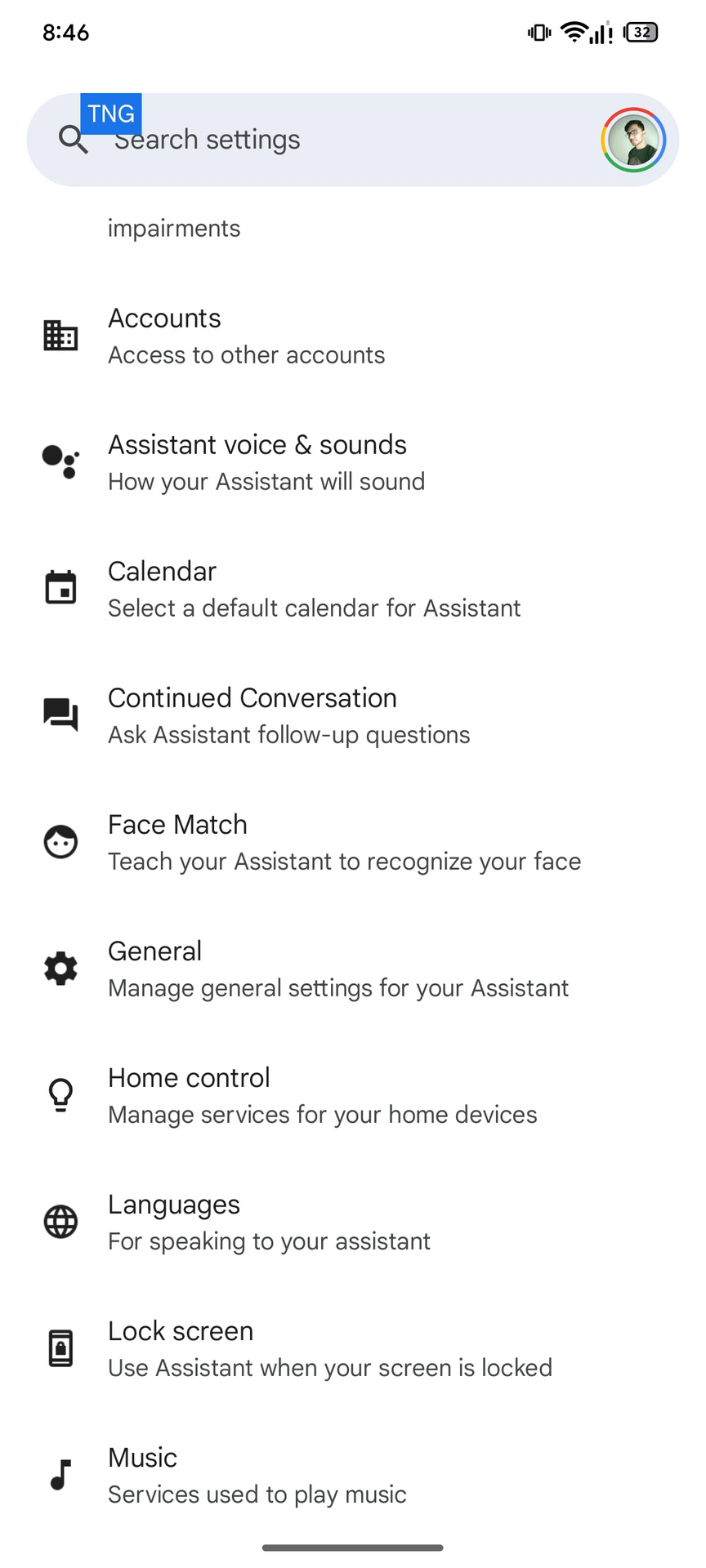
Gemini currently offers a setting that allows users to switch back to Google Assistant if they really want to. We know that Assistant is dead and going away, and soon, users will not be able to switch away from Gemini and back to Assistant. Google is working to remove the choice screen from Gemini and even Google Assistant settings, effectively locking users to Gemini.

Gemini settings Choice screen for digital assistants

Current UI in Gemini showing stub for Digital Assistant choice screen​

Google Assistant settings Choice screen for digital assistants

Current UI in Google Assistant showing stub for Digital Assistant choice screen​

Gemini settings No choice screen for digital assistants

Upcoming UI in Gemini with no stub for Digital Assistant choice screen​

Google Assistant settings No choice screen for digital assistants

Upcoming UI in Google Assistant with no stub for Digital Assistant choice screen​

As you can see, the “Digital assistants from Google” settings stub will soon be removed. Google hasn’t flipped the switch yet, but it’s inevitable, so Assistant fans had best make their peace with Gemini.
 

limmk

High Supremacy Member
Joined
Jul 5, 2001
Messages
41,206
Reaction score
8,166


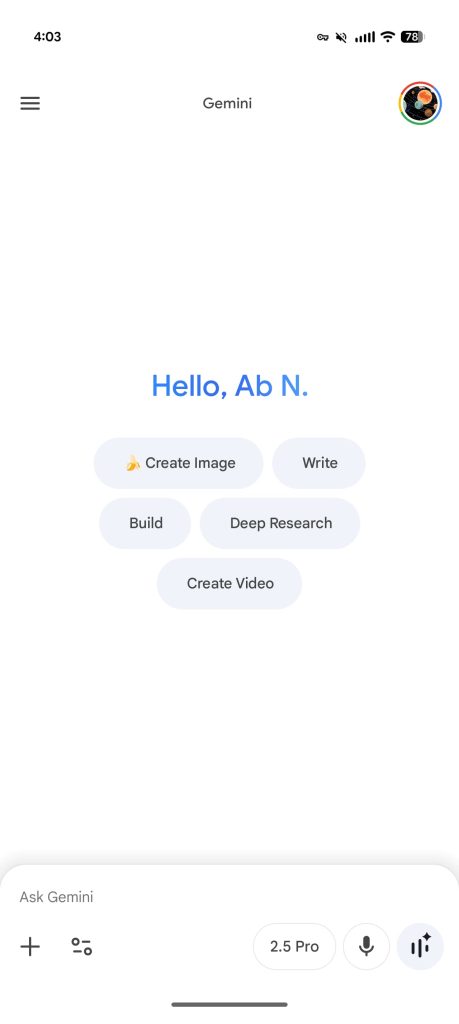
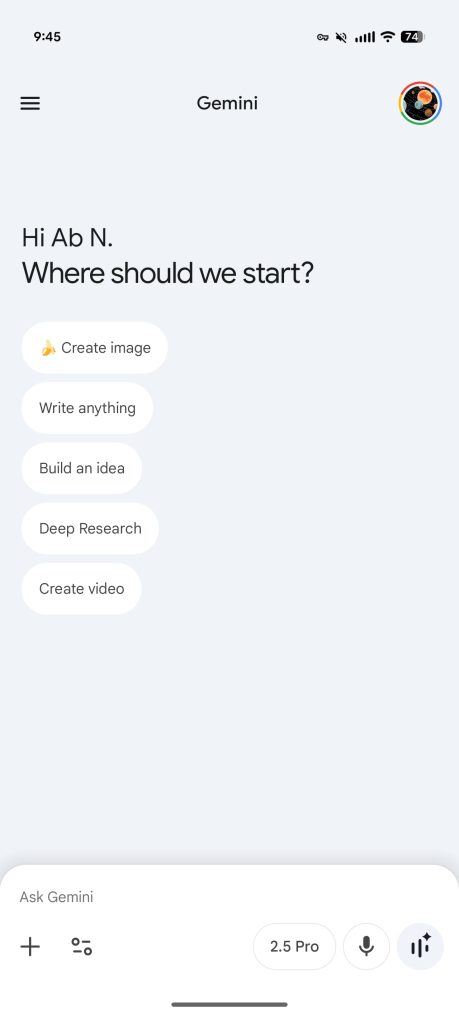
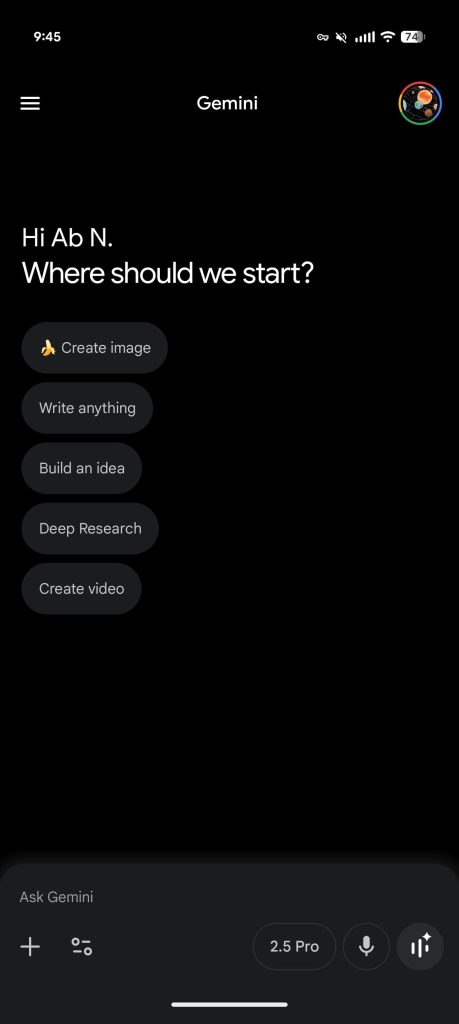
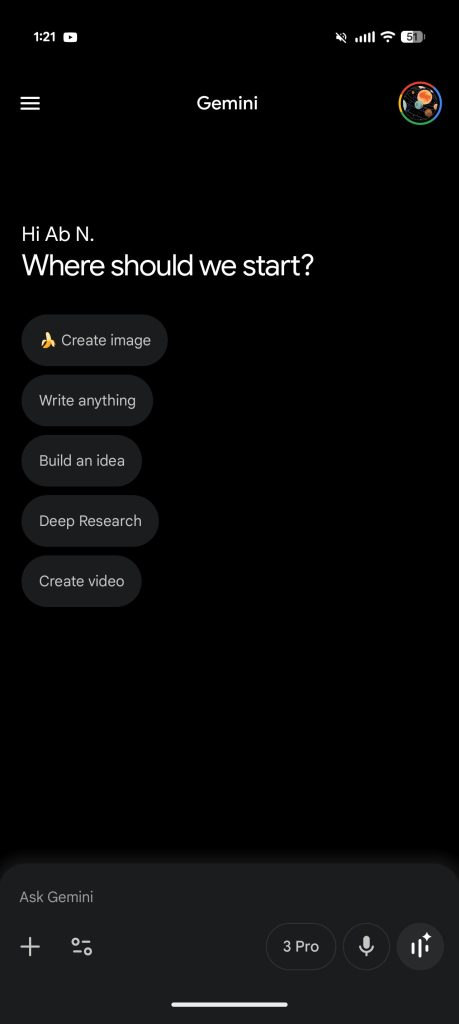
Following the last redesign in September, the Gemini app has a new look for its homepage and conversations, starting on Android.

On mobile, this homepage redesign still starts with a (non-blue) greeting, but is now followed by “Where should we start?” underneath. The capability chips are now arranged in a list:

  • Create image
  • Write anything
  • Build an idea
  • Deep Research
  • Create video
Another tweak sees “Gemini” in the app/top bar get a little bit larger following the model switcher move.

Old vs. new


Gemini-homepage-Sept-2025-light.jpg
Gemini-homepage-redesign-Nov-2025-light.jpg


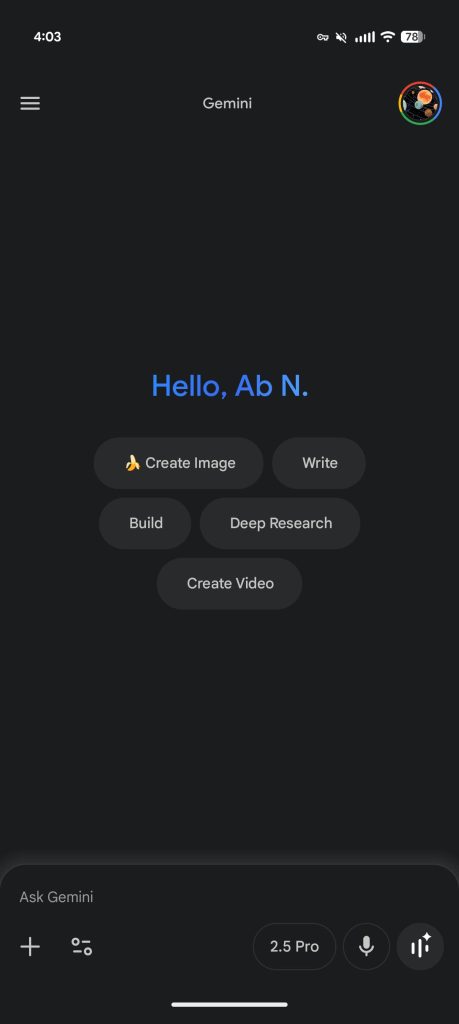
If you have the dark theme enabled, Google has switched from gray to black, though the color of the prompt box and full page conversations are unchanged for a curious dual-tone look. Meanwhile, the light theme adds a blue/gray hue to its background.

Gemini-homepage-Sept-2025-dark.jpg
Gemini-homepage-redesign-Nov-2025-dark.jpg


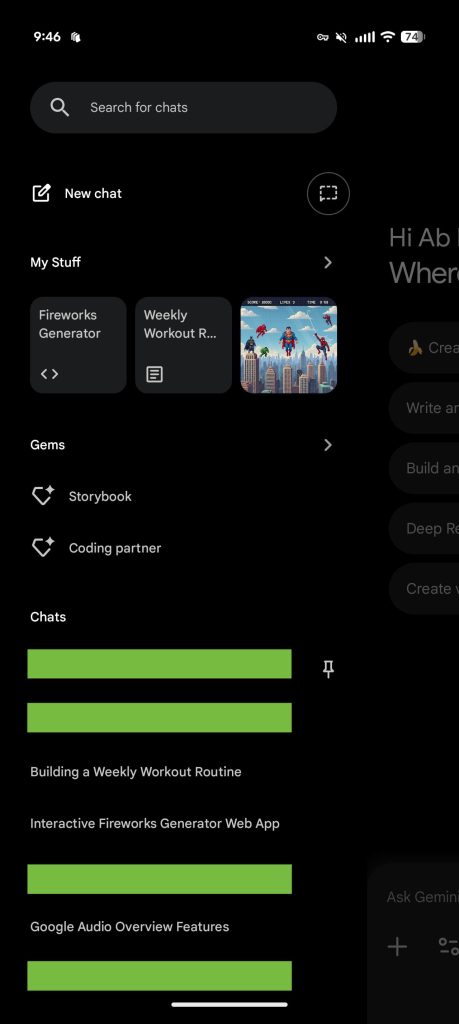
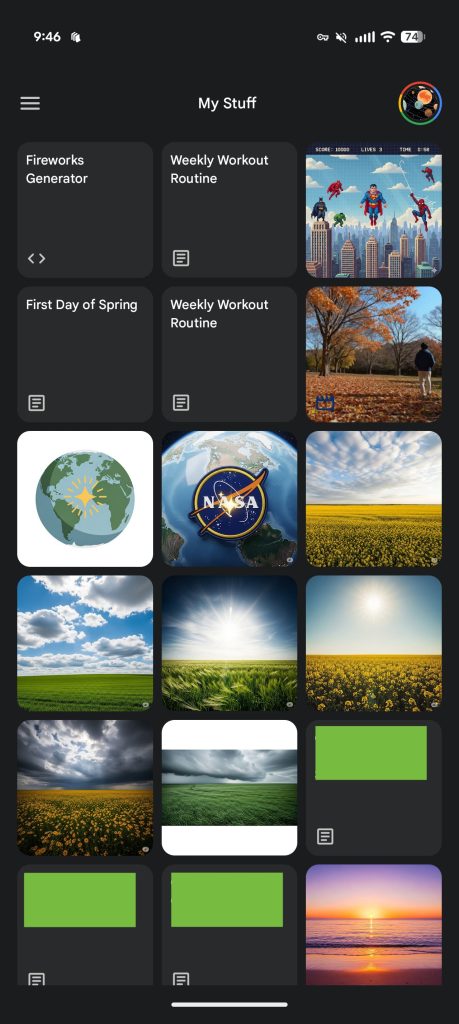
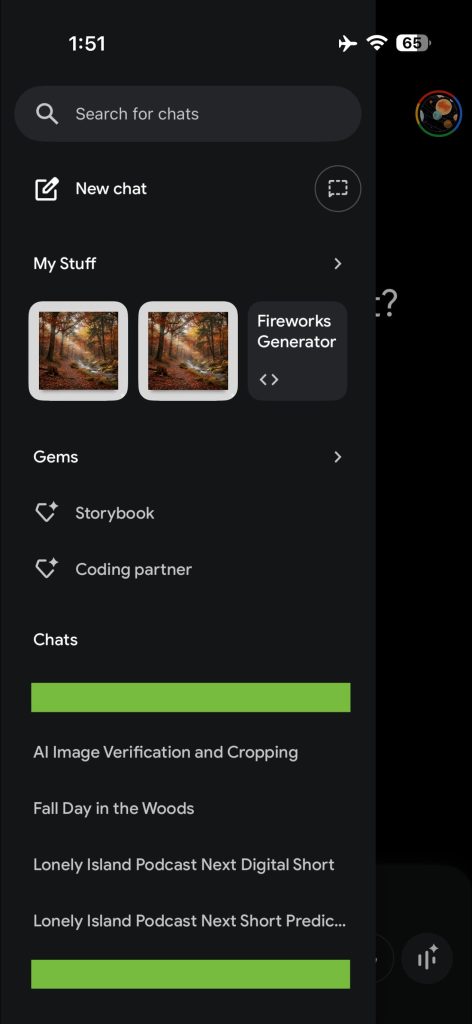
The navigation drawer is updated, and sees a new “My Stuff” section that shows images, videos, and Canvas works that you’ve generated. Joining Gems and Chats, you see the last three creations in rounded squares, while tapping the chevron takes you to a fullscreen feed.

Gemini-app-My-Stuff-1.jpg
Gemini-app-My-Stuff-2.jpg


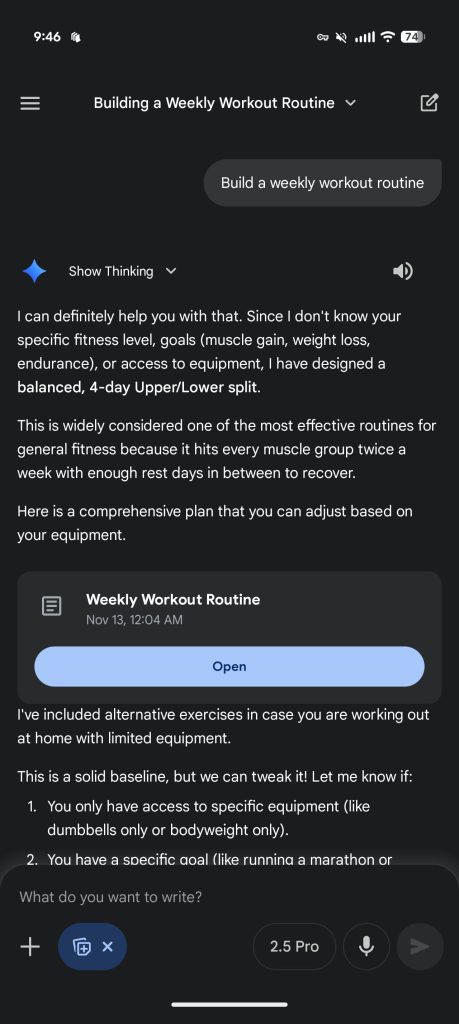
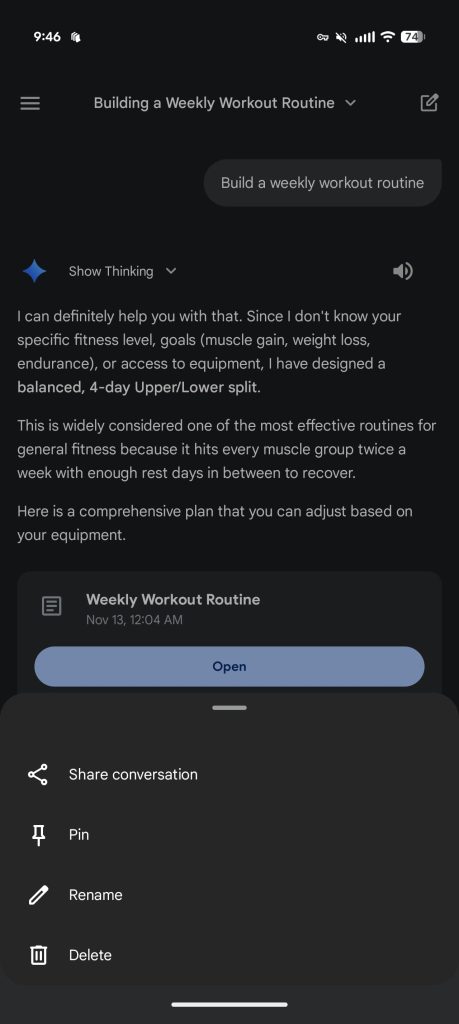
Conversations on mobile see some changes. The top-right corner loses its account switcher for a new chat button, while the conversation name now doubles as a dropdown menu to Share conversation, Pin, Rename, or Delete. These actions were previously only available from the navigation drawer.

As of today, we’re seeing this Gemini homepage redesign widely rolling out on Android with Google app 16.45. We’ve yet to see full availability on iOS or the web.

Gemini-app-chat-redesign-1.jpg
Gemini-app-chat-redesign-2.jpg
 

limmk

High Supremacy Member
Joined
Jul 5, 2001
Messages
41,206
Reaction score
8,166


Following the announcement yesterday, Gemini 3 Pro is now rolling out to the Gemini app on Android and iOS.

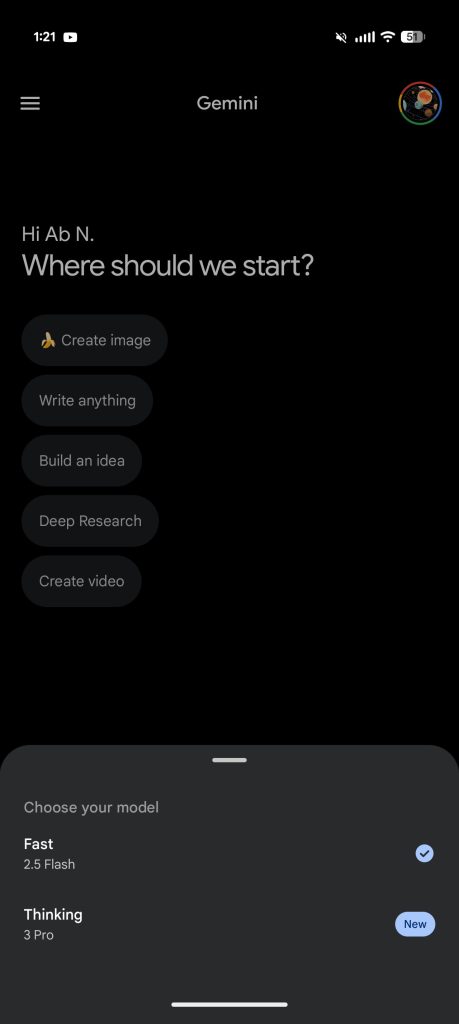
On Tuesday, Google’s “most intelligent model” came first to gemini.google.com. On the web, the model picker has you choose between “Fast: Answers quickly” or “Thinking: Thinks through complex topics with 3 Pro.”
This naming approach is mirrored in AI Mode: “Default: Fast all-around help” or “Thinking: 3 Pro reasoning and generative layouts.” Gemini 3 Pro rolled out yesterday to AI Pro and AI Ultra subscribers in the US.

On Android and iOS today, the Gemini prompt box is of course narrower so it’s “3 Pro” and “2.5 Flash” (like before), though “Fast” and “Thinking” does appear in the bottom sheet.

This is a server-side update, so force stop the Gemini app to load it. On Android, we’re seeing it on both the stable and beta channels of the Google app.

Gemini-app-Android-3-Pro-Thinking-1.jpg
Gemini-app-Android-3-Pro-Thinking-2.jpg


Google has also rolled out Gemini Agent to AI Ultra subscribers. Opening the Tools menu reveals a new “Agent” item below Deep Think that is badged with “Labs.” Additionally, there are new suggestion chips for: Stay organized, Brief me, Do tasks for me.

In other Gemini developments, Google yesterday rolled out a new @SynthID extension/app: “Tool to verify if medias are made with Google AI or not by detecting the SynthID watermark.” It’s enabled by default in the Connected Apps list.

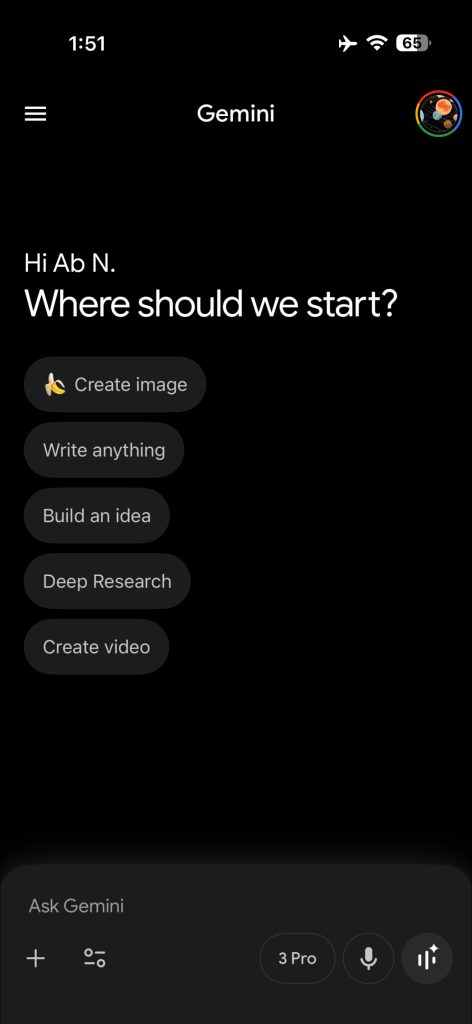
Finally, Google is now more widely rolling out (server-side update with the latest app version) the mobile redesign to the iPhone. Following the Android launch, Gemini gets a new homepage that arranges the suggestion chips vertically. The dark theme now makes use of a black background, though the prompt box remains unchanged for a two-tone look. Similarly, the light mode gets a little gray/blue hue.

In the navigation drawer, there’s a new “My Stuff” folder to quickly access your images, videos, reports, and other generations. You’ll find three recent works, while a tap takes you to the fullscreen feed.

Gemini-app-iPhone-redesign-Nov-2025-1.jpg
Gemini-app-iPhone-redesign-Nov-2025-2.jpg
 
Important Forum Advisory Note
This forum is moderated by volunteer moderators who will react only to members' feedback on posts. Moderators are not employees or representatives of HWZ Forums. Forum members and moderators are responsible for their own posts. Please refer to our Community Guidelines and Standards and Terms and Conditions for more information.
Top