[HELP PLS] Replacing CMOS battery for ITX motherboard

CCCustom

High Supremacy Member
Joined
Jul 18, 2012
Messages
36,254
Reaction score
10,173
1st time encountering motherboard where I cannot find the CMOS battery … so I believe from googling that it is those heatshrinked ones hidden at the I/O.

Motherboard: ASUS ROG Z590-i
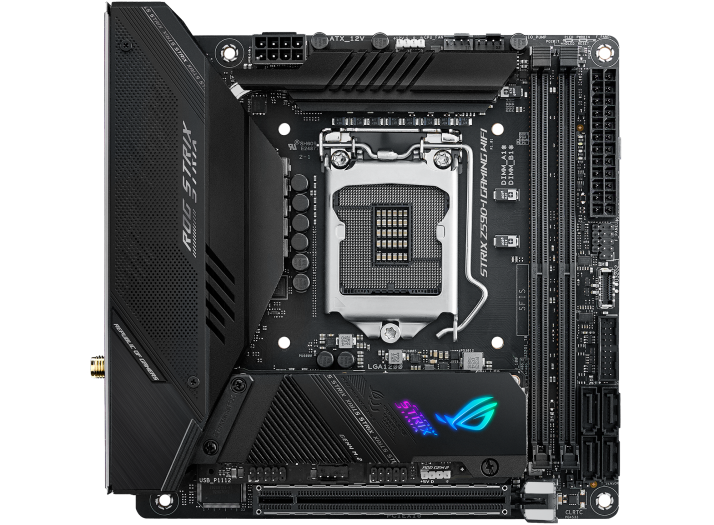
h525


I haven’t been able to find any guide on how to access the battery though, it is not covered in the manual.

I opened the top panel of the I/O cover (the 1 with the ROG STRIX wording secured by 2 screws) and found that it is just 1 thin plate, underneath is still a whole block covering all the I/Os except 1 square hole for the fan.

Anyone can advise how to get to the battery for this motherboard? I will assume there is no way to get to it without taking the whole system apart :frown:
 

Koenig168

Supremacy Member
Joined
Nov 4, 2007
Messages
9,739
Reaction score
1,554
I looked at the manual and there is no mention of where the CMOS battery is located, much less how to replace it. :rolleyes:

Looks like you have to take the system apart. Hope it is not a WC system. :)
 

CCCustom

High Supremacy Member
Joined
Jul 18, 2012
Messages
36,254
Reaction score
10,173
I found pictures of the ROG B550-i with what they refer to as I/O shroud removed:

jkFuGFI_d.webp


The thin plate with ROG STRIX wording I mentioned is apparently the fan grill … similar to this 1, take if off still see everything covered up except hole for the fan.

0WUS5x0_d.webp


The rest of the I/O shroud removed, but VRM heatsink still in place.

I don’t know if it is different for my Z590-i, but before I even worry about VRM heatsink, how should I take off the shroud like the 2nd pic? Don’t tell me screws are on the underside? :s16:
 

CCCustom

High Supremacy Member
Joined
Jul 18, 2012
Messages
36,254
Reaction score
10,173
6126uUn5j8L.jpg


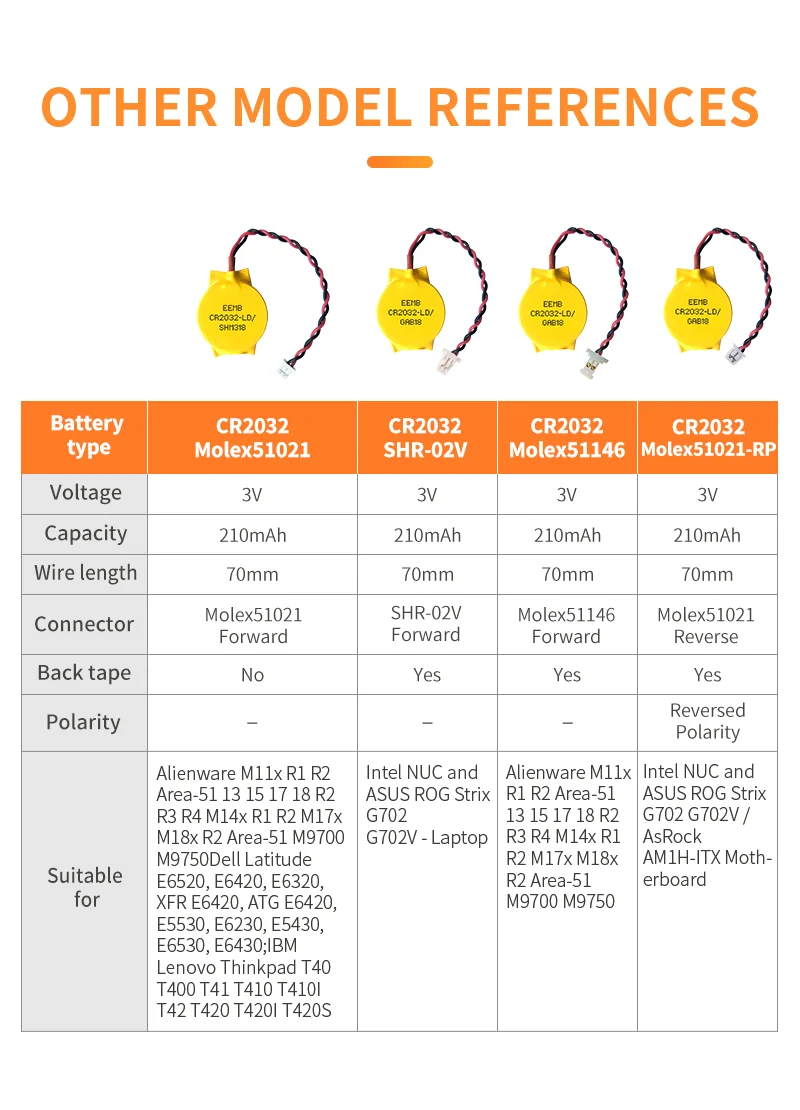
Anyone can advise if those pre-heatshrinked batteries connectors are universal for laptop and desktop motherboards?

I’d already bought a CR2032 but now I see this type of heatshrink - and apparently the wires connection inside the heatshrink are soldered onto the battery - I’m thinking it might make more sense to buy a pre-heatshrinked battery?

Is there a recommended or preferred brand or seller of pre-heatshrinked battery for motherboards, specifically for my board?
 

tsteo77

Senior Member
Joined
Oct 28, 2011
Messages
1,537
Reaction score
216
6126uUn5j8L.jpg


Anyone can advise if those pre-heatshrinked batteries connectors are universal for laptop and desktop motherboards?

I’d already bought a CR2032 but now I see this type of heatshrink - and apparently the wires connection inside the heatshrink are soldered onto the battery - I’m thinking it might make more sense to buy a pre-heatshrinked battery?

Is there a recommended or preferred brand or seller of pre-heatshrinked battery for motherboards, specifically for my board?
This should be suitable for your motherboard > https://www.amazon.com/dp/B089RWJVZ...?sp_csd=d2lkZ2V0TmFtZT1zcF9ocXBfc2hhcmVk&th=1
Anyway, hope i don't end up with such troublesome motherboard. :cry: I remember many years ago, there is no battery for replacement for motherboard. I too just replaced my CMOS battery 3weeks ago, :)
 

CCCustom

High Supremacy Member
Joined
Jul 18, 2012
Messages
36,254
Reaction score
10,173
This should be suitable for your motherboard > https://www.amazon.com/dp/B089RWJVZ...?sp_csd=d2lkZ2V0TmFtZT1zcF9ocXBfc2hhcmVk&th=1
Anyway, hope i don't end up with such troublesome motherboard. :cry: I remember many years ago, there is no battery for replacement for motherboard. I too just replaced my CMOS battery 3weeks ago, :)
You linked the 1 in my pic :o

But yeah this 1 is from Amazon US, so I’m wondering about e.g. Shopee for ideally local seller else from China with faster shipping than from US, and connector-wise whether its meant to be universal for laptop and desktop motherboards.

I’d want to look for something where they specifically state what battery is in it like this 1 though … think I saw something that specified KTS battery but they stated its for Lenovo laptops.
 

peterchan75

Supremacy Member
Joined
Apr 26, 2003
Messages
6,709
Reaction score
529
Don't bother replacing the battery. Just go to SLS mamak shops and get a new one. Bring along the existing one and make sure the connector is the same.
 

hexenB

Junior Member
Joined
Feb 24, 2015
Messages
82
Reaction score
4
You linked the 1 in my pic :o

But yeah this 1 is from Amazon US, so I’m wondering about e.g. Shopee for ideally local seller else from China with faster shipping than from US, and connector-wise whether its meant to be universal for laptop and desktop motherboards.

I’d want to look for something where they specifically state what battery is in it like this 1 though … think I saw something that specified KTS battery but they stated its for Lenovo laptops.
The head is not universal, but the wires red and black are. So you can just buy from shopee. If the head is not right size, you can bend the pins on the motherboard to suit your cr2032 head, or just cut the wires and use back the old head.

Sd2fb624b80384d098f10672fc4e741a6Y.png
 

CCCustom

High Supremacy Member
Joined
Jul 18, 2012
Messages
36,254
Reaction score
10,173
cannot just peel open the battery and stick a new battery then tape it back up?
I’m not taking apart my system to pull the battery out before buying the heatshrinked replacement (just gonna have to set my BIOS every time I turn this desktop on, which fortunately I don’t do every day), but this is what I googled is inside the heatshrink:

uyKaTK16VDROsiVe.medium


The contacts are supposed to be soldered onto the battery itself, soldered lightly enough so that you can still pry off the contacts with some effort (and they will bend out of shape depending on how you pry) … some people have said that they just tape it back on with regular scotch tape, but the recommended method is to use aluminium tape to ensure contact … which I don’t have and don’t see the point to go find and buy to do all that when it’s more cost effective to just get another heatshrinked battery.
 

peterchan75

Supremacy Member
Joined
Apr 26, 2003
Messages
6,709
Reaction score
529
The original terminal contact is not solder. Usually, it's spot weld. Soldering is slow and it's difficult to solder onto zinc surface. It may heat up battery which is to be avoided.
 

CCCustom

High Supremacy Member
Joined
Jul 18, 2012
Messages
36,254
Reaction score
10,173
The original terminal contact is not solder. Usually, it's spot weld. Soldering is slow and it's difficult to solder onto zinc surface. It may heat up battery which is to be avoided.
Not gonna pretend I know anything about this, just what I came across when looking up how to replace the battery :o But no difference in that after prying the contacts off the battery, the recommended solution is to use aluminium tape to ensure contact. So it probably makes more sense to just buy another heatshrinked battery.

I also see this battery holder thing that could possibly make future battery change easier?
case-for-cmos-bios-battery-cr2032-with-cables-and-onoff-switch.jpg

This 1 is not specificaly meant for motherboard though, has an on-off switch :s14: But a holder where you can replace the battery easily seems to make much more sense? Granted though, you’d probably not change CMOS battery more than once or twice in the lifetime of the motherboard.
 

wwenze

Greater Supremacy Member
Joined
Dec 2, 2002
Messages
83,693
Reaction score
27,733
Buy this and you can solder however you want

61xaqRU7e4L.jpg
 

peterchan75

Supremacy Member
Joined
Apr 26, 2003
Messages
6,709
Reaction score
529
Just get one from Shopee. It costs about $3-5. Better still, get one with double sided tape. I am sure those accessory shops at SLS have it too.
 

kimsix

Arch-Supremacy Member
Joined
Jan 6, 2009
Messages
19,471
Reaction score
9,454
Can try email avertek see if they willing to provide spare parts
 

tsteo77

Senior Member
Joined
Oct 28, 2011
Messages
1,537
Reaction score
216
You linked the 1 in my pic :o

But yeah this 1 is from Amazon US, so I’m wondering about e.g. Shopee for ideally local seller else from China with faster shipping than from US, and connector-wise whether its meant to be universal for laptop and desktop motherboards.

I’d want to look for something where they specifically state what battery is in it like this 1 though … think I saw something that specified KTS battery but they stated its for Lenovo laptops.
How about this then ? > https://www.amazon.com/KODASW-RTCBa...mzn1.sym.4e1b46a8-daf9-4433-b97e-d6df97cf3699
 

chrisvin

Senior Member
Joined
Jul 31, 2004
Messages
1,168
Reaction score
3
But I also read some laptops nowadays come with rechargable cmos battery :O
 

86technie

High Supremacy Member
Joined
Jun 8, 2006
Messages
39,404
Reaction score
5,360
Can try email avertek see if they willing to provide spare parts

I don't think distro will help.
Can try shops at Sim Lim Square see anyone got the CMOS battery.
PS try not to DIY cuz it's not simple inside.
 

CCCustom

High Supremacy Member
Joined
Jul 18, 2012
Messages
36,254
Reaction score
10,173
Bringing this topic back.

I got my KTS pre-shrinkwrapped battery couple days back and finally got it replaced in the early AM hours today.

NPGT my actual board, but this quote is correct:

is underneath the vrm heatsink

probe-placement.jpg

Hidden under the I/O shroud, stuck on the housing of the top row of USB ports.

To access it, the whole I/O shroud needs to be removed, and the screws are on the underside the motherboard. so changing of the CMOS battery is not possible without taking apart your system :s16:

Except there are major problems with that … unlike the B550-i that I shared where the I/O shroud and the VRM cooler are separate, the Z590-i’s VRM cooler is the I/O shroud :s16: 1-piece. And on top of it, there is a heatpipe running between the side and top power stages, so the side and top coolers are a single assembly and must be taken off as a whole - something I discovered while trying to pull the side off while the top is still screwed on, bending the heatpipe :s14: But the heatpipe is made of a somewhat soft metal, easy to bend back :o The VRM cooler’s fan cable splits into the individual wires at the connector and they are very fine wires, so I didn’t dare to pull … left the whole assembly still connected by the fan cable.

I’m not sure what they stuck the battery on the USB port’s housing was, felt more like super sticky chewing gum, hard to pry off, felt like I was going to pull the whole USB housing off instead. But I finally managed to get it off. Thankfully, the replacement battery’s connector is the same.

I get the lack of real estate on an ITX board, but this is srsly $#!tty design.
 
Last edited:
Important Forum Advisory Note
This forum is moderated by volunteer moderators who will react only to members' feedback on posts. Moderators are not employees or representatives of HWZ Forums. Forum members and moderators are responsible for their own posts. Please refer to our Community Guidelines and Standards and Terms and Conditions for more information.
Top