
Help with my sleeper PC build

Chrysanthemum Tea

Supremacy Member
Joined
Jan 30, 2012
Messages
6,089
Reaction score
1,421
I have a Sun Microsystem server case that is ATX compatible, I want to make a sleeper PC out of it
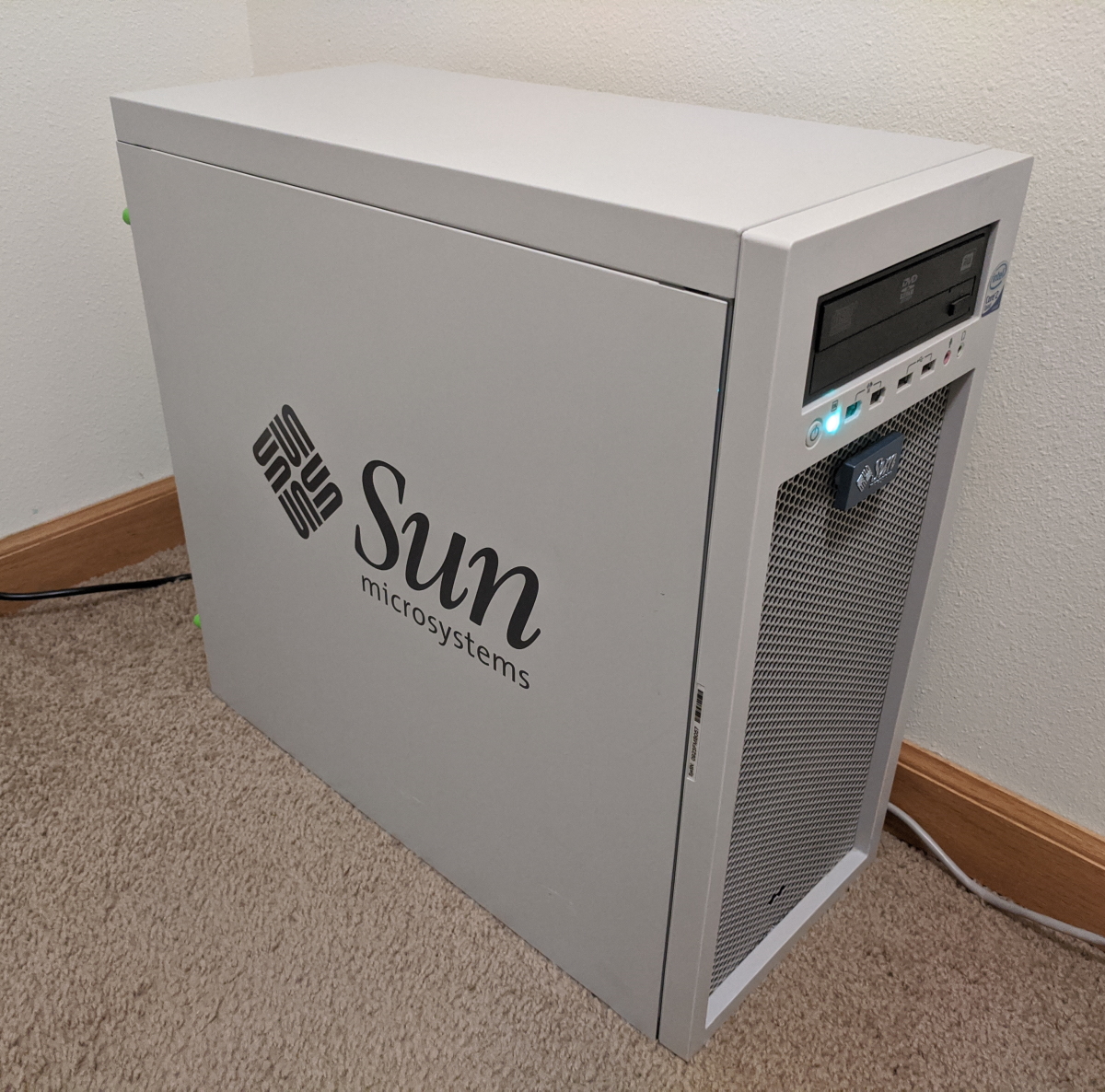
new_home.jpg
IMG-6294.jpg


Use case:
1. PC gaming, playing older AAA games (GTA V, Skyrim) at 1440p, sim games like Cities Skylines and Total War
2. Casual photo and video editing (lightroom, photoshop, davinci resolve)

What I have in mind so far, prices from Dynacore/PCThemes

i5 12600 + MSI B660 Tomahawk WiFi DDR4~$600
2x 16gb ddr4 3600mhz (please recommend)~$150
Asus TUF Gaming 3060 Ti~$800
Cooling: be quiet Dark Rock Pro 4 + case fans (not sure if this is overkill)~$200
PSU (please recommend)$-
1TB SSD (please recommend)$-

I plan to find someone to help me build this (might need to drill out some rivets to remove the drive cages, I don't have the tools)

Please recommend someone who accepts a build like this, or DM me if you are interested
 

86technie

High Supremacy Member
Joined
Jun 8, 2006
Messages
39,017
Reaction score
5,075
I have a Sun Microsystem server case that is ATX compatible, I want to make a sleeper PC out of it

new_home.jpg
IMG-6294.jpg


Use case:
1. PC gaming, playing older AAA games (GTA V, Skyrim) at 1440p, sim games like Cities Skylines and Total War
2. Casual photo and video editing (lightroom, photoshop, davinci resolve)

What I have in mind so far, prices from Dynacore/PCThemes

i5 12600 + MSI B660 Tomahawk WiFi DDR4~$600
2x 16gb ddr4 3600mhz (please recommend)~$150
Asus TUF Gaming 3060 Ti~$800
Cooling: be quiet Dark Rock Pro 4 + case fans (not sure if this is overkill)~$200
PSU (please recommend)$-
1TB SSD (please recommend)$-

I plan to find someone to help me build this (might need to drill out some rivets to remove the drive cages, I don't have the tools)

Please recommend someone who accepts a build like this, or DM me if you are interested

Rather just build a new PC with a new case, modern hardware recommend to have
good airflow. That case looks like from Intel Core 2 Duo era?
 

Chrysanthemum Tea

Supremacy Member
Joined
Jan 30, 2012
Messages
6,089
Reaction score
1,421
Rather just build a new PC with a new case, modern hardware recommend to have
good airflow. That case looks like from Intel Core 2 Duo era?
Yes core 2 duo era

I thought about the airflow, the rear can fit one 120mm fan, the whole front is actually a grill, so can fit 2 120mm fans for intake (or fit radiator for AIO)
It’s also why I went with parts that I don’t want to overclock, and picked a more high end cpu cooler, and won’t mind paying for better case fans
 

86technie

High Supremacy Member
Joined
Jun 8, 2006
Messages
39,017
Reaction score
5,075
Yes core 2 duo era

I thought about the airflow, the rear can fit one 120mm fan, the whole front is actually a grill, so can fit 2 120mm fans for intake (or fit radiator for AIO)
It’s also why I went with parts that I don’t want to overclock, and picked a more high end cpu cooler, and won’t mind paying for better case fans

03QOR4lstWhRxYsx4jXS5qh-25..v1569476361.jpg


Would recommend you get a new case, modern PC parts heat ouput are a lot so best
to have a good case with good airflow.
Old case wise the PSU placement is on top while new one is at the bottom and
I don't think that case support AIO cooler.

The top is block by PSU and front is block by the hard disk cage.
This one is Cooler Master MB520A comes with three AGRB fans, if you buy additional ARGB
which cost around $30 each getting a case like this will be more worth while.
BTW old case to put lighting looks very odd and ugly, I still have a old AMD Phenom II rig laying
in my store.

That one uses standard case fan with one color, that PC I have not used for sometime.

https://www.pcthemes.com.sg/case/cooler-master-masterbox-mb520-a-rgb-tempered-glass-casing
 

alamakazim

Supremacy Member
Joined
Feb 3, 2013
Messages
8,038
Reaction score
375
linus build one of that right?

for nostalgic look... no choice lo... need to spend $$$ if cannot DIY
 

NightRaven49

Master Member
Joined
May 17, 2019
Messages
3,699
Reaction score
1,544
03QOR4lstWhRxYsx4jXS5qh-25..v1569476361.jpg


Would recommend you get a new case, modern PC parts heat ouput are a lot so best
to have a good case with good airflow.
Old case wise the PSU placement is on top while new one is at the bottom and
I don't think that case support AIO cooler.

The top is block by PSU and front is block by the hard disk cage.
This one is Cooler Master MB520A comes with three AGRB fans, if you buy additional ARGB
which cost around $30 each getting a case like this will be more worth while.
BTW old case to put lighting looks very odd and ugly, I still have a old AMD Phenom II rig laying
in my store.

That one uses standard case fan with one color, that PC I have not used for sometime.

https://www.pcthemes.com.sg/case/cooler-master-masterbox-mb520-a-rgb-tempered-glass-casing
im sure ts knows what he wants (a sleeper pc), ur missing the point.
 

Chrysanthemum Tea

Supremacy Member
Joined
Jan 30, 2012
Messages
6,089
Reaction score
1,421
03QOR4lstWhRxYsx4jXS5qh-25..v1569476361.jpg


Would recommend you get a new case, modern PC parts heat ouput are a lot so best
to have a good case with good airflow.
Old case wise the PSU placement is on top while new one is at the bottom and
I don't think that case support AIO cooler.

The top is block by PSU and front is block by the hard disk cage.
This one is Cooler Master MB520A comes with three AGRB fans, if you buy additional ARGB
which cost around $30 each getting a case like this will be more worth while.
BTW old case to put lighting looks very odd and ugly, I still have a old AMD Phenom II rig laying
in my store.

That one uses standard case fan with one color, that PC I have not used for sometime.

https://www.pcthemes.com.sg/case/cooler-master-masterbox-mb520-a-rgb-tempered-glass-casing

The drive cages can be removed, they are just held by rivets that can be drilled out with the right tools. Probably need some cable ties to fix the AIO radiator

I want zero lights in my PC hahaha, I don’t like RGB things

linus build one of that right?

for nostalgic look... no choice lo... need to spend $$$ if cannot DIY

I saw Linus built a few sleeper PCs, but not with this case I think

but his builds are too overkill for me, and he needed to drill holes into the case to improve ventilation with those components, hopefully I don’t need to with the lower end stuff i

im sure ts knows what he wants (a sleeper pc), ur missing the point.

yes it’s quite hard to explain to people why I want to build with an old case, but it’s just a look I like


I’ve been reading that I shouldn’t get the i5 12600, it’s either i5 12400 or go for i7 12700 if I don’t want to overclock. Any thoughts?
 

NightRaven49

Master Member
Joined
May 17, 2019
Messages
3,699
Reaction score
1,544
I’ve been reading that I shouldn’t get the i5 12600, it’s either i5 12400 or go for i7 12700 if I don’t want to overclock. Any thoughts?
they are correct, 12600 is just a 12400 with slightly higher clocks for much more money, rather than being a non oc version of the 12600k. the 12400 should be adequate for the 3060ti.

as for psu, i would suggest the super flower legion gx pro 650w and for the ssd, a 1tb sn770.
 

poooooo

Arch-Supremacy Member
Joined
May 17, 2012
Messages
12,917
Reaction score
3,404
If you are trying to remove the hdd cage for thermal reason, I will tell you from personal experience removing the hdd cage from my fractal define r3 does nothing to thermal 🤣, so you can save the trouble.

If you are doing it for looks or to slot in longer gpu then yes.

PSU go full modular to declutter as the case is the old school top mount, no shroud design. Lesser cable, lesser rat nest to manage.
 

Chrysanthemum Tea

Supremacy Member
Joined
Jan 30, 2012
Messages
6,089
Reaction score
1,421
If you are trying to remove the hdd cage for thermal reason, I will tell you from personal experience removing the hdd cage from my fractal define r3 does nothing to thermal 🤣, so you can save the trouble.

If you are doing it for looks or to slot in longer gpu then yes.

PSU go full modular to declutter as the case is the old school top mount, no shroud design. Lesser cable, lesser rat nest to manage.

i probably need to remove it to fit the GPU, and maybe fit bigger/more fans in the front grill
 

Chrysanthemum Tea

Supremacy Member
Joined
Jan 30, 2012
Messages
6,089
Reaction score
1,421
Get a drill:o? it's cheap considering it's usefulness around the house.
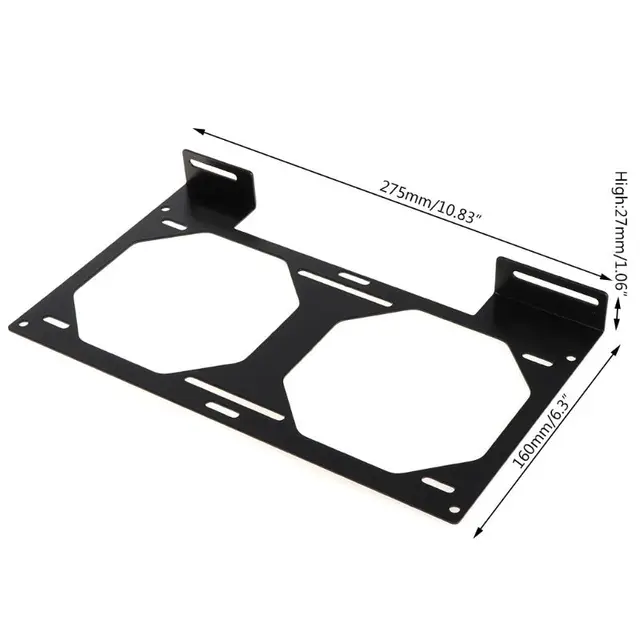
Apart from removing the drive cage you'd still need a way to mount fans at the front of the case for intake
You could use cable ties to get fans on the front grill but might not be aesthetically pleasing.

If it's me I'd mount a 240 or 280 radiator bracket near the front, something like pic below, so you could use an aio or just fans and even go as far as drilling 2 large hole at the bottom of the case for 240/280 fans and get longer feets. So drilling is still required:censored:

Fan-Bracket-240-Radiator-Mounting-Bracket-Water-Cooler-for-12-14CM-Fan-Holder-External-Computer-Case.jpg_640x640.jpg

thanks for the advice on the bracket, will look into it

drilling out the rivets is fine for me to DIY, I just don’t have the tools, but cutting out holes below is something I’m not too keen to do hahaha
 

Chrysanthemum Tea

Supremacy Member
Joined
Jan 30, 2012
Messages
6,089
Reaction score
1,421
Update:

Its done! Found a place at SLS to help with the build

SMS-1.jpg


SMS-2.jpg


Decided to up the budget a bit with the parts

i5 13600k + Gigabyte Z690 Aorus Elite AX DDR4
Corsair Vengeance 32GB
Asus TUF Gaming 3060 Ti
Thermalright Peerless Assassin 120 + 3x Gentle Typhoon
Corsair RM850
2x 1TB Samsung 980
 
Important Forum Advisory Note
This forum is moderated by volunteer moderators who will react only to members' feedback on posts. Moderators are not employees or representatives of HWZ. Forum members and moderators are responsible for their own posts.

Please refer to our Community Guidelines and Standards, Terms of Service and Member T&Cs for more information.
Top