Improve wifi speed

glitches

Junior Member
Joined
May 19, 2019
Messages
24
Reaction score
7
Hi all, networking noob here.

I'm currently using the ASUS rt ac 3200 router at home, and am on the 1gbps singtel plan.

I did a speedtest recently on my laptop (wired to router), intel 7265 adapter.

The speeds that I am getting range from 650 - 750 for both download and upload - is this normal?

For wireless connection, I used my galaxy s10 to test it; I connected to the 5ghz band. Even though I am standing <1m from the router, I am only seeing speeds of 300-350 mbps. Is this normal?

Any help is greatly appreciated. Thanks.
 

lifeislame

Supremacy Member
Joined
Mar 4, 2012
Messages
6,085
Reaction score
501
750mbps for lan is not ok. wireless try set to bandwidth to more than 80mhz or auto instead of 20mhz/40mhz for 5ghz wireless make sure you support ac

Sent from Samsung SM-A705MN using GAGT
 
Last edited:

glitches

Junior Member
Joined
May 19, 2019
Messages
24
Reaction score
7
750mbps for lan is not ok. wireless try set to bandwidth to more than 80mhz or auto instead of 20mhz/40mhz for 5ghz wireless make sure you support ac

Sent from Samsung SM-A705MN using GAGT
Hi, thanks for your reply. I'm using 80mhz alr, on cat 6 lan cable as well.

Is there something that I should do to get better results for wired connection?
 

chesterqw

Great Supremacy Member
Joined
Dec 29, 2006
Messages
58,014
Reaction score
5
Hi, thanks for your reply. I'm using 80mhz alr, on cat 6 lan cable as well.

Is there something that I should do to get better results for wired connection?

Yes, change to another server when you doing the speed test.
 

gregory_choo

Arch-Supremacy Member
Joined
Nov 7, 2007
Messages
10,532
Reaction score
1,996
Hi, thanks for your reply. I'm using 80mhz alr, on cat 6 lan cable as well.

Is there something that I should do to get better results for wired connection?

what applications are you running? why need high speed?

if your setup cannot give 1Gbps, why don't change to 500Mbps plan - save money and you may not feel any difference.
 

Apex

Senior Member
Joined
Jan 1, 2000
Messages
2,498
Reaction score
241
Check your anti virus or firewall if they are blocking or running.

Anti virus and firewall does affect speedtest result.

What browser are you using? Have you try with another browser?
 

glitches

Junior Member
Joined
May 19, 2019
Messages
24
Reaction score
7
Check your anti virus or firewall if they are blocking or running.

Anti virus and firewall does affect speedtest result.

What browser are you using? Have you try with another browser?
Hi, I don't exactly need high speeds - it's just a good to have. From my understanding, my setup should allow me to hit 1gbps, so I was wondering what else I have to do to reach those speeds.

The only firewall I have on is the windows defender. I have tried to disable the aiprotection and firewall on the asus router, but there is no difference in the speedtest results.

I'm currently using firefox. I've tried other browsers but the speedtest results seem to be worse in the other browsers.
 
Last edited:

Henry Ng

Arch-Supremacy Member
Joined
Aug 9, 2011
Messages
17,071
Reaction score
975
Hi all, networking noob here.

I'm currently using the ASUS rt ac 3200 router at home, and am on the 1gbps singtel plan.

I did a speedtest recently on my laptop (wired to router), intel 7265 adapter.

The speeds that I am getting range from 650 - 750 for both download and upload - is this normal?

For wireless connection, I used my galaxy s10 to test it; I connected to the 5ghz band. Even though I am standing <1m from the router, I am only seeing speeds of 300-350 mbps. Is this normal?

Any help is greatly appreciated. Thanks.

For wifi using Mobile phone, it is normal as it is the mobile phone wifi limitation. For phone getting extra bandwidth also no use as you will not need it. For wired connection to laptop, may be you are not using the right speed test server. Try other server. Do not use the router QOS.
 

glitches

Junior Member
Joined
May 19, 2019
Messages
24
Reaction score
7
For wifi using Mobile phone, it is normal as it is the mobile phone wifi limitation. For phone getting extra bandwidth also no use as you will not need it. For wired connection to laptop, may be you are not using the right speed test server. Try other server. Do not use the router QOS.
Hi, I've turned QoS off from day 1 as I've heard that it affects the speed.

I've tried different speed test websites (Speedtest.net, Fast, etc). Server wise, Singtel provides the best result (650 - 750 mbps, wired).

Can I check: is it normal to be getting 300mbps for wireless connection (5ghz band), even though I'm only <1m away from the router?
 

gregory_choo

Arch-Supremacy Member
Joined
Nov 7, 2007
Messages
10,532
Reaction score
1,996
Hi, I've turned QoS off from day 1 as I've heard that it affects the speed.

I've tried different speed test websites (Speedtest.net, Fast, etc). Server wise, Singtel provides the best result (650 - 750 mbps, wired).

Can I check: is it normal to be getting 300mbps for wireless connection (5ghz band), even though I'm only <1m away from the router?

s10 has wifi 6, so if you want higher figure on your s10, get a new router with wifi 6.

but, what you can achieve is to show that you can get higher speed on phone. the more important question is : what are you going to do what that speed?

if you are watch full hd video on phone, you need less than 5-10Mbps.

if fact, it is an overkilled if you watch full hd on phone, because of the small screen, 720p might look as good as 1080p.

so only 2-5 Mbps is needed.
 

Apex

Senior Member
Joined
Jan 1, 2000
Messages
2,498
Reaction score
241
Hi, I've turned QoS off from day 1 as I've heard that it affects the speed.

I've tried different speed test websites (Speedtest.net, Fast, etc). Server wise, Singtel provides the best result (650 - 750 mbps, wired).

Can I check: is it normal to be getting 300mbps for wireless connection (5ghz band), even though I'm only <1m away from the router?

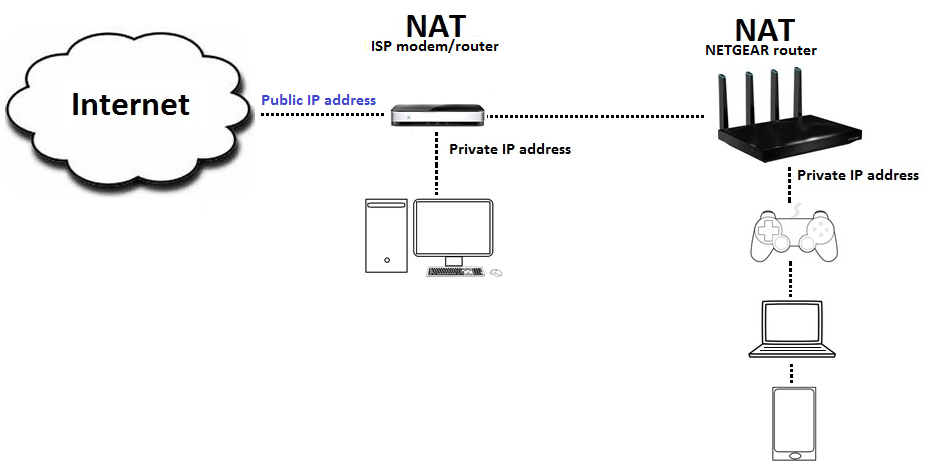
- You are on Singtel so you are on ONT or ONR?

- If ONR is your RT-AC3200 configure as AP(bridge) mode or router mode?

If you on ONR (already is a router) and you configure RT-AC3200 as router mode. U getting double NAT.

2.png


*example is showing netgear router but the theory is the same.
 

glitches

Junior Member
Joined
May 19, 2019
Messages
24
Reaction score
7
s10 has wifi 6, so if you want higher figure on your s10, get a new router with wifi 6.

but, what you can achieve is to show that you can get higher speed on phone. the more important question is : what are you going to do what that speed?

if you are watch full hd video on phone, you need less than 5-10Mbps.

if fact, it is an overkilled if you watch full hd on phone, because of the small screen, 720p might look as good as 1080p.

so only 2-5 Mbps is needed.

I see, thanks
 

glitches

Junior Member
Joined
May 19, 2019
Messages
24
Reaction score
7
- You are on Singtel so you are on ONT or ONR?

- If ONR is your RT-AC3200 configure as AP(bridge) mode or router mode?

If you on ONR (already is a router) and you configure RT-AC3200 as router mode. U getting double NAT.

*example is showing netgear router but the theory is the same.

Hi, I'm on singtel ont. I'm using the rt ac 3200 in router mode as I'm connecting the ont directly to it.
 

xiaofan

High Supremacy Member
Joined
Sep 16, 2018
Messages
32,287
Reaction score
9,383
Hi all, networking noob here.

I'm currently using the ASUS rt ac 3200 router at home, and am on the 1gbps singtel plan.

I did a speedtest recently on my laptop (wired to router), intel 7265 adapter.

The speeds that I am getting range from 650 - 750 for both download and upload - is this normal?

For wireless connection, I used my galaxy s10 to test it; I connected to the 5ghz band. Even though I am standing <1m from the router, I am only seeing speeds of 300-350 mbps. Is this normal?

Any help is greatly appreciated. Thanks.

The wired speed is lower than typical Singtel speed. On Windows 10, do not use the browser for testing, you should use the SpeedTest app from Windows Store. Try again to see if you hit the recommended speed.

Ref:
https://www.singtel.com/personal/support/broadband/typical-download-speeds
Typical local download speed
800.97Mbps – 963.71Mbps

I got 930Mbps tested yesterday.

But there were reports of dropped speed recently during the ** period.

As for wireless, that is actually normal, even though usually a Samsung phone should do a bit better, say 400Mbps to 500Mbps, but it varies, for example an aging router may have lower performance.
 
Last edited:

xiaofan

High Supremacy Member
Joined
Sep 16, 2018
Messages
32,287
Reaction score
9,383
I just did the tests again under Windows 10, a laptop with Ugreen USB3 to gigabit Ethernet adapter.

SingTel 1Gbps plan, SingTel SpeedTest server

SpeedTest App
Download 944Mbps, upload 884Mbps

Edge browser
Download 938Mbps upload 810Mbps

Chrome browser
Download 830Mbps, upload 812Mbps

Firefox browser
Download 918Mbps, upload 793Mbps
 
Last edited:

glitches

Junior Member
Joined
May 19, 2019
Messages
24
Reaction score
7
The wired speed is lower than typical Singtel speed. On Windows 10, do not use the browser for testing, you should use the SpeedTest app from Windows Store. Try again to see if you hit the recommended speed.

Ref:

Typical local download speed
800.97Mbps – 963.71Mbps

I got 930Mbps tested yesterday.

But there were reports of dropped speed recently during the ** period.

As for wireless, that is actually normal, even though usually a Samsung phone should do a bit better, say 400Mbps to 500Mbps, but it varies, for example an aging router may have lower performance.

Hi, thanks! The wired speeds are close to the recommended speed after I used the speed test app from the microsoft store.

Noted on your point on the aging router aspect - that was sth that I didnt think much about. I was thinking that perhaps there was sth else that could be tweaked to improve the performance :)
 

xiaofan

High Supremacy Member
Joined
Sep 16, 2018
Messages
32,287
Reaction score
9,383
Hi, thanks! The wired speeds are close to the recommended speed after I used the speed test app from the microsoft store.

Noted on your point on the aging router aspect - that was sth that I didnt think much about. I was thinking that perhaps there was sth else that could be tweaked to improve the performance :)

Yes I myself have an aging router, six year old Linksys WRT1900AC as the main router and a new low cost Huawei WS5200 Quad Core router as an AP My best result is with the iPhone X to get slightly above 400Mbps.

It is a 2*2 AC client and theoretical maximum is 866Mbps, but real world the maximum is around 600Mbps, but I have never get anything above 500Mbps.

My Huawei P20 can not even reach 300Mbps.

Since you have a good WiFi 6 client (I hear that Samsung phones have good WiFi performance), it makes sense to get a WiFi 6 router if your current router is old, something like Asus RT-AX58U AX3000 (around S$235 from Lazada) should already give you pretty good performance. Of course you can get better ones as well.
 
Last edited:

glitches

Junior Member
Joined
May 19, 2019
Messages
24
Reaction score
7
Yes I myself have an aging router, six year old Linksys WRT1900AC as the main router and a new low cost Huawei WS5200 Quad Core router as an AP My best result is with the iPhone X to get slightly above 400Mbps.

It is a 2*2 AC client and theoretical maximum is 866Mbps, but real world the maximum is around 600Mbps, but I have never get anything above 500Mbps.

My Huawei P20 can not even reach 300Mbps.

Since you have a WiFi 6 client, it makes sense to get a WiFi 6 router if your current router is old, something like Asus RT-AX58U AX3000 (around S$235 from Lazada) should already give you pretty good performance. Of course you can get better ones as well.

Sure, will do that! Thanks :)
 
Important Forum Advisory Note
This forum is moderated by volunteer moderators who will react only to members' feedback on posts. Moderators are not employees or representatives of HWZ. Forum members and moderators are responsible for their own posts.

Please refer to our Community Guidelines and Standards, Terms of Service and Member T&Cs for more information.
Top