Lagging issue with ninjatrader

probablye

Junior Member
Joined
Jul 26, 2022
Messages
75
Reaction score
122
@sk37 you're welcome!

Not sure if you've seen @hwzlite's message, but it's good advice.

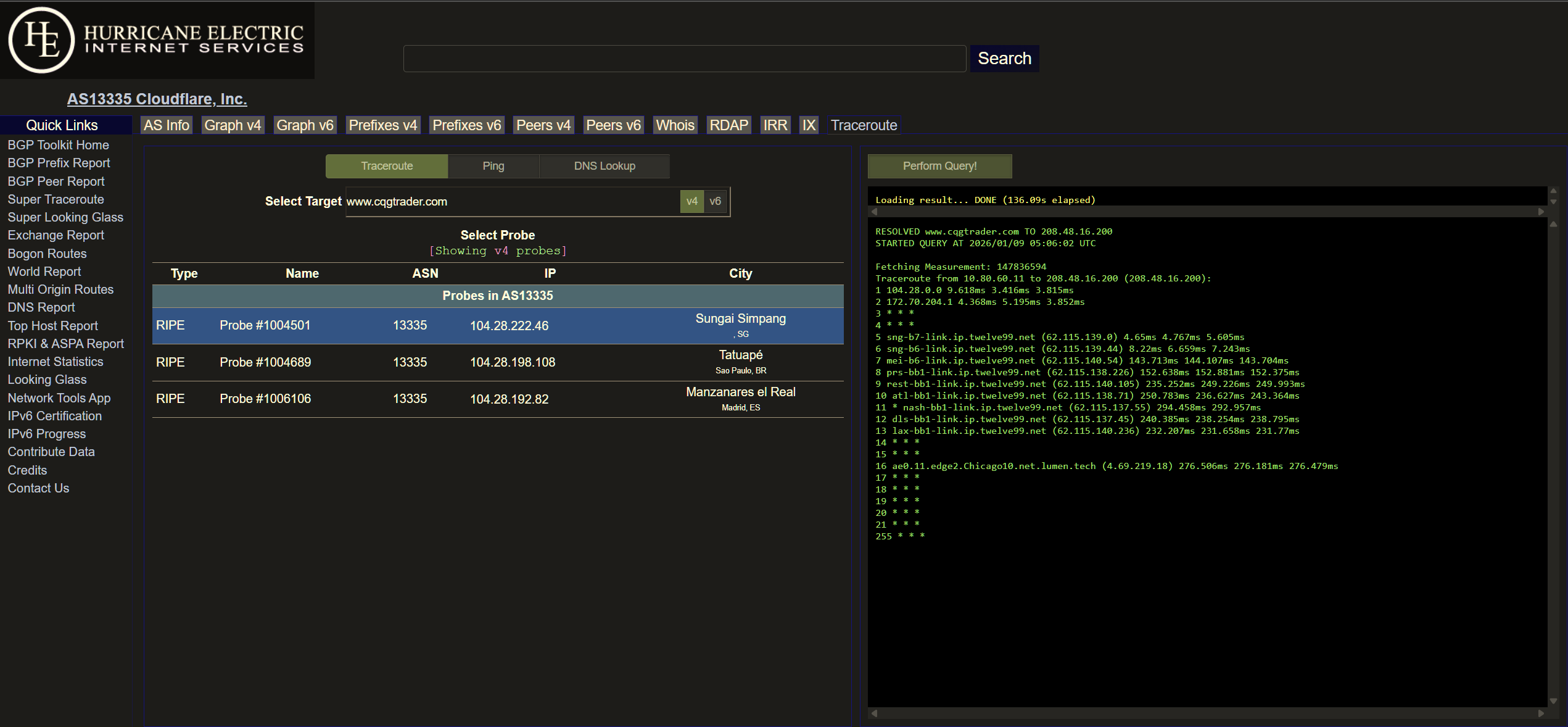
You can tell from the Cloudflare traceroute that, similar to M1, they are also using twelve99.net (a major transit provider called Arelion / Telia) to access the server in Chicago.

So by using Cloudflare's WARP feature, you can technically bypass Whizcomm's poor routing and use Cloudflare's (Arelion's) instead.

Start by installing it on your Windows computer and testing if it helps.

Once you've confirmed that it improves your connection, you can even learn a bit more and install Cloudflare WARP on your Asus router if you wish. That would be a lot more complex, but one step at a time!

This can be a good stop-gap measure for now until it's time to change ISP.
 

seowbin

Great Supremacy Member
Joined
Oct 10, 2001
Messages
72,892
Reaction score
1,561
instead of changing ISP, got think of changing the platform? lol

i think my ex colleague using poems, he complained till he get something . si bei funny, can't remember the exact story liao. but something like using their website no problem but app have issue. something like that
 

sk37

Member
Joined
Sep 28, 2003
Messages
427
Reaction score
7
@sk37 you're welcome!

Not sure if you've seen @hwzlite's message, but it's good advice.

You can tell from the Cloudflare traceroute that, similar to M1, they are also using twelve99.net (a major transit provider called Arelion / Telia) to access the server in Chicago.

So by using Cloudflare's WARP feature, you can technically bypass Whizcomm's poor routing and use Cloudflare's (Arelion's) instead.

Start by installing it on your Windows computer and testing if it helps.

Once you've confirmed that it improves your connection, you can even learn a bit more and install Cloudflare WARP on your Asus router if you wish. That would be a lot more complex, but one step at a time!

This can be a good stop-gap measure for now until it's time to change ISP.
yes, i looking all the advice you guys give, but it take time for me to understand. so far, i use grok to help me with the data you provide, it say singtel give a better connection.
 

sk37

Member
Joined
Sep 28, 2003
Messages
427
Reaction score
7
Do tryout the free Cloudflare's WARP (VPN) which might provide optimum peering through Cloudflare's global network, potentially bypassing congested routes.

Sample traceroute from Ripe Atlas Probe @ Cloudflare .SG :
Screenshot-2026-01-09-132846.png


Above indicated every responded hops with consistent full 3x Round-Trip Time (RTT) results without asterisks/star (*).

Ref: Traceroute: Finding meaning among the stars
thanks for the info, I will try to figure it out and see if this will work. :)
 

ieatcable

Junior Member
Joined
Sep 15, 2024
Messages
84
Reaction score
95
@sk37 doing you a favour here.

The IP address 208.48.16.200 belongs to CQG Inc, with its own corporate network AS25765. They appear to have CyrusOne and Level3 as their upstream providers. The server is based in Chicago.

This is the traceroute from my MyRepublic (Gamer) plan. I have noticed that for MR, access to servers in the US East Coast tend to be via Europe, versus a Japan route for the West Coast.

Target IP: 208.48.16.200

Hop Sent PL% Min Max Avg Host Name / [IP]
1 20 0 0.58 1.75 1.12 xxx
2 20 0 2.27 3.66 2.90 100.81.128.3 [100.81.128.3]
3 20 0 2.54 4.16 3.14 103-6-148-178.myrepublic.com.sg [103.6.148.178]
4 20 0 2.69 4.24 3.45 103-6-148-13.myrepublic.com.sg [103.6.148.13]
5 20 0 2.98 28.01 7.82 203.116.31.145 [203.116.31.145]
6 20 0 2.76 4.87 3.76 203.116.3-77.unknown.starhub.net.sg [203.116.3.77]
7 20 0 3.63 5.38 4.28 203.118.6.190 [203.118.6.190]
8 20 0 3.54 8.53 4.25 vl413-s20.cyberway.com.sg [203.116.3.33]
9 20 0 171.49 183.00 172.93 ae15.mpr1.lhr15.uk.above.net [195.66.224.76]
10 20 50 236.08 237.13 236.55 ae4.cr1.lhr11.uk.eth.zayo.com [64.125.28.194]
11 20 100 0 0 0 [-]
12 20 35 236.44 237.88 237.13 ae45.cr1.ewr1.us.zip.zayo.com [64.125.22.224]
13 20 0 236.92 238.16 237.53 ae5.cr2.ewr14.us.zip.zayo.com [64.125.22.223]
14 14 86 237.89 237.95 237.92 ae7.cr1.ord8.us.zip.zayo.com [64.125.29.24]
15 16 44 236.75 237.62 237.22 ae3.cr2.ord9.us.zip.zayo.com [64.125.30.77]
16 20 0 234.16 235.92 234.91 ae11.mpr2.ind1.us.zip.zayo.com [64.125.20.11]
17 20 0 237.17 238.74 237.87 ae0.mpr2.ind1.us.zip.zayo.com [64.125.20.160]
18 20 0 230.80 232.68 231.61 128.177.92.106 [128.177.92.106]
19 20 0 230.29 232.33 231.03 be-1005-r0.cvg1.cyrusone.net [209.172.217.209]
20 20 0 234.90 236.89 235.67 be-4003-r0.chi2.cyrusone.net [209.172.217.26]
21 20 0 230.26 231.56 230.75 216.117.22.150 [216.117.22.150]
22 20 100 0 0 0 208.48.16.200 [208.48.16.200]

This is the traceroute from Singtel, which should be similar to Whizcomms. Singtel's traceroute ends in LA. It doesn't show the internal hops within the US from LA across to Chicago:

Target IP: 208.48.16.200

Hop Sent PL% Min Max Avg Host Name / [IP]
1 19 0 0.28 9.65 1.22 xxx
2 20 0 1.00 9.52 1.71 bb116-14-127-252.singnet.com.sg [116.14.127.252]
3 20 70 2.24 7.29 3.94 165.21.193.22 [165.21.193.22]
4 20 0 1.24 2.47 1.54 165.21.193.21 [165.21.193.21]
5 20 0 1.40 17.30 2.98 165.21.138.241 [165.21.138.241]
6 20 0 1.00 10.40 2.01 SN-SINQT1-BO403-ae0.singnet.com.sg [165.21.138.81]
7 20 100 0 0 0 [-]
8 20 75 174.52 398.28 220.96 if-be-22-2.ecore1.svq-singapore.as6453.net [180.87.105.48]
9 18 44 174.12 181.92 175.37 if-bundle-53-2.qcore1.tv2-tokyo.as6453.net [209.58.61.96]
10 17 82 176.74 179.15 177.63 if-bundle-16-2.qcore2.tv2-tokyo.as6453.net [209.58.61.35]
11 19 47 176.07 176.52 176.29 if-ae-58-2.tcore1.av3-toyohashi.as6453.net [180.87.180.152]
12 20 65 178.10 184.67 179.44 if-ae-2-2.tcore2.av3-toyohashi.as6453.net [180.87.3.131]
13 20 90 175.98 176.22 176.10 if-bundle-28-2.qcore1.lvw-losangeles.as6453.net [64.86.252.32]
14 20 100 0 0 0 208.48.16.200 [208.48.16.200]

This is the traceroute from M1. The latency is higher because I'm using the 5G connection, but the routing ought to be the same as broadband:

Target IP: 208.48.16.200

Hop Sent PL% Min Max Avg Host Name / [IP]
1 19 0 0.58 1.31 0.92 xxx
2 20 0 0.91 1.33 1.06 100.127.125.128 [100.127.125.128]
3 20 100 0 0 0 [-]
4 20 0 9.63 23.91 16.32 172.23.151.177 [172.23.151.177]
5 20 25 11.89 27.28 17.26 100.65.0.29 [100.65.0.29]
6 20 100 0 0 0 [-]
7 20 100 0 0 0 [-]
8 20 0 11.10 28.09 20.28 222.245.65.202.unknown.m1.com.sg [202.65.245.222]
9 20 0 10.05 28.78 16.87 215.245.65.202.unknown.m1.com.sg [202.65.245.215]
10 20 20 12.72 25.38 19.17 sng-b4-link.ip.twelve99.net [213.248.100.86]
11 20 15 14.48 44.23 22.41 sng-b6-link.ip.twelve99.net [62.115.136.198]
12 20 0 187.98 201.28 194.51 lax-bb2-link.ip.twelve99.net [62.115.141.130]
13 20 100 0 0 0 [-]
14 20 100 0 0 0 [-]
15 20 0 230.09 259.86 237.95 ae0.11.edge2.chicago10.net.lumen.tech [4.69.219.18]
16 20 100 0 0 0 208.48.16.200 [208.48.16.200]

The data that we don't have however, is the return path from the Chicago server to the respective ISPs, which could affect your speed also.

Funny enough, I think ST is the one with the lowest possible ping among all SG ISPs to this trading platform IP. But latency is one thing, packet loss is another major factor which affects the stability of the connection greatly. You may experience it more during the peak periods from 8PM to 12AM.

Some users on ST recently are experiencing lags with overseas EU servers, and my testing seems to point the issue to a congestion with their internal SG-US backbone link which has been a common factor so far. Depending on luck and on the server, sometimes they can end up using a path that avoids the congested link.

Assuming CQG uses Lumen to reach ST, you can see that they link with Zayo which indeed sends traffic through the ST POP in the US, and thus use ST's congested link back to SG.

Code:
Tracing route to x 1 ae2.2.edge1.Chicago10.net.lumen.tech (4.69.133.29) 3ms 1ms 1ms
2 6461-3356-chi.sp.lumen.tech (4.68.62.74) 1ms 1ms 1ms
3 0.0.0.0 (0.0.0.0) * * *
4 0.0.0.0 (0.0.0.0) * * *
5 0.0.0.0 (0.0.0.0) * * *
6 0.0.0.0 (0.0.0.0) * * *
7 0.0.0.0 (0.0.0.0) * * *
8 0.0.0.0 (0.0.0.0) * ae8.cs2.lax112.us.zip.zayo.com (64.125.28.46) 51ms 50ms
9 ae14.mpr1.lax12.us.zip.zayo.com (64.125.27.39) 50ms 50ms 50ms
10 64.125.35.198.IPYX-145641-003-ZYO.zip.zayo.com (64.125.35.198) 233ms 240ms 243ms
11 203.208.171.118 (203.208.171.118) 218ms 219ms 218ms
12 203.208.178.205 (203.208.178.205) 244ms 203.208.158.10 (203.208.158.10) 239ms 203.208.172.165 (203.208.172.165) 214ms
13 203.208.142.185 (203.208.142.185) 208ms 203.208.158.205 (203.208.158.205) 245ms 203.208.142.161 (203.208.142.161) 154ms
14 203.208.158.10 (203.208.158.10) 227ms 203.208.183.90 (203.208.183.90) 229ms 203.208.158.9 (203.208.158.9) 208ms
15 203.208.158.9 (203.208.158.9) 216ms 203.208.158.10 (203.208.158.10) 208ms 203.208.183.82 (203.208.183.82) 218ms
16 203.208.183.90 (203.208.183.90) 245ms 203.208.183.82 (203.208.183.82) 208ms 203.208.158.10 (203.208.158.10) 240ms
17 SN-SINQT1-BO307-ae4.singnet.com.sg (165.21.138.82) 260ms 241ms 239ms

If the trading platform relies on Lumen transit, it's hard to point out which other ISP is better as neither SH nor M1 are connected to Lumen and rely on Tier 1 settlement free handoffs - which are prone to changes and their business interests. I remember SH used to have Lumen last year, but that seems to have changed.
 

seowbin

Great Supremacy Member
Joined
Oct 10, 2001
Messages
72,892
Reaction score
1,561
Funny enough, I think ST is the one with the lowest possible ping among all SG ISPs to this trading platform IP. But latency is one thing, packet loss is another major factor which affects the stability of the connection greatly. You may experience it more during the peak periods from 8PM to 12AM.

Don't like that leh. Make other providers emo :s13:

Even in my network also have higher or lower latency :s34:

faster in this case is Tier 1 return traffic via Tokyo directly to SG

Fetching Measurement: 147859518
Traceroute from 10.233.66.31 to 103.69.212.x
1 10.233.66.1 0.079ms 0.07ms 0.081ms
2 207.121.59.35 2.305ms 15.33ms 16.266ms
3 ae2.3601.edge3.Chicago10.net.lumen.tech (4.69.206.246) 0.356ms 12.476ms 5.507ms
4 chi-b23-link.ip.twelve99.net (213.248.90.168) 1.328ms 1.122ms 1.018ms
5 * * *
6 sea-b1-link.ip.twelve99.net (62.115.132.155) 44.669ms 44.582ms 44.609ms
7 sea-b4-link.ip.twelve99.net (62.115.132.156) 46.689ms 45.917ms 47.786ms
8 port-b2-link.ip.twelve99.net (62.115.139.132) 48.249ms 48.233ms 48.513ms
9 port-b7-link.ip.twelve99.net (62.115.142.88) 51.316ms 49.388ms 50.626ms
10 tky-b4-link.ip.twelve99.net (62.115.127.11) 139.277ms 142.857ms 140.965ms
11 tky-b7-link.ip.twelve99.net (62.115.140.30) 141.392ms 144.384ms 139.739ms
12 sng-b7-link.ip.twelve99.net (62.115.140.14) 206.455ms 206.714ms 206.672ms
13 * * *
14 62.115.38.155 206.928ms 206.865ms 206.759ms
15 103.69.212.x 206.699ms 206.681ms 206.701ms

Slower in this case is Tier 1 return traffic via Tokyo to HK then back to me via own private cable.
In this case, it took a longer path, unfortunately

Traceroute from 10.233.66.31 to 103.148.239.x :
1 10.233.66.1 0.089ms 0.083ms 0.089ms
2 207.121.59.35 0.434ms 10.019ms 2.505ms
3 ae2.3601.edge3.Chicago10.net.lumen.tech (4.69.206.246) 1.061ms 0.682ms 0.7ms
4 chi-b23-link.ip.twelve99.net (213.248.90.168) 1.165ms 1.038ms 1.222ms
5 * chi-bb2-link.ip.twelve99.net (62.115.126.158) 1.072ms *
6 sea-b1-link.ip.twelve99.net (62.115.132.155) 45.051ms 44.637ms 44.952ms
7 sea-b4-link.ip.twelve99.net (62.115.132.156) 46.77ms 47.893ms 47.822ms
8 port-b2-link.ip.twelve99.net (62.115.139.132) 48.2ms 48.304ms 48.321ms
9 port-b7-link.ip.twelve99.net (62.115.142.88) 50.584ms 49.902ms 50.374ms
10 tky-b4-link.ip.twelve99.net (62.115.127.11) 136.591ms 141.015ms 137.888ms
11 hnk-b4-link.ip.twelve99.net (62.115.139.222) 196.419ms 196.018ms 195.968ms
12 hnk-b3-link.ip.twelve99.net (62.115.143.241) 193.656ms 193.628ms 193.653ms
13 axclusivepteltd-ic-371331.ip.twelve99-cust.net (62.115.38.162) 193.752ms 193.634ms 193.786ms
14 edge1.sin01.as132337.net (103.148.239.225) 214.397ms 214.376ms 214.417ms
15 103.148.239.x 214.218ms 214.209ms 214.282ms
 

ieatcable

Junior Member
Joined
Sep 15, 2024
Messages
84
Reaction score
95
Don't like that leh. Make other providers emo :s13:

Even in my network also have higher or lower latency :s34:

faster in this case is Tier 1 return traffic via Tokyo directly to SG

Fetching Measurement: 147859518
Traceroute from 10.233.66.31 to 103.69.212.x
1 10.233.66.1 0.079ms 0.07ms 0.081ms
2 207.121.59.35 2.305ms 15.33ms 16.266ms
3 ae2.3601.edge3.Chicago10.net.lumen.tech (4.69.206.246) 0.356ms 12.476ms 5.507ms
4 chi-b23-link.ip.twelve99.net (213.248.90.168) 1.328ms 1.122ms 1.018ms
5 * * *
6 sea-b1-link.ip.twelve99.net (62.115.132.155) 44.669ms 44.582ms 44.609ms
7 sea-b4-link.ip.twelve99.net (62.115.132.156) 46.689ms 45.917ms 47.786ms
8 port-b2-link.ip.twelve99.net (62.115.139.132) 48.249ms 48.233ms 48.513ms
9 port-b7-link.ip.twelve99.net (62.115.142.88) 51.316ms 49.388ms 50.626ms
10 tky-b4-link.ip.twelve99.net (62.115.127.11) 139.277ms 142.857ms 140.965ms
11 tky-b7-link.ip.twelve99.net (62.115.140.30) 141.392ms 144.384ms 139.739ms
12 sng-b7-link.ip.twelve99.net (62.115.140.14) 206.455ms 206.714ms 206.672ms
13 * * *
14 62.115.38.155 206.928ms 206.865ms 206.759ms
15 103.69.212.x 206.699ms 206.681ms 206.701ms

Slower in this case is Tier 1 return traffic via Tokyo to HK then back to me via own private cable.
In this case, it took a longer path, unfortunately

Traceroute from 10.233.66.31 to 103.148.239.x :
1 10.233.66.1 0.089ms 0.083ms 0.089ms
2 207.121.59.35 0.434ms 10.019ms 2.505ms
3 ae2.3601.edge3.Chicago10.net.lumen.tech (4.69.206.246) 1.061ms 0.682ms 0.7ms
4 chi-b23-link.ip.twelve99.net (213.248.90.168) 1.165ms 1.038ms 1.222ms
5 * chi-bb2-link.ip.twelve99.net (62.115.126.158) 1.072ms *
6 sea-b1-link.ip.twelve99.net (62.115.132.155) 45.051ms 44.637ms 44.952ms
7 sea-b4-link.ip.twelve99.net (62.115.132.156) 46.77ms 47.893ms 47.822ms
8 port-b2-link.ip.twelve99.net (62.115.139.132) 48.2ms 48.304ms 48.321ms
9 port-b7-link.ip.twelve99.net (62.115.142.88) 50.584ms 49.902ms 50.374ms
10 tky-b4-link.ip.twelve99.net (62.115.127.11) 136.591ms 141.015ms 137.888ms
11 hnk-b4-link.ip.twelve99.net (62.115.139.222) 196.419ms 196.018ms 195.968ms
12 hnk-b3-link.ip.twelve99.net (62.115.143.241) 193.656ms 193.628ms 193.653ms
13 axclusivepteltd-ic-371331.ip.twelve99-cust.net (62.115.38.162) 193.752ms 193.634ms 193.786ms
14 edge1.sin01.as132337.net (103.148.239.225) 214.397ms 214.376ms 214.417ms
15 103.148.239.x 214.218ms 214.209ms 214.282ms
Arelion didn't honour MED? Or you didn't set :s22:

Ok when is @seowbin home ISP ready for subscription. I want leh.
 

seowbin

Great Supremacy Member
Joined
Oct 10, 2001
Messages
72,892
Reaction score
1,561
Arelion didn't honour MED? Or you didn't set :s22:

Ok when is @seowbin home ISP ready for subscription. I want leh.
bo set :s13: because i prefer to do cold potato routing. They hand off somewhere then i take traffic via private link.

it's equal priority for them in SG or HK. They return in HK i can also take and return. No issue

for this kind of cases, yes, it will be higher latency

Bo sell home ISP leh :s34:
pricing no good
 

sk37

Member
Joined
Sep 28, 2003
Messages
427
Reaction score
7
Funny enough, I think ST is the one with the lowest possible ping among all SG ISPs to this trading platform IP. But latency is one thing, packet loss is another major factor which affects the stability of the connection greatly. You may experience it more during the peak periods from 8PM to 12AM.

Some users on ST recently are experiencing lags with overseas EU servers, and my testing seems to point the issue to a congestion with their internal SG-US backbone link which has been a common factor so far. Depending on luck and on the server, sometimes they can end up using a path that avoids the congested link.

Assuming CQG uses Lumen to reach ST, you can see that they link with Zayo which indeed sends traffic through the ST POP in the US, and thus use ST's congested link back to SG.

Code:
Tracing route to x 1 ae2.2.edge1.Chicago10.net.lumen.tech (4.69.133.29) 3ms 1ms 1ms
2 6461-3356-chi.sp.lumen.tech (4.68.62.74) 1ms 1ms 1ms
3 0.0.0.0 (0.0.0.0) * * *
4 0.0.0.0 (0.0.0.0) * * *
5 0.0.0.0 (0.0.0.0) * * *
6 0.0.0.0 (0.0.0.0) * * *
7 0.0.0.0 (0.0.0.0) * * *
8 0.0.0.0 (0.0.0.0) * ae8.cs2.lax112.us.zip.zayo.com (64.125.28.46) 51ms 50ms
9 ae14.mpr1.lax12.us.zip.zayo.com (64.125.27.39) 50ms 50ms 50ms
10 64.125.35.198.IPYX-145641-003-ZYO.zip.zayo.com (64.125.35.198) 233ms 240ms 243ms
11 203.208.171.118 (203.208.171.118) 218ms 219ms 218ms
12 203.208.178.205 (203.208.178.205) 244ms 203.208.158.10 (203.208.158.10) 239ms 203.208.172.165 (203.208.172.165) 214ms
13 203.208.142.185 (203.208.142.185) 208ms 203.208.158.205 (203.208.158.205) 245ms 203.208.142.161 (203.208.142.161) 154ms
14 203.208.158.10 (203.208.158.10) 227ms 203.208.183.90 (203.208.183.90) 229ms 203.208.158.9 (203.208.158.9) 208ms
15 203.208.158.9 (203.208.158.9) 216ms 203.208.158.10 (203.208.158.10) 208ms 203.208.183.82 (203.208.183.82) 218ms
16 203.208.183.90 (203.208.183.90) 245ms 203.208.183.82 (203.208.183.82) 208ms 203.208.158.10 (203.208.158.10) 240ms
17 SN-SINQT1-BO307-ae4.singnet.com.sg (165.21.138.82) 260ms 241ms 239ms

If the trading platform relies on Lumen transit, it's hard to point out which other ISP is better as neither SH nor M1 are connected to Lumen and rely on Tier 1 settlement free handoffs - which are prone to changes and their business interests. I remember SH used to have Lumen last year, but that seems to have changed.
you are absolutely right that during 8pm to 12pm my wc totally cannot load, even eight have issue as well. especially during US market open at 10.30pm timing.
 

sk37

Member
Joined
Sep 28, 2003
Messages
427
Reaction score
7
everything you guys discuss i see till :s22:. but i really appreciate all the suggestion and discussion here from you all... 😊
 

xiaofan

High Supremacy Member
Joined
Sep 16, 2018
Messages
32,472
Reaction score
9,466
Funny enough, I think ST is the one with the lowest possible ping among all SG ISPs to this trading platform IP. But latency is one thing, packet loss is another major factor which affects the stability of the connection greatly. You may experience it more during the peak periods from 8PM to 12AM.

In the end it is probably not a good idea to use this USA based trader from Singapore.

Now it is about 9:30pm and I can see high packet loss from Singtel Fibre Broadband.

I bridged both the 10G port and 1G port of Singtel ZTE F8648P ONR to have two seperate networks (loophole for Singtel Fibre Internet, no matter using the old GPON ONT, GPON ONR or the latest XGS-PON ONR).

Singtel IP1 (OpenWRT router 1)
Bash:
root@openwrt18:~# mtr -T 208.48.16.200
                                                             My traceroute  [v0.95]
openwrt18 (119.74.xxx.xxx) -> 208.48.16.200 (208.48.16.200)                                                                 2026-01-09T21:25:22+0800
Keys:  Help   Display mode   Restart statistics   Order of fields   quit
                                                                                                           Packets               Pings
 Host                                                                                                    Loss%   Snt   Last   Avg  Best  Wrst StDev
 1. bb119-74-xxx-254.singnet.com.sg                                                                       0.0%   111    1.2   1.5   0.9  13.3   1.3
 2. 165.21.193.22                                                                                        47.3%   111  7306. 919.4   2.7 7321. 1817.
 3. 165.21.193.21                                                                                         0.0%   111    1.6  22.8   1.2 2077. 196.9
 4. 165.21.121.137                                                                                        0.0%   111    1.8  11.1   1.1 1033.  97.9
 5. 165.21.121.138                                                                                        0.0%   111    2.1   2.7   1.6  19.9   2.4
 6. 165.21.138.241                                                                                        0.0%   110    2.4   5.5   1.5  63.6  10.1
    165.21.138.245
 7. SN-SINQT1-BO403-ae0.singnet.com.sg                                                                    0.0%   110    2.2   2.3   1.4  31.0   2.8
    SN-SINQT1-BO403-ae1.singnet.com.sg
 8. ix-hge-0-0-0-14.ecore3.svq-singapore.as6453.net                                                      22.9%   110  4173. 2283.   2.0 7309. 2068.
 9. if-be-23-2.ecore2.svq-singapore.as6453.net                                                            4.5%   110  339.7 1601. 193.9 7645. 1776.
    if-be-22-2.ecore1.svq-singapore.as6453.net
10. if-bundle-53-2.qcore1.tv2-tokyo.as6453.net                                                           24.8%   110  243.2 1978. 228.8 7597. 1742.
    if-bundle-22-2.qcore2.esin4-singapore.as6453.net
11. if-bundle-19-2.qcore1.svw-singapore.as6453.net                                                       53.2%   110  2394. 2905. 326.9 7621. 2329.
    if-bundle-16-2.qcore2.tv2-tokyo.as6453.net
12. if-ae-58-2.tcore1.av3-toyohashi.as6453.net                                                           25.7%   110  4322. 4302. 197.1 7607. 2209.
    if-bundle-45-3.qcore2.kv8-chiba.as6453.net
    if-bundle-45-2.qcore2.kv8-chiba.as6453.net
13. if-ae-59-2.tcore2.av3-toyohashi.as6453.net                                                           30.9%   110  343.4 1617. 194.1 7514. 1970.
    if-bundle-6-2.qcore2.lvw-losangeles.as6453.net
    if-ae-2-4.tcore2.av3-toyohashi.as6453.net
    if-ae-2-2.tcore2.av3-toyohashi.as6453.net
14. 208.48.16.200                                                                                        28.2%   110  223.7 964.7 196.0 7505. 1672.
    if-bundle-28-2.qcore1.lvw-losangeles.as6453.net

Singtel IP2 (OpenWRT router2)
Bash:
root@openwrt38:~# mtr -T 208.48.16.200
                                                               My traceroute  [v0.95]
openwrt38 (115.66.xx.xxx) -> 208.48.16.200 (208.48.16.200)                                                                 2026-01-09T21:28:28+0800
Keys:  Help   Display mode   Restart statistics   Order of fields   quit
                                                                                                           Packets               Pings
 Host                                                                                                    Loss%   Snt   Last   Avg  Best  Wrst StDev
 1. bb115-66-xx-254.singnet.com.sg                                                                        0.0%   109    1.1   1.4   0.8   6.3   0.7
 2. 165.21.193.22                                                                                        38.5%   109  2106. 1743.   2.4 7266. 2252.
 3. 165.21.193.21                                                                                         0.0%   109    1.3   4.5   1.2  62.9   8.3
 4. 165.21.121.137                                                                                        0.0%   109    1.7   2.0   1.3   2.9   0.3
 5. 165.21.121.138                                                                                        0.0%   109    1.4  12.4   1.2 1079. 103.2
 6. 165.21.138.245                                                                                        0.0%   109    1.7 110.5   1.3 5184. 598.2
    165.21.138.241
 7. SN-SINQT1-BO403-ae0.singnet.com.sg                                                                    0.0%   108    1.8 137.0   1.4 3129. 569.2
    SN-SINQT1-BO403-ae1.singnet.com.sg
 8. ix-hge-0-0-0-14.ecore3.svq-singapore.as6453.net                                                      23.1%   108  1032. 2460.   1.9 7321. 2142.
 9. if-be-22-2.ecore1.svq-singapore.as6453.net                                                            4.6%   108  2223. 1461. 175.9 7467. 1681.
    if-be-23-2.ecore2.svq-singapore.as6453.net
10. if-bundle-22-2.qcore2.esin4-singapore.as6453.net                                                     24.1%   108  4325. 1939. 171.0 7475. 1884.
    if-bundle-53-2.qcore1.tv2-tokyo.as6453.net
11. if-bundle-19-2.qcore1.svw-singapore.as6453.net                                                       45.8%   108  4362. 2671. 173.5 7483. 2294.
    if-bundle-16-2.qcore2.tv2-tokyo.as6453.net
12. if-bundle-45-3.qcore2.kv8-chiba.as6453.net                                                           51.9%   108  7438. 2431. 170.1 7473. 2717.
    if-ae-58-2.tcore1.av3-toyohashi.as6453.net
    if-bundle-45-2.qcore2.kv8-chiba.as6453.net
13. if-bundle-6-2.qcore2.esv00-santaclara.as6453.net                                                     26.9%   108  2251. 1677. 172.4 7476. 1923.
    if-ae-2-4.tcore2.av3-toyohashi.as6453.net
    if-ae-59-2.tcore2.av3-toyohashi.as6453.net
    if-ae-2-2.tcore2.av3-toyohashi.as6453.net
14. 208.48.16.200                                                                                        23.4%   108  223.7 1047. 177.9 7472. 1813.
    if-bundle-28-2.qcore1.lvw-losangeles.as6453.net
 

seowbin

Great Supremacy Member
Joined
Oct 10, 2001
Messages
72,892
Reaction score
1,561
In the end it is probably not a good idea to use this USA based trader from Singapore.

Now it is about 9:30pm and I can see high packet loss from Singtel Fibre Broadband.

I bridged both the 10G port and 1G port of Singtel ZTE F8648P ONR to have two seperate networks (loophole for Singtel Fibre Internet, no matter using the old GPON ONT, GPON ONR or the latest XGS-PON ONR).

Singtel IP1 (OpenWRT router 1)
Bash:
root@openwrt18:~# mtr -T 208.48.16.200
                                                             My traceroute  [v0.95]
openwrt18 (119.74.xxx.xxx) -> 208.48.16.200 (208.48.16.200)                                                                 2026-01-09T21:25:22+0800
Keys:  Help   Display mode   Restart statistics   Order of fields   quit
                                                                                                           Packets               Pings
 Host                                                                                                    Loss%   Snt   Last   Avg  Best  Wrst StDev
 1. bb119-74-xxx-254.singnet.com.sg                                                                       0.0%   111    1.2   1.5   0.9  13.3   1.3
 2. 165.21.193.22                                                                                        47.3%   111  7306. 919.4   2.7 7321. 1817.
 3. 165.21.193.21                                                                                         0.0%   111    1.6  22.8   1.2 2077. 196.9
 4. 165.21.121.137                                                                                        0.0%   111    1.8  11.1   1.1 1033.  97.9
 5. 165.21.121.138                                                                                        0.0%   111    2.1   2.7   1.6  19.9   2.4
 6. 165.21.138.241                                                                                        0.0%   110    2.4   5.5   1.5  63.6  10.1
    165.21.138.245
 7. SN-SINQT1-BO403-ae0.singnet.com.sg                                                                    0.0%   110    2.2   2.3   1.4  31.0   2.8
    SN-SINQT1-BO403-ae1.singnet.com.sg
 8. ix-hge-0-0-0-14.ecore3.svq-singapore.as6453.net                                                      22.9%   110  4173. 2283.   2.0 7309. 2068.
 9. if-be-23-2.ecore2.svq-singapore.as6453.net                                                            4.5%   110  339.7 1601. 193.9 7645. 1776.
    if-be-22-2.ecore1.svq-singapore.as6453.net
10. if-bundle-53-2.qcore1.tv2-tokyo.as6453.net                                                           24.8%   110  243.2 1978. 228.8 7597. 1742.
    if-bundle-22-2.qcore2.esin4-singapore.as6453.net
11. if-bundle-19-2.qcore1.svw-singapore.as6453.net                                                       53.2%   110  2394. 2905. 326.9 7621. 2329.
    if-bundle-16-2.qcore2.tv2-tokyo.as6453.net
12. if-ae-58-2.tcore1.av3-toyohashi.as6453.net                                                           25.7%   110  4322. 4302. 197.1 7607. 2209.
    if-bundle-45-3.qcore2.kv8-chiba.as6453.net
    if-bundle-45-2.qcore2.kv8-chiba.as6453.net
13. if-ae-59-2.tcore2.av3-toyohashi.as6453.net                                                           30.9%   110  343.4 1617. 194.1 7514. 1970.
    if-bundle-6-2.qcore2.lvw-losangeles.as6453.net
    if-ae-2-4.tcore2.av3-toyohashi.as6453.net
    if-ae-2-2.tcore2.av3-toyohashi.as6453.net
14. 208.48.16.200                                                                                        28.2%   110  223.7 964.7 196.0 7505. 1672.
    if-bundle-28-2.qcore1.lvw-losangeles.as6453.net

Singtel IP2 (OpenWRT router2)
Bash:
root@openwrt38:~# mtr -T 208.48.16.200
                                                               My traceroute  [v0.95]
openwrt38 (115.66.xx.xxx) -> 208.48.16.200 (208.48.16.200)                                                                 2026-01-09T21:28:28+0800
Keys:  Help   Display mode   Restart statistics   Order of fields   quit
                                                                                                           Packets               Pings
 Host                                                                                                    Loss%   Snt   Last   Avg  Best  Wrst StDev
 1. bb115-66-xx-254.singnet.com.sg                                                                        0.0%   109    1.1   1.4   0.8   6.3   0.7
 2. 165.21.193.22                                                                                        38.5%   109  2106. 1743.   2.4 7266. 2252.
 3. 165.21.193.21                                                                                         0.0%   109    1.3   4.5   1.2  62.9   8.3
 4. 165.21.121.137                                                                                        0.0%   109    1.7   2.0   1.3   2.9   0.3
 5. 165.21.121.138                                                                                        0.0%   109    1.4  12.4   1.2 1079. 103.2
 6. 165.21.138.245                                                                                        0.0%   109    1.7 110.5   1.3 5184. 598.2
    165.21.138.241
 7. SN-SINQT1-BO403-ae0.singnet.com.sg                                                                    0.0%   108    1.8 137.0   1.4 3129. 569.2
    SN-SINQT1-BO403-ae1.singnet.com.sg
 8. ix-hge-0-0-0-14.ecore3.svq-singapore.as6453.net                                                      23.1%   108  1032. 2460.   1.9 7321. 2142.
 9. if-be-22-2.ecore1.svq-singapore.as6453.net                                                            4.6%   108  2223. 1461. 175.9 7467. 1681.
    if-be-23-2.ecore2.svq-singapore.as6453.net
10. if-bundle-22-2.qcore2.esin4-singapore.as6453.net                                                     24.1%   108  4325. 1939. 171.0 7475. 1884.
    if-bundle-53-2.qcore1.tv2-tokyo.as6453.net
11. if-bundle-19-2.qcore1.svw-singapore.as6453.net                                                       45.8%   108  4362. 2671. 173.5 7483. 2294.
    if-bundle-16-2.qcore2.tv2-tokyo.as6453.net
12. if-bundle-45-3.qcore2.kv8-chiba.as6453.net                                                           51.9%   108  7438. 2431. 170.1 7473. 2717.
    if-ae-58-2.tcore1.av3-toyohashi.as6453.net
    if-bundle-45-2.qcore2.kv8-chiba.as6453.net
13. if-bundle-6-2.qcore2.esv00-santaclara.as6453.net                                                     26.9%   108  2251. 1677. 172.4 7476. 1923.
    if-ae-2-4.tcore2.av3-toyohashi.as6453.net
    if-ae-59-2.tcore2.av3-toyohashi.as6453.net
    if-ae-2-2.tcore2.av3-toyohashi.as6453.net
14. 208.48.16.200                                                                                        23.4%   108  223.7 1047. 177.9 7472. 1813.
    if-bundle-28-2.qcore1.lvw-losangeles.as6453.net
Wah, that's worst than internet on SIA flights. Those only 800+ to 900ms... I wanna give up liao. Hahah
 

ieatcable

Junior Member
Joined
Sep 15, 2024
Messages
84
Reaction score
95
M1 10.40PM with TCP MTR. Stable. 0% loss.

Code:
mtr -T -r -w -c 108 208.48.16.200
Start: 2026-01-09T22:37:01+0800
HOST:                                        Loss%   Snt   Last   Avg  Best  Wrst StDev
  2.|-- 138.75.x.1                            0.0%   108    3.6   3.7   2.2  12.1   1.1
  3.|-- 182.246.65.202.unknown.m1.com.sg      0.0%   108    3.1   3.5   2.6   7.9   0.9
  4.|-- 181.246.65.202.unknown.m1.com.sg      0.0%   108    2.8   4.9   2.5  48.6   5.6
  5.|-- 38.246.65.202.unknown.m1.com.sg       0.0%   108    4.6   5.0   3.4  32.4   2.9
  6.|-- 162.246.65.202.unknown.m1.com.sg      0.0%   108    3.9  25.6   3.6 1022. 136.6
  7.|-- sng-b4-link.ip.twelve99.net           2.8%   108    3.8 593.5   3.8 7274. 1407.9
  8.|-- sng-b6-link.ip.twelve99.net           0.0%   108    7.6 167.3   5.5 3177. 506.6
  9.|-- lax-bb2-link.ip.twelve99.net          0.0%   108  1233. 247.6 192.9 1235. 192.8
 10.|-- lax-b22-link.ip.twelve99.net         44.4%   108  3309. 1276. 178.6 7427. 1923.8
 11.|-- ???                                  100.0   108    0.0   0.0   0.0   0.0   0.0
 12.|-- ae2.2.edge2.Chicago10.net.lumen.tech  0.0%   108  238.5 733.8 237.7 7420. 1613.1
        ae0.11.edge2.Chicago10.net.lumen.tech
 13.|-- 4.15.85.194                           0.0%   108  222.7 222.9 221.1 230.0   0.8
 14.|-- ???                                  100.0   108    0.0   0.0   0.0   0.0   0.0
 15.|-- 208.48.16.200                         0.0%   108  226.8 237.0 222.7 251.1   5.9

Bonus. GSL network.

Code:
# mtr -T -r -w 208.48.16.200
Start: 2026-01-09T22:42:26+0800
HOST:                                            Loss%   Snt   Last   Avg  Best  Wrst StDev
  2.|-- l880.sg-eqxsg3-cr7.globalsecurelayer.com  0.0%    10    1.2   1.1   1.1   1.2   0.0
  3.|-- ???                                      100.0    10    0.0   0.0   0.0   0.0   0.0
  4.|-- po3.mrs-ixmrs2-cr4.globalsecurelayer.com  0.0%    10  133.6 133.7 133.6 133.9   0.1
  5.|-- ???                                      100.0    10    0.0   0.0   0.0   0.0   0.0
  6.|-- be2065.ccr31.mrs02.atlas.cogentco.com     0.0%    10  159.3 159.0 158.7 159.5   0.3
  7.|-- ae24.edge4.mrs1.sp.lumen.tech             0.0%    10  134.6 135.0 134.0 136.7   1.0
  8.|-- ae2.2.edge2.Chicago10.net.lumen.tech      0.0%    10  213.9 216.2 212.0 223.2   3.4
  9.|-- 4.15.85.194                               0.0%    10  214.8 214.4 213.4 214.9   0.5
 10.|-- ???                                      100.0    10    0.0   0.0   0.0   0.0   0.0
 11.|-- 208.48.16.200                             0.0%    10  215.4 215.4 213.9 218.1   1.1
 

sk37

Member
Joined
Sep 28, 2003
Messages
427
Reaction score
7
want to update you guys I am able to get the chart running fine for now after using @hwzlite advice.

And would like to thanks everyone here for your help on providing all the data and advice. Although i don't quite understand everything you all mention, but at least i got better understand of what is going on the backend. this won't be solve in such a short time if I depend on the WC support.

will monitor for few more days for now before I see if I want to install Cloudflare on my asus router
 
Important Forum Advisory Note
This forum is moderated by volunteer moderators who will react only to members' feedback on posts. Moderators are not employees or representatives of HWZ. Forum members and moderators are responsible for their own posts.

Please refer to our Community Guidelines and Standards, Terms of Service and Member T&Cs for more information.
Top