Multiple PCs one screen/keyboard

chloechloe

Junior Member
Joined
Jan 17, 2014
Messages
51
Reaction score
0
Hi all - need a bit of advice.

I have two laptops - a PC and a MacBook (2020), I want them to share a single widescreen monitor and external keyboard / mouse.

Is there anyway to do this wirelessly?

e.g. Chromecast was one suggestion I had for the screen.
 

footi3

Arch-Supremacy Member
Joined
Jun 18, 2008
Messages
17,582
Reaction score
8,923
screen is easy, as long as there is ports available on your monitor, use the necessary adapters if required..

for mouse, keyboard.. you can try KVM or search for USB KVM switch.. for software solution.. you can try https://www.sharemouse.com/ .. wasnt able to test this as my work laptop does not allow such software
 

hafiz116

Senior Member
Joined
Sep 27, 2008
Messages
1,151
Reaction score
0
If your monitor supports PBP that will work to split the screen for both machines,.. the down side to this is that you only have 1/2 a screen per machine. Alternatively you may have software that can switch monitor like I have using my Dell monitor which you can assign shortcut keys to switch the monitor input (Ctrl + Alt + 1 or 2)

For Keyboard & Mouse there is a piece of software you can buy called Symless https://members.symless.com/purchase
 

Jeneze

Junior Member
Joined
Sep 17, 2019
Messages
8
Reaction score
0
Need some help here. I have a macbook and a Windows laptop, connecting to a single monitor.


I am using a USB KVM switch for my keyboard and mouse between the 2 laptops.

However, after switching 2 or 3 times the USB KVM switch stopped working.

Any idea have you guys encounter this before?

The USB KVM switch I am using is:
UGREEN USB 3.0 Sharing Switch, 2 Computers 4-Port USB Peripheral Switcher Adapter Box Selector for PC, Printer, Scanner, Mouse, Keyboard with One-Button Swapping and 2 Pack USB A to A Cable - intl |
 

coyote

Greater Supremacy Member
Joined
Sep 20, 2000
Messages
78,670
Reaction score
25,365
Use those $10 three hdmi in to one hdmi out cable. Easily be found from online stores.
 

Working

Member
Joined
Jun 24, 2014
Messages
161
Reaction score
4
Currently not using PC for gaming, so I installed Microsoft Remote Desktop Client on Mac. Mac mini is connected to monitor. Pros is, I can use the same audio/keyboard/mouse resource of the Mac, and I can copy and paste files across these two.
 

Mythmaker

Arch-Supremacy Member
Joined
Nov 29, 2004
Messages
11,772
Reaction score
0
There is a dell monitor which has built in KVM using USB C. I had been targetting that for the longest time :s13:
 

hellspawn_one

Supremacy Member
Joined
Mar 4, 2001
Messages
8,238
Reaction score
1
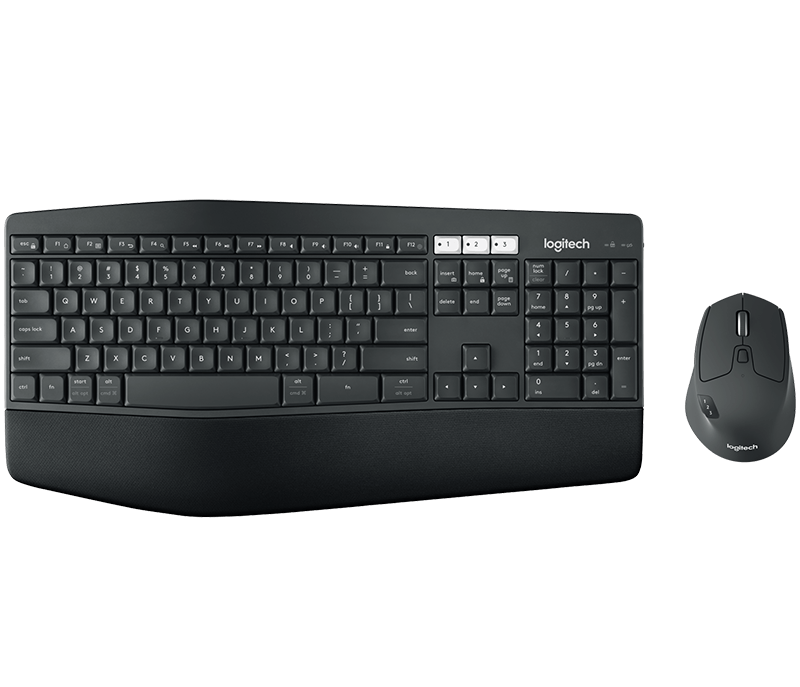
For the mouse and keyboard, can't you just get those keybosrd / mouse with wireless dongle and Bluetooth connectivity?

1 laptop uses wireless dongle, 1 laptop uses Bluetooth. Then just switch between using different connectivity.

For mouse, there are even mouse that let you connect to multiple machines via Bluetooth. Look at logitech m590 mouse.

Sent from Samsung SM-G970F using GAGT
 
Last edited:
Joined
Oct 26, 2011
Messages
48,336
Reaction score
7,467
Need some help here. I have a macbook and a Windows laptop, connecting to a single monitor.


I am using a USB KVM switch for my keyboard and mouse between the 2 laptops.

However, after switching 2 or 3 times the USB KVM switch stopped working.

Any idea have you guys encounter this before?

The USB KVM switch I am using is:
UGREEN USB 3.0 Sharing Switch, 2 Computers 4-Port USB Peripheral Switcher Adapter Box Selector for PC, Printer, Scanner, Mouse, Keyboard with One-Button Swapping and 2 Pack USB A to A Cable - intl |

I using this for over 1 year.
No issues everything very smooth for me.
I switch 10-30 times daily.
 
Joined
Oct 26, 2011
Messages
48,336
Reaction score
7,467
Hi all - need a bit of advice.

I have two laptops - a PC and a MacBook (2020), I want them to share a single widescreen monitor and external keyboard / mouse.

Is there anyway to do this wirelessly?

e.g. Chromecast was one suggestion I had for the screen.

Either KVM
c6de91960fa1c6bfe724311d67723ea8.jpg

Both device needs to support HDMI.

or Multi Device Bluetooth Keyboard.
mk850-performance-overview-page.png

Both devices need to have Bluetooth.
But cannot quick switch monitor.
You have to change the monitor input manually.
Or buy just buy another Monitor.
 

hellspawn_one

Supremacy Member
Joined
Mar 4, 2001
Messages
8,238
Reaction score
1
this one mouse only, cannot share keyboard and screen right?

yes, this is only for mouse, at least i din see any Logitech Flow for keyboard.

But you can switch between dongle and BT with a click of a button on the keyboard. I'm using this method now on my Logitech G613 keyboard.
 

KleoZy

Supremacy Member
Joined
Jan 1, 2000
Messages
5,718
Reaction score
1,012
if you are getting what Entry level PC is recommending, (Ugreen KVM)
you can just plug the wireless keyboard and mouse combo dongle
on either the keyboard or mouse port of the KVM.
you will be able to use keyboard and mouse, does not matter which you switch A or B. anyway wireless keyboard and mouse are self power efficient.

Do note that there are some limitation on monitor refresh rate.
I believe at 1980 x 1080 HD at 60Hz referesh and 4K/2K at 30hz
 
Important Forum Advisory Note
This forum is moderated by volunteer moderators who will react only to members' feedback on posts. Moderators are not employees or representatives of HWZ. Forum members and moderators are responsible for their own posts.

Please refer to our Community Guidelines and Standards, Terms of Service and Member T&Cs for more information.
Top