VoodooKing
Supremacy Member
- Joined
- Jan 1, 2000
- Messages
- 7,690
- Reaction score
- 33
Hey guys. I am on Singtel's 1GB plan. Recently I just replaced Singtel issued router AC Elite with Asus RTAX86U. Now the STB isn't working. I know Singtel-Other profile configures for port 4 to connect STB, that works fine but I would like to retain my old setup.
Original setup
ONT > AC Elite Port 1 > TL-SG105E > STB, PC, PS4, Android TV (All works fine)
Now
ONT> RTAX86U Port 4 > TL-SG105E > STB works, the rest don't work
I know that through CLI, port 4 can probably carry VLAN10 and 20 and then the TL-SG105E can perform VLAN tagging/untagging. I'm now just stuck at configuring the port 4.
Table for reference
# eth0 -> WAN
# eth1 -> LAN4
# br(XX) > bridge
For Singtel-Other profile, the ports are configured as below (I removed the rest of the ports info otherwise become too long and can't post)
br0 Link encap:Ethernet HWaddr 58:11:22:7C:AB:68
inet addr:192.168.1.254 Bcast:192.168.1.255 Mask:255.255.255.0
inet6 addr: fe80::5a11:22ff:fe7c:ab68%lo/64 Scope:Link
inet6 addr: 2400:d803:db4a:7338::1%1/64 Scope:Global
UP BROADCAST RUNNING ALLMULTI MULTICAST MTU:1500 Metric:1
RX packets:43853 errors:0 dropped:363 overruns:0 frame:0
TX packets:56272 errors:0 dropped:0 overruns:0 carrier:0
collisions:0 txqueuelen:0
RX bytes:12685194 (12.0 MiB) TX bytes:48597749 (46.3 MiB)
br101 Link encap:Ethernet HWaddr 58:11:22:7C:AB:68
inet addr:219.74.115.56 Bcast:219.74.115.255 Mask:255.255.255.0
UP BROADCAST RUNNING ALLMULTI MULTICAST MTU:1500 Metric:1
RX packets:52937 errors:0 dropped:0 overruns:0 frame:0
TX packets:33984 errors:0 dropped:0 overruns:0 carrier:0
collisions:0 txqueuelen:0
RX bytes:46299966 (44.1 MiB) TX bytes:11691965 (11.1 MiB)
eth0 Link encap:Ethernet HWaddr 58:11:22:7C:AB:68
inet6 addr: fe80::5a11:22ff:fe7c:ab68%lo/64 Scope:Link
UP BROADCAST RUNNING MULTICAST MTU:1500 Metric:1
RX packets:52938 errors:0 dropped:0 overruns:0 frame:0
TX packets:33184 errors:0 dropped:0 overruns:0 carrier:0
collisions:0 txqueuelen:1000
RX bytes:47464643 (45.2 MiB) TX bytes:11706375 (11.1 MiB)
eth0.v0 Link encap:Ethernet HWaddr 58:11:22:7C:AB:68
inet6 addr: fe80::5a11:22ff:fe7c:ab68%lo/64 Scope:Link
UP BROADCAST RUNNING ALLMULTI MULTICAST MTU:1500 Metric:1
RX packets:52938 errors:0 dropped:0 overruns:0 frame:0
TX packets:33668 errors:0 dropped:0 overruns:0 carrier:0
collisions:0 txqueuelen:0
RX bytes:46300032 (44.1 MiB) TX bytes:11634185 (11.0 MiB)
eth1 Link encap:Ethernet HWaddr 58:11:22:7C:AB:68
inet6 addr: fe80::5a11:22ff:fe7c:ab68%lo/64 Scope:Link
UP BROADCAST ALLMULTI MULTICAST MTU:1500 Metric:1
RX packets:117 errors:0 dropped:117 overruns:0 frame:0
TX packets:30 errors:0 dropped:0 overruns:0 carrier:0
collisions:0 txqueuelen:1000
RX bytes:14708 (14.3 KiB) TX bytes:3731 (3.6 KiB)
eth1.v0 Link encap:Ethernet HWaddr 58:11:22:7C:AB:68
inet6 addr: fe80::5a11:22ff:fe7c:ab68%lo/64 Scope:Link
UP BROADCAST ALLMULTI MULTICAST MTU:1500 Metric:1
RX packets:0 errors:0 dropped:0 overruns:0 frame:0
TX packets:18 errors:0 dropped:0 overruns:0 carrier:0
collisions:0 txqueuelen:0
RX bytes:0 (0.0 B) TX bytes:1350 (1.3 KiB)
Info for Port4 STB interface
#root: vlanctl --if eth1 --rx --tags 0 --show-table
VLAN Rule Table : eth1, Rx, nbrOfTags 0, default DROP
--------------------------------------------------------------------------------
===> eth1 (ONT) : RX, 0 tag(s)
Tag Rule ID : 0
Rx VLAN Device : eth1.v0
Filters
VlanDev MacAddr : No
Commands
00:[PUSH_TAG, 0x00008100, 0x00000001]
01:[SET_VID, 0x00000014, 0x00000000]
02:[SET_PBITS, 0x00000004, 0x00000000]
Rule Type : Flow
Hit Count : 0
--------------------------------------------------------------------------------
#root: brctl show
br0
eth2
eth3
eth4
eth5
eth6
eth7
br101
eth0.v0
eth1.v0
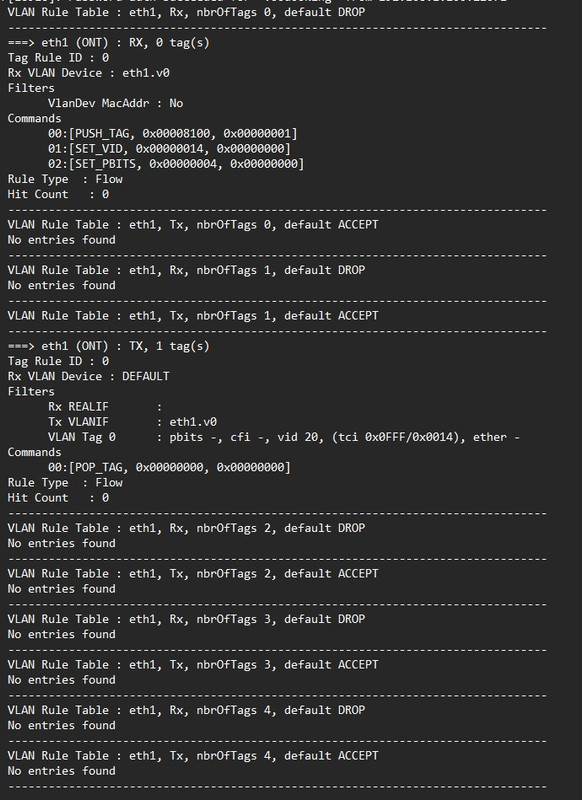
So eth1 (Port 4) in Singtel-Other profile is configured where a STB will get an IP address. I tried to add VLAN 10 to eth1 and then add it to br0 but it didn't work.
#root: vlanctl --mcast --if-create eth1 1
#root: vlanctl --if eth1 --tx --tags 0 --filter-txif eth1.v1 --push-tag --set-vid 10 0 --rule-append (Assign VLAN10 to the eth1.v1 interface..I think)
#root: vlanctl --if eth1 --rx --tags 1 --filter-vid 10 0 --pop-tag --set-rxif eth1.v1 --rule-append
#root: ifconfig eth1.v1 up
#root: brctl addif br0 eth1.v1
Both VLANs are now on Port 4 but I think the rules and commands wrong, should eth1.v1 be default DROP? eth1.v0 has Set_PBITS and documentation shows which I have no clue.
--set-pbits <pbits> <tag_nbr> Set the PBITS value of the VLAN Header number <tag_nbr> to <pbits>.
#root: vlanctl --if eth1 --rx --tags 0 --show-table
VLAN Rule Table : eth1, Tx, nbrOfTags 0, default ACCEPT
--------------------------------------------------------------------------------
===> eth1 (ONT) : TX, 0 tag(s)
Tag Rule ID : 0
Rx VLAN Device : DEFAULT
Filters
Rx REALIF :
Tx VLANIF : eth1.v1
Commands
00:[PUSH_TAG, 0x00008100, 0x00000001]
01:[SET_VID, 0x0000000A, 0x00000000]
Rule Type : Flow
Hit Count : 0
--------------------------------------------------------------------------------
VLAN Rule Table : eth1, Rx, nbrOfTags 0, default DROP
--------------------------------------------------------------------------------
===> eth1 (ONT) : RX, 0 tag(s)
Tag Rule ID : 0
Rx VLAN Device : eth1.v0
Filters
VlanDev MacAddr : No
Commands
00:[PUSH_TAG, 0x00008100, 0x00000001]
01:[SET_VID, 0x00000014, 0x00000000]
02:[SET_PBITS, 0x00000004, 0x00000000]
Rule Type : Flow
Hit Count : 0
--------------------------------------------------------------------------------
root# brctl show
br0
eth1.v1
eth2
eth3
eth4
eth5
eth6
eth7
br101
eth0.v0
eth1.v0
My resources were taken from
https://www.snbforums.com/threads/v...untagged-traffic-rt-ax86u-and-rt-ax88u.78411/https://www.snbforums.com/threads/asus-ac-86u-vlan-utility.55664/https://forums.hardwarezone.com.sg/...-singtel-asus-rt-ax86u.6564040/post-137421693
I thought I'd ask here and see if anyone knows what I'm doing wrong and maybe have an idea.
Original setup
ONT > AC Elite Port 1 > TL-SG105E > STB, PC, PS4, Android TV (All works fine)
Now
ONT> RTAX86U Port 4 > TL-SG105E > STB works, the rest don't work
I know that through CLI, port 4 can probably carry VLAN10 and 20 and then the TL-SG105E can perform VLAN tagging/untagging. I'm now just stuck at configuring the port 4.
Table for reference
# eth0 -> WAN
# eth1 -> LAN4
# br(XX) > bridge
For Singtel-Other profile, the ports are configured as below (I removed the rest of the ports info otherwise become too long and can't post)
br0 Link encap:Ethernet HWaddr 58:11:22:7C:AB:68
inet addr:192.168.1.254 Bcast:192.168.1.255 Mask:255.255.255.0
inet6 addr: fe80::5a11:22ff:fe7c:ab68%lo/64 Scope:Link
inet6 addr: 2400:d803:db4a:7338::1%1/64 Scope:Global
UP BROADCAST RUNNING ALLMULTI MULTICAST MTU:1500 Metric:1
RX packets:43853 errors:0 dropped:363 overruns:0 frame:0
TX packets:56272 errors:0 dropped:0 overruns:0 carrier:0
collisions:0 txqueuelen:0
RX bytes:12685194 (12.0 MiB) TX bytes:48597749 (46.3 MiB)
br101 Link encap:Ethernet HWaddr 58:11:22:7C:AB:68
inet addr:219.74.115.56 Bcast:219.74.115.255 Mask:255.255.255.0
UP BROADCAST RUNNING ALLMULTI MULTICAST MTU:1500 Metric:1
RX packets:52937 errors:0 dropped:0 overruns:0 frame:0
TX packets:33984 errors:0 dropped:0 overruns:0 carrier:0
collisions:0 txqueuelen:0
RX bytes:46299966 (44.1 MiB) TX bytes:11691965 (11.1 MiB)
eth0 Link encap:Ethernet HWaddr 58:11:22:7C:AB:68
inet6 addr: fe80::5a11:22ff:fe7c:ab68%lo/64 Scope:Link
UP BROADCAST RUNNING MULTICAST MTU:1500 Metric:1
RX packets:52938 errors:0 dropped:0 overruns:0 frame:0
TX packets:33184 errors:0 dropped:0 overruns:0 carrier:0
collisions:0 txqueuelen:1000
RX bytes:47464643 (45.2 MiB) TX bytes:11706375 (11.1 MiB)
eth0.v0 Link encap:Ethernet HWaddr 58:11:22:7C:AB:68
inet6 addr: fe80::5a11:22ff:fe7c:ab68%lo/64 Scope:Link
UP BROADCAST RUNNING ALLMULTI MULTICAST MTU:1500 Metric:1
RX packets:52938 errors:0 dropped:0 overruns:0 frame:0
TX packets:33668 errors:0 dropped:0 overruns:0 carrier:0
collisions:0 txqueuelen:0
RX bytes:46300032 (44.1 MiB) TX bytes:11634185 (11.0 MiB)
eth1 Link encap:Ethernet HWaddr 58:11:22:7C:AB:68
inet6 addr: fe80::5a11:22ff:fe7c:ab68%lo/64 Scope:Link
UP BROADCAST ALLMULTI MULTICAST MTU:1500 Metric:1
RX packets:117 errors:0 dropped:117 overruns:0 frame:0
TX packets:30 errors:0 dropped:0 overruns:0 carrier:0
collisions:0 txqueuelen:1000
RX bytes:14708 (14.3 KiB) TX bytes:3731 (3.6 KiB)
eth1.v0 Link encap:Ethernet HWaddr 58:11:22:7C:AB:68
inet6 addr: fe80::5a11:22ff:fe7c:ab68%lo/64 Scope:Link
UP BROADCAST ALLMULTI MULTICAST MTU:1500 Metric:1
RX packets:0 errors:0 dropped:0 overruns:0 frame:0
TX packets:18 errors:0 dropped:0 overruns:0 carrier:0
collisions:0 txqueuelen:0
RX bytes:0 (0.0 B) TX bytes:1350 (1.3 KiB)
Info for Port4 STB interface
#root: vlanctl --if eth1 --rx --tags 0 --show-table
VLAN Rule Table : eth1, Rx, nbrOfTags 0, default DROP
--------------------------------------------------------------------------------
===> eth1 (ONT) : RX, 0 tag(s)
Tag Rule ID : 0
Rx VLAN Device : eth1.v0
Filters
VlanDev MacAddr : No
Commands
00:[PUSH_TAG, 0x00008100, 0x00000001]
01:[SET_VID, 0x00000014, 0x00000000]
02:[SET_PBITS, 0x00000004, 0x00000000]
Rule Type : Flow
Hit Count : 0
--------------------------------------------------------------------------------
#root: brctl show
br0
eth2
eth3
eth4
eth5
eth6
eth7
br101
eth0.v0
eth1.v0
So eth1 (Port 4) in Singtel-Other profile is configured where a STB will get an IP address. I tried to add VLAN 10 to eth1 and then add it to br0 but it didn't work.
#root: vlanctl --mcast --if-create eth1 1
#root: vlanctl --if eth1 --tx --tags 0 --filter-txif eth1.v1 --push-tag --set-vid 10 0 --rule-append (Assign VLAN10 to the eth1.v1 interface..I think)
#root: vlanctl --if eth1 --rx --tags 1 --filter-vid 10 0 --pop-tag --set-rxif eth1.v1 --rule-append
#root: ifconfig eth1.v1 up
#root: brctl addif br0 eth1.v1
Both VLANs are now on Port 4 but I think the rules and commands wrong, should eth1.v1 be default DROP? eth1.v0 has Set_PBITS and documentation shows which I have no clue.
--set-pbits <pbits> <tag_nbr> Set the PBITS value of the VLAN Header number <tag_nbr> to <pbits>.
#root: vlanctl --if eth1 --rx --tags 0 --show-table
VLAN Rule Table : eth1, Tx, nbrOfTags 0, default ACCEPT
--------------------------------------------------------------------------------
===> eth1 (ONT) : TX, 0 tag(s)
Tag Rule ID : 0
Rx VLAN Device : DEFAULT
Filters
Rx REALIF :
Tx VLANIF : eth1.v1
Commands
00:[PUSH_TAG, 0x00008100, 0x00000001]
01:[SET_VID, 0x0000000A, 0x00000000]
Rule Type : Flow
Hit Count : 0
--------------------------------------------------------------------------------
VLAN Rule Table : eth1, Rx, nbrOfTags 0, default DROP
--------------------------------------------------------------------------------
===> eth1 (ONT) : RX, 0 tag(s)
Tag Rule ID : 0
Rx VLAN Device : eth1.v0
Filters
VlanDev MacAddr : No
Commands
00:[PUSH_TAG, 0x00008100, 0x00000001]
01:[SET_VID, 0x00000014, 0x00000000]
02:[SET_PBITS, 0x00000004, 0x00000000]
Rule Type : Flow
Hit Count : 0
--------------------------------------------------------------------------------
root# brctl show
br0
eth1.v1
eth2
eth3
eth4
eth5
eth6
eth7
br101
eth0.v0
eth1.v0
My resources were taken from
https://www.snbforums.com/threads/v...untagged-traffic-rt-ax86u-and-rt-ax88u.78411/https://www.snbforums.com/threads/asus-ac-86u-vlan-utility.55664/https://forums.hardwarezone.com.sg/...-singtel-asus-rt-ax86u.6564040/post-137421693
I thought I'd ask here and see if anyone knows what I'm doing wrong and maybe have an idea.
Last edited: