New PC random freezes

nakedtons

Banned
Joined
May 31, 2010
Messages
5,219
Reaction score
1,832
I have newly assembled my PC. All parts are new except for the reused old GPU. Booted up and installed Windows without any issue. System is stable except for random freezes a few times a day. It happens often whenever I played a video or played a youtube video. I downloaded installed all the drivers from scratch as it is a new system so it shouldn't be a driver issue. I press ctrl+shift+escape to bring out the taskbar. However it will freeze too including cmd. The Aura effects RGB lights would also freeze. However, the mouse cursor can still move and the video will continue to have audio for a few seconds before it totally freezes. I pressed restart or shutdown but it will take forever until I am forced to press the power on/off button. Sometimes it will be able to wake up from sleep and I had to do a hard restart to get anything on the screen. Is it due to my old GPU card? Tried to reseat the GPU but still the same problem.
 
Last edited:

nakedtons

Banned
Joined
May 31, 2010
Messages
5,219
Reaction score
1,832
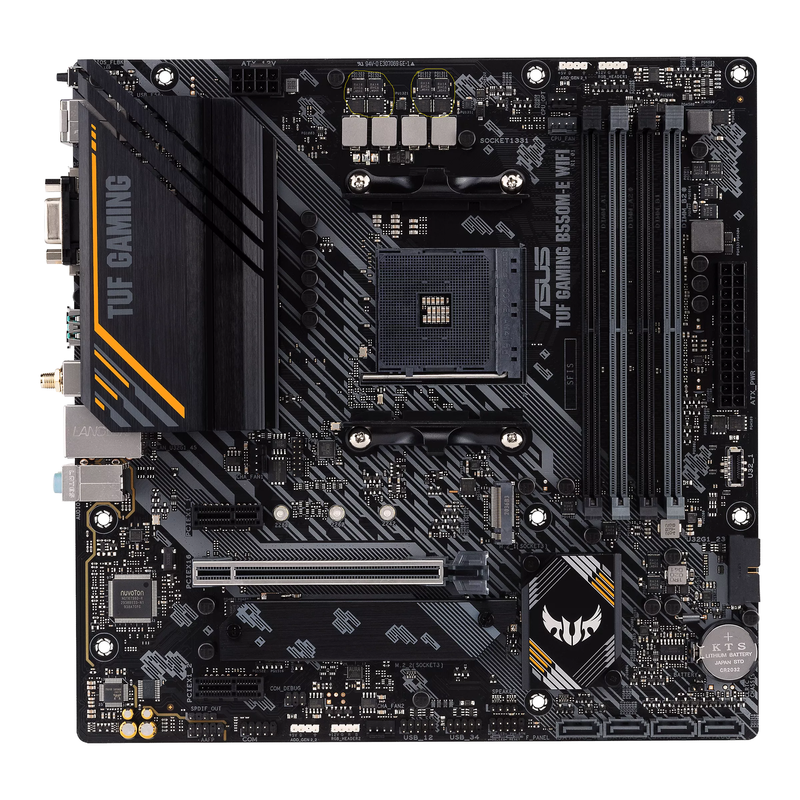
ASUS TUF Gaming B550M-E WIFI

AMD Ryzen 5 5500

Klevv Cras 3600mhz (2 x 8GB)

240GB Transcend SSD, 250GB Samsung EVO 860

Seasonic Focus GX-750

Gigabyte NVIDIA GTX 1070 TI 8GB
 

nakedtons

Banned
Joined
May 31, 2010
Messages
5,219
Reaction score
1,832
I also suspect it to be Armoury Crate software at the same time due to numerous complains about it. If so, is there an alternative program I can use to control the RGB lights?
 

tsteo77

Senior Member
Joined
Oct 28, 2011
Messages
1,542
Reaction score
216
Since you suspect the problem due to armoury crate software, remove it and see if problem still around.
You can also create a win10 live usb drive and run win10 directly without any other softwares or drivers,
play around with windows own programs and see if pc hang. Feedback your result.
 

86technie

High Supremacy Member
Joined
Jun 8, 2006
Messages
40,356
Reaction score
5,943
ASUS TUF Gaming B550M-E WIFI

AMD Ryzen 5 5500

Klevv Cras 3600mhz (2 x 8GB)

240GB Transcend SSD, 250GB Samsung EVO 860

Seasonic Focus GX-750

Gigabyte NVIDIA GTX 1070 TI 8GB

Take note there are RAM kits optimized for AMD, maybe you want to try turn off XMP profile
for that RAM which I doubt on AMD can run stable.

49523698732_c8cc6df7b6_o.jpg


Try do a clean install of Windows without internet than install all of drivers including chipset, LAN and audio from ASUS website but not through Windows update.

https://www.asus.com/Motherboards-C...ng/TUF-GAMING-B550M-E-WIFI/HelpDesk_Download/
Try use Crystaldiskmark see whether does it freeze or blue screen cuz usually system freeze are either caused by RAM or bad SSD.

https://crystalmark.info/en/software/crystaldiskmark/
Your build is OK except the RAM as well as SSD, maybe down the road you want to upgrade that SSD to
Samsung 970 EVO Plus 250GB which cost around $88.

https://www.challenger.sg/biz-solut...sd/samsung-970-evo-plus-250gb0--8801643628079
 

nakedtons

Banned
Joined
May 31, 2010
Messages
5,219
Reaction score
1,832
Bought the cheaper SSD as I thought that a bad hard drive was the cause of the BSOD on my old rig which doesn't have the nvme slot. Turned out that the old mobo failed so badly that I couldn't even install Windows on the SSD without a BSOD. I knew that the the old rig was done at that point and decided to build a new rig with the unused SSD.

Anyway, I have uninstalled NZXT CAM and closed the Armoury Crate processes. See if it still causes the freezes.
 
Last edited:

86technie

High Supremacy Member
Joined
Jun 8, 2006
Messages
40,356
Reaction score
5,943
Bought the cheaper SSD as I thought that a bad hard drive was the cause of the BSOD on my old rig which doesn't have the nvme slot. Turned out that the old mobo failed so badly that I couldn't even install Windows on the SSD without a BSOD. I knew that the the old rig was done at that point and decided to build a new rig with the unused SSD.

Anyway, I have uninstalled NZXT CAM and closed the Armoury Crate processes. See if it still causes the freezes.

I don't use ASUS Armoury, even disabled in the BIOS so it won't keep prompting me to install it.
There are better tools to monitor the PC health like HWinfo etc.
However RGB/ARGB control wise have to ASUS armoury but even my own rig doesn't have any RGB/ARGB
just a simple setup.
 

nakedtons

Banned
Joined
May 31, 2010
Messages
5,219
Reaction score
1,832
I don't use ASUS Armoury, even disabled in the BIOS so it won't keep prompting me to install it.
There are better tools to monitor the PC health like HWinfo etc.
However RGB/ARGB control wise have to ASUS armoury but even my own rig doesn't have any RGB/ARGB
just a simple setup.
I changed from LED fans to all RGB fans including the strips. Even my CPU cooler is RGB. Hope I can find alternative programs to Armoury Crate. I also suspected it to be the culprit is when the RGB lights stuck at the same color, the PC also freezes at the same time.
 

86technie

High Supremacy Member
Joined
Jun 8, 2006
Messages
40,356
Reaction score
5,943
I changed from LED fans to all RGB fans including the strips. Even my CPU cooler is RGB. Hope I can find alternative programs to Armoury Crate. I also suspected it to be the culprit is when the RGB lights stuck at the same color, the PC also freezes at the same time.

Just checking these are RGB not ARGB?
Both are different even the connector on the motherboard.
 

Red_herring

Senior Member
Joined
Jan 1, 2000
Messages
1,972
Reaction score
20
I also suspect it to be Armoury Crate software at the same time due to numerous complains about it. If so, is there an alternative program I can use to control the RGB lights?

for 3rd party argb software, you can try signal rgb, open rgb or rgb sync.
 

nakedtons

Banned
Joined
May 31, 2010
Messages
5,219
Reaction score
1,832
Closed Armoury Crate processes as soon as I picked my Aura effects. No freezes for a few days so far. In the past, it was like about two freezes a day. Looks like the program can really screw up PCs. ASUS needs to address the problem.
 

Koenig168

Arch-Supremacy Member
Joined
Nov 4, 2007
Messages
10,035
Reaction score
1,745
Closed Armoury Crate processes as soon as I picked my Aura effects. No freezes for a few days so far. In the past, it was like about two freezes a day. Looks like the program can really screw up PCs. ASUS needs to address the problem.

It's not just Asus. I usually don't install any MB software, just the drivers. Currently setting MB RGB via BIOS.
 
Important Forum Advisory Note
This forum is moderated by volunteer moderators who will react only to members' feedback on posts. Moderators are not employees or representatives of HWZ Forums. Forum members and moderators are responsible for their own posts. Please refer to our Community Guidelines and Standards and Terms and Conditions for more information.
Top