PS4 Audio connected to Dell U2717D

Tornesoul

Master Member
Joined
Nov 29, 2008
Messages
3,427
Reaction score
11
Hi guys, looking to purchase a ps4 slim and connect the video to my Dell U2717D via hdmi.

Wont have a problem with video, but have questions regarding audio, hope u guys could help.

As far as I know, ps4 slim only has optical audio out.

My current pc audio config is:
PC > usb > external Soundcard (Kontrol S4) > 1/4" cables > Speakers (KRK Rokit 5s)

Is there anyway to route the ps4 audio to the computer > soundcard?

The MSI B150 Mortar mobo has these outputs below, dosent seem to be possible:
1x Optical S/PDIF OUT connector
5x OFC audio jacks


Alternatively I saw that my Dell U2717D monitor has an Audio line-out port, allowing connection of speakers to playback audio coming through HDMI or DP audio channels.

NOTE: The audio line-out port does not support headphones (not too sure why)

page 9
https://static.bhphotovideo.com/lit_files/257264.pdf

was wondering if i could alternatively run ps4 > hdmi > dell monitor > audio line out 3.5mm to RCA to my speakers (bypassing com and external soundcard)

my krk rokit 5 can accept 1/4", rca, XLR.
has any1 tried the dell u2717d audio line out yet ?

Thanks all :)
 
Last edited:

shadow84

High Supremacy Member
Joined
Apr 15, 2009
Messages
34,277
Reaction score
419
Connect hdmi from ps4 to monitor. Then get a 3.5mm to rca cable to connect to speakers. But, is it easy to switch input on ur speakers?
 

xonix

Arch-Supremacy Member
Joined
Mar 24, 2001
Messages
17,592
Reaction score
1,693
Looks workable so long you don't mind 2 channel audio
 

wwenze

Greater Supremacy Member
Joined
Dec 2, 2002
Messages
83,510
Reaction score
27,544
PS4 slim doesn't have optical out either iirc

My PS TV also dun have optical out or analog out... Also connect HDMI to monitor and use 3.5mm

Connect the 3.5mm to your mixer and use hardware mixing instead of letting computer process it. This is due to latency issues if routed through computer.
 

Tornesoul

Master Member
Joined
Nov 29, 2008
Messages
3,427
Reaction score
11
Connect hdmi from ps4 to monitor. Then get a 3.5mm to rca cable to connect to speakers. But, is it easy to switch input on ur speakers?

hmm, wont turn on my pc if ps4 is on though. my speakers are able to accept all the inputs, i could just leave the inputs in

krkrear.jpg


Looks workable so long you don't mind 2 channel audio

am fine w 2 channels :)

PS4 slim doesn't have optical out either iirc

My PS TV also dun have optical out or analog out... Also connect HDMI to monitor and use 3.5mm

Connect the 3.5mm to your mixer and use hardware mixing instead of letting computer process it. This is due to latency issues if routed through computer.

how u use 3.5mm? ps tv out? but dosent ur tv have speakers?

my bad ps4 slim no optical out
 
Last edited:

wwenze

Greater Supremacy Member
Joined
Dec 2, 2002
Messages
83,510
Reaction score
27,544
hmm, wont turn on my pc if ps4 is on though. my speakers are able to accept all the inputs, i could just leave the inputs in

Your speakers accepts multiple inputs yes

But how are you going to adjust the PS4 volume?

That's why I suggested connecting to your Kontrol S4

how u use 3.5mm? ps tv out? but dosent ur tv have speakers?

my bad ps4 slim no optical out

PS TV, as in the desktop version of Vita.
 

t258jgn

High Supremacy Member
Joined
Oct 11, 2008
Messages
45,218
Reaction score
725
if cheap then the dac quality also same as the monitor line out isnt it?

A little better than monitor line out.


Better DAC with HDMI

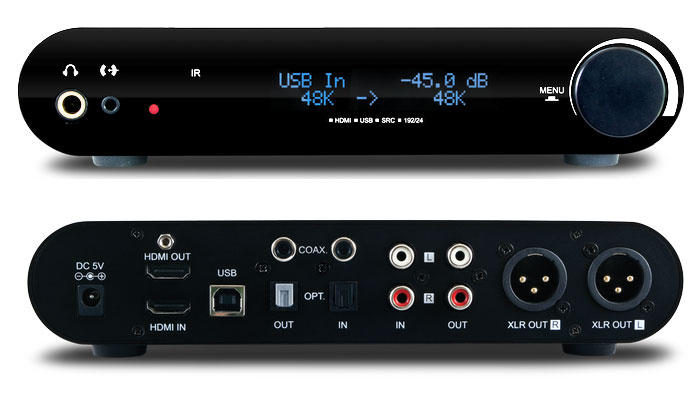
I've a 5mth old used Essence HDACC 24/192K Upsampling DAC for sale
Can connect HDMI / Your PC USB / RCA Input / 3.5mm Input to Balanced Out Audio

:D

essence_hdacc_large.jpg
 

86technie

High Supremacy Member
Joined
Jun 8, 2006
Messages
39,317
Reaction score
5,304
this one 1 look see the unbalanced xlr already know not cheap. cheap means china nameless brand hdmi audio splitter kind. that kind just skip, use monitor to speaker direct, save money can liao.

Alternate if you have sound card, from your monitor to
the sound card than to the speaker to amplify the signal.

Even if from monitor to speaker direct, the sound quality can be quite bad.
If not consider a mini mixer like Yamaha AG03 about $2XX.

Those using PS4 slim, definitely you will have problems connecting to a PC speaker.
Unless you go NTUC and buy a really cheap Aikra TV to connect to your PS4.

Maybe cost $1XX+?
 

wwenze

Greater Supremacy Member
Joined
Dec 2, 2002
Messages
83,510
Reaction score
27,544
Alternate if you have sound card, from your monitor to
the sound card than to the speaker to amplify the signal
.

Even if from monitor to speaker direct, the sound quality can be quite bad.
If not consider a mini mixer like Yamaha AG03 about $2XX.

Those using PS4 slim, definitely you will have problems connecting to a PC speaker.
Unless you go NTUC and buy a really cheap Aikra TV to connect to your PS4.

Maybe cost $1XX+?

Just... take a break, you're trying too hard.
 

Tornesoul

Master Member
Joined
Nov 29, 2008
Messages
3,427
Reaction score
11
Your speakers accepts multiple inputs yes

But how are you going to adjust the PS4 volume?

That's why I suggested connecting to your Kontrol S4


PS TV, as in the desktop version of Vita.

ah thanks man, knew asking here was a good idea,
i wouldnt be able to adjust the volume. is there anyway to do that in the ps4 itself? cause my speakers dont have a volume knob.

if i connected to my kontrol s4, i could run as a line through, but would need to on my com to on the software.. hmmm

the best solution atm would be ps4 > hdmi > monitor > audio output from dell u2717d > speakers

just that i'll have no vol control; and assuming the audio out works - very little info online

A little better than monitor line out.


Better DAC with HDMI

I've a 5mth old used Essence HDACC 24/192K Upsampling DAC for sale
Can connect HDMI / Your PC USB / RCA Input / 3.5mm Input to Balanced Out Audio

:D

essence_hdacc_large.jpg

how much is that doraemon? thanks man
 
Last edited:

Tornesoul

Master Member
Joined
Nov 29, 2008
Messages
3,427
Reaction score
11

wwenze

Greater Supremacy Member
Joined
Dec 2, 2002
Messages
83,510
Reaction score
27,544
Your Kontrol S4 has so many knobs, it should be capable of hardware mixing, so you only need to supply USB power to it without using computer software.

Else if it has so many knobs but can't use them, then it's just a poser console.


Tornesoul

Master Member
Joined
Nov 29, 2008
Messages
3,427
Reaction score
11
Your Kontrol S4 has so many knobs, it should be capable of hardware mixing, so you only need to supply USB power to it without using computer software.

Else if it has so many knobs but can't use them, then it's just a poser console.

haha I can run it through input A / B via rca line in. but will nd to on the software to set it to line through mode, which is quite troublesome, so hoping to avoid that; means my pc needs to be on as well


img-ce-traktor_kontrol_s4_overview_03_integratedaudiointerface_2x-7dae59d4f46a1cfbc8d0f5d8a313f419-d.jpg
 

Rock-kun

Senior Member
Joined
Sep 10, 2007
Messages
991
Reaction score
1
what I do:
  1. Connect speakers to 3.5mm jack on controller
  2. Turn on PS4 Slim
  3. Start game
  4. Long-press on controller PS button
  5. Route all audio output to controller

Problem solved.
 
Important Forum Advisory Note
This forum is moderated by volunteer moderators who will react only to members' feedback on posts. Moderators are not employees or representatives of HWZ. Forum members and moderators are responsible for their own posts.

Please refer to our Community Guidelines and Standards, Terms of Service and Member T&Cs for more information.
Top