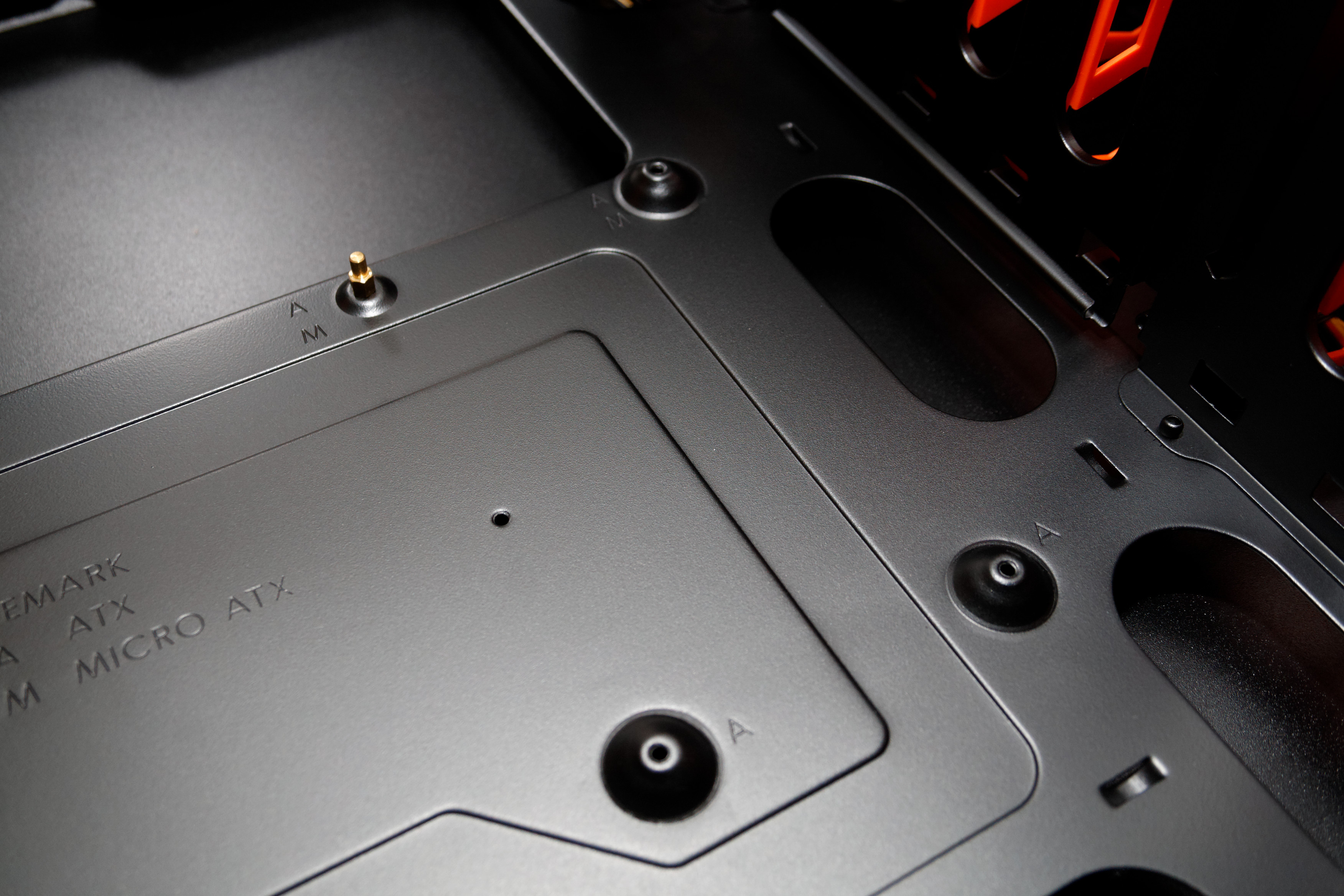
Question on fixing motherboard onto casing

zenitro

Member
Joined
Nov 6, 2013
Messages
153
Reaction score
1
Have a corsair 300R and a Asrock B75-DGS

so when i try to fix the mobo I can only screw in the top left, Top right and bottom left of the mobo

Bottom right does not have any screw hole for me to screw it in and is quite shaky when i try to push in the 24 pin(have to hold the back and press in the 24 pin)
Wonder if it is ok this way :s11:

FRe8x2m

http://imgur.com/FRe8x2m

the red box is my mobo.
the white spot, where the bottom right of the mobo is, is a preinstalled stand off which help to align the mobo but does not secure it
 
Last edited:

cyberwave

Arch-Supremacy Member
Joined
Sep 12, 2010
Messages
12,857
Reaction score
1
must screw in the stand off if u using matx mobo in 300r.

the default raised areas are for atx mobos
 

Clone_

Senior Member
Joined
Oct 6, 2008
Messages
901
Reaction score
0
your case itself got the labels
take out all the "A" standoffs and screw in all the "M" ones.
 

zenitro

Member
Joined
Nov 6, 2013
Messages
153
Reaction score
1
ok in case i didnt make myself clear enug

Cougar-Challenger-Review_20120918_0858DxO.jpg


the corsair 300R is similar to this case. it has raised holes to screw in except for the bottom right which is a stand off. Do i screw the standoff after i goes through the hole?

First time DIY lah dont blame me too much:s13:
 

cyberwave

Arch-Supremacy Member
Joined
Sep 12, 2010
Messages
12,857
Reaction score
1
screw in the standoff between that raised standoff and raised hole
 

zenitro

Member
Joined
Nov 6, 2013
Messages
153
Reaction score
1
screw in the standoff between that raised standoff and raised hole

there is several problem to that suggestion
took a few picture of the actual thing

dcUKqTv.jpg


wrote on the image but will write here again
white circle show the preinstalled standoff which goes through the motherboard but it is not secure. It is just protruding outwards

Yellow sqaure shows the bottom right of the mobo and you can see through it that there is no hole there

White square show the one that you want me to installed an additional standoff on but apparently the mobo isnt long enug to reach

Here is the overview

48nh7Su.jpg
 

zenitro

Member
Joined
Nov 6, 2013
Messages
153
Reaction score
1
the article dont really provide much info other than the one line(nor pictures?)

anyway i am thinking that is probably the problem.
Want to ask if it is ok to continue as it is(one side loose) or sld i think about drilling a hole myself and adding a standoff
 

hlots123

Supremacy Member
Joined
Apr 5, 2006
Messages
5,207
Reaction score
11
the article dont really provide much info other than the one line(nor pictures?)

anyway i am thinking that is probably the problem.
Want to ask if it is ok to continue as it is(one side loose) or sld i think about drilling a hole myself and adding a standoff
saw in their 1st gallery pic, same 2 standoff holes on their mb not used. but shd be ok, they also continued with install & testing...
 

tuckloong

High Supremacy Member
Joined
Jan 6, 2007
Messages
32,410
Reaction score
8,737
can on and test la..just be careful when u insert stuff on the motherboard...dont bend or break it :s12:
 

Phen8210

High Supremacy Member
Joined
Jul 29, 2011
Messages
28,884
Reaction score
8,215
u should always read the manual for casing, no matter how experienced u are.

cos every case is different, the screws and stuff..
 

zenitro

Member
Joined
Nov 6, 2013
Messages
153
Reaction score
1
u should always read the manual for casing, no matter how experienced u are.

cos every case is different, the screws and stuff..

lol the manual that they provided for the casing just tell you how many different type of screw they give you
 

zenitro

Member
Joined
Nov 6, 2013
Messages
153
Reaction score
1
The preinstalled standoff is already in 1 of the 4 holes required for the hsf pushpins, ram and atx connector, so you can just on the pc, there will not be any problems.

The yellowbox hole is meant for the sata connectors/chipset, so, just becareful when you insert the sata connector. If you only plug/play once you don't have to worry about this hole. If you plug and play the sata connector a lot then you can get those white plastic standoff (from the AT case), or a quick solution is to use any insulator (same length as standoff)and put in the yellow hole below and acts as support (like pencil etc).


thanks this is very much appreciated and informative

btw in what situation will I "plus and play" sata connecter alot? changing hdd all the time?

Edit
Just checked my mobo. Although it is known as a mircoATX it has the size of a FlexATX...

the picture at AnandTech show a mircoATX thus it can at least screw in all 4 sides
 
Last edited:

hlots123

Supremacy Member
Joined
Apr 5, 2006
Messages
5,207
Reaction score
11
Just checked my mobo. Although it is known as a mircoATX it has the size of a FlexATX...

the picture at AnandTech show a mircoATX thus it can at least screw in all 4 sides
still seems ok... narrower mb less, wider mb more standoffs need to support.
but i'm abit surprised abt this case design...
 

zenitro

Member
Joined
Nov 6, 2013
Messages
153
Reaction score
1
still seems ok... narrower mb less, wider mb more standoffs need to support.
but i'm abit surprised abt this case design...

true lah smaller mean lesser standoff needed but the casing dun have the hole at the right place to put those few standoff for convenient sake ma.

which part are you surprised about the design?
 

hlots123

Supremacy Member
Joined
Apr 5, 2006
Messages
5,207
Reaction score
11
true lah smaller mean lesser standoff needed but the casing dun have the hole at the right place to put those few standoff for convenient sake ma.

which part are you surprised about the design?
surprised tat they'd not provide all the req'd holes lor. even if can get by, its quite normal to feel quite insecure abt it, like ur now.

wonder only, if those earring stopper, the soft rubber kind, can fit & hold the preinstalled standoff tat can't be secured...
 
Important Forum Advisory Note
This forum is moderated by volunteer moderators who will react only to members' feedback on posts. Moderators are not employees or representatives of HWZ. Forum members and moderators are responsible for their own posts.

Please refer to our Community Guidelines and Standards, Terms of Service and Member T&Cs for more information.
Top