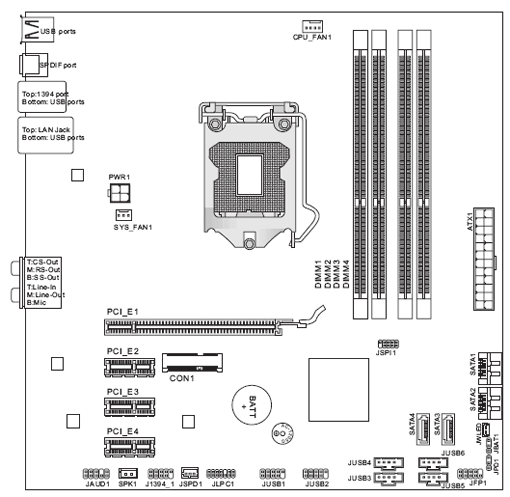
Ram installation question

5adisticD3vil

Great Supremacy Member
Joined
Jan 3, 2006
Messages
56,241
Reaction score
8,398
original


lets say there is 2x 4gig ram installed at pos2 and pos4
i wanna upgrade to 16gig
can i just slap a 8gig ram onto either pos1 or pos3??
or wat other way?

simple question but somehow i can't seem to remember the basic rule on this :s13::s13:
 

Godeau

Arch-Supremacy Member
Joined
Oct 11, 2009
Messages
15,963
Reaction score
6,473
I believe you will lose the dual channel by doing that. Best to consult your mobo manual
 

xonix

Arch-Supremacy Member
Joined
Mar 24, 2001
Messages
17,587
Reaction score
1,689
[ IMG]https://h30434.www3.hp.com/t5/image/serverpage/image-id/162039i5B66FB67098643EE/image-size/original?v=1.0&px=-1[/IMG]


lets say there is 2x 4gig ram installed at pos2 and pos4
i wanna upgrade to 16gig
can i just slap a 8gig ram onto either pos1 or pos3??
or wat other way?

simple question but somehow i can't seem to remember the basic rule on this :s13::s13:

Recommended:
2 x 4gb + 2 x 8gb

If you don't care about dual channel:
2x 4gb + 1 x 8gb ( consult your board user manual )
 

5adisticD3vil

Great Supremacy Member
Joined
Jan 3, 2006
Messages
56,241
Reaction score
8,398
damn, not my comp
is my customer's system PC
deliver whole system to them riao, then they want to last minute increase ram in the pc

worst case, if i install another 2x 4gig ram into pos1 and pos3
will still get 16gig right?
4gb +4gb +4gb+4gb
 
Joined
Oct 3, 2002
Messages
129,954
Reaction score
7,233
damn, not my comp
is my customer's system PC
deliver whole system to them riao, then they want to last minute increase ram in the pc

worst case, if i install another 2x 4gig ram into pos1 and pos3
will still get 16gig right?
4gb +4gb +4gb+4gb
Will still get, but the speed may differ

Sent from Rem Is Best Waifu using GAGT
 

wwenze

Greater Supremacy Member
Joined
Dec 2, 2002
Messages
86,435
Reaction score
30,120
Nowadays the rules have so much exceptions it's hard to predict what happens in specific cases.

Yes, to play safe it is best to use same number of modules with same capacity and same number of chips on each channel. But if you already have the RAM modules, you can try same total capacity on each Intel. Recent CPUs even support different capacity on each channel.
https://www.intel.com/content/www/us/en/support/articles/000005657/boards-and-kits.html#flex

Also DDR3 2x4G is easier to find than 1x8G anyway
 
Last edited:

5adisticD3vil

Great Supremacy Member
Joined
Jan 3, 2006
Messages
56,241
Reaction score
8,398
hmmm heck it lah, will try to get the same exact ram as per already installed in the pc then

thanks guys
 
Important Forum Advisory Note
This forum is moderated by volunteer moderators who will react only to members' feedback on posts. Moderators are not employees or representatives of HWZ Forums. Forum members and moderators are responsible for their own posts. Please refer to our Community Guidelines and Standards and Terms and Conditions for more information.
Top