Recommendation for mobile operator to do IT class offsite

xxnewbiexx

Junior Member
Joined
Jul 24, 2021
Messages
97
Reaction score
16
Hi, working with social work group, we are organizing IT class for migrant workers. We have 20 laptops available with a classroom setup. We are looking for experience of using mobile data for 20 machines connecting via wifi to a router which is connected to internet via mobile data.

We are planning training once a week for about 90 mins.

Anyone has any recommendation on:
1) Which mobile operation is good for this?
2) SIM Card wifi router that we could use for 20 machines.

Thanks.
 

froztheart

Supremacy Member
Joined
Aug 8, 2012
Messages
8,370
Reaction score
3,646
Hi, working with social work group, we are organizing IT class for migrant workers. We have 20 laptops available with a classroom setup. We are looking for experience of using mobile data for 20 machines connecting via wifi to a router which is connected to internet via mobile data.

We are planning training once a week for about 90 mins.

Anyone has any recommendation on:
1) Which mobile operation is good for this?
2) SIM Card wifi router that we could use for 20 machines.

Thanks.
If you looking to use mobile data with mobile routers, first verify the respective telcos - ST/SH/M1's coverage and connectivity at said location.
Once you identify which telco is better, then get a reliable mobile router. They don't come cheap, costing minimally 200+ onwards for 5G ones that supports more devices reliably.
Anything below $200 are 4G ones which is still usable, but your use case is 20 laptops so it's not going to be smooth unless you split them up to 2 routers serving 10 laptops each which performance wise might still not be great too.

Brands like TP-Link/Linksys/DLink etc. have 5G routers that supports more devices, and should have better performance compared to 4G routers.
For telcos, can check out this forum for more info - Mobile Communication Technology
 

xxnewbiexx

Junior Member
Joined
Jul 24, 2021
Messages
97
Reaction score
16
If you looking to use mobile data with mobile routers, first verify the respective telcos - ST/SH/M1's coverage and connectivity at said location.
Once you identify which telco is better, then get a reliable mobile router. They don't come cheap, costing minimally 200+ onwards for 5G ones that supports more devices reliably.
Anything below $200 are 4G ones which is still usable, but your use case is 20 laptops so it's not going to be smooth unless you split them up to 2 routers serving 10 laptops each which performance wise might still not be great too.

Brands like TP-Link/Linksys/DLink etc. have 5G routers that supports more devices, and should have better performance compared to 4G routers.
For telcos, can check out this forum for more info - Mobile Communication Technology
Thanks it been awhile since I have posted so i did my own testing. Here are my findings and maybe good for anyone who have similar requirement in future:

For SIM card, must have 5G, 4G is just not good enough.
I have tested SIMBA, GOMO and My republic all 5G plans, GOMO or rather (Singtel) network is the best. The test area is at Kranji. I am able to achieve download speed of 450 mb and upload speed of about 100 mb.

For router and hotspot
I have tested with Pixel and Vivo phones, Pixel is better. If I am not wrong, Android phone cannot support more than 8 connections. with 8 connections it still work well.

For router
I used Dlink DWR-X2000 https://www.dlink.com.sg/product/dwr-x2000-5g-ax1800-wi-fi-6-router/ I also tested with other cheaper options, not good enough and I am don't recommend them.
Even with this Dlink router, support of more than 8 connections is unstable. Not sure if it is mobile provider limit or bandwidth limit.

For now my recommendation for anyone who needs a similar setup as I do, support 20+ PC in an environment here there is no good wifi connection. Get multiple 5G subscription SIM card (Singtel) use hotspot on phone and each phone support 8 PC. This is what I see as workable.
 

froztheart

Supremacy Member
Joined
Aug 8, 2012
Messages
8,370
Reaction score
3,646
Thanks it been awhile since I have posted so i did my own testing. Here are my findings and maybe good for anyone who have similar requirement in future:

For SIM card, must have 5G, 4G is just not good enough.
I have tested SIMBA, GOMO and My republic all 5G plans, GOMO or rather (Singtel) network is the best. The test area is at Kranji. I am able to achieve download speed of 450 mb and upload speed of about 100 mb.

For router and hotspot
I have tested with Pixel and Vivo phones, Pixel is better. If I am not wrong, Android phone cannot support more than 8 connections. with 8 connections it still work well.

For router
I used Dlink DWR-X2000 https://www.dlink.com.sg/product/dwr-x2000-5g-ax1800-wi-fi-6-router/ I also tested with other cheaper options, not good enough and I am don't recommend them.
Even with this Dlink router, support of more than 8 connections is unstable. Not sure if it is mobile provider limit or bandwidth limit.

For now my recommendation for anyone who needs a similar setup as I do, support 20+ PC in an environment here there is no good wifi connection. Get multiple 5G subscription SIM card (Singtel) use hotspot on phone and each phone support 8 PC. This is what I see as workable.
Nice, glad you tested the telco and got a decent mobile router too.
Yes, once more devices connected, the speed will degrade since bandwidth is shared.

But critically is the connectivity as usage location, then will be the mobile routers. Cheaper ones usually do not have or will not be able to support such high loads.
In summary, need both good connectivity and mobile router to ensure as best experience possible for such scenarios.
 

it_geek

Master Member
Joined
Feb 12, 2017
Messages
3,265
Reaction score
663
Thanks it been awhile since I have posted so i did my own testing. Here are my findings and maybe good for anyone who have similar requirement in future:

For SIM card, must have 5G, 4G is just not good enough.
I have tested SIMBA, GOMO and My republic all 5G plans, GOMO or rather (Singtel) network is the best. The test area is at Kranji. I am able to achieve download speed of 450 mb and upload speed of about 100 mb.

For router and hotspot
I have tested with Pixel and Vivo phones, Pixel is better. If I am not wrong, Android phone cannot support more than 8 connections. with 8 connections it still work well.

For router
I used Dlink DWR-X2000 https://www.dlink.com.sg/product/dwr-x2000-5g-ax1800-wi-fi-6-router/ I also tested with other cheaper options, not good enough and I am don't recommend them.
Even with this Dlink router, support of more than 8 connections is unstable. Not sure if it is mobile provider limit or bandwidth limit.

For now my recommendation for anyone who needs a similar setup as I do, support 20+ PC in an environment here there is no good wifi connection. Get multiple 5G subscription SIM card (Singtel) use hotspot on phone and each phone support 8 PC. This is what I see as workable.
your real problem after 8 devices is not so much the speed, but the HEAT generated by the device. Many people underestimate how much heat is being generated that it severely impacts the performance of the device.
 

froztheart

Supremacy Member
Joined
Aug 8, 2012
Messages
8,370
Reaction score
3,646
your real problem after 8 devices is not so much the speed, but the HEAT generated by the device. Many people underestimate how much heat is being generated that it severely impacts the performance of the device.
Ah yes, the heat is another factor causing performance issue too.
 

xxnewbiexx

Junior Member
Joined
Jul 24, 2021
Messages
97
Reaction score
16
Sorry i disagree, if you re referring to hotspot, I think the China phone has a 8 device limit. Pixel can't remember I think there is something documented.

The router I used is a normal broadband router, it just has SIM card as an option or backup. The limit of roughly 8 devices came up on that as well. I am pretty sure this router could handle hundreds of connection from a broadband connectivity point.

I suspect the 8 device limit come more from telco operator. Only Singtel gives me good connectivity, My Republic / SIMBA all have lousy 5G connection at Kranji.
 

liangtam

High Supremacy Member
Joined
Aug 20, 2002
Messages
38,847
Reaction score
190
Device limit is more on the wifi side. Not all wifi AP are made equal, or sometime even they're done to ensure stability.
A 'normal broadband router', could be a good device, it could also be a below average unit made with cheap component or lower end capable processor or modem.
 

froztheart

Supremacy Member
Joined
Aug 8, 2012
Messages
8,370
Reaction score
3,646
Sorry i disagree, if you re referring to hotspot, I think the China phone has a 8 device limit. Pixel can't remember I think there is something documented.

The router I used is a normal broadband router, it just has SIM card as an option or backup. The limit of roughly 8 devices came up on that as well. I am pretty sure this router could handle hundreds of connection from a broadband connectivity point.

I suspect the 8 device limit come more from telco operator. Only Singtel gives me good connectivity, My Republic / SIMBA all have lousy 5G connection at Kranji.
Not exactly telco limitation, but the bandwidth especially for 4G networks compared to 5G networks, might essentially be used up depending on the task at hand.
High bandwidth activites compared to low bandwidth activities will yield different results and experiences definitely.

Device limit is more on the wifi side. Not all wifi AP are made equal, or sometime even they're done to ensure stability.
A 'normal broadband router', could be a good device, it could also be a below average unit made with cheap component or lower end capable processor or modem.
And yes, this. Depending on the specification of mobile router, such limitations are in place so that the performance isn't affected.
Thus, usually the specs will state the maximum supported clients possible. Cheaper ones likely provides lower device connectivity count as compared to better spec ones which is why the differentiation and price point.
 

sacredrays

Arch-Supremacy Member
Joined
Feb 1, 2009
Messages
12,864
Reaction score
1,959
depends on what resources ur students will be using, if constantly need stream videos etc, u need to be able to handle that huge bandwidth demand.

when u said more than 8 will be unstable, what exactly does that mean? wifi disconnections, slow loading or video stream keeps stopping to buffer more?
 

xxnewbiexx

Junior Member
Joined
Jul 24, 2021
Messages
97
Reaction score
16
depends on what resources ur students will be using, if constantly need stream videos etc, u need to be able to handle that huge bandwidth demand.

when u said more than 8 will be unstable, what exactly does that mean? wifi disconnections, slow loading or video stream keeps stopping to buffer more?
When greater than 8 PC connects to router, u get connected with no internet or cannot connect at all.

The setup is for teaching migrant workers Office application. No serious video streaming but if we can get good connectivity, we like to teach them office via the free web browser version of Office instead using the software app version installed on notebook.

I am sharing this based on hands on experience on a class we just completed, not some theoretical discussion by other posters here on over heating. For router we have tried from mobile phone hotspot to small mobile portable routers to 2 serious model router that could be used in home.

We think we already have solution in place, sharing is just for other who may wish to do such projects in future.
 

hwzlite

Master Member
Joined
Jan 27, 2007
Messages
3,060
Reaction score
3,200
When greater than 8 PC connects to router, u get connected with no internet or cannot connect at all.

The setup is for teaching migrant workers Office application. No serious video streaming but if we can get good connectivity, we like to teach them office via the free web browser version of Office instead using the software app version installed on notebook.

I am sharing this based on hands on experience on a class we just completed, not some theoretical discussion by other posters here on over heating. For router we have tried from mobile phone hotspot to small mobile portable routers to 2 serious model router that could be used in home.

We think we already have solution in place, sharing is just for other who may wish to do such projects in future.

Kudos for your social work! :cool:

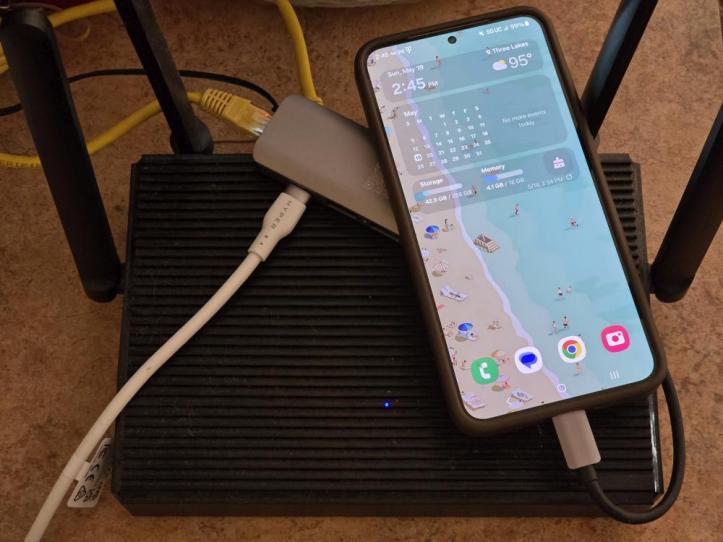
Alternatively, another solution if you have Android phone (v11) , type-c usb ethernet hub & router to spare :
20240519_144508.jpg
 
Last edited:

it_geek

Master Member
Joined
Feb 12, 2017
Messages
3,265
Reaction score
663
When greater than 8 PC connects to router, u get connected with no internet or cannot connect at all.

The setup is for teaching migrant workers Office application. No serious video streaming but if we can get good connectivity, we like to teach them office via the free web browser version of Office instead using the software app version installed on notebook.

I am sharing this based on hands on experience on a class we just completed, not some theoretical discussion by other posters here on over heating. For router we have tried from mobile phone hotspot to small mobile portable routers to 2 serious model router that could be used in home.

We think we already have solution in place, sharing is just for other who may wish to do such projects in future.
the discussion isn't theoretical tho.

For context, I was using the Netgear Nighthawk M6 5G mmWave Mobile Hotspot, Unlocked MR 6550. On 5G SA using MyRepublic for bandwidth intensive applications. Peak speed around 30MB/s download, 20MB/s upload.

Within 10 minutes, the onboard temps surged to 95 degrees celsius. Speed dropped to a fraction - 50kb/s download, 36kb/s upload.

Within 30 minutes, the whole device shut itself off and never turned back on again. It was so hot that the SIM card warped and basically became unusable.

After receiving the replacement router from Netgear, i opened up the battery pack to install an old Hyper 212 Cooler Master heatsink complete with two fans. Consistently can hit peak speed and temps remain at 40 deg.

The point is because of the limitation of the 5G antenna and chipset, designers haven't quite found a way to properly dissipate heat in their native form. So this is the only halfway-house solution I have found so far.
 

sacredrays

Arch-Supremacy Member
Joined
Feb 1, 2009
Messages
12,864
Reaction score
1,959
but he not using portable wifi device leh.

normal router d-link DWR-X2000 with mobile 5g connectivity and he reported that he faced connectivity issues when more than 8 laptop connected to the router via wifi.
 

xxnewbiexx

Junior Member
Joined
Jul 24, 2021
Messages
97
Reaction score
16
Kudos for your social work! :cool:

Alternatively, another solution if you have Android phone (v11) , type-c usb ethernet hub & router to spare :
20240519_144508.jpg
Bro new year start we are starting a new class. I have problem connecting usb ethernet port to my pixel phone. Tried 3 different brands and all have same issue, the usb ethernet option does not turn on to allow me to select it.
Using developer option, I already set usb to default to usb tethering, any suggestion?
 

TanKianW

Supremacy Member
Joined
Apr 21, 2005
Messages
6,725
Reaction score
3,373
Bro new year start we are starting a new class. I have problem connecting usb ethernet port to my pixel phone. Tried 3 different brands and all have same issue, the usb ethernet option does not turn on to allow me to select it.
Using developer option, I already set usb to default to usb tethering, any suggestion?

Maybe can try a 4G/LTE router from GL-iNet? :LOL:

UjVk14r.jpeg
 
Important Forum Advisory Note
This forum is moderated by volunteer moderators who will react only to members' feedback on posts. Moderators are not employees or representatives of HWZ. Forum members and moderators are responsible for their own posts.

Please refer to our Community Guidelines and Standards, Terms of Service and Member T&Cs for more information.
Top