
Recommendations for router type/placement

hubberb

Junior Member
Joined
May 5, 2018
Messages
8
Reaction score
0
Hello,
Currently looking at replacing my current router (Asus RT-AC68U) with possible TUF AX6000 in the upcoming comex IT show in mid nov.

Current location of router (R) and ONT as per below - Wifi signal is non existent in kitchen/service yard, main bedroom occasionally weak and I doubt that changing to AX6000 will make that big a difference

To get wifi connection in the kitchen as well, i was considering consider getting 2 x Zenwifi BT10 (or 2 x Asus RT-BE86U and use Ai Mesh), with one near the ONT and the other at my current router position. Is this a suitable solution?

Any suggestions welcome. Thank you
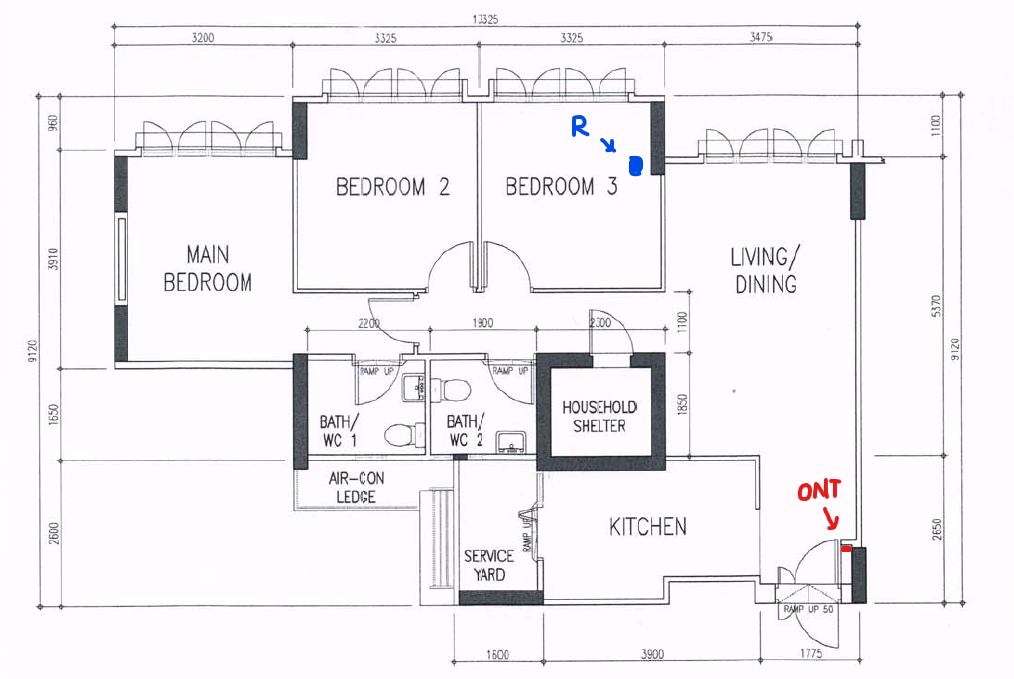

808-B-router.png
 

xiaofan

High Supremacy Member
Joined
Sep 16, 2018
Messages
34,692
Reaction score
11,488
Hello,
Currently looking at replacing my current router (Asus RT-AC68U) with possible TUF AX6000 in the upcoming comex IT show in mid nov.

Current location of router (R) and ONT as per below - Wifi signal is non existent in kitchen/service yard, main bedroom occasionally weak and I doubt that changing to AX6000 will make that big a difference

To get wifi connection in the kitchen as well, i was considering consider getting 2 x Zenwifi BT10 (or 2 x Asus RT-BE86U and use Ai Mesh), with one near the ONT and the other at my current router position. Is this a suitable solution?

Any suggestions welcome. Thank you


808-B-router.png

So this is a BTO and you have LAN ports in the rooms, right?

There is another user showing similar BTO floor plan, the location of the household shelter is quite BAD so that is nearly impossible to cover the full flat with single wireless router, no matter how good is the wireless router.

Your plan should work. Depending on the placement of the node in Bedroom 3, you may still have weak signal in Main Bedroom. So worst case is to add a node in the Main Bedroom.

You can also carry out experiment to place the second node in Bedroom 2 instead of Bedroom 3 if possible. That may help the coverage of the main bedroom.

RT-BE86U has one disadvantage that it has single 10G port (also 1GB RAM). RT-BE88U will be a better buy (dual 10G ports, 2GB RAM, more ports). Both have China version which are much cheaper than local version if you do not care about local warranty.

If M1 6Gbps/10Gbps plans are available in your location, M1 6Gbps/10Gbps bunle with a pair of Asus ZenWiFi BT10 are both superb deals. The advantage of ZenWiFi BT10 is that it has dual 10G ports and also has 6GHz band. The CPU is a bit weaker but it should be good enough for most of the users who are more interested in wireless performance.
 

hubberb

Junior Member
Joined
May 5, 2018
Messages
8
Reaction score
0
So this is a BTO and you have LAN ports in the rooms, right?

There is another user showing similar BTO floor plan, the location of the household shelter is quite BAD so that is nearly impossible to cover the full flat with single wireless router, no matter how good is the wireless router.

Your plan should work. Depending on the placement of the node in Bedroom 3, you may still have weak signal in Main Bedroom. So worst case is to add a node in the Main Bedroom.

You can also carry out experiment to place the second node in Bedroom 2 instead of Bedroom 3 if possible. That may help the coverage of the main bedroom.

RT-BE86U has one disadvantage that it has single 10G port (also 1GB RAM). RT-BE88U will be a better buy (dual 10G ports, 2GB RAM, more ports). Both have China version which are much cheaper than local version if you do not care about local warranty.

If M1 6Gbps/10Gbps plans are available in your location, M1 6Gbps/10Gbps bunle with a pair of Asus ZenWiFi BT10 are both superb deals. The advantage of ZenWiFi BT10 is that it has dual 10G ports and also has 6GHz band. The CPU is a bit weaker but it should be good enough for most of the users who are more interested in wireless performance.

Hey Xiaofan, thanks for the recommendations.

There are LAN ports in the rooms, though it a slightly older BTO (under 10 years) and had to get electricians to convert all the tel ports in all 3 bedrooms to LAN ports.

Will it make sense if i get the physically smaller BT 10 and put it at the ONT area in order to have the wired ethernet part linked

Modem at ONT output -> ZenWifi BT10 (covers kitchen and living room) -> LAN output from Zenwifi BT10 to data port of bedroom 2 or 3 -> LAN port from bedroom 2 or 3 to RT-BE88U in bedroom.

Asking this cause based on asus website, specs for CPU wise RT-BE88U seems to be better and my brain is telling me that more powerful RT-BE88U should be the primary router. Or am I overthinking?
 

xiaofan

High Supremacy Member
Joined
Sep 16, 2018
Messages
34,692
Reaction score
11,488
Hey Xiaofan, thanks for the recommendations.

There are LAN ports in the rooms, though it a slightly older BTO (under 10 years) and had to get electricians to convert all the tel ports in all 3 bedrooms to LAN ports.

Will it make sense if i get the physically smaller BT 10 and put it at the ONT area in order to have the wired ethernet part linked

Modem at ONT output -> ZenWifi BT10 (covers kitchen and living room) -> LAN output from Zenwifi BT10 to data port of bedroom 2 or 3 -> LAN port from bedroom 2 or 3 to RT-BE88U in bedroom.

Asking this cause based on asus website, specs for CPU wise RT-BE88U seems to be better and my brain is telling me that more powerful RT-BE88U should be the primary router. Or am I overthinking?

For Asus AImesh, it is better not to mix RT-BE88U (dual band, more powerful CPU) with ZenWiFi BT10 (trinad, less powerful CPU).

So either go with two units of ZenWiFi BT10, or use two units of Asus RT-BE88U.
 

hubberb

Junior Member
Joined
May 5, 2018
Messages
8
Reaction score
0
For Asus AImesh, it is better not to mix RT-BE88U (dual band, more powerful CPU) with ZenWiFi BT10 (trinad, less powerful CPU).

So either go with two units of ZenWiFi BT10, or use two units of Asus RT-BE88U.
Got it. Thank you for the recommendation 😊
 

xRenol

Supremacy Member
Joined
Dec 27, 2011
Messages
7,213
Reaction score
185
Sorry to hijack the thread.

I would need some suggestions on the router placement to cover the whole flat and minimize the usage of Mesh system if possible. I plan to have at least 4 LAN ports as shown below and probably the 5th one in Bedroom 3.
  1. Is it recommended to connect Smart TV via LAN or Wi-Fi is sufficient?
  2. Will relocation of the TP be a better option to minimize the length of LAN cables running around the flat?
Option 1: Place ONT and router at current TP location.
Option 2: Place ONT at current TP location and router near LAN Port #2
Option 3: Relocate TP to near LAN Port #2 and place ONT and router at the new TP location

I feel a more centralized location will be at bottom right hand corner of Bedroom 2.

Thank you.

floorplan.jpg
 

xiaofan

High Supremacy Member
Joined
Sep 16, 2018
Messages
34,692
Reaction score
11,488
Sorry to hijack the thread.

I would need some suggestions on the router placement to cover the whole flat and minimize the usage of Mesh system if possible. I plan to have at least 4 LAN ports as shown below and probably the 5th one in Bedroom 3.
  1. Is it recommended to connect Smart TV via LAN or Wi-Fi is sufficient?
  2. Will relocation of the TP be a better option to minimize the length of LAN cables running around the flat?
Option 1: Place ONT and router at current TP location.
Option 2: Place ONT at current TP location and router near LAN Port #2
Option 3: Relocate TP to near LAN Port #2 and place ONT and router at the new TP location

I feel a more centralized location will be at bottom right hand corner of Bedroom 2.

Thank you.

floorplan.jpg

Very strange plan. Why have three LAN ports in Bedroom 2? With your current plan, where do you plan to put the main wireless node and the second wireless node?

Normallly you would like to have LAN ports in every room to have the flexibility and be future proof. And if you want to have the main wireles router in a central location and hope to use single wireless router to cover the full flat, you can plan two LAN ports in that location. Your flat central location is like in the living room, say outside of Bedroom 2 and main bedroom.

Option 1: Two nodes solution (recommended)
No need to relocate the TP, LAN port 1/2/3/4 in the living room and all three bedroom, main node in LAN 1, second node in main bedroom.

Option 2: Single wireless router solution
No need to relocate the TP, LAN port 2/3/4 in the living room and all three bedroom, port 1/5 in the living room central location. A dumb switch in the TP location.

Option 2 is corresponding to the Option 2 in the following FAQ.

https://forums.hardwarezone.com.sg/...home-networking.6653421/page-3#post-149431568
 

xRenol

Supremacy Member
Joined
Dec 27, 2011
Messages
7,213
Reaction score
185
Very strange plan. Why have three LAN ports in Bedroom 2? With your current plan, where do you plan to put the main wireless node and the second wireless node?

Normallly you would like to have LAN ports in every room to have the flexibility and be future proof. And if you want to have the main wireles router in a central location and hope to use single wireless router to cover the full flat, you can plan two LAN ports in that location. Your flat central location is like in the living room, say outside of Bedroom 2 and main bedroom.

Option 1: Two nodes solution (recommended)
No need to relocate the TP, LAN port 1/2/3/4 in the living room and all three bedroom, main node in LAN 1, second node in main bedroom.

Option 2: Single wireless router solution
No need to relocate the TP, LAN port 2/3/4 in the living room and all three bedroom, port 1/5 in the living room central location. A dumb switch in the TP location.

Option 2 is corresponding to the Option 2 in the following FAQ.

https://forums.hardwarezone.com.sg/...home-networking.6653421/page-3#post-149431568
The three LAN ports are for 2 PCs and 1 Smart TV in Bedroom 2.

Thanks for the information. I will read up on the FAQ.
 

xiaofan

High Supremacy Member
Joined
Sep 16, 2018
Messages
34,692
Reaction score
11,488
The three LAN ports are for 2 PCs and 1 Smart TV in Bedroom 2.

Thanks for the information. I will read up on the FAQ.

I see. You can have one main LAN port in Bedroom 2 (from TP to Bedroom 2), say in the location of LAN 2 in your picture. Then you can add a network switch to branch out to the other two LAN ports locations in Bedroom 2. This should be cheaper option for Bedroom 2.

Still it is better to have LAN ports in other bedrooms (Main Bedroom and Bedroom 3) to be future proof. In fact, I would even suggest to add one LAN port in the living room area which is close to the kitchen/dining area -- that seems to be a potential area with weak WiFi coverage.
 

xRenol

Supremacy Member
Joined
Dec 27, 2011
Messages
7,213
Reaction score
185
I see. You can have one main LAN port in Bedroom 2 (from TP to Bedroom 2), say in the location of LAN 2 in your picture. Then you can add a network switch to branch out to the other two LAN ports locations in Bedroom 2. This should be cheaper option for Bedroom 2.

Still it is better to have LAN ports in other bedrooms (Main Bedroom and Bedroom 3) to be future proof. In fact, I would even suggest to add one LAN port in the living room area which is close to the kitchen/dining area -- that seems to be a potential area with weak WiFi coverage.
Thanks for the advice.

Is it recommended to connect Smart TV via LAN or Wi-Fi is sufficient?
 

TanKianW

Supremacy Member
Joined
Apr 21, 2005
Messages
6,820
Reaction score
3,511
Thanks for the advice.

Is it recommended to connect Smart TV via LAN or Wi-Fi is sufficient?

Wifi is sufficient but wired LAN is better for lower latency and better user experience. Reason being most smart TV comes with subpar wireless, esp much older models.​
 
Important Forum Advisory Note
This forum is moderated by volunteer moderators who will react only to members' feedback on posts. Moderators are not employees or representatives of HWZ Forums. Forum members and moderators are responsible for their own posts. Please refer to our Community Guidelines and Standards and Terms and Conditions for more information.
Top