• The HardwareZone forums will be temporarily unavailable on January 21, from 5:00am to 6:00am (+8GMT) while we perform scheduled maintenance.

SSD cloning --> partitions question

Lophophora

Junior Member
Joined
Feb 28, 2018
Messages
16
Reaction score
0
Hey guys, I'm cloning a 250GB SSD to a new 500GB SSD. I am using Macrium Reflect which is supposed to do that easily for me but I am not sure about partitions: should I use the default "copy selected partitions" action while cloning? What about the unused space on the new SSD? Doesn't it need to be partitioned too before I can use it?

After clicking and dragging the existing partitions to the new drive, the program shows a grey block of unused space but doesn't let me do anything with it. I'd like to make sure I don't mess up the new drive before starting the procedure.
 

jtjt00

Arch-Supremacy Member
Joined
Jan 1, 2000
Messages
17,259
Reaction score
345
Why don't you format 500GB SSD to NTFS first before cloning?
 

terry1

Senior Member
Joined
Nov 22, 2005
Messages
565
Reaction score
1
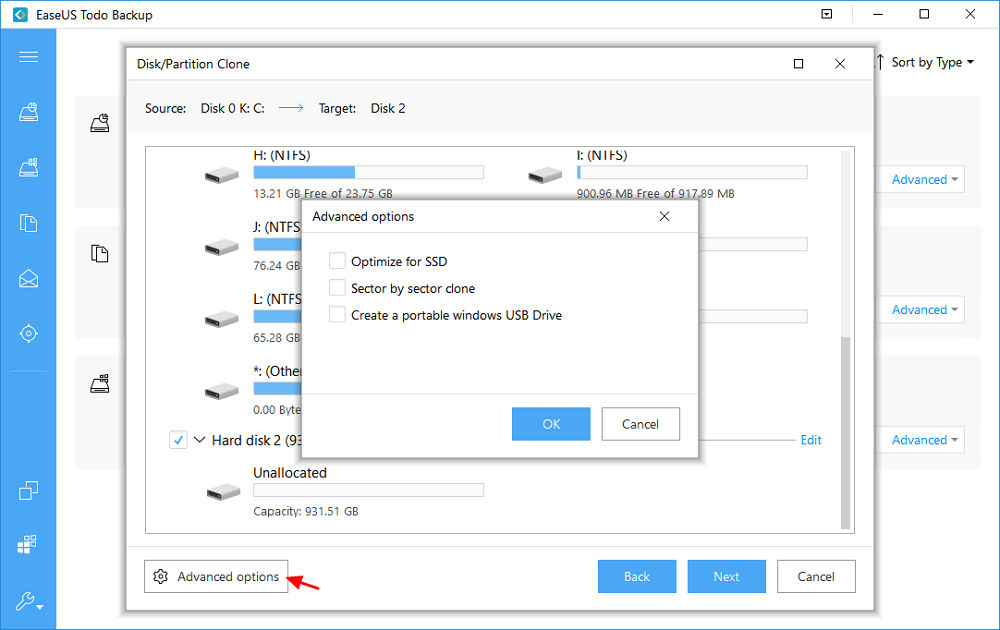
use easeus todo backup software. it is free and obviously written by some brilliant china man. strange title. the software is fast, reliable and did i say it is free. to clone hard disc/ssd, just copy disk to disk. the last i counted, i needed only three clicks of the mouse to clone my ssd. simple :D

https://www.easeus.com/backup-software/tb-free.html

https://www.easeus.com/backup-utility/migrate-windows-10-to-ssd.html

disk-clone-2.png
 

Lophophora

Junior Member
Joined
Feb 28, 2018
Messages
16
Reaction score
0
jtjt00 said:
Why don't you format 500GB SSD to NTFS first before cloning?

Probably because I'm a noob and I didn't know I had to :s22:

Actually I completed the cloning procedure and it seems to have worked, but Windows sees the drive as a 250GB while Macrium Reflect does see its full 500GB capacity.

So I get this missing step is what I had to do prior to cloning right?
 

commach

Great Supremacy Member
Joined
Apr 11, 2001
Messages
53,997
Reaction score
18
Click the clone partition properties and select the max. partition size for your 500GB SSD as the destination drive for cloning.
 

Kiwi8

Honorary Member
Deluxe Member
Joined
May 3, 2001
Messages
137,268
Reaction score
16,376
Probably because I'm a noob and I didn't know I had to :s22:

Actually I completed the cloning procedure and it seems to have worked, but Windows sees the drive as a 250GB while Macrium Reflect does see its full 500GB capacity.

So I get this missing step is what I had to do prior to cloning right?

Since now u have already cloned the drive, what remains to do, is to use up the remaining space to create a new partition where u can use the space.
 

yusoffb01

Arch-Supremacy Member
Joined
Jun 17, 2008
Messages
16,578
Reaction score
1,653
boot with new drive, go disk manager, then extend the c partition to remaining size
 

Lophophora

Junior Member
Joined
Feb 28, 2018
Messages
16
Reaction score
0
Since now u have already cloned the drive, what remains to do, is to use up the remaining space to create a new partition where u can use the space.

But that is what I did with Macrium Reflect when cloning, and indeed when I open Macrium Reflect it shows the correct partitions size:

350MB "system" partition
240GB NTFS partition
230GB NTFS partition

How can I create a partition when it already exists? It just seems that Windows doesn't see it correctly.
 

Lophophora

Junior Member
Joined
Feb 28, 2018
Messages
16
Reaction score
0
Thanks. Here's what I see in the disk manager:

(can't post image)

I don't understand why the drive is seen as 250GB capacity when the total of its partitions adds up to 500GB. What should I do from here?

Ok I can't post an image (I probably don't have enough messages or something like that). In the disk manager upper window the drive is said to have a 250GB total capacity and in the bottom window its partitions adds up to 500, that doesn't make any sense.
 

kracie17

Member
Joined
Oct 19, 2017
Messages
268
Reaction score
1
Thanks. Here's what I see in the disk manager:

(can't post image)

I don't understand why the drive is seen as 250GB capacity when the total of its partitions adds up to 500GB. What should I do from here?

Ok I can't post an image (I probably don't have enough messages or something like that). In the disk manager upper window the drive is said to have a 250GB total capacity and in the bottom window its partitions adds up to 500, that doesn't make any sense.

could you send me a PM of the image? upload to imageshack and then i take a look. or you could try out the guide. do not need to download the program. try using the windows method. otherwise, you can try cloning again but this time use automatic/proportional instead of as is.
 
Last edited:

Lophophora

Junior Member
Joined
Feb 28, 2018
Messages
16
Reaction score
0
could you send me a PM of the image?

Thanks but I think I figured it out. The partition I extended wasn't name (lettered), I think I just extended the wrong partition. So I begin the whole process again and extended another partition and this time it works fine.

Now all that's left is change the boot order and I should be good to go.
 
Important Forum Advisory Note
This forum is moderated by volunteer moderators who will react only to members' feedback on posts. Moderators are not employees or representatives of HWZ. Forum members and moderators are responsible for their own posts.

Please refer to our Community Guidelines and Standards, Terms of Service and Member T&Cs for more information.
Top