Z790 Slow intialization?

  • Need someone to talk to?
    Feeling down, anxious and need help? Mental Health Helpline: 6389-2222 (24 hours) More info

Kusanagi

Supremacy Member
Joined
Dec 22, 2000
Messages
9,507
Reaction score
106
Hi guys,

Noticed that on pressing the power button, it takes approximately 7-10seconds for the light to come on in cold boot
i.e. Takes about 7-10 seconds for the motherboard to initialize and start POST

Saw quite a few people mentioning the same on Reddit
Most was due to issues with the Load BIOS Button being depressed, but my setup doesn't have such a button
Some mentioned that current 13th Gen are generally slow

Anyone else facing similar issues?

Once it POST however, loading into OS is no problem, takes around another 5-7 seconds

Specs:
13600K
Asust Strix Z790-I
NR200P Max rise cable connected to the Asus TUF 4070 Ti
Coolermaster V850 PSU
 
Last edited:

LiLAsN

Master Member
Joined
Dec 14, 2008
Messages
2,690
Reaction score
504
Isn't that the Memory Training procedure? One where it will turn on the lights and then shut off for around 2-3 times.
Before then cycling through all the motherboard error codes to determine if there's anything wrong with the connected components like your CPU or RAM or GPU or power cable before then posting to the motherboard UEFI screen and then booting into windows.
 
Last edited:

86technie

High Supremacy Member
Joined
Jun 8, 2006
Messages
39,898
Reaction score
5,674
How many sticks of RAM do you have?
If four sticks boot up will be even longer as well as when XMP is turned on.
Pros and cons of DDR5 RAM since the memory training is much longer
than DDR4.
 

kaixax555

Honorary Member
Joined
Nov 6, 2007
Messages
125,546
Reaction score
323
I assume you are on DDR5

Yes like others said DDR5 takes much longer to train than DDR4 hence the extended boot times are required to train the memory to run properly
 

Kusanagi

Supremacy Member
Joined
Dec 22, 2000
Messages
9,507
Reaction score
106
Yes am on DDR5

Thanks for the input, just wanted to confirm as it wasn't well defined what boot times actually covers

Does it include the time taken to power on?
Or does it begin at POST?
Hence wanted to verify

If I were to break down mine with 15 seconds, it would look like this

Power On : 11 seconds before there is any output on monitor
POST : 2 seconds
Windows Loading: 2 seconds

saw someone share this as well
index.php
 

ragnarok95

Senior Moderator
Senior Moderator
Joined
Mar 9, 2004
Messages
125,065
Reaction score
6,317
Z790I is a itx mobo, 2 slot of DDR5. Should be DDR5 training but the timing feels acceptable.
 

86technie

High Supremacy Member
Joined
Jun 8, 2006
Messages
39,898
Reaction score
5,674
Yes am on DDR5

Thanks for the input, just wanted to confirm as it wasn't well defined what boot times actually covers

Does it include the time taken to power on?
Or does it begin at POST?
Hence wanted to verify

If I were to break down mine with 15 seconds, it would look like this

Power On : 11 seconds before there is any output on monitor
POST : 2 seconds
Windows Loading: 2 seconds

saw someone share this as well
index.php

Seems normal unless you want quick boot.
That means have to change to normal DDR5 without XMP.

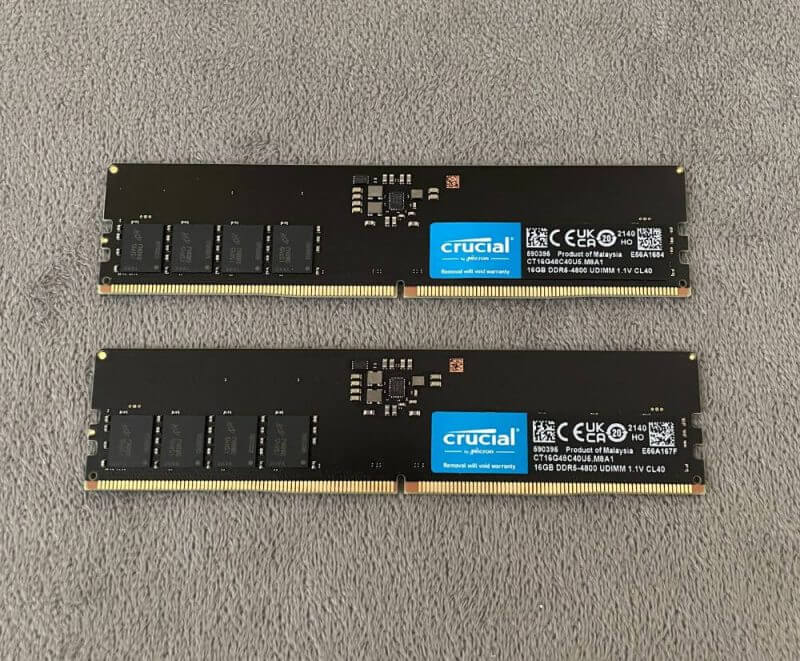
crucial-ddr5-ram-review3.jpg
 

ragnarok95

Senior Moderator
Senior Moderator
Joined
Mar 9, 2004
Messages
125,065
Reaction score
6,317
I do not think XMP will affect memory training. I could be wrong so hope the memory expert here can share some infos.
 

LiLAsN

Master Member
Joined
Dec 14, 2008
Messages
2,690
Reaction score
504
True. It happened with DDR4 as well. But because I wanted quick boot and because my RAM couldn't handle its rated XMP, I just ran it at Intel Stock frequency for both the RAM and CPU. This resulted in a very quick cycling through motherboard error process and going straight into the booting into Windows process.
 

Kusanagi

Supremacy Member
Joined
Dec 22, 2000
Messages
9,507
Reaction score
106
Seems normal unless you want quick boot.
That means have to change to normal DDR5 without XMP.

crucial-ddr5-ram-review3.jpg
Have tried booting without any XMP profiles as well, didn’t really seem to help

so long as it is expected and within parameters I guess it’s ok

thanks all!
 

86technie

High Supremacy Member
Joined
Jun 8, 2006
Messages
39,898
Reaction score
5,674
Have tried booting without any XMP profiles as well, didn’t really seem to help

so long as it is expected and within parameters I guess it’s ok

thanks all!
Yes correct using DDR5 is like that
 

deepblue_82

Arch-Supremacy Member
Joined
Oct 23, 2007
Messages
19,621
Reaction score
2,378
wow... only that i read this thread then i know about this on ddr5
will the mem boot be better in time? or its just a pit fall on ddr 5?
 

86technie

High Supremacy Member
Joined
Jun 8, 2006
Messages
39,898
Reaction score
5,674
wow... only that i read this thread then i know about this on ddr5
will the mem boot be better in time? or its just a pit fall on ddr 5?

Is DDR5 memory design, so far I haven't seen any manufacturer release BIOS update to shorten boot time.
So if anyone want to build a PC with DDR5, recommend is two sticks else the boot time will be even longer.
Do update the BIOS once a while but not always especially when it states "improve memory compatibility."
 

Kusanagi

Supremacy Member
Joined
Dec 22, 2000
Messages
9,507
Reaction score
106
this problem seems to be even more prevalent on AM5 platforms with memory training performed on every boot it seems
 

kimsix

Arch-Supremacy Member
Joined
Jan 6, 2009
Messages
19,935
Reaction score
9,917
with amd, if you turn on memory context restore, boots up ddr5 very fast even for 64gb

but mcr lowers ddr5 some % of overclocked performance
 

deepblue_82

Arch-Supremacy Member
Joined
Oct 23, 2007
Messages
19,621
Reaction score
2,378
Is DDR5 memory design, so far I haven't seen any manufacturer release BIOS update to shorten boot time.
So if anyone want to build a PC with DDR5, recommend is two sticks else the boot time will be even longer.
Do update the BIOS once a while but not always especially when it states "improve memory compatibility."
True... but then... but by modern standards 10-15 sec is a long time
 

86technie

High Supremacy Member
Joined
Jun 8, 2006
Messages
39,898
Reaction score
5,674
True... but then... but by modern standards 10-15 sec is a long time

Yes, unless those who are used to it.
Like ASUS Maximus XI Hero using DDR4 which I use , doesn't boot up very quickly.
It take some time including memory training before it post. Which is roughly around 10 secs for the board to check through every component before it post.
To me when I see DDR5 with similar boot time is not much difference.
But with four sticks of DDR5 will be even longer.
 

Encrypted11

Supremacy Member
Joined
Jun 9, 2012
Messages
5,914
Reaction score
254
Asus’s memory training and POST time was never fast on Intel. If you want it fast, buy ASRock.

If MRC Fastboot and various vendor specific fastboot options are enabled with RAM at JEDEC spec and unplug your discrete GPU you can trail the POST time of the same gen ultrabook’s POST time.

As long as you enable XMP these days with complex memory training or run high memory clocks expect your POST time to go up.

You can enable MRC Fastboot after your successful a couple of successful memory training. If it doesn’t go bad or drift you can keep that enabled. But if you’re running tight maybe on 7400+ MHz you want a full memory training every boot.

This is not a platform problem but more of how far you want to go out of spec without breaking your OS and data.
Those 3-5 second POST times still exist even in 13 gen, but with hyper optimized bioses and minimal hardware on the MB like on a laptop, MRC Fastboot enabled and memory training done on the fly after you enter OS instead of before POST.

To give you an example, MSI Z690I MEG Unify + i7-13700K at 7800MHz C32 gives me 59 second POST MRC Fastboot disabled (Full training). If I disable that I’m down to 15 seconds. If I unplug the dGPU and disable the LAN orom etc in BIOS and run JEDEC speed I might get 7 seconds.
 
Last edited:

deepblue_82

Arch-Supremacy Member
Joined
Oct 23, 2007
Messages
19,621
Reaction score
2,378
Yes, unless those who are used to it.
Like ASUS Maximus XI Hero using DDR4 which I use , doesn't boot up very quickly.
It take some time including memory training before it post. Which is roughly around 10 secs for the board to check through every component before it post.
To me when I see DDR5 with similar boot time is not much difference.
But with four sticks of DDR5 will be even longer.
if my com takes so long to boot i would say there is something wrong.. with my pc.. thats for me..
 

86technie

High Supremacy Member
Joined
Jun 8, 2006
Messages
39,898
Reaction score
5,674
Asus’s memory training and POST time was never fast on Intel. If you want it fast, buy ASRock.

If MRC Fastboot and various vendor specific fastboot options are enabled with RAM at JEDEC spec you can get trail the POST time of the same gen ultrabook’s POST time.

As long as you enable XMP these days with complex memory training or run high memory clocks expect your POST time to go up.

You can enable MRC Fastboot after your successful a couple of successful memory training. If it doesn’t go bad or drift you can keep that enabled. But if you’re running tight maybe on 7400+ MHz you want a full memory training every boot.

This is not a platform problem but more of how far you want to go out of spec without breaking your OS and data.
Those 5 second POST times still exist even in 13 gen, but with hyper optimized bioses and minimal hardware on the MB like on a laptop, MRC Fastboot enabled and memory training done on the fly after you enter OS instead of before POST.

Err.. Or entry level boards which doesn't come with memOK feature or Diagnostic.
However there's a reason why such boards are not recommended.
 
Important Forum Advisory Note
This forum is moderated by volunteer moderators who will react only to members' feedback on posts. Moderators are not employees or representatives of HWZ Forums. Forum members and moderators are responsible for their own posts. Please refer to our Community Guidelines and Standards and Terms and Conditions for more information.
Top