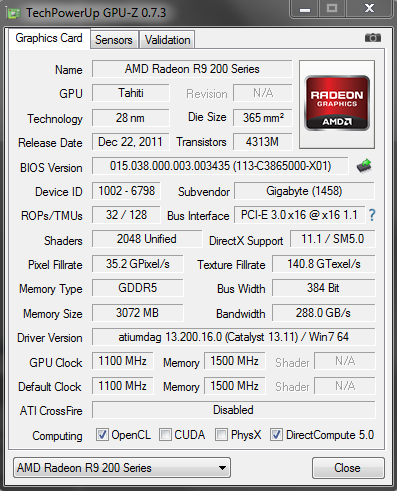
Q regarding R9 280x and screen problem

spyboy48

Senior Member
Joined
Feb 20, 2006
Messages
1,342
Reaction score
0
one more to confirmed it!
Guys just wait for better drivers :D
No point and knowing that AmD drivers needs time to mature!
If old bios works on 7970, why same bios doesn't works on 280x?
Think!
Yeh, that's what I have seen as well. The sapphire card is very loud. In terms of performance the order is Sapphire > Asus > Gigabyte > MSI (280x). I would choose the Asus card as is has the second highest clock speed, It is extremely quiet, performs amazingly, cools perfectly, looks desirable and power consumption is low, On firestrike (full load) Asus draws ~393 watts and the Sapphire draws a whopping 469 watts. However the Asus card is a bit more expense than the others. It is really up to you but in my opinion the Asus is the best one and is the one I will be getting.
 
Last edited:

spyboy48

Senior Member
Joined
Feb 20, 2006
Messages
1,342
Reaction score
0
Just called the shop. Was told by them that the stock taken are all from the same distributor. High chance is that the problem is on Gigabyte side. Since from what I see, the board are all blue for Gigabyte.

They asked to send an email for comparison and will do just that to clarify stuff.

no worries, mine is blue too. Card length is just right 27cm.
 

MacClipper

High Supremacy Member
Joined
Jan 1, 2000
Messages
33,617
Reaction score
4
maybe not. urs is 270x, device id is 1002-6810 - think 270x including from other brands same, dated 2013.

280x seems to be all device id 1002-6798, dated 2011 even for 280x toxic, Sapphire R9 280X Toxic Edition OC 3GB Review | KitGuru - Part 2
Yup, definitely says 2013 on my 270X card. =:p

Looks like someone at AMD got lazy and didn't bother updating the time stamps on the 280X core BIOS causing this confusion.


btw, the 280X cards do seem to have slightly different BIOS versions, one newer and one older.

Perhaps, new 280X BIOS updates may be due to fix this date anomaly. :)
 

spyboy48

Senior Member
Joined
Feb 20, 2006
Messages
1,342
Reaction score
0
Thanks for the advise. That problem just happened once, and I'm not sure what caused it too. Will try a few times again to see if that problem comes back. Just updated my video card driver, and so far so good. Hopefully its the driver fault.

try disable onboard intel graphics...it might have crashed due to the Amd drivers.
 

MacClipper

High Supremacy Member
Joined
Jan 1, 2000
Messages
33,617
Reaction score
4
And 290X BIOS again seems properly dated like the 270X


Weird discrepancies... =:p
 

XxGaiaxX

Senior Member
Joined
Apr 1, 2006
Messages
669
Reaction score
20
My desktop just black screen again during play. It just turn black but monitor still getting signal just that the screen is total black can't do anything at all, while the cpu still running but after awhile my monitor stops getting signal from the cpu.
 

royfrosty

High Supremacy Member
Joined
Jul 23, 2009
Messages
27,730
Reaction score
1,554
My desktop just black screen again during play. It just turn black but monitor still getting signal just that the screen is total black can't do anything at all, while the cpu still running but after awhile my monitor stops getting signal from the cpu.

K just brig back and exchange. Most likely lemon.
 

spyboy48

Senior Member
Joined
Feb 20, 2006
Messages
1,342
Reaction score
0
My desktop just black screen again during play. It just turn black but monitor still getting signal just that the screen is total black can't do anything at all, while the cpu still running but after awhile my monitor stops getting signal from the cpu.

disable intel graphics onboard?
if still got issues, go direct to CDL to check.
 
Last edited:

spyboy48

Senior Member
Joined
Feb 20, 2006
Messages
1,342
Reaction score
0
How come your bios is 038 and mine is 036?
Which shop u bought it from?

Mine's blue. And it's suppose to be Gigabyte. Not sure why it displayed as undefined too.

After doing some windows update and rebooting of com, it appears correctly again. Not sure why is that so. Its kind of an on off issue.

Capture_zps86393871.png


aaaflyer

Senior Member
Joined
Mar 24, 2005
Messages
909
Reaction score
5
My desktop just black screen again during play. It just turn black but monitor still getting signal just that the screen is total black can't do anything at all, while the cpu still running but after awhile my monitor stops getting signal from the cpu.

definitely its a faulty card. go exchange asap.

this reminds me of my 5850 when i first got it. exactly the same issue, black screen (or distorted screen), game still playing but cannot do anything but a cold reboot. luckily distro very nice and free 1to1 exchange and all is well after i get the 3rd 5850 card lol.
 
Last edited:

Mikey

Member
Joined
Jan 1, 2000
Messages
423
Reaction score
0
the date is not a timestamp of bios but a gpuz database of when the core is launch. is r280x a hawaii core or tahiti?
 

MacClipper

High Supremacy Member
Joined
Jan 1, 2000
Messages
33,617
Reaction score
4
Interesting point raised - so some data is read off the BIOS programming while others are read off a utility contained or TPU database?

Just checked it against AIDA64 and likewise with some discrepancies again eg, 8800 series?


The more uncertain info shown is in green.
 

hlots123

Supremacy Member
Joined
Apr 5, 2006
Messages
5,207
Reaction score
11
Interesting point raised - so some data is read off the BIOS programming while others are read off a utility contained or TPU database?
techPowerUp! Forums - View Single Post - Radeon HD 7950 Specs Confirmed in GPU-Z Screenshot
GPU Release Dates in GPU-Z - techPowerUp! Forums

frm the 2nd link, i believe W1zzard manually adds the "release date" data after scouring the net for the date. then maybe its tied to that cards' device id. since 280x exact same device id same as 7970, date is the same old...?
 

spyboy48

Senior Member
Joined
Feb 20, 2006
Messages
1,342
Reaction score
0
Just get it straight.
Fact is TS mentioned about the driver identity and graphic issue.

So after pointing most cards out in the market have this issues, either Gpuz data base is not up to date or bios ID wrong, driver, and knowing 280x Gpu 280x = 7970.

Reviewer must proves the facts not directly pointing fingers. Pointing to his own grave and link to bios fan issue!!! :s12::s12::s12:
http://forums.hardwarezone.com.sg/80490650-post6.html
Adding or creating troubles???

So, no choice, I need to say it out and prove your review on Sapphire cards: doesn't sapphire has this fan issues: far more noisy than Gigabyte!!!
http://forums.hardwarezone.com.sg/80497434-post21.html

Definitely, AmD 7970 = 280x (identity issues) just like NVidia rename their cards too.

Already informed TS that to bring it down to CDL to check, if is not the driver issues.
http://forums.hardwarezone.com.sg/80504269-post31.html
 
Last edited:

MacClipper

High Supremacy Member
Joined
Jan 1, 2000
Messages
33,617
Reaction score
4
techPowerUp! Forums - View Single Post - Radeon HD 7950 Specs Confirmed in GPU-Z Screenshot
GPU Release Dates in GPU-Z - techPowerUp! Forums

frm the 2nd link, i believe W1zzard manually adds the "release date" data after scouring the net for the date. then maybe its tied to that cards' device id. since 280x exact same device id same as 7970, date is the same old...?
This confirms that the date is not read off the BIOS programming then but a value tied to the Device ID in GPU-Z database... unlike CPU-Z or AIDA64.

Thx!
 
Last edited:

spyboy48

Senior Member
Joined
Feb 20, 2006
Messages
1,342
Reaction score
0
Resolves intermittent black screen when resuming from a S3/S4 sleep-state if the display is unplugged during the sleep-state on systems supporting AMD Enduro™ technology


You need to know AmD drivers is still at Beta stage for R7 and R9, no point contemplating right now.

Is not WHQL yet???

So, certain games you may encounter some issues!

Is nothing new under the SUN! so state facts!!!

Few examples here about beta drivers:

AMD Catalyst 13.8 BETA (13.200.0.0 July 23) Download
Resolved issues:
  • Resolved crash when enabling AMD CrossFireX™ on some AMD 970 platforms
  • Improved stability for AMD Radeon HD 7790
  • Resolved intermittent mouse cursor corruption when rapidly moving the cursor across window borders
AMD Catalyst 13.10 BETA (13.200.11.0 September 4) Download
AMD Catalyst 13.10 Beta includes all of the features/fixes found in AMD Catalyst 13.8 Beta2
PCI-E bus speed is no longer set to x1 on the secondary GPU when running in CrossFire configurations
Rome Total War 2: Updated AMD CrossFire™ profile
  • improves CrossFire scaling up to 20% (at 2560x1600 with extreme settings)
  • resolves corruption issues seen while playing the game
AMD Catalyst 13.10 BETA2 (13.200.11.0 September 20) Download
AMD CrossFire frame pacing improvements for CPU-bound applications
Resolves image corruption seen in Autodesk® Inventor® 2014
Resolves intermittent black screen when resuming from a S3/S4 sleep-state if the display is unplugged during the sleep-state on systems supporting AMD Enduro™ technology

13.9 WHQL certified drivers stated:

AMD Catalyst 13.9 WHQL Download
RESOLVED ISSUES
  • Severe flicker in Far Cry® 3 game cinematic that may continue into gameplay.
  • BSOD crash when enabling CrossFire in the AMD Catalyst Control Center after installing a third AMD Radeon HD7790 graphics card.
  • BSOD crash in Windows 8 when display turns off (idle/sleep mode).
  • AMD Catalyst Control Center crash after creating an Eyefinity Group.
  • Disappearing mouse cursor in Windows 8 after completing the AMD Catalyst Driver installation and rebooting the system.
  • Cyberlink PowerDVD stop working with a pop-up error message during playback of a Blu-Ray movie under Power Saving mode.
  • When Dual Graphics is disabled within AMD Catalyst Control Center, the secondary display connected may not enable.
  • Frame drops experienced during playback of interlaced Blu-Ray content when all visual quality settings are enabled in AMD Catalyst Control Center.
  • Significant game performance slowdowns when moving the mouse cursor in World of Warcraft using DirectX 9 rendering mode.
  • Anti-aliasing and anisotropic filtering settings saved within created AMD Catalyst Control Center application profiles do not apply correctly.
  • Windows 8 Metro applications experience very low FPS when Dual Graphics is enabled in the AMD Catalyst Control Center.
 
Important Forum Advisory Note
This forum is moderated by volunteer moderators who will react only to members' feedback on posts. Moderators are not employees or representatives of HWZ Forums. Forum members and moderators are responsible for their own posts. Please refer to our Community Guidelines and Standards and Terms and Conditions for more information.
Top