[SIC] Hoot Club! Post Your Technology/Hardware Related Purchases Here! - Part 4

Elijahonli

High Supremacy Member
Joined
Oct 27, 2008
Messages
25,846
Reaction score
159
time to sell i supposed.
but actually i got it with the intention to replace the old DAC as it was too big but looks like no i have no choice and unless there is a way to get my speakers to connect to 2 different inputs LOL ?

Does 3.5mm splitter affect audio performance? haha

Edit: googled and it was recommended not to use 3.5mm splitter to feed 2 audio source the speaker LOL

so i need RCA splitter lol
 
Last edited:

hlots123

Supremacy Member
Joined
Apr 5, 2006
Messages
5,207
Reaction score
11
I have been playing Battlefront 2 extensively last night and it is smooth as butter. Getting around 100-134fps on Ultra settings in game. PERFECT.
juz asking, for ur competitive play its better for u to have higher fps >120 with chance of tear, than keeping within gsync limit & no tear?
 

elmariachi

Supremacy Member
Joined
May 30, 2005
Messages
6,355
Reaction score
1,508
juz asking, for ur competitive play its better for u to have higher fps >120 with chance of tear, than keeping within gsync limit & no tear?

Actually, using the option FAST under Vsync in nvidia control panel, even more than >120fps I have not encountered any tear. Keeping it around 100-120 is very smooth even dipping below 100s still smooth. Can only tell not very smooth when it drops below 90. At least with Battlefront 2. Battlefront 2 game play is slower so the occurrence of tearing is not as high as Battlefront 1.

I tried Battlefront 1 to compare and the max I get is around 140fps and there is slight tearing when I snatch my wrist when making fast movements. But it is the same as when I had my S2716DG 144hz when I was getting about 170fps on 2560x1440.

So all in all, actually works better keeping within G-sync range with Vsync set to Fast in nvidia control panel.
 

Nakedtoes

Great Supremacy Member
Joined
Dec 9, 2002
Messages
60,204
Reaction score
3,609
PYLzaEd.jpg


Latest movies usually shot in 21:9 so perfect for an Ultrawide.

Games that support 21:9 looks great!

I have been gaming on it for hours on end and never gave me a headache.

The curve makes it more immersive.

Note: This is not alienware or acer but still a 34" curved ultrawide that is about $850.
Full HD only right? What model?
 

hlots123

Supremacy Member
Joined
Apr 5, 2006
Messages
5,207
Reaction score
11
Actually, using the option FAST under Vsync in nvidia control panel, even more than >120fps I have not encountered any tear. Keeping it around 100-120 is very smooth even dipping below 100s still smooth. Can only tell not very smooth when it drops below 90. At least with Battlefront 2. Battlefront 2 game play is slower so the occurrence of tearing is not as high as Battlefront 1.

I tried Battlefront 1 to compare and the max I get is around 140fps and there is slight tearing when I snatch my wrist when making fast movements. But it is the same as when I had my S2716DG 144hz when I was getting about 170fps on 2560x1440.

So all in all, actually works better keeping within G-sync range with Vsync set to Fast in nvidia control panel.
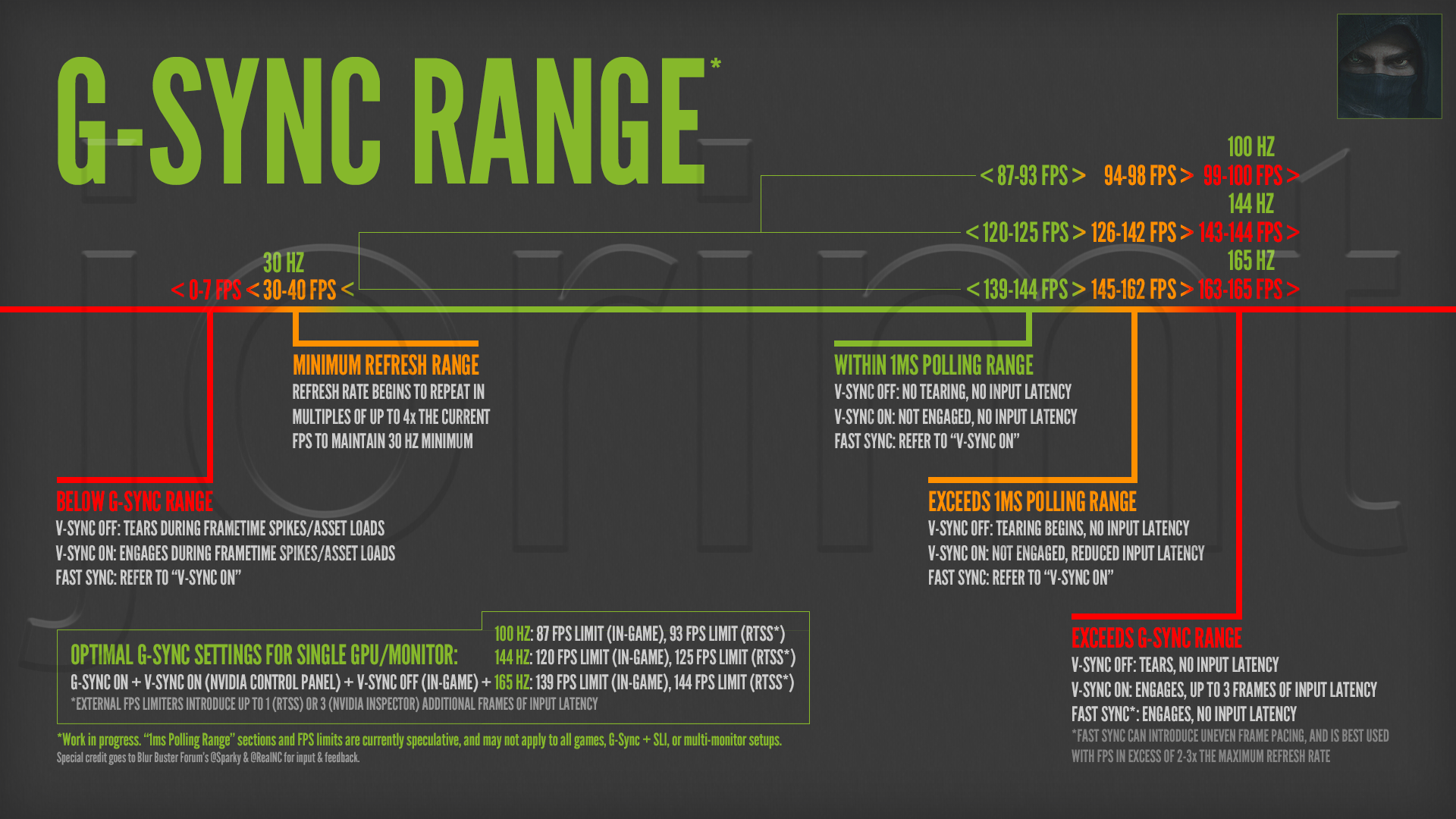
oic, but see if jorimt's diagram & post helps in any way...
https://forums.geforce.com/default/.../gsync-not-working-100-/post/5016644/#5016644
d777648bda9e2a004e7b65a59a817680.png
oops i forgot to add link jus now
 

elmariachi

Supremacy Member
Joined
May 30, 2005
Messages
6,355
Reaction score
1,508

hlots123

Supremacy Member
Joined
Apr 5, 2006
Messages
5,207
Reaction score
11
My understanding of fast sync must be wrong then if referring to the diagram. Right now basically I am getting between 100-130fps on ultra settings, it can go down to low 90s or high 80s depending on which map.

So question is should I use Vsync on now?
i believe his recommendatns are:
gsync ON
nvcp vsync ON (game vsync OFF)
frame limiter set a few frames below max/120

for frame limiter u can try if RTSS (afterburner) better, or in-game better
i believe he said there are some games, the in-game limiter is bad?

as u kno, i'm not sensitive so i jus use RTSS to keep it simple
 

elmariachi

Supremacy Member
Joined
May 30, 2005
Messages
6,355
Reaction score
1,508
i believe his recommendatns are:
gsync ON
nvcp vsync ON (game vsync OFF)
frame limiter set a few frames below max/120

for frame limiter u can try if RTSS (afterburner) better, or in-game better
i believe he said there are some games, the in-game limiter is bad?

as u kno, i'm not sensitive so i jus use RTSS to keep it simple

I will try it tonight and see how it goes.
Wah hlots eveytime you post, i research untill siao but in the end things work out for better. You GURU!!!
 

CrispyPeddler

Senior Member
Joined
Jul 26, 2016
Messages
1,829
Reaction score
7
i believe his recommendatns are:
gsync ON
nvcp vsync ON (game vsync OFF)
frame limiter set a few frames below max/120

for frame limiter u can try if RTSS (afterburner) better, or in-game better
i believe he said there are some games, the in-game limiter is bad?

as u kno, i'm not sensitive so i jus use RTSS to keep it simple

hmm.. i dont understand on the frame limiter part based on the diagram.

currently my setting is
Gsync on
Vsync on (nvcp), Vsync off (in-game)
no frame limiter or anything.

so, with my current setup, i shud set RTSS frame limiter at 144fps (since my monitor is OC to 165hz) to optimize my gsync in any game? :s22::s22:. teach me GURU! i have not until now see any difference by using gsync.
 

elmariachi

Supremacy Member
Joined
May 30, 2005
Messages
6,355
Reaction score
1,508
hmm.. i dont understand on the frame limiter part based on the diagram.

currently my setting is
Gsync on
Vsync on (nvcp), Vsync off (in-game)
no frame limiter or anything.

so, with my current setup, i shud set RTSS frame limiter at 144fps (since my monitor is OC to 165hz) to optimize my gsync in any game? :s22::s22:. teach me GURU! i have not until now see any difference by using gsync.

I was just reading a whole bunch of mambo jumbo and I think optimal G-sync settings from what many people are saying is :

Optimal G-SYNC Settings*

*Settings tested with a single G-SYNC display on a single desktop GPU system; specific DSR, SLI, and multi-monitor behaviors, as well as laptop G-SYNC implementation, may vary.
Nvidia Control Panel Settings:

  • Set up G-SYNC > Enable G-SYNC > Enable G-SYNC for full screen mode.
  • Manage 3D settings > Vertical sync > On.
In-game Settings:

  • Use “Fullscreen” or “Exclusive Fullscreen” mode (some games do not offer this option, or label borderless windowed as fullscreen).
  • Disable all available “Vertical Sync,” “V-SYNC” and “Triple Buffering” options.
  • If an in-game or config file FPS limiter is available, and framerate exceeds refresh rate:
    Set 3 FPS limit below display’s maximum refresh rate (57 FPS @60Hz, 97 FPS @100Hz, 117 FPS @120Hz, 141 FPS @144Hz, etc).
RTSS Settings:

  • If an in-game or config file FPS limiter is not available and framerate exceeds refresh rate:
    Set 3 FPS limit below display’s maximum refresh rate (see G-SYNC 101: External FPS Limiters HOWTO).
I will try it tonight and see. I think best to use in-game Frame Limiters if possible otherwise use RTSS and minus 3 frames from your refresh rate for the FPS cap. I know Battlefront has ingame commands you can use to frame cap. I also never used a frame cap untill now but I will try with those settings and see if it is any smoother.
 

hlots123

Supremacy Member
Joined
Apr 5, 2006
Messages
5,207
Reaction score
11
I will try it tonight and see how it goes.
Wah hlots eveytime you post, i research untill siao but in the end things work out for better. You GURU!!!
paiseh, no lah
actually i jus use wat expert say w/o actually comparing
but since ur extra sensitive & competitive, u shd see which better

and jorimt actually mentioned this further down,
If you're not noticing tearing, and would rather get all the frames you can outside the G-Sync range, then just leave it as is. You're one of the few people G-Sync on + V-Sync off was intended for; you don't even need an fps cap.

With G-Sync on + V-Sync off + no fps cap, you're getting the least input latency possible.
 

hlots123

Supremacy Member
Joined
Apr 5, 2006
Messages
5,207
Reaction score
11
hmm.. i dont understand on the frame limiter part based on the diagram.

currently my setting is
Gsync on
Vsync on (nvcp), Vsync off (in-game)
no frame limiter or anything.

so, with my current setup, i shud set RTSS frame limiter at 144fps (since my monitor is OC to 165hz) to optimize my gsync in any game? :s22::s22:. teach me GURU! i have not until now see any difference by using gsync.
i rem jorimt ever said gsync just set RTSS limiter 2-3 frames below max & call it a day (orange range) - for no tearing
but some pple mention they still get tearing in that range
and tats where the green range & explanation come in

^ be aware my understanding may not be correct, as i glanced thru many posts & threads back & forth to get an overall gist when i bot my gsync monitor...
 

Encrypted11

Supremacy Member
Joined
Jun 9, 2012
Messages
5,937
Reaction score
271
I will try it tonight and see how it goes.
Wah hlots eveytime you post, i research untill siao but in the end things work out for better. You GURU!!!

When hlots makes a post, will look back and most will think how come I couldn't find it on google earlier on :s34:
 

elmariachi

Supremacy Member
Joined
May 30, 2005
Messages
6,355
Reaction score
1,508
i rem jorimt ever said gsync just set RTSS limiter 2-3 frames below max & call it a day (orange range) - for no tearing
but some pple mention they still get tearing in that range
and tats where the green range & explanation come in

^ be aware my understanding may not be correct, as i glanced thru many posts & threads back & forth to get an overall gist when i bot my gsync monitor...

I still think it is far better to use in-game limiters if possible unless the game does not have an inbuilt frame limiter, the use RTSS.
 

CrispyPeddler

Senior Member
Joined
Jul 26, 2016
Messages
1,829
Reaction score
7
  • If an in-game or config file FPS limiter is not available and framerate exceeds refresh rate:
    Set 3 FPS limit below display’s maximum refresh rate (see G-SYNC 101: External FPS Limiters HOWTO).

i rem jorimt ever said gsync just set RTSS limiter 2-3 frames below max & call it a day (orange range) - for no tearing
but some pple mention they still get tearing in that range
and tats where the green range & explanation come in

^ be aware my understanding may not be correct, as i glanced thru many posts & threads back & forth to get an overall gist when i bot my gsync monitor...

irregardless of what my ingame fps, i just set all games (if there is no ingame frame limiter) with RTSS 2-3 frames below my monitor max fps?
 

hlots123

Supremacy Member
Joined
Apr 5, 2006
Messages
5,207
Reaction score
11
I still think it is far better to use in-game limiters if possible unless the game does not have an inbuilt frame limiter, the use RTSS.
hmm i think ur correct, seems jorimt mentioned in-game limiter best
https://www.blurbusters.com/gsync/gsync101-input-lag-tests-and-settings/11/

i think i mixed up wat jorimt posted & RealNC posted, & who said wat exactly - sorry abt for any misinfo earlier
https://forums.guru3d.com/threads/the-truth-about-pre-rendering-0.365860/page-18#post-5475016
https://forums.guru3d.com/threads/the-truth-about-pre-rendering-0.365860/page-12#post-5380262

edit, added more links
 
Last edited:

hlots123

Supremacy Member
Joined
Apr 5, 2006
Messages
5,207
Reaction score
11
Last edited:

popeyes

Senior Member
Joined
May 12, 2013
Messages
1,902
Reaction score
153
ya.i had the promo code now. I am wondering 300 off is based on 2199 or 1799. I have no luck to get thru Dell plaza singapura, nobody is picking the phone.

It's $1799 minus $300 thus final price $1499. I called and the dell guy said can assist me to purchase over the phone, i was like :eek:

Anyway he said there's a display set at Dell Plaza sing so those interested can pop by.
 
Important Forum Advisory Note
This forum is moderated by volunteer moderators who will react only to members' feedback on posts. Moderators are not employees or representatives of HWZ Forums. Forum members and moderators are responsible for their own posts. Please refer to our Community Guidelines and Standards and Terms and Conditions for more information.
Top