
Google Pixel Update - Android 12 July 2022

Mecisteus

Great Supremacy Member
Joined
Jun 16, 2002
Messages
55,632
Reaction score
12,165
I wonder why Google doesn't release separate security update and OS upgrade?

I am still on 10 now. I need the security update but still sticking to 10 for now.
 

porky_88

Senior Member
Joined
Nov 8, 2007
Messages
682
Reaction score
1
I wonder why Google doesn't release separate security update and OS upgrade?

I am still on 10 now. I need the security update but still sticking to 10 for now.
simple... coz it's not in google's interest to do so. google's aim is to get everyone to update to the latest and beta test their software :)

we are all google suckers... lol
 

limmk

High Supremacy Member
Joined
Jul 5, 2001
Messages
43,190
Reaction score
8,324
October security patch rolling out to Google Pixel, factory images & OTAs live
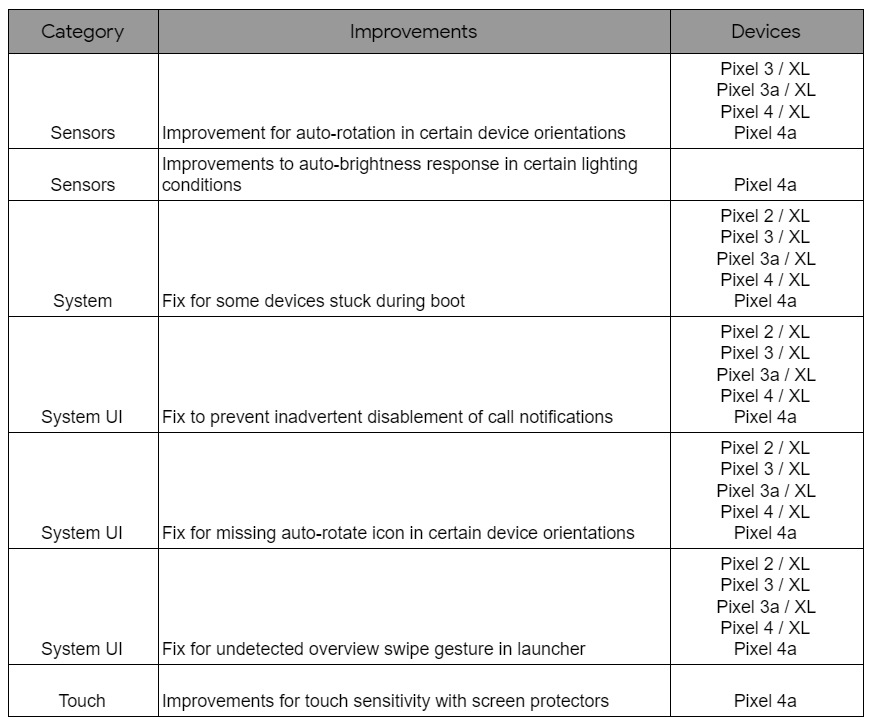
Pixel 4a October update fixes auto brightness, touchscreen sensitivity, and more


kvBYvYv.jpg

pixel-4a-october-update.png


Factory Images for Nexus and Pixel Devices
Full OTA Images for Nexus and Pixel Devices

Android Security Bulletin—October 2020
Pixel Update Bulletin—October 2020
 

limmk

High Supremacy Member
Joined
Jul 5, 2001
Messages
43,190
Reaction score
8,324
November security patch rolling out to Google Pixel, factory images & OTAs live

kvBYvYv.jpg

thread-80591482-12983713722925484100.png


Get security updates & Google Play system updates
  1. Open your device’s Settings app ⚙️
  2. Tap Security 🔒
  3. Check for an update:
    ◾ To check if a Security update is available, tap Security update 📱
    ◾ To check if a Google Play system update is available, tap Google Play system update 📱
  4. Follow any steps on the screen

Factory Images for Nexus and Pixel Devices
Full OTA Images for Nexus and Pixel Devices

Android Security Bulletin—November 2020
Pixel Update Bulletin—November 2020


6cjeMcB.png
 

kEvinErd

Supremacy Member
Joined
Dec 28, 2008
Messages
5,720
Reaction score
421
Got the OTA on my Pixel 5 after manually "Checking for Updates", but not on my Pixel 4 XL. "Check for updates" is broken again....??? Seriously, Google.
 

limmk

High Supremacy Member
Joined
Jul 5, 2001
Messages
43,190
Reaction score
8,324
Got the OTA on my Pixel 5 after manually "Checking for Updates", but not on my Pixel 4 XL. "Check for updates" is broken again....??? Seriously, Google.

Last nov also same thing happened, if you enrolled in android/beta, opt out, wait a few minutes and check for updates again.

 

limmk

High Supremacy Member
Joined
Jul 5, 2001
Messages
43,190
Reaction score
8,324
December security patch rolling out to Google Pixel, factory images & OTAs live

Unfortunately, no security fixes for Pixel 2 and Pixel 2 XL yet.

m3ZxJRf.jpg

Feature_Availability.jpg


The OTA update will roll out in phases depending on carrier and device. Users will receive a notification once it becomes available.

The latest features for Pixel owners are here


Get security updates & Google Play system updates
  1. Open your device’s Settings app ⚙️
  2. Tap Security 🔒
  3. Check for an update:
    ◾ To check if a Security update is available, tap Security update 📱
    ◾ To check if a Google Play system update is available, tap Google Play system update 📱
  4. Follow any steps on the screen

6cjeMcB.png


Factory Images for Nexus and Pixel Devices
Full OTA Images for Nexus and Pixel Devices

Android Security Bulletin—December 2020
Pixel Update Bulletin—December 2020


How to unlock Developer options
Settings > About phone > Scroll to the bottom and tap Build number 7 times. You will get a note saying "You are now a developer!"
Go back into Settings > System > Advanced > Developer options.

Settings > System > Advanced > Developer options > Turn off Mobile data always active
Settings > System > Advanced > Developer options > Turn off Force 90Hz refresh rate
Settings > System > Advanced > Developer options > Set Window animation scale to .5x
Settings > System > Advanced > Developer options > Set Transition animation scale to .5x
Settings > System > Advanced > Developer options > Set Animator duration scale to .5x

How to unlock Developer options (Play Store)
Settings > Scroll to the bottom and tap Play Store version 7 times. You will get a note saying "You are now a developer!"
Internal app sharing option appears.

Keep your device & apps working with Google Play Services
Settings > Tap Apps & notifications > See all apps > Scroll down and tap Google Play Services > Tap Storage & cache > Tap Clear Cache

If Play Store won’t download apps
Longpress Google Play Store icon > Tap 'i' icon > Tap Storage & cache > Tap Clear storage

Use these tips and tricks if you're experiencing bad Pixel battery life. A little (of something) goes a long way...
Settings > Network & internet > Mobile network > Preferred network type > LTE
Settings > Battery > Turn on Adaptive battery
Settings > Display > Turn off Adaptive brightness
Settings > Display > Turn on Dark theme
Settings > Display > Advanced > Select 15/30 seconds screen timeout
Settings > Display > Advanced > Turn off Screen attention
Settings > Display > Advanced > Turn off Auto-rotate screen
Settings > Display > Advanced > Turn off Ambient EQ
Settings > Display > Advanced > Turn off Smooth Display
Settings > Display > Advanced > Lock screen display > Turn off Always on
Settings > Sound > Turn off vibrate for calls
Settings > Sound > Live Caption > Turn off Live Caption
Settings > Sound > Now playing > Turn off show songs on lock screen
Settings > Sound > Advanced > Turn off Touch vibration
Settings > Privacy > Turn off Show passwords
Settings > Location > Wi-Fi and Bluetooth scanning > Turn off Wi-Fi and Bluetooth scanning
Settings > Security > Face unlock > Turn off Unlocking your phone
Settings > Security > Screen Lock > Tap wheel icon > Automatically lock > Select Immediately
Settings > System > Digital wellbeing & parental controls > Tap 3-dot menu > Manage your data > Turn off daily device usage
Settings > System > Gestures > Turn off Active edge
Settings > System > Gestures > Turn off Double-tap to check phone
Settings > System > Gestures > Turn off Lift to check phone
Settings > System > Gestures > Turn off Flip to shhh
Settings > System > Motion Sense > Turn off Motion Sense
 
Last edited:
Important Forum Advisory Note
This forum is moderated by volunteer moderators who will react only to members' feedback on posts. Moderators are not employees or representatives of HWZ Forums. Forum members and moderators are responsible for their own posts. Please refer to our Community Guidelines and Standards and Terms and Conditions for more information.
Top