
[NAS] Synology NAS owner club!

Status
Not open for further replies.

Yevin227

Senior Member
Joined
Jun 3, 2007
Messages
924
Reaction score
17
I used to use expansion bay. I swear against it. Relies too much on the main unit and is actually slower. Makes booting also slow.

Your thoughts on getting a separate unit is much more palatable

What config are you using now?
 

voux00

Junior Member
Joined
Oct 19, 2009
Messages
58
Reaction score
0
Hi, looking to upgrade my 1819+ to a larger synology nas with more bays but don't want to go the expansion bay route.

is 2419+ recommended for 12 bays?

Does anyone have any recommendations for UPS-es for these 2 models as well?

Main usage is as a private cloud, data backup and also file streaming (minor)

Depends on your co budget and projected data storage requirements... but I'd rather buy a 2nd NAS (eg, another 1819) and split the usage to distribute data load (eg, by dept - NAS1 for sales/ops, NAS2 for accounts/HR; or by purpose - NAs1 for cloud, NAS2 for backup/streaming; or by location if you've >1 physical office locations).

I like to play safe so usually go with APC UPS with the USB data port that's supported by Syno so it can activate Safe shutdown.
 

Yevin227

Senior Member
Joined
Jun 3, 2007
Messages
924
Reaction score
17
Depends on your co budget and projected data storage requirements... but I'd rather buy a 2nd NAS (eg, another 1819) and split the usage to distribute data load (eg, by dept - NAS1 for sales/ops, NAS2 for accounts/HR; or by purpose - NAs1 for cloud, NAS2 for backup/streaming; or by location if you've >1 physical office locations).

I like to play safe so usually go with APC UPS with the USB data port that's supported by Syno so it can activate Safe shutdown.

Thanks! Do you have recommendations for what model of APC UPS?
 

batniss

Arch-Supremacy Member
Joined
Nov 23, 2015
Messages
16,550
Reaction score
578
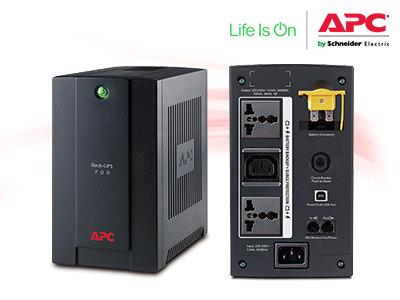
Like to share my experience for those looking for a cheaper alternative UPS

APC-Back-UPS-700VA

For those who is looking for "not a white elephant battery" and cheaper alternative compared to what was discussed before. CS650. This is approximately <SGD$130, only 3 outlet (you can use a multiplug) and only 390W.

Product Technical Info
APC%20Back-UPS%20700VA.jpg

Link to buy from: APC-Back-UPS-700VA (Note: Type-A USB not included)


Connected to Synology with UPS PowerChute port (Type-A USB)
ybuCdvt.jpg

Example.. mine.
 

pwongkk

High Supremacy Member
Joined
Jun 30, 2006
Messages
30,136
Reaction score
15,105
Depends on your co budget and projected data storage requirements... but I'd rather buy a 2nd NAS (eg, another 1819) and split the usage to distribute data load (eg, by dept - NAS1 for sales/ops, NAS2 for accounts/HR; or by purpose - NAs1 for cloud, NAS2 for backup/streaming; or by location if you've >1 physical office locations).

I like to play safe so usually go with APC UPS with the USB data port that's supported by Syno so it can activate Safe shutdown.

For those who hook up to UPS, make sure you do a battery check frequently after 2 years of usage. The battery lifespan would have been reduced, and may not sustain power for long during a power failure.

And related to the above, some batteries may bloat. Best to change out the battery after 2 years if you know how to or buy a new one altogether. Batteries are a source of ups fire.
 

i1magic

Arch-Supremacy Member
Joined
Dec 11, 2002
Messages
22,366
Reaction score
117
Already $0. You already spent on the device so u can just use it.

google and movies? No copyright infringement? Speed?

Btw below $2 unlimited storage attractive for non important files very good Where to get ? I googled and dont see it


Yah. From Taobao, I PM you the link.


Upload speed is about 25-30MB/s, quite fast. But if you got a lot of data to dump, do split it up, maybe 100-200GB/day. If not will kana throttle.
 

yusoffb01

Arch-Supremacy Member
Joined
Jun 17, 2008
Messages
16,623
Reaction score
1,676
Yah. From Taobao, I PM you the link.


Upload speed is about 25-30MB/s, quite fast. But if you got a lot of data to dump, do split it up, maybe 100-200GB/day. If not will kana throttle.


upload limit about 750gb a day.

gpYal9M.jpg

a free option until may 2021 is to upload to google photos. upload limit of <15min clips and 100GB a day. original files can be downloaded

 
Last edited:

i1magic

Arch-Supremacy Member
Joined
Dec 11, 2002
Messages
22,366
Reaction score
117
upload limit about 750gb a day.

gpYal9M.jpg

a free option until may 2021 is to upload to google photos. upload limit of <15min clips and 100GB a day. original files can be downloaded

×<MEDIA>@https://i.imgur.com


Wah, up to 750GB/day. Where did you read that from? IIRC, I start to get disconnection and drop in speed after maybe 300-400GB (this is super argah estimation, no basis, just plain feeling).

No point. I already stop syncing to Google Photos already. Transferring of data is very time consuming. Time is $$.
 

i1magic

Arch-Supremacy Member
Joined
Dec 11, 2002
Messages
22,366
Reaction score
117
How do I check what is the biggest hard disk size that my DS416 NAS can support?
 

bencheongcm

Arch-Supremacy Member
Joined
Oct 31, 2002
Messages
23,045
Reaction score
36
Need advice from you guys if I can upgrade my storage size of of 6TB running at RAID 5 with 4x2TB HDD on the DS920+?


Can it be replaced with HDD by HDD by letting the RAID rebuild thru inserting a larger cap HDD in slot by slot?
 

batniss

Arch-Supremacy Member
Joined
Nov 23, 2015
Messages
16,550
Reaction score
578
Need advice from you guys if I can upgrade my storage size of of 6TB running at RAID 5 with 4x2TB HDD on the DS920+?


Can it be replaced with HDD by HDD by letting the RAID rebuild thru inserting a larger cap HDD in slot by slot?

Yes can be done
 

bencheongcm

Arch-Supremacy Member
Joined
Oct 31, 2002
Messages
23,045
Reaction score
36
Yes can be done
Just to understand that I am on the same page, this is also support on the standard RAID 5 and not only the SHR?
So all I will need to do is to remove the slot 4 2TB HDD to replace with a 8TB waiting for it to rebuild and moving to slot 3 and so on?
 

jeffong

Senior Member
Joined
Jan 1, 2000
Messages
2,199
Reaction score
1,255
Anyone who's looking to upgrade your Synology NAS with 10Gbe PCIe card, Amazon SG having a pretty sweet deal on a dual port Synology 10Gbe RJ45 card (E10G18-T2) for $130. The dual port SFP+ card is also available for $162.
 

batniss

Arch-Supremacy Member
Joined
Nov 23, 2015
Messages
16,550
Reaction score
578
Just to understand that I am on the same page, this is also support on the standard RAID 5 and not only the SHR?
So all I will need to do is to remove the slot 4 2TB HDD to replace with a 8TB waiting for it to rebuild and moving to slot 3 and so on?

yes you can do it as you just described. I suggest to power your nas off before removing/insert the hdd.
 

existential_reality

Senior Member
Joined
Aug 11, 2017
Messages
639
Reaction score
36
One thing to note (read this online) if once installed those running rack system NAS the fan speed will default to full (the sound will deafening haha).

Not sure about non rack models.


Anyone who's looking to upgrade your Synology NAS with 10Gbe PCIe card, Amazon SG having a pretty sweet deal on a dual port Synology 10Gbe RJ45 card (E10G18-T2) for $130. The dual port SFP+ card is also available for $162.
 

existential_reality

Senior Member
Joined
Aug 11, 2017
Messages
639
Reaction score
36
Quick update for those always interested in HDD health between brands.

2 of my Ironwolf Pro 10TB drives started to develop bad sectors, some info on it

Drive 1
Temperature: 37 Deg C
Power on Time: 24905 hours
Bad Sector count: started at 500 last month increase to 600
Still within warranty period * likely will RMA at some point.

Drive 2
Temperature: 39 Deg C
Power on Time: 11240 hours
Bad Sector count: Stable at 8
Still within warranty period

Tbh I dun think this says much except drives so develop bad sectors at times, have several more similar drives with the around the same run time between the two which are running fine. Hope this helps in making your HDD decisions.
 
Status
Not open for further replies.
Important Forum Advisory Note
This forum is moderated by volunteer moderators who will react only to members' feedback on posts. Moderators are not employees or representatives of HWZ Forums. Forum members and moderators are responsible for their own posts. Please refer to our Community Guidelines and Standards and Terms and Conditions for more information.
Top