The AMD Zen 3 Ryzen 5000 Discussion Thread

Joined
Jun 8, 2021
Messages
331
Reaction score
335
can 10700k easily overclock all cores to say 4.9 to 5ghz and use 220w?
for ryzen 5800x all cores at most 4.5 to 4.6ghz but use 150w?
ram wise both should run 3800?

in this situation 10700k is better performance but lower efficiency? :o

i think intel overclock can still have speedstep etc, cores will downclock. but ryzen manual cannot downclock.
10700k to me is literally a sibling to 9900K, so i dun think it will be any issue to hit 5ghz with good cooling. But at as 220w, i dun think it will be that low. Last year i had tested 1 of my friends rig with 10900K, it can easily gobble 295W+ at all core 5ghz under OCCT small FFT AVX2. So i argar argar the 10700K will be about 240W+ like my old 9900K...:unsure:
 
Last edited:
Joined
Jun 8, 2021
Messages
331
Reaction score
335
Unless you sway and your IMC doesn't want to do 1900 FCLK. :s13:

For high frequency RAM OC Intel is probably the safer bet. Overall memory latency is lower on Intel too afaik.
Yup, the Intel latency is about 8-11ms lower than AMD at both same 3600mhz cl16 ram speed when i tested. But in realtime usage, i cannot feel the difference.... maybe i a bit old liao.... 😅
 
Last edited:

soltrdc

Senior Member
Joined
Sep 27, 2004
Messages
779
Reaction score
251
Undervolting is the name of the game, be it Intel or AMD... the 10700K should have some headroom for undervolting since it's not as highly clocked as the i9s?

Excuse me for a short off-topic here:

I realize one unfortunate thing though, which bro @watzup_ken pointed out before, is that for Intel, some very nice-to-have tech are limited to the i9, in this case, Thermal Velocity Boost. With my 10850K, I am able to configure in such a way that when the CPU is very heavily tasked, e.g. in CPU rendering (CBR23 multi-core bench), it will limit clocks to 4.8 GHz and draw 175W, but when running equally multithreaded but not so intensive tasks e.g. CPU-Z bench, it can run up to 5 GHz with 150W, all this with a -75 mV undervolt. I wouldn't know how to achieve this without the use of Thermal Velocity Boost though.
 

watzup_ken

High Supremacy Member
Joined
Nov 21, 2003
Messages
25,671
Reaction score
2,122
Undervolting is the name of the game, be it Intel or AMD... the 10700K should have some headroom for undervolting since it's not as highly clocked as the i9s?

Excuse me for a short off-topic here:

I realize one unfortunate thing though, which bro @watzup_ken pointed out before, is that for Intel, some very nice-to-have tech are limited to the i9, in this case, Thermal Velocity Boost. With my 10850K, I am able to configure in such a way that when the CPU is very heavily tasked, e.g. in CPU rendering (CBR23 multi-core bench), it will limit clocks to 4.8 GHz and draw 175W, but when running equally multithreaded but not so intensive tasks e.g. CPU-Z bench, it can run up to 5 GHz with 150W, all this with a -75 mV undervolt. I wouldn't know how to achieve this without the use of Thermal Velocity Boost though.
I may try undervolting when I get the CPU and motherboard. Not planning to OC or upgrade, so only getting a B460 ITX board.
 

Red_herring

Senior Member
Joined
Jan 1, 2000
Messages
1,972
Reaction score
20
Maybe stocks are back after crypto crashed

Waiting for RAM
Me too. Hoping for ram prices to drop. I was looking at crucial ballistic rgb 2 x 16gb abt 2 wks before prime day was going at 268... now went up to close to 300..

My recently purchased 5600x now paired with old ddr 2133 rams :ROFLMAO:
 

kimsix

Arch-Supremacy Member
Joined
Jan 6, 2009
Messages
20,030
Reaction score
9,968
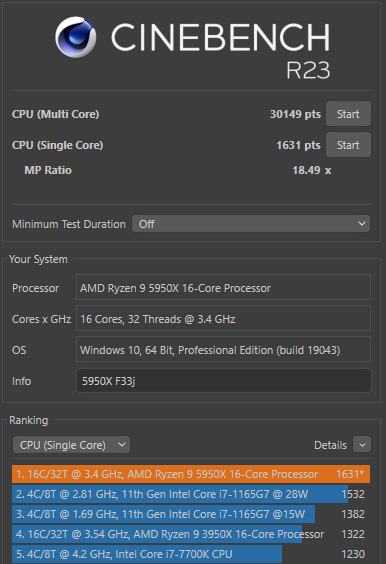
5950x-svm-100bclk-r23.png


managed to hit 30k with cold morning boot with svm on :o

thanks to core cycler and event viewer whea errors, to identify which cores are over offset

my ccd2 not good but all cores except the 2 best ones, can -15 curve optimiser. the 2 best cores can only -9 on co. :o
 
Joined
Jun 8, 2021
Messages
331
Reaction score
335
5950x-svm-100bclk-r23.png


managed to hit 30k with cold morning boot with svm on :o

thanks to core cycler and event viewer whea errors, to identify which cores are over offset

my ccd2 not good but all cores except the 2 best ones, can -15 curve optimiser. the 2 best cores can only -9 on co. :o
Very beautiful score there bro, Ichiban!!!..(y):s12:. Really good that you have the patience and know how to tune your individual core. For me, i run road already... 🥵😅
Are you using Gigabyte Mobo too with F33j bios? Recently this month they had last updated F33 bios, so far so good after i had been using, maybe you can try update see see... ;).
 
Joined
Jun 8, 2021
Messages
331
Reaction score
335
Undervolting is the name of the game, be it Intel or AMD... the 10700K should have some headroom for undervolting since it's not as highly clocked as the i9s?

Excuse me for a short off-topic here:

I realize one unfortunate thing though, which bro @watzup_ken pointed out before, is that for Intel, some very nice-to-have tech are limited to the i9, in this case, Thermal Velocity Boost. With my 10850K, I am able to configure in such a way that when the CPU is very heavily tasked, e.g. in CPU rendering (CBR23 multi-core bench), it will limit clocks to 4.8 GHz and draw 175W, but when running equally multithreaded but not so intensive tasks e.g. CPU-Z bench, it can run up to 5 GHz with 150W, all this with a -75 mV undervolt. I wouldn't know how to achieve this without the use of Thermal Velocity Boost though.
True, Intel and Amd had been pushing their frequency with tons of power until efficiency being thrown out of the window. Undervolting is a better play here now, but i guess there are still quite a number of bro still love their PC to perform at their best if they are able to cool their component well... 😊
 

kimsix

Arch-Supremacy Member
Joined
Jan 6, 2009
Messages
20,030
Reaction score
9,968
Very beautiful score there bro, Ichiban!!!..(y):s12:. Really good that you have the patience and know how to tune your individual core. For me, i run road already... 🥵😅
Are you using Gigabyte Mobo too with F33j bios? Recently this month they had last updated F33 bios, so far so good after i had been using, maybe you can try update see see... ;).

Oh that field forgot to change, but is on f34a as they released another new beta.
i use ** r23 and core cycler, is quite fast if use round figures. if can complete r23 will then run core cycler in bacground while pcw in edmw.
those on ryzen 5000 can try to squeeze that last bits :o
 
Joined
Jun 8, 2021
Messages
331
Reaction score
335
Oh that field forgot to change, but is on f34a as they released another new beta.
i use ** r23 and core cycler, is quite fast if use round figures. if can complete r23 will then run core cycler in bacground while pcw in edmw.
those on ryzen 5000 can try to squeeze that last bits :o
Oh i see i see...:).
I did came across a post by Mach3.2 bro regarding CoreCycler, but i am bit skeptical about the security issue with free new testing software :p , so i didn't give it a try yet ( maybe next time when i am free...:) ). So far i only using regular OCCT single and multi thread test for stability, once no error or crash or whea, then i will just dial back CO undervolting by 10-15 to keep a safety headroom down the road (old habit as i did with Intel, like -0.1ghz or +0.02 - 0.03V)... :)
 
Last edited:

Lastwishes

Senior Member
Joined
Jun 12, 2005
Messages
724
Reaction score
209
Oh i see i see...:).
I did came across a post by Mach3.2 bro regarding CoreCycler, but i am bit skeptical about the security issue with free new testing software :p , so i didn't give it a try yet ( maybe next time when i am free...:) ). So far i only using regular OCCT single and multi thread test for stability, once no error or crash or whea, then i will just dial back CO undervolting by 10-15 to keep a safety headroom down the road (old habit as i did with Intel, like -0.1ghz or +0.02 - 0.03V)... :)

Core cycler is good. It's just a scripted Prime95 test.

All core -15 might not have a hard crash, but it's not necessarily stable. After testing extensively with core-cycler, I found that my best cores were only stable (i.e. no errors in calculation) at 0 and -5 :cry: , while I have other cores stable between -30 to -20.
 

stressmage

Master Member
Joined
Oct 6, 2002
Messages
3,757
Reaction score
25
Core cycler is good. It's just a scripted Prime95 test.

All core -15 might not have a hard crash, but it's not necessarily stable. After testing extensively with core-cycler, I found that my best cores were only stable (i.e. no errors in calculation) at 0 and -5 :cry: , while I have other cores stable between -30 to -20.
My 5900x also same, best 4 core is 0,5,10,10
The rest is 15 to 20. :unsure:
 

Lastwishes

Senior Member
Joined
Jun 12, 2005
Messages
724
Reaction score
209
My 5900x also same, best 4 core is 0,5,10,10
The rest is 15 to 20. :unsure:
My 5950x is best 4 core, 5, 0, 15, 15.

The rest are between 20, 25 and 30, with one odd core that requires -15.

I think some people have said that the new 1.2.0.3 agesa is slightly more stable (but I can't confirm). Before I updated my bios, I went with more conservative numbers. Only spent the time to properly stress test (about 3 whole days of futzing around with core cycler) after I updated to the new bios.
 
Joined
Jun 8, 2021
Messages
331
Reaction score
335
Core cycler is good. It's just a scripted Prime95 test.

All core -15 might not have a hard crash, but it's not necessarily stable. After testing extensively with core-cycler, I found that my best cores were only stable (i.e. no errors in calculation) at 0 and -5 :cry: , while I have other cores stable between -30 to -20.
Wow bro, you had provided a very good guideline for headroom safety between multi all core and single core test limit you had tested. I copy that, thank you very much mate...:s12:(y)
My 5900x also same, best 4 core is 0,5,10,10
The rest is 15 to 20. :unsure:
Yesterday night i had went over to bro place to enable his 5900X PBO and tweaked the CO thru OCCT stress test. After reading the setting you all set for your PC, I am now kinda worry that i might had set too high for him liao...🤔😓
But 1 thing i can definitely confirm again after i turn on the PBO, 5900X is a different beast compare to 5950X, it's frequency response are slightly more responsive than my 5950X. Executing files, multitasking, swap tab between browsers, call up duplicated copies, it simply just flash right infront of you much quicker than 5950X.
 
Last edited:

Lastwishes

Senior Member
Joined
Jun 12, 2005
Messages
724
Reaction score
209
Wow bro, you had provided a very good guideline for headroom safety between multi all core and single core test limit you had tested. I copy that, thank you very much mate...:s12:(y)

Welcomed. I also learnt a lot from the bros sharing here.

5900X is a different beast compare to 5950X, it's frequency response are much faster than my 5950X. Executing files, multitasking, swap tab between browsers, call up duplicated copies, it simply just flash right infront of you much quicker than 5950X.
This doesn't sound correct leh... haha. Both chips are more than powerful enough that there shouldn't be a difference cpu-wise for those operations.

Ssd/hard drive seems like a more likely factor.
 

wwenze

Greater Supremacy Member
Joined
Dec 2, 2002
Messages
85,154
Reaction score
29,028
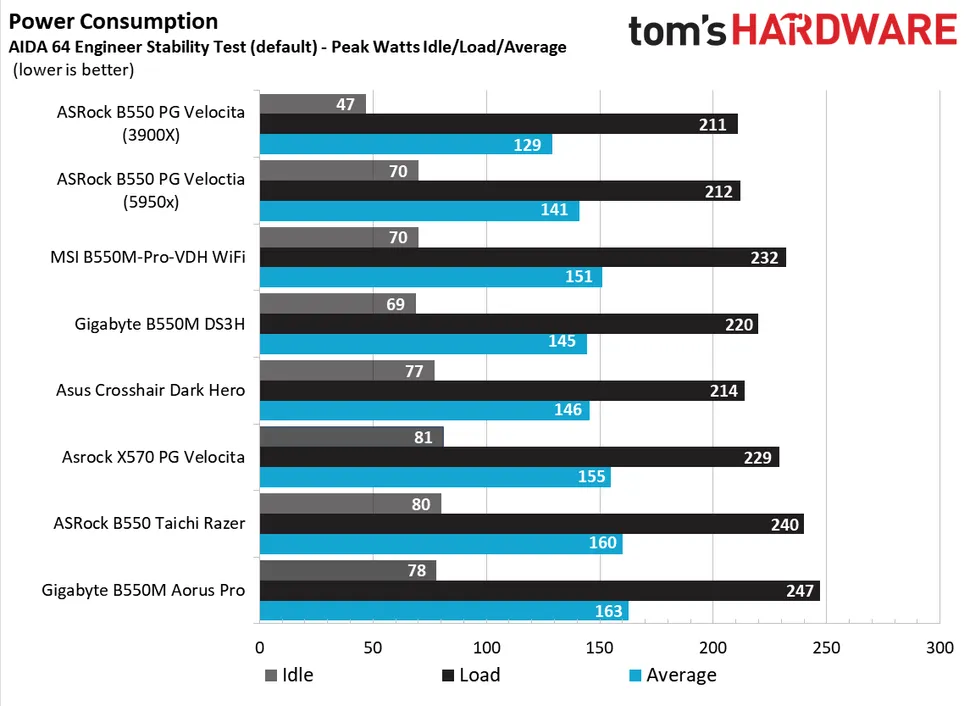
How to convince people to spend more on motherboard:

Show them this graph

PK9PqgD.png


I'm surprised Gigabyte Aorus Pro did so badly. It also draws the most power in THG's test

H3MwSnewNwMq8C9rHcrqgF-970-80.png.webp


To think I almost bought that. Now I'm leaning towards Steel Legend. Or just pay a bit more for MORTAR.
 
Important Forum Advisory Note
This forum is moderated by volunteer moderators who will react only to members' feedback on posts. Moderators are not employees or representatives of HWZ Forums. Forum members and moderators are responsible for their own posts. Please refer to our Community Guidelines and Standards and Terms and Conditions for more information.
Top