New HDB BTO Flat - How do you connect your Home Fiber Network

pedigreelee

Junior Member
Joined
Apr 5, 2010
Messages
24
Reaction score
0
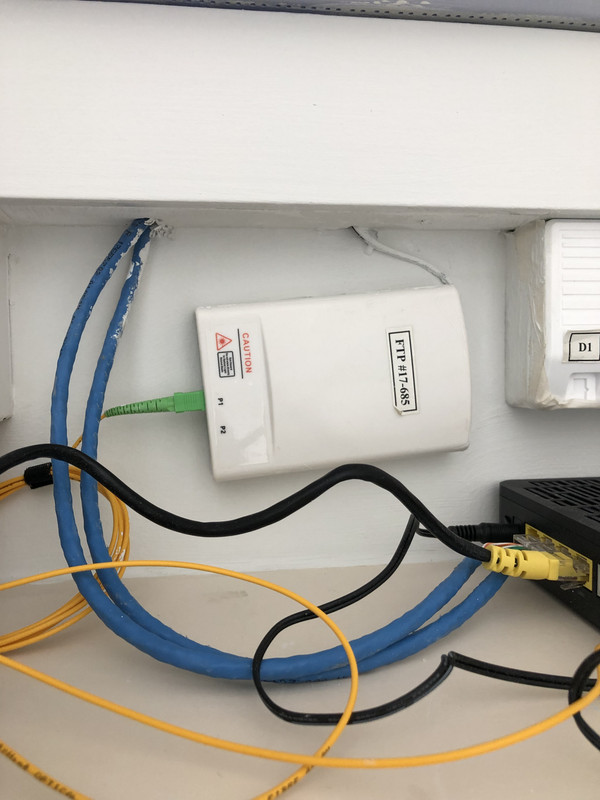
My friend’s ID work. Any idea on why the electrician lay the two LAN cables directly out from the trunking instead of through the box?

Btw the FTP is like that because carpentry work block the access point.
8-B8-B1-B68-2-F0-E-4178-8411-F7-E992-AC5-C11.jpg
 

TanKianW

Supremacy Member
Joined
Apr 21, 2005
Messages
6,679
Reaction score
3,325
Hi all, beginner to home networking here.

Just got a resale (5 years old) flat and trying to navigate the best networking strategy here.

I'm planning to get a 1gbs plan from Singtel together with the Wifi 6 Asus router. Is it true that singtel comes with ONR so my setup can be;

TP -> ONR -> Patch panel -> Asus router in living room.

Will this setup work and can I reap the most benefit from the Wifi 6 with this setup?
I'm also worried that the master bedroom is too far from the router, how can I improve the setup? I got a lan port in all of the room currently.

Thanks

Few recommendations, for consideration:
  • Check with your electrician if you could lay another RJ45 cabling to TV console so you could connect your router LAN port back to the patch panel. (One in, one out at TV console side). Nothing beats LAN network to every room. ONR -> TV patch port 1 -> WAN of router at TV console -> LAN of router to port 2 at TV -> switch at patch panel -> LAN from switch to patch panel leading to every room
  • Request Singtel to bridge your ONR. They are more willing to do this now. So you can use the (RT-Ax86U?) in router mode instead of AP mode.
  • Usually MBR's (at the end) wifi signal will be bad, good to install another AP/mesh with wired backhaul.
 

TanKianW

Supremacy Member
Joined
Apr 21, 2005
Messages
6,679
Reaction score
3,325
My friend’s ID work. Any idea on why the electrician lay the two LAN cables directly out from the trunking instead of through the box?

Btw the FTP is like that because carpentry work block the access point.
8-B8-B1-B68-2-F0-E-4178-8411-F7-E992-AC5-C11.jpg

Maybe it is additional LAN ports? More knowledgeable home users/ID now prefer to have 2 LAN ports at TV console and MBR. You can check with your friend. But this also seems like a sloppy job. I will request the ID to install a bigger/longer patch panel.
 

kenho_23

Member
Joined
Jul 9, 2004
Messages
183
Reaction score
5
Hi Guys, I am new to networking here, but will be getting a new BTO soon. I have ASUS AX88 currently and planning to use it as my main router.

I read from the group mention that we should put a weak router in DB box to connect to ONT and leave the stronger one AX88 as a node. However I also read somewhere that in AIMesh setup, the stronger router should be the primary node. This is a little conflict with the above recommendation. How bad is the performance if we use weak router as primary node.

I am also planning to use Wired Backhual in my new place.
 

xiaofan

High Supremacy Member
Joined
Sep 16, 2018
Messages
31,990
Reaction score
9,221
Hi Guys, I am new to networking here, but will be getting a new BTO soon. I have ASUS AX88 currently and planning to use it as my main router.
I read from the group mention that we should put a weak router in DB box to connect to ONT and leave the stronger one AX88 as a node. However I also read somewhere that in AIMesh setup, the stronger router should be the primary node. This is a little conflict with the above recommendation. How bad is the performance if we use weak router as primary node.
I am also planning to use Wired Backhual in my new place.

Just make sure you have two LAN ports in the living room console area and then you will not face such conflict.

ONT in DB box -- living room LAN port 1 -- RT-AX88U as main router in living room -- living room LAN port 2 -- Dumb Switch like TP-Link TL-SG105 in DB box -- LAN ports in rooms

If the RT-AX88U is not good enough, add another Asus router like the RT-AX55 in the DB box.

But if you really do not have two LAN ports close to each other in the living room console area, then get an RT-AX56U (512MB RAM) or RT-AX55 (256MB RAM) in the DB box. Wireless is more important in this case so you should not put RT-AX88U in the DB box. And RT-AX56U or RT-AX55 will be good enough as the main AImesh router for most of the people.
 

kenho_23

Member
Joined
Jul 9, 2004
Messages
183
Reaction score
5
2 LAN point at living room, is it something new BTO equip with or this need to bring in contractor to install it?
 

gregory_choo

Arch-Supremacy Member
Joined
Nov 7, 2007
Messages
10,491
Reaction score
1,979
2 LAN point at living room, is it something new BTO equip with or this need to bring in contractor to install it?
there are 2 lan points but there are meters apart. so you need to move one of them or to lay another new cable.
 

kenho_23

Member
Joined
Jul 9, 2004
Messages
183
Reaction score
5
Thank you for the advice. Yes I will probably go for the dual LAN option to link it back to my DB box, and do a wired backhual from bedroom. Just thinking that the LAN route is a little long from ONT to living room then going all the way back to the switch in the box and then to the room LAN for the 2nd Node.
 

xiaofan

High Supremacy Member
Joined
Sep 16, 2018
Messages
31,990
Reaction score
9,221
Thank you for the advice. Yes I will probably go for the dual LAN option to link it back to my DB box, and do a wired backhual from bedroom. Just thinking that the LAN route is a little long from ONT to living room then going all the way back to the switch in the box and then to the room LAN for the 2nd Node.

The length does not really matter in the home environment. Technically CAT 5E cable can support gigabit Ethernet at about 100 meters distance. Cost of the cable is not that much either in comparison to the labor cost.
 

species8472

Junior Member
Joined
Aug 22, 2021
Messages
4
Reaction score
0
Dear gurus,

Please advise a newbie here. I have gotten my BTO with the TP located in the DB by the main door. The intent is to be able to use the ethernet ports in the DB without installing new ethernet points or using ONR from Singtel.

I am thinking of the following config: TP -> ONT -> router in DB -> mesh router as AP in hall (via ethernet) -> mesh AP outside bedrooms, and, ethernet into a range extender config as AP in the master room if mesh coverage not good.

Qn: Does the WiFi speed of the router (in the DB) matter if i am just using it as a means to use the ethernet ports? meaning can i get one rated at 300mbps and yet get higher speeds on the mesh APs since it is a "pass through" from ONT to AP via ethernet?
 

rAcEr

Supremacy Member
Joined
Jan 1, 2000
Messages
5,737
Reaction score
7
The wifi speed in the dB box router does not matter. U should turn off wifi on that device if u r relying on other mesh devices for wireless coverage.
 

magix

Arch-Supremacy Member
Joined
May 28, 2000
Messages
16,876
Reaction score
84
Dear gurus,

Please advise a newbie here. I have gotten my BTO with the TP located in the DB by the main door. The intent is to be able to use the ethernet ports in the DB without installing new ethernet points or using ONR from Singtel.

I am thinking of the following config: TP -> ONT -> router in DB -> mesh router as AP in hall (via ethernet) -> mesh AP outside bedrooms, and, ethernet into a range extender config as AP in the master room if mesh coverage not good.

Qn: Does the WiFi speed of the router (in the DB) matter if i am just using it as a means to use the ethernet ports? meaning can i get one rated at 300mbps and yet get higher speeds on the mesh APs since it is a "pass through" from ONT to AP via ethernet?

If your device are all connected to the mesh router. The wifi speed for the “router in DB” don’t matter.

Your singtel is ONT or ONR? Saw the first part talking ONR then 2nd part ONT.
 

species8472

Junior Member
Joined
Aug 22, 2021
Messages
4
Reaction score
0
If your device are all connected to the mesh router. The wifi speed for the “router in DB” don’t matter.

Your singtel is ONT or ONR? Saw the first part talking ONR then 2nd part ONT.
Hi, I am trying to avoid using Singtel although their ONR is the simplest solution.

That's why i mentioned ONT later on as I would like to subscribe to M1 or Starhub and still be able to use the Ethernet ports in the DB.
 

xiaofan

High Supremacy Member
Joined
Sep 16, 2018
Messages
31,990
Reaction score
9,221
Qn: Does the WiFi speed of the router (in the DB) matter if i am just using it as a means to use the ethernet ports? meaning can i get one rated at 300mbps and yet get higher speeds on the mesh APs since it is a "pass through" from ONT to AP via ethernet?

Which router you intend to put in the DB box? It is correct that the wireless spec of the router in the DB box does not matter. However, the CPU and RAM may matter, depending on the feature you want.

Cheapst one and lowest end router in the DB box I would recommend: Linksys EA7500 V2, Linksys EA8100 V1 and Asus RT-AC2600, etc, they all have the low end Dual Core MIPS CPU at 880MHz, and 256MB RAM.

Better one to use: Asus RT-AX56U with Tri-core ARM Cortex A7 CPU at 1.5GHz and 512MB RAM.
 

species8472

Junior Member
Joined
Aug 22, 2021
Messages
4
Reaction score
0
Which router you intend to put in the DB box? It is correct that the wireless spec of the router in the DB box does not matter. However, the CPU and RAM may matter, depending on the feature you want.

Cheapst one and lowest end router in the DB box I would recommend: Linksys EA7500 V2, Linksys EA8100 V1 and Asus RT-AC2600, etc, they all have the low end Dual Core MIPS CPU at 880MHz, and 256MB RAM.

Better one to use: Asus RT-AX56U with Tri-core ARM Cortex A7 CPU at 1.5GHz and 512MB RAM.
Thanks guru!

If I get a tri band DDWRT router in the DB, and configure 1 band with VPN, will the VPN be passed through to the Tri band APs?

Intent is to switch network to watch different Netflix selections and other geo restricted content.
 

xiaofan

High Supremacy Member
Joined
Sep 16, 2018
Messages
31,990
Reaction score
9,221
Thanks guru!

If I get a tri band DDWRT router in the DB, and configure 1 band with VPN, will the VPN be passed through to the Tri band APs?

Intent is to switch network to watch different Netflix selections and other geo restricted content.

Sorry no idea about DD-WRT.

To use VPN properly, I will recommend to use better routers, beter than the ones I mentioned. I will recommend Intel CPU based mini PC router running OpenWRT or pfSense.
 

meladu

Junior Member
Joined
Dec 9, 2018
Messages
5
Reaction score
0
Hello all,

Wanted to ask about the existing lan ports in new HDB homes.
My computer lan speed detected is 100mpbs. I have checked the computer lan card and its supporting up to 2.5gbps, and lan cable used is cat7. May I know what is causing the detected 100mpbs? could it be the internal hdb cables used or the lan port outlet to support only 100mpbs?

My current setup -
Viewqwest 1Gbps - installed at db box and router connected to 2 lan ports for study room desktop direct connection.
Study room - direct lan connection from data point.
 

gregory_choo

Arch-Supremacy Member
Joined
Nov 7, 2007
Messages
10,491
Reaction score
1,979
Hello all,

Wanted to ask about the existing lan ports in new HDB homes.
My computer lan speed detected is 100mpbs. I have checked the computer lan card and its supporting up to 2.5gbps, and lan cable used is cat7. May I know what is causing the detected 100mpbs? could it be the internal hdb cables used or the lan port outlet to support only 100mpbs?

My current setup -
Viewqwest 1Gbps - installed at db box and router connected to 2 lan ports for study room desktop direct connection.
Study room - direct lan connection from data point.
there are 8 wires in the cable, if one of them is faulty, then you will get 100Mbps.
 
Important Forum Advisory Note
This forum is moderated by volunteer moderators who will react only to members' feedback on posts. Moderators are not employees or representatives of HWZ. Forum members and moderators are responsible for their own posts.

Please refer to our Community Guidelines and Standards, Terms of Service and Member T&Cs for more information.
Top