New 10Gbps/5Gbps/6Gbps/3Gbps XGS-PON based plans

kimsix

Arch-Supremacy Member
Joined
Jan 6, 2009
Messages
19,455
Reaction score
9,438
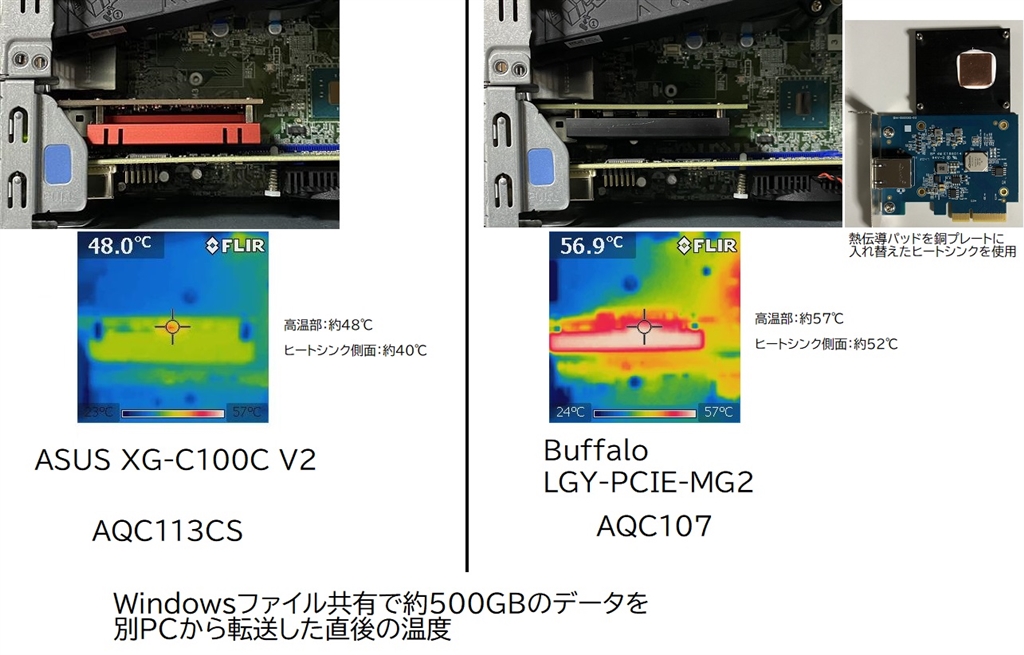
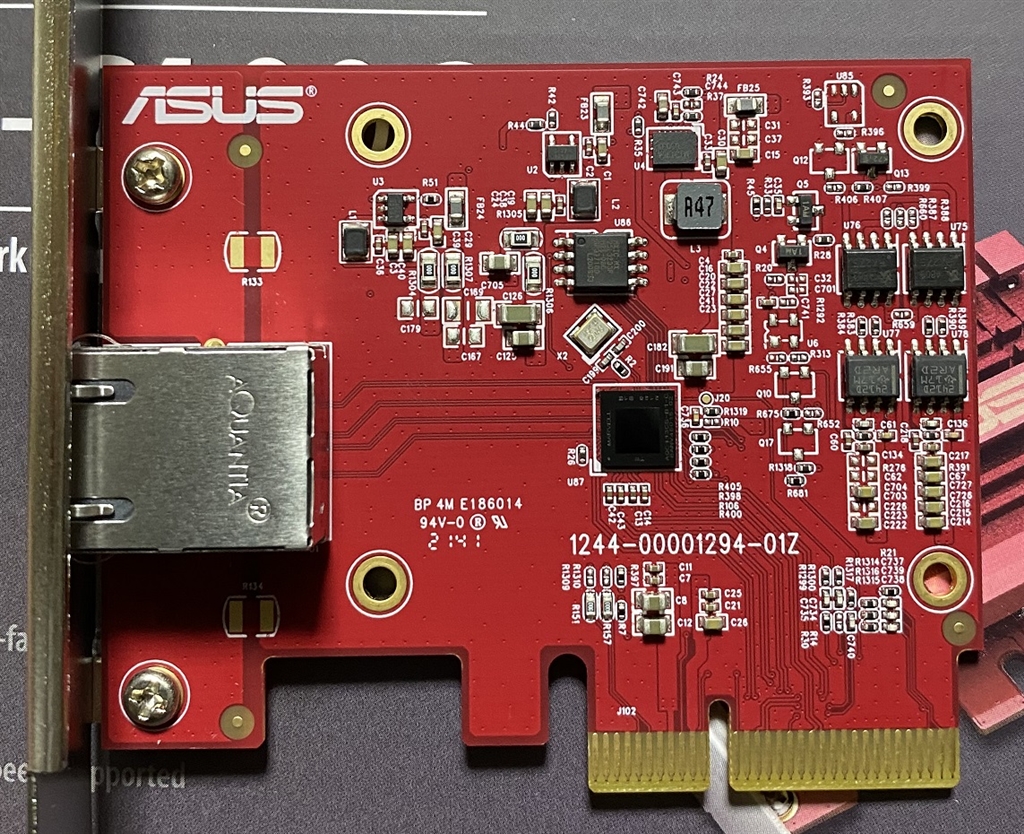
confirm asus xg-c100c v2 uses the updated AQC113CS, that apple uses in new mac. it is cooler and can run pcie4x1 or pcie3x2

A cheaper alternative to tplink x401 for pc bros

https://bbs.kakaku.com/bbs/K0001019118/#24567179

3649071_m.jpg
3648836_m.jpg
 

xiaofan

High Supremacy Member
Joined
Sep 16, 2018
Messages
32,706
Reaction score
10,235
Sorry, OT a little. Anyone using Netgear router or mesh? Probably not one of the more common brands in SG but is it any good?

Am looking at Orbi 970 and specs wise looks pretty decent.

https://netgearstore.sg/collections...i-7-mesh-system-2-pack-black-be27000-rbe972sb

Plus if you buy from Kaira it comes with free installation which otherwise costs $120 is you buy from elsewhere then book installation from Netgear website cos they outsource to Kaira.

I guess for you experts its pointless but for a noob like me, hardware installation especially if free is worth it. 😅

Netgear is a top brand for consumer routers. Netgear Orbi is one of the best consumer mesh solutions you can buy. But it is expensive.

Actually I have recommended the paid installation to a few users in the forum in the past (usually for those with multiple storey housing type) to go with RBK753 or RBK853. The installation charge of S$120 is very reasonable.
https://netgearstore.sg/products/on-site-installation-service-in-person

But the mesh solution is quite expensive, especially higher end triband ones, like Orbi 850/860 (WiFi 6). Orbi 960 (quadband WiFi 6E) is even more expensive. Now they offer free installaton if you buy three or four pack of Orbi 860/960.
https://netgearstore.sg/collections/netgear-promotion

Orbi 970 is a very high end quad-band WiFi 7 mesh solution. If you are willing to pay, just go ahead.
Two pack at S$2799 (free on-site installation)
Three pack at S$3799 (free on-site installation)
https://netgearstore.sg/products/orbi-970-quad-band-wifi-7-mesh-system-2-pack-black-be27000-rbe972sb

Dongknows review:
https://dongknows.com/netgear-orbi-970-series-wi-fi-7-mesh-review/

Dongknows article of Netgear Orbi in general: not a cost effective choice if you can use Ethernet Backhaul (with LAN ports in the rooms).
https://dongknows.com/netgear-orbi-overview/
 
Last edited:

Apparatus

Great Supremacy Member
Joined
May 27, 2005
Messages
55,754
Reaction score
12,476
NETGEAR Orbi 970 WiFi 7 quad band 27Gbps 2.4/5-1/5-2/6. 2 units for S$2799

TP LINK DECO BE95 WiFi 7 quad band 33Gbps 2.4/5/6-1/6-2. Price is US$1000 for 2 units on amazon which is much less than Orbi 970 2 units
 
Last edited:

limcc

Supremacy Member
Joined
Jan 1, 2000
Messages
6,561
Reaction score
203
confirm asus xg-c100c v2 uses the updated AQC113CS, that apple uses in new mac. it is cooler and can run pcie4x1 or pcie3x2

A cheaper alternative to tplink x401 for pc bros

https://bbs.kakaku.com/bbs/K0001019118/#24567179

3649071_m.jpg
3648836_m.jpg
Genuinely asking, how is this a cheaper alternative when TP Link TX-401 can be bought for S$80++, sometime S$70+?

https://www.amazon.sg/TP-Link-10Gbps-Adapter-Network-TX401/dp/B08GFGG888?th=1

I'm almost sure the TX-401 I bought from Amazon.sg was a lemon cause it always cause issue when I inserted to system--2 systems. The intel X540s from Ali are causing the systems to warm up and I actually attached a 40mm fan to disperse the heat. Really feel like the X99 system I used to transcode video, not pleasant in this heat.

Not going for the overprice TB dongle, now is searching for alternative below S$100.
 

kimsix

Arch-Supremacy Member
Joined
Jan 6, 2009
Messages
19,455
Reaction score
9,438
Genuinely asking, how is this a cheaper alternative when TP Link TX-401 can be bought for S$80++, sometime S$70+?

https://www.amazon.sg/TP-Link-10Gbps-Adapter-Network-TX401/dp/B08GFGG888?th=1

I'm almost sure the TX-401 I bought from Amazon.sg was a lemon cause it always cause issue when I inserted to system--2 systems. The intel X540s from Ali are causing the systems to warm up and I actually attached a 40mm fan to disperse the heat. Really feel like the X99 system I used to transcode video, not pleasant in this heat.

Not going for the overprice TB dongle, now is searching for alternative below S$100.

local 3 year warranty, with coupons can get about $110 the asus one loh.
 

Singrish

Senior Member
Joined
Jul 12, 2020
Messages
1,666
Reaction score
304
Netgear is a top brand for consumer routers. Netgear Orbi is one of the best consumer mesh solutions you can buy. But it is expensive.

Actually I have recommended the paid installation to a few users in the forum in the past (usually for those with multiple storey housing type) to go with RBK753 or RBK853. The installation charge of S$120 is very reasonable.
https://netgearstore.sg/products/on-site-installation-service-in-person

But the mesh solution is quite expensive, especially higher end triband ones, like Orbi 850/860 (WiFi 6). Orbi 960 (quadband WiFi 6E) is even more expensive. Now they offer free installaton if you buy three or four pack of Orbi 860/960.
https://netgearstore.sg/collections/netgear-promotion

Orbi 970 is a very high end quad-band WiFi 7 mesh solution. If you are willing to pay, just go ahead.
Two pack at S$2799 (free on-site installation)
Three pack at S$3799 (free on-site installation)
https://netgearstore.sg/products/orbi-970-quad-band-wifi-7-mesh-system-2-pack-black-be27000-rbe972sb

Dongknows review:
https://dongknows.com/netgear-orbi-970-series-wi-fi-7-mesh-review/

Dongknows article of Netgear Orbi in general: not a cost effective choice if you can use Ethernet Backhaul (with LAN ports in the rooms).
https://dongknows.com/netgear-orbi-overview/
Donk not impressed 😅
 

Singrish

Senior Member
Joined
Jul 12, 2020
Messages
1,666
Reaction score
304
NETGEAR Orbi 970 WiFi 7 quad band 27Gbps 2.4/5-1/5-2/6. 2 units for S$2799

TP LINK DECO BE95 WiFi 7 quad band 33Gbps 2.4/5/6-1/6-2. Price is US$1000 for 2 units on amazon which is much less than Orbi 970 2 units
Based on reviews BE95 & 85 seem to have noisy fans. Reviewers also like not impressed by the lack of options under web UI compared to Deco (comparing TPLink to TP lah).

Guess i’ll wait till Asus ZenWiFi BQ16 Pro arrives in SG.

https://www.asus.com/networking-iot...m/zenwifi-wifi-systems/asus-zenwifi-bq16-pro/

Will not be cheap but cheaper than me getting two Asus wifi 7 routers to link as AIMesh. Less hassle setting up too. Wonder if Asiaone’s prices are accurate.

https://www.asiaone.com/business/as...fi-7-routers-rog-rapture-gt-be98-zenwifi-bq16
 
Last edited:

omelet

Senior Member
Joined
Dec 9, 2006
Messages
2,252
Reaction score
348
confirm asus xg-c100c v2 uses the updated AQC113CS, that apple uses in new mac. it is cooler and can run pcie4x1 or pcie3x2

A cheaper alternative to tplink x401 for pc bros

https://bbs.kakaku.com/bbs/K0001019118/#24567179

3649071_m.jpg
3648836_m.jpg


During my search for 10G NIC, I came across quite a few post around online forums...and way more on reddit on Aquantia/Marvell card...
On the v2, there seem to be multiple variant and some seem to have more issue.
Asus website don't even provide firmware updates for the V2.
https://rog-forum.asus.com/t5/gamin...etection-on-reboots-amp-cold-boots/m-p/949628

The original AQC107 has actually had firmware update which fixed the stability problem.
Asus XG-C100C (AQC107) seem to be no longer sold. So no longer an option.
I ended up getting the Tp-Link TX401 to get AQC107, and thus able to at least download drivers and firmware update from Marvell website.

The Tp-Link out of the box (with latest drivers from Marvell website instead of TP-Link) had stability issue, it would randomly start slowing down and then disconnect itself. Then I had to reboot the system to get back the connectivity.
Flashing the firmware to the latest from Marvell website, and downloading the latest driver from Microsoft Catalog, then disabling Recv Segment Coalescence both IPv4/IPv6 as per some reddit post actually fixed the connectivity issue. But the NIC will still randomly slow down, from 8.2Gbps to 4~5Gbps. A reboot will typically solve the issue.

So after some frustration, I bought a NIC with Intel X550-T2. Out of the box, it works correctly....full stop. :ROFLMAO:
Ok...I updated the driver from Intel website later, but that's all you need to do.
 

Henry Ng

Arch-Supremacy Member
Joined
Aug 9, 2011
Messages
17,085
Reaction score
981
A quick search online, i noticed that in Hong Kong not every house is fibre ready so ISP is offering 5G unlimited data for home use and it is very very cheap only.
 

Apparatus

Great Supremacy Member
Joined
May 27, 2005
Messages
55,754
Reaction score
12,476
Just a quick check

Is SH fiber broadband down now? Woodlands side no have leh. WiFi have. Reboot the router still the same.
 

Apparatus

Great Supremacy Member
Joined
May 27, 2005
Messages
55,754
Reaction score
12,476
Shut down laptop and reboot and now back to normal liao. I was on broadband when suddenly it just dropped with no internet connection. Thought my 10G OWC adapter kaput ah

Did a speedtest

20240407-102209.jpg
 

Henry Ng

Arch-Supremacy Member
Joined
Aug 9, 2011
Messages
17,085
Reaction score
981
Shut down laptop and reboot and now back to normal liao. I was on broadband when suddenly it just dropped with no internet connection. Thought my 10G OWC adapter kaput ah

Did a speedtest

20240407-102209.jpg
My OWC 10Gbps adaptor already spoilt with no connection at all so i sent it back to the seller who issued me a receipt and said he need to sent it to Taiwan to claim the warranty. Now i am using Wifi 6 la. Nokia ONR wifi also can have issue and i just restart the Nokia ONR la. Lousy ONR la. I feedback to SH backend la. 10Gbps already so much issues and can not do it properly so impossible to launch 25Gbps in future for sure. In HK, HKBN still using 1Gbps and 2 X 1Gbps only. Not yet trial for 10Gbps plan. Read that most home users in HK are still on 1G or 2G internet only.

https://www.hkbn.net/personal/broadband/en/
https://www.probroadbandprice.com/zh-hant/boardband/

Some are on 2.5Gbps plan.

https://www.hgcbroadband.com/en/broadband/2500m-broadband
 
Last edited:

Apparatus

Great Supremacy Member
Joined
May 27, 2005
Messages
55,754
Reaction score
12,476
My OWC 10Gbps adaptor already spoilt with no connection at all so i sent it back to the seller who issued me a receipt and said he need to sent it to Taiwan to claim the warranty. Now i am using Wifi 6 la. Nokia ONR wifi also can have issue and i just restart the Nokia ONR la. Lousy ONR la. I feedback to SH backend la. 10Gbps already so much issues and can not do it properly so impossible to launch 25Gbps in future for sure. In HK, HKBN still using 1Gbps and 2 X 1Gbps only. Not yet trial for 10Gbps plan. Read that most home users in HK are still on 1G or 2G internet only.

https://www.hkbn.net/personal/broadband/en/
https://www.probroadbandprice.com/zh-hant/boardband/

Some are on 2.5Gbps plan.

https://www.hgcbroadband.com/en/broadband/2500m-broadband

Did you cool the OWC 10Gbps adaptor when in use like on the aircon or have a small fan to cool it?

10G devices like switch, ethernet adapter, hub etc and M.2 NVMe USB4/TB4 SSD enclosure can become hot to touch if no built-in fan. It's like to keep the internal temp of your PC down to avoid parts early breakdown and the system efficient

Running devices hot can shorten their lives
 
Last edited:

Henry Ng

Arch-Supremacy Member
Joined
Aug 9, 2011
Messages
17,085
Reaction score
981
Did you cool the OWC 10Gbps adaptor when in use like on the aircon or have a small fan to cool it?

10G devices like switch, ethernet adapter, hub etc and M.2 NVMe USB4/TB4 SSD enclosure can become hot to touch if no built-in fan. It's like to keep the internal temp of your PC down to avoid parts early breakdown and the system efficient

Running devices hot can shorten their lives
i see.
 

boobip

Senior Member
Joined
May 8, 2003
Messages
1,348
Reaction score
92
Sorry, OT a little. Anyone using Netgear router or mesh? Probably not one of the more common brands in SG but is it any good?

Am looking at Orbi 970 and specs wise looks pretty decent.

https://netgearstore.sg/collections...i-7-mesh-system-2-pack-black-be27000-rbe972sb

Plus if you buy from Kaira it comes with free installation which otherwise costs $120 is you buy from elsewhere then book installation from Netgear website cos they outsource to Kaira.

I guess for you experts its pointless but for a noob like me, hardware installation especially if free is worth it. 😅
LOL, HWZ forumers are pro-Asus, so not much literature u can find here. Google SNB forums for Orbi if u need to do your due diligence

I've used 750 and then upgraded to 850 before. One issue with Orbi is that u can't split SSIDs into 5Ghz and 2.4Ghz, so power users typically shun Orbis. Other gripes are that standard router features like network security, parental controls comes as subscription mode after the free trial ends and sometimes firmware updates screw up the entire system lol (if u are the set it and forget about it kind of user, then no issue. Just ask the netgear folks to disable auto-updates when setting up your system). I do find that, if going purely by wireless backhaul (i.e. no ethernet cable connecting between router and satellite), speeds at the Orbi Satellite nodes are far superior to both TP-Link mesh (used Deco X60 for a week, performance wasn't that great) and Aimesh (Asus XT8 was disappointing). Roaming algorithm between nodes is very well implemented with Netgear mesh, U'll hardly feel any interruptions when your device connects from one node to the other, no need for users to set anything to optimise it.

IMO - if money is no object, and u like the simplicity of the system, I'd say go for it.

EDIT: PS - Before you commit, please call up Kaira Technology and ask if they have the all black 970. Plastics used to house Orbis are really low grade, the white ones turn yellow in no time.... that's why Asus is clever, all black except for Special editions lol ;)

EDIT 2: One more thing to add - Orbi's radios are much stronger than Asus and penetrate concrete walls much better. When I was setting up Asus AI Mesh in my brother's place with his old Orbi 350 still in play, the signal strength from client device to satellite 1 room away (door closed) is 10dBm stronger on the Orbi than the Asus AX86 Pro (measured 3 times across a 2 hour span in the afternoon on Wifi Analyzer). Hence this is why Orbi works better on wireless backhaul. There is a caveat though... with better wireless backhaul performance vs TP-Link or Asus, means their radios work harder and potentially burn out faster than competitors. Personally, I have used Orbis for max of 2 years and have never had any major problems with them. However, if u see your satellite constantly disconnecting from the Router within the 3 year warranty period, I'd suggest immediately calling up Kaira to get the whole set changed if possible

EDIT 3: And please instruct the Installers to set either Channel 1 or 11 on the 2.4Ghz band ONLY. Otherwise 2.4Ghz is unusable with the congestion around, when the Orbi goes crazy one day and switches some of your devices to use 2.4Ghz. U'll thank me.

 
Last edited:

Apparatus

Great Supremacy Member
Joined
May 27, 2005
Messages
55,754
Reaction score
12,476
I see recommendation of setting 20MHz for the 2.4GHz band. The reason is to avoid interference by other neighboring 2.4GHz bands

Now the eb810v router has this spec for the 2.4Ghz band with EHT40 as below

20240409-005359.jpg


So should set the 2.4GHz band to 40MHz to take advantage of the EHT or set to 20MHz? If set to 20MHz then what is the purpose of EHT40?
 
Last edited:
Important Forum Advisory Note
This forum is moderated by volunteer moderators who will react only to members' feedback on posts. Moderators are not employees or representatives of HWZ Forums. Forum members and moderators are responsible for their own posts. Please refer to our Community Guidelines and Standards and Terms and Conditions for more information.
Top