Firewalla Gold Pro: 10G Cyber Security Firewall & Router Protecting Your Family and Business

hwzlite

Master Member
Joined
Jan 27, 2007
Messages
3,054
Reaction score
3,185

zhanhuju

Member
Joined
Dec 30, 2022
Messages
467
Reaction score
481
this is just DNS blocking of known malicious host names, anyone can implement using pihole.

IDS/IPS requires fine tuning and solutions that does not require such efforts will probably be ineffective.

So it's all a whole bunch of hot air, except for the DNS blocking, which you can retroactively add to your network with a little bit of work.
It is normal a lot of people don't know technology just see marketing buzzwords and buy into nonsense.
Let me just say this, EVEN without SSL MITM just plain old unencrypted TCP/UDP streams, how difficult is it to inspect the data segments and reassemble them to scan for malware payloads and block the traffic before the packet reaches the client?
If a generic low power intel box without DPUs can do this, then I must as well find a new job.
This is just some generic Intel box sold for $100 dollars on taobao marked by to $800 to cheat people who don't know better.

This DPI = inspect IP + Port only like any other firewall/router
 

GlassDoor

Member
Joined
Mar 29, 2021
Messages
408
Reaction score
718
these days.. not difficult to inspect packet headers at wire speed..
but DPI/IPS/IDS are all heavily abused marketing terms that probably the marketers don't understand :D

for those interested with IPS/IDS start your reading from snort or suricata
and it's not a enable and forget...
 

xiaofan

High Supremacy Member
Joined
Sep 16, 2018
Messages
32,381
Reaction score
9,420
It is normal a lot of people don't know technology just see marketing buzzwords and buy into nonsense.
Let me just say this, EVEN without SSL MITM just plain old unencrypted TCP/UDP streams, how difficult is it to inspect the data segments and reassemble them to scan for malware payloads and block the traffic before the packet reaches the client?
If a generic low power intel box without DPUs can do this, then I must as well find a new job.
This is just some generic Intel box sold for $100 dollars on taobao marked by to $800 to cheat people who don't know better.

This DPI = inspect IP + Port only like any other firewall/router

Interesting info.

BTW, @Mach3.2's comment is a reply to Asus AIprotection Pro mentioned by @Henry Ng, but the comments may be applicable to Firewalla Gold Pro as well.

Like ASUS Ai-Protection Pro.

this is just DNS blocking of known malicious host names, anyone can implement using pihole.

IDS/IPS requires fine tuning and solutions that does not require such efforts will probably be ineffective.

So it's all a whole bunch of hot air, except for the DNS blocking, which you can retroactively add to your network with a little bit of work.

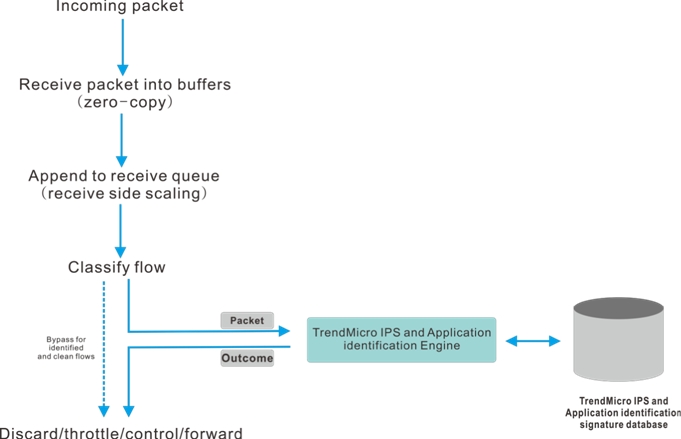
I am not using Asus AIProtection Pro myself. Asus AI Protection Pro is from Trend Micro. Asus also uses Trend Micro's DPI engine for the implementation of Asus Adaptive QoS.

So I think Asus AIprotection Pro is Cloud Based and may not need that high performance local CPU on the router.

To test, I just enabled both Asus AIprotection Pro and Asus Adaptive QoS on my Asus RT-AX86U router a few days ago, and I do not see much extra loading. It seems to have no penatlity for WAN Speed either.

+++++++++++++++++++++++++++
Reference:

Asus AIprotection:
https://www.asus.com/sg/content/aiprotection/
https://www.asus.com/sg/support/faq/1012070/

731e0919-a641-4691-b1cf-4a9a89b022cb.jpg


04d459e7-307e-4fa1-a331-055c372db1a1.jpg


Older info From RMerlin about Asus AIprotection Pro:
(Rmerlin ismain developer of Asuswrt-Merlin alternative FW)
https://www.snbforums.com/threads/trend-micro-dpi-engine-on-asus-router.28444/

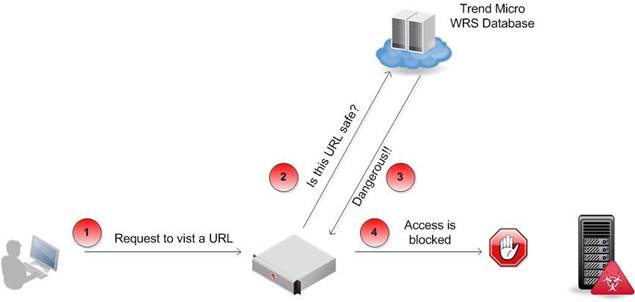
It's part local, part-cloud based. Protocol and app identification for instance is local. Malicious website detection probably connects online to Trend Micro's WRS (Web Reputation Service).

The engine does not do file scanning, so it does not protect you against downloaded malicious files.

The DPI engine only scans a few bytes at the start of a connection.

The engine itself is part of the firmware.


From Asus Taiwan staff in the above thread.
  • DPI engine is in router.
  • WRS server is in Cloud Server, not only URL filter, it's URL content filter.
  • We just help to protect, not anti-virus, so we can't scan any malware in your pc or router or downloading file.
  • DPI engine won't effect performance in BRCM high-end models so far.
From RMerlin about Asus Adaptive QoS (main developer of Asuswrt-Merlin alternative FW)
https://www.snbforums.com/threads/why-does-trend-micro-need-to-collect-data-for-adaptive-qos.56658/
Adaptive QoS uses the Trend Micro DPI engine to analyze traffic type, based on signature files also provided by Trend Micro. This is how it's able to automatically classify traffic.
 
Last edited:

xiaofan

High Supremacy Member
Joined
Sep 16, 2018
Messages
32,381
Reaction score
9,420
As for the effectiveness of AI Protection Pro, I am not sure. I use Adguard Home DNS (or Pi-Hole) and I do not see anything from the logs of Asus AIProtection Pro. I have enabled on and off for testing purpose since Dec 2023 and it catches nothing.

fkCr60e.png


I tend to think it is not that effective if you have things like Adguard Home or Pi-Hole already and use common sense when accessing the internet (unfortunately many people do not have the common sense). But if not, it may still be useful for average users.

Reference: it can not intercept encrypted HTTPS traffic and VPN traffic
https://www.snbforums.com/threads/ai-protection-and-other-privacy-policies.80704/

Comments from Tech9:
AiProtection does nothing, if the traffic is encrypted. In business firewalls you have to run SSL proxy to decrypt HTTPS traffic and then run it through Suricata/Snort common IDS/IPS. Otherwise IDS/IPS also does nothing with encrypted traffic. And the above approach has some issues and limitations. Good thing when you run Suricata/Snort is it runs locally without sharing data to 3rd party company. AiProtection is service for data. Not sure if Asus pays TrendMicro or TrendMicro pays Asus to harvest data from router users. Free for the life of the product? Sure!

Testing Video
 

xiaofan

High Supremacy Member
Joined
Sep 16, 2018
Messages
32,381
Reaction score
9,420
these days.. not difficult to inspect packet headers at wire speed..
but DPI/IPS/IDS are all heavily abused marketing terms that probably the marketers don't understand :D

for those interested with IPS/IDS start your reading from snort or suricata
and it's not a enable and forget...

This is in line with the comment from @Mach3.2 that "IDS/IPS requires fine tuning and solutions that does not require such efforts will probably be ineffective."

This is also in line with the comment mentioned in the SNB forum.

So most likely the DPI/IPS/IDS thingy from Firewalla will not be that good either.

Can we say the same thing for DPI/IPS/IDS with Ubiquiti gatways like UDM PRO (3.5Gbps), UDM SE (3.5Gbps), Unifi Gateway Ultra (1Gbps)?


Reference: AIProtection Pro can not intercept encrypted HTTPS traffic and VPN traffic
https://www.snbforums.com/threads/ai-protection-and-other-privacy-policies.80704/

Comments from Tech9:
AiProtection does nothing, if the traffic is encrypted. In business firewalls you have to run SSL proxy to decrypt HTTPS traffic and then run it through Suricata/Snort common IDS/IPS. Otherwise IDS/IPS also does nothing with encrypted traffic. And the above approach has some issues and limitations. Good thing when you run Suricata/Snort is it runs locally without sharing data to 3rd party company. AiProtection is service for data. Not sure if Asus pays TrendMicro or TrendMicro pays Asus to harvest data from router users. Free for the life of the product? Sure!
 

xiaofan

High Supremacy Member
Joined
Sep 16, 2018
Messages
32,381
Reaction score
9,420
these days.. not difficult to inspect packet headers at wire speed..
but DPI/IPS/IDS are all heavily abused marketing terms that probably the marketers don't understand :D

for those interested with IPS/IDS start your reading from snort or suricata
and it's not a enable and forget...

BTW, I tend to think snort or suricata is not required for typical home user. Rather simpler stuff like Adguard Home, Pi-hole or pfBlockerNg-devel (if using pfSense), Safe Browsing in Browsers, endpoint protection (eg: Windows Security) are good enough.

Most important is probably basic cybersecurity knowledge and common sense.
https://www.csa.gov.sg/information-for/general-public
 

xiaofan

High Supremacy Member
Joined
Sep 16, 2018
Messages
32,381
Reaction score
9,420
This is in line with the comment from @Mach3.2 that "IDS/IPS requires fine tuning and solutions that does not require such efforts will probably be ineffective."

This is also in line with the comment mentioned in the SNB forum.

Can we say the same thing for DPI/IPS/IDS with Ubiquiti gatways like UDM PRO (3.5Gbps), UDM SE (3.5Gbps), Unifi Gateway Ultra (1Gbps)?

Hmm, Unifi Gateways seem to use Suricata, so it is probably useful for those who want to use the DPI/IPS/IDS feature.

Reference:
https://community.ui.com/questions/...s-on-UDM/2625caa8-22b8-40db-b7ff-570c1d0ec2a6
https://community.ui.com/questions/UDM-Pro-Suricata-version/946225fe-11f1-4af1-8b78-a87fc90f9edf
 
Last edited:

xiaofan

High Supremacy Member
Joined
Sep 16, 2018
Messages
32,381
Reaction score
9,420
This is in line with the comment from @Mach3.2 that "IDS/IPS requires fine tuning and solutions that does not require such efforts will probably be ineffective."

This is also in line with the comment mentioned in the SNB forum.

So most likely the DPI/IPS/IDS thingy from Firewalla will not be that good either.

Maybe it is not so correct to say that but there are limitations with regard to encrypted traffic.

1) Firewalla uses Zeek / Bro. The good thing about Firewalla is that the source codes are available in github. So we can see Zeek mentioned in the codes and pull requests in many places.
https://github.com/firewalla/firewalla
https://github.com/search?q=repo:firewalla/firewalla+zeek&type=code


Firewalla does use Zeek / Bro. This is public information. you can login and do a top ... you will see it running. Zeek is pretty heavy, and it is a pretty good IDS and a solid foundation to work with, and our team developed the IPS part.

2) From the following link:


Firewalla is already doing SNI inspection, this is how we block things like tiktok ... The firewalla can't decrypt https and man in the middle. This involves messing with certificates ...
 

GlassDoor

Member
Joined
Mar 29, 2021
Messages
408
Reaction score
718
when i used to used sophos UTM many year back it used snort...

honestly most users probably don't know/don't care... and for effective IPS/IDS dedicated and capable admins are required.. so take take consumer DPI/IPS/IDS that's set and forget with a bowl of salt.

on asuswrt... i bet most don't know that even if auto update firmware is disable, asus can bypass and update firmware.. so my question is what else are they not telling you? :D

and if you think running merlin's firmware can protect privacy... surprise .. surprise... it's hardcoded into asus firmware blobs... most of the telemetry, dns probing... all hardcoded!

so if really kiasu.. kiasi... make your wifi router as a dumb passthrough AP device... then again... 99% of enduser will think i am crazy cum stupid.... :D
 

xiaofan

High Supremacy Member
Joined
Sep 16, 2018
Messages
32,381
Reaction score
9,420
All in all, for home users, Firewalla product line may be geared toward a niche market who want something better than consumer routers like Asus/Netgear/Linksys/TP-Link, and yet do not want to play with more complex stuff like OpenWRT/pfSense/OPNsense.

But it is interesting to see why the targetted customers do not go with Unifi gateways like UDM, UDM Pro or UDM SE and yet to go with FIrewalla Purple/Gold/Gold Pro.
 

TanKianW

Supremacy Member
Joined
Apr 21, 2005
Messages
6,704
Reaction score
3,345
Beryl AX (GL-MT3000):

Pros:


  • Faster WiFi: Supports faster WiFi speeds on the 5GHz band (2402Mbps vs 1200Mbps on Slate AX).
  • More Storage: Double the internal storage (256MB vs 128MB on Slate AX).
  • Newer Technology: Uses DDR4 memory compared to DDR3L on Slate AX.
  • 2.5 Gigabit Port: Has one 2.5 Gigabit Ethernet port for faster wired connections (although you'd need a compatible network).
  • Smaller & Lighter: More compact and portable design.
Cons:

  • Less Powerful CPU: Dual-core CPU compared to the quad-core in Slate AX, which might affect performance for demanding tasks.
  • No SD Card Slot: Lacks an SD card slot for expandable storage.
  • No EAP Authentication: Doesn't support EAP authentication used in some university and public Wi-Fi networks.
Slate AX (GL-AXT1800):

Pros:


  • More Powerful CPU: Quad-core CPU for potentially better performance with VPNs and other CPU-intensive applications.
  • SD Card Slot: Allows for expandable storage using a microSD card.
  • EAP Authentication Support: Connects to networks requiring EAP authentication.
  • More Ethernet Ports: Three Gigabit Ethernet ports for wired connections.
Cons:

  • Slower WiFi (5GHz): Offers a lower maximum speed on the 5GHz band (1200Mbps).
  • Older Memory: Uses DDR3L memory compared to the newer DDR4 in Beryl AX.
  • Larger & Heavier: Less portable due to its bigger size and weight.
  • No 2.5 Gigabit Port: Limited to Gigabit Ethernet ports.
Cost:

Prices can fluctuate, but generally, the Beryl AX (GL-MT3000) is slightly more expensive than the Slate AX (GL-AXT1800).

Choosing the Right Router:

  • For speed: Beryl AX wins with faster WiFi and a 2.5 Gigabit port (if your network supports it).
  • For power users: Slate AX might be better with its quad-core CPU and expandable storage.
  • For travel: Beryl AX is smaller and lighter for portability.
  • For university/EAP networks: Slate AX is the only option with EAP authentication support.
Ultimately, the best choice depends on your specific needs and priorities. Consider what features are most important to you and how you plan to use the router.

Both cmi. :ROFLMAO: My customised last gen Beryl MT1300 with expanded storage on TF card, Wireguard, Tailscale, SQM, AdGuard Home, VLANs wins both of them hands down. That is the beauty of highly configurable firmware on a router. Your imagination is the limit but will also be hit with the reality of the HW limitations some where down the road. But it does reward those who loves to tinker (myself included) with much more features on a tiny body.

Jokes aside. I will think that most who use the portable routers are likely using it for small WiFi coverage area where WiFi 5 should still be sufficient for mobile devices and likely do not require 2.5G too where most will be connecting to a laptop or simple desktop which came equipped with 1G NIC. If using 4G network/WiFi repeater, your bottleneck will still be on your mobile/wireless network.

Unless you using it as a home AP and do not like spider/monster like routers as APs, then I guess getting their discrete looking AX router makes lots of sense. If for travel and small hostel, their AC range is more than sufficient for the use case. But if there is not much difference in price, no harm getting the AX range. Personally, I will prefer the Slate AX if my Beryl MT1300 uplorry.​
 

xiaofan

High Supremacy Member
Joined
Sep 16, 2018
Messages
32,381
Reaction score
9,420

xiaofan

High Supremacy Member
Joined
Sep 16, 2018
Messages
32,381
Reaction score
9,420
If we just compare the pricing, I tend to think Firewalla Gold Pro is quite over-priced, UDM SE seems to be a better buy (even though it can not do 10Gbps IPS/IDS but rather only 3.5Gbps). Of course it is cheaper we DIY with pfSense using low power mini PC.

Commercial offering of 10G capable router/firewall at the similar price range or lower: Firewalla Gold Pro at around US$798 [ about S$1077)

Netgeate pfSense Plus powered : Netgate 6100 from US$799
https://www.netgate.com/appliances#compare-products

Ubiquiti UDM-SE: US$499 or S$733.02
https://sg.store.ui.com/sg/en/collections/unifi-dream-machine/products/udm-se

TP-Link ER8411 router: about S$535
https://www.tp-link.com/sg/business-networking/omada-sdn-router/er8411/
https://dynacoretech.com/tp-link-er8411-omada-vpn-router-with-10g-ports-4897098683309

Asus ROG GT-BE98: S$1099 (with quad-band WiFi, probably not a fair comparison)
https://sg.store.asus.com/rog-rapture-gt-be98.html
 

hairymonster

Senior Member
Joined
Jun 16, 2013
Messages
1,308
Reaction score
61
Bro @TanKianW

If I am not mistaken, you enabled the ips/ids capability on your pfsense. Do you spend alot of time on the ips alarms in pfsense? I think, even setting it to balanced policy in suricata will still flag a considerable alarms. What is your advice for home users towards ips/ids.
 

Mach3.2

Great Supremacy Member
Joined
Apr 8, 2011
Messages
72,405
Reaction score
2,466
Bro @TanKianW

If I am not mistaken, you enabled the ips/ids capability on your pfsense. Do you spend alot of time on the ips alarms in pfsense? I think, even setting it to balanced policy in suricata will still flag a considerable alarms. What is your advice for home users towards ips/ids.
set to alert mode and monitor for a few weeks, then slowly start blocking those alerts until things (that matter) break.

Check back everyday. IDS/IPS management is a full time job. :)


Or just turn it off and don't bother, especially in a home setting where you're not hosting anything on the public interwebz.
Use adblockers, selectively run javascript in your browser, and don't anyhow download software.
 

hairymonster

Senior Member
Joined
Jun 16, 2013
Messages
1,308
Reaction score
61
I was contemplating going down the pfsense route with ips and ids enabled. Did that for my parents and I couldn't find time to monitor and be there to resolve problems should any false positives be flagged up. So I turned it off and leaving only pfng blocker enabled.

Also I went with the firewalla pro. Hopefully is not a bad choice :D
 

BradenHeat

Supremacy Member
Joined
Apr 4, 2005
Messages
7,310
Reaction score
1,610
I was contemplating going down the pfsense route with ips and ids enabled. Did that for my parents and I couldn't find time to monitor and be there to resolve problems should any false positives be flagged up. So I turned it off and leaving only pfng blocker enabled.

Also I went with the firewalla pro. Hopefully is not a bad choice :D

it should be doable, but theres a high chance of problems since its prototype ish,

i would still recommend FW only for your own physical enviroment, and well known products like Ubiquiti Unifi, as its more easier to manage
 
Important Forum Advisory Note
This forum is moderated by volunteer moderators who will react only to members' feedback on posts. Moderators are not employees or representatives of HWZ. Forum members and moderators are responsible for their own posts.

Please refer to our Community Guidelines and Standards, Terms of Service and Member T&Cs for more information.
Top