

You are using an out of date browser. It may not display this or other websites correctly.
You should upgrade or use an alternative browser.
You should upgrade or use an alternative browser.
ViewQwest Fiber Broadband Official Thread - Part 6
- Thread starter toshiro_sg
- Start date
More options
Who Replied?If you do not want to buy those power hungry 10G NICs (some of them really cheap from Taobao), you can also look at the following 5G NIC from IOcrest.
http://www.iocrest.com/index.php?id=2413
Only RMB 89 plus shipment and GST from Taobao official IOCrest store.
https://detail.tmall.com/item.htm?id=794237745650
【淘宝】https://m.tb.cn/h.g9iJHtaeZ7swqzX?tk=lO5R3daRNtX CZ3452 「乐扩 Pcie单口5G网卡RJ45电口网卡PXE无盘启动电竞游戏网卡有线瑞昱RTL8126芯」
点击链接直接打开 或者 淘宝搜索直接打开
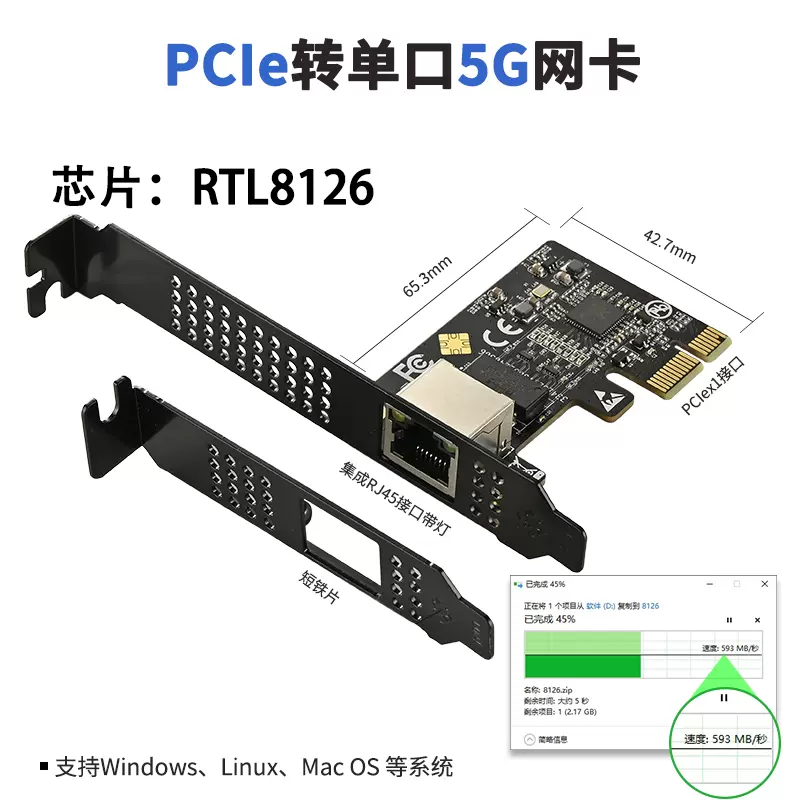
This is a good stop gap solution to 10G nics. Just wondering which of the low cost 10G switches support 5G step down.
- Joined
- Sep 16, 2018
- Messages
- 32,632
- Reaction score
- 10,181
This is a good stop gap solution to 10G nics. Just wondering which of the low cost 10G switches support 5G step down.
Good question.
1. TP-Link China model TL-ST2005 is reasonably priced.
https://www.tp-link.com.cn/product_2848.html?v=detail#tag
5 x 10G/5G/2.5G/1G/1000M/100Mbps RJ45 ports
2. Or the 8-port version TL-ST2008
https://www.tp-link.com.cn/product_2431.html?v=specification#tag
8 x 10G/5G/2.5G/1G/1000M/100Mbps RJ45 ports
3. Taobao pricing for reference only.
https://item.taobao.com/item.htm?spm=a21n57.1.item.8.2898523ctXk7Yi
TL-ST2005 -- RMB 1208.79
TL-ST2008 -- RMB 1607.39
- Joined
- Sep 16, 2018
- Messages
- 32,632
- Reaction score
- 10,181
The service tech did ask me if i want in bridged mode or router mode and use all the port on the ONT which means its possible to be in ONR mode also...
That is interesting.
Let's see if VQ comes out with a FAQ like last time for 1Gbps/2Gbps plan (1Gbps -- can be bridged, 2Gbps -- can not be bridged).
https://viewqwest.com/sg/residential/faq/delivery-and-installation/
Q: Can I use my fibre modem as a bridge?
A: You can use your fibre modem as a bridge.
For the 2Gbps Single Network, the 4-port Fibre modem must act as the primary router. Any other routers you plan to use must be set as an Access Point.
If you wish to bridge the modem and use another router as the primary router, you’ll need to subscribe to 1Gbps Plan.
Good question.
1. TP-Link China model TL-ST2005 is reasonably priced.
https://www.tp-link.com.cn/product_2848.html?v=detail#tag
5 x 10G/5G/2.5G/1G/1000M/100Mbps RJ45 ports
2. Or the 8-port version TL-ST2008
https://www.tp-link.com.cn/product_2431.html?v=specification#tag
8 x 10G/5G/2.5G/1G/1000M/100Mbps RJ45 ports
3. Taobao pricing for reference only.
https://item.taobao.com/item.htm?spm=a21n57.1.item.8.2898523ctXk7Yi
TL-ST2005 -- RMB 1208.79
TL-ST2008 -- RMB 1607.39
Thank you for the recommendation.
For SFP+ switches, does the support for link speed lie with the switch or the transceiver or both?
Still not ideal for online gaming
hi bro , can i know why even with VQ and static IP still not ideal for online gaming?
Im a gamer here that been using VQ for the past 2 years , seems quite ok , but always open to learn more how i can improve my latency or gaming experience!
You guys can always send in a ticket to support with your game server ip for route optimization.
hi bro , can i know why even with VQ and static IP still not ideal for online gaming?
Im a gamer here that been using VQ for the past 2 years , seems quite ok , but always open to learn more how i can improve my latency or gaming experience!
I am guessing his most ideal way is to pull a direct lan cable to the online game servers rack la. that way, no latency issue, no ping issue, no lag issues, and can kill NPCs and DPS better than anyone else.
- Joined
- Sep 16, 2018
- Messages
- 32,632
- Reaction score
- 10,181
Thank you for the recommendation.
For SFP+ switches, does the support for link speed lie with the switch or the transceiver or both?
Not an expert here. Just start to learn about 10G networking recently. I believe it is the SFP+ copper module which decide NBase-T support.
@Mach3.2, please correct me if I am wrong and the SFP+ switch chipset also matters.
I have only seen 2.5G and 10G copper or Optic modules, no 5G modules. So far I have only bought 10Gbe SFP+ modules (optic and copper) and I have no intention to buy the 2.5 modules. I have also two 1G optic modules as well for testing purposes.
So back to the original question, maybe it is not a good idea to get the IOcrest 5Gbe network adapter as there will be concerns of compatibility.
IOcrest has 10G NICs but for sure not the cheapest.
Last edited:

fool1988
Senior Member
- Joined
- Jun 12, 2014
- Messages
- 501
- Reaction score
- 196
Similarly, I recontracted on July 25th, upgrading from a 1Gbps to a 3Gbps plan. I received an acknowledgment email confirming the recontracting details and chose the free weekday installation option without a router. The email indicated that installation would occur within 3-5 working days. Following @xiaofan's advice, I purchased the TF-6000 router, which arrived yesterday. However, I have yet to receive any call from Viewqwest. Additionally, I received an invoice for the 3Gbps plan and another email stating that I recontracted to a 1Gbps plan without a router for 24 months. This is confusing.Mine is out of contract for 1 year lol. I got free weekday installation.
I contacted Viewqwest this morning, and they informed me that their records show I recontracted to a 1Gbps plan instead of the 3Gbps plan. I explained that this is incorrect and provided my acknowledgment email and invoice as proof that I was charged for the 3Gbps plan. They said they would report this issue to their renewal team and get back to me within another 3-5 working days. This is frustrating.
fool1988
Senior Member
- Joined
- Jun 12, 2014
- Messages
- 501
- Reaction score
- 196
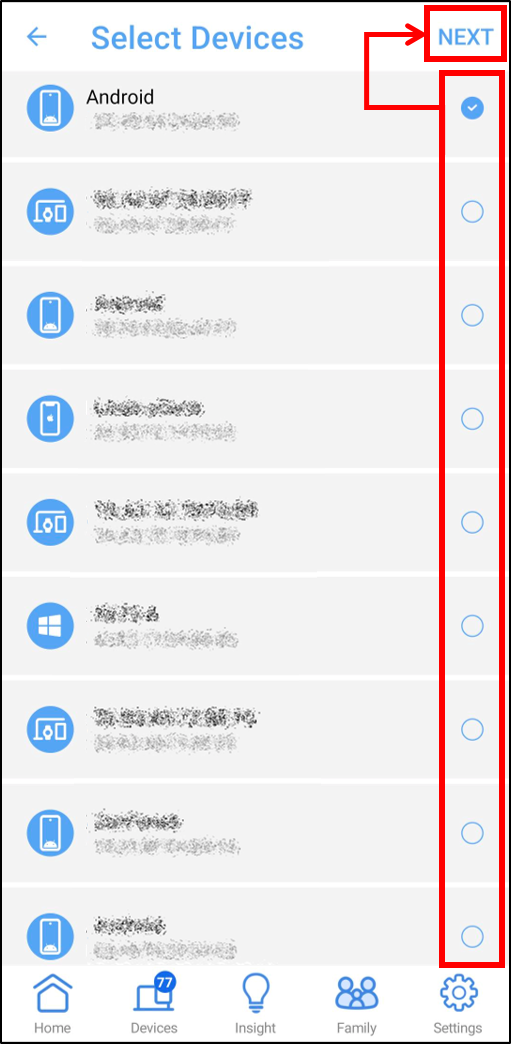
I have google family link installed on my kid's phone as well. But each of them got one computer for those e-learning sake. But I discovered my 9yo son using the google to search for "nakxd photos" after "challenge" by his friends in school... Using the URL filtering on Asus router will block the whole family to access google, so I modified his computer host file to prevent them to browse to google.com until one day they can self-control themselves.I use Google family link for android phone, and Microsoft family safety for windows. The app usage tracking and website approvals work great to me.
I have google family link installed on my kid's phone as well. But each of them got one computer for those e-learning sake. But I discovered my 9yo son using the google to search for "nakxd photos" after "challenge" by his friends in school... Using the URL filtering on Asus router will block the whole family to access google, so I modified his computer host file to prevent them to browse to google.com until one day they can self-control themselves.
Try browser extensions that block access to URLs containing specified keywords, such as: https://www.techlockdown.com/blog/cold-turkey-blocker
Or use software with advanced parental controls like: https://adguard.com/en/article/parental-control-software.html
You can use adsguards like previous post. or you can use Asus Parental controlI have google family link installed on my kid's phone as well. But each of them got one computer for those e-learning sake. But I discovered my 9yo son using the google to search for "nakxd photos" after "challenge" by his friends in school... Using the URL filtering on Asus router will block the whole family to access google, so I modified his computer host file to prevent them to browse to google.com until one day they can self-control themselves.
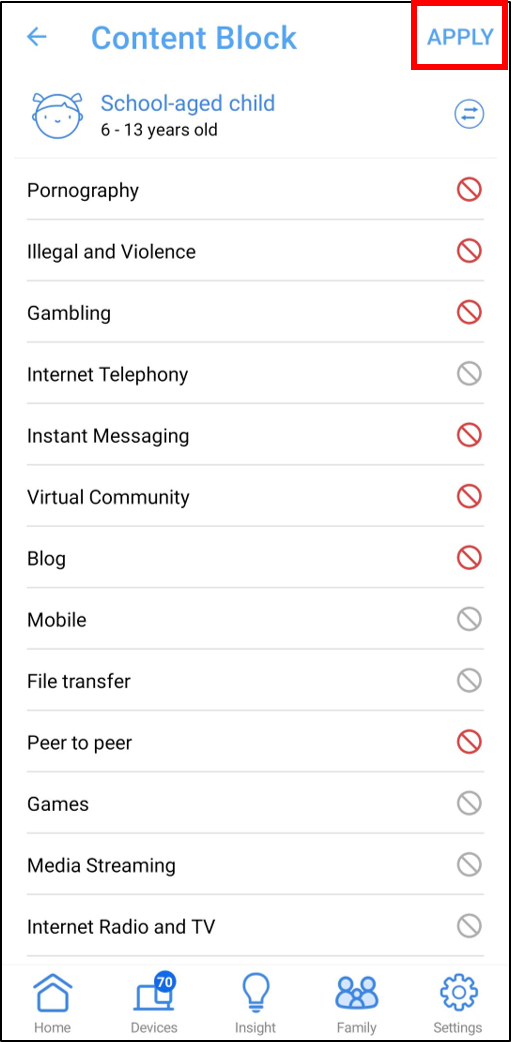
ASUS parental controls, also known as Family controls, can be used to restrict children's internet usage and protect their digital wellbeing. They can be set up using the ASUS Router app and can include features such as:
- Kid-safe preset: Automatically applies age-based filters for inappropriate content and online access time
- Access rules: Configure rules to limit internet access
- Time scheduling: Schedule online and offline hours, or grant extra time as a reward
- Safe browsing: Filter explicit content from search engine results and block specific content
If you no time to explore yourself, just go to https://www.youtube.com/results?search_query=ASUS+parental+controls
Last edited:
fool1988
Senior Member
- Joined
- Jun 12, 2014
- Messages
- 501
- Reaction score
- 196
Browser extension I explorer before, but I think it might be simple for them to figure it out. I prefer some "complicated" way which they don know how to unblock. Rising kids so difficult than networking..Try browser extensions that block access to URLs containing specified keywords, such as: https://www.techlockdown.com/blog/cold-turkey-blocker
Or use software with advanced parental controls like: https://adguard.com/en/article/parental-control-software.html
fool1988
Senior Member
- Joined
- Jun 12, 2014
- Messages
- 501
- Reaction score
- 196
I tried Asus parental control to block adult content. Also tried to use URL filtering or Keyword filtering under Asus FW, but it will applicable to all devices that connected under the same router, then daddy sometime cannot have happy time! HAHA
I tried Asus parental control to block adult content. Also tried to use URL filtering or Keyword filtering under Asus FW, but it will applicable to all devices that connected under the same router, then daddy sometime cannot have happy time! HAHA
Can filter by device la , go look at https://www.asus.com/sg/support/faq/1049408/
Not an expert here. Just start to learn about 10G networking recently. I believe it is the SFP+ copper module which decide NBase-T support.
@Mach3.2, please correct me if I am wrong and the SFP+ switch chipset also matters.
I have only seen 2.5G and 10G copper or Optic modules, no 5G modules. So far I have only bought 10Gbe SFP+ modules (optic and copper) and I have no intention to buy the 2.5 modules. I have also two 1G optic modules as well for testing purposes.
So back to the original question, maybe it is not a good idea to get the IOcrest 5Gbe network adapter as there will be concerns of compatibility.
IOcrest has 10G NICs but for sure not the cheapest.
Could be still worth a try. Maybe pair with the newer Realtek based chipset 10G switches. Value proposition, less heat and those constrained by internal Cat5e cabling.
https://forums.servethehome.com/ind...k-8126-5gb-network-card-a-quick-review.44718/
Normal, i waited for about 2 weeks before they contacted me to arrange the installation.Similarly, I recontracted on July 25th, upgrading from a 1Gbps to a 3Gbps plan. I received an acknowledgment email confirming the recontracting details and chose the free weekday installation option without a router. The email indicated that installation would occur within 3-5 working days. Following @xiaofan's advice, I purchased the TF-6000 router, which arrived yesterday. However, I have yet to receive any call from Viewqwest. Additionally, I received an invoice for the 3Gbps plan and another email stating that I recontracted to a 1Gbps plan without a router for 24 months. This is confusing.
I contacted Viewqwest this morning, and they informed me that their records show I recontracted to a 1Gbps plan instead of the 3Gbps plan. I explained that this is incorrect and provided my acknowledgment email and invoice as proof that I was charged for the 3Gbps plan. They said they would report this issue to their renewal team and get back to me within another 3-5 working days. This is frustrating.
When I login to the VQ portal also showing 1G.
Think abt 3 days after they came to do the installation then the portal status show 3G contract.

morimorimori
Member
- Joined
- Jan 8, 2004
- Messages
- 324
- Reaction score
- 205
Cloudflare dns has an adult site block if you want to try.I tried Asus parental control to block adult content. Also tried to use URL filtering or Keyword filtering under Asus FW, but it will applicable to all devices that connected under the same router, then daddy sometime cannot have happy time! HAHA
Malware Blocking Only
Primary DNS: 1.1.1.2
Secondary DNS: 1.0.0.2
Malware and Adult Content
Primary DNS: 1.1.1.3
Secondary DNS: 1.0.0.3
- Joined
- Sep 16, 2018
- Messages
- 32,632
- Reaction score
- 10,181
Cloudflare dns has an adult site block if you want to try.
Malware Blocking Only
Primary DNS: 1.1.1.2
Secondary DNS: 1.0.0.2
Malware and Adult Content
Primary DNS: 1.1.1.3
Secondary DNS: 1.0.0.3
This is my preferred DNS sever to use (Malware and Adult Content for family).
More about DNS based security, including Pi-hole and Adguard Home, along with other security related topics
https://forums.hardwarezone.com.sg/...ated-offering-dns-for-security.6938654/page-3

bomberman
Arch-Supremacy Member
- Joined
- Jan 1, 2000
- Messages
- 10,495
- Reaction score
- 12
i've also recently recontracted from 1GBps to 3Gbps..
the invoice i've got is also showing 1GBps. not sure why.
but tech support contacted me to arrange appt to change modem. interestingly i have just changed the modem to the new fibrehome one, ask the tech support. they just say they are told to change mine, so they have to execute the job. strange
the invoice i've got is also showing 1GBps. not sure why.
but tech support contacted me to arrange appt to change modem. interestingly i have just changed the modem to the new fibrehome one, ask the tech support. they just say they are told to change mine, so they have to execute the job. strange
Important Forum Advisory Note
This forum is moderated by volunteer moderators who will react only to members' feedback on posts. Moderators are not employees or representatives of HWZ Forums. Forum members and moderators are responsible for their own posts.
Please refer to our Community Guidelines and Standards and Terms and Conditions for more information.
