Starhub UltraSpeed 3Gbps/5Gbps/10Gbps plans

Henry Ng

Arch-Supremacy Member
Joined
Aug 9, 2011
Messages
17,072
Reaction score
977
Most of TP-Link networking products are well priced for the segment they target, except for the polishing of the UI/UX on some aspects (mainly for power users), very unlikely they would need to "fudge" the review to get a positive spin.
Agree. I think my 810 is very good.
 

tsammyc

Member
Joined
Mar 29, 2002
Messages
271
Reaction score
146
TP Link prices, to some extent, according to their costs. If they are using Qualcomms expensive platform such as Networking Pro 1220 Platform, which I think is in the Deco BE85, then it will be dramatically more expensive than the HU710, that is on their Immersive Home 326 Platform. For small network environments, like a home, on common clients, the WiFi speeds will be similar. The distance and range of the router likely depends not on the CPU but the WiFi chip. More powerful CPUs handle things like VPNs, multiple users etc. better. TP Link's cheapest WiFi 7 router, the BE230, is on a Broadcom platform, but it happily communicates with the HU710 at over 2Gbps

 

halocast

Great Supremacy Member
Joined
Feb 19, 2005
Messages
57,689
Reaction score
1,430
Woohoo! 🎉 You’re as excited as we are! Yes, the Flint 3 (GL-BE9300) is gearing up to launch in Q2 2025 – mark your calendars! 📅 Want to be the first to know all the juicy details? 📨 Subscribe to our email updates here: https://www.gl-inet.com/products/gl-be9300/ and stay in the loop. 🚀

Coming :o
 

williamljm

Junior Member
Joined
Dec 30, 2011
Messages
22
Reaction score
8
Hmm, you mentioned RBR/RBS852 before (triband WiFi 6), that is totally different from RBR50/RBS50 (triband AC WiFi).

I tend to think three units of Asus ZenWiFi BQ16 should be good enough. I will actually suggest the following cheaper combinations.
1) Asus ROG GT-BE98 + two Asus ZenWiFi BT10 (one BT10 will be limited to 2.5Gbps)
2) Asus ZenWiFi BQ16 + two Asus ZenWiFi BT10 (one BT10 will be limited to 1Gbps)

M1 users are dumping Asus ZenWiFi BT10 at about S$900 for two units.

You can always add 10G switch in the future to make the second ZenWiFi BT10 to use 10G connection as well.
Thanks for the suggestion. Unfortunately I already have the 2xBQ16 in my storeroom now (ordered on Lazada 12.12).
over the next few days I plan to try a few variations to see if 2xBQ16 is sufficient wifi coverage across the :
1. Keep main BQ16 router in DB and satellite BQ16 in master bedroom via Wired backhaul.
2. Move main BQ16 router to Living room and satellite in Master Bedroom via Wireless backhaul.

if both these options don’t provide solid Wifi coverage then I may need to get a 2nd satellite, I suppose adding a single unit of BT10 should suffice since it will be wireless backhaul?
 

williamljm

Junior Member
Joined
Dec 30, 2011
Messages
22
Reaction score
8
Of course but i think there is power point as the person say do not want to put the router on the floor but no desk there. Such small book selve is very cheap and put some books there.
Thanks for the rec, but placing a small book shelf there is not going to get support from my Boss at home… aesthetics etc. :D

Have to see if I can find a way to run the LAN and power cable and hide it somewhere…
 

xiaofan

High Supremacy Member
Joined
Sep 16, 2018
Messages
32,484
Reaction score
9,652
Thanks for the suggestion. Unfortunately I already have the 2xBQ16 in my storeroom now (ordered on Lazada 12.12).
over the next few days I plan to try a few variations to see if 2xBQ16 is sufficient wifi coverage across the :
1. Keep main BQ16 router in DB and satellite BQ16 in master bedroom via Wired backhaul.
2. Move main BQ16 router to Living room and satellite in Master Bedroom via Wireless backhaul.

if both these options don’t provide solid Wifi coverage then I may need to get a 2nd satellite, I suppose adding a single unit of BT10 should suffice since it will be wireless backhaul?

I tend to think Option 1 is better. But you may need to add a BT10 in the living room and use Ethernet backhaul in case it is not so good. Ethernet backhaul is more stable and better than wireless backhaul.

Ech-Lan1.png


See if this works.

Thanks xiaofan, good point re ONR 1G LAN Port. That implies my wireless backhaul between the 2 BQ16 via ONR will be limited to 1G since that is a bottleneck?

Internal wiring is CAT 6 to patch panel in DB box.
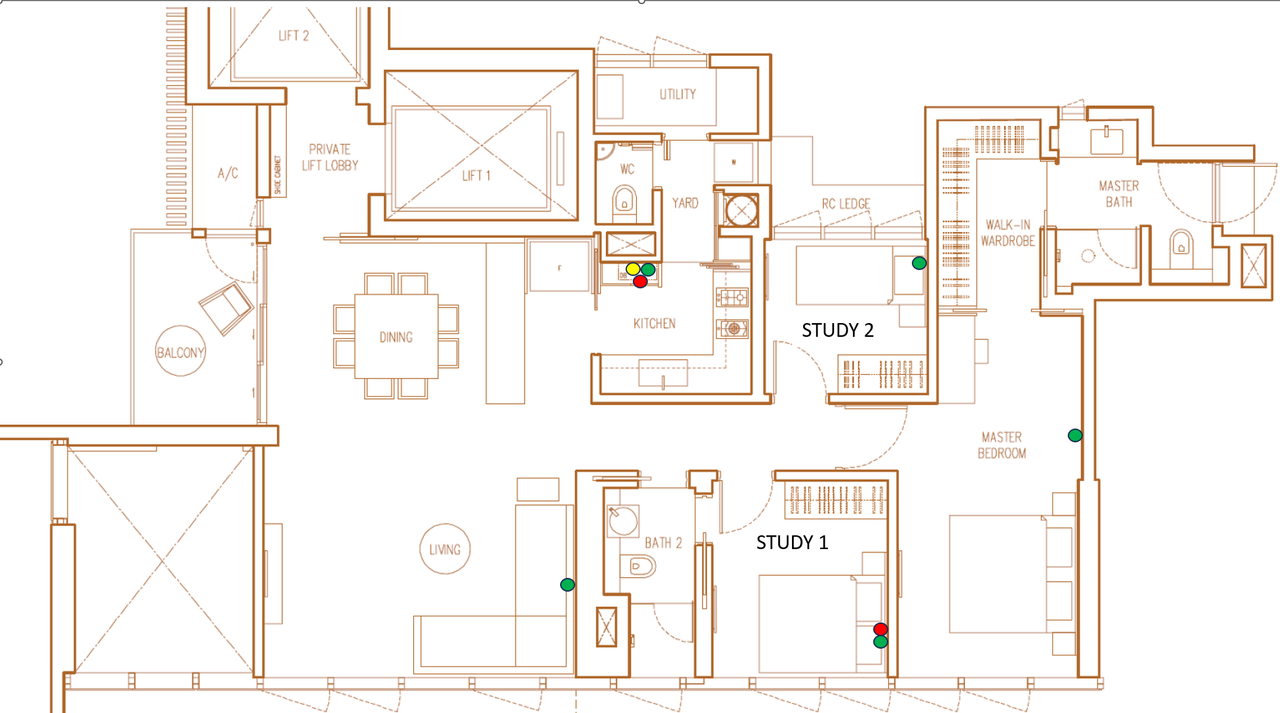
- Yellow dot is FTP and ONT inside DB box (wooden door) inside kitchen, with a glass sliding kitchen door.
- Red dots are where I plan to place the BQ16. Main Router BQ16 placed in DB box next to ONT, satellite BQ16 placed in Study 1 where there is a LAN port back to the patch panel in DB box so can wired backhaul.
- Green dots are LAN points throughout the house

I am currently running 3x Orbi RBR/RBS50 inside DB box (1), Study 1 (wired backhaul), and Master (wireless backhaul). Currently poor wifi/ broadband coverage points are the balcony and master bathroom (quite intermittent).
Plan is to upgrade to 2x BQ16 at the red dots. Not sure if that will provide enough coverage and throughput, after I upgrade to SH 5Gbps plan.
Open to any feedback pls, thanks.

Thanks. There is a LAN point in master bedroom but on the wrong side, the satellite RBS50 currently placed on the opposite wall where there is a vanity desk to place it on. Where the LAN point is a blank wall with no table or shelf, didn’t want to put it randomly on the floor.

thanks for rec, I will look into Orbi 970. But the main issue as I posted above is I suspect my Orbi RBR/RBS50 is giving problem or degraded due to dropping LAN connection. And recent 6 months it keeps going purple 4-5 times a day, dropping internet connectivity.
 

tsammyc

Member
Joined
Mar 29, 2002
Messages
271
Reaction score
146
Thanks for the rec, but placing a small book shelf there is not going to get support from my Boss at home… aesthetics etc. :D

Have to see if I can find a way to run the LAN and power cable and hide it somewhere…
Run a discrete flat cable along the baseboard and put the router under the bed 😃boss won’t see it and 10Gbps ports will keep you warm at night
 

Henry Ng

Arch-Supremacy Member
Joined
Aug 9, 2011
Messages
17,072
Reaction score
977
Thanks for the rec, but placing a small book shelf there is not going to get support from my Boss at home… aesthetics etc. :D

Have to see if I can find a way to run the LAN and power cable and hide it somewhere…
Are you joking? if a small book shelf is too small then get a middle size book shelf. There are many nice book shelf outside. You never ask her how you know she will not support. You must be like a gentleman and talk to her nicely, she will sure respect you as her man. That is life. Have not try you already gave up?
 

vampire29

Junior Member
Joined
Aug 30, 2008
Messages
89
Reaction score
7
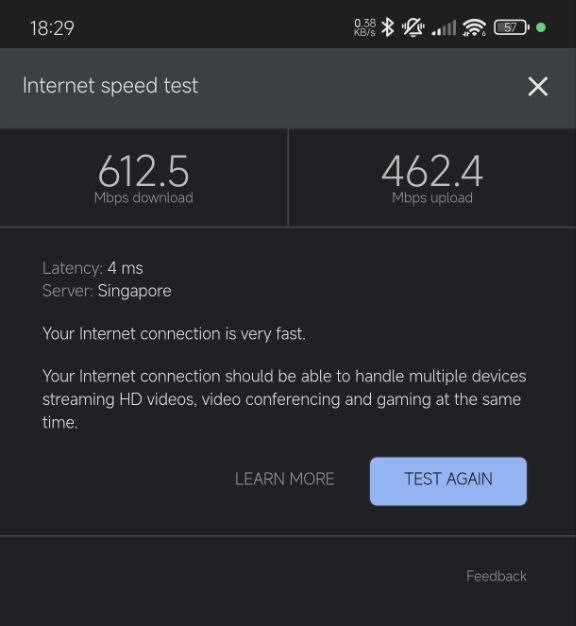
Last friday Starhub came down to install ONR.

below are the speed test at DP box, trooper say is normal when just install.
6280498048530497771a.jpg


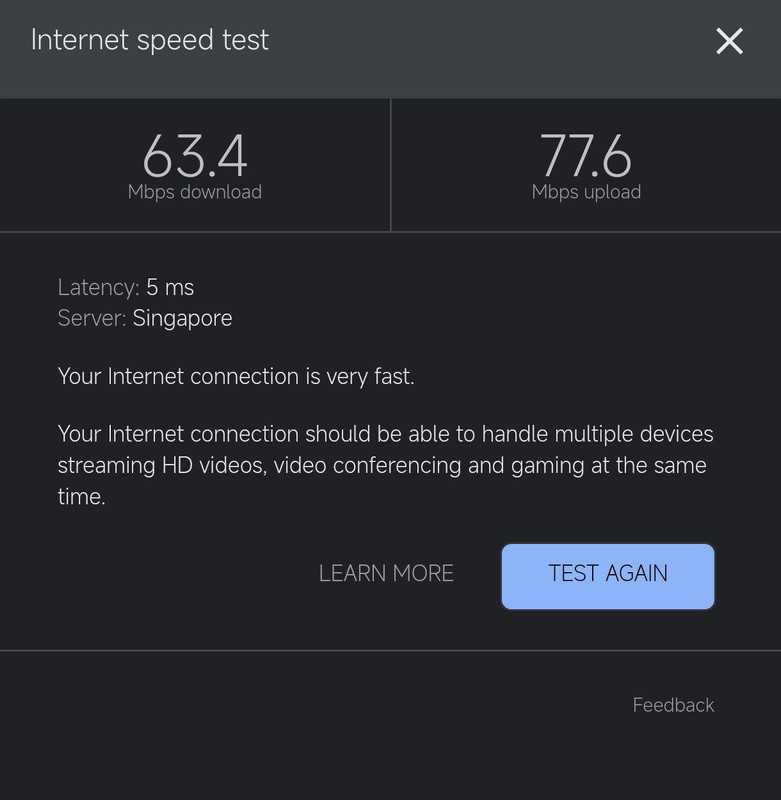
below tested at living room which the 2nd mesh is there.
6280498048530497779.jpg


the speed is normal?
 

xiaofan

High Supremacy Member
Joined
Sep 16, 2018
Messages
32,484
Reaction score
9,652
via wifi connection to mobile.

What is the mobile phone? The speed is not too low with wireless connection to the Nokia ONR in the DB box.

What is the connection between the Nokia Beacon 2 and the main Nokia ONR? If using wireless connection with obstructions in between, that could explain the super poor wireless speed in the living room.

Nokia ONR + Nokia Beacon 2 (lousy wireless router) with Ethernet backhaul is an okay combination.
Nokia ONR + Nokia Beacon 2 (lousy wireless router) with wireless backhaul is a poor combination in many cases.
 

sillyb0y

Master Member
Joined
Jun 12, 2008
Messages
3,182
Reaction score
10
Any recommend model for switch to put inside DB box?

below design can work or need to put a router between ONT and Switch (DB cabinet).

1) ONT to Switch (DB cabinet)
2) Switch (DB cabinet) Lan port 2 to Router (Living)
3) Switch (DB cabinet) Lan port 3 to Router (Master Room)
 
Important Forum Advisory Note
This forum is moderated by volunteer moderators who will react only to members' feedback on posts. Moderators are not employees or representatives of HWZ. Forum members and moderators are responsible for their own posts.

Please refer to our Community Guidelines and Standards, Terms of Service and Member T&Cs for more information.
Top