ISP and Router Vendor Security Related Offering, DNS and Firewall for Security

xiaofan

High Supremacy Member
Joined
Sep 16, 2018
Messages
31,876
Reaction score
9,154
Hi guys.
I am on Whizzcomms. Which dns should I use to have best performance and high level of security?

It all depends on your needs. Usually a router will give you options to list at least two DNS servers.

Personally I use Quad 9 and Cloudflare 1.1.1.2 (malware blocking only) or 1.1.1.3 (malware and adult contents blocking, good to use if got kids).

WC does not seem to have IPv6 so you will not encounter the high latency issues I have with SingTel IPv6.

Take note just using these type of public DNS with filtering will not give you high level of security. Most important thing is to be careful and learn the ABCs of cyber security. For example, do not anyhow click a link. That is a very simple rule but many people still do not understand and just click.

CSA Singapore gives some good and simple advice to the general public.
https://www.csa.gov.sg/information-for/general-public
 
Last edited:

FinalTidus

High Supremacy Member
Joined
Dec 8, 2004
Messages
35,091
Reaction score
1,167
It all depends on your needs. Usually a router will give you options to list at least two DNS servers.

Personally I use Quad 9 and Cloudflare 1.1.1.2 (malware blocking only) or 1.1.1.3 (malware and adult contents blocking, good to use if got kids).

WC does not seem to have IPv6 so you will not encounter the high latency issues I have with SingTel IPv6.
Oh I see. So it's possible to use 2 DNS?

Is the default dns good enough? I kind of prefer lower latency and some level of security. If the default dns offers the best performance then I will stick.

I heard of quad9. Will try it out. Hopefully same or better latency compared to default dns
 

xiaofan

High Supremacy Member
Joined
Sep 16, 2018
Messages
31,876
Reaction score
9,154
Oh I see. So it's possible to use 2 DNS?

Is the default dns good enough? I kind of prefer lower latency and some level of security. If the default dns offers the best performance then I will stick.

I heard of quad9. Will try it out. Hopefully same or better latency compared to default dns

The default DNS will usually mean the ISP provided DNS.

Starhub DNS is known to be not so stable. Singtel DNS may be okay. Not so sure about M1. VQ FreeDom DNS is also known to be problematic. Not so sure about MR.

In general I would not recommend using ISP's DNS myself. They do not have filterings in general, other than the websites blocked by IMDA.

If you want to have low latency, Google DNS (8.8.8.8 and 8.8.4.4) is usally the best but it does not have filtering. Same for Cloudflare 1.1.1.1 and 1.0.0.1 (low latency but no filtering).
 
Last edited:

xiaofan

High Supremacy Member
Joined
Sep 16, 2018
Messages
31,876
Reaction score
9,154
For DNS block list, I usually use OISD. It works under Adguard Home and Pi-hole. It used to work under pfBlockNG-devel (pfSense) but no longer works now.
https://oisd.nl/

There is an alternative now.
https://github.com/hagezi/dns-blocklists#overview

Reference: previous discussion on Pi-hole which contains blocklist, blacklist and whitelist to be used.
https://forums.hardwarezone.com.sg/...ole-blocking-on-google-cloud-compute.6375286/

My Adguard Home DNS Blocklists setting and Ad blocking Test result (97%) -- using Asus RT-AX86U router
https://d3ward.github.io/toolz/adblock.html
2L3xJAU.png


jPwL6jc.png
 

HiHelloBye

Senior Member
Joined
Oct 8, 2010
Messages
1,312
Reaction score
380
Is it advisable to set as

9.9.9.9
208.67.222.222
?

set at Router WAN DNS Better or LAN DHCP DNS?
i set it on Router WAN DNS

once configured, just double-check whether the settings are reflected or not. it should be a straightforward process...
 

xiaofan

High Supremacy Member
Joined
Sep 16, 2018
Messages
31,876
Reaction score
9,154
For example, go to the following websites to confirm that there are no DNS Leaks.
https://www.dnsleaktest.com/
https://browserleaks.com/dns

Example from dnsleaktest.com.

I am using Adguard Home for my Asus RT-AX86U router.
U4pyqzl.png


Test results from dnsleaktest.com match the above settings.

jnS4wqS.png


Browserleaks.com test results -- more difficult as they do not show the hostname, but the good thing is that it shows IPv6 DNS servers if you have IPv6.

p4RkXzh.png


Edit to add:
I have since removed quad9 from the upstream DNS as it seems to go to US/Canada (WoodyNet, Inc)
 
Last edited:

xiaofan

High Supremacy Member
Joined
Sep 16, 2018
Messages
31,876
Reaction score
9,154
Recent security advisory for some Asus routers, posted by @hwzlite. The good thing is that Asus still provides support for these routers and provided the firmware updates.
https://forums.hardwarezone.com.sg/...e-authentication-bypass-on-7-routers.7038640/

https://www.bleepingcomputer.com/ne...al-remote-authentication-bypass-on-7-routers/

ASUS has released a new firmware update that addresses a vulnerability impacting seven router models that allow remote attackers to log in to devices.
+++++++++++++++++++++++++
The flaw, tracked as CVE-2024-3080 (CVSS v3.1 score: 9.8 “critical”), is an authentication bypass vulnerability allowing unauthenticated, remote attackers to take control of the device.

ASUS says the issue impacts the following router models:

  • XT8 (ZenWiFi AX XT8) – Mesh WiFi 6 system offering tri-band coverage with speeds up to 6600 Mbps, AiMesh support, AiProtection Pro, seamless roaming, and parental controls.
  • XT8_V2 (ZenWiFi AX XT8 V2) – Updated version of the XT8, maintaining similar features with enhancements in performance and stability.
  • RT-AX88U – Dual-band WiFi 6 router with speeds up to 6000 Mbps, featuring 8 LAN ports, AiProtection Pro, and adaptive QoS for gaming and streaming.
  • RT-AX58U – Dual-band WiFi 6 router providing up to 3000 Mbps, with AiMesh support, AiProtection Pro, and MU-MIMO for efficient multi-device connectivity.
  • RT-AX57 – Dual-band WiFi 6 router designed for basic needs, offering up to 3000 Mbps, with AiMesh support and basic parental controls.
  • RT-AC86U – Dual-band WiFi 5 router with speeds up to 2900 Mbps, featuring AiProtection, adaptive QoS, and game acceleration.
  • RT-AC68U – Dual-band WiFi 5 router offering up to 1900 Mbps, with AiMesh support, AiProtection, and robust parental controls.
ASUS suggests that people update their devices to the latest firmware versions available on its download portals (links for each model above). Firmware update instructions are available on this FAQ page.
 

xiaofan

High Supremacy Member
Joined
Sep 16, 2018
Messages
31,876
Reaction score
9,154
Latest large scale DDOS attack to OVHcloud because of unpatched MikroTik routers.
https://www.bleepingcomputer.com/ne...cord-breaking-ddos-attack-on-mikrotik-botnet/

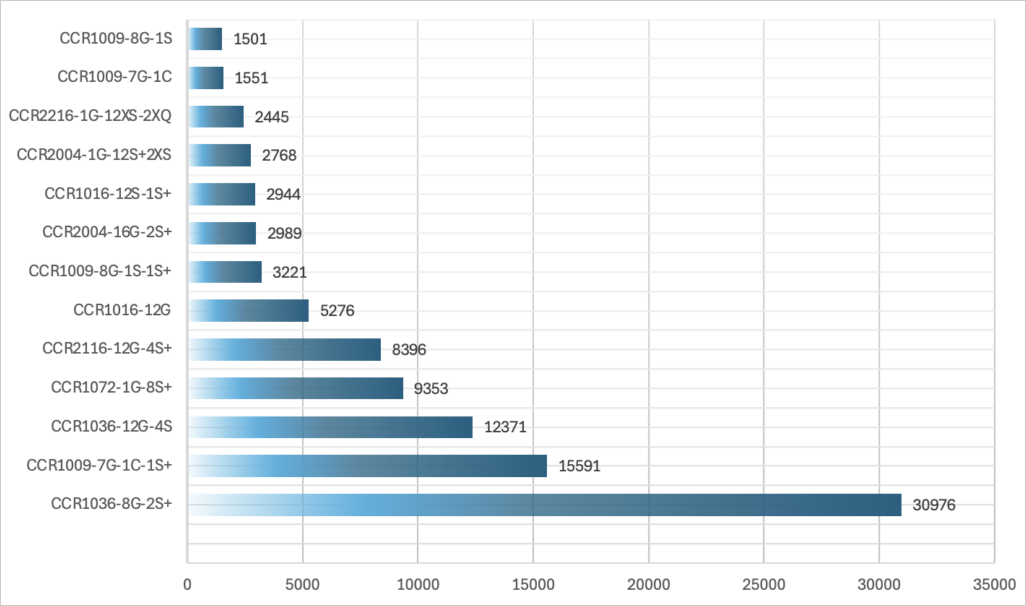
OVHcloud says many of the high packet rate attacks it recorded, including the record-breaking attack from April, originate from compromised MirkoTik Cloud Core Router (CCR) devices designed for high-performance networking.

The firm identified, specifically, compromised models CCR1036-8G-2S+ and CCR1072-1G-8S+, which are used as small—to medium-sized network cores.

Many of these devices exposed their interface online, running outdated firmware and making them susceptible to attacks leveraging exploits for known vulnerabilities.

The cloud firm hypothesizes that attackers might use MikroTik's RouterOS's "Bandwidth Test" feature, designed for network throughput stress testing, to generate high packet rates.

OVHcloud found nearly 100,000 Mikrotik devices that are reachable/exploitable over the internet, making up for many potential targets for DDoS actors.

mikrotiks.png


Due to the high processing power of MikroTik devices, which feature 36-core CPUs, even if a small percentage of those 100k were compromised, it could result in a botnet capable of generating billions of packets per second.

OVHcloud calculated that hijacking 1% of the exposed models into a botnet could give attackers enough firepower to launch attacks, reaching 2.28 billion packets per second (Gpps).

MikroTik devices have been leveraged for building powerful botnets again in the past, with a notable case being the Mēris botnet.

Despite the vendor's multiple warnings to users to upgrade RouterOS to a secure version, many devices remained vulnerable to attacks for months, risking being enlisted in DDoS swarms.

OVHcloud says it has informed MikroTik of its latest findings, but they have not received a response.
 

xiaofan

High Supremacy Member
Joined
Sep 16, 2018
Messages
31,876
Reaction score
9,154
Some Asus routers are also no longer supported. So it is better for the users to upgrade.
https://www.asus.com/event/network/eol-product/

1) Asus RT-AC1200G+, RT-AC2600 (M1 issued free router)

2) Asus RT-AC87U and RT-AC88U

3) From the above, Asus has also listed the following popular AC routers in the EOL list.
Asus RT-AC68U, RT-AC68U V4, RT-AC86U, GT-AC2900, GT-AC5300 and RT-AC5300 and ZenWiFi CT8.

Edit to add --> Asus provided some urgent security FW fixes for some of the AC routers like RT-AC68U and RT-AC86U, due to serious security issues.

4) Even some of the AX routers have been EOLed.
RT-AX56U V1, RT-AX68U (not officially sold in Singapore) and RT-AX92U
 
Last edited:

radon

Senior Member
Joined
Jan 1, 2000
Messages
992
Reaction score
89
If need to control the dns block list & don't mind paying then can consider service like control d and nextdns.
 

BBCWatcher

Arch-Supremacy Member
Joined
Jun 15, 2010
Messages
23,140
Reaction score
4,663
Some wireless routers allow you to configure DNS over HTTPS (DoH) and/or DNS over TLS (DoT) connections, and then they can act as DNS servers for your LAN-attached (including Wi-Fi connected) devices. This arrangement prevents Internet-side snooping of your DNS requests — at least while your devices are connected to your home network and using your home DHCP server’s DNS server address(es). And it doesn’t require reconfiguring clients — although that’s another possible option assuming they support DoH or DoT.

OpenWrt (with an add-on package) and MikroTik’s RouterOS, as examples, both support this type of configuration. It’s not that difficult to set up. If you’re particularly paranoid you can block or redirect any unencrypted DNS traffic so that clients are forced to use your DNS pathway, although you can’t really block all DoH requests coming directly from clients since that’s indistinguishable from other HTTPS traffic. And if you’re slightly sophisticated you can configure different DNS servers (via DoH or DoT) for different LANs. For example, if you want a guest Wi-Fi network to have more restrictive DNS lookups (using a DNS service that filters out malware, phishing, and adult content, for example), that‘s possible.
 

xiaofan

High Supremacy Member
Joined
Sep 16, 2018
Messages
31,876
Reaction score
9,154
If you’re particularly paranoid you can block or redirect any unencrypted DNS traffic so that clients are forced to use your DNS pathway, although you can’t really block all DoH requests coming directly from clients since that’s indistinguishable from other HTTPS traffic.

Actually you can block DoH if you use OpenWRT. This is a common issue many users of Pi-hole/Adguard Home/etc are facing. The trick is to block DoH vendors' IP.

Example from OpenWRT documentation: using banip is just one method, there are other ways like using IPsets and firewall rules.
https://openwrt.org/docs/guide-user/firewall/fw3_configurations/intercept_dns

DNS over HTTPS
Utilize banIP to filter DoH traffic forcing LAN clients to switch to plain DNS.

banIP configuration:
https://openwrt.org/docs/guide-user/services/banip#blocking_doh

DoH-IP-blocklists:
https://github.com/dibdot/DoH-IP-blocklists

Another DoH IP blocklists:
https://github.com/jpgpi250/piholemanual/tree/master/DOH
 
Last edited:

xiaofan

High Supremacy Member
Joined
Sep 16, 2018
Messages
31,876
Reaction score
9,154
For pfSense: how to block DoH requests from local devices.
https://forum.netgate.com/topic/159432/options-for-blocking-dns-over-https
  1. Using a DoH IP blocklist (e.g. using pfBlockerNG)
  2. Using a DoH DNS blocklist (e.g. using pfBlockerNG DNSBL or Pi-hole)

For OPNsense:
https://www.allthingstech.ch/blocking-doh-with-opnsense-using-fqdn-domain-lists
https://forum.opnsense.org/index.php?topic=31912.0

Same idea for MikroTik RouerOS:
https://forum.mikrotik.com/t/redire...-over-https-requests-made-by-clients/147912/6
 

BBCWatcher

Arch-Supremacy Member
Joined
Jun 15, 2010
Messages
23,140
Reaction score
4,663
Actually you can block DoH if you use OpenWRT. This is a common issue many users of Pi-hole/Adguard Home/etc are facing. The trick is to block DoH vendors' IP.
Yes, you can block particular target IP addresses. For example, you can block 1.1.1.1 (one of CloudFlare's IPv4 DNS server addresses). But it's not foolproof. You're just blocking direct access to well-known DNS services when you do that. It's trivially easy for clients to bypass such blocks.
 
Important Forum Advisory Note
This forum is moderated by volunteer moderators who will react only to members' feedback on posts. Moderators are not employees or representatives of HWZ. Forum members and moderators are responsible for their own posts.

Please refer to our Community Guidelines and Standards, Terms of Service and Member T&Cs for more information.
Top