Those who use digital lock lip lai

TMBagain

Senior Member
Joined
Apr 1, 2021
Messages
711
Reaction score
477
Thank you for that post. I had missed all the news from CES 2026.
This Aqara U400 is one fine specimen of a smart deadbolt lock!

Deadbolts:
I would go ot the extent to suggest everyone have a look at deadbolts types of smart locks. Deadbolts are physically more secure than the rim type of lock , and has a more optimal (smaller) footprint on the door, which translates to price (and hence price performance).

Many years ago, it used to be just Samsung and Yale. They were slow to improve. I was impressed with Aqara U100 when it was launched (see old posts), it's built and price/performance. Aqara U400 takes it further. This is one company to go all out on the deadbolts (because of the size of the US market) - which we will benefit here because it can be installed on our door.

To be updated:
  • Apple online store
    - Without installation option.
    - No information on warranty and the process
    - Mid to end March availability date (8-10 weeks on the cart yesterday)

  • For U100, the local Singapore distributor added an Aqara hub versus online platforms.
    Not sure about this time.

  • Can't find more local information and pricing - too early!
    - will update more when I can google around.
For those into locks, there are some interesting (detailed) information on Aqara U400 on Interlock website ...(scroll to the bottom). Need sometime to digest, and update this post.

https://interlock.com.sg/products/aqara-u400-uwb-deadbolt-lock
 
Last edited:

sansanjikikut

Master Member
Joined
Sep 26, 2015
Messages
2,872
Reaction score
115
Thank you for that post. I had missed all the news from CES 2026.
This Aqara U400 is one fine specimen of a smart deadbolt lock!

Deadbolts:
I would go ot the extent to suggest everyone have a look at deadbolts types of smart locks. Deadbolts are physically more secure than the rim type of lock , and has a more optimal (smaller) footprint on the door, which translates to price (and hence price performance).

Many years ago, it used to be just Samsung and Yale. They were slow to improve. I was impressed with Aqara U100 when it was launched (see old posts), it's built and price/performance. Aqara U400 takes it further. This is one company to go all out on the deadbolts (because of the size of the US market) - which we will benefit here because it can be installed on our door.

To be updated:
  • Apple online store
    - Without installation option.
    - No information on warranty and the process
    - Mid to end March availability date (8-10 weeks on the cart yesterday)

  • For U100, the local Singapore distributor added an Aqara hub versus online platforms.
    Not sure about this time.

  • Can't find more local information and pricing - too early!
    - will update more when I can google around.
Interesting information on Interlock website...

https://interlock.com.sg/products/aqara-u400-uwb-deadbolt-lock

interlock pricing should be inclusive of wooden door installation, but whether they can do it on gate or not is still a question mark. If can install on metal gate, will it be able to use back the same structure/hole (without additional cut/drilling) as the u100 - have contacted interlock sg but they say will check and get back.

this uwb feature should be a gamechanger for hdb flats if it really works as intended! also need to consider electroplated vs spray finish..
 

sansanjikikut

Master Member
Joined
Sep 26, 2015
Messages
2,872
Reaction score
115
For those who installed a digital lock on their metal gate, did you opt to remove the original hdb gate handle, if remove any reason, and if keep it, why? just want to know the various pros/cons of keeping or removing the handle, thx
 

i_dun_understand

Senior Member
Joined
Feb 15, 2014
Messages
1,400
Reaction score
308
For those who installed a digital lock on their metal gate, did you opt to remove the original hdb gate handle, if remove any reason, and if keep it, why? just want to know the various pros/cons of keeping or removing the handle, thx

In my previous house, I changed a new gate to go with my digital gate lock. I deliberately opt out the gate door handle as I was thinking it no longer serve any purpose.

After installation, I noticed the gate is abit loose when in a closed position. Later i realized is due to the missing latch from the door handle that secure the gate when in closed position. The digital gate lock does not have a latch to secure the gate firmly when in closed position.

Years later when moving to another house, I choose to have to the door handle when changing the gate.
 

i_dun_understand

Senior Member
Joined
Feb 15, 2014
Messages
1,400
Reaction score
308
Woaa... Lockin new digital door lock v7 use laser beam to charge the battery. Showing it in CES 2026 now. Rumour to be out in Q3
 

sansanjikikut

Master Member
Joined
Sep 26, 2015
Messages
2,872
Reaction score
115
In my previous house, I changed a new gate to go with my digital gate lock. I deliberately opt out the gate door handle as I was thinking it no longer serve any purpose.

After installation, I noticed the gate is abit loose when in a closed position. Later i realized is due to the missing latch from the door handle that secure the gate when in closed position. The digital gate lock does not have a latch to secure the gate firmly when in closed position.

Years later when moving to another house, I choose to have to the door handle when changing the gate.
thanks for reply. may i know which brand/model for the gate lock you installed in your previous house? also you mention loose in gate closed position - are you referring to closed (unlocked) or closed (locked) or both situations?
 

i_dun_understand

Senior Member
Joined
Feb 15, 2014
Messages
1,400
Reaction score
308
thanks for reply. may i know which brand/model for the gate lock you installed in your previous house? also you mention loose in gate closed position - are you referring to closed (unlocked) or closed (locked) or both situations?
I was using Phillips gate lock previously.

I was referring when gate is closed (locked). In most digital gate lock, the lock is just a metal piece sticking out when in closed position. It does not have latch to secure the gate firmly.
 

Irenicis

Master Member
Joined
Dec 27, 2008
Messages
4,766
Reaction score
121
Just like to share my initial review with the Solity G1 + GEA1000K bundle
Bought mine through Gain City as I had deposit with them but nothing else to buy from them

Opted for the Matter module instead of the WiFi module and connected through my Apple TV Home Hub

While both locks have 2 way synchronize unlock, unlocking the G1 gate lock from Homekit does not trigger the door lock to unlock, which kind of defeats the purpose of having remote unlock...
The GEA1000K also does not come with any WiFi/Matter module so you can't add it to your smarthome ecosystem to unlock it separately

Anyone with a different experience please let me know, as I might have a unit that is not working as intended.
Nevertheless, I believe having the flexibility to control both locks remotely would still be ideal

While the GEA1000K supports installing a module, I think it isn't supposed to come with one installed as the description for the G1 bundle does not include Smart App as an unlocking method for the door lock, even though the description for the standalone GEA1000K includes the smart app functionality.
https://solitysmartlock.com/product/solity-gate-lock-g1-bundle/
https://solitysmartlock.com/product/solity-gea-1000k/


However, the description for the Solity G1 + GEA1000 bundle specifically includes Smart App unlocking method for both the gate and door lock.
https://solitysmartlock.com/product/solity-bundle-gea-1000-g1/

Given that the price difference between the two bundles is only $150, I would recommend future buyers to opt for the GEA1000 one instead, as it comes with more convenient unlocking methods (Fingerprint and RFID) as well as the WiFi/Matter module (which it should be included since it is explicitly stated in the bundle description)

If like me, you have gotten the bundle with the GEA1000K and would like remote unlocking for both locks, you can get an additional WiFi/Matter module from their website for $70. I however purchased the module for $40+ from a store on Shopee that seems to ship the module from Korea for around. Have not yet received the module to test, so buy at your own risk!!

Would like to hear further review after more usage if possible. Am thinking of this bundle as well. For now, what is the only way to activate the 2 way synchronize unlock?
 

TMBagain

Senior Member
Joined
Apr 1, 2021
Messages
711
Reaction score
477
For those who installed a digital lock on their metal gate, did you opt to remove the original hdb gate handle, if remove any reason, and if keep it, why? just want to know the various pros/cons of keeping or removing the handle, thx
[ I like think you meant "remove the original HDB gate handle" (because you are installing a digital gate lock in the original gate lock position? ]

If I were to install a digital gate lock (0.1 probability), I would mount it at a higher location (than the existing HDB lock position) and keep my existing gate handle (and latch).

Alternatively, I would use the Solity G1 mortise gate lock (which is designed to replace old gate lock in situ and is less flimsy in physical mounting than the rim types).


-- long answer --

If you install a new digital gate lock at the original HDB gate lock location, the apparently not-so-obvious:
  • You lose the ability to revert to regular key lock in the future (should requirements change, for any reason)
  • You lose a perfectly good gate handle and you need to grab the remaining parts of the gate, and I am not sure the coating will be as durable (to sweat and dirt) as that of a purpose-made handle
  • the height of the digital lock position (being fixed) may be less optimal for some people—think of your own scenarios
  • (yes) and some already commented—the "latch" of the HDB gate will be gone—and you/the vendor will solution something else to do the function of holding the gate in place eg. a magnet (is what I recall to be the common technique).

    The only in situ replacement without losing this is a mortise-type digital gate lock, e.g., the Solity G1.

  • left over holes need to be plugged/covered with (hopefully same color) material.
 
Last edited:

sansanjikikut

Master Member
Joined
Sep 26, 2015
Messages
2,872
Reaction score
115
[ I like think you meant "remove the original HDB gate handle" (because you are installing a digital gate lock in the original gate lock position? ]

If I were to install a digital gate lock (0.1 probability), I would mount it at a higher location (than the existing HDB lock position) and keep my existing gate handle (and latch).

Alternatively, I would use the Solity G1 mortise gate lock (which is designed to replace old gate lock in situ and is less flimsy in physical mounting than the rim types).


-- long answer --

If you install a new digital gate lock at the original HDB gate lock location, the apparently not-so-obvious:
  • You lose the ability to revert to regular key lock in the future (should requirements change, for any reason)
  • You lose a perfectly good gate handle and you need to grab the remaining parts of the gate, and I am not sure the coating will be as durable (to sweat and dirt) as that of a purpose-made handle
  • the height of the digital lock position (being fixed) may be less optimal for some people—think of your own scenarios
  • (yes) and some already commented—the "latch" of the HDB gate will be gone—and you/the vendor will solution something else to do the function of holding the gate in place eg. a magnet (is what I recall to be the common technique).

    The only in situ replacement without losing this is a mortise-type digital gate lock, e.g., the Solity G1.

  • left over holes need to be plugged/covered with (hopefully same color) material.
holding the gate in place - meaning when its closed + locked or closed + unlocked?

Also, if lets say we were to install u100 on a metal privacy gate above the original hdb mortise lock set, is it more secure to cut a hole in the side metal gate to anchor in the u100 deadbolt? vendors are doing it the rim method (install additional gate box on the inside and holder to catch the deadbolt) but I feel it kinda defeats the purpose of a true deadbolt.
 

TMBagain

Senior Member
Joined
Apr 1, 2021
Messages
711
Reaction score
477
holding the gate in place - meaning when its closed + locked or closed + unlocked?
Well, both.

Sometimes, we want to just close the gate and leave it unlocked. The latch keeps the gate in the closed position all the time (and not swinging open when the wind is blowing in the wrong direction).

In the locked situation, it keeps the gate from rattling on windy days, because the bolt and bolt hole may have unsuitable clearance.

-- long answer--
It is a good question for all buyers/users of digital locks because it matters—especially when the digital locks
don't work as well as we thought they would.

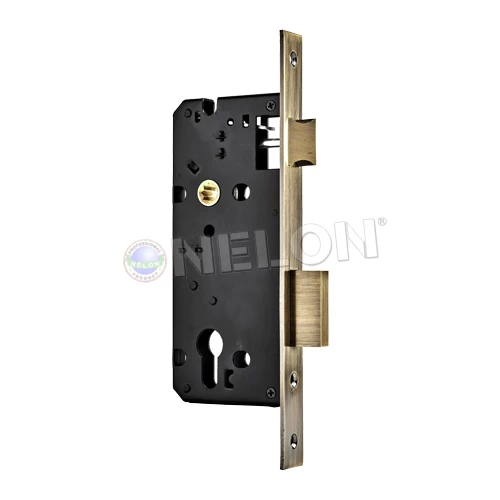
All of us use the lock latch a few times every day without thinking about it (the purpose). In the picture below, the latch is the one at the top, and the bolt is at the bottom. Sometimes the latch looks like a roller ball, but it would serve the same purpose.

The purpose of the latch is to hold the door (gate) in the closed position—so that the door (gate) stays closed (and does not swing open, say, on windy days). To state the obvious, the door must be in a proper closed position before it can be locked (or automatically locked when it is a digital lock). If the door is not in a proper position when the door looks closed, then the bolt would not be able to enter the bolt hole; this would be a situation of misalignment.

Without the lock latch, there are two other alternate ways to ensure the door is in a proper position: the door closer (does not apply in a gate situation) and the human hand (the user). But the user doesn't like to wait and hold the gate in position (even for 2 seconds); we'd rather walk away as soon as the gate closes. We like the latch to do the job of holding the gate in position (before the autolock kicks in).

The latch is sprung ( fitted with spring); it retracts on pressure from door ( gate) closing or hand turning, and sprung out on door ( gate) closing. In a closed and locked situation, it does help in maintaining the door (gate) from vibrating on a windy day when the bolt and bolt hole has some clearance.

[ I realized the above is too verbose. Stand by your door today, and open/close your door ... and ponder. It could be easier ]


sg-11134207-7rcee-m6g8pqjml95m42.webp

Also, if lets say we were to install u100 on a metal privacy gate above the original hdb mortise lock set, is it more secure to cut a hole in the side metal gate to anchor in the u100 deadbolt? vendors are doing it the rim method (install additional gate box on the inside and holder to catch the deadbolt) but I feel it kinda defeats the purpose of a true deadbolt.

The standard HDB privacy metal gate frame is not thick enough. I have previously seen photos on Facebook et al. that some vendor may have a way to skip the gate box. The bolt sits a bit outside the frame, so it is a matter of riveting it down with a plate of some sort. I recall it was a forumer here who may have posted. Let me do some digging. This is still not optimal as bolting completely into the frame - unless you make a new one with a thicker frame at that area. So yes, you can't have your cake (a deadbolt) and eat it too.
 
Last edited:

sansanjikikut

Master Member
Joined
Sep 26, 2015
Messages
2,872
Reaction score
115
Well, both.

Sometimes, we want to just close the gate and leave it unlocked. The latch keeps the gate in the closed position all the time (and not swinging open when the wind is blowing in the wrong direction).

In the locked situation, it keeps the gate from rattling on windy days, because the bolt and bolt hole may have unsuitable clearance.

-- long answer--
It is a good question for all buyers/users of digital locks because it matters—especially when the digital locks
don't work as well as we thought they would.

All of us use the lock latch a few times every day without thinking about it (the purpose). In the picture below, the latch is the one at the top, and the bolt is at the bottom. Sometimes the latch looks like a roller ball, but it would serve the same purpose.

The purpose of the latch is to hold the door (gate) in the closed position—so that the door (gate) stays closed (and does not swing open, say, on windy days). To state the obvious, the door must be in a proper closed position before it can be locked (or automatically locked when it is a digital lock). If the door is not in a proper position when the door looks closed, then the bolt would not be able to enter the bolt hole; this would be a situation of misalignment.

Without the lock latch, there are two other alternate ways to ensure the door is in a proper position: the door closer (does not apply in a gate situation) and the human hand (the user). But the user doesn't like to wait and hold the gate in position (even for 2 seconds); we'd rather walk away as soon as the gate closes. We like the latch to do the job of holding the gate in position (before the autolock kicks in).

The latch is sprung ( fitted with spring); it retracts on pressure from door ( gate) closing or hand turning, and sprung out on door ( gate) closing. In a closed and locked situation, it does help in maintaining the door (gate) from vibrating on a windy day when the bolt and bolt hole has some clearance.

[ I realized the above is too verbose. Stand by your door today, and open/close your door ... and ponder. It could be easier ]


sg-11134207-7rcee-m6g8pqjml95m42.webp


The standard HDB privacy metal gate frame is not thick enough. I have previously seen photos on Facebook et al. that some vendor may have a way to skip the gate box. The bolt sits a bit outside the frame, so it is a matter of riveting it down with a plate of some sort. I recall it was a forumer here who may have posted. Let me do some digging. This is still not optimal as bolting completely into the frame - unless you make a new one with a thicker frame at that area. So yes, you can't have your cake (a deadbolt) and eat it too.
thank u for the detailed explanation on the latch importance! now i know why the u100 is more suitable for those old hdb wooden doors with a separate latch handle and lockset (eg https://www.horme.com.sg/product.aspx?id=4437)

as for the u100 installation on HDB privacy metal gate, i managed to find some photos of it but not sure how the installer manage to secure it to the gate frame:
https://feedback-cdn.karousell.com/...0/1132547_1690701757_d1e2c649_progressive.jpg
https://feedback-cdn.karousell.com/...0/1132547_1690701757_681d0d86_progressive.jpg

if can do above way would be the most secure, as its very close to a true deadbolt typically installed on a wooden door. do let me know if you can find the forumer's post.

Seems u100 installed on metal gate as a rim type with gate box is very common nowadays, even recommended by the vendors themselves.
 

Xemoth

Senior Member
Joined
Feb 27, 2012
Messages
839
Reaction score
39
Would like to hear further review after more usage if possible. Am thinking of this bundle as well. For now, what is the only way to activate the 2 way synchronize unlock?
Gate -> door unlock works when unlocking the gate using facial recognition, fingerprint, rfid and pin. I believe mechanical key unlock does not trigger the sync unlock.

For door -> gate, pressing the unlock button on the GEA1000K will trigger the sync unlock on the gate.
When the installer came to install, I was taught that pressing the button twice instead of once on the inner side of the GEA1000K would unlock only the door and not the gate (for situations where there's strangers on the other side of the gate). However in reality, sometimes the first press of the button does nothing (not sure if it is because the lock is in sleep mode?) and requires a second press for the unlock to trigger.
This unpredictable behaviour makes me unlock both gate and door when I only want to unlock the door itself.

The GEA1000K door lock is rather loud when locking and unlocking, although I am not sure if this is the norm as it is my first time using digital locks.

Also the roller latch on the G1 is rather tight and requires a bit of force to close the gate, which causes a lot of noise on the newer BTO style gates (reverbs everytime the gate is closed lol)

The G1 cannot be unlocked using mechanical key from the inside as well (again I'm not sure if this is the norm for the usual rim style lock). While I have not used the lock long enough for it to run out of battery, I absolutely do not want to be in the situation where I am inside the house, can't unlock the gate because the battery ran out and I do not have any fresh batteries in the house (IIRC emergency power supply is only on the outside, might need to verify when I am home), or when the motherboard dies.

This would be a dealbreaker for me if I had realized this before purchasing. But since the G1 is meant to be installed on gates, this may not affect everyone unless you have the BTO privacy gates.

Given a choice, I would have went for deadbolt locks instead if not for the unpolished installation and also because I had deposit stuck with Gain City..

In fact my original choice was the U300 given that it is a privacy gate with no access from the outside. Would have accepted any kind of installation but too bad no vendor was willing to try to install on the BTO style gates.

EDIT: Yeap no way to open the gate from within the house if the lock dies. I think I will probably cut the gate to open up a hole to access the keyhole from inside..
 
Last edited:

ducky_88

Master Member
Joined
Oct 13, 2006
Messages
4,991
Reaction score
9
Hi, with so many dual lock sync brands out there. I am lost as to which model to get. Can anyone recommends me please.

i would prefer to have these features.
  1. Pin
  2. RFID
  3. Card access
  4. Finger print
  5. Facial recognition (nice to have)
  6. Doorbell and video survel (nice to have)
appreciate some recommendations please. btw this is for my metal gate privacy BTO.

thanks in advance!
 

TMBagain

Senior Member
Joined
Apr 1, 2021
Messages
711
Reaction score
477
Thank you for your post.

The Solity G1 was built for Singapore gate market. Though that is a common marketing claim for most vendor, I actually saw enough points to allow Solity G1 to pass through my lock nerd filter.

I learnt a few things. I also found reasons to call my goto vendor to shore up my understanding.

Gate -> door unlock works when unlocking the gate using facial recognition, fingerprint, rfid and pin. I believe mechanical key unlock does not trigger the sync unlock.
In a previous post, you mentioned that remote unlocking of the gate does not trigger sync. I am equally curious why this seemingly similar electronic trigger would not have made the list as the others.

I was told by my vendor that it does. Have you validated this with yours, or the main Solity support line? Your question may carry more weight (than mine) with an actual purchase.

For door -> gate, pressing the unlock button on the GEA1000K will trigger the sync unlock on the gate.
When the installer came to install, I was taught that pressing the button twice instead of once on the inner side of the GEA1000K would unlock only the door and not the gate (for situations where there's strangers on the other side of the gate). However in reality, sometimes the first press of the button does nothing (not sure if it is because the lock is in sleep mode?) and requires a second press for the unlock to trigger.
This unpredictable behaviour makes me unlock both gate and door when I only want to unlock the door itself.
I understand that is frustrating enough to make it as good as not having a feature. FWIW, an intermittent issue is as good as the lock being faulty. If you can consistently reproduce / record an intermittent positive, I think it is worth the effort to pursue. It is either a batch issue or a firmware issue

The GEA1000K door lock is rather loud when locking and unlocking, although I am not sure if this is the norm as it is my first time using digital locks.

Also the roller latch on the G1 is rather tight and requires a bit of force to close the gate, which causes a lot of noise on the newer BTO style gates (reverbs everytime the gate is closed lol)
I read somewhere the roller ball (depth) is adjustable, to compensate for the varying clearance between the two gate panels. Plesse inspect and request for instructions (if not on site) assistance. To mitigate it further, metal on metal sound, perhaps some thin dampening strips.

The G1 cannot be unlocked using mechanical key from the inside as well (again I'm not sure if this is the norm for the usual rim style lock). While I have not used the lock long enough for it to run out of battery, I absolutely do not want to be in the situation where I am inside the house, can't unlock the gate because the battery ran out and I do not have any fresh batteries in the house (IIRC emergency power supply is only on the outside, might need to verify when I am home), or when the motherboard dies.

This would be a dealbreaker for me if I had realized this before purchasing. But since the G1 is meant to be installed on gates, this may not affect everyone unless you have the BTO privacy gates.
Yes, it seems the current gate lock offerings in the industry does not address physical key override on both sides, ie inside and outside. I would imagine this would change as HDB standard privacy gate becomes mainstream. If anyone is making a new privacy gate, allow a physical window / hole of some sort.
 
Last edited:

TMBagain

Senior Member
Joined
Apr 1, 2021
Messages
711
Reaction score
477
Thank you for your post.

The Solity G1 was built for Singapore gate market. Though that is a common marketing claim for most vendor, I actually saw enough points to allow Solity G1 to pass through my lock nerd filter.

I learnt a few things. I also found reasons to call my goto vendor to shore up my understanding.

Gate -> door unlock works when unlocking the gate using facial recognition, fingerprint, rfid and pin. I believe mechanical key unlock does not trigger the sync unlock.
In a previous post, you mentioned that remote unlocking of the gate does not trigger sync. I was told by my go-to vendor Interlock that it does.

Have you validated this with yours, or the main Solity support line; your question may carry more weight (than mine) with an actual purchase.

For door -> gate, pressing the unlock button on the GEA1000K will trigger the sync unlock on the gate.
When the installer came to install, I was taught that pressing the button twice instead of once on the inner side of the GEA1000K would unlock only the door and not the gate (for situations where there's strangers on the other side of the gate). However in reality, sometimes the first press of the button does nothing (not sure if it is because the lock is in sleep mode?) and requires a second press for the unlock to trigger.
This unpredictable behaviour makes me unlock both gate and door when I only want to unlock the door itself.
I understand that is frustrating enough to make it as good as not having a feature. FWIW, an intermittent issue is as good as it being a faulty lock. If you can consistently reproduce / record an intermittent positive, I think it is worth the effort pursue. It is either a batch issue or a firmware issue.

The GEA1000K door lock is rather loud when locking and unlocking, although I am not sure if this is the norm as it is my first time using digital locks.

Also the roller latch on the G1 is rather tight and requires a bit of force to close the gate, which causes a lot of noise on the newer BTO style gates (reverbs everytime the gate is closed lol)
I read somewhere the roller ball (depth) is adjustable, to compensate for the varying clearance between the two gate panels. Inspect and request for instructions (if not on site) assistance. To mitigate it further the metal on metal sound, perhaps some thin dampening strips.

The G1 cannot be unlocked using mechanical key from the inside as well (again I'm not sure if this is the norm for the usual rim style lock). While I have not used the lock long enough for it to run out of battery, I absolutely do not want to be in the situation where I am inside the house, can't unlock the gate because the battery ran out and I do not have any fresh batteries in the house (IIRC emergency power supply is only on the outside, might need to verify when I am home), or when the motherboard dies.

This would be a dealbreaker for me if I had realized this before purchasing. But since the G1 is meant to be installed on gates, this may not affect everyone unless you have the BTO privacy gates.
Yes, it seems the current gate lock offerings in the industry does not address physical key override on both sides, ie. inside and outside. I would imagine this would change as HDB standard privacy gate becomes mainstream. If anyone is making a new privacy gate one, allow a physical window / hole of some sort.
 
Last edited:

Xemoth

Senior Member
Joined
Feb 27, 2012
Messages
839
Reaction score
39
In a previous post, you mentioned that remote unlocking of the gate does not trigger sync. I was told by my vendor that it does.

Have you validated this with yours, or the main Solity support line; your question may carry more weight (than
mine) with an actual purchase.
The remote unlocking using the actual RF remote unlocks both door and gate at the same time. I am not sure whether they both unlock because they are synchronized or because both locks are paired separately to the remote. In the previous post when I mentioned remote unlock not triggering the sync, I was referring to unlocking through the app/matter. Apologies for the confusion.

I understand that is frustrating enough to make it as good as not having a feature. FWIW, an intermittent issue is as good as.it being a faulty lock. If you can consistently reproduce / record an intermittent positive, I think it is worth the effort pursue. It is either a batch issue or a firmware issue.
Thanks bro for the advice.
I was trying to live with it but I guess I should double check with Solity to see if this is the correct behaviour.
I read somewhere the roller ball (depth) is adjustable, to compensate for the varying clearance between the two gate panels. Inspect and request for instructions (if not on site) assistance. To mitigate it further the metal on metal sound, perhaps some thin dampening strips.
Will definitely try to tinker around to improve the user experience once I have settled down in the new house 👍🏻

Agree that almost all gate locks out there are meant for the traditional gates instead of the privacy gate. Would really love to have a mortise style gate lock with a handle, like the Aqara A100.
 

TMBagain

Senior Member
Joined
Apr 1, 2021
Messages
711
Reaction score
477
The remote unlocking using the actual RF remote unlocks both door and gate at the same time. I am not sure whether they both unlock because they are synchronized or because both locks are paired separately to the remote. In the previous post when I mentioned remote unlock not triggering the sync, I was referring to unlocking through the app/matter. Apologies for the confusion.

Our descriptions are aligned. We are not referring to the (physical) remote controller device. And for clarity, the sync between G1 and the door lock is via RF (and that is an independent statement from mentions of "RF remote").

This scenario works based on the answer I get from Interlock, my go-to vendor:
__
Remote Solity G1 unlock, via Solity App, will trigger sync unlock with door lock.
__

PS. Would Matter / Homekit change the above? I like to think that it does not. Solity G1 to door sync is via RF. So as long as as the G1 gets triggered, the G1 to door (RF based) sync works directly. While theoretical, it is logical - but to stand corrected. If anything, perhaps Solity may need to update the firmware in this context.
 
Last edited:

1a2a3a

Senior Member
Joined
Sep 5, 2006
Messages
1,671
Reaction score
48
does anyone know if their sv40 can be remotely unlock with a blue tooth gateway?

i bought a ble gateway and connect the sv40 in mihome and attach to the gateway - i can now see the status and get notification of lock and unlocked. but when i tried to remote unlock the sv40, it says no bluetooth connection...? is this is expectation? i thought the whole idea of the gateway is for remote control but this feels like the gateway only allow for notification and logs viewing remotely...
 

Nystalia1990

Senior Member
Joined
Dec 8, 2004
Messages
1,828
Reaction score
8
Hello,

My main gate door lock is experiencing battery drain issue lasting about 1 week max. Currently I am using Lockin S30 Pro and some OEM main gate door lock.

I am planning to upgrade since I have intention to change the main gate door lock.

Is Lockin V5 + Lockin V3 gate good combo? Is the Lockin S6 Max as good as Lockin v5?
 
Important Forum Advisory Note
This forum is moderated by volunteer moderators who will react only to members' feedback on posts. Moderators are not employees or representatives of HWZ Forums. Forum members and moderators are responsible for their own posts. Please refer to our Community Guidelines and Standards and Terms and Conditions for more information.
Top