
Eight Home Internet - 10 Gbps

deathblade82

Senior Member
Joined
Oct 25, 2002
Messages
1,568
Reaction score
26
Anyone using Eight with Asus RT BE92U router? No issue right?
I not using Eight nor BE92U yet, don't really foresee any issue.

But u will be limited to 2.5Gbps wired, as it has only one 10Gbps port

Just to give you a peace of mind, I am using an Asus GT-AX6000 with Simba/M1 10G plan.

Also just being limited to 2.5G wired, other then that, no issues at all.
 

keenklee

Arch-Supremacy Member
Joined
Sep 9, 2000
Messages
18,784
Reaction score
6,568
I not using Eight nor BE92U yet, don't really foresee any issue.

But u will be limited to 2.5Gbps wired, as it has only one 10Gbps port

Just to give you a peace of mind, I am using an Asus GT-AX6000 with Simba/M1 10G plan.

Also just being limited to 2.5G wired, other then that, no issues at all.
IMHO.
Maybe go one step higher, 5Gbe - faster.
In the process, I found out that I can actually get VPN speed faster than 2.5Gbe on an old notebook. :ROFLMAO:
 

kogregory

Member
Joined
May 3, 2001
Messages
240
Reaction score
21
I not using Eight nor BE92U yet, don't really foresee any issue.

But u will be limited to 2.5Gbps wired, as it has only one 10Gbps port

Just to give you a peace of mind, I am using an Asus GT-AX6000 with Simba/M1 10G plan.

Also just being limited to 2.5G wired, other then that, no issues at all.
Thanks.
 

keenklee

Arch-Supremacy Member
Joined
Sep 9, 2000
Messages
18,784
Reaction score
6,568
I may want to do a UCG-Fiber since am also running a Ubiquiti AP liao. :cool:
IMHO.
For simplicity, you probably should since it is a single brand.
I think in one of the other thread, it was posted regarding the performance. I use AI to check and here is the results.

Key Factors Impacting Performance​

  • Security Features (IDS/IPS): The UCG-Fiber is rated for 5 Gbps of total routing throughput with IDS/IPS enabled. However, running a WireGuard tunnel simultaneously creates a significant CPU load. Users have reported that enabling heavy "CyberSecure" filters can drop WireGuard client speeds from ~900 Mbps down to roughly 450–550 Mbps.
I am exploring the idea of using either GL.iNet Beryl 7 or Brume 3 which can achieve Wireguard speed about 1Gbe for my personal VPN server. Any faster I think I need to go the pFSense route or linux machine.
 

xiaofan

High Supremacy Member
Joined
Sep 16, 2018
Messages
35,116
Reaction score
11,740
I am exploring the idea of using either GL.iNet Beryl 7 or Brume 3 which can achieve Wireguard speed about 1Gbe for my personal VPN server. Any faster I think I need to go the pFSense route or linux machine.

You can refer to this thread for Wireguard VPN Server/client performance.

https://forums.hardwarezone.com.sg/threads/wifi-7-routers-with-high-vpn-server-speed.7087782/

Take note testing methods may play a part in the results.

I have done testing of Wireguard VPN Server performance of Intel N100 virtualized CPU (two virtual core and not the real quad core CPU), TP-Link Archer BE805 and Asus TUF-BE6500.

TP-Link Archer BE805 can achieve greater than 1.5 Gbps Wireguard VPN Server performance.

More Wireguard VPN performance data here (not clear it is wireguard VPN server of client). German language Youtube Video.

The author mentions that Asus Wireguard VPN implementation only uses two core of the CPU and not 4-core.

Asus ROG GT-BE19000 -- 889 Mbps download, 748 Mbps upload (BCM 4916 CPU)
Asus ROG GT-BE98 -- 1058 Mbps download, 735 Mbps upload (BCM 4916 CPU)
Asus RT-BE88U -- 1134 Mbps download, 677 Mbps upload (BCM 4916 CPU)
Asus RT-BE92U -- 752 Mbps download, 503 Mbps upload (BCM6755/6754 CPU)
TP-Link Archer GE800 -- 2113 Mbps download, 1057 Mbps upload (IPQ9574 CPU)
TP-Link Archer BE800 -- 2114 Mbps download, 1979 Mbps upload (IPQ9574 CPU)
TP-Link Archer BE550 -- 1682 Mbps download, 1232 Mbps upload (IPQ9554 CPU)
TP-Link Archer BE230 -- 865 Mbps download, 814 Mbps upload (BCM6755/6754 CPU)


deathblade82

Senior Member
Joined
Oct 25, 2002
Messages
1,568
Reaction score
26
IMHO.
For simplicity, you probably should since it is a single brand.
I think in one of the other thread, it was posted regarding the performance. I use AI to check and here is the results.

Key Factors Impacting Performance​

  • Security Features (IDS/IPS): The UCG-Fiber is rated for 5 Gbps of total routing throughput with IDS/IPS enabled. However, running a WireGuard tunnel simultaneously creates a significant CPU load. Users have reported that enabling heavy "CyberSecure" filters can drop WireGuard client speeds from ~900 Mbps down to roughly 450–550 Mbps.
I am exploring the idea of using either GL.iNet Beryl 7 or Brume 3 which can achieve Wireguard speed about 1Gbe for my personal VPN server. Any faster I think I need to go the pFSense route or linux machine.
Not doing VPN of any sort.

Might need to get a SPF+ adapter if going for a dual WAN(load balance) solution.
 

keenklee

Arch-Supremacy Member
Joined
Sep 9, 2000
Messages
18,784
Reaction score
6,568
You can refer to this thread for Wireguard VPN Server/client performance.

https://forums.hardwarezone.com.sg/threads/wifi-7-routers-with-high-vpn-server-speed.7087782/

Take note testing methods may play a part in the results.

I have done testing of Wireguard VPN Server performance of Intel N100 virtualized CPU (two virtual core and not the real quad core CPU), TP-Link Archer BE805 and Asus TUF-BE6500.

TP-Link Archer BE805 can achieve greater than 1.5 Gbps Wireguard VPN Server performance.
IMHO.
I am unlikely to get those routers
- router placement of the BE805 at my location undermines its usefulness and also it is Easy Mesh.
- Asus TUF-BE6500 is not 10Gbe
My place setup is fixed using DPN-BE7212GR which makes the LAN 10Gbe ready and soon-to-setup TP-Link BE65 Pro 3-nodes Deco Mesh.
My options likely will be < $200 GL,iNet Beryl 7 and/or Brume 3 up to 1.1 Gbps. End of the day, they can take over the Asus router on the Singtel FBB. At the moment, what I had in mind is a home VPN server for overseas use and experiment.
If I want faster, I will likely deploy on the Beelink Ryzen 7 5800H either Proxmox Linux VM or pFSense but at the moment, it is too time consuming. :ROFLMAO:
 

kogregory

Member
Joined
May 3, 2001
Messages
240
Reaction score
21
Anyone on Eight with Eero Max 7 mesh & using 2.4Ghz for their Roborock vacuum?I have one as well as a printer that operates only on 2.4Ghz. I understand that Eero cannot have separate SSID bands for 2.4 & 5Ghz. How to connect to the 2.4Ghz for these devices?
 

unculturedf

Junior Member
Joined
Dec 2, 2022
Messages
47
Reaction score
7

RICO8607

Junior Member
Joined
Apr 24, 2024
Messages
31
Reaction score
2
Screenshot-2026-04-25-16-13-06-61-bf3984983b16c4c7a2648038200b165a.jpg

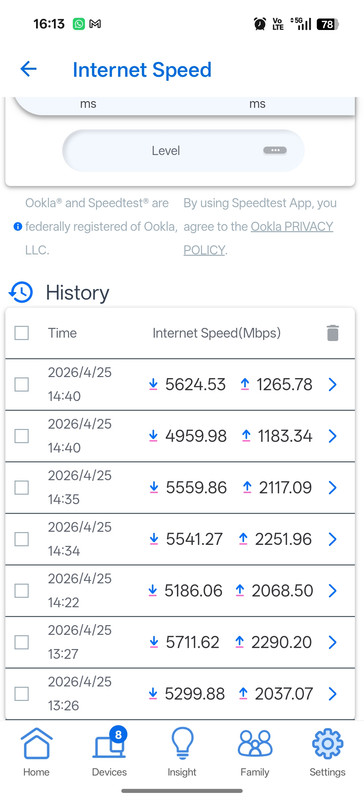
Hi everyone, I just had 10Gbps home internet installed today and I'm using the Asus ZenWiFi BT10.
When I run the built-in speed test within the router's interface, the result shows around 5.5 [Mbps/Gbps]. If it is indeed 5.5 Mbps, that seems way too low. I was expecting it to reach at least 6,000 Mbps (6 Gbps) or more.
Interestingly, I was previously on a Singtel 5Gbps plan and I was getting the exact same speed.
Is this speed normal for a 10Gbps setup? What kind of speeds should I realistically be seeing? Could there be a setting I missed, or is this a limitation of the router's internal speed test?"
 

xiaofan

High Supremacy Member
Joined
Sep 16, 2018
Messages
35,116
Reaction score
11,740
Screenshot-2026-04-25-16-13-06-61-bf3984983b16c4c7a2648038200b165a.jpg

Hi everyone, I just had 10Gbps home internet installed today and I'm using the Asus ZenWiFi BT10.
When I run the built-in speed test within the router's interface, the result shows around 5.5 [Mbps/Gbps]. If it is indeed 5.5 Mbps, that seems way too low. I was expecting it to reach at least 6,000 Mbps (6 Gbps) or more.
Interestingly, I was previously on a Singtel 5Gbps plan and I was getting the exact same speed.
Is this speed normal for a 10Gbps setup? What kind of speeds should I realistically be seeing? Could there be a setting I missed, or is this a limitation of the router's internal speed test?"

More like a limitation of the ZenWiFi BT10 which has a relatively slow CPU.

Same limitatiin exists for HB710 used by Starhub/MR.
 

RICO8607

Junior Member
Joined
Apr 24, 2024
Messages
31
Reaction score
2
More like a limitation of the ZenWiFi BT10 which has a relatively slow CPU.

Same limitatiin exists for HB710 used by Starhub/MR.
Would it be a better choice if I switched from the ZenWiFi BT10 to the eero Max 7? Will I see any real improvement in performance?
 

xiaofan

High Supremacy Member
Joined
Sep 16, 2018
Messages
35,116
Reaction score
11,740
Would it be a better choice if I switched from the ZenWiFi BT10 to the eero Max 7? Will I see any real improvement in performance?

I do not think you will get meaningful improvement in terms of wired and wireless speed.

Take note the built-in OOkla SpeedTest result has nothing to do with the real speed. If you get a proper 10Gbe Network adapter for your computer, you should get higher speed.

Asus ZenWiFi BT10 has better FW features than eero Max 7, no need to change.

But if you want to get the eero Max 7 and sell for a profit to offset your monthly price, just go ahead.
 

ceecookie

Arch-Supremacy Member
Joined
Dec 26, 2006
Messages
22,582
Reaction score
857
Screenshot-2026-04-25-16-13-06-61-bf3984983b16c4c7a2648038200b165a.jpg

Hi everyone, I just had 10Gbps home internet installed today and I'm using the Asus ZenWiFi BT10.
When I run the built-in speed test within the router's interface, the result shows around 5.5 [Mbps/Gbps]. If it is indeed 5.5 Mbps, that seems way too low. I was expecting it to reach at least 6,000 Mbps (6 Gbps) or more.
Interestingly, I was previously on a Singtel 5Gbps plan and I was getting the exact same speed.
Is this speed normal for a 10Gbps setup? What kind of speeds should I realistically be seeing? Could there be a setting I missed, or is this a limitation of the router's internal speed test?"
U need enterprise grade hardware to achieve true 10gbps speed if u have 10gbps capable clients.

Ubiquiti is one example, Microtik is another. These will cost at least 1-2k to purchase the individual parts to form a home network, as u know enterprise dont do AIO (like typical Asus home router). Need to buy 1 gateway, 1 switch and 1 AP etc.
 

keenklee

Arch-Supremacy Member
Joined
Sep 9, 2000
Messages
18,784
Reaction score
6,568
Screenshot-2026-04-25-16-13-06-61-bf3984983b16c4c7a2648038200b165a.jpg

Hi everyone, I just had 10Gbps home internet installed today and I'm using the Asus ZenWiFi BT10.
When I run the built-in speed test within the router's interface, the result shows around 5.5 [Mbps/Gbps]. If it is indeed 5.5 Mbps, that seems way too low. I was expecting it to reach at least 6,000 Mbps (6 Gbps) or more.
Interestingly, I was previously on a Singtel 5Gbps plan and I was getting the exact same speed.
Is this speed normal for a 10Gbps setup? What kind of speeds should I realistically be seeing? Could there be a setting I missed, or is this a limitation of the router's internal speed test?"
IMHO.
Try to run an extenal speed test. Also your upload speed is not very promising.

I use a low-cost D-Link DPN-BE7212GR and I am slowly moving to 10Gbe.
At the present moment, I am using a Wavlink 5Gbe USB Adaptor and my speed > 4000 Mbps for download and upload.
 
Last edited:

xiaofan

High Supremacy Member
Joined
Sep 16, 2018
Messages
35,116
Reaction score
11,740
U need enterprise grade hardware to achieve true 10gbps speed if u have 10gbps capable clients.

Ubiquiti is one example, Microtik is another. These will cost at least 1-2k to purchase the individual parts to form a home network, as u know enterprise dont do AIO (like typical Asus home router). Need to buy 1 gateway, 1 switch and 1 AP etc.

Actually you do not need enterprise grade HW. Of couse Ubiquiti Unifi Ecosystem is good if you want to go that route.

Consumer routers are okay with the XGS-PON 10Gbps plan which is at about 8.2Gbps max due to limitations of the XGS-PON technology used. I will call them "8.5Gbps plan" in reality.

Examples at below S$400: TP-Link Archer BE805, TP-Link EB810v

On the device side, a good 10Gbe network adapter (can be below S$120) will do.

Example from @Henry Ng using EB810v and an 10G Thunderbolit adapter.

I am using OWC Thunderbolt 10G adapter for more than 2 years and it is so far so good. My only issue is wifi 7 unstable with my EB810v router.

Which is your ISP? Starhub speed is ok for local speed. Today no one went back office and most people are online and the speed look ok. Please note that 10Gbps internet is only available on LAN cable connection and i am using Cat. 5e cable and not Cat. 6 yet. Next time new BTO will be Cat. 6 cable.


My wired connection is stable but not stable for wifi 7 connection.


KL Speedtest server


xiaofan

High Supremacy Member
Joined
Sep 16, 2018
Messages
35,116
Reaction score
11,740
For eight Home Internet customers, if you want to get a low cost 10Gbe capable routers, just go with eero Max 7. It should be able to support wired device with 10Gbe adapter.

On the device side, check out this thread.
https://forums.hardwarezone.com.sg/threads/5gbe-and-beyond-ethernet-adapters.7068236/

More options for router (wired and wireless) and switch.
https://forums.hardwarezone.com.sg/...and-switch-rj45-version-no-sfp-ports.7072646/
https://forums.hardwarezone.com.sg/...port-switch-and-vq-xgs-pon-onu-stick.7047645/
 

ceecookie

Arch-Supremacy Member
Joined
Dec 26, 2006
Messages
22,582
Reaction score
857
Actually you do not need enterprise grade HW. Of couse Ubiquiti Unifi Ecosystem is good if you want to go that route.

Consumer routers are okay with the XGS-PON 10Gbps plan which is at about 8.2Gbps max due to limitations of the XGS-PON technology used. I will call them "8.5Gbps plan" in reality.

Examples at below S$400: TP-Link Archer BE805, TP-Link EB810v

On the device side, a good 10Gbe network adapter (can be below S$120) will do.

Example from @Henry Ng using EB810v and an 10G Thunderbolit adapter.
Thanks for sharing. So you mean those $400+ routers have more powerful cpu/ram than asus BT10, to be able sustain 10gbps lan speed?

I had the impression BT10 was a top tier router from asus given the price point
 

xiaofan

High Supremacy Member
Joined
Sep 16, 2018
Messages
35,116
Reaction score
11,740
Thanks for sharing. So you mean those $400+ routers have more powerful cpu/ram than asus BT10, to be able sustain 10gbps lan speed?

I had the impression BT10 was a top tier router from asus given the price point

Yes, Asus ZenWiFi BT10 has a slower CPU (BCM6764L or BCM6765), similar to Asus RT-BE92U.

Only the higher end ones use the flagship BCM4916CPU, like ZenWiFi BQ16, ROG GT-BE98, RT-BE88U and RT-BE86U.

Asus likes to use lower end CPU on the ZenWiFi series, like the older Asus ZenWiFi XT8, which uses the same low end BCM6755 as the low end RT-AX56U. Then higher end AX router like ROG GT-AX11000 and RT-AX86U will use flagship BCM4908 CPU.

ZenWiFi XT12 and ET12 do use flagship BCM4912 CPU, like Asus ROG GT-AX11000 Pro, ROG GT-AX6000 and RT-AX86U Pro.

qZS2ZSm.png
 
Last edited:
Important Forum Advisory Note
This forum is moderated by volunteer moderators who will react only to members' feedback on posts. Moderators are not employees or representatives of HWZ Forums. Forum members and moderators are responsible for their own posts. Please refer to our Community Guidelines and Standards and Terms and Conditions for more information.
Top