What is taking up my storage?

kenapa siol

Master Member
Joined
Dec 12, 2011
Messages
2,590
Reaction score
60
Need help!
My pc is currently running out of storage. Im using the old ADATA 128gb ssd as my main drive. Using win 7 64bit home edition. I dont have much apps, just the basics like

Itunes
utorrent
cccleaner (i always clear registries and those temp cookies)
avast AV
IDM
dropbox
google chrome
handbrake
K lite codec
winrar and 7zip
and so on..

Currently, im only left with 4gb on my C drive. Is there anyway to check which program or what is eating up my storage?
 

NoLogicLah

Arch-Supremacy Member
Joined
Mar 15, 2011
Messages
11,051
Reaction score
211
disable windows restore

right click my computer > properties > system protection
 

kenapa siol

Master Member
Joined
Dec 12, 2011
Messages
2,590
Reaction score
60
disable windows restore

right click my computer > properties > system protection

Thanks for the prompt reply. So basically just disable this windows restore will do? It has nothing to do with my ssd having too much "junks"?
 

lobo76

Supremacy Member
Joined
Nov 24, 2003
Messages
7,416
Reaction score
0
If you play lots of games, the savefiles can commonly be found in User>My Document>My Games

That...could take up quite a bit of space, esp for games that give you unlimited slots. Some save game files are also bigger than others. Also, when you uninstall a game, they might NOT be removed, so the savegames of all the games you have ever install may still be around.
 

kenapa siol

Master Member
Joined
Dec 12, 2011
Messages
2,590
Reaction score
60
If you play lots of games, the savefiles can commonly be found in User>My Document>My Games

That...could take up quite a bit of space, esp for games that give you unlimited slots. Some save game files are also bigger than others. Also, when you uninstall a game, they might NOT be removed, so the savegames of all the games you have ever install may still be around.

I dont play any pc game on my desktop. It is used for watching video, youtube, surfing and streaming video only. :(


Last time im using AVG AV, untill it keeps prompting me that the trial is expired, i switch to avast. Last time also lacking storage :)

Edit: I will dl a few apps from what kadinsky bro recommend, then check which folder is eating up all my storage.
 
Last edited:

kandinsky

Master Member
Joined
Jan 7, 2015
Messages
4,693
Reaction score
10
Ok thanks, will try it once im home.

Just a quick check, if its not any apps or program taking up my storage, could it be other things like "memory, cookies, cache" etc etc? Possibly to manually del it?

You mentioned that you use ccleaner to clean registry & cookies, can use it to clean cache and temp files as well. Run 'Analyze' under both 'Windows' and 'Applications'.

Manually is always a bit iffy unless you know for sure exactly what you are deleting.
 

kenapa siol

Master Member
Joined
Dec 12, 2011
Messages
2,590
Reaction score
60
You mentioned that you use ccleaner to clean registry & cookies, can use it to clean cache and temp files as well. Run 'Analyze' under both 'Windows' and 'Applications'.

Manually is always a bit iffy unless you know for sure exactly what you are deleting.

Yeap, cleared everything in "windows" and "applications" as well. No significant increase on my storage. Hence not sure if its because my ssd is too old not functioning well, or unknown folder is collecting all temp files/memories and so on :(

manually, what i did was goto c drive, and click on individual main folder and see which folder is showing more storage used..
It is usuer under the "user" folder and the "windows" folder that is taking up at least 10gb..
 

kandinsky

Master Member
Joined
Jan 7, 2015
Messages
4,693
Reaction score
10
I just tried SpaceSniffer, not bad, quite fast. Worth trying. Don't even require installation.

Just to share, biggest file for me was hiberfil.sys @ 25GB. Read that not recommended to delete cos in win 8.1 it's used for fast boot. I have the space to spare anyways.
 

weap0nx

Master Member
Joined
Sep 13, 2000
Messages
4,400
Reaction score
4
I just tried SpaceSniffer, not bad, quite fast. Worth trying. Don't even require installation.

Just to share, biggest file for me was hiberfil.sys @ 25GB. Read that not recommended to delete cos in win 8.1 it's used for fast boot. I have the space to spare anyways.

it is a direct consequence of you having so much RAM. hiberfil.sys as the name may suggest is a memory snapshot as the computer goes into hibernation so that it can restore back to RAM when you start back up. I believe it's safe to delete between successive hibernations but you'll see your hard disk free space rollercoaster go back up when Windows recreates it.

The main culprit of large disk space usage is
- hiberfil.sys
- Paging file (if system set is also directly proportional to the amount of RAM you have)
- Shadow copy volume (Windows restore)

To fix respectively:
- disable hibernation or hybird sleep if you have it
- disable paging file or move off your conservatively spaced SSD to a HDD
- disable Windows restore on your SSD

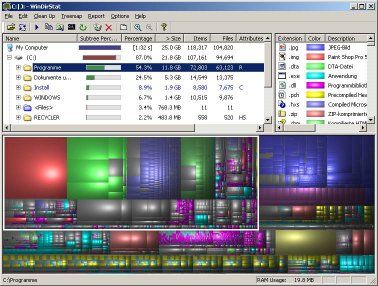
One way to visualize disk usage is to download Windirstat, it's one of those software's that incredibly well thought of and just darn useful. Kudos to the developer!

windirstat.jpg
 

kandinsky

Master Member
Joined
Jan 7, 2015
Messages
4,693
Reaction score
10
it is a direct consequence of you having so much RAM. hiberfil.sys as the name may suggest is a memory snapshot as the computer goes into hibernation so that it can restore back to RAM when you start back up. I believe it's safe to delete between successive hibernations but you'll see your hard disk free space rollercoaster go back up when Windows recreates it.]

Thanks for the suggestions! Yeah, I read it's around 60-70% of your ram usually. I don't need to fix it, TS is the one running short of space, not me :)
 

kenapa siol

Master Member
Joined
Dec 12, 2011
Messages
2,590
Reaction score
60
Hi guys, thanks for all the help rendered. Im still trying out the method mentioned, but on the same time, i hooted a samsung 850 EVO 256gb ssd, delivery takes about 2-3weeks. Meanwhile can i check with you guys that

1) Can i copy my entire C drive from my old hdd to my new ssd and everything stays the same? If yes, how do i do it?

2) If reformat and and reinstall again into the new ssd is recommended, im using win 7 home edition (bought it at Malaysia, KL), i rem i need to manually activate it, but ive forgotten how i did it as it was 3-4yrs back.

3) I was thinking that in future, all the prg and app that i used mentioned in the first post to be installed in the old ssd, while the new ssd is only for OS, is this a good option, or there is a better option?:)
 

lobo76

Supremacy Member
Joined
Nov 24, 2003
Messages
7,416
Reaction score
0
2) If reformat and and reinstall again into the new ssd is recommended, im using win 7 home edition (bought it at Malaysia, KL), i rem i need to manually activate it, but ive forgotten how i did it as it was 3-4yrs back.

Disconnect Internet.
Try to activate the windows. Since Internet cannot...
Click Show me other ways to activate.
Type your Windows 7 product key, and then click Next.
Click Use the automated phone system.
Follow instructions to fill in a lot of numbers. Then Activate.

Reconnect Internet to update.

p.s If you bought fr Malaysia, it should be SEA version. Not sure if the Internet method works because there is a Singapore version. That was the recommendation anyway...
 
Important Forum Advisory Note
This forum is moderated by volunteer moderators who will react only to members' feedback on posts. Moderators are not employees or representatives of HWZ Forums. Forum members and moderators are responsible for their own posts. Please refer to our Community Guidelines and Standards and Terms and Conditions for more information.
Top