(NAS) D-Link DNS-320L

albertlee

Supremacy Member
Joined
Jan 1, 2000
Messages
9,586
Reaction score
180
Hey guys i just saw that i can upgrade the firmware with 1.04b12.Current firmware version is 1.02.

Thing is i have installed fun plug and transmission if i upgrade the firmware will i lose all my settings and/or will "destroy" my system?

Firmware upgrade is pretty safe as it involve only the flash memory although the presence of actual HDD is still require. FFP and other related add-on packages will not be affected including user data.

Disclaimer: it's always prudent to have a backup before proceeding.
 

albertlee

Supremacy Member
Joined
Jan 1, 2000
Messages
9,586
Reaction score
180
it is the former. too slow for me. that is why i am selling. as mentioned in another thread, after using some other nas, these dlink nas are too slow for me. no offense :D

Well, you should have done your research first before buying it in the first place. Also it's quite meaningless to compare with other NAS unless it's of the similar price range but yet offer better performance.

Anyway, good luck in selling your DNS-320.
 

breakdown

Junior Member
Joined
Sep 20, 2014
Messages
7
Reaction score
0
Firmware upgrade is pretty safe as it involve only the flash memory although the presence of actual HDD is still require. FFP and other related add-on packages will not be affected including user data.

Disclaimer: it's always prudent to have a backup before proceeding.

Just did the upgrade and everything works as it should be!Once more thank you albertlee.

On another topic would anyone know how to add a chinese ip camera on the surveillance addon?I know it is supposed to support only Dlink vendor cameras but i had read somewhere that one could attach one to the system by providing with a similar dlink ip camera.Unfortunately i can't find the post anymore.
 
Last edited:

BusteR

Senior Member
Joined
Sep 16, 2008
Messages
2,082
Reaction score
126
Anyone tries plex or serviio on 320L?
I find the default dlna lousy.
Plex or serviio?
 

terry1

Senior Member
Joined
Nov 22, 2005
Messages
565
Reaction score
1
Well, you should have done your research first before buying it in the first place. Also it's quite meaningless to compare with other NAS unless it's of the similar price range but yet offer better performance.

Anyway, good luck in selling your DNS-320.

yes i did but just given the specs that the nas is running on 800mhz marvell kirkwood dose not give you a good indication of the speed and responsiveness.

by the way i do own more than 10 nas. i would replace the firmware with debian linux or funplug. the lenovo ix2 is half the price and many times the performance but this belongs to another thread :D
 

albertlee

Supremacy Member
Joined
Jan 1, 2000
Messages
9,586
Reaction score
180
yes i did but just given the specs that the nas is running on 800mhz marvell kirkwood dose not give you a good indication of the speed and responsiveness.

by the way i do own more than 10 nas. i would replace the firmware with debian linux or funplug. the lenovo ix2 is half the price and many times the performance but this belongs to another thread :D

Well, you should be looking at the NAS overall benchmark performance instead of just relying on the specs alone.

As mentioned before, it's meaningless to made comparison with dissimilar hardware, Lenovo ix2 is running on 1.6Ghz processor with 256MB. And as for the pricing, I have my doubt it cost half the price of DNS-320.

Anyway, this discussion is getting a bit off-topic to begin with in the first place.
 

souleva

Junior Member
Joined
Apr 10, 2008
Messages
13
Reaction score
0
Problem with D-Link DNS-320

Hi All,

I am facing a problem with my NAS currently.

Recently, I have switched to fibre optic. I used to be able to access the NAS through wireless but now only the LAN connected ones can access the NAS. May I know is there any setting that I can do to allow access through wireless network?

Thank you.
 

souleva

Junior Member
Joined
Apr 10, 2008
Messages
13
Reaction score
0
Ok, sorry for the above post.

I have found the problem. It is just disabling of the QoS in the router. Thank you.
 

sturm100

Member
Joined
Apr 26, 2000
Messages
494
Reaction score
0
Hi Guys,

Not sure if this is the place to ask, I have this DNS 320 for 2-3 years, today it just gave up on me, and upon further checking the connection came off(more like burnt off) and has a burning smell. Do you guys leave your NAS on 24hrs a day? I was not at home when this happen, and I am so glad that the it did not catch fire....Not sure if I can bring this up to Dlink? or just get a new one?
 

albertlee

Supremacy Member
Joined
Jan 1, 2000
Messages
9,586
Reaction score
180
Hi Guys,

Not sure if this is the place to ask, I have this DNS 320 for 2-3 years, today it just gave up on me, and upon further checking the connection came off(more like burnt off) and has a burning smell. Do you guys leave your NAS on 24hrs a day? I was not at home when this happen, and I am so glad that the it did not catch fire....Not sure if I can bring this up to Dlink? or just get a new one?

Don't know why you guys keep posting in the wrong thread? There is one for DNS-320, this one is for DNS-320L.

Anyway, which "connection" you referring to? Got picture?
 

sturm100

Member
Joined
Apr 26, 2000
Messages
494
Reaction score
0
Don't know why you guys keep posting in the wrong thread? There is one for DNS-320, this one is for DNS-320L.

Anyway, which "connection" you referring to? Got picture?

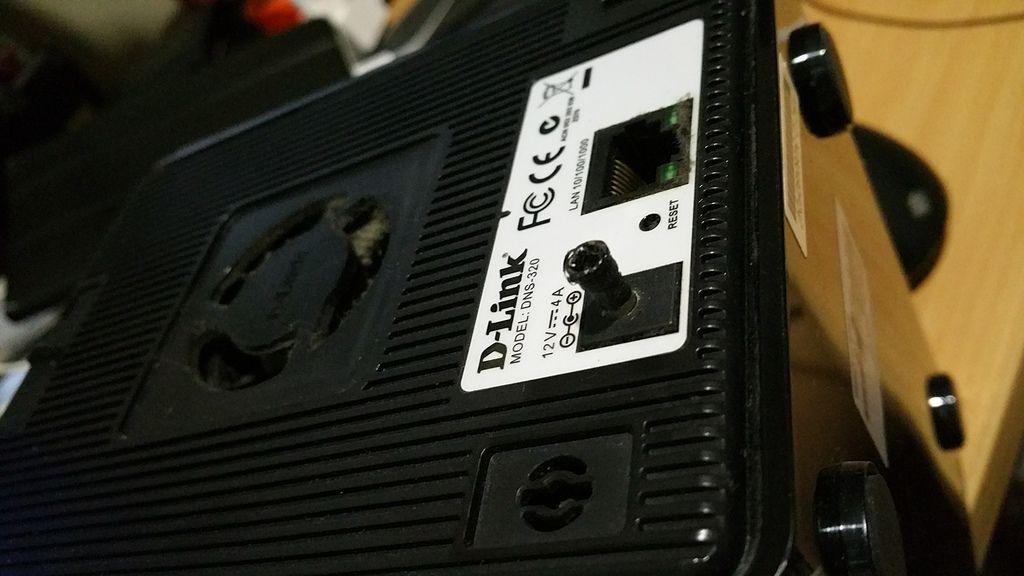
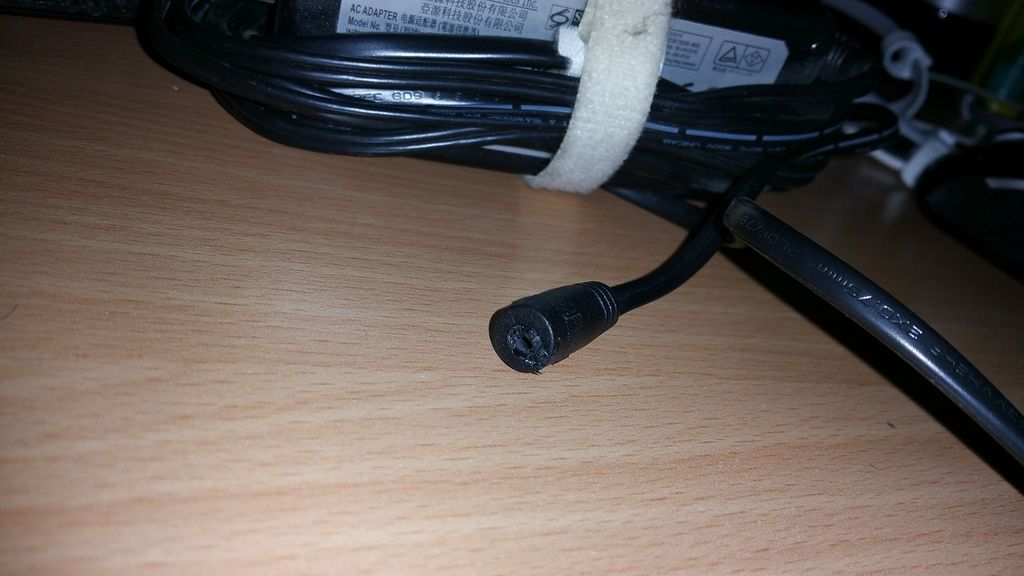
Sorry about this, not sure if 320 is alive here. The connector got burnt leaving the metal part sticking in. There is a strong burnt smell emitting from the metal connector, so I am not sure if the my NAS is still working. Or can i just buy any 12v 4A power plug and try it?

2015-09-14%2001.05.41.jpg


2015-09-14%2001.07.58.jpg
 

albertlee

Supremacy Member
Joined
Jan 1, 2000
Messages
9,586
Reaction score
180
Sorry about this, not sure if 320 is alive here. The connector got burnt leaving the metal part sticking in. There is a strong burnt smell emitting from the metal connector, so I am not sure if the my NAS is still working. Or can i just buy any 12v 4A power plug and try it?

2015-09-14%2001.05.41.jpg


2015-09-14%2001.07.58.jpg

This is serious, I came across leaking capacity in power adapter but this incident could easily resulted in a fire outbreak. I wonder whether the adapter is MIC.

Looking at the layer of dust on the NAS cooling fan, it seem like you didn't do house cleaning for quite sometime. Insufficient cooling within the NAS itself could result in more power being drawn thus causing overheating.

My advice would to bring the NAS together with the drives down to D-Link support even if it is out-of-warranty. Get them to check and probably get a refurnished one if current one is damaged.
 

gikosg

Junior Member
Joined
Mar 1, 2012
Messages
3
Reaction score
0
DNS-320L blue LED blinking, fail to power up

Hi, I read that there are some issues with DNS-320L not able to power up with blue LED blinking. I encountered similarly problem with my NAS after 2 years of using. I wonder if this is a common issues with this model.

I bought a new DNS-320L and wanted to transfer my HDD from the faulty DNS-320L to the new DNS-320L. Was prompted to format the HDDs. Both 2TB HDD are configured as RAID 1. Anyway to avoid reformatting them? I thought it should work without reformatting since they are the same model.

Any advice will be greatly appreciated.
 
Important Forum Advisory Note
This forum is moderated by volunteer moderators who will react only to members' feedback on posts. Moderators are not employees or representatives of HWZ. Forum members and moderators are responsible for their own posts.

Please refer to our Community Guidelines and Standards, Terms of Service and Member T&Cs for more information.
Top