

hengheng220
Master Member
- Joined
- Mar 4, 2013
- Messages
- 4,424
- Reaction score
- 7
Compass Point machiam ghost town now...
really meh? long time no go liao, but the last time i went quite crowded leh, nearby got MRT sure no problem de ba

Compass Point machiam ghost town now...


really meh? long time no go liao, but the last time i went quite crowded leh, nearby got MRT sure no problem de ba
closing liao

Is en bloc renovation, shops are closing down gradually. Now even Swensen's and BK also gone...Aiya renovation not close down la

After a few days without comp, finally back online.

Waiting for Intel 750GB 400GB SSD to arrive at PC Themes, then I can finally complete my rig overhaul.

Why don't want install on top slot? You want show off the yellow colour audio boost is it hahahaAfter a few days without comp, finally back online.
Waiting for Intel 750GB 400GB SSD to arrive at PC Themes, then I can finally complete my rig overhaul.

Hw much is the ssd?

hello peng you/shushu men, wanted to ask where to post if i want to ask gw2 stuff? can post here anot since here like the most active (other than EDMW) will get banned anot?
Why don't want install on top slot? You want show off the yellow colour audio boost is it hahaha
Sent from microwave oven using GAGT

Nope, the RAM slot covers are definitely in the way, not just the rear IO cover. If u actually look at a X99 Xpower board (or any MSI X99 board for that matter), u find that the RAM clips are super close to the PCIe slot, and they are static (i.e. only the top clips open or close, the bottom clips are held in place tightly). So as long as there is something protruding out from the GPU (like backplate), confirm clash. How i noe cant fit is when i slot the GPU in, screw on the PCIe bracket screws, connect the VGA PSU cables, I can still see my Lightning's PCIe pins. Which means that the PCIe pins only half-entered the PCIe slot even with the PCIe bracket screws in place.I think the only thing blocking is the rear io cover?
Maybe you should look again hahaha. Got one time I thought the pcie slot on mobo and case expansion screw holes don't match. Realised its my own mistake...
Board supports 4 way SLI? I think you may lose some lanes if not using first slot. Do correct me if i am wrong hahaha. Then again not important bah since 8x/16x samasama for gpu
Sent from microwave oven using GAGT
Start from the second expansion slot of the case. The first pcie slot alligns with the 2nd expansion slot. Using a 750D and X99A SLI which is not unfamiliar to your 760T. Hope this picture helps and explains why you can't slot it in:Nope, the RAM slot covers are definitely in the way, not just the rear IO cover. If u actually look at a X99 Xpower board (or any MSI X99 board for that matter), u find that the RAM clips are super close to the PCIe slot, and they are static (i.e. only the top clips open or close, the bottom clips are held in place tightly). So as long as there is something protruding out from the GPU (like backplate), confirm clash. How i noe cant fit is when i slot the GPU in, screw on the PCIe bracket screws, connect the VGA PSU cables, I can still see my Lightning's PCIe pins. Which means that the PCIe pins only half-entered the PCIe slot even with the PCIe bracket screws in place.
And I'm not gonna do 4-way SLI with my i7-5820k 28-lane CPU chip. In fact, 850W PSU is hardly enough to support 2 980Ti in SLI, let alone 4. And good news is that the mobo auto-detects my PCIe_4 as the x16 slot when my PCIe_1 slot isnt populated, so I still get full bandwidth even at the _4 slot.

Okay my bad. I shouldn't say "all MSI X99 boards" coz after googling for images I realised that the Xpower and the SLI-Plus have different PCIe configs.Start from the second expansion slot of the case. The first pcie slot alligns with the 2nd expansion slot. Using a 750D and X99A SLI which is not unfamiliar to your 760T. Hope this picture helps and explains why you can't slot it in:
Anw because for non 4 way boards, some pcie lanes may be compromised especially the third slot. For instance, the 3rd slot for the SLI Krait only supports 8x and the third slot splits with the first slot for 8x 8x if 3rd slot is occupied.
Sent from microwave oven using GAGT

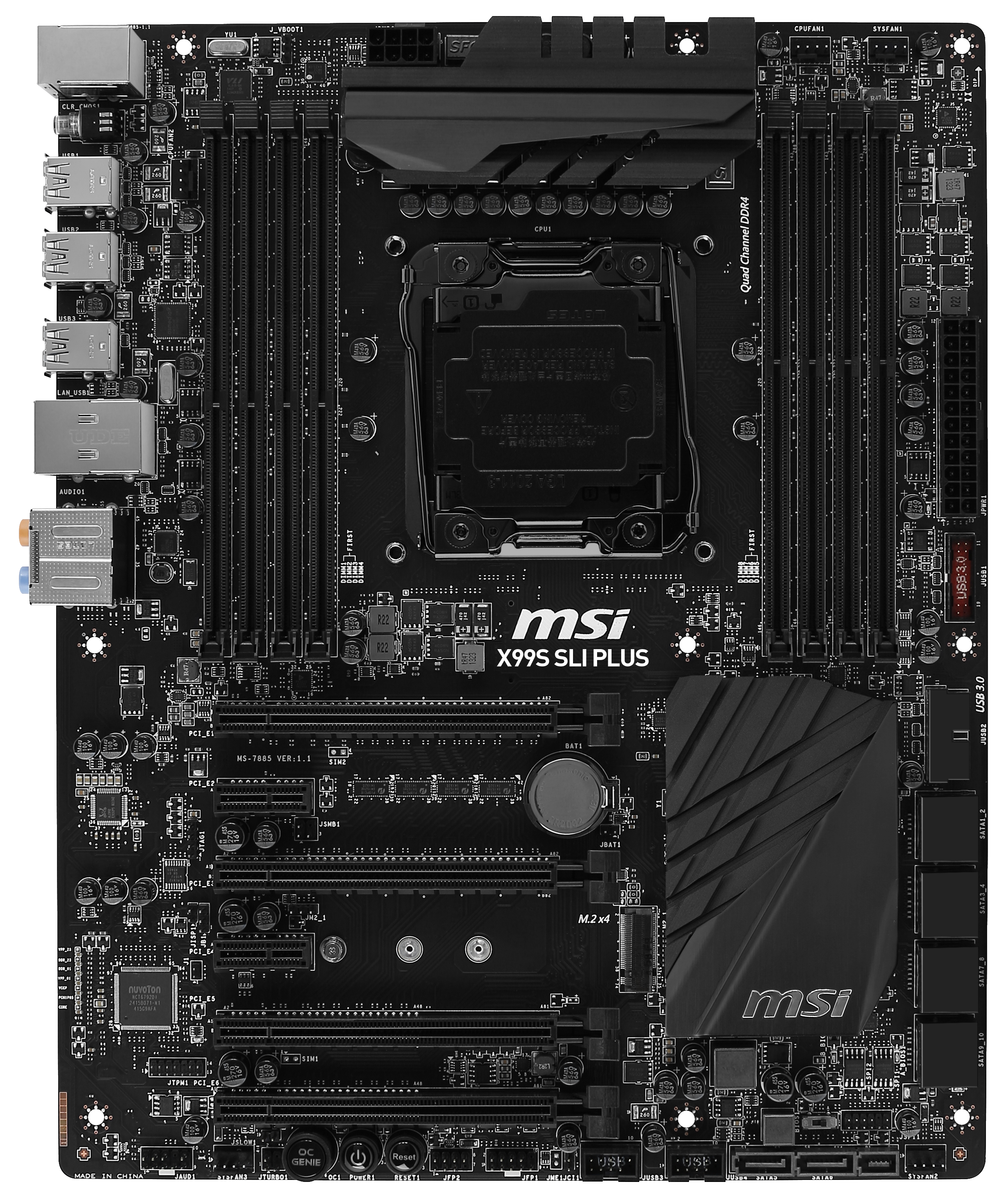
Oh okay I see... Quite clear.Okay my bad. I shouldn't say "all MSI X99 boards" coz after googling for images I realised that the Xpower and the SLI-Plus have different PCIe configs.
The MSI X99 XPower config:
The MSI X99 SLI-Plus config:
Do take note of the spacing between the RAM clips and the first PCIe slot. As u can see, the SLI-Plus has a much larger space compared to the Xpower, hence u can put the GPU in the 2nd PCIe bracket on the 750D. But mine is on the 1st PCIe bracket. If I put on 2nd PCIe bracket, there is no PCIe lane on that bracket slot to fit the GPU in.


