

1k budget for GPU and CPU upgrade?

greatgreenman

Senior Member
Joined
May 19, 2016
Messages
566
Reaction score
16
I'm currently using an RTX 2070 Super and R5 3600. Playing games on 1440p. Seems like 2070 Super can't really run AAA games on max settings without frame drops anymore. Also recently got into video rendering, so the R5 3600 isn't ideal. Might be looking for a better CPU cooler as well if budget allows. Currently using Cooler Master H212.

Hoping 1k is enough for a decent upgrade and if there are any recommendations. I will definitely be selling my old GPU and CPU after the upgrade as well.
 

NightRaven49

Master Member
Joined
May 17, 2019
Messages
3,741
Reaction score
1,579
Hoping 1k is enough for a decent upgrade and if there are any recommendations.
its enough. a 5700x is about $250 or less nowadays on carou, and a 7800xt can be had for under $700 on techyard, both of which should be quite substantial upgrades (the 7800xt is almost double the performance of the 2070s and has double the vram too). do make sure ur bios is updated and ur psu allows for a much more powerful gpu (~750w). the remaining $50 or so can also get u the thermalright phantom spirit 120 se from pc themes, which is one of the best value air coolers around.
I will definitely be selling my old GPU and CPU after the upgrade as well.
will this add back into the budget?
 

86technie

High Supremacy Member
Joined
Jun 8, 2006
Messages
40,376
Reaction score
5,959
CPU cooler I don't think you want to upgrade.
AMD Ryzen in general are easier to cool unlike Intel.

1) Is the AMD chipset installed?
For optimal performance as well as elimate micro-shuttering.
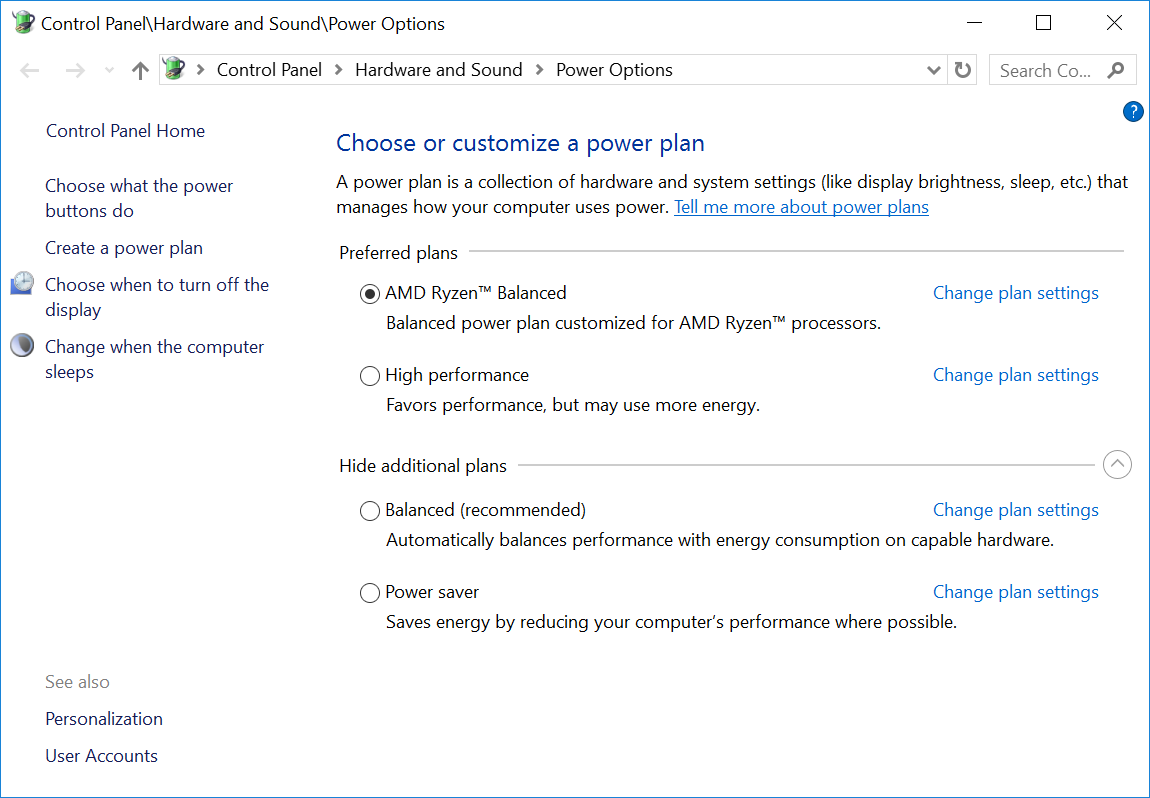
AMD chipset include AMD power plan for Ryzen 3000 series.

ryzen-windows10-custom-power-plan.png


If you did not have this installed, suggest backup.
Format the drive than install Windows from scratch with latest drivers for your motherboard.

2) For newer CPU upgrade, you need to update the BIOS first before you can upgrade to Ryzen 5000 series.
I doubt you have sufficient budget for graphic card.
*Correct post since never do homework.
 
Last edited:

greatgreenman

Senior Member
Joined
May 19, 2016
Messages
566
Reaction score
16
its enough. a 5700x is about $250 or less nowadays on carou, and a 7800xt can be had for under $700 on techyard, both of which should be quite substantial upgrades (the 7800xt is almost double the performance of the 2070s and has double the vram too). do make sure ur bios is updated and ur psu allows for a much more powerful gpu (~750w). the remaining $50 or so can also get u the thermalright phantom spirit 120 se from pc themes, which is one of the best value air coolers around.

will this add back into the budget?
will look into those. I've never used AMD GPUs before. I have 650w psu. Nowadays that's not enough?

CPU cooler I don't think you want to upgrade.
AMD Ryzen in general are easier to cool unlike Intel.

1) Is the AMD chipset installed?
For optimal performance as well as elimate micro-shuttering.
AMD chipset include AMD power plan for Ryzen 3000 series.

ryzen-windows10-custom-power-plan.png


If you did not have this installed, suggest backup.
Format the drive than install Windows from scratch with latest drivers for your motherboard.

2) For newer CPU upgrade, you need to update the BIOS first before you can upgrade to Ryzen 5000 series.
The best option will be Ryzen 5700 under $300.
I doubt you have sufficient budget for graphic card.
Suggest get a faster NVME SSD not sure what is the current you are using.

Like get a Samsung 970 EVO Plus I assume your motherboard must be a B450
which only supports PCIE Gen 3 only.
First time I've heard of the AMD power plan. Will try downloading that chipset. My NVME SSD should be good enough? I don't think changing it will see much of a boost in performance.
 

86technie

High Supremacy Member
Joined
Jun 8, 2006
Messages
40,376
Reaction score
5,959
will look into those. I've never used AMD GPUs before. I have 650w psu. Nowadays that's not enough?


First time I've heard of the AMD power plan. Will try downloading that chipset. My NVME SSD should be good enough? I don't think changing it will see much of a boost in performance.

Which motherboard are you using?
Which SSD are you using?
NVME SSD there's a difference as there are those with DRAM and those without.
 

greatgreenman

Senior Member
Joined
May 19, 2016
Messages
566
Reaction score
16
Which motherboard are you using?
Which SSD are you using?
NVME SSD there's a difference as there are those with DRAM and those without.
MSI B450 Tomahawk Max. I'm using some P-series Samsung NVME SSD; can't remember exact model. Don't think there's anything special about it, but I don't think a better NVME SSD will give me the same kind of performance boost as a new CPU or GPU?
 

ragnarok95

Senior Moderator
Senior Moderator
Joined
Mar 9, 2004
Messages
125,212
Reaction score
6,451
Cpu: 5700X (amazon.sg S$266)
Gpu: Powercolor 7800XT (Techyard S$689)
Total: S$955. Still got S$45 can go eat good food.

You also intend to sell your 3600 and RTX 2070 Super. From Carousell these are the prices i see available now; S$50 for R5 3600 and S$250 for RTX2070 Super. You can only get back around ~S$300 for this combo, plus/minus the condition and warranty and bla bla bla.

S$955 - $300 = S$655 for upgrade. Since your budget is S$1k. You can up your cpu to a 5800X3D or 7900GRE or both.
 

NightRaven49

Master Member
Joined
May 17, 2019
Messages
3,741
Reaction score
1,579
The best option will be Ryzen 5700 under $300.
nope.
tldw 5700 is not a lower clocked 5700x (which is already a lower clocked 5800x), but a 5700g with disabled igpu. productivity will be similar to a 5700x, but gaming will be no better than a 3600 due to its reduced cache size.
I have 650w psu. Nowadays that's not enough?
650w is generally enough, but if ur buying a whole new psu then provisioning a little more is not that much more expensive. in my experience the gpu manufacturer recommended psu has a lot of headroom, ive gotten away with running cards like the 5700xt on my old 450w (150w-200w below recommended). i would apply a little undervolt to reduce power consumption since it is running a bit close though.
You also intend to sell your 3600 and RTX 2070 Super. From Carousell these are the prices i see available now; S$50 for R5 3600 and S$250 for RTX2070 Super. You can only get back around ~S$300 for this combo, plus/minus the condition and warranty and bla bla bla. Since your budget is S$1k. You can up your cpu to a 5800X3D or 7900GRE or both.
if the 4070super is not that much more expensive than the 7900gre that is what i would go with, since the latter needs memory oc to be competitive and is generally far behind in rt and upscaling, and ts seems apprehensive to go amd. the 5700x3d is also viable alongside a gpu upgrade with 1.3k while losing barely any performance vs the 5800x3d.
 

ragnarok95

Senior Moderator
Senior Moderator
Joined
Mar 9, 2004
Messages
125,212
Reaction score
6,451
Coming from a 3600, i would avoid both 5700 and 5700G because both make no sense to me when 5700X is going for S$266 in amazon.sg, esp if you also intend to change gpu too.
 

86technie

High Supremacy Member
Joined
Jun 8, 2006
Messages
40,376
Reaction score
5,959
MSI B450 Tomahawk Max. I'm using some P-series Samsung NVME SSD; can't remember exact model. Don't think there's anything special about it, but I don't think a better NVME SSD will give me the same kind of performance boost as a new CPU or GPU?

https://www.msi.com/Motherboard/B450-TOMAHAWK-MAX/support

Samsung P series are OEM line of SSD like 970, 980.
OEM and consumer range the speed is not much of big difference.

What you can do:

1) Update the motherboard BIOS.
This will update the AMD AGESA which has some performance tweaking.
2) Format/Erase SSD than install Windows. (Disconnect from Internet so you can install drivers)
Do install AMD chipset -> LAN -> Audio -> Graphic card

I did a guide in another thread about how to do this properly.

Wipe the NVME SSD using MSI Secure erase inside BIOS.

bios-manual-12.jpg


2) Configure the boot mode from CSM to UEFI.
Latest BIOS should have UEFI mode enabled.

sddefault.jpg


3) Enable secure boot (*Latest BIOS may ensure this by default)

index.php


3) Press F11 boot into your thumbdrive take note it should state UEFI:XXXXXX.

4) UEFI boot should have a MSI Logo spining but at first it can be Windows spining.

5) Install Windows using thumbdrive no need to format the drive.
Just let the Windows installer partition the drive.

6) Install the driver AMD chipset -> LAN -> Audio -> Graphic card
 

watzup_ken

High Supremacy Member
Joined
Nov 21, 2003
Messages
25,670
Reaction score
2,123
If you are retaining the motherboard, then you don't have much of a choice since the next jump will be Ryzen 5000 series. The Ryzen 7 5700X is the best processor you can get for a good price and fits your budget. Otherwise for video rendering, the Intel i5 12600/ 13600 with higher thread counts may be a good alternative.
 

greatgreenman

Senior Member
Joined
May 19, 2016
Messages
566
Reaction score
16
Thanks all, so general consensus for CPU is 5700X which looks like what I'll get.

Looks like Powercolor Radeon RX 7800XT is under $700 on thetechyard which looks like a good deal. Only thing is I've never heard of powercolor before and have never used and AMD GPU. Just wondering if there's any reason why I shouldn't get this or if there's any comparable Nvidia GPU that is around the same price?
 

Phen8210

High Supremacy Member
Joined
Jul 29, 2011
Messages
29,031
Reaction score
8,284
Thanks all, so general consensus for CPU is 5700X which looks like what I'll get.

Looks like Powercolor Radeon RX 7800XT is under $700 on thetechyard which looks like a good deal. Only thing is I've never heard of powercolor before and have never used and AMD GPU. Just wondering if there's any reason why I shouldn't get this or if there's any comparable Nvidia GPU that is around the same price?

I would check with them if that GPU is a new set before purchasing
 

Phen8210

High Supremacy Member
Joined
Jul 29, 2011
Messages
29,031
Reaction score
8,284
is RTX 4070 the equivalent of RX 7800 XT? Looks like AMD performance benchmark is better except when it comes to RT

Buy RTX 4080 super or RTX 4090 if you want to use RT, I guess.

The lower cards not much performance to spare for RTX.
 

NightRaven49

Master Member
Joined
May 17, 2019
Messages
3,741
Reaction score
1,579
Only thing is I've never heard of powercolor before and have never used and AMD GPU. Just wondering if there's any reason why I shouldn't get this or if there's any comparable Nvidia GPU that is around the same price?
is RTX 4070 the equivalent of RX 7800 XT? Looks like AMD performance benchmark is better except when it comes to RT
the amd exclusive partners like powercolor, sapphire and xfx generally pump out decent cards. performance wise the 7800xt is faster in raster, not too far behind in rt and packs more vram compared to the 4070 like u mentioned, while generally costing $100 cheaper or even more. at the techyard price, the closest competing card is the 4060ti 16gb, which doesnt hold a candle to the 7800xt. the only concern is power consumption, but i wouldnt be worried on a 650w psu. at least the fighter is a triple fan design vs dual fans on cheap 4070s, which should help mitigate the higher temperatures and noise.
 

Phen8210

High Supremacy Member
Joined
Jul 29, 2011
Messages
29,031
Reaction score
8,284
oh dont forget if you go nvidia must go 16GB VRAM at least for 1440P
 

greatgreenman

Senior Member
Joined
May 19, 2016
Messages
566
Reaction score
16
Thanks for all the advice. I got the 7800 XT and 5700X for around $946. I went with Hellhound instead for better overall performance for +$36 extra. Now wondering if I should switch out my Coolermaster H212 LED for a better cooler or just get some thermal paste to reuse it. The main thing I've never liked about my current cooler is that the red LED light is always on.
 
Last edited:
Important Forum Advisory Note
This forum is moderated by volunteer moderators who will react only to members' feedback on posts. Moderators are not employees or representatives of HWZ Forums. Forum members and moderators are responsible for their own posts. Please refer to our Community Guidelines and Standards and Terms and Conditions for more information.
Top