2012 macbook air with question mark icon

Lu_cius

Junior Member
Joined
Jul 27, 2014
Messages
11
Reaction score
0
Hello guys, i accidentally erased all the data in my macbook air and after restarting i got the folder with the question mark icon.

I understand that i've deleted the bootup software along with everything else. Is there any solution to salavge? mac noob here.

Thank you
 

asriznet

Senior Member
Joined
Oct 2, 2009
Messages
981
Reaction score
0
Hello guys, i accidentally erased all the data in my macbook air and after restarting i got the folder with the question mark icon.

I understand that i've deleted the bootup software along with everything else. Is there any solution to salavge? mac noob here.

Thank you

As mentioned on the other thread, boot up to OS X Recovery and perform a new installation from there.
 

Lu_cius

Junior Member
Joined
Jul 27, 2014
Messages
11
Reaction score
0
all i see it a blinking folder and a question on it, ive followed the site u linked. no effect. :(
 

asriznet

Senior Member
Joined
Oct 2, 2009
Messages
981
Reaction score
0
all i see it a blinking folder and a question on it, ive followed the site u linked. no effect. :(

Most cases you're not doing it properly.

1. turn off the computer totally and make sure it's not on sleep mode or anything.
2. take note of the keys(Command ⌘ + alt/option + R), don't have to press it yet.
3. switch on the computer
4. BEFORE you hear the chime, press and HOLD the 3 keys in step 2.
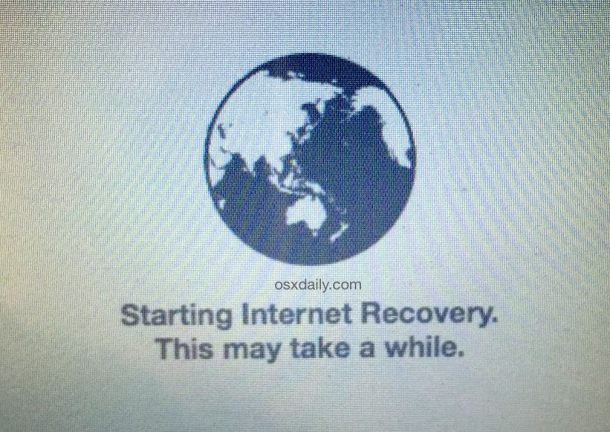
5. you should see it loading into internet recovery like below image, it should work because your macbook air is built with internet recovery.

starting-internet-recovery-mac-os-x-610x432.jpg


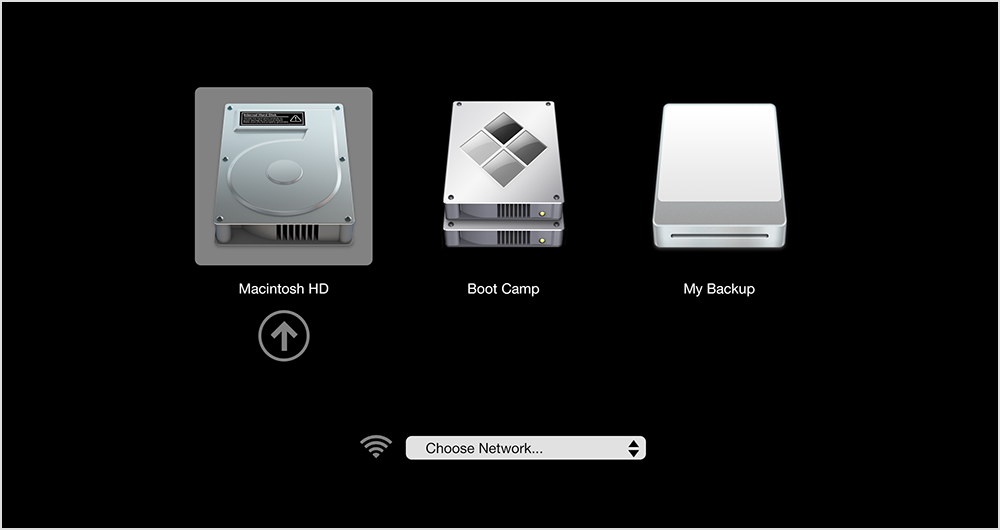
if it does the same thing, repeat the steps with just the "alt/option" key and see if you see the Startup Manager like below.

HT1310_01-yosemite-startup_disk-en.png
 
Important Forum Advisory Note
This forum is moderated by volunteer moderators who will react only to members' feedback on posts. Moderators are not employees or representatives of HWZ Forums. Forum members and moderators are responsible for their own posts. Please refer to our Community Guidelines and Standards and Terms and Conditions for more information.
Top