
21.5 inch iMac 2011 SSD Replacement

weap0nx

Master Member
Joined
Sep 13, 2000
Messages
4,398
Reaction score
3
Hi guys,

Wanna replace my 2011 iMac HDD with an SSD. I want to keep my optical drive as I listen to CDs often.

I was wondering if any of you guys have done it? Is there a way to use double sided tape to secure the SSD in place instead of having to buy a 2.5->3.5 inch adapter?
 

asriznet

Senior Member
Joined
Oct 2, 2009
Messages
981
Reaction score
0
Hi guys,

Wanna replace my 2011 iMac HDD with an SSD. I want to keep my optical drive as I listen to CDs often.

I was wondering if any of you guys have done it? Is there a way to use double sided tape to secure the SSD in place instead of having to buy a 2.5->3.5 inch adapter?

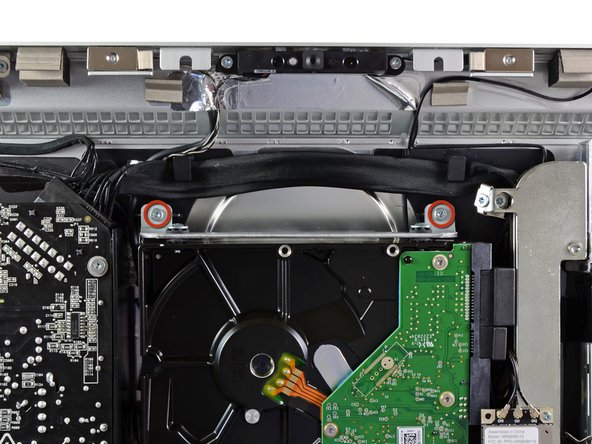
i think just use the existing hard drive bracket is sufficient, but you can only use 1 screw to secure the SSD though which I feel should be secure enough uh.

NSogTWXkaACgjgqK.medium
 

weap0nx

Master Member
Joined
Sep 13, 2000
Messages
4,398
Reaction score
3
Good find! thanks a lot,

I'll try it out and see if the offsets are good
 

asriznet

Senior Member
Joined
Oct 2, 2009
Messages
981
Reaction score
0
Good find! thanks a lot,

I'll try it out and see if the offsets are good

Haha yeah if you feel a little paranoid, wrap a tape around the other side of the SSD to the bracket.

For more secure option, drill another hole in the existing bracket to fit the other screw hole of the SSD. ;)
 

weap0nx

Master Member
Joined
Sep 13, 2000
Messages
4,398
Reaction score
3
Haha yeah if you feel a little paranoid, wrap a tape around the other side of the SSD to the bracket.

For more secure option, drill another hole in the existing bracket to fit the other screw hole of the SSD. ;)

Damn it some times I wish I had thought of these, used to mod stuff now I just look for stuff to buy that fits.

Yeah I think drilling an additional hole would be a great idea. I'm just wondering if the first screw hole even lines up. Have you done it before?

EDIT: Been comparing pics of the SSD mount holes and 3.5 inch hdd mount holes, quite different. in fact it looks like the bracket does not reach far enough back to even get the first hole of the SSD. Plus SSDs are so thin, in terms of height it may not even clear the bottom of the bracket.
 
Last edited:

asriznet

Senior Member
Joined
Oct 2, 2009
Messages
981
Reaction score
0
Damn it some times I wish I had thought of these, used to mod stuff now I just look for stuff to buy that fits.

Yeah I think drilling an additional hole would be a great idea. I'm just wondering if the first screw hole even lines up. Have you done it before?

EDIT: Been comparing pics of the SSD mount holes and 3.5 inch hdd mount holes, quite different. in fact it looks like the bracket does not reach far enough back to even get the first hole of the SSD. Plus SSDs are so thin, in terms of height it may not even clear the bottom of the bracket.

The SATA connector is not fixed(cable) so it should reach which ever hole you want to use for the SSD. yeah I just compared a 3.5" HDD and an SSD, the screw hole on the SSD looks a bit smaller, that only means you need a smaller screw on the bracket?i don't see that much of an issue, just need the correct size screw for the SSD on the bracket.

I recently just replaced a faulty 3.5" HDD from an iMac, didn't attempt to put in an SSD or any 2.5" drives though but as mentioned the SATA connector is a cable so it's flexibile enough for you to move it around a bit.


you can see more detailed photos on ifixit: https://www.ifixit.com/Guide/iMac+Intel+21.5-Inch+EMC+2428+Hard+Drive+Replacement/5954
 
Last edited:

weap0nx

Master Member
Joined
Sep 13, 2000
Messages
4,398
Reaction score
3
The SATA connector is not fixed(cable) so it should reach which ever hole you want to use for the SSD. yeah I just compared a 3.5" HDD and an SSD, the screw hole on the SSD looks a bit smaller, that only means you need a smaller screw on the bracket?i don't see that much of an issue, just need the correct size screw for the SSD on the bracket.

I recently just replaced a faulty 3.5" HDD from an iMac, didn't attempt to put in an SSD or any 2.5" drives though but as mentioned the SATA connector is a cable so it's flexibile enough for you to move it around a bit.


you can see more detailed photos on ifixit: https://www.ifixit.com/Guide/iMac+Intel+21.5-Inch+EMC+2428+Hard+Drive+Replacement/5954

Jeeez, yeah I thought it was a SATA backplane and had to line up.
Thanks a lot man, great help!
 
Important Forum Advisory Note
This forum is moderated by volunteer moderators who will react only to members' feedback on posts. Moderators are not employees or representatives of HWZ Forums. Forum members and moderators are responsible for their own posts. Please refer to our Community Guidelines and Standards and Terms and Conditions for more information.
Top