5600 + 5700xt

deepblue_82

Arch-Supremacy Member
Joined
Oct 23, 2007
Messages
19,911
Reaction score
2,470
i was using last year's gfx drivers all along.
but this 2 months... my 5700xt when running games mostly running pupg on max possible setting.. 1080p
when gaming the fps dips till like 5-60fps... before this 2 months it was like at least 100+ fps... when playing...
now the gfx sounds more like a jet taking off... i checked the temps also about resting around 60+ load 80+ ....
after all that i tried to updated to the latest drivers .. but still the same..
need ur help guys...
 

Animagamer

Junior Member
Joined
Nov 4, 2006
Messages
95
Reaction score
3
Have you checked open the case and check the graphic card . Might need to do some cleaning
 

deepblue_82

Arch-Supremacy Member
Joined
Oct 23, 2007
Messages
19,911
Reaction score
2,470
Have you checked open the case and check the graphic card . Might need to do some cleaning
i tot about it so i brought a blower/vac xiaomi one.. once it reaches then i will do some cleaning...
so u think its due to dust and maybe some blockage?
 

Animagamer

Junior Member
Joined
Nov 4, 2006
Messages
95
Reaction score
3
i tot about it so i brought a blower/vac xiaomi one.. once it reaches then i will do some cleaning...
so u think its due to dust and maybe some blockage?
Based on your message and seems like it and the 5700xt quite old before you link see this video Cleaning gpu
Beside dust i am not sure what else, unless the gpu fan need to be replace . I am not a technician
 

xonix

Arch-Supremacy Member
Joined
Mar 24, 2001
Messages
17,587
Reaction score
1,689
Fan noise is cpu or gpu ? Might need a new application of thermal paste for either cpu or gpu.
 

soreloser

Senior Member
Joined
Feb 26, 2024
Messages
642
Reaction score
250
Idle 60C is pretty high, most likely overheating under load which causes the FPS drops. What case are you using? Possible that airflow is bad so that the internals just overheating overall?

SSD overheating can be another cause of FPS drops. Airflow is important.
 

deepblue_82

Arch-Supremacy Member
Joined
Oct 23, 2007
Messages
19,911
Reaction score
2,470
Idle 60C is pretty high, most likely overheating under load which causes the FPS drops. What case are you using? Possible that airflow is bad so that the internals just overheating overall?

SSD overheating can be another cause of FPS drops. Airflow is important.
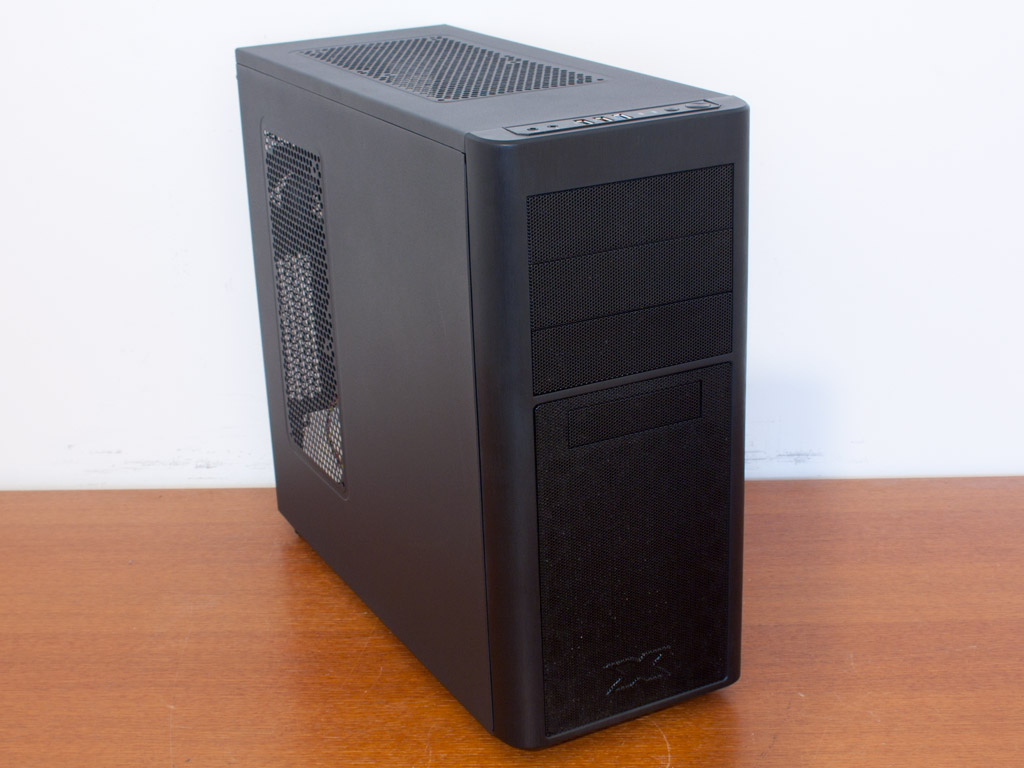
my case has 3 fans... Asgard XP 3.0 ....
i am in a aircon room..
ok once my blower/vac arrives i will open my case and check and clean... got can see whats wrong...
 

soreloser

Senior Member
Joined
Feb 26, 2024
Messages
642
Reaction score
250
my case has 3 fans... Asgard XP 3.0 ....
i am in a aircon room..
ok once my blower/vac arrives i will open my case and check and clean... got can see whats wrong...
Never heard of that case before... Google search also can't find. Had a friend with 3x fans intake but a thick tempered glass in the way with small intake slots on the side. 1x exhaust fan and whole pc heat up like oven due to airflow issues. Took off the front case panel and solved the issues, some crappy CM case from 2019. He still considering which case to get

If you don't mind, try taking off the front panel and see if it helps
 

Vanyel

Arch-Supremacy Member
Joined
Sep 5, 2014
Messages
12,191
Reaction score
2,118
Never heard of that case before... Google search also can't find. Had a friend with 3x fans intake but a thick tempered glass in the way with small intake slots on the side. 1x exhaust fan and whole pc heat up like oven due to airflow issues. Took off the front case panel and solved the issues, some crappy CM case from 2019. He still considering which case to get

If you don't mind, try taking off the front panel and see if it helps
Cougar fv270 very chio
 

86technie

High Supremacy Member
Joined
Jun 8, 2006
Messages
40,316
Reaction score
5,921
my case has 3 fans... Asgard XP 3.0 ....
i am in a aircon room..
ok once my blower/vac arrives i will open my case and check and clean... got can see whats wrong...
casenew.jpg


This?
Either upgrade the case fan to better one like put Arctic F12 or change case.
This case is very retro model.
 

deepblue_82

Arch-Supremacy Member
Joined
Oct 23, 2007
Messages
19,911
Reaction score
2,470
casenew.jpg


This?
Either upgrade the case fan to better one like put Arctic F12 or change case.
This case is very retro model.
haha.. mine abit better side is plastic panel can see inside...
i just got my blower/vac... i will open and see first...
 

86technie

High Supremacy Member
Joined
Jun 8, 2006
Messages
40,316
Reaction score
5,921
haha.. mine abit better side is plastic panel can see inside...
i just got my blower/vac... i will open and see first...

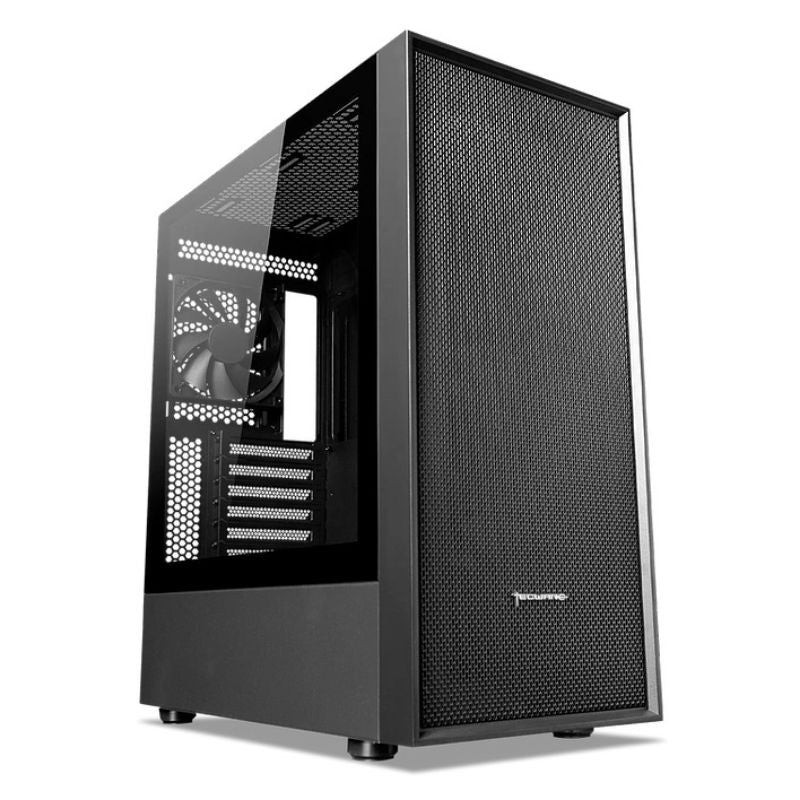
To me you need a new case which won't cost a lot.

620dc057bf51c.jpg


Example Tecware Nexus Air ATX around $70.


nexus-air_slide-05_1.jpg


innerside1.jpg


Newer case the airflow is more direct since it is not block by the CD/DVD + HDD rack which
are mostly old design.
So air will be push in more with modern case not to mention hardware like GPU are getting
hotter and hotter.

Or you can just change all the case fan to Artic F12 which cost $12 each.
But I think the front of the case is choke up, maybe you got time you have to wash
the front.

Let it dry first before putting it back.
 
Important Forum Advisory Note
This forum is moderated by volunteer moderators who will react only to members' feedback on posts. Moderators are not employees or representatives of HWZ Forums. Forum members and moderators are responsible for their own posts. Please refer to our Community Guidelines and Standards and Terms and Conditions for more information.
Top