Advice on PC upgrade

kiwizor

Member
Joined
Oct 10, 2005
Messages
254
Reaction score
11
Hi guys, can I get some advice whether my current PC build can be upgraded and which parts to upgrade? Hoping not to spend too much, mainly use for playing low demand games, but finding that loading times getting longer and longer.

Currently running:
AMD Ryzen 7 2700X + B450 Aorus Pro Wifi
Corsair Vengence LPX 3000 Mhz 8GB x2
Nvidia GeForce GTX 1650 Super 4gb (was previously running a Radeon RX580 8GB but it crashed)
Adata 512GB SSD + Toshiba 2TB HDD

Thank you!
 

NightRaven49

Master Member
Joined
May 17, 2019
Messages
3,740
Reaction score
1,577
Hoping not to spend too much, mainly use for playing low demand games, but finding that loading times getting longer and longer.
well the cpu is quite old at this point. u could upgrade the bios of ur motherboard to support 5000 series ryzens and then swap in a 5600, which should be quite a bit faster. is the adata ssd a sata one? changing to nvme could help too.
 

Phen8210

High Supremacy Member
Joined
Jul 29, 2011
Messages
29,028
Reaction score
8,284
Hi guys, can I get some advice whether my current PC build can be upgraded and which parts to upgrade? Hoping not to spend too much, mainly use for playing low demand games, but finding that loading times getting longer and longer.

Currently running:
AMD Ryzen 7 2700X + B450 Aorus Pro Wifi
Corsair Vengence LPX 3000 Mhz 8GB x2
Nvidia GeForce GTX 1650 Super 4gb (was previously running a Radeon RX580 8GB but it crashed)
Adata 512GB SSD + Toshiba 2TB HDD

Thank you!

upgrade to ssd first, ssd can reuse in future

then next upgrade do overhaul along with using that ssd
 

kiwizor

Member
Joined
Oct 10, 2005
Messages
254
Reaction score
11
well the cpu is quite old at this point. u could upgrade the bios of ur motherboard to support 5000 series ryzens and then swap in a 5600, which should be quite a bit faster. is the adata ssd a sata one? changing to nvme could help too.
It's an nvme. Possible to upgrade CPU without changing motherboard? Might be an idea.
 

86technie

High Supremacy Member
Joined
Jun 8, 2006
Messages
40,338
Reaction score
5,934
It's an nvme. Possible to upgrade CPU without changing motherboard? Might be an idea.

For AMD B450 you don't need to change motherboard.
However for newer CPU recommend to install Windows from fresh.
So few options for you:

1) Reuse your current hardware do a clean install see how it performs.
Update the motherboard BIOS to latest to support newer CPU.
FYI for AMD Ryzen 2000/3000 latest AMD Chipset must be install for optimal CPU performance.
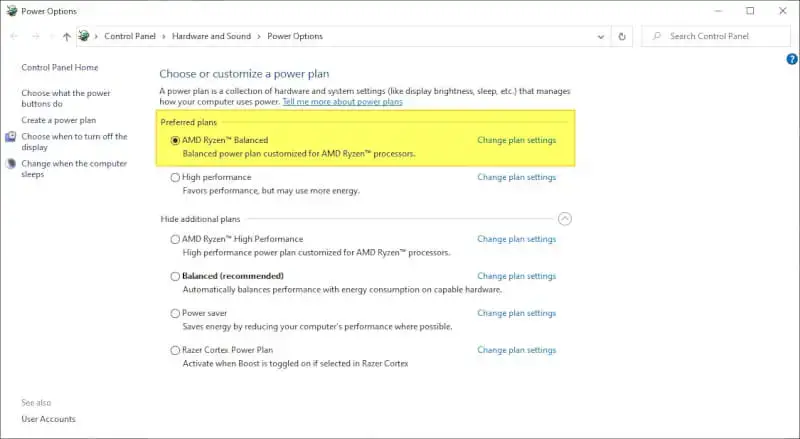
Cuz the chipset will install the AMD Ryzen power plan for optimal CPU performance.
Take note 5000 doesn't need this power plan but still need to install AMD chipset.
As it will install certain components to the default Windows power plan for optimal CPU performance.

AMD-Ryzend-Balanced-Plan.jpg


Than install motherboard drivers like LAN, audio, WIFI, BT.
*Disconnect from internet when doing a clean install of Windows so you can install
all the latest drivers.

https://www.amd.com/en/support/chipsets/amd-socket-am4/b450

https://www.gigabyte.com/Motherboard/B450-AORUS-PRO-WIFI-rev-1x/support#support-dl-driver-wlanbt

2) Upgrade the motherboard BIOS than upgrade to Ryzen 5 5600 or 7 5700 depending on your budget.
Than do a clean install of Windows for optimal performance with latest drivers.
 

Koenig168

Arch-Supremacy Member
Joined
Nov 4, 2007
Messages
10,030
Reaction score
1,741
Since your issue is loading times, upgrading to a 2 TB NVMe SSD should be the first step. You can also take this opportunity to do a fresh Windows install.

I doubt you need a CPU upgrade.
 

kiwizor

Member
Joined
Oct 10, 2005
Messages
254
Reaction score
11
For AMD B450 you don't need to change motherboard.
However for newer CPU recommend to install Windows from fresh.
So few options for you:

1) Reuse your current hardware do a clean install see how it performs.
Update the motherboard BIOS to latest to support newer CPU.
FYI for AMD Ryzen 2000/3000 latest AMD Chipset must be install for optimal CPU performance.
Cuz the chipset will install the AMD Ryzen power plan for optimal CPU performance.
Take note 5000 doesn't need this power plan but still need to install AMD chipset.
As it will install certain components to the default Windows power plan for optimal CPU performance.

AMD-Ryzend-Balanced-Plan.jpg


Than install motherboard drivers like LAN, audio, WIFI, BT.
*Disconnect from internet when doing a clean install of Windows so you can install
all the latest drivers.

https://www.amd.com/en/support/chipsets/amd-socket-am4/b450

https://www.gigabyte.com/Motherboard/B450-AORUS-PRO-WIFI-rev-1x/support#support-dl-driver-wlanbt

2) Upgrade the motherboard BIOS than upgrade to Ryzen 5 5600 or 7 5700 depending on your budget.
Than do a clean install of Windows for optimal performance with latest drivers.
Why disconnect from internet? I thought need Internet to get latest update? Sorry for noob qn.

Thanks for all the input so far. Looks like SSD replacement is the way to go. Any models to suggest for 2TB SSD?

Also thinking whether to upgrade RAM, as I multitab a lot and memory usage seems to hit 90%. Will 32gb make a difference?
 

86technie

High Supremacy Member
Joined
Jun 8, 2006
Messages
40,338
Reaction score
5,934
Why disconnect from internet? I thought need Internet to get latest update? Sorry for noob qn.

Thanks for all the input so far. Looks like SSD replacement is the way to go. Any models to suggest for 2TB SSD?

Also thinking whether to upgrade RAM, as I multitab a lot and memory usage seems to hit 90%. Will 32gb make a difference?

1) WIndows update drivers are not latest nor be compatible with the PC.
I know some use Windows update to install everything.
But than whether the PC have full functionality is a question especially audio.

So download all the drivers like graphic card, Chipset onto a Thumbdrive.
Than install drivers after Windows have been installed.
Disconnect from internet will ensure latest drivers are installed cuz Windows
will install missing drivers thus conflicting the installation.

2) RAM prices have come down a lot so you can get a 32GB RAM kit.
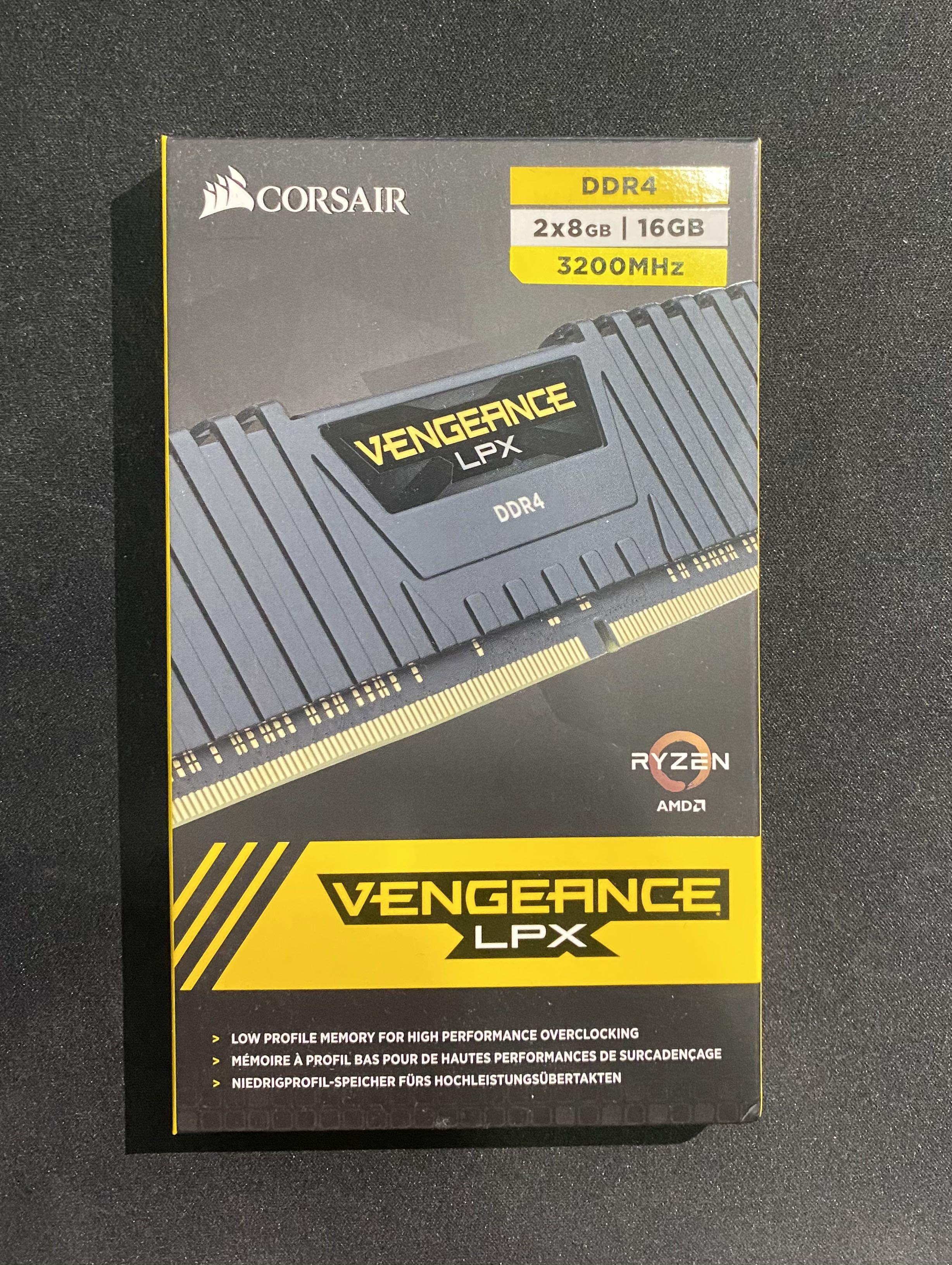
When getting new RAM do ask for AMD optmized kit like this.

corsair_vengeance_lpx_ddr4_16g_1603296457_b89d18ab_progressive.jpg


This means the RAM is tested and compatible with AMD Ryzen.
AMD Ryzen 1000/2000 generation are very picky with the type of RAM used.
 

iceblendedchoc

Arch-Supremacy Member
Joined
Nov 22, 2016
Messages
23,169
Reaction score
9,944
Hi guys, can I get some advice whether my current PC build can be upgraded and which parts to upgrade? Hoping not to spend too much, mainly use for playing low demand games, but finding that loading times getting longer and longer.

Currently running:
AMD Ryzen 7 2700X + B450 Aorus Pro Wifi
Corsair Vengence LPX 3000 Mhz 8GB x2
Nvidia GeForce GTX 1650 Super 4gb (was previously running a Radeon RX580 8GB but it crashed)
Adata 512GB SSD + Toshiba 2TB HDD

Thank you!
what type of low demand games are you playing with loading time?
 

Rogue

Senior Member
Joined
Jan 1, 2000
Messages
5,369
Reaction score
116
Loading times for which games? They don't change much if there's not much change to your system, like same game with same system environment. E.g didn't install many bloatware, not infected by malware, didn't stream 4k movies to another monitor, video recording/encoding, etc.

Do you have enough free space and did your OS regularly trim the SSD and defrag the HDD? Should do a storage diagnostic for impending failures.

Only exception is online game, either your internet connectivity went bonkers or the game servers are having issues. Taking much longer or even forever to sync during loading screens.
 
Last edited:

kiwizor

Member
Joined
Oct 10, 2005
Messages
254
Reaction score
11
For a 10 year old mmorpg, heh. I added an ssd and shifted the game to the ssd. It's not blazing fast, but definitely no longer a drag, so I suppose that helped a bit.

Waiting for a RAM kit to arrive now and see if that will make an additional difference. I'm assuming it will help when changing maps.

Graphics card I'm looking at budget cards now - rx7600, rtx 3060 ti or rtx 4060, but no urgency to upgrade as my games run fine on current settings.
 

oddbasket

Arch-Supremacy Member
Joined
Sep 5, 2003
Messages
24,192
Reaction score
5,879
Any singular upgrade other than ssd won't give u a huge decrease to loading time. An MMO installation can get over 100+gb easily given the content added over the years, a 512gb ssd can perform slower if you run low on storage space. Best bet is higher capacity ssd. MMO load times also depends on the server, good idea to check with your MMO buddies if they are experiencing longer loads as well. Mmos are also usually more cpu intensive
 
Important Forum Advisory Note
This forum is moderated by volunteer moderators who will react only to members' feedback on posts. Moderators are not employees or representatives of HWZ Forums. Forum members and moderators are responsible for their own posts. Please refer to our Community Guidelines and Standards and Terms and Conditions for more information.
Top