Advices for a new case

Proximus

Supremacy Member
Joined
May 21, 2001
Messages
7,004
Reaction score
93
I have the following cases in mind for my build.

- CM H500M
- CORSAIR 500D SE RGB
- Lian Li PC-011 Dynamic

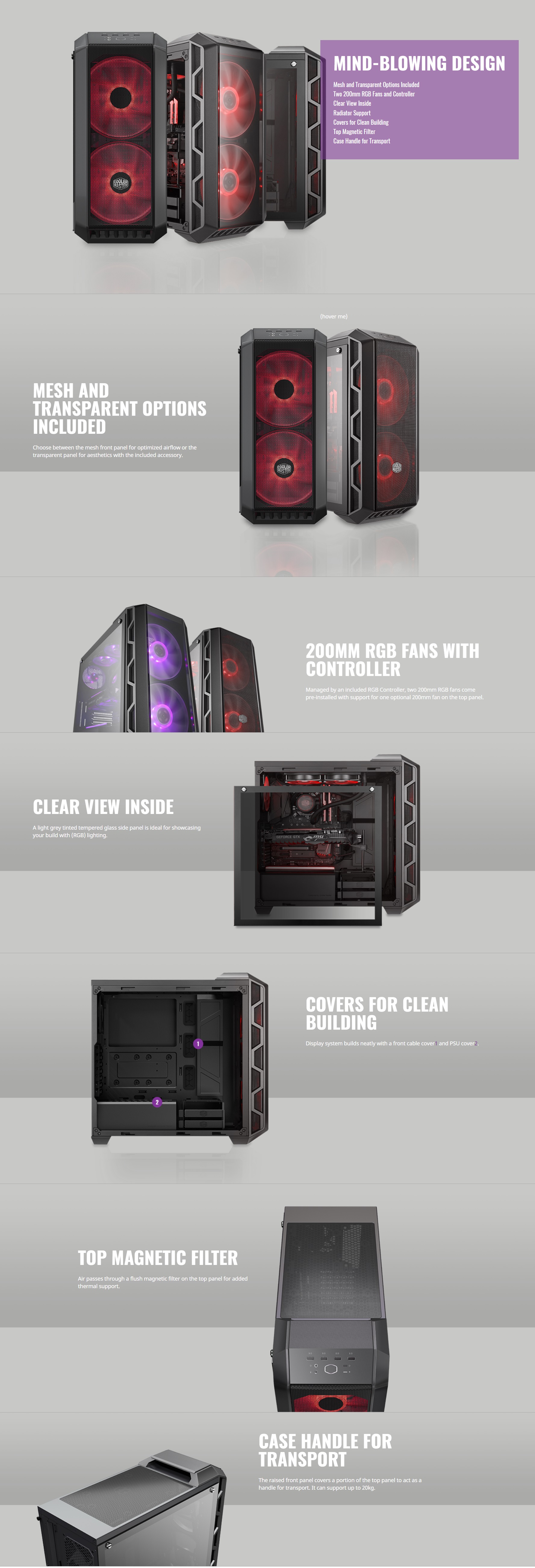
Am leaning towards H500M due to reasonable airflow and expandbility.

Also liked 500D but it is expensive.

Any expert feedbacks?
 

MagixuserII

Member
Joined
Jul 21, 2018
Messages
213
Reaction score
0
I have the following cases in mind for my build.

- CM H500M
- CORSAIR 500D SE RGB
- Lian Li PC-011 Dynamic

Am leaning towards H500M due to reasonable airflow and expandbility.

Also liked 500D but it is expensive.

Any expert feedbacks?


Why go H500M, when you can buy the cheaper H500 with interchangeable mesh/acrylic front. Cost only $139 at Lazada.

One thing to note, If your going for Lian Li PC011-D you cant install CPU air tower cooler taller than 150mm, same thing goes for wide GPU. So you either go AIO or custom water cooling loop and vertical mount GPU. Cheapest I saw is at Carousell brand new at S$175. Add another $35 for the Coolermaster Vertical mount bracket + riser cable. A cheaper alternative is Tecware VXR at S$108 + S$35 Coolermaster Vertical GPU mount.

So if youre going air cooler, better go for CM500. But if your going AIO or water cooling either the PC011-D or VXR will be a good choice.
 
Last edited:

Gaminator

Supremacy Member
Joined
Jul 21, 2004
Messages
8,627
Reaction score
691
I am using a CM H500M for my just built Ryzen rig, when I play games, my Red Devil Vega64 goes to about 73C (not bad for a air cooled VEGA64) and my CPU temps goes to high 60's. Yes, can really feel warm air being vented from the case but I feel the 2x 200mm case intake fans in front really helps. System specs in my profile. Here's a pic....
B1KBjE8.jpg

Yes, I know got a piece of tissue paper in the pic, nothing perverted okay, used it to wipe the glass and front console of fingerprints.
hXzG6Zr.jpg

A shot of the inside, my Thermaltake Water 3.0 360 is mounted on top...the case has good airflow, but still cannot handle 2x GB VEGA64 Gaming OC in CrossFire mode, and perhaps the top card didin't have good airflow due to being just millimeters above the 2nd card due to my mobo design.
 
Last edited:

reaverx

Supremacy Member
Joined
May 6, 2003
Messages
5,286
Reaction score
11
I am using a CM H500M for my just built Ryzen rig, when I play games, my Red Devil Vega64 goes to about 73C (not bad for a air cooled VEGA64) and my CPU temps goes to high 60's. Yes, can really feel warm air being vented from the case but I feel the 2x 200mm case intake fans in front really helps. System specs in my profile. Here's a pic....
B1KBjE8.jpg

Yes, I know got a piece of tissue paper in the pic, nothing perverted okay, used it to wipe the glass and front console of fingerprints.
hXzG6Zr.jpg

A shot of the inside, my Thermaltake Water 3.0 360 is mounted on top...the case has good airflow, but still cannot handle 2x GB VEGA64 Gaming OC in CrossFire mode, and perhaps the top card didin't have good airflow due to being just millimeters above the 2nd card due to my mobo design.
can the fans lighting be change to RED Only ?

or its multi colored . im also looking ard for a case ... and i dont like the rainbow colors
 

Proximus

Supremacy Member
Joined
May 21, 2001
Messages
7,004
Reaction score
93
I am using a CM H500M for my just built Ryzen rig, when I play games, my Red Devil Vega64 goes to about 73C (not bad for a air cooled VEGA64) and my CPU temps goes to high 60's. Yes, can really feel warm air being vented from the case but I feel the 2x 200mm case intake fans in front really helps. System specs in my profile. Here's a pic....
B1KBjE8.jpg

Yes, I know got a piece of tissue paper in the pic, nothing perverted okay, used it to wipe the glass and front console of fingerprints.
hXzG6Zr.jpg

A shot of the inside, my Thermaltake Water 3.0 360 is mounted on top...the case has good airflow, but still cannot handle 2x GB VEGA64 Gaming OC in CrossFire mode, and perhaps the top card didin't have good airflow due to being just millimeters above the 2nd card due to my mobo design.

Nice... It seems that the mesh is catching a fair amount of dust?

Is the USB-C 3.1 cable from the case long enough to reach your mobo?
 

Gaminator

Supremacy Member
Joined
Jul 21, 2004
Messages
8,627
Reaction score
691
can the fans lighting be change to RED Only ?

or its multi colored . im also looking ard for a case ... and i dont like the rainbow colors
As Magixuser had said, the front 2x 200mm fans are RGB, so you can choose a static color of your choice.

Nice... It seems that the mesh is catching a fair amount of dust?

Is the USB-C 3.1 cable from the case long enough to reach your mobo?
That's what the mesh is for, to trap dust, so it's doing its job. Just need a can of air duster, remove the front mesh and blow out the dust.

Yes, the USB 3.1cable is long enough.....you can actually see it in my 2nd pic. It's the cable that passes over my 2nd SSD (the grey one) and is attached to my mobo just under that digital debug LED.
 

Proximus

Supremacy Member
Joined
May 21, 2001
Messages
7,004
Reaction score
93
As Magixuser had said, the front 2x 200mm fans are RGB, so you can choose a static color of your choice.

I thought they are A-RGB? Coolermaster site and all the reviews I read online mentions A-RGB.
 

Proximus

Supremacy Member
Joined
May 21, 2001
Messages
7,004
Reaction score
93

Gaminator

Supremacy Member
Joined
Jul 21, 2004
Messages
8,627
Reaction score
691
Thanks for the info.

Saw that you are using 4 x 4GB? I thought Ryzen 3000 series uses dual channel memory? 16GB x 2 will be better?
Using 4x 8GB simply because I want to fill up all four RAM slots for that nice bling.....no other reason.:o But, I do have 4x 8GB Patriot Viper Steel Gunmetal Grey incoming, rated at 3733Mhz CL17....this one got no bling bling, so I might just use 2x 8GB for better OC'ing compatibility. Can keep the other 2x 8GB as spare....
 

Proximus

Supremacy Member
Joined
May 21, 2001
Messages
7,004
Reaction score
93
Using 4x 8GB simply because I want to fill up all four RAM slots for that nice bling.....no other reason.:o But, I do have 4x 8GB Patriot Viper Steel Gunmetal Grey incoming, rated at 3733Mhz CL17....this one got no bling bling, so I might just use 2x 8GB for better OC'ing compatibility. Can keep the other 2x 8GB as spare....

Thanks for prompt responses.
 

reaverx

Supremacy Member
Joined
May 6, 2003
Messages
5,286
Reaction score
11
As Magixuser had said, the front 2x 200mm fans are RGB, so you can choose a static color of your choice.


That's what the mesh is for, to trap dust, so it's doing its job. Just need a can of air duster, remove the front mesh and blow out the dust.

Yes, the USB 3.1cable is long enough.....you can actually see it in my 2nd pic. It's the cable that passes over my 2nd SSD (the grey one) and is attached to my mobo just under that digital debug LED.
is there ample space after installing a normal ATX mobo ?

and on top i want to install an AIO cooler

will there be extra space left over ? i like big cases lol
 

Gaminator

Supremacy Member
Joined
Jul 21, 2004
Messages
8,627
Reaction score
691
is there ample space after installing a normal ATX mobo ?

and on top i want to install an AIO cooler

will there be extra space left over ? i like big cases lol
My mobo is E-ATX, and if you see the pic, I have a Thermaltake Water 3.0 360 mounted on top, so for me, there's space........but not for custom rads and the like.
 
Important Forum Advisory Note
This forum is moderated by volunteer moderators who will react only to members' feedback on posts. Moderators are not employees or representatives of HWZ Forums. Forum members and moderators are responsible for their own posts. Please refer to our Community Guidelines and Standards and Terms and Conditions for more information.
Top