Assistance required with mini itx build

Falcon4eva

Junior Member
Joined
May 1, 2009
Messages
11
Reaction score
0
Hi all,

I've been thinking of building a small form factor pc with a case like the SilverStone SST-ML08B, that would support gaming with 144fps on a 144Hz monitor (like either a BenQ XL2411P or a MSI MAG241C). I also want to get a GTX1070 for the GPU, and probably 1 (or 2) TB SSD.

Because of the itx form factor, I assume that Gigabyte's GTX1070 Mini ITX is 'necessary', is that correct? If not, is it better to get a normal sized GTX1070?

I also understand that the mobo needs to fit the itx form factor as well, which leaves me undecided between

i7-8700 + Asus ROG STRIX H370-I
versus
Ryzen 5 2600 + Asus ROG STRIX B450-I

Totally have no clue about everything else such as RAM and PSU yet.

Can any senpai here offer me some advice or suggestion? Especially on which brands have a better reputation on performance, etc.

Much appreciated and many thanks!:s12:
 

bobozhang137

Senior Member
Joined
Jun 27, 2010
Messages
2,436
Reaction score
0
Hi all,

I've been thinking of building a small form factor pc with a case like the SilverStone SST-ML08B, that would support gaming with 144fps on a 144Hz monitor (like either a BenQ XL2411P or a MSI MAG241C). I also want to get a GTX1070 for the GPU, and probably 1 (or 2) TB SSD.

Because of the itx form factor, I assume that Gigabyte's GTX1070 Mini ITX is 'necessary', is that correct? If not, is it better to get a normal sized GTX1070?

I also understand that the mobo needs to fit the itx form factor as well, which leaves me undecided between

i7-8700 + Asus ROG STRIX H370-I
versus
Ryzen 5 2600 + Asus ROG STRIX B450-I

Totally have no clue about everything else such as RAM and PSU yet.

Can any senpai here offer me some advice or suggestion? Especially on which brands have a better reputation on performance, etc.

Much appreciated and many thanks!:s12:

Regarding gpu. It shows that it supports up to 300mm graphic cards. Means it supports all gtx 1070 out there.

I dont think theres a 3 slot 1070.

Then regarding the intel 8700 vs ryzen 2600. Both are great 6 core 12 thread processors. The intel having slightly better ipc or processing speed over the ryzen. But costing 200 dollars more than the ryzen. In my opinion, it depends on your budget. I'll personally go for the ryzen cause you can easily upgrade your processor in the future. But if you go intel and plan to upgrade in the future. You most probably will have to upgrade your motherboard as well. (Because the other 3 processors that are currently better than the 8700 is the 8700k. 9700k and 9900k which needs a z board to be revalant.)
 

hawthorne

Arch-Supremacy Member
Joined
May 9, 2006
Messages
11,714
Reaction score
210
I was building a small form factor PC previously and I chose the Node 202 instead. Dimensions is smaller than the SST-ML08B. Gfx card supported is 310mm, so u pretty can get almost all 1070 out there.

SFF builds I would encourage you to go for M.2 form factor SSD if possible. This will free up precious space within the case.
 

Falcon4eva

Junior Member
Joined
May 1, 2009
Messages
11
Reaction score
0
Then regarding the intel 8700 vs ryzen 2600. Both are great 6 core 12 thread processors. The intel having slightly better ipc or processing speed over the ryzen. But costing 200 dollars more than the ryzen. In my opinion, it depends on your budget. I'll personally go for the ryzen cause you can easily upgrade your processor in the future. But if you go intel and plan to upgrade in the future. You most probably will have to upgrade your motherboard as well. (Because the other 3 processors that are currently better than the 8700 is the 8700k. 9700k and 9900k which needs a z board to be revalant.)

Yeah I also saw reviews saying that AMD is economically better for the long run, and they also give rather decent stock CPU cooler as compared to nothing from Intel. Thanks for the advice!
 

Falcon4eva

Junior Member
Joined
May 1, 2009
Messages
11
Reaction score
0
I was building a small form factor PC previously and I chose the Node 202 instead. Dimensions is smaller than the SST-ML08B. Gfx card supported is 310mm, so u pretty can get almost all 1070 out there.

SFF builds I would encourage you to go for M.2 form factor SSD if possible. This will free up precious space within the case.

Oh nice, could you share your build with me? Also, where did you get the parts from?

Edit: Also one other issue, does the node 202 case give you airflow/heating issues when your system is on load?
 
Last edited:

hawthorne

Arch-Supremacy Member
Joined
May 9, 2006
Messages
11,714
Reaction score
210
Mine was meant to be mainly a HTPC, plus for some light gaming. This build was done about a year ago, so the specs might be a bit old

Gigabyte H270N ITX with Intel Core i5 7400
Corsair Vengeance LPX 2400MHz CL14 (2 piece kit), 8GB
Samsung 850 EVO M.2 250GB
Corsair SF Series SF600 PSU
Zotac GTX 1060 Mini
Fractal Design Node 202 Case

Parts mainly from Fuwell and Dynacore
 
Last edited:

Falcon4eva

Junior Member
Joined
May 1, 2009
Messages
11
Reaction score
0
I managed to come up with the following part list, hoping for comments on whether it is reasonable, if there are compatibility issues, or if its better to upgrade certain parts etc:

CPU: AMD - Ryzen 5 2600
Motherboard: Asus - ROG Strix B450-I Gaming Mini ITX
Memory: Corsair - Vengeance LPX 32 GB (2 x 16 GB) DDR4-2666 Memory
Storage: Western Digital - Blue 1 TB M.2-2280 Solid State Drive
Video Card: Gigabyte - GeForce GTX 1070 8 GB G1 Gaming Video Card
Case: Fractal Design - Node 202 HTPC Case
Power Supply: Corsair - SF 450 W 80+ Gold Certified
Operating System: Microsoft - Windows 10 Home OEM 64-bit
Monitor: BenQ - ZOWIE XL2411P

Thanks in advance!
 

Gixxerfied

Greater Supremacy Member
Joined
May 24, 2008
Messages
84,939
Reaction score
2,920
My node 202 built recently without gfx..

KQVWacjh.jpg


S5vhdyfh.jpg


zzK9ksxh.jpg

AMD Ryzen 2400G
ASROCK B450 Gaming-ITX/AC
Cryorig C7 Cooler
Corsair Vengence LPX 16GB(2 x 8GB) for AMD
Samsung 970 Evo NVME M.2 250GB
Samsung 860 EVO 1TB 2.5" SSD
Corsair SF600 80Plus Platinum
Fractal Design Node 202

Parts from Fortran cos lazy to go source. He was clearing backlog after CNY so told him to pass me then i fix myself..
 
Last edited:

hawthorne

Arch-Supremacy Member
Joined
May 9, 2006
Messages
11,714
Reaction score
210
My node 202 built recently without gfx..

KQVWacjh.jpg


S5vhdyfh.jpg


zzK9ksxh.jpg

AMD Ryzen 2400G
ASROCK B450 Gaming-ITX/AC
Cryorig C7 Cooler
Corsair Vengence LPX 16GB(2 x 8GB) for AMD
Samsung 970 Evo NVME M.2 250GB
Samsung 860 EVO 1TB 2.5" SSD
Corsair SF600 80Plus Platinum
Fractal Design Node 202

Parts from Fortran cos lazy to go source. He was clearing backlog after CNY so told him to pass me then i fix myself..
No gfx y need the extra 2 fans?
 

Falcon4eva

Junior Member
Joined
May 1, 2009
Messages
11
Reaction score
0
AMD Ryzen 2400G
ASROCK B450 Gaming-ITX/AC
Cryorig C7 Cooler
Corsair Vengence LPX 16GB(2 x 8GB) for AMD
Samsung 970 Evo NVME M.2 250GB
Samsung 860 EVO 1TB 2.5" SSD
Corsair SF600 80Plus Platinum
Fractal Design Node 202

Nice!

May I ask if the CPU cooler was useful? I've been reading online and there's back and forth discussion regarding the stock cooler that comes with the ryzen, so would like to hear hows the performance of your setup.

I also like that it can support the weight of the monitor on top of it. lol.
 

Gixxerfied

Greater Supremacy Member
Joined
May 24, 2008
Messages
84,939
Reaction score
2,920
Nice!

May I ask if the CPU cooler was useful? I've been reading online and there's back and forth discussion regarding the stock cooler that comes with the ryzen, so would like to hear hows the performance of your setup.

I also like that it can support the weight of the monitor on top of it. lol.

Actually my monitor is not sitting on the case but mounted on a monitor arm... :s13: Silvery thing u see on top of the node is my dac..

No chance of using the stock cooler although reviews is abit mix but generally okay for usage. idle temp looking at around late 30s to low 40s of cos with a few window open.
 

hawthorne

Arch-Supremacy Member
Joined
May 9, 2006
Messages
11,714
Reaction score
210
Nice!

May I ask if the CPU cooler was useful? I've been reading online and there's back and forth discussion regarding the stock cooler that comes with the ryzen, so would like to hear hows the performance of your setup.

I also like that it can support the weight of the monitor on top of it. lol.
A CPU cooler with a larger fan will give u less noise compared to the stock one, which is usually smaller.

I was using stock intel cooler for my gaming rig and the whizzing sound from the CPU cooler can get irritating at times. It is very quiet now that I changed it to a CRYORIG H7.

PSA: do some research on the whether there will be any issues between your Mobo and a third party CPU cooler

I broke my mobo's USB3 connector because the cryorig h7 interfers with it. I might have been too forceful, and it snapped :( . I have since changed the Mobo to an asus strix h270 itx. While this Mobo does not interfers with the USB3 connector, the rear plate rests on a resistor or something, making it croaked with mounted. In the end I need to use a file to file down 2mm off the rear plate before it can fit properly
 

Falcon4eva

Junior Member
Joined
May 1, 2009
Messages
11
Reaction score
0
Actually my monitor is not sitting on the case but mounted on a monitor arm... :s13: Silvery thing u see on top of the node is my dac..

No chance of using the stock cooler although reviews is abit mix but generally okay for usage. idle temp looking at around late 30s to low 40s of cos with a few window open.

Oh. :s13: Your rig looks nice though, the whole setup looks very neat. Even more looking forward to completing my own :D

I broke my mobo's USB3 connector because the cryorig h7 interfers with it. I might have been too forceful, and it snapped :( . I have since changed the Mobo to an asus strix h270 itx. While this Mobo does not interfers with the USB3 connector, the rear plate rests on a resistor or something, making it croaked with mounted. In the end I need to use a file to file down 2mm off the rear plate before it can fit properly

I hope the newer asus strix mobos have solved this problem? Otherwise I also wouldn't know how to check :o

I have a question regarding exrta case fans -- how to connect additional fans, if say I want to get extra 5 more fans in total? Like do I need special cables or can I just plug them on top of each other to the same PWM part? I want to play it safe and get extra fans for intake and exhaust, but I realize I don't know if it can be support :s11:
I read that the asus strix b450-i has 1x CPU fan connector and 1x Chassis fan connector, can I simply load all the extra case fans on the chassis fan connector? How does it work? :s11::s11:

Thanks for all the help guys!
 

Gixxerfied

Greater Supremacy Member
Joined
May 24, 2008
Messages
84,939
Reaction score
2,920
Oh. :s13: Your rig looks nice though, the whole setup looks very neat. Even more looking forward to completing my own :D


I hope the newer asus strix mobos have solved this problem? Otherwise I also wouldn't know how to check :o

I have a question regarding exrta case fans -- how to connect additional fans, if say I want to get extra 5 more fans in total? Like do I need special cables or can I just plug them on top of each other to the same PWM part? I want to play it safe and get extra fans for intake and exhaust, but I realize I don't know if it can be support :s11:
I read that the asus strix b450-i has 1x CPU fan connector and 1x Chassis fan connector, can I simply load all the extra case fans on the chassis fan connector? How does it work? :s11::s11:

Thanks for all the help guys!

Using a fan split cable but ur tuning utility program wont beable to detect the rpm(At least that's what happen to mine when i run the 2 case fan via split cable to one of my mobo chassis fan header).

You wana mount fans also need place to mount ma..Node 202 only has mounting for 2 case fan. My mobo has 2 chassis fan header and one cpu..
 

MajiMax

Arch-Supremacy Member
Joined
Nov 19, 2008
Messages
19,901
Reaction score
3,098
Paiseh, can ride on TS's thread.

CPU - Ryzen-3 2200G
Motherboard - Gigabyte Aorus B450i Pro Wifi
CPU cooler - Noctua – NH-L9a-AM4
Storage - Adata XPG SX8200 Pro PCIe Gen3x4 (NVMe) 256GB
RAM - Corsair Vengeance LPX 8GB (2 x 4GB) DDR4 DRAM 2400MHz C14
Casing - In-Win Chopin Mini-ITX Chassis, with 150W Power Supply

Wanna ask, whether is there any compatibility issue?

Especially on the storage interface with the motherboard.

https://www.gigabyte.com/Motherboard/B450-I-AORUS-PRO-WIFI-rev-10#sp

1 x M.2 connector (Socket 3, M key, type 2242/2260/2280 SATA and PCIe 3.0 x4/x2 SSD support)

http://www.xpg.com/en/specification/583

Form Factor M.2 2280
 

Falcon4eva

Junior Member
Joined
May 1, 2009
Messages
11
Reaction score
0
Paiseh, can ride on TS's thread.

CPU - Ryzen-3 2200G
Motherboard - Gigabyte Aorus B450i Pro Wifi
CPU cooler - Noctua – NH-L9a-AM4
Storage - Adata XPG SX8200 Pro PCIe Gen3x4 (NVMe) 256GB
RAM - Corsair Vengeance LPX 8GB (2 x 4GB) DDR4 DRAM 2400MHz C14
Casing - In-Win Chopin Mini-ITX Chassis, with 150W Power Supply

Wanna ask, whether is there any compatibility issue?

Especially on the storage interface with the motherboard.

From what I can see, the gigabyte board has a single slot for m.2, so that seems alright. The ram speeds are okay too, and the CPU cooler clearance for Chopin is stated as 43mm, which the noctua (37mm height) passes. Don't see any issues from this :)
 

hawthorne

Arch-Supremacy Member
Joined
May 9, 2006
Messages
11,714
Reaction score
210
I have a question regarding exrta case fans -- how to connect additional fans, if say I want to get extra 5 more fans in total? Like do I need special cables or can I just plug them on top of each other to the same PWM part? I want to play it safe and get extra fans for intake and exhaust, but I realize I don't know if it can be support :s11:
I read that the asus strix b450-i has 1x CPU fan connector and 1x Chassis fan connector, can I simply load all the extra case fans on the chassis fan connector? How does it work? :s11::s11:

Thanks for all the help guys!
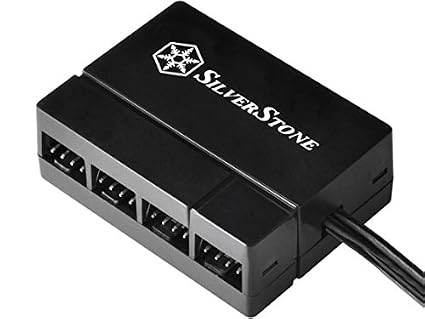
I used this
41yV5kjgjRL._SX425_.jpg


This allows u to power all the fans via a sata power cable from your PSU. Maybe I'm paranoid, I dun like the idea of 1 fan led powering multiple fans.
 
Last edited:

MajiMax

Arch-Supremacy Member
Joined
Nov 19, 2008
Messages
19,901
Reaction score
3,098
From what I can see, the gigabyte board has a single slot for m.2, so that seems alright. The ram speeds are okay too, and the CPU cooler clearance for Chopin is stated as 43mm, which the noctua (37mm height) passes. Don't see any issues from this :)

Thank you.

Somehow like cannot find Noctua NH-L9a-AM4 on hwz pricelist or local site having this cpu cooler. :s11:
 

Falcon4eva

Junior Member
Joined
May 1, 2009
Messages
11
Reaction score
0
Somehow like cannot find Noctua NH-L9a-AM4 on hwz pricelist or local site having this cpu cooler. :s11:

I think only cybermind sells noctua stuff, cause its the official distributor or something.

This allows u to power all the fans via a sata power cable from your PSU. Maybe I'm paranoid, I dun like the idea of 1 fan led powering multiple fans.

I don't know whether the tiny tiny node 202 case will have space left for me to include such a fan hub.. You have both the hub and the node 202, in your experience do you think there's space?
 
Important Forum Advisory Note
This forum is moderated by volunteer moderators who will react only to members' feedback on posts. Moderators are not employees or representatives of HWZ Forums. Forum members and moderators are responsible for their own posts. Please refer to our Community Guidelines and Standards and Terms and Conditions for more information.
Top